Tag: windows

  • Microsoft kills Python 3.7 ¦ … and VBScript ¦ Exascaling ARM on Jupiter

    Microsoft kills Python 3.7 ¦ … and VBScript ¦ Exascaling ARM on Jupiter

    Welcome to The Long View—where we peruse the news of the week and strip it to the essentials. Let’s work out what really matters.

    This week: VS Code drops support for Python 3.7, Windows drops VBScript, and Europe plans the fastest ARM supercomputer. (more…)

  • AWS Saves Ukraine’s Data | WPF ‘is not Dead’ (yet) | Devs Quit for Cash

    AWS Saves Ukraine’s Data | WPF ‘is not Dead’ (yet) | Devs Quit for Cash

    Welcome to The Long View—where we peruse the news of the week and strip it to the essentials. Let’s work out what really matters.

    This week: Amazon S3 is keeping Ukraine’s data safe, we ask if Windows Presentation Foundation is dead, and developers tell us why they switch jobs. (more…)

  • Rezilion Adds Windows Support to Dynamic SBOM Tool

    Rezilion Adds Windows Support to Dynamic SBOM Tool

    Rezilion has added support for Windows applications to its tool for dynamically generating software bills of materials (SBOMs).

    Rezilion CEO Liran Tancman said in addition to existing support for Linux applications, it’s now possible to analyze all the components that make up a Windows application runtime environment in real-time.

    That capability also makes it possible to search for and pinpoint the location of components, such as the Log4j vulnerability, across millions of files and on thousands of hosts, containers and applications, he added.

    Rezilion has created a searchable proprietary next-generation vulnerability database (NGVDB) that identifies which issues impact specific classes and functions. In addition to surfacing remediation suggestions, the capability also reduced the number of false positives that IT teams would otherwise have to track down.

    The SBOM tool the company provides builds on that capability to provide insights into the complete attack surface of an application that could be exploited by cybercriminals.

    In general, the components of a Windows application are more challenging to track and analyze because of the many different frameworks created to build them over the last few decades. However, with more than half of all applications running on Windows, the need to create SBOMs for those applications has become a more pressing concern, especially in the wake of an executive order issued by the Biden administration that requires federal agencies to provide SBOMs for every application they use.

    It’s not clear how many enterprise IT organizations will be following suit, but the general expectation is that SBOMs will soon be a lot more prevalent than they have been. In the wake of a series of high-profile cybersecurity breaches, there is now more scrutiny of software supply chains than ever.

    The challenge, of course, is determining which vulnerabilities to remediate first once they are identified in an application. There are simply too many vulnerabilities to patch all at once, so DevOps teams need to be able to identify which vulnerabilities are the most severe. For years, cybersecurity teams have been creating spreadsheets filled with long lists of vulnerabilities, but there is usually no context provided in terms of how severe a vulnerability is. As a result, developers would allocate a small portion of their time to applying patches that are prioritized based on intuition and level of complexity rather than severity.

    It may still be a while before most organizations that build software are able to consistently create accurate SBOMs. It may be even longer before the organizations that consume those SBOMs have the processes in place to operationalize them. In theory, an organization, if necessary, should be able to prevent software from being deployed based on the list of components included in the SBOM. However, that decision is not always straightforward. There is usually a range of reasons for including a potentially vulnerable component in an application that needs to be considered.

    One way or another, the overall security of applications is about to steadily improve. The only issue is how much pain will need to be experienced to achieve that goal.

  • Foundation Proposes Advancing eBPF Adoption Across Multiple OSes

    Foundation Proposes Advancing eBPF Adoption Across Multiple OSes

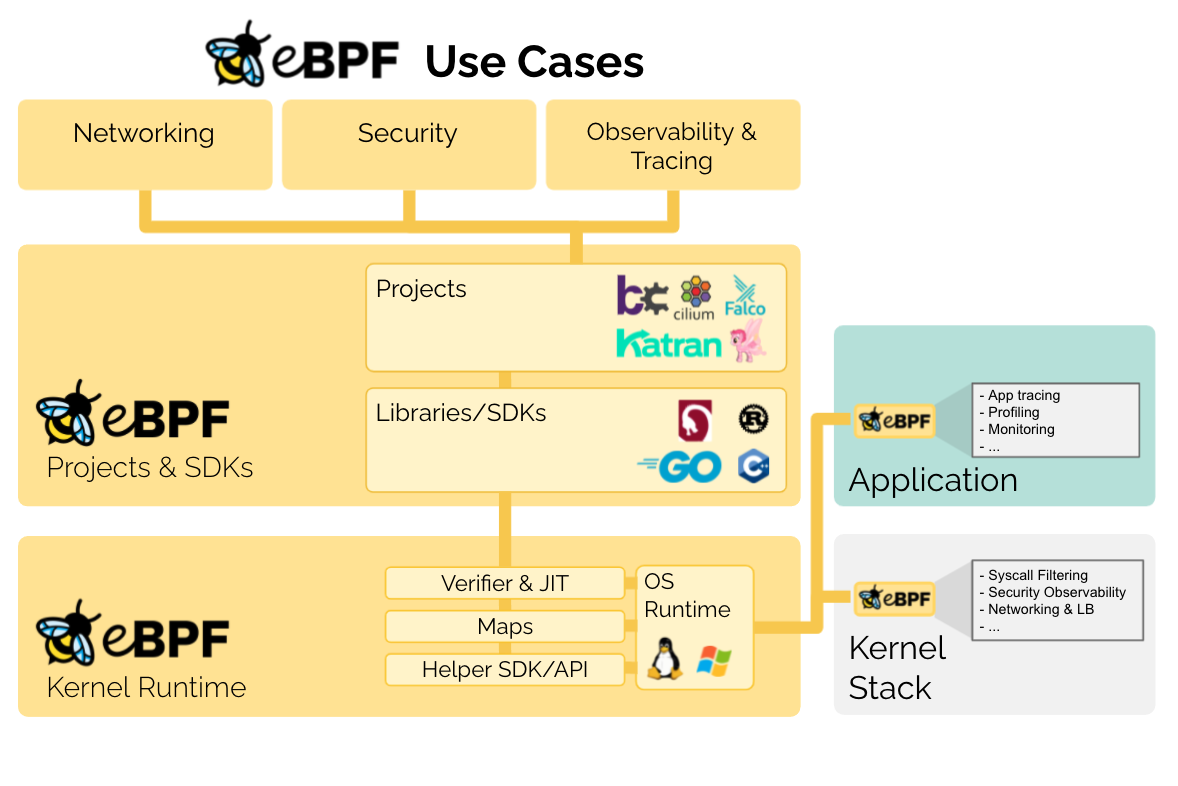
    The eBPF Foundation, which proposes to advance adoption of an approach that enables sandbox programs to run faster at the kernel level, is being launched today as an arm of the Linux Foundation.

    The technology known as eBPF was originally developed for Linux. The eBPF Foundation is now committed to expanding use of eBPF across all operating systems. Members of the eBPF Foundation include Facebook, Google, Isovalent, Microsoft and Netflix.

    Thomas Graf, CTO and co-founder of Isovalent, a provider of networking and security tools that leverage eBPF, said IT organizations should expect to see the technology become part of Windows, along with other operating systems, as the core technology is tested and validated across a much wider range of platforms.

    In effect, eBPF changes the way operating systems are designed. It bridges the boundary between kernel and user space by enabling developers to combine and apply logic across multiple subsystems that, historically, were completely independent of one another. That approach enables, for example, a security tool to scale to the point where it can identify threats at much higher levels of throughput to improve overall scale at a time when the volume of cybersecurity attacks being simultaneously launched continues to increase.

    Currently, eBPF is widely employed by web-scale companies such as cloud service providers. Facebook is using it as the primary software-defined load balancer in its data centers while Google is using open source Cilium networking software within its managed Kubernetes offerings.

    However, adoption within on-premises IT environments that have deployed Linux has been more limited simply because the number of vendors that have optimized networking, security and storage offerings to take advantage of eBPF is still fairly limited.

    Sysdig, for example, recently launched made available an instance of the open source Falco container security platform available that employs eBPF. Tigera has also made available an instance of its container networking platform that leverages eBPF at the kernel level of Linux.

    Ultimately, Graf notes the biggest benefit of eBPF is efficiency. The total cost of processing for security, networking and storage platforms should decline as more vendors take advantage of a capability that will one day be widely employed across multiple operating systems.

    In the meantime, IT organizations would be well-advised to ask their vendors when they plan to support eBPF. Cloud service providers generally require it to deliver their own managed services more efficiently, so any vendor that hopes to sell a platform to those providers will need to support eBPF to drive performance at scale. The issue then becomes determining which platforms that have embraced the technology are also available in on-premises IT environments looking for similar benefits.

    Regardless of approach, it’s clear there will soon be a reason to upgrade not just networking, storage and security platforms but also instances of operating systems that don’t yet support eBPF. DevOps teams would be well-advised to plan accordingly because the number of platforms that will ultimately benefit from eBPF spans the entire enterprise.

  • Puppet Deepens Windows Integration

    Puppet Deepens Windows Integration

    Puppet today announced it has extended support for Windows environments across its portfolio of IT automation tools by adding a Group Policy Migration capability that enables multiple Windows configurations to be tracked simultaneously and offering to assist organizations seeking to deploy the open source Chocolately package manager.

    In addition, Puppet has extended its support for Microsoft tools by adding a Puppet PowerShell Desired State Configuration (DSC) Builder module, through which the Powershell tools Microsoft relies on to configure operating systems are directly exposed.

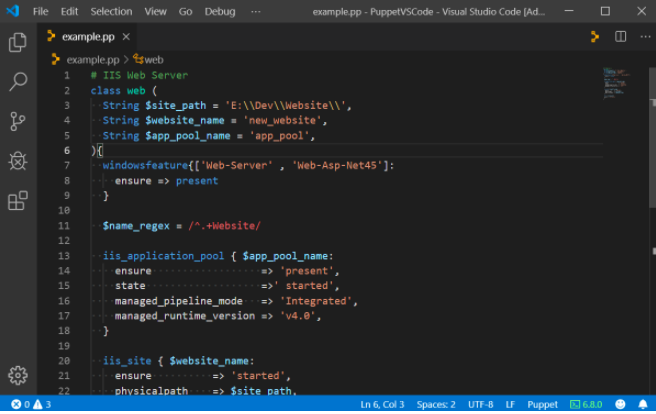
    Finally, Puppet has also added a Puppet VSCode Extension that gives Windows administrators the ability to invoke the Puppet Domain Specific Language (DSL) to access capabilities such as Intellisense and error-checking using their existing user interface and text editor for Windows.

    Puppet CTO Abby Kearns said interest in IT automation has significantly increased in the wake of the downturn brought on by the COVID-19 pandemic. While IT organizations that have been running instances of Linux have had access to a broad range of IT automation tools for years, Windows environments have not enjoyed the same level of parity even though half the workloads organizations are trying to manage today are based on Microsoft.net code, she said.

    With more pressure to automate than ever, Puppet sees an opportunity to fill that void, Kearns added.

    By relying on Puppet tools to automate both Linux and Windows platforms, an opportunity to reduce the total cost of IT also presents itself as organizations look to either limit or reduce IT headcount. Puppet claims there are already more than 40,000 organizations using its tools, including more than 80% of Global 5,000 organizations.

    It’s not clear to what degree Microsoft is invested in IT automation tools, especially compared to IT vendors that make managing infrastructure as code both inside and out of the cloud their sole focus. However, since it launched Azure Microsoft has been investing in tools to manage infrastructure as code. The depth of the Puppet portfolio enables IT organizations to also apply IT automation to operating systems and now to applications via Chocolately.

    Less clear is to what degree IT organizations may finally unify the management of Windows and Linux systems as part of an effort to reduce costs in the wake of the downturn. Most organizations continue to manage Windows and Linux systems in isolation. However, as IT organizations embrace IT automation more broadly, many are looking to standardize on a common set of best DevOps practices whenever possible.

    In the meantime, the opportunity to extend IT automation into the midmarket remains significant. Most enterprise IT organizations have already embraced IT automation to a significant degree. Midmarket IT teams have generally not had the skills and resources required to manage infrastructure as code. However, as IT automation tools become more accessible to the average IT administrator, there may come a day soon when broad swaths of IT systems deployed by midmarket IT organizations will finally be automated.

  • DevOps Deeper Dive: Apple Adds Fuel to ITSM Fire

    DevOps Deeper Dive: Apple Adds Fuel to ITSM Fire

    Apple’s acquisition this week of Fleetsmith, a provider of IT service management (ITSM) tools for Apple devices, is reigniting a fierce debate over how best to manage endpoints in heterogeneous IT environments.

    Fleetsmith, along with rivals including Jamf Software and IBM, provides ITSM tools that only manage Apple devices. The company argues that the IT teams managing Apple devices prefer to use tools that feel like MacOs or iOS applications. However, both enterprise environments typically have both Apple and Windows devices. As such, many IT teams have adopted ITSM tools that allow them to centrally manage both platforms.

    Until now, Apple has been relatively neutral in terms of how best to manage its devices. The acquisition of Fleetsmith signals the company is about to focus more on ITSM at a time when many organizations need to revamp their approach to managing endpoints in the wake of the COVID-19 pandemic.

    With more individuals likely to be spending more time working from home, the management of highly distributed endpoints becomes even more challenging. Apple has yet to outline its plans for Fleetsmith or say whether it will continue to support Fleetsmith customers. The assumption is the company will incorporate the Fleetsmith ITSM tools into its portfolio.

    Mac and Windows: Can’t We All Get Along?

    In the meantime, providers of platforms capable of managing heterogeneous endpoints are pressing their cases for increased centralization. Many IT organizations have adopted separate tools for managing Windows and Apple devices; centralizing the management of endpoints presents those organizations with an opportunity to reduce costs.

    “IT teams don’t want to hop around infrastructure, said Greg Keller, CTO for JumpCloud, a provider of ITSM tools. “Centralization creates this single-pane-of-glass efficiency.”

    The need to centralize endpoint management will become even more pronounced as desktop computing moves into the cloud, added Pradyut Roy, a product manager for ManageEngine, a provider of ITSM tools that also span multiple types of endpoints.

    “There is going to be a huge drive to centralize the control plane,” said Roy.

    A survey of 519 IT professionals published this week by ManageEngine finds 47% of organizations are planning to provide more mobile-capable assets to employees. As those endpoints are rolled out, IT teams will need ITSM platforms accessible from anywhere that enable them to manage devices regardless of what network they are connected to at any given time.

    Apple doesn’t have the greatest reputation when it comes to appreciating ITSM requirements in the enterprise. For example, it often changes application programming interfaces (APIs) in ways that are not backward-compatible, so providers of ITSM tools often must make significant updates to their tools. That API issue is likely to become even more significant as organizations that have adopted best DevOps practices look to extend them to applications running on Apple devices.

    ITSM is clearly in a state of flux. Most IT organizations rely on legacy ITIL-based processes to manage IT infrastructure consistently. As businesses begin to require more flexibility, many of those ITIL-based processes will need to be revisited. The opportunity—and the challenge—now is finding a way to converge ITIL and DevOps practices across as many different types of endpoints as possible.

  • GitLab Updates Core CI/CD Platform

    GitLab Updates Core CI/CD Platform

    GitLab this week delivered an update to its namesake continuous integration/continuous delivery platform that promises to make pipelines more efficient and easier to manage, in addition to making it easier to set up pipelines in Windows environments.

    Version 12.7 of the core GitLab platform adds support for Parent-Child Pipelines and Pipeline Resource Groups. Parent-Child Pipelines make it possible to run separate child pipelines concurrently, while Pipeline Resource Groups enable DevOps teams to limit pipeline concurrency to better manage jobs and resources.

    A Code Review Analytics module is designed to make it easier to find Merge Requests in review that require some level of intervention, while enhanced Merge Request widgets show when changes have made it to a specific environment.

    Other new capabilities include being able to automatically stage all changes with the GitLab integrated development environment (IDE) and the ability to share group access with another group.

    Finally, GitLab has added a beta release of Windows Shared Runner, which brings Windows environments to the GitLab platform via a managed service. Darren Eastman, senior product manager for Runner at GitLab, said instead of having to separately download agent software through which jobs on a GitLab pipeline are executed, Windows environments are becoming full-fledged citizens of the GitLab platform.

    Eastman said IT organizations running Windows compared to their Linux brethren are still playing a little catch-up in terms of DevOps maturity. However, with the arrival of microservices based on Docker containers on Windows, the need to embrace best DevOps practices to manage application development and deployment is becoming more apparent, he said.

    Of course, Microsoft is pushing its own rival CI/CD platform in the form of Azure DevOps, formerly known as Visual Team Studios. GitLab is betting that most organizations will prefer to consume a fully managed CI/CD service that spans both Windows and Linux platforms, especially as hybrid cloud computing gains traction in the months and years ahead.

    Regardless of the CI/CD platform employed, the overall size of the DevOps community should expand considerably in 2020 as more organizations that rely on Windows to build and deploy applications embrace DevOps’ core principles. Naturally, competition between Microsoft and providers of rival CI/CD platforms will be fierce. Microsoft in many ways is a behemoth that was constructed mainly by a loyal base of developers that the company can be expected to guard jealously. However, as Microsoft has embraced Linux alongside Windows in the cloud, the number of Windows developers who have been exposed to alternative platforms has increased.

    In the meantime, organizations that have teams that build and deploy applications on both Windows and Linux will have some cultural challenges to overcome should they decide to standardize on a common set of DevOps processes. Rather than managing each platform in isolation, there’s a clear opportunity to reduce costs and increase application development efficiency. The issue now is determining which DevOps platform might best enable them to begin a journey that is likely to take a few years to fully complete.

    — Mike Vizard

  • CircleCI Extends CI/CD Reach to Windows Platforms

    CircleCI Extends CI/CD Reach to Windows Platforms

    CircleCI today announced it will make available its continuous integration and continuous deployment (CI/CD) platform available on a variety of Windows platforms.

    Matt Wyman, vice president of product for CircleCI, said the decision to support Windows stems from recent Microsoft DevOps initiatives, most notably its move to acquire GitHub. As Microsoft invests more time and energy promoting best DevOps practices, demand for CI/CD platforms running on-premises or in the Microsoft Azure public cloud will escalate sharply, said Wyman.

    The Windows environment on CircleCI also includes support for Docker Engine – Enterprise for Windows workflows and all Windows jobs run isolated on a virtual machine. Each new job uses an environment that gets created just in time and gets destroyed once the job finishes running. That approach is intended to ensure both build reproducibility and the security of the code, data and secrets stored in a CI environment. All CircleCI features such as caches, Workspaces, approval jobs and Contexts are now being made available for Windows jobs.

    Wyman said CircleCI now expects organizations to extend the same software development lifecycle processes for building and deploying both Windows and Linux-based applications. The ability to leverage the same pipelines within the context of a common CI/CD platform spanning both environments will help narrow the time and effort required today to build Windows applications, he added.

    Currently, it’s unclear whether a common set of processes for building and deploying applications in Windows and Linux environments might foster greater collaboration within IT organizations. Linux and Windows teams don’t tend to interact much. However, as more organizations look to apply repeatable processes that enable them to build more reliable software faster, the need to standardize DevOps processes has become apparent. Of course, Circle CI isn’t the only provider of a CI/CD platform looking to take advantage of that emerging hybrid cloud computing opportunity.

    It’s also worth noting that providers of platforms such as Microsoft and Red Hat are also promoting their own approaches to software development lifecycle management. Organizations need to decide how much they want to rely on the tools and processes made available by platform vendors instead of a CI/CD platform that integrates DevOps processes across multiple platforms. To fight that battle, CircleCI last month revealed it has raised another $53 million in funding. At that time, the company noted that the total monthly job count on its platform stood at 30 million, up from 7 million in January 2018.

    Regardless of the path chosen forward, organizations increasingly need to build and deploy software on multiple platforms. The challenges associated with managing those processes are nothing less than considerable. The issue IT leaders will need to determine first is how much they want to drive unification of software development from the top down versus simply providing a common set of tools and platforms that their teams will (hopefully) gravitate toward.

    — Mike Vizard

  • Which Desktop OS Is Best for DevOps?

    Which Desktop OS Is Best for DevOps?

    Which operating system (OS) is best for DevOps engineers to use on their workstations?

    That’s a weighty question. Talk about which OS is “best” for any purpose is always controversial.

    I’m not going to stick my neck out by saying that one OS is definitively better than others when it comes to doing DevOps work. But I would like to consider the strengths and weaknesses of each of the major desktop operating systems—Windows, Linux and macOS—for performing DevOps work.

    Windows

    Statistically speaking, Windows is the OS that most people use. By extension, it’s the OS that most DevOps engineers probably use. (I can’t confirm that fact, because I’ve yet to see a study of which OS DevOps engineers actually use.)

    As I see it, Windows has two main advantages from a DevOps perspective, including:

    • Popularity. This is a strength because DevOps is all about having freedom to pick and choose which tools to use. Given that Windows is so popular, almost everything is compatible with it. OS compatibility problems, therefore, don’t get in your way of doing DevOps as you see fit.
    • The Windows subsystem for Linux, which lets you run some Linux CLI tools on Windows. This feature is handy if you need to do DevOps work for both Linux and Windows server environments.

    The main drawback of relying on Windows is that, well, it’s Windows. Compared to Linux, Windows offers very little opportunity to customize, and that restraint can be a drawback from a DevOps perspective. When it comes to core tasks, such as working from the command line, you’re stuck with the tools Microsoft offers you. And you can’t do very much to harden your Windows system for security purposes.

    Linux

    For my money, Linux is the best OS for DevOps. But I say that only because I’m a die-hard Linux lover and I tend to think Linux is the best for everything.

    But even if you are not a Linux fanboi, you have to admit that it has certain advantages for doing DevOps work:

    • Linux is ultra-customizable. You can choose to set up your system in whichever way works best for your workflow. You can use a wide array of tools. You can make lots of changes to add extra security. Given that DevOps values choice, this is a big benefit.
    • In many cases, DevOps engineers are supporting software delivery pipelines that deploy to Linux server environments. Being able to work from a native Linux environment can make it easier to do things such as test and stage those applications on your local device when it becomes necessary to do so. You could, for example, spin up a Linux container on your local machine, which you couldn’t do with a Windows or macOS workstation.
    • On most mainstream Linux distributions, installing all of the DevOps tools you need is extremely fast and simple using repositories and package managers. It’s not exactly difficult to install most DevOps tools on other systems, either, but I don’t think any OS can beat the package management systems used by Linux distributions.

    Linux’s major limitation is that learning it takes some time, particularly for DevOps engineers weaned on Windows. You also run the risk of needing a tool that doesn’t support Linux, although I’m having a difficult time thinking of any DevOps tools that doesn’t work on Linux systems.

    MacOS

    Last but not least is macOS. Overall, I don’t think macOS is ideal for doing DevOps work. The only strength I can think of is:

    • It gives you a native Unix-like environment. You can’t run your Linux containers directly on a Mac, but you can at least use some native Unix tools.

    Drawbacks for macOS are many. It’s not very customizable. It lacks compatibility with some applications and tools. It comes with its own learning curve if you have never used a Mac before.

    Does OS Choice Even Matter?

    Now that I’ve weighed the pros and cons of Windows, Linux and macOS as operating systems for DevOps engineers, let me state the obvious: It’s 2019, and in many respects it no longer really matters which OS you run on your local machine. Lots of applications—including key DevOps tools, such as IDEs—now run in the cloud as often as not. Plus, there are a plethora of hardware virtualization tools out there that will let you run virtually any OS in a virtual machine within another type of OS. You can run Linux and Windows side-by-side as virtual machines on your Mac, if you want.

    Still, not everything runs in the cloud, and having to switch between virtual machines is not always practical. It’s therefore worth thinking hard about which desktop OS will best serve your DevOps needs and making that the one that controls your bare metal.

    — Chris Tozzi

  • VMware Ties Desktop Virtualization to DevOps Productivity

    VMware Ties Desktop Virtualization to DevOps Productivity

    It’s no secret that when it comes to building applications, many developers prefer to use the Apple Macintosh. However, that preference can create multiple DevOps challenges. VMware is moving to reduce the friction with the release of VMware Fusion Pro 10, a desktop virtualization offering for Apple Macs that now supports REST application programming interfaces (APIs) to more easily programmatically invoke virtual machines on Macs.

    In addition, VMware has significantly improved support for graphical processors units (GPUs) and 3D graphics within VMware Fusion Pro 10 that are now more commonly being invoked by developers.

    At the same time, VMware is also updating VMware Workstation 14 and Workstation Player, which adds support for Windows 10 and Windows Server 2016 along with updated Linux support for Fedora 26 and Ubuntu 17.04 guest operating systems to the desktop virtualization software. Workstation Player is a subset of VMware Workstation 14 that IT organizations can employ to limit the size of a virtual machine running on a local workstation.

    Other new capabilities include support for Microsoft’s Virtualization Based Security (VBS) features of Windows 10 Enterprise and Windows Server 2016 guests, enhanced virtual networking and new support and controls for working with vSphere and the vCenter Server Appliance software.

    Michael Roy, product line marketing manager for VMware Fusion, says more organizations are making GPUs available to developers as part of an effort to build more robust applications. Support for GPUs make it easier for developers to build compute-intensive applications for multiple operating system environments within the context of a DevOps environment managed by an IT organization, he notes.

    Other new capabilities include a revamped user interface and support for the Apple Touch Bar to simplify moving between native applications and virtual machine environments, including applications hosted on the VMware PhotonOS distribution of Linux optimized for hosting container applications.

    In this release of Fusion Pro, VMware is also adding support for Microsoft’s VBS features—which include Credential Guard for Windows 10 virtual machines, unified extensible firmware interface (UEFI) Secure Boot and a virtual Trusted Platform Module—in the same way it supports them on VMware Workstation 14.

    Finally, VMware is providing access to enhanced networking controls to enable management of network address translation (NAT) rules, network packet loss and latency simulation and renaming of VM networks.

    The updates were announced ahead of VMware’s VMWorld annual conference, being held Aug. 27-31 in Las Vegas.

    Developers typically require more access to more IT environments than almost any other employee, so maximizing the number of operating systems that can be deployed on their systems is in the best financial interests of the organization. Even when an organization can afford multiple machines most developers don’t want to have to move files between physical machines. Desktop virtualization software provides a means to not only increase productivity but also reduce the amount of machine overhead associated with developing applications across multiple operating environments.

    — Mike Vizard