Tag: VS Code

  • VS Code for Mainframe: The Enterprise Developer Tipping Point

    VS Code for Mainframe: The Enterprise Developer Tipping Point

    Optics matter. At a recent industry conference, a university lecturer reconfirmed what many in attendance already knew, “3270 [green screens] scare off the young generation of developers.” No matter how state-of-the-art the platform or mission-critical the applications, perceptions are formed largely based on optics, and green screens are not a good look.

    Beyond optics, though, a new option offers the promise of a more normalized developer experience (DevX) and DevOps productivity across platforms, along with the staffing flexibility it brings. In short, Visual Studio Code (VS Code) is a big step toward breaking down the mainframe silo.

    VS Code’s extensible, ‘any language, any platform’ design makes it the perfect tool for mainframe developers and with the free and open Code4z extension pack, VS Code is mainframe-ready. Developers are now using VS Code for mainframe AppDev just like their peers, taking advantage of the extraordinary ecosystem and the other many benefits that have made it a runaway success.

    Per my previous article, Git for Mainframe: Back to the Future, combining VS Code with Git (i.e., editor and source interfaces) makes the experience complete.

    So how does Code4z make VS Code mainframe-ready?  Let’s explore the answers from a functional perspective.

    Editing & Debugging

    Mainframe is closely associated with core languages like COBOL, Assembler and JCL, which are often ignored in the world of modern tooling. With VS Code’s extensible framework, however, incorporating these languages is simple and seamless.

    The Language Server Protocol (LSP), which was developed for VS Code, is now an open standard also used by the next generation of browser-based editors, providing a degree of future-proofing. LSP extensions provide a rich editing experience with a wide range of popular features including IntelliSense, which offers capabilities like syntax checking, verb formatting suggestions and variable name completion.

    Code4z offers LSP extensions for COBOL and High Level Assembler (HLASM) while additional extensions are available for languages like JCL, REXX, Db2, and Easytrieve. The extensibility of this technology has already been used to extend syntax awareness to specific language dialects.

    Similar to LSP, the Debug Adapter Protocol (DAP) provides a native interface and layer of abstraction for debug services. Code4z’s debugger extension facilitates the debugging of CICS and batch COBOL programs, an integral part of the end-to-end experience.

    Access & Security

    Mainframe applications, the lifeblood of many businesses, require rock-solid security throughout the entire SDLC. Code4z leverages Zowe, the award-winning open source framework that extends mainframe security and access controls to tools like VS Code. The Zowe Explorer extension, built on the Zowe CLI, provides access to data sets, jobs and USS files and developers also use it to issue TSO and MVS commands and to submit JCL. Zowe Explorer is packaged with Code4z as is a data editor for mainframe data sets including VSAM. This extension is built on Zowe Explorer, again leveraging the extraordinary extensibility.  A Zowe Explorer for CICS is also available.

    Similarly, developers can access a rich and growing set of conformant Zowe CLI extensions via the terminal and scripting.

    Access to SCMs tools is also supported. In addition to VS Code’s native Git integration, there are extensions for Endevor, ChangeMan ZMF, and related tools.

    DevOps Automation

    Since my introductory article a few years ago, Z is for Zowe – the Open Path to Mainframe DevOps, Zowe has enjoyed wide adoption with 69% of surveyed sites either currently using or planning to use it within the year.

    With mainframe teams now using Zowe to adopt modern shift-left practices, scripts for scanning, building, deploying and testing can be run manually by developers from VS Code, in addition to automatic triggers from code commits. This flexibility further empowers developers to own their code throughout the SDLC and beyond.

    With VS Code, mainframe developers can be equipped with more self-service capabilities like Db2 schema provisioning to accelerate the testing process. With capabilities like these, developers can remain in the VS Code experience focused on editing rather than being distracted by low-value infrastructure activities, like requesting and waiting for DBA action.

    Playing the Long Game

    While VS Code is the dominant tool today—almost 3 times as popular as its closest competitor according to Stack Overflow with the lead growing—what is the long-term opportunity?

    Demand for a modern, enterprise-aligned experience spans many domains, from increasing productivity to backfilling retiring staff. Elevating team morale and future-proofing vital mainframe assets ensure this adoption trend will only increase.

    But tools change. Browser-based editors and in-the-cloud collaboration are gaining greater acceptance and the AI-assist excitement is palpable. Bringing mainframe developers onto an enterprise platform ensures mainframe teams will be able to benefit from the same advances as distributed peers. Enabling VS Code and its cloud equivalents demonstrates a commitment to the long-term success of these applications and by reducing the idea-to-production cycle, product owners become champions.

    While not all mainframe developers will embrace VS Code, especially those close to retirement, the vast majority will, as we have experienced within our Broadcom engineering organization. The bottom line is that VS Code makes them even more productive, as illustrated in Confessions of a Career ISPF Programmer.

    Many of today’s developers are proficient with multiple languages (i.e., polyglot) so picking up an additional language like COBOL becomes less daunting if everything else—editor, repo, DevOps processes, etc.—is familiar.

    Getting Started

    For a closer look at the many free and open Code4z extensions, check out the Developer Cockpit, which simulates a COBOL/Db2/CICS developer configuration. And read From VS Code to Mainframe Developer Cockpit for more detailed use cases.

    Most importantly, try it! Code4z is available on the VS Code Marketplace.

    And stay tuned for additional Code4z extensions in the pipeline. There’s never been a more exciting time to be a mainframe developer!

  • How to Secure Online Coding Platforms

    How to Secure Online Coding Platforms

    Threat Modeling for Online Coding Platforms

    The evolution of DevOps teams and a greater reliance on cloud-based computing has completely changed the coding process. Now, with Integrated Development Environments (IDEs), coding can be done entirely online. This is convenient, but are online IDEs secure? To answer this, we will focus on two popular cloud-based IDEs: AWS Cloud9 and Visual Studio Online.

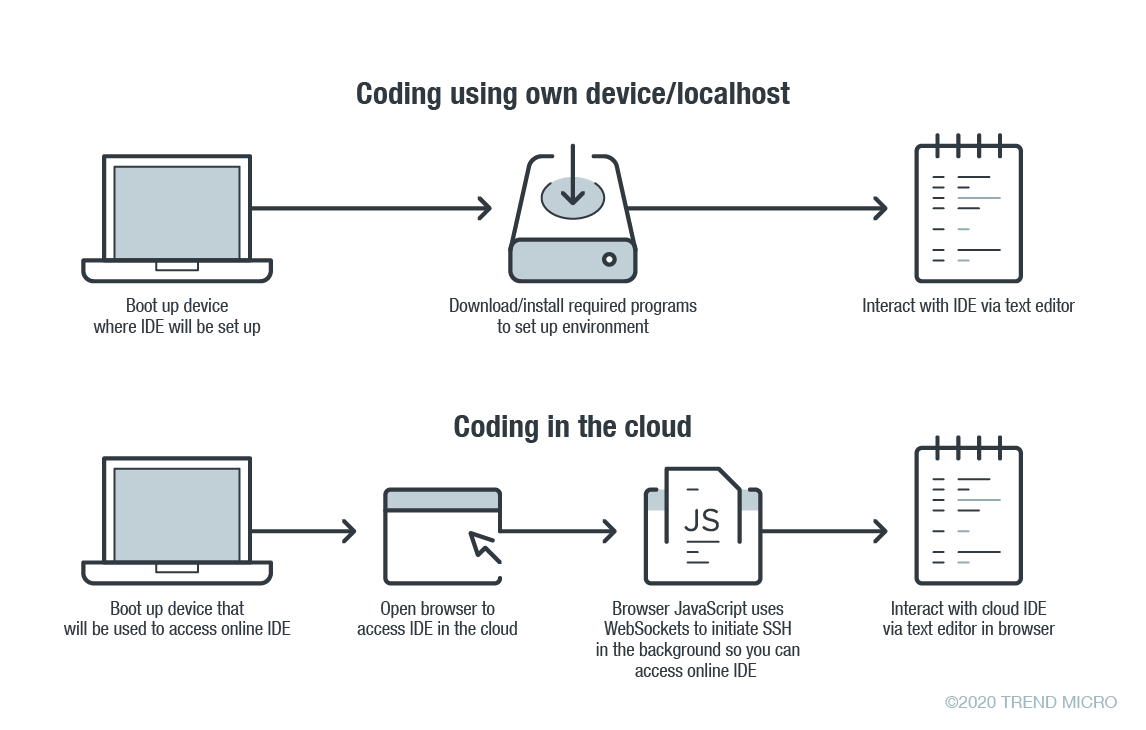
    In online coding, the IDE is rendered inside your browser, the browser JavaScript engine uses WebSockets to initiate an Secure Shell (SSH) connection to your linked device in the background—e.g. virtual private server (VPS)—providing you with the familiar terminal interface to execute commands. The environment—meaning the linked cloud VM/VPS or SSH-accessible device—includes tool configurations (like which tokens are included, or cloud configuration files), a copy of the source code, compilers and other tools that you want to use.

    Figure 1. Local versus cloud-based IDE. Source: Trend Micro.

    The main difference between local and cloud-based coding platforms is where the bulk of the environment resides. In cloud IDEs, the environment is a virtual machine instance inside your cloud provider. In terms of security, this means you are delegating trust to the cloud provider, but you are responsible for preventing any backdoors from opening or introducing misconfiguration issues to the VM. In the case of using your own device with AWS Cloud9, you are responsible for configuring the device securely.

    Linked Devices/VMs Are Not Always Secure

    What is running on the backend often dictates whether linked devices and VMs are secure. As previously described, an SSH-linked device is necessary to use these online coding platforms. In the case of Visual Studio Online (still in preview mode as of this writing), we can find a Visual Studio (VS) Code server running on the machine.

    The code server itself is a Node.js application to which your browser will connect. You can also download the whole ~/.vscode-remote folder and run the server inside your local environment.

    As the owner of the linked device, you have permission to promote yourself to root and install or configure whatever you think you will need. You also have, by default, both Docker and Git pre-installed.

    In the case of AWS-hosted Cloud9, the situation is a little more complicated. The backend necessary for platform communication is located inside the linked device while the frontend remains hosted on a different location. But, like in VS, you can also promote yourself to root.

    This brings us to our first security concern: How secure or private are linked devices/VMs?

    The linked device contains confidential information—access tokens, application configurations, source code, etc., which should be protected against unauthorized access.

    By default, the platform is secured by the provider. However, you should keep in mind that, together with your root access availability, you are also responsible for preventing misconfiguration issues, especially when using third-party plugins. AWS does not provide plugin support for plugins not developed by them.

    There are possible misconfigurations you might make that can lead to security issues. For example, if you set your IDE to be accessible from outside, either intentionally for ease of sharing, or unintentionally, that change can have major consequences.

    In addition, it is not common for access tokens to be stored in encrypted token vaults. A lot of them can be viewed via plaintext configuration files. Without additional security measures, your access tokens can end up exposed to outsiders.

    Once unauthorized access is acquired by cybercriminals, they can compromise your code for their own gain. An example would be the supply chain attack against a software company that modified software updates with malware.

    Browsers Can Introduce Malicious Extensions or Vulnerabilities

    The next security concern is the browser itself. As online coding platforms are accessed from web browsers, you should be very careful when accessing these sites from public, non-domain, shared or unprotected computers.

    Malicious browser extensions are a well-known phenomenon. While an untrusted computer possibly infected with malware presents an obvious risk, it is also possible for an attacker to steal code using a malicious web browser extension.

    Code Extensions and Plugins Can Also Contain Malware

    The main advantage of Visual Studio Online and, generally, the VS Code platform, is the number of extensions available. This in and of itself is yet another possible attack surface.

    Let’s imagine a malicious VS Code extension—a useful-looking extension with an embedded backdoor. The lack of permission checking (such as disk access, network access, process access, etc.) for extensions during installation or use, becomes a security problem. The extent of security checks during extension publishing is limited to having a valid publisher ID and a few image-related restrictions. This means you have to trust the extension developer entirely.

    No Software Application Is Error-Free

    The ever-present possibility of vulnerabilities in any kind of software must be considered as well. In the case of online coding platforms, they can be affected by web-class vulnerabilities since IDEs are web applications. For example, a vulnerability that allows an attacker to execute their own JavaScript code can have control of the IDE or remote linked devices.

    A recent vulnerability affecting the Visual Studio Live Share extension, which is also available for VS Code, shows that we can expect to see another vulnerability affecting online coding platforms in the near future.

    Securing Cloud IDEs Is a Must for DevOps

    Threat modeling allows us to understand the different factors at play that can affect the overall security of a computing environment. Cloud IDEs should be no different from other software, if not more critical to secure.

    Here are some recommendations for each of the security issues we raised:

    • For linked device security — Install trustworthy software. Keep that software updated. Don’t indiscriminately open ports to the internet.
    • For browsers — Work inside trusted and secured environments. Try to avoid using shared computers. Install browser extensions from trusted vendors only.
    • For VS Code extensions — Avoid installing extensions from unknown sources or authors.
    • For vulnerabilities in general — Make sure your environment is updated to the most recent version.

    — David Fiser

  • Che: A Revolutionary IDE for the Mainframe

    Che: A Revolutionary IDE for the Mainframe

    Tools such as the green screens of ISPF and the Eclipse desktop IDE, enhanced with proprietary plug-ins, have served mainframe application developers well over the years and, for those comfortable with them, will continue to do so. However, changes in the broader world of development are creating the conditions for a revolution in mainframe tooling.

    First, mainframe developers are aging out of the workforce, leaving behind extensive code libraries and a workforce skills gap. Those likely to back-fill these roles know and love modern IDEs, especially Visual Studio Code, while the popularity of Eclipse is waning. For example, the annual Stack Overflow Developer Survey found that, over the past year, the popularity of Visual Studio Code grew from 35% to 51%, once again making it the most popular IDE, while Eclipse fell from 19% to 14%. According to Business Insider, 8.5 million developers worldwide use VS Code, creating a huge talent pool.

    Second, application development has made great strides in productivity since the current mainframe dev tools were created, especially in DevOps automation with enablers like task runners, scripting and testing frameworks. The Stack Overflow survey cites scripting language Python as the most sought-after skill among developers, by far.

    Finally, as the velocity of overall software delivery increases, mainframe is a critical component of digital transformation initiatives. According to 451 Research, 24% of companies are releasing application software daily or hourly while, similarly, DORA’s 2019 State of DevOps survey shows 20% of teams are deploying multiple times per day. Software delivery expectations have changed with continuous deployment becoming the new normal and, to remain a vital computing platform for the long term, mainframe app development needs to support this paradigm.

    An Open Source and Cloud Development Technology 

    Rather than an evolution of the existing Eclipse IDE, Eclipse Che is a radical departure. According to the Eclipse Foundation, “Che 7 is the world’s first Kubernetes-native IDE that’s built from the ground up for cloud native application development. It simplifies and accelerates cloud development by allowing developers who are not Kubernetes experts to immediately contribute to cloud native application development efforts. In turn, Che 7 relies upon Eclipse Theia, which provides a highly modular and extensible IDE platform built on modern web technologies that runs on both your desktop or in your browser.”

    For large enterprises, a good analogy for key value proposition of a hosted IDE is Git: usability and collaborative power have made Git the de facto standard for version control and Che’s workspace server offers comparable benefits.  

    Developers working on mainframe applications can use Che via the Che4z subproject. Che4z, whose primary goal is to bring a modern developer experience to mainframe software development, offers an extension pack providing access to the z/OS file system, remote debug and remote editing of COBOL programs with all the expected modern editor capabilities including syntax highlighting, code assist and real time syntax validation. After a beta period, Che4z is now GA.

    Beyond the foundational benefits mentioned above, Che is revolutionary for the mainframe for many reasons.

    Visual Studio Code and More

    Che was architected around a VS Code-like experience from the outset which, with the growth of VS Code, means Che extends its value.  Che is based on Eclipse Theia which provides an in-browser VS Code experience complete with the latest tooling protocols: language server, debug adapter and compatibility with VS Code extensions. 

    The Che4z sub-project, contributed by Broadcom, provides language support for both COBOL and High Level Assembler (HLASM).  The language server protocol (LSP) enables developers to use these languages with Che, VS Code and any other LSP clients (e.g., IntelliJ, VIM, Emacs).

    Bottom line: developers can use VS Code for mainframe development independent of Che adoption (the Code4z extension pack is available on the VS Code marketplace).

    Cross-Platform Applications

    For many Fortune 500 companies, the mainframe hosts critical system-of-record applications and data while the cloud and mobile applications have evolved from user-oriented systems-of-experience. With tech-first startups disrupting entire industries, large companies are deploying more cross-platform applications to maintain, if not win, market share by harnessing the best of both worlds. Cross-platform apps combine modern user experiences with the transactional power and data assets of mainframes.

    Because cloud and mobile developers need to integrate mainframe applications, allowing them to use the tools they know and love is critical. This includes the popular code editors and IDEs they love today as well as the new innovations, such as browser-based, container deployed tools that make them more productive.

    With its workspace server, Che also facilitates pair programming, which is a powerful approach when mainframe and distributed developers need to collaborate on cross-platform applications.

    Bottom line: Che makes the mainframe less of a silo and more like other platforms.

    Open Source-Enabled Vendor Independence

    While open source is not new to the mainframe–zLinux has been around for years–access to off-platform toolchains became possible with the introduction of the Zowe open source framework (described in more detail below). Unlike the incumbent Eclipse vendors, and consistent with the open source vision, the Che4z extensions are open sourced and free to use. There is now an alternative to the proprietary, vendor-controlled model: true open source tooling for mainframe developers.

    Furthermore, Eclipse locked mainframe developers into using a specific set of editors, runtimes and user interfaces for required capability and functionality–thus imposing a steep learning curve. Che, by comparison, offers flexibility via modular design, allowing individual developers to choose the components they need.

    Whether developing for mainframe or other platforms, the Che community welcomes contributions from those passionate about software development. Want to incorporate a lesser-used language? No need to plead with a vendor. Anyone can seek community support for an idea or simply do it themselves. The Che/Che4z communities will ensure the proper procedures are followed before any code is ever released.

    Bottom line: Che provides a more frictionless, fast-moving toolset allowing coding innovations to extend to the mainframe.

    Onboarding and Cost Reduction

    Consider the compatibility and maintenance headaches created by the heavyweight plugins required for Eclipse. For mainframe leaders, the need to reduce costs is an ongoing challenge as is the need to quickly onboard the next-generation of developers. As a container-based IDE with no client footprint, Che eliminates the need for local installation, maintenance and configuration. The potential of moving entire teams currently using Eclipse with customizations to Che provides an attractive opportunity to materially reduce operating costs while simultaneously improving developer productivity.

    Because Che workspaces are containerized, new team members can onboard instantly–open the container, begin work. This means developers, who are high cost resources, can more easily move across projects, teams, departments, etc.

    Bottom line: For mainframe leaders focused on staffing and costs, Che increases the talent pool while eliminating costs.

    Built on Zowe

    The extensions that open the mainframe to the Che IDE are powered by the Open Mainframe Project’s Zowe open source framework, which maintains mainframe-native security standards. Zowe, which was founded by Broadcom, IBM and Rocket Software and is the first open source project based on z/OS, enables developers to manage, control, script and develop on the mainframe just like cloud and other platforms. 

    Command line interfaces (CLIs), which come with platforms such as AWS and Azure, are popular with developers wanting the productivity lift of task runners, scripting and higher levels of automation (i.e., CLIs facilitate DevOps adoption). The Zowe CLI (the mainframe equivalent) magnifies the value of the Che4z stack as any set of commands that run through the CLI can be automated.

    Bottom line: Using Zowe as the foundation for the Che4z mainframe extensions ensures the modern experience extends far beyond the IDE.

    Path Forward

    For leaders wanting to empower developers integrating mainframe code and resources with the most popular and powerful app development tools, Che provides the best of both worlds–the immediacy of VS Code use with the path to full-on, in-the-cloud team collaboration.

    Expanded tool choice, greater alignment with off-platform peers and DevOps-fueled software delivery are all reasons why Che is not only the first Kubernetes-native IDE, but a real revolution for mainframe development.

    — Jean-Louis Vignaud