Tag: VMs

  • How 5G Will Change the Public Cloud as We Know It

    How 5G Will Change the Public Cloud as We Know It

    When it comes to realizing the promise of 5G, we’re still a few years away. Under the hood, though, the rollout of 5G infrastructure and the new applications 5G will enable—from AR and VR to new drone capabilities and beyond—will drive dramatic changes in infrastructure demands, starting with the public cloud.

    In the 5G era, many of the applications that will become possible and take advantage of this network infrastructure will require a tremendous amount of data to be moved and processed—whether for a connected car, video surveillance with real-time analytics, or AR/VR—so much so that the data needs can’t really be solved at the responsiveness that these applications will demand from the centralized public cloud as we know it. As 5G creates a new ecosystem, a lot of these applications are going to be built in new ways and rely on the attributes of edge clouds: Edge computing delivered as a cloud-like service. Underpinning it will be cloud-native architectures and other highly automatable and flexible infrastructure to help make it a reality. Let’s take a look at some of the key elements.

    What is an ‘Edge Cloud’?

    SaaS companies building applications in the public cloud today are used to self-service, elastic infrastructure. You don’t have to think about hardware, you pay per use, there are APIs to take advantage of, and most importantly everything is highly automatable and flexible. More than likely, you need only think in terms of a handful of centralized locations as you build—a site on the west coast, one on the east coast, one or two in Europe or Asia.

    In the 5G future, that will likely no longer be the case. Many new, revenue-generating services will depend on low-latency, high-bandwidth capabilities that enable applications and data processing to get closer to the user or device. Everything from industrial applications, IoT, to immersive infotainment (virtual and augmented reality) to telemedicine and more will be able to take advantage of the 5G network and edge-compute processing to deliver new capabilities and experiences.

    Services like these depend not only on connectivity but also on the ability to gather data, process it, and more importantly, move and act on it at very high speeds.

    In this new world, you still want the same things from your infrastructure—it needs to be elastic and capable of scaling up and scaling down. And reliability, automation, and agility (the ability to iterate and deploy quickly) become even more important. And it needs to be available and running in many, many more places in order to be close to the customers and devices you are serving. You’re not thinking about three locations across the globe or two or three across the U.S. Instead, you may be thinking about a couple of dozen in one metro area alone. A whole new kind of compute environment has to be built around that, as well as a cloud infrastructure environment.

    The Multi-Mode Present, and What’s Next

    5G environments will require very flexible infrastructure that can be highly automated, repurposable, and usable in very generic ways. If you are building metro, point-of-presence data centers all over the country, it is not cost-effective to use highly specific infrastructure for each application in each site; it is too limiting in flexibility and too onerous to manage at scale.

    One aspect of the infrastructure challenge is that service providers still rely in part on monolithic, traditional applications that tend to run in physical or virtualized environments to make them deployable, controllable and able to be automated. But newer applications are being designed with a different technology stack based on containers.
    With applications that live in both areas, flexibility across VMs and containers is a must. As a result, rollouts of 5G will employ a multimode infrastructure, combining both virtual machines and containers in order to support both legacy and modern applications. The goal: Easy automation everywhere.

    Virtualized and container environments will need to live and operate in concert with one another. They both require automation, but because each has its own needs it’s important to choose a technology stack and approach that will incorporate and work with both.

    While virtual machines and virtualized network functions (VNFs) are more prevalent today, that won’t remain true for long. As carriers move to microservice architectures that drive continuous improvement and speed time to value, adoption of CNFs is growing.

    The Road Ahead

    Since it is still early days for 5G use cases, architecture flexibility will allow carriers to pivot toward any killer apps that emerge. Data-centric infrastructure that can deliver both performance, agility and flexibility is essential.

    As we look out at the possibilities for 5G, it’s helpful to think back to the early 1990s. With AOL dial-up and a 2400 baud modem, you could email, surf the web (though it was painfully slow) and play a few games. The advent of broadband ushered in entirely new applications and use cases like e-commerce and media streaming and drove the infrastructure changes to support them. 5G presents the same type of potential for sea change that will open up a whole new world of innovations for the consumer and the enterprise.

  • How to Isolate Development Environments: Vagrant vs. Docker

    How to Isolate Development Environments: Vagrant vs. Docker

    “It works on my machine.” This line has become an excuse often overused by developers to escape the burden of having to investigate problems experienced by end users that they are unable to replicate on their development machines. While this may excuse developers—after all, they didn’t experience the problem during development and therefore couldn’t have anticipated it happening to some users—it doesn’t solve the problem.

    Sometimes, issues are caused by end user mistakes, such as skipping a step in an installation process. Often, however, the problem arises from some disparity in the development and server or user environments. With the vast assortment of machine configurations in use—different operating systems, hardware specifications and software versions—even the slightest differences in development and production device configurations can cause dramatic differences in the behavior of many applications.

    This can be a serious issue, as it requires members of the development and operations team to identify the root cause of the problem, which potentially introduces unexpected and often significant delays in deployment and production schedules. Especially in the DevOps culture where rapid development, frequent deployment and highly dependable releases are of highest priority, such unexpected delays are completely unwelcome.

    Thankfully, there are a number of tools that have emerged to address this very problem. In this article, we take a close look at two popular tools with two different approaches to solving the problem of environment disparity: Vagrant and Docker. Like many DevOps tools and technologies such as continuous integration, these tools work well with all types of project setups, including IT outstaffing (dedicated development teams). Let’s compare these two solutions and see which types of scenarios each one is best fit for.

    Vagrant vs. Docker

    Vagrant offers to solve the aforementioned problem by enabling developers to easily create and manage virtual machines (VMs) in which they can develop, test and deploy applications. By using a VM, a developer or DevOps engineer is assured that as long as the application is run within the virtual machine, its behavior will be the same regardless of the actual hardware and operating system of the computer that the VM is running on.

    Docker offers a similar solution, but uses a different technology. Instead of using virtual machines, it uses containers, which are similar to Linux Containers (LXC) that are included in Linux systems. Containers serve a similar purpose as virtual machines, but at a much less extensive level and, therefore, are much more lightweight. Rather than isolating an application in its own virtual computer with a full operating system, containers simply isolate an application inside an environment with the minimum components necessary to run the application. This includes system libraries and tools, settings and configuration files and a runtime environment. Compared to virtual machines, containers consume much less resources from the actual machine on which it is being hosted. Docker has a comprehensive documentation library that includes information on what Docker and Docker containers are, how to install Docker and how to execute a Docker run.

    Vagrant and Docker share some common goals. For instance, in software development, both tools enable a more streamlined and consistent software development and deployment workflow by eliminating the need to worry about the application behaving differently in different machines. Moreover, it offers some degree of security to the host machine: Since the application is isolated from the rest of the system, issues caused by one application should remain within the scope of its environment and should not break the rest of the system.

    There are, however, a number of important differences between Vagrant and Docker that make them suitable for different types of applications. Let’s examine more closely how these two differ.

    Scope of Isolation

    While both Vagrant and Docker wrap applications into isolated environments, they differ in the degree to which these applications are isolated—or, effectively, the scope of the isolated environments. For Vagrant, the scope is the entire operating system: An application can access any and all components of the full virtualized machine and operating system it is being run in. For Docker, on the other hand, the scope is much narrower, as an isolated environment is limited to a single application or service: Each container is created specifically for an application. Effectively, this implies that with Vagrant, a single isolated environment can run multiple applications at once, while with Docker, running multiple applications will typically require the use of a separate isolated environment for each one.

    Resource Consumption

    Since Vagrant virtualizes an entire machine with a full operating system, it naturally has a high overhead cost and consumes a lot of resources from the host machine. With Docker, on the other hand, an app within a container shares the same kernel—the core module or component of an operating system—with both apps in other containers and the host machine itself. This enables containers to have much less overhead and subsequently consume much less resources from the host machines than do virtual machines. In effect, a host machine running apps with containers can run up to three times as many applications as it can with virtual machines. Moreover, since launching apps within containers won’t necessitate having to wait for the virtual OS to boot up, launching apps can also be substantially faster with Docker than it is with Vagrant.

    Limitations

    Vagrant and Docker also have their own limitations. Docker, for instance, is currently natively available to two operating systems: Linux, where it uses the Linux Kernel, and Windows, where it uses the Windows kernel. Docker is also available for MacOS, although it runs Docker containers on top of a Linux virtual machine. Moreover, Docker has some security issues—its use of containers make it less secure than Vagrant. Since applications within Docker containers share the same kernel with each other and with the host machine, it’s possible for a malicious program within a Docker container to affect other containers and even harm the host machine itself.

    While Vagrant, which uses virtual environments, is much more secure in this regard, it is limited in that it is meant only as a tool for development and generally not recommended for use in production environments. In other words, it is meant to provide a convenient way to virtualize the environment of the server to which an application is eventually going to be deployed, but once in production, the application must be run directly on the host machine. On the other hand, Docker provides a consistent environment for applications throughout the entire software development workflow, from creation to production.

    Conclusion

    Being able to isolate applications into their own controlled environments has proven to be extremely useful for software development, as it eliminates many hardware and software incompatibility problems that applications may run into when executed in different machines. This is particularly useful in DevOps environments, as it streamlines the whole software development workflow by eliminating sources of unexpected problems, thereby potentially shortening development cycles.

    We have looked into two popular tools for environment isolation, Vagrant and Docker. Both isolate applications from the host machine, although to varying degrees and using different technologies. Vagrant uses virtual machines, which can support multiple applications at once, but can be heavy on resource consumption and is only recommended for use during development. Docker, on the other hand, uses containers, which support only single applications, but is much lighter in terms of resource consumption and can be used both during development and during production.

    As such, these two tools cater to different business needs. If you require the development of a complex system of multiple applications interacting with each other, using Vagrant may be beneficial, but if you’re aiming to create a single portable application and want to minimize resource consumption, then Docker is the way to go.

    — Myron Monets

  • Core Factors Influencing Java Memory Consumption

    Core Factors Influencing Java Memory Consumption

    Java is known for having an insatiable appetite for resources, requiring strict controls to not exceed budget limits. However, the latest JDK updates and other developments have helped to make Java runtime extremely flexible in terms of memory usage. When configured smartly, Java can be cost-effective for different types of applications—cloud-native or legacy, microservice or monoliths. Today, it’s possible to make Java very slim from the start and scale it up gradually without consuming unnecessary resources.

    Here we’ll take a closer look at the factors influencing resource usage inside JVMs, see what tools can help and how processes can be tuned to gain more elasticity and scalability, ultimately reducing TCO.

    Scaling Possibilities: Virtualization vs. Containerization

    Within JVMs there are several scaling options: vertical, horizontal and a combination of both. To maximize results, it is important to start with a vertical scaling configuration that optimizes RAM and CPU usage inside every instance, based on current load levels. As a next step, these settings will be replicated across all instances while scaling horizontally.

    VMs Scaling

    While starting to run a project inside a VM, it is important to pick the right size machine, as too small an instance can lead to performance issues or even downtimes during load spikes. However, over-allocating will result in wasted unused resources during normal load or idle periods that still must be paid for. This can be a tough choice.

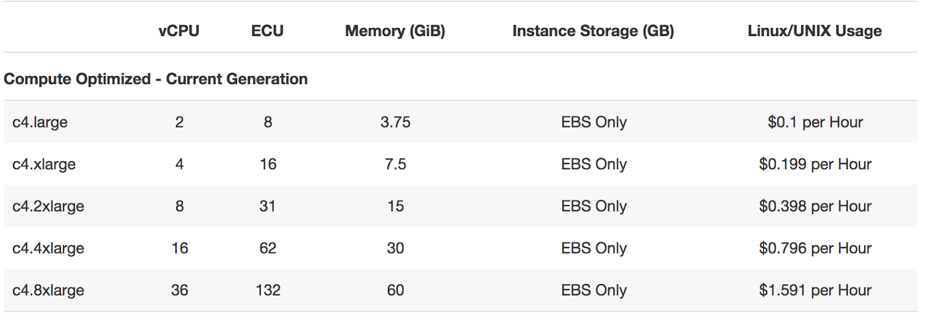
    Start with a smaller VM and scale it as the project grows. When just a bit more resources are required, the cloud vendor can offer you to double the size, as this is the most commonly used scaling step (e.g. see AWS offer below).

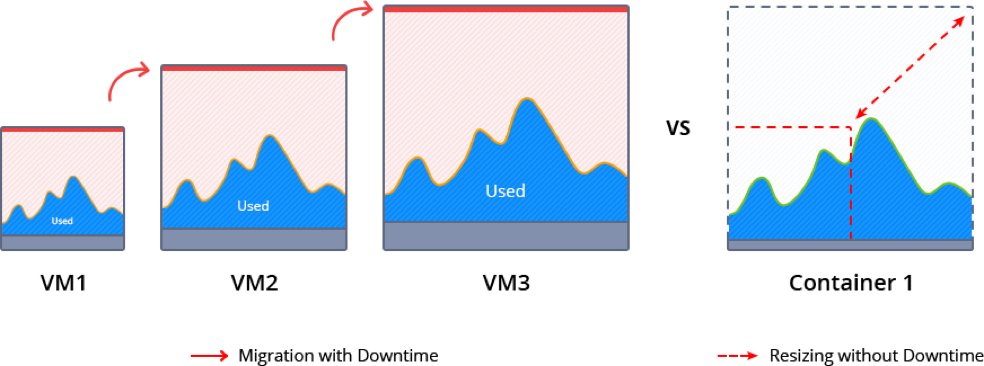
    During such scaling, the current VM normally is paused to migrate and redeploy the application. This inevitably causes some downtime and requires manual intervention.

    Memory ballooning provides a possible way (although rather complicated) to modify the amount of resources inside VMs on the fly without incurring downtime. However, this process is not fully automated and requires special tools to monitor the memory pressure in the host and guest OS and then activate vertical scaling based on the needs. As a result, memory ballooning doesn’t work well in practice, as the memory sharing should be automatic to present the expected advantages.

    Unfortunately, lack of VM elasticity and efficiency in terms of resource usage often leads to overpaying.

    Containers Scaling

    Containerization presents a new way of application packaging that makes resource consumption more granular and flexible, by automatic resource sharing among containers on the same host using cgroups. Unlike VMs, containers’ boundaries can be easily scaled up and down without the need to pause and reboot running instances.

    There are two types of containers: application and system containers. Both use the same scaling approach but they are intended for different purposes. An application container (such as Docker or rkt) typically is more lightweight, runs a single process and is used mainly for creating new projects, as it is easy to build them from pre-existing Docker image templates.

    A system container (LXD, OpenVZ) behaves like a full OS and can run full-featured init systems. This type of container is preferable for monolithic and legacy applications, as it can reuse the originally created design and important “old school” settings.

    Even system containers are much thinner compared to virtual machines, so scaling up and down takes much less time. And the horizontal scaling process is very granular and smooth, as a container can be easily provisioned from scratch or cloned.

    Garbage Collector Choice

    To maximize the efficiency of the above mentioned vertical scaling inside a Java-based container, it is important to select the appropriate garbage collector (GC) and tune it according to the project needs.

    Let’s review five widely used garbage collector solutions:

    • G1: From JDK 9, this modern shrinking garbage collector is enabled by default. One of its main benefits is the ability to compact free memory space without lengthy pause times and uncommit unused heaps. This GC is considered the best production-ready option for vertical scaling.
    • Parallel: A default GC in JDK8, it is a good option for low pauses but not for memory shrinking. This makes it inappropriate for flexible vertical scaling.
    • Serial, ConcMarkSweep (CMS): Both of these are shrinking garbage collectors with the ability to scale memory usage in JVMs vertically. But in comparison to G1, they require four Full GC cycles to release all unused resources. A new JVM option (-XX:-ShrinkHeapInSteps) in JDK 9 can  speed up memory release by bringing down committed RAM right after the first Full GC cycle.
    • Shenandoah: Shenandoah is a rising star among garbage collectors which promises to be the best solution for JVM vertical scaling. Its main benefit over the others is the ability to shrink in live mode without necessity to call Full GC, which helps eliminate significant performance degradation.

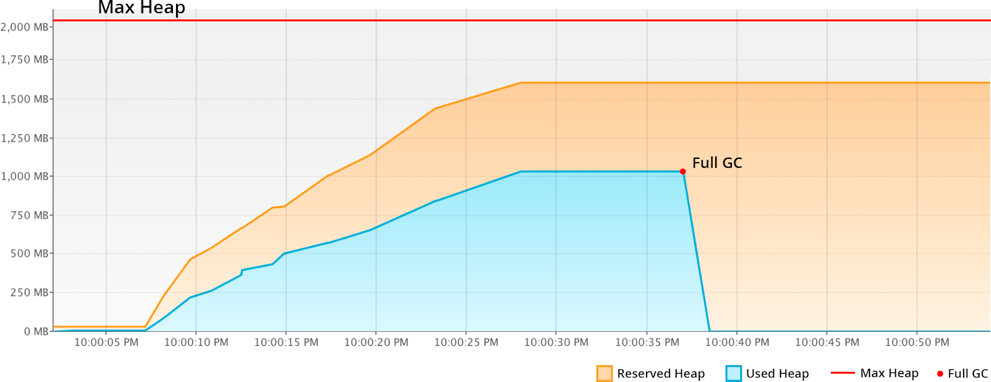
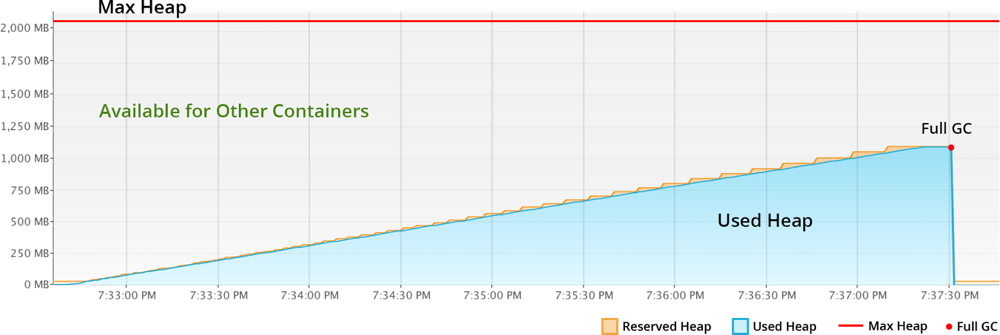
    Let’s compare memory behavior with shrinking G1 and non-shrinking Parallel:

    With Parallel, the unused RAM is not released back to OS. JVM keeps it forever, even disregarding the explicit Full GC calls. So even if your application has low RAM consumption, the unused resources cannot be shared with other processes or other containers as it’s fully allocated to the JVM.

    The modern shrinking G1 garbage collector significantly improves resource utilization compared to the previous example. The reserved RAM increases slowly according to the real usage growth. And all unused resources within the Max Heap limits are not wasted by standing idle, but made available to other containers or processes running in the same host.

    To summarize, Java applications with non-shrinking GC or non-optimal JVM start options hold all allocated RAM. For scaling Java vertically, the garbage collector should provide memory shrinking in runtime. In other words, it has to package all the live objects together, remove garbage objects, uncommit and release unused memory back to the operation system.

    Charging Model of Cloud Providers

    Nowadays, most of the cloud vendors offer a “pay as you go” billing model. This means that it is possible to start with a smaller machine and then add more servers or migrate to a twice-bigger instance as the project grows. But as described above, usually you reserve more than the application actually consumes to avoid the risk of downtime during the load spikes. As a result, many organizations overpay because the account is charged per VM but not based on the consumed resources inside.

    At the same time, there are providers offering  “pay as you use” billing approaches that became possible with the help of containerization, resource granularity and automatic vertical scaling. The payment is based on the resource units inside container. And the required capacity is provided and reclaimed on the fly in accordance with the load at the current moment. As a result, you are charged based on actual consumption and are not required to make complex reconfigurations to scale up or down.

    Taking into consideration all these factors and implementing the right settings can significantly reduce the costs for Java hosting resources, as well as positively influence application performance as a whole. Cloud and container technologies continue eliminating barriers and offering new opportunities for projects with different architectures and budgets.

    About the Author / Ruslan Synytsky

    Ruslan Synytsky is CEO and co-founder of Jelastic. He designed the core technology of the multilingual cloud platform that runs thousands of containers in a wide range of data centers worldwide. Ruslan worked on building highly available clustered solutions, as well as enhancements of automatic vertical scaling and horizontal scaling methods for legacy and microservice applications in the cloud. Ruslan is actively involved in various conferences for developers, hosting providers, integrators and enterprises. Follow him on Twitter.
     

  • VMs, Containers, Cloud, Cluster: Scheduling Differences

    VMs, Containers, Cloud, Cluster: Scheduling Differences

    Scheduling is a large part of making the data center go, and more to the point of making the virtualized (be it VMs, cloud, containers, or clustering) portion of the data center work.

    While there are a lot of variables to virtualization performance, scheduling impacts performance all of the time. And yet we only really talk a lot about it in clustering (where a robust scheduler on par with an OS scheduler is required).

    There’s a reason for that, and it is worth exploring.

    (Side note: I was talking about this blog with Lori while I was writing it, and she reminded me of when we took our Masters’ courses, the Operating Systems class used Homer Simpsons greedily wanting donuts as our scheduling project. So whenever we think scheduling, we mentally hear one of the many Homer processes being denied a donut and going “D’oh!”)

    For virtual machines, scheduling is largely forgone in favor of other resource utilization. Virtualization only cares about CPUs and memory requirements when the virtual machine is created. You tell it then, and the only time you worry about it again is if you demand more CPU cores than the physical hardware can provide—and in some cases, CPU virtualization will allow you to keep spinning up VMs even after that. Only the real scheduling mechanisms actually can be at odds with each other in a heavy load situation. The host OS scheduler, for example, could swap out your VM’s active thread at the same time the guest OS has raised the level of importance for an app to “insanely high, do it now.” Although this only begins to show if basic rules about servers and loads are ignored, it does happen.

    You get the same issues with private clouds. Why? Because even though everyone in the marketing world pretends it isn’t true, private cloud and VMware ESXi essentially are the same underlying toolset. And usage patterns in the enterprise show not only does everyone know that, but also the differences are less substantial than any of the organizations involved want to admit. Not that they are the same code, but in practice, they do the same things.

    The one place where these two (and public cloud for that matter) really make use of scheduling is when automatically responding to spikes in usage that threaten to bury a system. However, solutions to usage spikes are not part and parcel of these systems; they are crafted by DevOps (or Dev, or Ops) folks who work at places where dropped connections are lost money and, thus, a quick response of growing the pool of available servers and then later shrinking it is important. But because they are using their own metrics to determine the need, more of these systems are implemented in application provisioning tools than in cloud or virtualization software. We could argue about where this functionality actually belongs, but not really where it is implemented today.

    I kind of bled into public cloud there, so will address it. When people talk about it being more “agile” or “adaptive,” they mean “with this quasi-scheduling code we wrote to spin up instances at need.” It doesn’t matter if the “code” is a python script or an Ansible playbook—they did the scheduling, not the system.

    That leaves clustering software (such as Mesos). Because clustering software treats many machines as one big thing, it requires a scheduler to manage the resources. In the case of Mesos, the central scheduler really isn’t that smart, and I think that is a genius implementation. It knows what resources (CPU, memory) each machine has available, it knows what resources have been assigned from that machine, and for each of the “frameworks” (think of them as job executors; though that’s a bit simplistic, it’s perfect for this discussion) what it needs to get its work done. Then it does a best match, offers resources to frameworks and waits for more resources to come available from finished executions.

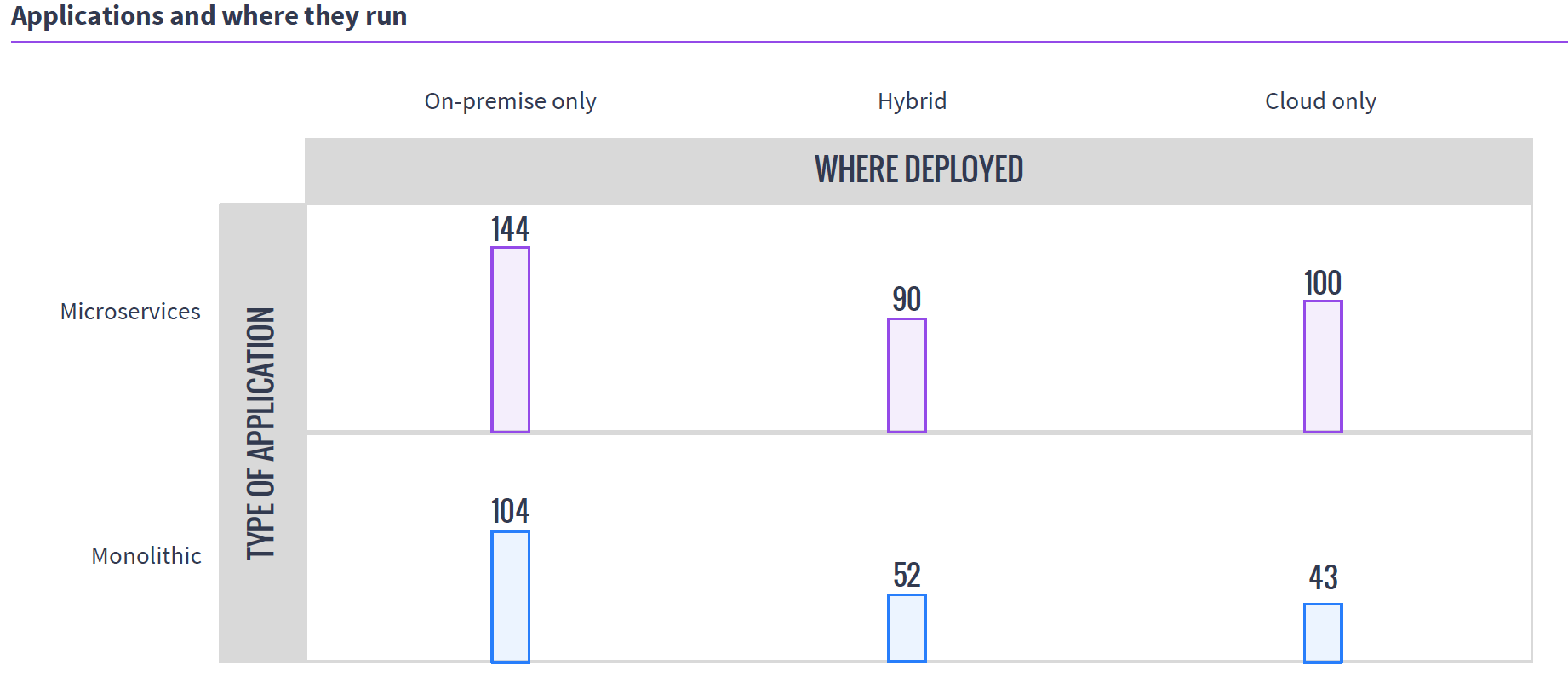
    So in the world of VMs, if you have 50 unique applications that need resources, you create 50 VMs to service them. In either cloud environment, you do the same. It is a joke we like to make that because of microservices, containers are treated like VMs, except if you have 50 unique applications, you create 500 containers, but the reality is that they are exactly like VMs in many use cases, and make 50 containers when containerizing existing apps. Taking a look at MesoSphere’s 2016 survey of clustering users, you can see that a fair number of clustering users are using containers with Mesos and DC/OS, while many of them are not doing it exclusively with microservices.

    Source: MesoSphere user survey, August 2016

    In the clustering world, you have what presents as one big monster machine that is going to run these applications as resources come available, so if your 50 applications require fewer resources than the cluster offers, they simply execute in parallel; if you don’t have enough hardware to run them, unlike with VMs, you can just queue them up and, assuming the cluster isn’t over-burdened, eventually they all will run.

    This gets more interesting when containers are added to clustering (a common environment), because then you do have discrete containers, but the scheduler still manages how many resources are available/in use, and the container architecture allows the app to carry its requirements with it across the cluster.

    Why do we care? Because you know what your workloads are and which scheduling methodology is more important to your organization. If there are 50 applications that all have steady resource needs and run all of the time, then virtualization might be right for you, but if the organization’s workloads are shifting constantly and resources need to be cycled at a high rate, clustering might be right for you. Either way, knowing what’s out there is never a hindrance.

    — Don Macvittie

  • The One Simple Reason to Consider Clustering

    The One Simple Reason to Consider Clustering

    As you may know, I’m pretty interested in the newest round of clustered computing these days. I’m digging in pretty deep to see how well-suited it is to the enterprise, and how it is best used/architected/implemented.

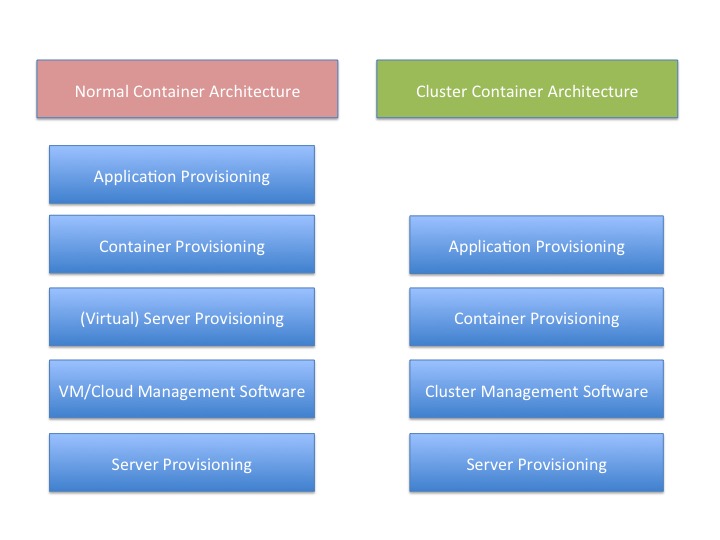
    There is a reason for that, and I think this graphic probably gives it away:

    You’ll note that “container provisioning” is in there. It doesn’t need to be. If your environment is running without containers at this time, then simply remove that block from both sides of the diagram and remove container from the titles.

    The fact is that there is one less step in any provisioning environment short of one app, one server.

    And remember that this abstraction doesn’t touch on storage provisioning, AAA or OS upgrades at two different levels (or in some scenarios three).

    And that’s a big deal. Not just because you have one less layer for deployment, you also have one less layer for maintenance, one less layer for security, one less layer for logging … It’s a big deal. As I’ve mentioned before, we have increased the complexity of the operations environment to the point that some form of DevOps is nearly required to keep a modern or cutting-edge data center running smoothly. The newest round of clustering solutions removes one layer from the architecture stack, reducing that complexity a little bit. Of course, it is just a slowing in the growth of complexity, but it’s better than a “Damn the torpedoes, full speed ahead!” approach to complexity.

    The thing is that clustering software has been around for a very long time—I was briefed back when VMware was just making a name for itself about a clustering solution that was aimed at gaming sites. I never wrote about it because VMware stole the thunder, and the company couldn’t reference any customers except gambling websites—not exactly an easy comparison to make with enterprise environments. This briefing was my first, but clustering existed long before that, even.

    But this round is different than most recent clustering solutions. It focuses on resources and scheduling, not on making a special-purpose large-sized computer. This round of clustering software makes a large computer that looks to apps like Linux. That’s a far more useful abstraction, if it works without a ton of overhead.

    And the overhead is what I’ll be digging into over the next few weeks.

    But yes, I think it’s a great idea. Give me a big old expandable Linux box, make it look exactly like Linux to my apps and let’s see what it means for app growth.

    — Don Macvittie

  • Are VMs becoming El Caminos?

    Are VMs becoming El Caminos?

    In 2010, it looked as if virtualization had won. We expected all servers to virtualize workloads and the primary question was which cloud infrastructure manager would dominate. Now in 2015, the picture is not as clear. I’m seeing a trend that threatens the “virtualize all things” battle cry.

    IMG_20150301_170558985Really, it’s two intersecting trends: metal is getting cheaper and easier while container orchestration is advancing on rockets. If metal can truck around the heavy stable workloads while containers zip around like sports cars, that leaves VMs as a strange hybrid in the middle.

    What’s the middle? It’s the El Camino, that notorious discontinued half car, half pick-up truck.

    The explosion of interest in containerized workloads (I know, they’ve been around for a long time but Docker made them sexy somehow) has been creating secondary wave of container orchestration. Five years ago, I called that Platform as a Service (PaaS) but this new generation looks more like a CI/CD pipeline plus DevOps platform than our original PaaS concepts. These emerging pipelines obfuscate the operational environment differently than virtualized infratructure (let’s call it IaaS). The platforms do not care about servers or application tiers, their symantec is about connecting services together. It’s a different deployment paradigm that’s more about SOA than resource reservation.

    On the other side, we’ve been working hard to make physical ops more automated using the same DevOps tool chains. To complicate matters, the physics of silicon has meant that we’ve gone from scale up to scale out. Modern applications are so massive that they are going to exceed any single system so economics drives us to lots and lots of small, inexpensive servers. If you factor in the operational complexity and cost of hypervisors/clouds, an small actual dedicated server is a cost effective substitute for a comprable virtual machine.

    I’ll repeat that: a small dedicated server is a cost effective substitute for a comparable virtual machine.

    I am not speaking against virtualize servers or clouds. They have a critical role in data center operations; however, I hear from operators who are rethinking the idea that all servers will be virtualized and moving towards a more heterogeneous view of their data center. Once where they have a fleet of trucks, sports cars and El Caminos.

    Of course, I’d be disingenuous if I neglected to point out that trucks are used to transport cars too. At some point, everything is metal.