Tag: virtual machines

  • Dell Brings DevOps to Edge Computing Environments

    Dell Brings DevOps to Edge Computing Environments

    Dell Technologies today updated its edge computing platform this week to make it simpler to programmatically provision infrastructure using DevOps best practices.

    Phil Burt, senior director of project management for edge computing at Dell Technologies, said version 2.0 of Dell NativeEdge adds additional declarative blueprints based on YAML files and the Topology and Orchestration Specification for Cloud Applications (TOSCA) framework.

    Blueprints for Telit, Litmus and PTC for manufacturing use cases, Deep North for retail, Dell Streaming Data Platform for analytics and Rancher Labs K3s for Kubernetes environments are provided.

    Those blueprints make it simpler to either deploy applications on a lightweight operating system that Dell developed optimized for edge computing platforms or any other software stack an IT organization may prefer, he added.

    Dell is also adding support for the virtual Trusted Platform Module (vTPM) and UEFI Secure Boot capabilities to apply zero-trust IT principles to edge computing platforms using hardware-based cryptography and secure storage for encryption keys, certificates and passwords.

    Finally, Dell is also making available a three-year subscription plan for NativeEdge to lower the total cost of deploying edge computing platforms.

    Dell relies on virtual machines it developed for edge computing platforms to deliver software. IT teams can then opt to deploy monolithic applications or container-based applications running on an instance of Kubernetes deployed as an extension of the virtual machine provided by Dell. Those platforms can then also automatically connect to a network to provide the connectivity required.

    Regardless of approach, Dell is providing a method to programmatically orchestrate the management of highly distributed edge computing environments, noted Burt.

    In the longer term, Dell is also researching how to apply generative artificial intelligence (AI) to the management of edge computing environments using the data its monitoring tools provide, he added.

    While edge computing has been around in one form or another for decades, as more organizations start to process and analyze data at the point where it is created and consumed, the number of applications deployed at the network edge has increased substantially. As such, the number of applications that need to be built and deployed at the edge using DevOps best practices is growing exponentially. In fact, managing those workloads is only going to become that much more challenging as more AI models are deployed at the network edge.

    Of course, not every workload at the edge is managed by an IT team. For years, many organizations have relied on operational technology (OT) teams that have historically deployed applications at the network using manual processes. Organizations that embrace DevOps practices to automate the deployment of workloads at the edge will naturally have to navigate some cultural issues alongside the technical challenges encountered when programmatically deploying software.

    It’s not clear how much software will be running at the network edge in the years ahead, but as the capabilities of the IT infrastructure made available continue to increase, so will the complexity of the applications that will be deployed. The challenge, as always, is going to be finding the best way to manage all that distributed software at what will soon be an unprecedented level of scale.

  • Akamai Launches Gecko Edge Computing Services

    Akamai Launches Gecko Edge Computing Services

    Akamai Technologies today launched an initiative that promises to make it simpler to centrally manage and deploy application workloads on edge computing platforms.

    Shawn Michels, vice president for product management for cloud computing Akamai, said a Generalized Edge Compute (Gecko) offering leverages the global points of presence (PoPs) that Akamai uses for its content delivery network (CDN) to now deploy application workload managed via the Linode cloud service the company acquired in 2022.

    At the core of this offering is a set of virtual machines that enable a full stack of application software to be deployed in an edge computing environment to eliminate latency that would otherwise be encountered when transferring data to a cloud computing environment. The ultimate goal is to provide IT organizations with a federated set of services they can employ to process data where it makes the most sense based on performance requirements, said Michels.

    For example, applications infused with artificial intelligence (AI) will need to be able to invoke enough compute resources to run inference engines at the edge, while other less compute-intensive application workloads are best deployed in cloud computing environments, he noted.

    Michels added that rather than locking IT teams into a specific architecture, Akamai is committing to meeting IT organizations where they are, including adding support for containers running on Kubernetes clusters in its PoPs later this year.

    Akamai has more than 4,100 points of presence around the globe. With the acquisition of Linode, Akamai added a set of cloud computing services to compete directly against hyperscalers such as Amazon Web Services (AWS), Microsoft and Google by making cloud services available at a lower cost at a time when more organizations than ever are concerned about the total cost of IT.

    In its first phase of Gecko, Akamai will provide access to virtual machines in 100 locations by the end of the year. Akamai has already deployed Gecko servers in Hong Kong SAR; Kuala Lumpur, Malaysia; Querétaro, Mexico; and Johannesburg, South Africa, as well as in cities without a concentrated hyperscaler presence, including Bogotá, Colombia; Denver, Colorado; Houston, Texas; Hamburg, Germany; and Marseille, France. Deployment of a tenth Gecko region this quarter is planned for Santiago, Chile. Akamai is committing to adding hundreds of cities to its global cloud computing footprint over the next several years.

    In the longer term, Akamai also plans to add automated workload orchestration to make it easier for developers to build applications across hundreds of distributed locations.

    More workloads than ever are being deployed at the network edge as IT teams look to deploy software closer to the point where data is being created and consumed. That will require extending the reach of existing DevOps workflows to edge computing environments that will be based on everything from x86 and Arm processors to graphical processor units (GPUs).

    The challenge, as always, will be finding a way to effectively manage those workloads when the IT teams responsible for them are often physically located thousands of miles away.

  • 5 Best Practices for Using VMs on Azure Cloud

    5 Best Practices for Using VMs on Azure Cloud

    When beginning a cloud improvement/optimization project, an easy place to start is to focus on the initial low-hanging fruit of your virtual machine (VM) environments. This article takes a closer look at these steps, using a Microsoft Azure VM environment as an example.

    Here are five best practices that can be easily achieved when using VMs on Azure cloud.

    1. Properly Size Your Virtual Machines: To maximize performance and minimize costs, it’s important to size your VMs appropriately. You can use the Azure portal to determine the right size for your workloads and then select the right VM size based on the CPU, memory and storage requirements of your application. For example, you can use the Azure VM sizing calculator tool to get an estimate of the virtual machine size based on your workload requirements.

    Let’s say you want to host a web application that requires 2 vCPUs, 8 GB of memory and 50 GB of storage. You can use the Azure VM sizing calculator tool to determine the appropriate VM size based on these requirements. The tool may suggest using a “Standard B2s” VM which has 2 vCPUs, 4 GB of memory and a maximum disk size of 32 GB.

    In this case, you would need to increase the disk size to 50 GB. You can do this by adding a data disk to the VM or using a larger VM size with enough disk space. For example, you could use a “Standard B4ms” VM with 4 vCPUs, 16 GB of memory, and a maximum disk size of 64 GB.

    It’s important to note that the actual VM size may vary based on your workload requirements and the specifics of your application. The Azure VM sizing calculator tool provides a helpful starting point, but you should also perform your own testing and validation to ensure that the VM size meets your needs.

    2. Use Managed Disks: Managed disks provide increased reliability, scalability and security compared to traditional storage accounts. For example, you can use managed disks to automatically scale the disk size and performance as the data grows and to replicate data for disaster recovery.

    For example, to create a 100 GB managed disk, follow these steps:

    • In the Azure portal, go to the “Disks” section and click on “Add.”
    • Select “Blank disk” as the source and specify the disk size as 100 GB.
    • Choose the appropriate storage account type (Premium or Standard), replication options and disk type (HDD or SSD).
    • Give the disk a name and create it in the same resource group as your VM.
    • Once the disk is created, you can attach it to your VM by going to the virtual machine’s “Disks” section, clicking on “Attach,” and selecting the newly created disk. By using managed disks, you benefit from automatic disk management and replication as well as improved reliability and security compared to traditional storage accounts. Additionally, managed disks simplify the process of attaching and detaching disks to and from VMs, making it easier to manage your storage resources.

    3. Enable Monitoring and Diagnostics: To monitor the health and performance of your VMs, you can use Azure Monitor which provides real-time insights into resource utilization, application performance and other key metrics. You can also configure alerts to notify you of potential issues and diagnose problems using Azure Log Analytics. For example, you can set up an alert to notify you if the CPU usage of a VM exceeds a certain threshold.

    You can also use Azure Monitor to gain real-time insights into the virtual machine’s resource utilization, application performance and other key metrics by following these steps:

    • In the Azure portal, go to the virtual machine’s “Monitoring” section.
    • Click on “Diagnostic settings” and then click on “Add diagnostic setting.”
    • Give the diagnostic setting a name, select the VM you want to monitor and choose the metrics and logs you want to collect.
    • Choose the storage account you want to use to store the monitoring data and specify the retention policy for the data.
    • Click “Save” to apply the changes.

    By enabling monitoring and diagnostics for your virtual machines, you can proactively monitor the health and performance of your VMs and quickly identify and resolve potential issues. Additionally, you can use the collected data to generate reports, visualize trends and perform analysis to gain deeper insights into the performance of your VMs.

    4. Implement Security Best Practices: To secure your virtual machines, you can use Azure Security Center to implement security best practices and monitor for potential threats. You can also use Azure Active Directory to control access to VMs and secure your identity management. For example, you can use Azure Security Center to assess the security of your VMs and implement security recommendations such as enabling network security group (NSG) rules to restrict inbound and outbound traffic.

    If you have a VM that you want to connect to other resources in your Azure environment, you can use a managed virtual network to provide a secure and scalable networking solution for your VM.

    Here is how to create a managed virtual network in Azure:

    • In the Azure portal, go to the “Virtual network” section and click on “Add.”
    • Give the virtual network a name, select the appropriate subscription and resource group and specify the address space.
    • Create one or more subnets within the virtual network, and specify the subnet address range and subnet name.
    • Associate the virtual network with a network security group (NSG) to control inbound and outbound traffic.
    • Create a network interface for your VM and associate it with the virtual network and subnet you created.

    By using a managed virtual network, you can create a secure and isolated network environment for your VM and connect it to other resources in your Azure environment. Additionally, you can use the virtual network to control and manage network traffic and implement advanced networking scenarios such as load balancing, VPN connectivity and more.

    5. Keep Virtual Machines Up-to-Date: Regularly updating your VMs with the latest security patches and software updates helps ensure that they are protected against potential threats and vulnerabilities. You can use Azure Update Management to automate the update process and keep your VMs updated. For example, you can schedule regular updates for your VMs to ensure they always have the latest security patches and software updates installed.

    When planning public cloud environments, two commonly used words are “progress” and “results.” Following the best practices above will help position your cloud journey for success.

  • Broadcom Acquires VMware to Expand Software Portfolio

    Broadcom Acquires VMware to Expand Software Portfolio

    Broadcom today pulled the trigger on an acquisition of VMware for $61 billion in cash and stock that could dramatically expand its software portfolio.

    Tom Krause, president of the Broadcom Software Group, told investors that the Broadcom infrastructure software group will become part of VMware once the deal closes. The deal, however, includes a 40-day “go shop” option for VMware to court another suitor who might be willing to acquire VMware at a higher price.

    Should the deal close, Broadcom is committed to melding its portfolio of DevOps, AIOps and security offerings with the VMware portfolio, said Krause. Broadcom acquired CA Technologies in 2018 and the enterprise division of Symantec in 2019.

    Krause said Broadcom plans to invest in the core VMware vSphere, vSAN and vRealize management software platforms that drive the most revenue for VMware today. Broadcom is also committed to increasing VMware earnings from $4.7 billion to $8.5 billion within the next three years. The primary driver of that growth will be savings generated by eliminating duplicate functions in the combined company and a forecasted increase in the volume of workload running on VMware platforms, said Krause. There are currently 300,000 vSphere customers that are increasing the number of workloads they are deploying both in the cloud and in on-premises IT environments, he noted.

    Broadcom is also committed to shifting as many customers as possible away from perpetual software licenses to subscriptions that generate more consistent recurring revenues, added Krause. VMware today reported revenue for the first quarter of fiscal 2023 was $3.09 billion, an increase of 3% from the first quarter of fiscal 2022. Subscription and software-as-a-service applications accounted for 29% of total revenue for the quarter. Subscription and SaaS revenue for the first quarter was $899 million, an increase of 21% year-over-year.

    Dan Kirsch, principal analyst and managing director for Techstrong Research, an arm of the parent company of devopsy.kinsta.cloud, said given the size of the deal, many existing VMware customers are naturally going to be nervous. The primary concern will be the degree to which Broadcom might attempt to increase licensing fees to meet its financial goals, he noted.

    The acquisition of VMware comes at a time when the number of workloads being deployed in the cloud is far outpacing the rate at which workloads are being deployed in on-premises IT environments. The bulk of those workloads run on non-VMware-based hypervisors. However, many of the workloads that run on VMware today in a data center are being shifted to the cloud. VMware has also invested in building a Tanzu platform for building and deploying cloud-native applications on Kubernetes clusters.

    Broadcom is committed to investing in research and development across the combined software portfolio, said Krause.

    It remains to be seen how much of the VMware employee base will remain with the combined company. It’s not uncommon for there to be a ‘brain drain’ in the wake of a major merger, noted Kirsch.

    Whether or not the deal closes, a lot of IT teams will, at the very least, be reviewing their VMware software portfolio in the weeks ahead as the new Broadcom-VMware entity evolves. In fact, it’s likely that the acquisition of VMware will set off a wave of mergers and acquisitions during what appears to be an economic downturn. That means regular reviews of vendor relationships will soon be the order of the day for a wide range of IT organizations.

  • HashiCorp Updates Terraform Tool for Azure Cloud

    HashiCorp Updates Terraform Tool for Azure Cloud

    HashiCorp today announced it has updated the instance of Terraform it created to automate the configuration of virtual machines on the Microsoft Azure cloud to give IT teams more granular control.

    Version 2.0. of Terraform (TF) AzureRM Provider will allow IT teams to separately configure virtual machines by type for instance of both Windows and Linux.

    In addition, version 2.0 of TF AzureRM Provider will allow users to specify custom timeouts for resources. Previously, timeouts were set for one hour by default.

    Finally, TF AzureRM Provider 2.0 removes resources, data sources and fields that have been deprecated. TF AzureRM Provider currently provides access to 374 resources and 119 data sources.

    Amith Nair, vice president of product marketing for HashiCorp, said the goal is to provide IT teams with a set of tools for automating the configuration of virtual machines on Azure that is more accessible than the tools currently provided by Microsoft.

    Nair said HashiCorp is seeing increased adoption of Microsoft Azure, which in turn creates demand for tools that make it easier to deploy virtual machines at scale. In fact, Nair notes that as more workloads move into the public cloud the less resistance there is to IT automation as administrators look for ways to manage IT at what is now unprecedented scale. Of course, many organizations gain their first experience with tools such as Terraform when they first embrace a set of best DevOps practices.

    Less clear is how many virtual machines are being configured on top of instances of Windows versus Linux. There is no doubt Microsoft has emerged as the strongest challenger to the dominance of Amazon Web Services (AWS) in the public cloud. Much of that success, however, comes from the fact that Microsoft supports distributions of Linux alongside Windows Server on the Azure cloud. There are, of course, many organizations, such as Walmart, that prefer to standardize on Azure simply because they view Amazon to be a competitor. At the same time, however, there are many companies that employ both AWS and Azure.

    Nair said most organizations that have adopted more than one cloud tend to manage them in isolation from one another. However, it is expected that one day more organizations will seek to unify the management of multiple clouds within the context of a truly hybrid cloud computing environment as the total cost of cloud computing continues to rise with each additional workload deployed. Naturally, many of those organizations eventually will gravitate toward tools that can be employed across multiple clouds.

    In the meantime, whether it’s IT administrators or developers themselves configuring virtual machines in the cloud, it’s thanks to tools such as Terraform that the amount of time and effort required to set up virtual machines in the cloud is now as negligible as it is. The challenge now is not so much finding tools to automate IT as much as it is navigating all the cultural changes that naturally ensue.

    — Mike Vizard

  • VMware to Acquire Avi Networks for NetOps Capability

    VMware to Acquire Avi Networks for NetOps Capability

    VMware announced it intends to acquire Avi Networks for an undisclosed price as part of an ongoing effort to close the gap between network operations (NetOps) and DevOps.

    Once this deal closes, sometime between now and August, VMware plans to add a software-based load balancer, along with a web application firewall (WAF) and a service mesh to its network virtualization software portfolio.

    Tom Gillis, senior vice president and general manager for the networking and security business unit at VMware, said the goal is ultimately to make it as simple to deploy applications in an on-premises IT environment as it is on a public cloud by enabling IT organizations to automate the provisioning of network resources exposed via the VMware NSX network virtualization overlay. Avi Networks will extend those capabilities by adding a high-performance programmable load balancer, which eliminates reliance on legacy load balancers based on proprietary hardware platforms that are both expensive and rigid.

    Gillis said VMware will then infuse the WAF technology developed by Avi Networks into its network overlay platform to further secure east-west traffic in the data center.

    Finally, VMware intends to marry the service mesh technology from Avi Networks that supports a high-performance ingress controller with its ongoing efforts to integrate the open source Istio service mesh with NSX.

    Once all that work is completed, Gillis said it should be possible to deploy a workload on any platform with a single click. The challenge organizations face today is that provisioning and securing the network resources required to deploy an application outside of a public cloud computing environment still takes multiple days to sometimes weeks. VMware has already signaled its intention to make NSX network overlays available across multiple clouds and on-premises IT environments.

    Avi Networks CEO Amit Pandey noted that both companies are on a similar trajectory to leverage x86 processors to eliminate reliance on proprietary networking hardware. That shift to software-based networks and security services is driving the biggest transformation in the data center in the last 25 years.

    In terms of leveraging application programming interfaces to automate the provisioning of networks, it’s clear networking technologies have been lagging behind advances made in both compute and storage infrastructure. The challenge and the opportunity vendors such as VMware now see is the ability to more holistically manage IT environments spanning from the network to the application. As part of that strategy, VMware has been making a string of acquisitions to extend its core virtual machine franchise.

    It’s still too early to say whether all those investments will pay off for VMware. Reliance on VMware technologies in public clouds is relatively slight compared to the dominance VMware has today in on-premises IT environments. VMware is banking that its ability to extend the reach of its portfolio to foster the development of hybrid cloud computing, which is strongly anchored around on-premise IT environments that still run the majority of the workloads in the enterprise, will prevail.

    — Mike Vizard

  • Pivotal Software Previews Automation Framework

    Pivotal Software Previews Automation Framework

    At the North America Cloud Foundry Summit 2019 conference, Pivotal Software announced it is beta testing an automation framework that promises to keep its distribution of the platform-as-a-service (PaaS) environment continuously updated.

    In addition, Pivotal revealed it will be adding support for open source technologies including Envoy load balancing and Istio service mesh software developed outside the auspices of the Cloud Foundry Foundation (CFF) to its Pivotal Cloud Foundry (PCF) distribution. Envoy and Istio are being employed to add a new routing tier to tier to PCF to give developers more control over network traffic.

    Richard Seroter, vice president of product for Pivotal, said Platform Automation for PCF consists of a series of building block modules that will be applied to all the components of PCF as well as eventually the distribution of Kubernetes that Pivotal curates in collaboration with sister company VMware.

    Pivotal also announced that Pivotal Application Service (PAS), the runtime for PCF, will soon support Windows Server 2019 along with the ability to configure multiple custom ports per PAS container to make deploying containerized applications in a PaaS environment more efficient from a networking perspective.

    Finally, Pivotal is adding more descriptive metadata to the application programming interfaces (API) it exposes across the PAS runtime.

    Seroter said Pivotal continues to focus on automating as much of the IT operations pipeline as possible. Rather than allocating IT staff to create and manage these pipelines, Pivotal is making a case for relying on a set of managed services that span instances of Cloud Foundry and Kubernetes running on top of virtual machines deployed on either a public cloud or on-premises. That approach relies on a highly opinionated operational pipeline defined by Pivotal that IT organizations will need to adopt to benefit from a highly consistent and repeatable approach to managing IT operations at scale, he said.

    The need for a more structured approach to managing IT operations is only becoming more acute as organizations embrace Kubernetes platforms alongside Kubernetes, Seroter added. In fact, a survey of 501 IT leaders published by the CFF finds almost half of respondents (48%) report using some combination of PaaS, containers and serverless technologies together.

    It’s still unclear how much IT organizations will standardize on a particular application development platform. PaaS environments typically have a more robust set of application development tools, but they can consume tens of virtual machines to stand up. Development tools for Kubernetes platforms are still evolving, but the platform provides a more efficient way to consume both virtual machines and bare-metal servers. It is apparent that for some time to come that many IT organizations will find themselves managing multiple platforms. The challenge that creates for DevOps teams is finding a way to manage those platforms consistently using a common framework rather than having to deploy and master separate management. It may take quite a while for IT leaders to rationalize their management platforms, but with each passing day it becomes clearer that goal increasingly is within reach.

    — Mike Vizard

  • Why Unikernels Are Great for DevOps

    Why Unikernels Are Great for DevOps

    DevOps tooling seems to be in a never-ending state of self-transformation. The continuing evolution of infrastructure and the tools that go with it are forever creating new ecosystems. On the infrastructure side, we saw VMWare, Citrix and other companies bring to market massive virtualization in the late ’90s and early ’00s. This, of course, prompted a little bookstore in Seattle to unleash something known as “the cloud,” forever changing the way developers push code to production.

    The cloud, of course, is just an API around virtualization. A lot of the infrastructure changes prompted configuration management software, including Chef and Puppet, to emerge. Puppet is now 15 years old and Chef is around 10; even Ansible is now 7 years old.

    In the past years, we’ve seen tools such as Terraform emerge and other higher-layer infrastructure, such as Docker, which led into Kubernetes. There’s a lot of tooling out there to make applications run on servers. Just as the containers/Kubernetes ecosystems have tried to implement change on top of virtualization infrastructure, we are starting to see developers dig back down into the operating system layer to improve infrastructure there. This leads us to our topic today: unikernels.

    Unikernels are single-purpose virtual machines (VM). They only run one application—which is interesting when you think about it, because that’s precisely how a lot of DevOps practitioners provision their applications today. There is way too much software to provision nowadays—pools of app servers, clusters of databases, etc. Unikernels are fast to boot, fast to run, small in size, way more secure than Linux or containers and, if you have access to your own bare metal—either in your data center or through a provider—you can run thousands of them per box.

    Some stats? Some can boot in less than five milliseconds—that’s slightly slower than calling fork (three milliseconds) but orders of magnitude faster than Linux. Some can run databases including Cassandra and MySQL, 20 percent faster. Some people (yours truly included) have provisioned thousands of them on a single box with no performance degradation. Some are reporting them running as a VM faster than a comparable bare-metal Linux installation of that application. Clearly, this is worth investigating.

    There are many different methods that a given organization can take to provision software, but it’s pretty clear that popping into a server over SSH and sudo apt-get install something is very much of a downtrend. Phrases such as “immutable infrastructure” and “continuous deployment” fly right in the face of this sort of practice. You are either rebuilding your containers, rebuilding your instance or both. Unikernels really embrace this model as there is no apt-get-like functionality in them and you can’t log in to them remotely. They don’t even have the concept of users, mainly because at the end of the day, why do you even need them?

    At scale, it’s getting more difficult by the day to make the argument for this construct. If the app is misbehaving, shoot it in the head and take it down. Debug the reason locally. It’s extremely rare for an end user to reason that there is something wrong with the host operating system.

    In a unikernel, the only reason you’ll see a reference to a user is that most apps will demand to be run as a particular user or do things such as check for root privileges. In our case, if you look at underlying calls such as getuid, they are just stubs because we don’t need or use them. Keep in mind that this isn’t the mid-’90s anymore. We don’t have boxes laying around, where there are half-dozen users all running their code on the same box anymore. That model has long been gone. Unikernels don’t have shells and don’t have the notion of running other programs besides the one that is running.

    If it’s easier to think about, consider that unikernels are much more like processes than they are like operating systems, although they share characteristics of both. While many link, the application in others will load. Unikernels are a concept that are largely misunderstood because everyone assumes it’s somehow like Linux. Just as unikernels are not just “containers 2.0,” unikernels are very different from Linux as well. Linux is a general-purpose operating system, while unikernels only run one application. Linux was made to run on bare metal, while unikernels are made to run as VMs. Keep in mind Linux predates VMWare by a solid eight or nine years and the cloud by many more. Operating system researchers wanted to go this route in the ’90s, but we just weren’t ready yet.

    Another way to think about them is that they implement a sandbox for server-side applications. Much in the same way that the Chrome browser isolates each tab from each other to prevent one evil site from messing with another browser tab, unikernels prevent one application from messing with another application. Although under the hood, the technical implementation is quite different. More importantly, the unikernel single-process model eliminates the capability of running other ad-hoc programs inside the same VM. This is a huge blow to attackers who wish to run other programs on the same machine. It doesn’t prevent things such as remote file inclusion (RFI) attacks for various scripting languages, but for compiled and VM runtimes, it’s a striking blow because it deals with the fundamental problem of attackers using exploits only as a key to enter the server. Once they are on the server, they want to run their programs such as mysqldump or a cryptominer. They could care less about your software. Those organizations practicing shift-left security, or zero-trust infrastructure, should be keeping the development of unikernels on their radar.

    However, unikernels are not without their problems. These are computers we are talking about here. One of the larger problems for unikernel adoption was that to build them, you had to be a lower-level systems engineer doing things such as twiddling CFLAGS in makefiles or patching foreign codebases you’d never patch yourself. This was problematic and something we wanted to fix with a new open source tool. So, we opened up OPS—which can take any existing Linux application and run it as a unikernel, making their use a lot easier.

    If you’ve made it this far, I’m going to reward you: Let’s build and run a unikernel right now. Then, at least, the next time someone asks you if you’ve used them before, you can say yes.

    First thing is, you’ll want to grab OPS. You can paste this into a Linux or Mac shell, and it will download and install itself:


    curl https://ops.city/get.sh -sSfL | sh

    If you’d like to examine the source and build it yourself go to https://github.com/nanovms/ops.

    Next, let’s create a project directory:


    mkdir nodejs && cd nodejs

    Put this into a hi.js file:


    var http = require('http'); http.createServer(function (req, res) { res.writeHead(200, {'Content-Type': 'text/plain'}); res.end('Hello Worldn'); }).listen(8083, "0.0.0.0"); console.log('Server running at http://127.0.0.1:8083/');

    This is simply a small little web server that listens on port 8083.

    At this point you might be asking yourself, Do I need to install node on my system? The answer is no—not unless you plan on using external packages.

    Now we can run it:
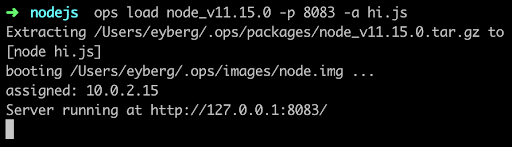
    If it’s the first time you run ops, it will first download a node “package,” which is the interpreter and anything else it needs to run. For some languages, such as Python and Ruby, this can be substantial.

    Then it builds a small disk-bootable disk image that contains your application code and, as you can see, boot straight into it. There is no init manager like Linux and there aren’t 30 different services that get fired off. Keep in mind this is a single process running.

    Now you should be able to hit it up with curl and see it run:
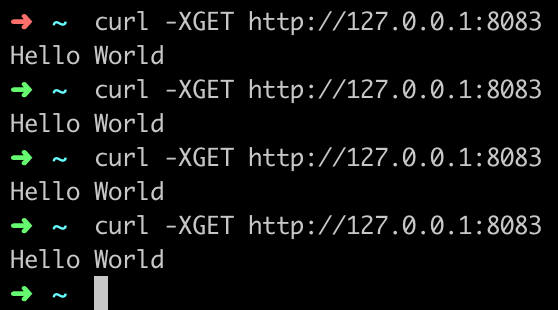
    You’ve just built and run your first unikernel. How cool is that?

    As certain trends such as “serverless,” “functions as a service,” and “no ops” gain steam, these concepts go hand in hand with unikernels. DevOps practitioners at organizations that use microservices and containers will also want to take notice as the amount of work to deploy artifacts such as these decrease considerably. Why is that? One of the many problems that containers had to struggle with was that all the existing underlying infrastructure layers that live at the virtualization layer, such as file systems and networking, had to be shifted up a few layers. Not only did this introduce performance and security challenges, but it also threw out the 20 years of virtualization software and ecosystem development that already existed. What’s interesting about unikernels is that they are always deployed as VMs, so they get to re-use a lot of the underlying ecosystem that has been existent, with very little or no change required.

    From an adoption standpoint, unikernels are flying at ultra-sonic speeds under the radar. A lot of people are not aware of how many projects or organizations are working on unikernels today. Unikernels are starting to attract major attention from many various groups and institutions. Even famous, old stalwart Linux contributors such as Ulrich Drepper, the maintainer of libc, are working on unikernel projects today. Now there are even foundations and consortiums for unikernels. One recently announced was the UNICORE project. IBM even listed its No. 1 cloud patent recently as a hypervisor built for unikernels.

    If you’re are a self-described DevOps person, it’d behoove you to learn more about unikernels and start playing around with them to understand them better. They aren’t going to kill Linux and they’re not going to kill containers, but do expect to see massive adoption in the coming years—not just because of their security and performance benefits, but because of the new forms of compute they unlock.

    — Ian Eyberg

  • How DevOps Optimizes Use of Resources

    How DevOps Optimizes Use of Resources

    How is DevOps changing the way we compute? One big DevOps innovation is helping developers and admins consume exactly what resources they need to deploy an app—nothing more and nothing less.

    Traditionally, using (and paying for) only what you need has been tough in all parts of life. If I want to park my car for just 10 minutes on a Baltimore street, I have to pay $1 for a half-hour’s worth of time, because that’s the minimum parking fee. In similar fashion, I pay about $50 a month for the heating bill in the unoccupied house I just bought, even though the heat is turned off, because that’s the minimum monthly charge.

    The problem of having to pay for more than you actually need was a big issue in the pre-DevOps digital world, too. In the past, if you wanted to deploy an app, you had two options. The first was to run it on a bare-metal server. If you did that, to help mitigate the risk of the server becoming overloaded, you’d dedicate more resources to the app than would be necessary during normal usage. That meant paying for capacity that you were not using most of the time.

    The other option was to use a virtual machine (VM). Thanks to tricks such as live-migration and “hot-plugging,” commercial virtualization platforms provided some elasticity to VMs, helping to assure that the VMs consumed only the resources they needed at any given time. But virtualization still means you are wasting resources on hardware emulation and running guest operating systems that needlessly duplicate most of the functionality of the host. Even the leanest VM environment requires you to dedicate more resources to deploying an app than the app actually requires.

    DevOps and the Consumption Revolution

    DevOps technologies are changing all of this. They are revolutionizing the way we consume digital resources and introducing efficiencies that were not possible in the age before DevOps.

    The most obvious example of such innovation is containers. With a containerized app, you get the portability and elasticity that traditionally have been available only from virtual machines. But with containers, you don’t have to waste resources on virtualization. Your apps only consume what they need at any given moment in time.

    Technologies such as Lambda functions on AWS are bringing the same efficiency to the public cloud. With Lambda, you don’t have to pay for virtual servers, memory or disk space on an ongoing basis just to ensure that you have them available when you need them. Instead, you can use Lambda functions to get access to a large amount of compute capacity in the cloud instantly, and stop paying for it the millisecond you no longer need it.

    Also worth noting is all of the automation that DevOps brings to software delivery by promoting continuous delivery practices. In the age of waterfall development, each part of the organization had to wait around on other teams to push code or test results down the pipeline before it could perform its own tasks. With continuous delivery, everyone works continuously and in parallel. The result is no more wasted time and skills.

    In a multitude of ways, then, DevOps is optimizing the digital consumption. In the future, we’ll wonder why we ever accepted “miminum” fees or had to pay for more than what we needed to get the job done.

    — Chris Tozzi