Tag: version control system

  • Perforce Melds Artifact Package Manager with Version Control Platform

    Perforce Melds Artifact Package Manager with Version Control Platform

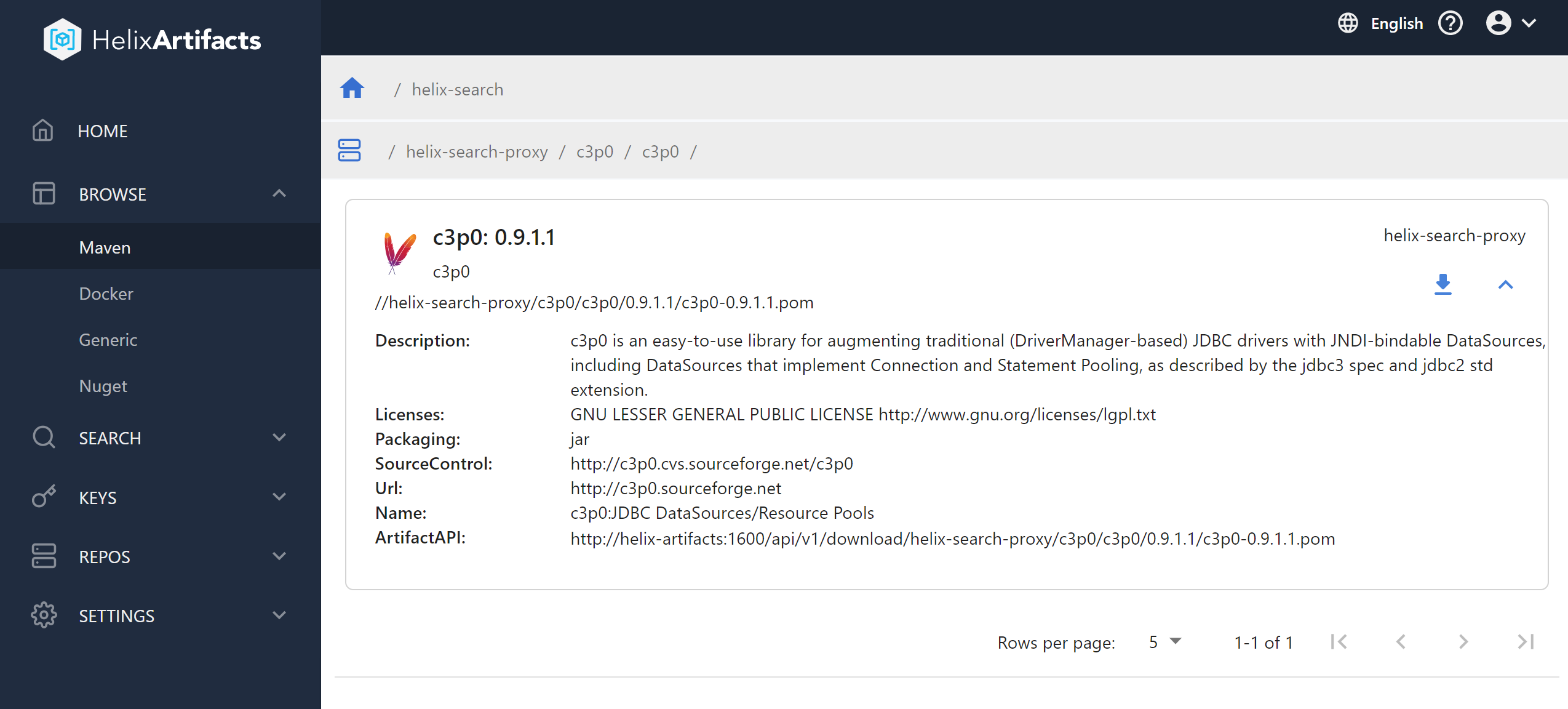
    Perforce Software has added a universal package manager, dubbed Helix Artifacts, to its portfolio that enables users of its Helix Core version control platform to store and track source code.

    Gerhard Krüger, product manager for Helix Core digital asset management at Perforce Software, said the goal is to enable DevOps teams that employ Helix Core to access a package manager without having to exit Helix Core.

    That approach also provides a more secure and cost-effective way to store, consume and distribute artifacts that also serves to improve developer productivity, he added. The ability to manage artifacts on top of a version control platform also means DevOps teams will not need to set up additional storage infrastructure or configure separate security permissions just to distribute software packages, noted Krüger.

    Perforce

    Helix Artifacts is a self-hosted package manager that functions as a translator for packages such as NuGet, Maven or Docker that enables them to communicate directly with Helix Core as well as build systems and integrated developer environments (IDEs). Helix Artifacts is made available via a per-server subscription model that costs substantially less than rival approaches to managing artifacts, Perforce Software claims.

    Most DevOps teams are trying to strike a balance between employing best-of-breed tools to build applications and the need to reduce complexity and, ultimately, cost. As such, any time a tool becomes a feature of another platform that a DevOps team uses, there will be a review of the processes being employed. Many DevOps teams are trying to reduce the amount of time they spent maintaining tool integrations.

    There’s also now a lot more focus on software supply chain security. Each new tool generally creates yet another set of credentials that need to be protected as cybercriminals continue to aggressively attempt to inset malware into applications before they are deployed in a production environment. It’s not clear to what degree DevOps teams are looking to consolidate toolchains, but given those rising security concerns, it’s only a matter of time before security teams start to ask why the DevOps toolchain attack surface is so wide.

    In the meantime, the number of organizations that have widely embraced DevOps best practices across the enterprise continues to steadily grow. Over the past decade, most organizations have had at least one application development team embrace DevOps. However, as the pressure to build software to drive digital business transformation initiatives has steadily increased since the onslaught of the COVID-19 pandemic, the need to apply DevOps best practices to accelerate application development has become more pronounced. As a result, more organizations than ever are looking to standardize their application development efforts on a smaller number of platforms to reduce friction.

    It’s too early to say whether the rate at which applications are being developed and deployed since the start of the pandemic has actually increased. The one thing that is certain, however, is the bulk of organizations are now trying to accelerate like never before.

  • DevOps Deeper Dive: Git Turns 15

    DevOps Deeper Dive: Git Turns 15

    Git, the version control system that arguably has enabled many DevOps advances over the last decade, is turning 15 this month. Git was developed by Linus Torvalds, best known for his contributions to Linux, and was so-named after he and the rest of the Linux community referred to it as “that stupid content tracker.” The term “Git” is British slang for “contemptible person.”

    Today, Git is now arguably one of the most important and successful open source projects ever launched. For the past 15 years, the Git project has been led by Junio Hamano, a software engineer who today works for Google.

    Git gained traction among developers because it provides support for rapid branching and merging of code in a way that also enables visualizing and navigating a non-linear development history. While even as far back as 2005 that was not a new idea, Git has emerged as the de facto standard for version control.

    “Git is an essential part of everything we do,” said Pratik Wadher, a vice president at Intuit, which has made extensive use of the version control system within the context of multiple DevOps initiatives over the last half-dozen years. “It’s the single source of truth.”

    As the de facto standard, Git has been the driving force behind what is now a multi-billion segment of the IT industry. In fact, with more individual developer and organizations contributing to Git than ever, the pace of innovation remains surprisingly strong 15 years into the open source project.

    GitLab, GitHub, Microsoft and Google, for example, contributed a partial clone capability, available as an experiment via GitHub and GitLab, that makes it easier to work with large files. Instead of having to clone every file in a Git repository, it soon will become possible to more efficiently set up clones of repositories regardless of the size of the files in that repository.

    That capability not only will prove critical to teams of developers working across multiple geographic regions but also will enable DevOps teams to employ Git to develop, for example, gaming applications that require DevOps teams to routinely work with large files, said Brendan O’Leary, senior developer evangelist for GitLab.

    “It will enable new use cases,” said O’Leary.

    The steady flow of innovations over the past 15 years has kept the base of organizations that rely on Git coming back for more. “The interesting thing about Git is that it has had real staying power,” said Kelly Stirman, vice president of product strategy and marketing for GitHub.

    In terms of industry standards, Git can take its place alongside SQL and Linux in terms of impact, noted Stirman.

    That staying power has even surprised some of the most ardent proponents of DevOps. “It’s been quite a journey,” said Ido Green, vice president of technology for JFrog, noting no one really knew 15 years ago just how big an impact the repository would have on software development.

    Today, most organizations are employing Git because development teams don’t know any other way to manage source code.

    “Git is now the default way to manage source code,” said François Dechery, chief strategy officer for CloudBees. “Ten years ago that was not the case.”

    Where Git will be 10 years from now is, of course, anyone’s guess. But with the rise of various forms of artificial intelligence (AI) and the eventual embrace of best DevSecOps practices, it’s clear there are still many innovations to come that will revolve around a Git repository in some way.

  • The Competitive Advantages of Modern SCMs

    The Competitive Advantages of Modern SCMs

    Source code management (SCM) is not a new concept. It has been in existence since around 1980, when Revision Control System (RCS), one of the first major SCMs, was released.

    But that doesn’t mean SCM today is the same as it was decades ago. Modern SCM tools do much more than their predecessors. They handle not just application code, but all the configuration scripts and templates used to build and support the infrastructure that applications rely on.

    Here is an explanation of what a modern SCM can do for you, and why it’s important from a business perspective to have a modern SCM.

    What Do SCM Tools Do?

    SCM tools, also known as version control systems (VCSs), at their most basic level, provide a history of all changes to one or more files and directories within a repository. These tools are most effective on text-based files such as source code and configuration files, as they can show line-by-line differences. While some tools can do specific binary file types (such as Microsoft Word documents), typically, binary files are stored intact, and each change results in a whole new copy being saved.

    An example of what metadata is tracked in the history (CLI-based example):

    $ p4 changes

    Change 2 on 2019/04/19 by dev@desktop ‘deletion of library.dll’

    Change 1 on 2019/04/18 by dev@jenkins ‘Initial commit’

    …

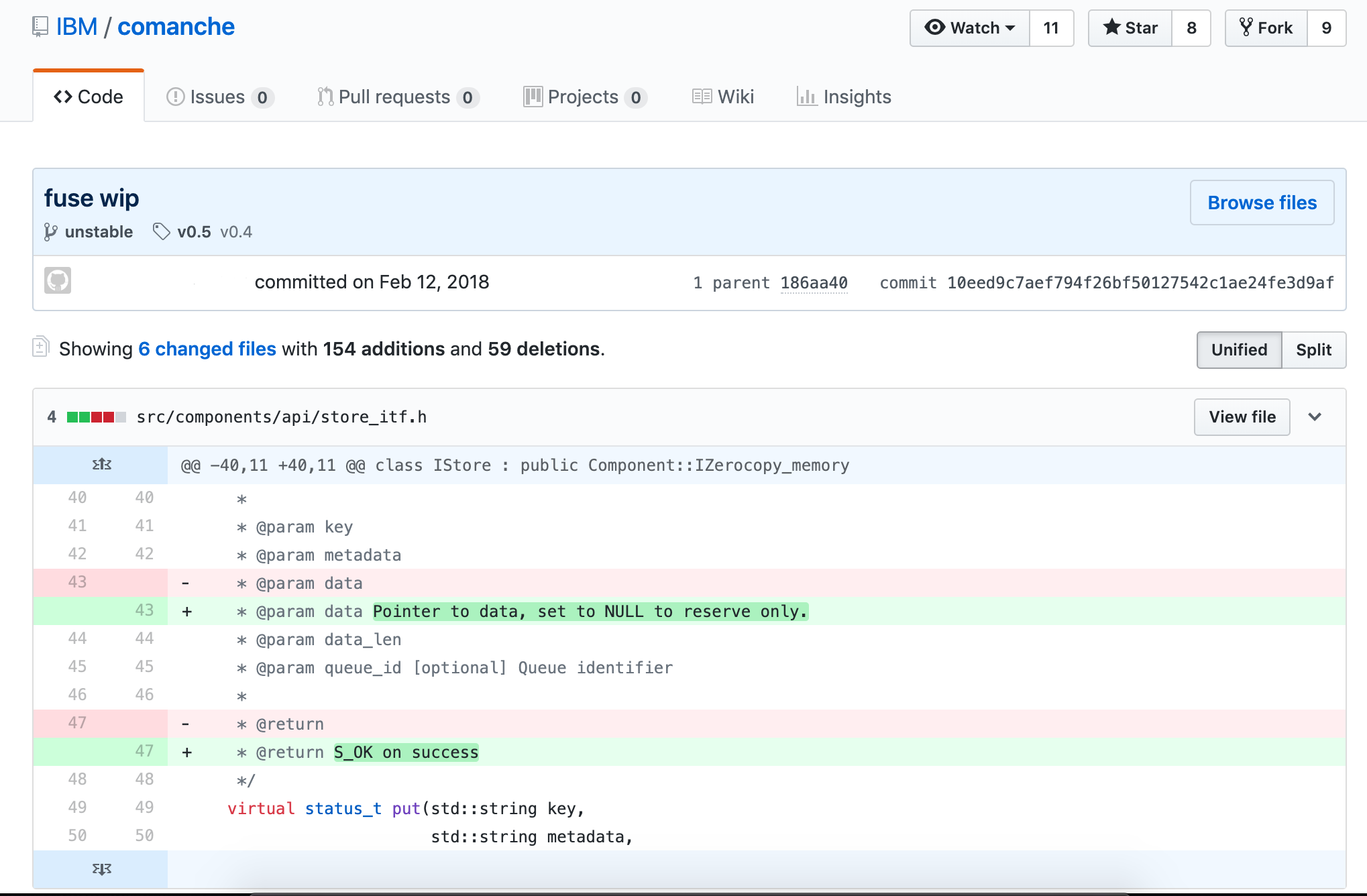
    You can display what has actually changed in each file (GUI-based example):
    Distributed vs. Centralized SCM

    There are actually three models of SCM tools: local-only, centralized and distributed.

    There is currently no modern SCM tool that runs local-only. Modern SCMs have evolved beyond a local-only architecture.

    Centralized SCM tools work by having every change committed directly back to the source server that is the authority for whatever is being worked on. There is code hosted on the local workstation, but any and all changes are tracked on the server. This model was dominant in the late 1980s and is still extremely popular in many large enterprises. The benefit of having everything centralized is all changes are tracked, and it is easy to stay in sync with the authoritative repository that leads to very few conflicting merges. The downside is a constant connection to the network is required to get any work done.

    Distributed SCM tools came out of obscurity in the early 2000s with their biggest proponent: Linux kernel development. Linux kernel development had evolved into a globally dispersed team, and not all members had the bandwidth or always-on connectivity needed to continue to use their centralized SCM toolset. The biggest benefit of the distributed model is each workstation has a complete copy of the entire repository and can locally branch, tag, revert and commit changes. At certain points (often daily, sometimes weekly), each developer syncs their local repository with the remote repository (which can loosely be called the authoritative version). The biggest downside is a much higher likelihood of conflicting changes being applied to files in the repository if there isn’t a lot more coordination around the process. It isn’t enforced with locks like it is in a centralized model.

    Why Use SCM Tools?

    Reproducibility and traceability. Period. It really is that simple.

    With SCM tools embedded in your development and support lifecycles, you can produce the code used for any version at any time, which will let you reproduce the binaries that were running in production. In addition, you can trace back to who actually changed the line of code that either fixed the defect or broke the world.

    Let’s go through a few scenarios where this can make all the difference.

    1. Fixing an ABEND from a Job that Only Runs Quarterly

    It’s 3 a.m., and you receive a phone call from operators saying your job has ABENDed, and their normal remediation steps didn’t fix it.

    Without SCM in place, you can only work with the code you have. You are in the middle of refactoring it, so it is in no shape to go anywhere near production–leading to meetings full of apologies and late nights spent working.

    With SCM, you check the tags in the repository and pull the latest production build, fix it, test it, push it to production and have the job back up and running before others make it into the office. Then, you can create a new tag, and there is a record of what was done.

    2. Discovery in a Lawsuit for an Event that’s Six Years Old

    This is pretty straightforward. We live in a world where companies love to sue each other, and your legal team will appreciate your ability to reproduce things as they were so you can prove what does or doesn’t work as expected, or does or doesn’t include whatever patented code the other side claims. No one likes to lose a default judgement.

    3. Client Finds a Bug in the Older Release They Still Run

    This applies to managed offerings or when the client installs the software on their own; there is always that one client who for some reason can’t upgrade.

    In this case, inside your SCM tool, as a best practice you would create a branch every time you do a release of your product. On that release branch, you can easily make code changes and rebuild and distribute the new, updated binaries of a version that was originally released two presidents ago, without having any impact on other customers or your own production deployments.

    Timeline of Popular SCM Tools

    There are dozens of version control tools and discussing the evolution of each one would fall far beyond the scope of this publication. However, there are a few key SCM tools that have led the way in establishing standards and norms for the industry. Their history is outlined here.

    1. Unix

    Concurrent Version System (CVS) was the first widely used SCM tool in the Unix ecosystem. It was a pioneer in the centralized approach when it was released in 1990. CVS is heavily based on RCS (to the point that most RCS repositories were seamlessly converted).

    Microsoft had a tool called Visual Source Safe (VSS) that it supported and distributed from the mid-1990s through the early 2000s. VSS was good for the typical mid-sized source code repository. Microsoft did not use VSS internally, as their internal needs were too complicated and their code repositories were too large for the tool.

    2. Cross-Platform SCMs: Perforce, ClearCase and SVN

    Perforce was the dominant source management tool used within Microsoft for decades. Perforce supported the level of complexity Microsoft and other large enterprises had around tagging and branching. It was also cross-platform like other popular tools such as PVCS, which helped it support development across all facets of a large enterprise’s infrastructure, from mainframes to Unix to Linux to Windows.

    Rational ClearCase (later bought by IBM) was heavily used by larger enterprises across all platforms, especially when mission-critical systems that leveraged big iron hardware and service-oriented architecture were involved. While ClearCase was a centralized system, it had several features that were unique and valuable to distributed teams, including dynamic views, which could be remotely mounted, and true code-level integration with Rational ClearQuest to track exactly what was changed in each defect and request. These concepts were revolutionary, but required large and reliable network interconnections, which is why distributed systems have become more commonplace today.

    While enterprises were adopting PVCS, Perforce or ClearCase, many open source, web-scale and smaller organizations were adopting Subversion (SVN), released in 2000. It built on CVS’s success and specifically addressed a couple of major annoyances with CVS’s architecture, which included repository-wide versions (which allowed a more consistent approach to versioning applications), as well as atomic commits (meaning the entire change is applied at once—if any of it fails, then the entire change is rolled back).

    Rational Team Concert, which emerged in 2008, represented another important point in the evolution of SCMs. It was cloud compatible and offered features (such as build management) that extended beyond just version control.

    The Git Revolution

    The world of SCM changed significantly with the introduction of Git, which was released in 2005.

    Initially developed by the Linux kernel development team, Git built on the lessons learned from a previous product the team used, called BitKeeper. Git is a truly distributed SCM tool and is now the dominant SCM tool for all new development. Git is multi-platform and has the largest mindshare across organizations of all sizes.

    Git has a much larger ecosystem around it than previous SCM tools enjoyed, and multiple vendors offer solutions that are built on it. Git is the default tool for most modern continuous integration tools, such as Jenkins.

    Using Modern SCMs with z/OS

    On the mainframe, SCMs developed in parallel to other platforms, but remained entirely separate in their implementation. Products such as Endevor, ChangeMan and ISPW were born as Library Managers, but were later used for version control. Still, the core technology that powers them is over 20 years old. They have remained substantially unchanged throughout their lives.

    Recently, however, with the rise in popularity of of hybrid applications and the adoption of lean/agile development processes, the legacy SCMs have come under increasing pressure to modernize. The vendors who produce these products have belatedly tried to bolt on modern capabilities; and where this has been proven impossible or impractical, they have elected to integrate with Git. However, since Git is now fully supported on the z/OS platform, organizations requiring the capabilities of a modern SCM are able to use Git without the hindrance or cost of a legacy SCM.

    You might think developers who work on legacy platforms such as mainframes, have to abandon their entire environments in favor of modern ones in order to take advantage of modern SCMs. Fortunately, that is not the case. Tools such as Dependency Based Build (DBB) bridge the divide between mainframe apps and modern SCMs. DBB lets mainframe developers use Git to manage source code for z/OS COBOL applications. It also supports Groovy for managing builds.

    Git, and the build tools that integrate with it, have become the go-to SCM solution for virtually all developers today, on most platforms. With the rapid uptake of Git already on Z, and tools like DBB available, it is clear Git is also going to become the dominant SCM for the z/OS development.

    As teams modernize their practices to handle the explosion in the sheer number of applications being built and the infrastructure automation scripts that support them, moving to an agile development methodology or trying to take advantage of DevOps practices such as continuous integration (CI) is impossible without a modern SCM tool to push all the changes through.

    Modern SCM tools are the foundational building block every technology team needs to successfully support all aspects of an application’s lifecycle.

    — Vince Power

  • DevOps Challenges and Version Control: What the Survey Results Tell Us

    DevOps Challenges and Version Control: What the Survey Results Tell Us

    Putting DevOps into practice is an ongoing experiment for many organizations. Developers often struggle with continuous integration (CI) or continuous delivery (CD) performance, testing delays and other bottlenecks. While not the answer to everything, version control—that long-established foundation of software development toolchains—has become a central part of DevOps, particularly DevOps at scale.

    This is underlined by the results of “DevOps Challenges and Version Control,” a recent survey conducted by devopsy.kinsta.cloud on behalf of Perforce Software, which provides some interesting insight into their experiences. This includes the role of version control systems within DevOps in practice, plus the top challenges the companies surveyed face.

    A total of 467 people from organizations across the globe responded, with roles ranging from DevOps engineer to QA analyst and CTO. Before we look at the challenges and issues they face—not just with their version control system but DevOps in general—first let’s look at the good news: Most version control systems are a good fit for their current DevOps initiatives.

    For instance, more than half of all respondents said the most important features of their current version control system are:

    • Improved collaboration.
    • Improved CI.
    • Better support for distributed teams.
    • Quality.
    • Faster commits.

    These were followed by compliance/security, at 48 percent. These jibe well with the main DevOps challenges they also cited:

    • CI/CD issues (a third cite CI/CD workflow streamlining as their top priority).
    • Prioritizing backlog and development projects.
    • Managing build artifacts and containers
    • Developer complaints about slow commits and merges
    • Working with open source software.

    These are all things that VCS can help fix.  For instance, these days, most version control systems transactions are automation for CI, rather than user requests.

    CI Challenges

    So far so good, but users want more from their version control system. Almost a third would like better integration with the software development toolchain. Other improvements on the wish list include security with fine-grained permissions, handling large files or repos and file access for teams in multiple locations or working remotely and improved CI performance.

    CI is critical to good DevOps and giving developers real-time feedback theoretically improves quality, but if the version control system’s speed and performance does not match demand, then bottlenecks are created. The last thing anyone wants is developers sitting around waiting for builds to happen. The survey’s respondents said testing (28 percent) and waiting for code reviews (23 percent) were the two points in CI that slow everything down the most.

    People Want More from their Version Control Systems

    So, what’s the answer? Version control that combines speed and performance, of course, but also built-in automated code review to alleviate the frustration of time spent waiting for tests and other tasks. Given that 64 percent are based in multinational locations, 7 percent work remotely and a mere 29 percent work in the same office, clearly the version control system needs to support dispersed working environments, too. In many situations where the version control system is being used for multiple artifact types and not just code, this needs to be covered, too.

    Likewise, most respondents have Git somewhere in the organization and understandably so: it is open source, users can get started with Git quickly and it is suited to small teams. However, Git struggles to scale, and, given some of the challenges that respondents quoted, this is clearly something many are experiencing. Enterprise strategies are emerging that give developers the Git interface they’re familiar with, but also the scalability, global replication and high performance for moving files and performing builds.

    With so many perceived challenges cited, it is no surprise that almost half of all those surveyed said they plan to replace their existing version control system. The top reasons cited were scalability issues, poor cross-platform integration and lack of DevOps support, plus the perennial pain point of license costs.

    Understandably, switching version control systems can seem daunting, but equally, based on the survey’s responses, many organizations are clearly living with systems that are expensive to maintain and have productivity issues that are getting in the way of, rather than supporting, DevOps. Conversely, choosing version control system strategies and tools can tangibly and positively impact on achieving DevOps success.

    — Tim Russell

  • DevOps Doesn’t Stop at the Database

    DevOps Doesn’t Stop at the Database

    DevOps has moved into the mainstream and practices such as continuous delivery now are being widely adopted. But what about the database? Applications often have a back-end database that needs to be developed and maintained at the same time.

    At first glance, there doesn’t seem to be an issue. The recent “State of Database DevOps Survey” from Redgate showed that 75 percent of companies have developers in their team who work across both applications and databases.

    Investigate a little deeper, however, and the cracks start to appear. The survey also showed that while version control is used by 81 percent of those in application development, it falls to 58 percent for the database. The same is true for continuous integration and automated deployments—39 percent and 33 percent for the application, 20 percent and 21 percent for the database.

    What’s going on? If developers are increasingly responsible for the database as well the application, why can’t the principles of DevOps be applied across both areas? That way, rather than the database being the problem at the end of the pipeline that can (and many times does) cause releases to fail, it becomes part of the pipeline.

    Especially when you consider that the biggest downside of traditional siloed database development is the downtime often experienced when introducing changes. That’s not to mention slowing down releases and preventing companies responding rapidly to changing business requirements.

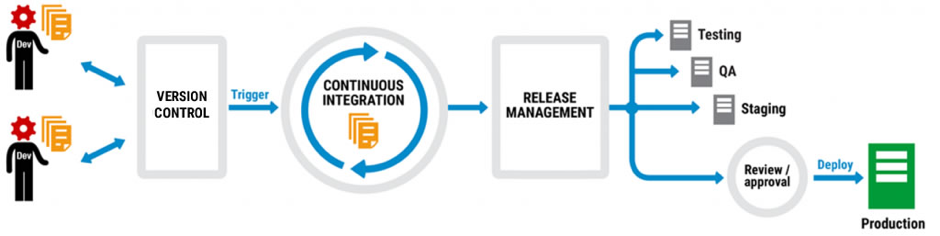
    A typical DevOps workflow looks something like this:

    Code is version-controlled so different developers can work on multiple branches at the same time. When it’s checked into the version control system (VCS), often at the end of each day, it triggers a continuous integration process that builds and validates the changes. Once the changes are complete, a release management tool then pushes them through the testing, QA and staging environments and there’s a final review before the changes are deployed to production.

    Not every company does all of this, but many do different parts of it and plan to extend DevOps practices into other areas. They might start with version control, for example, get the team accustomed to checking in changes, and then move on to continuous integration.

    It works too. The “2016 State of DevOps Report” from Puppet found that organizations practicing DevOps deploy 200 times more frequently, recover from failures 24 times faster, and have a 3 times lower change failure rate. DevOps has moved from a developer-led approach to one that businesses are actively encouraging.

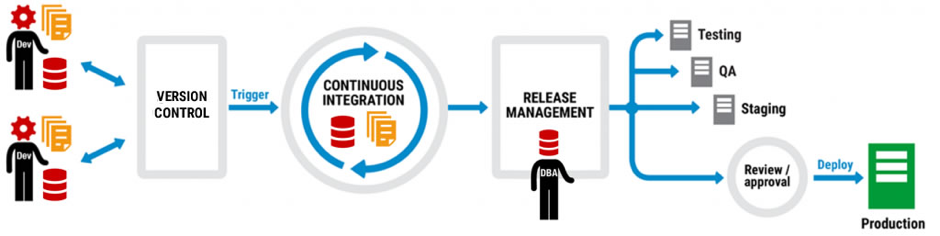
    Thing is, database development can be part of the same picture as application development. Let’s take another look at that DevOps workflow:

    The same workflow, but this time with database development included. Note that there are no extra boxes or arrows, there are no asterisks with caveats, and the only difference is that database development has been added to application development and a DBA has stepped in to the frame.

    But how can database development be added to the DevOps mix when it requires new tools, separate processes, a different mindset? The answer is to think about integration not separation, and extending the current infrastructure not replacing it.

    Application development teams, for example, will use a VCS like Team Foundation Server (TFS) or Git, a continuous integration system like TeamCity or Jenkins, and maybe a deployment automation tool like Octopus Deploy. They’ll also have a favored IDE for application development, probably Visual Studio, and if they do database development, they may well work in SQL Server Management Studio as well.

    Ask them to add to their workload with unfamiliar tools and development environments, or enforced policies and processes, and the shine of DevOps starts to lose its luster. What was freeing them to perform better is now tying them down to an unwelcome way of working.

    Ask them, on the other hand, to use the same tools and processes but extend their capability to database development and it’s a different story. If they already version application code using TFS, for example, there are database version control tools out there that plug into it so that database development becomes an additional part of the process, not an extra process.

    The same is true for continuous integration, release management and deployment. At every step of the DevOps workflow, database development can join application development so that it’s a natural partner rather than an unwelcome guest.

    But just how realistic is this approach? When development teams are already facing the challenge of introducing DevOps, is it a pipe dream to think the database will even be considered as part of the picture?

    According to Microsoft, no. When Visual Studio 2017 was launched in March, the Enterprise edition included Redgate Data Tools in the installer to make it easier for users to implement DevOps practices when building, deploying and maintaining their SQL Server databases.

    As Shawn Nandi, senior director for Cloud App Development and Data product marketing at Microsoft said at the time: “We think this is an important step forward to help companies extend DevOps practices to all parts of their applications.”

    So if you’re considering adopting DevOps, remember the database can be part of it, too.

    About the Author/Matt Hilbert

    Matt Hilbert is a technology writer at Redgate Software with 20 years’ experience working for lots of the world’s biggest tech companies – and many of the smallest. He has a particular fascination for emerging technologies and is on a continuing mission to decompile, untangle, and explain techspeak to a wider audience, and excite people about the endless possibilities technology offers.