Tag: UX

  • Three Common Testing Mistakes – And Solutions

    Three Common Testing Mistakes – And Solutions

    A few weeks ago at SauceCon, devopsy.kinsta.cloud talked to Matt Wyman, chief customer officer at SauceLabs. This year’s theme, Reimagine Test, emphasized the need to prioritize the user experience in testing. As Wyman put it, “We really focused on that customer experience, using the right type of test tool at the right moment.” After the conference, we caught up with him to talk more about a critical point—that many teams don’t know how to test for user experience because that hasn’t been in their wheelhouse.

    Wyman provided advice on three typical testing mistakes and how developers can improve the accuracy and breadth of their testing environment.

    1. Bloated Testing Suites

    Here’s a common scenario: Flaky tests get slipped into large test suites and developers ignore them instead of correcting or removing them. The suite gets increasingly bloated as people add more and more tests, which can obscure their results. “From the outside, it’s hard to tell which tests are the most critical when you’re making a change to pass,” Wyman said.

    He explained that if two people are working on the same part of the codebase and person A sets up a focused series of tests, person B can make a change and be sure it will work when those tests pass. But that’s no longer the case with a testing suite stuffed with irrelevant tests.

    “If instead, I create a two-hour suite with thousands of tests in it, you won’t know which one is most applicable to the change you’re making,” Wyman pointed out. “This is one of the more significant complications when people are less knowledgeable about building a good test suite or test practice.”

    2. Using a Single Tool Like a Hammer

    Wyman emphasized the need to use the right testing tools at the right time for the right purpose—something many developers don’t do. In this common mistake scenario, he said, the developer takes a functional user interface testing framework and uses it to validate their integrations, their APIs, their visual results and everything else.

    “It’s a classic case where you have a hammer and everything looks like a nail,” he said. “It makes your overall testing practice very heavy and very long. Typically, if you’re not using the right tool for the right purpose, it takes a lot of effort to maintain it.”

    3. User blind spots

    You don’t know what you don’t know—or, as Wyman put it, “the experience error is hard to find and even harder to discover.”

    Wyman discussed a hypothetical scenario in which engineers build and test a system that accepts only numeric inputs. Testing runs perfectly—because the engineers test only the entry of numbers. The fix here is fuzz testing: Thinking beyond simple use cases and introducing a “what if” quotient by testing random and unforeseen inputs, such as users who enter letters. Building this foresight into the programming language itself can involve developers in the quality assurance process much earlier and avoid mistakes down the line.

    He also stressed the need for observability in testing, with instrumentation that can help teams predict where users might run into limitations. “Developers have to look at the user analytics and usage analytics, not just system analytics,” he said. “Quite often the user analytics and observability the product manager is looking at, they see from the outside—and that’s useful data for the developer, so they can see those failure cases early.”

    Transcending Testing Limitations

    Is there such a thing as a flawless test environment? Probably not. But by sidestepping the three mistakes above, developers can transcend ingrained testing paradigms and elevate both quality and experience.


  • How to Optimize Data in Software Development

    How to Optimize Data in Software Development

    Data can drive significant business value for every company. Globally, we are collecting more of it than ever before, and it keeps growing—from 45 zettabytes in 2019 to a projected 175 zettabytes by 2025, according to IDC. However, companies are struggling to monetize all the personal, behavioral, engagement and transactional data from customers and operations and turn it into actionable intelligence to drive their digital strategies. Leveraging insights from your data is critical for success and the development of new digital solutions to better serve customers, grow sales, improve operations and more.

    Data helps organizations develop the right software for the right customer at the right time. Data-driven organizations are 23 times more likely to acquire and retain customers than their peers, and are growing at an average of more than 30% annually, according to Forrester.

    Organizations with a deep and dedicated focus on data and analytics tend to follow three common paths to successfully drive their software development initiatives.

    Discovery Matters

    It is nearly impossible to draw value, understanding, and insights from the massive amount of data businesses collect without a proper discovery system in place. Having a comprehensive process of collecting data from various databases and silos and consolidating it into a single source that can be easily and instantly evaluated is critical for any software development project.

    During client engagements, data scientists perform deep-dive research into clients’ data pools and workflows to support client roadmaps. We recently partnered with a global e-commerce company to create a recommendation system for their customers. The discovery process allowed us to verify the feasibility of recommended products using their existing data before moving ahead with the project. Using machine learning, the team was able to clean and analyze information from multiple angles. With that knowledge and confidence, the rest of the development project proceeded quickly knowing the data was in place and the project was viable.

    Align KPIs

    Software development metrics help organizations and their partners track and measure how an application is performing and how effective the development team is in its work. IT organizations rely on a range of KPIs to fully understand software engineers’ progress, as well as gauge software quality including performance, engagement and user satisfaction. While each engagement is different and requires a different set of KPIs, ensuring that the organization and development team are on the same page is crucial.

    During the e-commerce project, success was measured through conversion and user retention rates. Other KPIs that are regularly used include developer productivity and performance metrics like cycle time and team velocity, and software developer metrics like response time, usability and UX data, among others.

    Deploy Agile

    By using agile methodologies at all stages of development, developers are able to focus on business results, not just architecture and new technologies. A similar agile approach can also be applied to data management. When it comes to data science, it’s all about extracting useful information from raw, structured and unstructured data and implementing machine learning models to analyze vast amounts of information. This process requires more creativity and is a key driver for understanding potential risks and failures over the course of any given project.

    With agile, data models and analyses are broken down into manageable bite-sized chunks that can be built and tested quickly—the same way software is developed. If the analytics do not yield the expected results, data scientists see the failures immediately and can correct their course. They could ask the team to analyze different data sets, adjust the models, tweak algorithms or make an educated decision about the project’s viability.

    A multinational credit company took this approach to the next level when it used agile to develop a new, big data hybrid cloud platform. After anonymizing, aggregating and storing information in a data lake, the team quickly realized the database it was planning to use was limited to a certain number of partitions and entities. By running agile sprints and developing and testing the minimum viable product (MVP) continuously, the team was able to seamlessly switch to a new database that had more scale and functionality.

    The value of data is only going to increase with time. Data-driven organizations embrace the use of data and analytics to gain unique business insights to support their software development projects and overall business. By focusing on the data in each and every development project, companies have a tremendous opportunity to gain a competitive advantage and grow their businesses.

  • How to Build an Accessibility-First Design Culture

    How to Build an Accessibility-First Design Culture

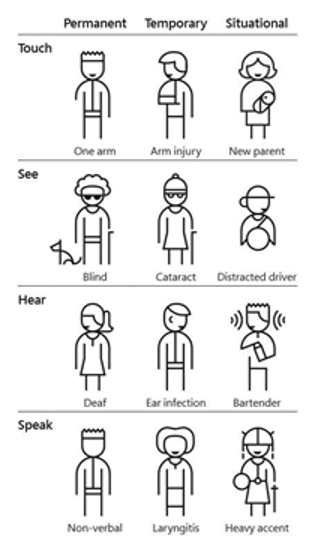
    When it comes to digital experiences, every one of us can recount a frustrating interaction with a website or app. For the 61 million American adults with disabilities, lack of website accessibility can transform a frustrating experience to one that inhibits essential activities such as working, shopping and socializing.

    To improve customer experiences and ensure equal access for all users, more businesses are adopting a human-centered, inclusive approach to design. But building a culture of accessibility can be a daunting task. Consider these steps to help build a culture of accessibility in your organization and engrain it as a practice across your development teams.

    Photo Credit: Microsoft Inclusive Toolkit

    Get Buy-In

    While most businesses agree accessibility is important, getting internal buy-in can be a bumpy process. Accessibility likely wasn’t a part of the curriculum for developers and engineers, and it may not be a common term yet among leadership in your organization. The industry and your brand haven’t been intentionally exclusive; rather, teams haven’t been enlightened yet to think about accessibility and its impact. There’s a misconception that inaccessible products only affect a small portion of end users. However, 1 billion people, or 15% of the world’s population, experience some form of disability, and we must include them when designing products.

    Additionally, the following points can help champion an accessibility program:

    1. Accessible products benefit everyone no matter their physical or cognitive ability because accessible products represent an ideal user experience that is clear and intuitive. For example, many people tend to be power users of keyboard shortcuts. The ability to tab through inputs or use the enter key to submit a form makes all users more productive, not just those who rely on a keyboard instead of a mouse. Similarly, applications with proper focus management and strong color contrast have better navigation, while also empowering those with low vision to perceive changes.
    2. Accessibility is an investment in your employees and customers. Measuring the business value of accessibility can be tricky. One way to frame it is to think about the ripple effects of inaccessible products. Not only are you preventing users with disabilities from using your product, you’re also limiting the people who can work at your company and develop your product. That impact is further extended for B2B companies—you’re limiting who your customers can engage with and sell to, as well. While measuring the success of an accessible product isn’t always easy, it’s clear that inaccessible products can create unanticipated and cascading business and legal problems.

    Bake It In

    Like any program, accessibility requires constant attention to engrain it in an organization’s culture. Consider creating a group of cross-functional Accessibility Champions that own keeping accessibility top of mind, sharing insights and advocating for accessibility on their teams. This group should consist of anyone who touches the UI of the product, such as the entire design team, someone on each engineering team and representation from QA. This approach ensures each team is prioritizing accessibility as they build and test and they have a point person on their team leading the effort. It also redistributes the idea of an accessibility expert, disseminates knowledge throughout your organization and gives everyone the sense that accessibility is a part of their role.

    Creating an accessibility engineering plan will help guide your organization toward making accessibility and inclusive design an integral part of your processes across planning, development and QA. This plan can include incremental changes along with broader, long-term goals:

    • Conduct an accessibility audit.
    • Sync with sales and customer support to determine if customers have experienced friction with the product due to inaccessibility or if anyone has asked when the product will be accessible.
    • Determine the top three components to fix first.
    • Add Accessibility Epic(s) to Jira to track improvements.
    • Add accessibility as acceptance criteria for every project.
    • Include accessibility testing in bug bashes.
    • Weave accessibility into the onboarding process for all engineering new hires.
    • Add an accessibility section to any technical design and product requirement documentation.
    • Add a section to the GitHub PR template that surfaces accessibility checks (testing with keyboard, screen reader and linting).
    • Showcase/demo accessibility fixes on a regular cadence at engineering all-hands meetings and OKR reviews.

    Start With the Components

    So, what to do first? A great place to begin is your component library. Identify which components are used the most often and which underlying components underpin other functions. For example, make sure buttons, inputs and links have accessible focus and hover states. It’s a lucrative, efficient way of scaling accessibility fixes because once you make one fix, you’ll see it propagate throughout the organization wherever that component is used.

    There are a few key factors to be aware of at this stage. First, create a clear plan for who can make changes and how you’re testing components to ensure accessibility features are not unintentionally removed. Second, your work doesn’t end after creating accessible components. In the UI, individual components are put together like puzzle pieces, and just because each piece is accessible doesn’t mean the entire UI will be. Since the UI involves multiple components talking to each other, you’ll need to ensure that the experience is usable and accessible as a whole.

    The goal is to ensure every existing and new component in a library is accessible by default. This way, when developers pull features into their work, they’ll know with certainty it’s designed to be accessible. Get it right once, and you get it right everywhere.

    Building a culture of accessibility doesn’t happen overnight, but you can start with a few small changes that have a greater collective impact and build from there to make it a part of your entire development workflow. Most importantly, making an actionable, conscious commitment to accessibility will contribute to building better products and a more inclusive web.

    For more information and resources about accessibility and inclusive design, visit the W3C Web Accessibility Initiative documentation, which includes tips to help designers and developers get started. Additionally, the A11Y project provides Web Content Accessibility Guidelines (WCAG) checklists to determine how accessible your site is. Plus, services such as Fable and Access Works allow you to meet with people with disabilities and engage them in research and user testing.

  • Designing a Future of Innovative UX, Without UI

    Designing a Future of Innovative UX, Without UI

    The long-fabled future of a world without traditional human-to-computer interactions is no longer science fiction. It’s a reality. Consumers all across the globe are wearing computers on the wrists, talking to artificial intelligence to check the weather and monitoring body functions through micro-devices. This is just the tip of the iceberg of what is possible through creative technology design, and yet the masses still see holograms and implantations as far-off science fiction, rather than the very close and possible future.  

    Designers and developers are leading the charge into the future, but not without their fair share of challenges and hurdles. With a blank slate of endless potential, how can we design for a simple UX while still having a visually appealing product? Moreover, what if, in the near future visuals are not required at all?

    The New Frontier of Design

    Holograms, audio controls, wearables … new technologies have the potential to disrupt the screen entirely. Society is teetering on the edge of the uncanny valley of a world without traditional UI, and designers must take the reigns. 

    Take audio design, for example. Voice technology and virtual assistants are already rendering many screen functions moot. Technology leaders such as Apple, Google, Samsung, Amazon and beyond are pouring resources into voice, creating a screenless interface simple and intuitive enough for any consumer to use. Google, for example, has made creating an app on the Google home quite simple though Google Console. Designers can have fun building the tone, language and personality for the app easily in as little as five minutes. While it’s true that we live in a world where some still battle this technology, it’s also the case that audio assistants are carving out a place for themselves in our home and our lives. The technologies powering audio controls are being developed and refined quickly, so learning how to design for it now is key. 

    Itcher, a recommendation engine that helps users discover movies, music, television shows, bestselling books, games and more, requires no UI at all. The voice-powered platform allows users to ask their voice assistant for a recommendation, prompts them with questions to better understand his or her tastes and preferences and leverages artificial intelligence to provide optimal recommendations. 

    Designing for audio navigation is not necessarily fully intuitive. More so than with desktop screens or handheld devices, interactive audio treads on the brink of the uncanny valley—imitating humans in many respects but still not quite convincingly human. Audio designers like the team at Itcher must consider factors such as lexicon, pitch, volume, direction and most importantly, value for users to want to interact with a voice-controlled device. 

    One contributing factor for the rise of audio is the rise of wearable technology such as smartwatches, AR smart glasses and beyond. Designed to be connected to consumers at all times, wearables are blurring the lines between technology and its users. As the wearables become better optimized for everyday use, the screens will shrink, and likely disappear altogether. This will make audio design more valuable than ever before. 

    While people are still going to be very dependent on traditional screen interfaces for quite some time (especially for complex tasks), there is no doubt the world is hurtling towards a future where screens are no longer a necessity, but an option. Designers and developers no longer have the luxury of waiting for the next big thing to enter mainstream—it’s here. 

    Focus on the U (User)

    No matter if you are designing for a wearable, a voice assistant or a mobile app, customer feedback is an important aspect of innovation and design that often gets overlooked. Of course, the first thing a designer must consider should always be the end user—know the business and customer requirements so they are making the best product that will fill the needs of both. A designer that does not approach a project by asking many “why” questions of both the company and the target audience will not have the information they need to build the best and simplest interface she or he can.

    Innovative thinking is important at all points of the design process, but to ground design in reality rather than getting trapped in science fiction aspirations, designers must have both quantitative and qualitative research to better understand not only the functionality success of a product or platform, but also the user sentiment. This requires heavy interaction with stakeholders (both internal and external) at every stage of the design process. 

    Bring customers in to soundboard ideas, test products and platforms and engage on a deeper level with the business. At Shutterstock, we speak to customers on a regular basis, hold focus groups, and use user testing platforms to ensure we have customer feedback at many steps along the way. It’s vital for customers to be able to interact with products and platforms along with designers. This allows for greater creativity and most importantly, simplicity in UX. 

    Focus on Simplicity

    Shakespeare’s quote “Brevity is the Soul of Wit,” from Hamlet, is typically interpreted for works of writing, encouraging authors to be concise. However, this is also true of all creative endeavors, writing, art and design. Making things simple (concise) takes hard work, it takes time, it takes skill and giving yourself the space as a designer to do that work is critical to finding success in creating a “simple” design.

    Designing something simple is one of the hardest things every designer faces. Sure, it’s easy for the designer to come up with a simple interface that answers the customer’s needs at a cursory level, but often there are additional requirements or stakeholder feedback that one also has to take into account. It’s important to remember that product, UX and engineering are all parts of an equal trifecta. Designer and developer questions, as well as conversations with real customers about how to solve a user’s need, will only make a product better in the long run. The challenge for designers is balancing immediate feedback from their company and users with forward-thinking innovation. 

    It is often not intuitive for both businesses and consumers alike to imagine a future that pushes the boundaries of what exists. Designers are uniquely positioned to bring abstract innovation and technology to the masses through simple and intuitive UX.

    — Erin Essex

  • The Emergence of UI and UX in DevOps Tools

    The Emergence of UI and UX in DevOps Tools

    Most of the popular DevOps tools on the market such as Puppet, Chef and Jenkins, are open-source and require a high level of proficiency. With the complexity comes the challenge of learning new frameworks and paradigms, a benefit to those who want to challenge themselves and learn new skills.

    But while these tools have become widely adopted, the widespread adoption of DevOps is creating a need for interfaces that cater to all users, from the most technical engineers to those who don’t want to learn, don’t see the value in learning or don’t need some of the top-end power that a complex scripting interface provides.

    It is for this reason that CloudBees developed Blue Ocean, a new interface for its continuous delivery tooling, and Red Hat released a user interface (UI) for Ansible.

    The Right Time for UI?

    Why have there not been UIs before now?

    I would say two reasons:

    1. Users did not demand nor care for one until now. A UI in many circles is seen to been more presciptive/restrictive of what can be achieved, and that only scripting/programming interfaces expose the real power to an engineer. Also, many of the most progressive engineers like scripting; they derive satisfaction from learning new skills, especially those that are the most highly desirable/in demand. And, I think many engineers like things because they are difficult to do; it’s a challenge, they have bragging rights and means they likely are getting paid more/are in demand.
    2. The open-source community is not as good at or geared toward building UIs.

    Why has a UI become important now?

    At MidVision, like many of the other commercial automation tool vendors, we have always believed that user experience and accessibility is critical, so we have provided command-line, scripted, API and GUI interfaces to our tooling. But this has not been the common approach.

    What makes this moment different is the wider adoption of DevOps automation tooling by groups that want at least graphical user interfaces (GUIs) and improvements to user experience such that you don’t need to be super-technical to be able to use them.

    The main groups we see are:

    • Business users within an organization. Continuous delivery/release automation tooling very much promotes collaboration, interaction and self-service, allowing release managers to see the status or pipelines, approve releases or initiate deployments. Managers may want to see dashboards and metric, produce reports or usage data. Other less technical staff, offshore teams, second level support, etc., may want to be able to provision, clone environments or deploy changes.
      There is a gap between the nerds in the basement speaking one language – and the business users who speak another which accessibility, UI and UX hopes to bridge.
    • Operations. There are certain parts of IT Operations that have welcomed the technical script-based tooling with open arms—it was a natural evolution for a UNIX system admin to become a DevOps/automation engineer. They can still script in shell (or are they meant to be doing it all in Python? ?). Again, some of the security tooling, storage, etc., are generally more comfortable down in the weeds. As you move up the stack however, toward the business application deployments, users are much more familiar and comfortable with UIs. Also, at this level dashboard, metrics, access control and reporting are much more important—and all of which are very hard to achieve without a proper UI.
    • Wider industry adoption. Adoption of the tools and techniques that are often advocated in the DevOps world started with the same poster child companies—Netflix, Twitter, Facebook, Google—and other newer companies that are cloud-native, have an open-source-first policy and are unencumbered by heritage technology stacks.

    We have then seen parts of enterprises adopt DevOps practices and tooling. Obviously, it is important to start small, establish value and then scale—running an initiative like you would a startup within an enterprise works well.

    Now that there is a compelling body of evidence to suggest that DevOps practices provide competitive advantage, cost savings, improved time to market, etc., other industries that are heavily dependent on technology have not had yet adopted these practices for varying reasons. Some parts of the finance and healthcare industries are two such areas. These industries have concerns around security and stability that may have slowed their adoption to date.

    Overall, however, this wider adoption means we need to cater not just for the new breed of DevOps engineers that are both system administrators and programmers and can script in Shell, Rudy and Python. We also need to cater to a wider group that either don’t have the skills to use these tools or don’t care for them.

    What change, then, are we likely to see?

    I believe DevOps tooling will evolve to provide new interfaces to cater to business users and self-service, and to make it easier to achieve the same thing without needing years of experience using a tool before being considered a competent user.

    I would compare many of the current tools today to a map and compass. Lovers of orienteering or mountaineering may suggest using a GPS or map on a mobile phone is cheating, cannot be relied upon or won’t provide the same same information as the contours on a 1 to 10,000 map. Or maybe you prefer vinyl to Spotify.

    Neither of these things are wrong; they are just not the only right. If you want to nerd out with your map and compass, vinyl LPs and Python scripts, I say fill your boots. All of which, BTW, I have some passion for! However, if you also want to get in your car, enter a zip code and know that it will get you there (accepting there is maybe a route that is slightly quicker if only you had done your research more thoroughly), this makes perfect sense to me.

    User experience is at the heart of the most of the other products we choose to consume, and I think many new and existing users will be pleased with UX becoming more important as tools like ours and others put this at the forefront of their design.

    About the Author / Dave Sayers

    Dave Sayers is a co-founder and technical services director of MidVision, a provider of Release Automation and Continuous Delivery Software. He works closely with customers and partners on DevOps and Automation initiaitves throughout Europe and North America and is responsible for devising and managing the partner and channel strategy. Connect with him on LinkedIn.

  • App Dev: Stop Spinning Wheels on the Spinning Wheel

    App Dev: Stop Spinning Wheels on the Spinning Wheel

    When it comes to websites and apps – speed matters; today’s consumers want everything yesterday. Recent studies show that there is no surer way to lose the trust of a consumer than to produce an app with sluggish performance. Recently, Amazon reported that for every tenth of a second of latency, sales decrease by one percent. Furthermore, almost half (48 percent) of consumers stated that they immediately uninstalled an app after slow performance. That’s a huge cost that translates directly to the bottom line.

    Today’s websites and applications are hyper competitive when it comes to user experience (UX). Consumers are educated – and if the digital experience isn’t engaging and effective, they will leave for a digital channel that does deliver that experience.

    The problem lies in the collaboration between UX designers and line of business teams. UX designers load up their sites and apps with cool content and hot third party JavaScript for a strong visual appeal. Following that, teams who are looking at competitor’s digital properties ask for even more content to be added in hopes that the app will be even more useful. Unfortunately, with this strategy, the end result is an incredible experience that probably performs somewhere between “eh” and “terrible”. Off go the consumers because the one thing they hate worse than something boring? Something slow.

    So, it’s tough being a designer; contrary to popular belief, the reality is that web loading speeds on average are actually getting slower on a global scale. As more users flock to social media, and ecommerce sites to get their fix of images, videos and interactive plugins, web speeds have been plummeting. Factor in that 50 million people in the U.S. now watch streaming video on mobile phones, and the issue become clear. High-speed Internet is no longer enough to get content to consumers in a timely manner. In fact, you have to assume high speed is irrelevant because so much interaction is now “over the air” mobile.

    The question now becomes, what can designers, developers and organizations do to maximize experience and keep things fast in a world where performance is slowly degrading?

    Testing is Mission Critical

    It’s not rocket science that before a website or app is released into the wild, it needs to be tested and then deployed it in a way where it can be monitored to check it for performance issues, or any bugs that might annoy users into never looking at it again. The “it will get better” model of the past is dead. You have to get it right the first time.

    However, testing and monitoring once isn’t enough; because there are so many variables that are introduced by 3rd party content – from a paid ad slot to an image to logins for social accounts to all the various marketing tags. A failure on the part of any one of these sources can damage performance. Furthermore, those third party bits are part of long chains of infrastructure themselves– with lots of exposed weak points. If your third party social media login JavaScript object can’t communicate to its house – or the pipe it’s house uses to talk to Facebook is down, all the consumer knows is that they won’t be back.

    As good of an idea as it may seem to drop in one more marketing or advertising capability to increase the revenue generated by applications, it needs to be tested and monitored first to make sure it doesn’t have the opposite effect. Without fully assessing the risks associated with the addition of these services, it’s hard to evaluate whether it will help or hurt the business.

    Finally, be sure to load test at different traffic levels. It can be easy to focus testing on best-case scenarios, but be aware that once released, apps need to perform under a whole host of different network conditions.

    Keep It Simple, but Don’t be Stupid

    Design is always a balance between the desire to give consumers more functionality and a more interactive and friendly UI. For many organizations, this means coming up with something snazzy, and then having developers and operations make sense of it to enable performance. So – often to avoid potential points of contention – the bias drifts towards being safe and ensuring performance at minimal cost.

    Ultimately, the best experience will equal more sales, more views, more consumers, and better ROI. It actually is rooted in economic fact – the experience can and will drive more revenue, but only by investing in support.

    So, how do you maintain and stretch experience without blowing up performance? The key is being predictable by spending time on research, evaluating different options and constantly testing them to see what provides the right balance of experience and performance. Just because you have been using the same social media JavaScript object from a well-known source doesn’t mean you shouldn’t always be comparing it against other alternatives. And given that at least 30% of web pages come from third parties, this means there is a lot of continuous monitoring and research to do.

    Scientific Method

    Ultimately what we are doing here is taking the artist’s mindset of maximizing creativity, and applying the scientific method. Researching all those third party options and checking their performance – before presenting to the DevOps team – provides the ammunition to show that it’s possible to affordably deliver great performance and a great experience. Then, partnering with DevOps to constantly monitor third party content makes sure that at the first sign of degradation, backup providers are waiting in the wings to be deployed.

    About the Author/Adam Thier

    adam-thierAdam Thier is the Executive Vice President of Engineering at Keynote Systems. He brings Keynote over 25 years of software development and product experience ranging from a number of successful startups through engineering leadership roles at industry leaders such as SAP. In particular, he is an expert in analytic applications, predictive analytics, massively parallel in-memory databases, and columnar store processing.
     
    Prior to Keynote, Thier was the Senior Vice President of Frontline applications at SAP, and prior to that ran development for Hyperion’s applications portfolio prior to its acquisition by Oracle. Thier is an avid proponent and practitioner of design thinking and credits most of the success of the products he has been responsible for to deep engagement with customers and continuous co-innovation.  Thier has a BA from Marist College.
  • DevOps & UX: A Star-Crossed Love Story

    DevOps & UX: A Star-Crossed Love Story

    “Two households, both alike in dignity
    In fair Verona, where we lay our scene
    From ancient grudge break to new mutiny
    Where civil blood makes civil hands unclean.
    From forth the fatal loins of these two foes
    A pair of star-cross’d lovers take their life
    Whose misadventured piteous overthrows
    Do with their death bury their parents’ strife.” ~ Romeo and Juliet: Prologue, William Shakespeare

    For more than 15 years I have watched as they battle. The chasm between the two houses was so wide that I often wondered if it would ever be bridged. I never wavered from my view that we were all one house striving to find common ground for making working solutions for the world around us. Sometimes there were allies beside me. Sometimes I stood alone, For the first time in my professional history, it seems like the blood-feud could be put aside. Is it time for peace? Even more ambitious, is the day of an alliance at hand?

    The Feud

    For many years, corporate IT and finance were the only voices in the room. Ruled by an unquestioned and unmeasured desire for quantification and linear solutions, design considerations were usually an afterthought. All parties were subservient to the almighty ROI which ruled over all with an iron fist. Claims of possible productivity gains through better tooling were always met with doubt and even when taken seriously, you could not claim productivity gains unless you were willing to commit to lowering headcount. Tooling for technical employees to manage the environment and its operating data was so scarce, that there were more applications with no maintenance tooling than applications with operational plans. Operational changes were made by going into databases by hand and making changes in a “hit or miss until you hit” fashion.

    In the late 90’s UX showed up to the party and with a basis in humanism, the equation changed. This was the time that the “great misunderstanding” happened and 15 years were wasted building up a corporate landscape strewn with enmity and false narratives. The “great misunderstanding” goes something like this:

    • “Let’s make something that people can use” – UX practitioner espouses user-centric design and introduces new methods and artifacts into the SDLC processes which take interaction design specifications to a new level in corporate America
    • “That’s going to take more time and I don’t agree that it’s any better than what I could do myself” – IT staff view this incursion as a mechanism to take what little time they are given to complete projects while also limiting their creative outlet
    •  “I don’t care what you think and neither does anyone else” – UX practitioners view the response as a denial of their value proposition and a fundamental lack of care about the people who interact with technology

    Several of the basic assumptions in these archetypal interactions between disciplines were short-sighted. For example:

    • The “more time” fallacy – adding a design process may take more time if you only think about a single iteration in development and that’s only if you are lucky enough to have a complete interaction model worked out in your head that doesn’t have any design holes in it. Designing interactions on paper saves time in the same way that technical design saves time over “jumping straight to coding”
    • The “fighting on the wrong front” mistake – It was never the goal of UX to remove IT budget. The goal was to make things better for the humans that interacted with technology while creating business value. The two different disciplines never saw their goals as aligned. We will never know what the alternate history would have been like had UX and IT teamed up to get larger budgets in an effort to create better and more sustainable experiences for users, developers AND operators.
    • The “reductive labeling” error – Both IT and UX created a narrative where the interaction and visual design tasks were the “creative tasks” for “creative people”, while the development was the “technical tasks” for “technical people”. These labels have stuck around for the last 15 years and we are still paying the price for removing the idea that IT staff is fundamentally non-creative and devoid of craft.
    • The “self-reinforcing paradox” tragedy – It was never the goal of IT to demean the UX discipline. When one neglected child is joined by another neglected child, the two will almost unavoidably fight over the little attention afforded to either of them. The irony here is that UX’s basis in cognitive science could have possibly seen the hostile response from IT for what it was; a cry for help. Instead, UX took the bait offered by IT and thus we are here 15 years later with a wide chasm between two disciplines that should be united by common causes:
      • a desire to make awesome stuff
      • a desire to create sustainable solutions
      • a desire to express one’s self at work
      • a desire to improve the lives of their customers and employees at the same time

    Oh The Humanities

    When IT resources and UX practitioners first came together the familiar plot “boy meets girl, boy loses girl” emerged and we may now, thanks to DevOps finally have arrived at the time when “boy gets girl again”. Gene Kim and the folks at IT Revolution Press have hit the target dead center in their manifesto:

    “Working in most IT organizations is often thankless and frustrating. People feel as if they’re trapped in an ever-repeating horror movie, helpless to change the outcome The organization abdicates their responsibility to ensure that IT is managed well, plunging the department into relentless intertribal warfare between development, IT operations and information security. And of course, the auditors.

    What inevitably results is chronic under-achievement. The life of an IT professional is often demoralizing and frustrating, typically leading to feelings of powerlessness and rife with stress which seeps into every aspect of life. From stress-related health problems, to social issues, to tension at home, it has become clear that the current state of the IT professional is not only unhealthy, but unsustainable.

    As people, we’re wired to contribute and to feel like we’re actively making a difference. Yet, all too often when IT professionals ask their organization for support, they’re met with “you don’t understand,” or worse, a barely masked, “you don’t matter.”

    As a human being, this is the worst response we could receive. Because the opposite of love isn’t hate — it’s apathy.”

    Despite what some IT step-children will tell you, UX is not about making pretty pictures. UX as a discipline was formed to combat apathy and contempt by corporations through a mechanism of introducing empathy. Similarly, DevOps wasn’t formed to “make web pages faster”. DevOps clearly has a tactic of emphasizing performance (as well as other technical tactics), and performance improvements are clearly one of the benefits that come out of a DevOps organization. DevOps was formed to make IT a more sane and human space inside companies for IT employees, it just so happens that DevOps produces other impacts that are financially beneficial for enterprises.

    Avoiding The Fates of Romeo And Juliet

    Knowing that waters of DevOps and UX flow from the same wellspring allows the practitioners of DevOps several opportunities to repair the tragedies that have already befallen our enterprises before they escalate to the Shakespearian proportions. Three broad categories of opportunities would be:

    1. Enroll UX into the DevOps movement – Knowing that we are aligned creates multiple possibilities to bring many industry and enterprise change agents into our cause. How much would the DevOps adoption curve accelerate if people like Don Norman, Jesse James Garret, Alan Cooper or Steve Krug were visible advocates for DevOps? Support from UX at the leadership level in the industry and within your enterprise is an advantage you cannot afford to pass up. The number of consensus driven organizations are just too many to count and the more groups and individuals that believe in advancing our cause, the better.
    2. Learn from UX’s travails – Creating artificial barriers to discipline inclusion is ultimately an adoption limiting factor. When we make things pass-fail or turn collaborations into confrontations or competitions for who is DevOps and who is not, we all lose out on the what a wider community could offer. Hold yourself accountable to pivot confrontations into constructive opportunities where learning can happen for people of different disciplines.
    3. Take some pages from UX’s playbook –  UX’s biggest lever for creating believers is by involving non-UXers in the research methods and activities (think about the last time you went to a usability test behind the 2 way mirror and saw a person struggle to use a system you were part of implementing). One of the best things we the practitioner community can do is to demonstrate what life is like without DevOps in real-life scenarios. When someone really attaches to how ugly a manual process is, or how soul-crushing it is to not be able to self-actualize in their job, they can’t help but want to be a part of making it better. Problem solving is hard-wired into the human condition, let’s leverage it.