Tag: toolset

  • How To Foster a Culture of Citizen Developers

    How To Foster a Culture of Citizen Developers

    What can leaders do to encourage a thriving environment of citizen developers in their organization?

    Over the last several months, businesses of all sizes have had to embrace rapid change, as have their workforces. When it comes to IT departments, even before the pandemic many were fielding requests to implement new technology, customize solutions to niche problems and automate specific tasks at rapid rates. Unfortunately, these increased demands coincide with an ongoing developer drought, and paired with the pandemic, have put an added strain on some already thinly stretched IT teams.

    As a result, there has been an observable rise in citizen developers being tapped to relieve some of this burden. “Citizen developer” here is used to describe any programming novice or non-developer who has been tasked with the responsibility of constructing custom applications. This person has some familiarity with programming but may not have been formally trained and, therefore, may use their own set of tools and workarounds to complete the work. If leaders don’t make an effort to create standardization, the consequence can be high variability in quality, efficiency and output.

    And it doesn’t seem to be a passing phase. I recently spoke with Dave Garrett, chief strategy and growth officer at Project Management Institute. As we look to the future, Garrett believes that citizen developers will play a critical role in helping organizations stay agile and ensuring projects move forward without delay.

    Though it won’t solve all of your pressing technical concerns, the good news is that with smart strategies, a citizen development emphasis can ease the burden on IT teams and improve output. Garrett spoke to a sea change of new techniques being developed to respond to these growing needs.

    4 Elements of Strong Citizen Developers Culture

    1. Standard Toolsets

    To start, build a solid foundation by choosing standard toolsets. Be sure all development staff is made aware of the toolsets you’ve deemed standard, clarify that adopting them is a priority and ensure that all have access. Standard approaches to using these tools should also be established and communicated, such as programming languages and stylistic standards.

    “If you have a standard toolset and approach, then you have many people who can help,” Garrett said, emphasizing that by doing so, you are building a broader base of support. Having a larger pool of employees to pull from helps an organization stay on top of the necessary tasks and creates more freedom for open collaboration. As a bonus, professional developers are freed to focus on more advanced tasks, such as machine learning and or mathematically complex programming.

    In deciding which toolsets and approaches to make standard, Garrett said, ask yourself, What will get them from A to B most quickly and efficiently? One approach to this is low-code or no-code tools. He considers such platforms transformational in empowering citizen developers to express ideas tangibly without a great deal of coding.

    2. Technical Training

    From here, ensure that all development staff, especially your citizen developers, have been technically trained in adopting the standard toolsets and approaches that have now been established. This may include offering training in low-code UIs and instilling fundamental programming concepts such as boolean logic and conditional programming such as If/Then/Else statements.

    “Set a foundation of success for learners,” he said. For example, have them build something of value during training, making it as actionable as possible for the use cases they will be handling.

    3. Discouraging Use of Shadow IT

    Once you have established toolsets and training, leadership should do whatever’s possible to enforce the established standard’s adoption and discourage the use of shadow IT—tools, applications and workarounds not approved by leadership within the company. Shadow IT, as a practice, can be messy, creating high variability and making quality-control and collaboration difficult. “You want to avoid it,” Garrett said.

    4. Good Mentorship and Governance

    Another benefit of having a standard toolset and eliminating shadow IT use is that it enables more efficient mentorship—critical for inspiring citizen developers. IT teams are advised to identify a mentor or group of mentors proficient with the standard tools to offer ongoing guidance to the team’s citizen developers.

    Quality mentorship goes hand in hand with quality governance. “Governance” here is used to mean technical admins who enforce the use of technical standards, tools and programming styles. No-code tools require access control that reflects a citizen developer’s permissions.

    Building in Hyper Agility + The Two-Pizza Rule 🍕🍕

    One way to think, Garrett said, is hyper agile. This can apply to team size, smart PM cycle lengths and brainstorming techniques.

    Team Size

    In thinking of ideal team size, ask: How can the team be optimized to work quickly and efficiently? One suggestion Garrett had was to ensure your team isn’t too large to effectively train, mentor and govern. For example, as a rule of thumb, he mentioned the old “two pizzas” rule: A team size shouldn’t require more than two pizzas to share a meal.

    Sigh. Remember things like in-person training? Pizza parties? Obviously, old meetups can’t be executed exactly to plan these days, except with some clever contactless delivery tactics, but you get the idea. A strategically sized team will create an efficient workflow and collaboration in your team dynamics.

    Cycle Length

    As projects come in, an agile cycle length, or sprint, for completing a specific set of work should be determined. What is an efficient amount of time to expect a team to turn out a project? To determine this, sprints should start with a planning meeting during which the product owner defines the work criteria. The development team determines a realistic time frame to complete the work scope. The scrum master or team manager typically makes this call.

    The lengths of agile sprints can vary—some may be two weeks, while others may be 30 days—depending on the scope of work. Most project management experts recommend you aim to keep your cycle length consistent, so teams get used to working within a set amount of time.

    Brainstorming

    Bringing attention to how your team ideates together is an excellent way to build agile collaboration. Brainstorming as a development team fosters collaboration and allows you to aggregate the talent and pull ideas together for the best output, whether you’re trying to solve a niche problem or simply join forces around how best to complete the sprint.

    Garrett recommended bringing people together in smaller groups for round-robin brainstorms and creating as you’re ideating. “Thus, iterations happen fast,” and all team members are given a chance to express their ideas in a tangible way.

    Once citizen developers see success, you can then use the excitement of building applications and solutions together to drive things forward, he said. Your anchor is a cool product that gets people excited—great for both morality and high-quality output.

    When Are Citizen Developers Appropriate?

    The question should be asked: When is it appropriate to call on citizen developers? Garrett recommended performing a suitability assessment to identify the best use cases for citizen developers. This will help the organization understand when it’s smartest to bring them in.

    The easiest way to answer this may be to consider: When isn’t it appropriate? Assigning advanced processes to citizen developers such as algorithm-heavy, mathematically complex programming or core product functionality is usually inappropriate, he said. Instead, utilize citizen developer talent for constructing internal business utilities that can be automated easily.

    There are formal suitability assessment tools that look at scores and attributes for applications to help you make this call. “However, everyone’s different,” Garrett noted. “You have your own ways of working, given context, goals and what you’re trying to accomplish.” So it may make the most sense to perform your own internal suitability assessment.

    Do the Numbers

    According to a recent PMI report, over the past five years half of organizations have recognized team members who brought innovative ideas forward, but:

    • Only 25% required dedicated time for innovative thinking and idea generation.
    • Only 19% hosted a creativity lab or hackathon facilitated by a professional.

    By contrast, their research shows that those promoting innovative practices see stronger results. Case in point:

    • 80% of organizations that encourage project leaders to expand their role have invested in at least one innovative idea in the past five years.

    The trend PMI sees on this front is that organizations want to innovate, but don’t always know how to make it happen. So, how might they push innovation forward? If you can implement a strong citizen development toolset, you can “enable innovation to bubble up,” Garrett said. The hope is this guide offers a blueprint for fostering just that.

  • Is DevOps Transformation a Holy Grail?

    Is DevOps Transformation a Holy Grail?

    Both development and operations teams are popping up in enterprises all over the world, and even though DevOps programs are still in the early stages, our ultra digital world calls for even more software applications. This is why many analyst and consultants alike believe that, in the near future, DevOps will be even more powerful than legacy IT. DevOps will be something businesses of all sizes will not be able to live without and the sooner you initiate the DevOps transformation, the better.

    Why DevOps Transformation?

    One of the most exciting aspects of DevOps is enacting technology practices and architecture that help organizations create an agile and continuous product flow, from development to testing, operations and all the way to deployment while increasing stability, reliability and security at the same time.

    More importantly, adopting DevOps can enact changes in the culture of your business, such as allowing teams to work more quickly with more independence. Back in the days before DevOps, deploying even a minor update, upgrade or bug fix would involve literally hundreds of developers doing weeks worth of work.

    Today’s top-performing businesses and DevOps adopters are deploying much faster, and the products they release generally have greater reliability. Still not convinced that DevOps is the holy grail? Consider the following.

    Focus on Speed, Not Cost

    Do you want to achieve the same capabilities of Amazon and Netflix? Of course! Who doesn’t? It’s easy to make an excuse that they have a lot of money to spend, but, when we look deeper, companies that achieve DevOps success are more focused on optimizing speed, not cost. Organizing and optimizing for cost creates functional silos for networking and database people, server admins and many others.

    When you optimize for speed, you are willing to cultivate talent from within, increase engineers’ salary and send them to conferences. You would not necessarily do these things if you were simply optimizing for cost. There are a whole bunch of techniques we can use to optimize for speed, such as using small, cross-functional teams that can deploy value to the customer independently without having to rely on hundreds or, in some cases, thousands of people.

    Best of all, you don’t have to be a big conglomerate to make this transition. Even small and medium-sized businesses can choose to optimize for speed, break down silos and get their product to market faster. After all, this is what DevOps is all about.

    Software Speed vs. Quality

    Businesses that rely on developing and deploying software to support or supply their customers often are faced with choosing speed or quality. If you go to market before your competitor(s), you could be cutting corners in terms of testing and quality assurance, which can ruin your launch. However, if you wait until your code is perfect, you could end up lagging behind in the race for the next big breakthrough. Fortunately, the DevOps approach can resolve this dilemma while improving the bottom line.

    Way back in 2015, the “State of DevOps Report” collected the DevOps health and habits of more than 20,000 tech professionals and found that top performers using DevOps show more agility and reliability in their releases and they were twice more likely than non-DevOps users to exceed productivity goals. In the roughly 800 companies that had a stock ticker symbol, the top performers had an almost 50 percent higher market capitalization growth over three years. This indicates that DevOps is great for IT performance as well as organizational performance.

    What everything boils down to is that all modern businesses are increasingly more reliant on technology when it comes to acquiring new customers and bringing value to those customers. It is becoming increasingly apparent that agility and speed are key attributes for companies who want to win in today’s marketplace.

    DevOps Transformation Guide

    With all of the benefits listed above, you are probably eager to get started with DevOps. Here is a simple step-by-step guide to assist you in your DevOps transformation.

    1. Conduct an Enterprise Readiness Audit – The highest probability of a successful DevOps transformation is when it is championed from the very top. The participation of business leaders is just as vital as operations, security and development teams. To get everyone on the same page and to ensure that your DevOps transformation gets off to a good start, seek assistance from an experienced, external consultant or coach. The purpose of this first step is to get executives to buy in, create mutual goals and get an understanding of what an Agile-DevOps program looks like.
    2. Create a DevOps Center of Excellence (CoE) – One of the most important things you must do here is designate an Executive DevOps lead with enterprise authority. There is no use in creating this Center of Excellence at the incorrect organizational level. It must be spearheaded by someone who has the support and trust from all branches of the organization including delivery and vendors.
    3. Create a Program Governance – Such a program will include creating a communications plan, an enablement program as well as establishing program KPIs. In terms of making a cultural impact on your organization, this is perhaps the most important step. The roles and responsibilities of practitioners will change with Agile and DevOps and it is vital that they understand collaborations between structures where historically animosity could have existed so they can break down these organizational silos. The KPIs will also need to be transitioned from individual metrics to holistic customer business results.
    4. Create a Project Intake Process – Project intake really sets the tone for how successful each new sprint that comes into the program will be. What matters here is not the tools and process, but rather the proper sizing of the tools and process. There is a need to fit for purpose when selecting accelerators, toolchain and development methods. Once it is created, the communication of the intake process needs to be disseminated across the organization. Keep gathering feedback and and continuously evolve and mature based on this feedback.
    5. Identify and Initiate Pilots – To achieve the highest probability of success, apply this step to a specific portfolio of applications or a domain solution. The purpose here is to create a value-stream map of a specific application with company wide participation on all levels. This needs to be done with the necessary amount of detail to identify manual and automated processes, end-to-end process tooling and the people and skills that are involved.
      The next aspect of the intake project is the collaboration between the subject matter experts from the Center of Excellence with the project team. The goal is to advise on “to-be” processes with proper tooling, reusable assets and automation. As the application goes through the development and test cycle, be sure to identify and capture the KPIs for the program in order to compare with existing KPIs.
    6. Scale Your DevOps Program – This final step involves taking feedback from the pilot metrics and scaling them by taking different application portfolios and running multiple release trains. It is not enough to merely do automated deployments and daily builds. The last, but by no means least, piece of the DevOps puzzle is constant feedback and optimization.

    Key Takeaways

    • To keep up with top-performing businesses and stay alive in today’s ultra-competitive, fast-paced environment, implementing DevOps is an absolute must. DevOps is not solely reserved for giant enterprises such as Amazon and Netflix and can be implemented in any-size organizations.
    • In the not too distant future, DevOps will become something businesses of all sizes will not be able to live without. To reap all the benefits DevOps has to offer, the sooner you make the transition to DevOps, the better.
    • With DevOps, there is no longer a reason to choose between speed and quality when deploying your software. When implemented properly, DevOps will allow you to deploy software with both agility and reliability increasing your customer base and the bottom line.
    • The step-by-step approach mentioned above can and should be implemented in any flavor and variety that best suits each individual organization’s needs and constraints.  Pay particularly close attention to large gaps or excessive deviations as they are red flags which will need to be corrected.

    About the Author / Stanislav Ivaschenko

    Stanislav Ivaschenko is a certified AWS solutions architect at Squadex with more than 10 years of professional experience in building, delivering, supporting and optimizing a broad range of software applications. From bare metal to the cloud, from monolith architecture to microservices his expertise and experience help to meet business needs for startups, mid-sized companies and large enterprises. He has experienced a large number of DevOps and infrastructure related tools, services and management practices.

  • CA Technologies Extends DevOps Push

    CA Technologies Extends DevOps Push

    At its CA World 2017 conference this week, CA Technologies moved to tighten the integration between the various elements of its DevOps portfolio acquired over the last year and unveiled CA Digital Experience Insights, an analytics-infused monitoring tool delivered via a software-as-a-service (SaaS) model.

    The company also announced an instance of the CA Microservices Gateway that allows the API management platform to be deployed as a Docker container. Earlier this week, CA Technologies launched a beta release of Fastrack.io, a service for monitoring Kubernetes clusters based on machine learning algorithms and embedded in an instance of the open-source Prometheus container monitoring service.

    The company is also adding CA Virtual Test Data Manager, a tool that makes it simpler to create copies of large data sets for testing purposes, and CA Service Virtualization Community Edition and CodeSV, a plug-in that enables DevOps teams to invoke service virtualization from within their integrated development environment to mimic external services without having to connect to an actual instance of those services running in a production environment.

    Additionally, CA Technologies announced it has integrated CA Veracode security testing software with CA Automic IT automation platform, and announced general availability of BlazeMeter API Test, a SaaS-based API testing tool, and CA Continuous Delivery Director SaaS, a service that integrates the DevOps toolchain.

    Aruna Ravichandran, vice president of DevOps product and solutions marketing for CA Technologies, says each of these offerings are part of a larger company effort designed to enable organizations to set up their own software factories. Now that more organizations have come to realize their ability to differentiate themselves depends on custom software, many of them want to be able to acquire all the integrated DevOps tools required to achieve that goal from a single vendor, Ravichandran says.

    CA Technologies is making a concerted effort to link the need to create a software factory as a prerequisite for driving digital business transformation at scale. To achieve that goal, she says, control over IT operations is continuing to shift to the left as developers become more accountable for the entire application experience. Offerings such as CA Digital Experience Insights make it simpler for developers to holistically manage those end user experiences by infusing predictive analytics and machine learning algorithms coupled with improved data acquisition techniques in a single service, Ravichandran says.

    CA Technologies clearly wants to become a DevOps force to be reckoned with. In the last two years it has acquired Blazemeter, Automic, Veracode and Runscope. Prior to that, the company acquired Rally Software, Nolio, Grid Tools and Layer 7 Technologies. From here it’s likely CA Technologies will continue to expand its portfolio by acquiring companies while tightening the integration between the various code bases that make up its DevOps portfolio.

    The company’s stated goal is to provide a suite of DevOps tools and services that are too compelling to ignore without forcing IT organizations to consume a product or service they don’t want by maintaining open interfaces across the portfolio. The degree to which CA Technologies can succeed in that effort remains to be seen. But there’s no getting away from the fact that the company has now assembled a formidable DevOps arsenal of products and services.

    — Mike Vizard

  • Building a Services and IoT Platform with DevOps, Part 1

    Building a Services and IoT Platform with DevOps, Part 1

    With the growth of the internet of things (IoT), expected to connect more than 50 billion devices (things) in next three years, building intelligent systems in a more connected world is presenting many challenges. Especially in building software for IoT, beyond hardware and network connectivity challenges there are numerous challenges in development, test, release, managing the infrastructure, monitoring the infrastructure and devices (things) and security.

    This article focuses on key components in IoT platform, how to select right set of DevOps tools for building those components, and creating a DevOps pipeline for the IoT platform.

    Building Your Own Services and IoT Platform with DevOps

    The main components in IoT solution comprises of device registration and identity, data ingestion, command and control, rules and actions for hot data analytics and cold data analytics, data storage, alerts and reporting.

    Device Registration and Identity: The devices/edge need to connect to each other and to a cloud gateway to send/receive the data, for which the devices have to be uniquely identified and registered at the gateway so that only authenticated and authorized devices/users can communicate to the cloud. Every IoT platform vendors has its own way of device registration and identity methods for storing device metadata such as AWS Things Shadow and AWS Gateway Rules Engine, Device twin and Azure IOT hub in Azure, GE Predix, etc.

    Data Ingestion: The devices communicate to the cloud/field gateway, which further ingests the data (device info and telemetry info, such as temperature data from sensors) into the cloud. You can use multiple options of PAAS services from Azure/AWS/GE predix, etc. for this component.

    Command and Control: These components cause the device to take an action and send messages to a device from the cloud, which can be built with PaaS services such as AWS Kinesis, Lambda functions, Azure functions, Azure Logic Apps, etc. or open-source technologies.

    Rules and Actions: These components act on specific device-to-cloud data, using the rules defined for processing hot data (where the data needs to be queried and analyzed within specified time interval) and cold data (where the data can be stored for delayed querying and further analysis). These components can also be built with existing PaaS services or using open-source tools such as Apache Storm, Map Reduce, Hive, Data Lake, etc. for data streaming and analytics.

    Data Storage: You need to store multiple types of data ranging from device metadata, telemetry data from specified set of devices, hot data and cold raw data, which needs to be stored and scaled up based on demand.

    Alerts/Notifications: The analyzed data needs to be visualized to derive more useful business metrics and outcomes, which can be integrated to external systems or other business applications to take preventive and predictive actions. Customized dashboards and data monitoring tools needs to be integrated to the solution to enable monitoring, alerts and notifications.

    With increased complexity in IoT development, the large number of devices to be monitored and large volumes of data to be analyzed and to manage complex infrastructure, DevOps becomes essential to the IoT development life cycle.

    Selecting the Right DevOps Tools for an IoT Platform

    Selecting the right DevOps tools for an IoT platform can help overcome challenges in creating/pushing applications and firmware updates to large scale of devices, as well as monitoring and infrastructure provisioning on-demand.

    With PaaS services used for IoT development, there is less code development but more configurations and rules-based development for developing key IoT components.

    Also, the teams developing device software and application development may be distributed, but the releases need to be streamlined with complete traceability and auditability. You need to manage a scalable infrastructure to support an IoT platform.

    Given below are some of the DevOps Tools used in most of IoT developments to help DevOps teams develop, build and release an IoT platform seamlessly.

    • Version Control: Git, for distributed teams and maintaining repositories for device development, application development and infrastructure automation development. Other tools are Clear case, SVN or TFVC.
    • Continuous Integration: Jenkins, VSTS (Visual Studio Team Services) and Bamboo to create jobs to do build, unit test and code quality analysis for the application, device software and infrastructure scripts, with the support of large collection of tools plugins and usage of different build tools such as gradle, maven, msbuild, etc., as well as supporting multiple technology stacks.
    • Infrastructure Provisioning and Automation: Ansible, ARM (Azure Resource Manager) and AWS cloud formation templates to automate the infrastructure in multiple cloud vendors and use tools such as Terraform or Spinnaker to automate the provisioning of infrastructure across hybrid clouds and maintain a common infrastructure blueprint, which enables the porting/migration of infrastructure workloads across clouds.
    • Infrastructure Testing: When PaaS services are used for developing certain components in an IoT platform, testing those PaaS components is a bit different—PaaS services have less code but more configurations and endpoints from dev/test team perspectives. Testing these components will involve endpoint testing, whether rules are created properly, how data flows between the different components and robust infrastructure verification. These infrastructure testing scripts can be written using Python/groovy or Vagrant to simulate the environment and test, or by using testing frameworks such as Pester for PowerShell scripts. You can extend your test solutions to leverage the REST APIs/CLI commands, exposed by different PaaS services, and these test scripts can test the PaaS services too, with simulated test data and generate the test result reports.
    • Continuous Deployment: VSTS Release manager, Jenkins, Capistrano, CA Nolio, etc. can be used to create the deployment workflows for deploying device firmware updates, application updates separately with control to release on multiple environments, gated checks and streamlined deployment process, with feedback enabled.
    • Test Automation: Selenium, Jmeter, security testing tools such as Veracode, EMMA, CA Lisa, Inspec, Robot framework and performance test tools are used for test automation. Testing in IiT is complex, as it needs an end-to-end testing of multiple devices interconnected. Most of the other device development may not be in your control, except your own device development, so to test an end-to-end functionality you need to have robust test cases and simulated test devices and test environments. This is where containers can help in test automation—a simulated device as a Docker container can run in one test environment and testers can use service virtualization tools such as IBM Rational Test Virtualization Server, CA Service Virtualization, Parasoft Virtualize or HP Service Virtualization to test their end-to end functionality when other dependent components/devices are being developed or not available.
    • Security and Code Quality Analysis and Security Testing is key in IoT development. As more and more devices are interconnected, the risk of data breach/data privacy is high; hence, a shift left of security testing during the development phase as part of the CI pipeline is inevitable. Tools such as Veracode, EMMA and Inspec can be used to run security analysis and identify security vulnerabilities and compliance issues. Unit testing tools such as junit, xunit, nunit or mstest can be used based on the technology stack. Code quality analysis tools such as SonarQube, coverity, cobertura and Fxcop are widely used for code quality analysis in IoT application components development.
    • Containerization and Container Orchestration: You can deploy your application as Docker containers, which have less footprint in the physical/hosted infrastructure and runs only with required application framework, libraries and dependencies. These containers/cluster of containers are managed with container orchestration tools such as Kubernetes, Docker Swarm, AWS Container Services, Azure Container Services, etc. As mentioned above, simulated test devices can run in docker containers, which enables shipping/moving the containers across any cloud and making the test environments ready within minutes.
    • Monitoring: Monitoring in IoT involves monitoring the devices; infrastructure VMs/clusters; telemetry data; the build, test and releases; and billing, among others. Metrics such as cluster usage, CPU usage, network availability, response time, number of devices connected and devices updated/not updated can be configured and viewed in monitoring tools including AWS Cloudwatch, Azure Application Insights & LogAnalytics, Stream Analytics, New Relic, Prometheus (open source), Nagios, Coscale, SysDig, Dynatrace and GE Predix Monitoring. The tools can be selected depending on the target platform on different clouds or on-premises, technology stack and other factors.
    • Cloud and Cloud Management: Cloud providers including AWS, GE Predix, Azure and GCP provide out-of-the-box features and support for IoT platforms with starter kits, IoT device SDKs, protocols, gateways customization and more. Cloud management tools such as Right Scale cloud management platform, OneOps, etc., can be used for managing the infrastructure workloads; bringing in central governance, access control and security; monitoring billing and optimization; managing security and standards; and streamlining and orchestration of IoT platform development.

    Depending on the technology stack, the DevOps requirements and business needs, the right tool needs to be selected to streamline IoT platform development with feedback flowing between the different stream of teams involved in IoT development, and to bring in standardization in security, governance and tools, metrics to measure and to better manage IoT platform.

    Release, Rollout Firmware/Application Updates

    Rollout of firmware updates for an IoT platform is more challenging compared to application releases; with device updates, we have to deal with network latency, issues with connectivity of devices, security issues, different sets of devices, different deployment channels, deployments done over the air and different sets of protocols used by different manufacturers.

    There is additional complexity involved when there are new additions to devices or when supporting legacy devices, and this needs incorporating integrated end-to-end testing as part of deployment pipeline, to test the devices and applications from a user-centric approach.

    In IoT development, there are multiple development and deployment pipelines for firmware updates, server-side code, mobile apps and multiple devices delivering to multiple endpoints. Hence, the release cadence of IoT components varies, as application code updates can be released monthly, whereas firmware updates to devices can happen every three to six months—hence, a well-defined process must be followed for regularly integrating the code.

    Continuous testing involves infrastructure testing, performance testing, end user testing and functional testing, all of which must be integrated with the release pipeline, where deployments can happen to simulated test environments, provisioned as environments as code (environment with all runtime dependencies needed to run the application like Docker containers), rather than simply infrastructure as code.

    DevOps teams need to keep track of releases and monitor all these deployments, ensure environments are stable, trace back the releases with the device firmware updates and track the defects. The DevOps teams should pull the release packages of different components from multiple pipelines and prepare main and customized builds to integrate and deploy the components together.

    The following are the main steps in CI/CD pipeline for IoT platform development.

    1. Code checked into version control: Check in the code for application development, device/firmware development, PaaS services configurations, infra automation scripts and templates to the version control, pointing to the defined repositories.
    2. Continuous Integration: Build jobs created in a CI server such as Jenkins/VSTS/Bamboo executes build compilation, unit testing, code quality analysis, automated reviews, environment configuration preparation, running security testing analysis, creating deployment packages or baked-in container images, for deployment.
    3. Triggers Deployment: The build agents generate the packages for firmware updates application updates and notifies release agent to trigger deployment.
    4. The deployment workflow can call a service/worker job, which in turn can connect to the cloud gateway services, to notify firmware updates.
    5. The cloud gateway picks up the firmware updates and notifies devices for devices updates. The devices will the pull the updates and installs the updates and further send telemetry data.
    6. Multiple testing environments in cloud can be integrated to the release pipeline to simulate the firmware updates.
    7. In case of application rollouts, there will be canary releases to gradually roll out to different environments in different regions after functional testing/regression testing.
    8. Testing: Security testing, firmware updates targeting to specific devices, performance of the device during the updates, device identity and memory usage, etc., needs to be addressed during deployments in IoT. Once the application is deployed to the test environment, functional/regression testing occurs and generates the test reports.
    9. Monitoring metrics such as memory usage, performance of the device, network traffic, latency, devices connected, reliability, etc., needs to be monitored, as these are of prime importance to decide on how to implement remote updates and monitoring without affecting the performance of the devices and these metrics has to be notified to the Dev/QA/DevOps teams as part of release pipeline execution.
    10. On-demand environment provisioning scripts/templates must be integrated with deployment pipeline to provision the test environments, add more devices as per the scaling metrics.

    Establishing a CI CD pipeline well ahead at the start of development and following mature DevOps practices such as security testing, infrastructure testing, containerization, monitoring, cloud and DevOps governance and feedback-driven development are the keys to help address the challenges in building your own services and IoT solutions.

    About the Author / Lavanya Subbarayalu

    Lavanya Subbarayalu is Senior Architect working with Technology Office in HCL Technologies. She has expertise in IOT, Azure, DevOps consulting & Microsoft technologies. She is associated with DevOps COE, working on design and Development of DevOps solutions and consulting tools. Connect with her on LinkedIn.
  • How an Integrated Tool System Helps Implement DevOps

    How an Integrated Tool System Helps Implement DevOps

     DevOps is the marriage of application development teams with system operations teams, their philosophies and actions.

    In an agile environment, development, testing and operations all must work together to meet frequent iterations, releases and delivery goals. This calls for a collaborative development environment that supports data orchestration with other lifecycle tools.

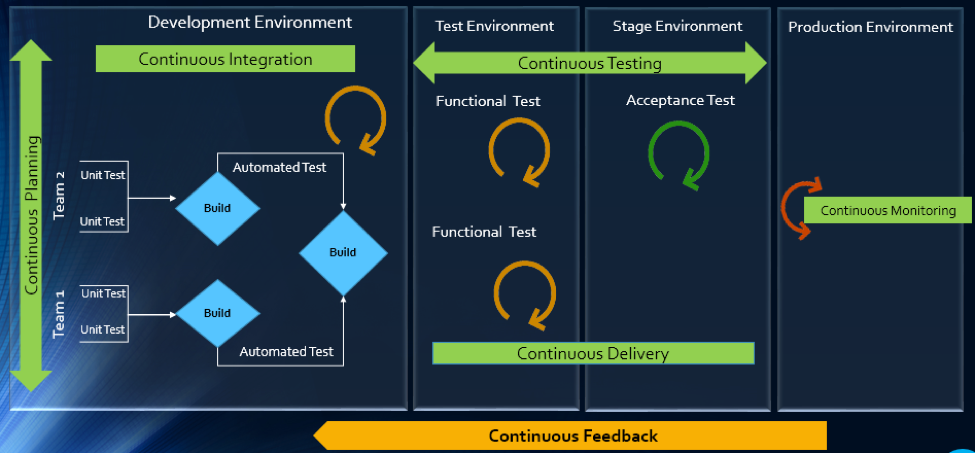
    The article will explain how multitool integration support can help organizations perform the DevOps life cycle, which includes continuous planning, continuous integration, continuous testing, continuous monitoring, continuous delivery and continuous feedback mechanism.

    The Drivers of DevOps

    Today, with the increasing competition and the need for an early market release, the software development industry is undergoing a paradigm shift. Agility has become an inevitable process across all organizations. In addition, shorter ROI cycle spans, frequent releases, increased CRs and different IT systems and tool technologies have made the situation critical.

    The industry demands higher transparency, maximum visibility, minimum turn-around time, lesser human intervention and efficient processes at every stage, from development to delivery.

    However, organizations that use specialized tools to manage builds, deployments and delivery processes continue to face difficulties when it comes to data orchestration and process automation across the tool chain.

    In an agile environment, developers and testers need to ensure not only that code changes work and integrate well, but also  that frequent iterations do not make the product unstable. Hence, seamless cross-tool collaboration is very important here.

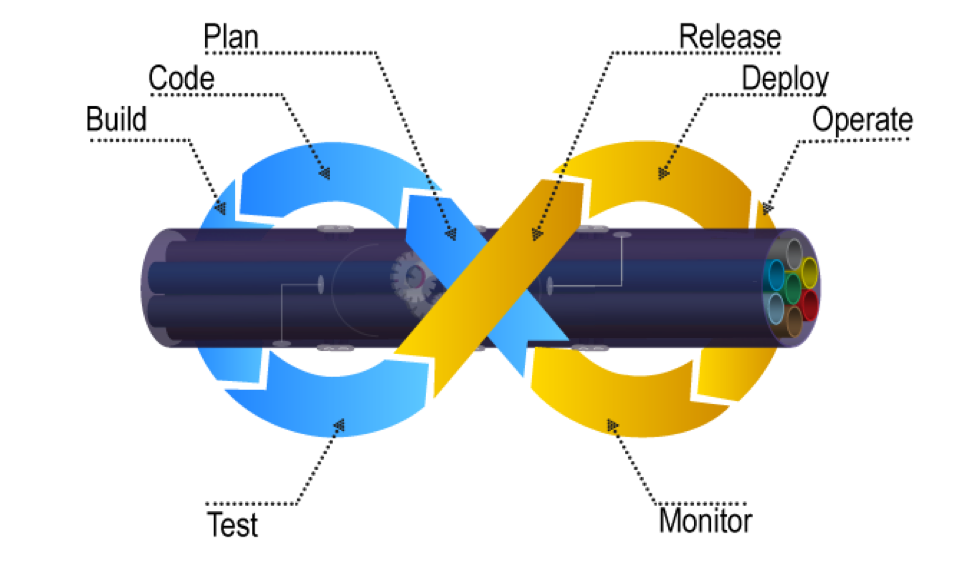
    The process chain consisting of Code –> Build –> Provision –> Test –> Defect Fix –> Deploy –> Release needs to run continuously and smoothly without compromising delivery deadlines or the product quality.

    Automation is the Catch Line

    With the rising demand for continuous delivery and sprint-based development, manually setting up a test, build and deployment environment is burdensome and time-consuming.

    Software teams need to automate the entire cycle of build, provisioning and deployment of test environments, including the tools, scripts and test data to ensure rapid delivery. They also need to collaborate around the application architecture and monitor event-action-based mechanism for seamless data flow across the tool chains.

    Reports show the most important DevOps components are IT automation, agile development and collaborative teaming of personnel. Therefore, without centralized orchestration of tools, achieving DevOps is not a realistic situation. Since organizations spend around 73 percent of their DevOps budget in tool acquisition, it is important they know how to get the tools working together to overcome DevOps obstacles.

    In the process of connecting their existing and new toolsets, most organizations search for an integration methodology that is scalable, reliable and easy to maintain. Point-to-point integration between tools help, but to a limited extent. Even a single change in integration rules involves complex coding and high maintenance across development, test and deployment cycles.

    How ESB-based Integration Can Help

    An enterprise service bus (ESB)-architected integration hub connects both the existing and the new tools to support a seamless data flow between them across the DevOps life cycle.

    Once integrated, the data from both the development and the operations tools become readily available for use to every stakeholder. The benefit of using ESB-based integration is that you can add or remove any tool based on your connectivity requirements.

    In a typical scenario, DevOps teams use a series of cross-functional tools starting from project planning to delivery and operations. Neither of these tools comes with built-in integration features, which results in inconsistent flow of information among tool users.

    Project managers use application lifecycle management (ALM) or Agile planning tools to detail the scope of work and tracking progress reports. Upon unit testing, developers use a different tool to check in a code from their integrated development environment (IDE) to the source code management (SCM) repository. They also perform a code quality analysis before committing to the SCM.

    In such a scenario, continuous integration (CI) can be achieved only when developers bring these planning, unit testing, code analysis and SCM tools under one roof. That is, connecting the tools through a common integration hub. It also helps developers to manage everything from within the IDE.

    After successful check-ins, build engineers trigger the SCM tools for automated build and testing. Upon a successful build, testers engage in continuous testing using manual and test automation tools, followed by provisioning for continuous deployment. They also perform load testing, API testing and security testing using separate tools. An integration support helps to keep the real-time data flowing between the build and the testing tools uninterrupted and seamless.

    A DevOps system also includes application performance monitoring (APM) tool for continuous monitoring of memory consumption, CPU usage, database health and release tracking. Operations team use help desk/ IT service management (ITSM) tools for continuous feedback generation and customer support. And delivery managers use continuous delivery tools for defining and tracking release pipeline through graphical interface.

    When all these tools are connected to a central integration hub, product release and help desk operations become faster and efficient. The integration between development and ITSM tools facilitates continuous feedback generation, which helps to improve the product quality.

    Through an integrated tool ecosystem, project managers can create a DevOps workflow based on business logic and automate the data movement across tool systems. Business analysts, developers, testers and delivery managers can also get real-time update on development progress and keep track of actionable items. Supervisors can route cross-tool data to a central repository and generate meaningful reports and analytics before taking business decisions.

    Fig: ESB Integration Bus Facilitating Adoption of DevOps
    An ESB-based integration tool helps organizations to implement and leverage the best DevOps practices by establishing connections across all participating tools. An integrated tool ecosystem helps achieve the following:

    • Real-time collaboration between development, delivery and operations tools
    • Continuous planning from requirements capturing and review to design and code analysis
    • Cross-tool traceability for defining relationships between various data objects
    • Test strategy implementation for continuous testing
    • Continuous integration through automatic triggering of build on successful completion of code check-in
    • Continuous testing through workflow based automatic triggering of both manual and automated test cases
    • Scheduled test automation script execution enabling continuous delivery
    • Continuous monitoring of release quality through reports and dashboards
    • Automated defect identification and resolution for faster help desk response
    • End-to-end traceability providing better release predictability and change impact analysis
    • Meaningful reports, metrics and KPIs for quick decision-making
    • Continuous delivery through tracking release pipeline

    How Inter-tool Connectivity Brings Continuity

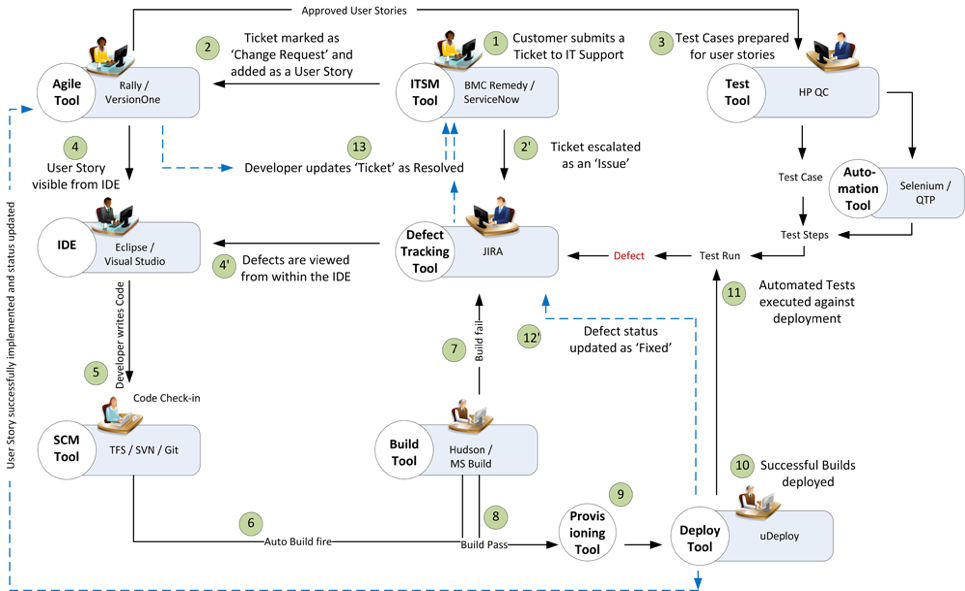
    To understand the stages of engineering practice, let us consider a sample DevOps scenario in an IT service organization.

    The organization uses an ITSM tool to manage support tickets submitted by customers. On submission of a ticket, it is automatically passed on to an ALM tool as user stories or defects for internal development.

    On allotting to a sprint, developers and testers view the user stories or defects from IDE, SCM and test tool. Once the coding is complete and codes get checked in at an SCM tool, an automatic build gets triggered using a build tool. Upon successful completion of the build, tool provisioning is done through a virtual machine.

    The successful build can be automatically deployed using a deployment tool and automated tests can be executed through a test automation tool. The test results are then captured and linked with test cases and the source requirements for traceability.

    The defects that are raised in the defect tracking tool for failed test cases can be automatically routed to developers for fixing.

    Fig: DevOps scenario achieved in a collaborative tool environment

    Once connected to an integrated tool system, users get a complete visibility of the tool records and their relationships from within their own tools. Developers, testers and help desk managers can get complete traceability view between development artifacts and change requests or defects.

    When all the tools participating in DevOps sync with each other, developers can easily view the support tickets reported by the operations team right from their own IDE.

    The help desk team also gets a real-time update whenever a change request gets implemented or a defect is resolved by the development team. It eliminates the latency in communication between the Dev and Ops teams to a great extent.

    In addition, customers get frequent updates from the help desk team, which makes them happy and confident about the product performance.

    Conclusion

    Implementation of DevOps is not a “Do once and forever” type of task. Just deploying the right set of tools to the right users will not serve the purpose. Proper connectivity between and across the DevOps tools chain is necessary if you want to create a collaborative work environment around the Dev and Ops teams.

    An integrated tool system saves considerable amount of time and effort, which would otherwise be wasted on manual execution, monitoring and reporting of data during DevOps implementation.

    About the Author / Sanat Singha

    Sanat Singha is a senior technical and web marketing writer. He takes special interest in ALM process, technologies and tools integration as an industry. Sanat does content marketing, professional blogging, social media promotion and website analytics.


  • Quest Software Extends DevOps Reach to MySQL Databases

    Quest Software Extends DevOps Reach to MySQL Databases

    Thanks mainly to the rise of DevOps, the number of open-source database deployments in the enterprise has risen sharply in the last two years. The driving force behind those deployments has been developers that have shown a marked preference for downloading an open-source database instead of requesting access to a commercial database from a database administrator (DBA) working in an IT department. As more of those applications get deployed, however, either the developer or a DBA still needs to find a way to manage those open-source databases.

    To address that issue, Quest Software is now making available its Toad Edge tools for managing databases available for IT organizations that have deployed MySQL databases. Greg Davoll, executive director of product management and marketing, says Quest Software already supports open-source Postgres databases and will be adding support for other open-source databases.

    In a lot of instances Davoll says the same DBA that is being tasked with managing IBM DB2 or Oracle databases is being tasked to manage MySQL databases. Most of them are already familiar with Toad database tools that are already widely used by internal IT organizations. Davoll says Quest Software is well aware there are a variety of open-source tools available for managing open-source databases. But Davoli says most of those offerings are not nearly as rich in terms of features as Toad database management tools that have been continually enhanced now for the better part of a decade.

    For example, Toad Edge can be used to identify and manage schema differences and initiate changes in real time. Toad Edge can also be used to explore and edit JSON data as well as keeping all the scripts being employed to manage databases up to date.

    Davoll notes that Toad Edge has also been integrated with Jenkins Continuous Integration server to allow databases to better facilitate continuous integration/continuous deployment (CI/CD) processes.

    Most DBAs have come to terms with the fact they are being required to support multiple databases. They don’t always appreciate the extra work that involves. But as the number of applications deployed across the enterprise dramatically increases, the cost of employing commercial databases to support them all would be prohibitively expensive. Developers often download an open-source database on their own because they don’t want to spend time participating in an extended procurement process involving salespeople and purchasing managers.

    Developers don’t always appreciate what’s required to keep the databases their applications up and running. Many of them initially believed they would be able to eliminate the need for a DBA altogether. But developers soon discover how much time is required to do routine database maintenance. DBAs may not always get the respect they deserve. But as most developers have come to appreciate, it’s difficult to have a truly integrated DevOps process that doesn’t include at the very least someone willing to manage those tasks.

    — Mike Vizard

  • Patrick McClory on Building Successful DevOps Organizations

    Patrick McClory on Building Successful DevOps Organizations

    Patrick McClory has been writing code, managing DevOps and designing scalable application infrastructures for more than 10 years. Most recently, as COO and CTO of DualSpark, he served as an expert Amazon Web Services consultant, helping clients capitalize on the benefits of cloud architecture and design with modern and innovative software, infrastructure and automation strategies leveraging AWS. After DualSpark’s recent acquisition by Datapipe, McClory assumed the role of SVP of Platform Engineering and Delivery Services, where his expertise is put to good use overseeing Datapipe’s global automation and DevOps, as well as its strategic consulting and platform teams. In this role, he manages several teams, including Datapipe’s client-focused service delivery team focused on enabling customers to transform their businesses by leveraging cloud-based patterns and practices.

    devopsy.kinsta.cloud: Tell us a little about your cloud experience, your consulting background and your role with Datapipe?

    McClory: I found myself in the Amazon partner channel probably a little over eight years ago. I worked for a couple of Amazon partners, and then I eventually went to work for Amazon. After having helped lead some of their consulting work in their professional services organization, which was fairly fledgling at the time, I left to form my own organization. It proved to be an interesting divergence for me. Where I previously spent a lot of time helping clients solve technical cloud problems—which is typically technical and very straightforward—I found myself transitioning to the greater software- and people-problem challenges around effectively taking advantage of cloud technologies.

    That’s really how DualSpark was born, both in terms of cloud data architecture, design and consulting. We helped customers understand how to take advantage of the cloud from a business perspective, as well as dive all the way down into the deep, nitty-gritty of exactly how they should technically do it. After eight years of consulting in that world and Datapipe acquiring DualSpark, I found myself in an interesting place where I now run the consultative, the engineering, the client-face role for Datapipe. I also run our platform-engineering team. The big story behind that is trying to take all the knowledge and all the patterns and all of the collective wisdom that we’ve gained over the years, between myself and the team, and building product to help our customers get there faster.

    devopsy.kinsta.cloud: We’re many years into the movement toward DevOps. What do you think we’ve learned the biggest challenges to be when it comes to getting DevOps right?

    McClory: What we’ve learned is that the technical side of the argument, when it comes to actually achieving a DevOps workflow, is probably the least complicated. The real challenge is getting people aligned and focusing the effort in the right direction. For me, that’s been the challenge. But people gravitate toward the tools because they’re easy. Realistically, you can’t take advantage of the tools if you don’t get yourself organized and going in the right direction.

    I’m going to tell a story. There was probably a span of six months where I had the, “What continuous integration tool should I use?” discussion. Invariably, every time, everyone ends up with the same sets of tools. Everybody ends up with Jenkins and, realistically, no one’s always terribly happy with it. Still, it was a six-week conversation, no matter what they eventually chose. Then, rather than starting from nothing, I decided to come to these meetings with a pre-configured system. I would load it into their AWS account, or wherever made sense. They’d see Jenkins hooked up, fully, to their source control toolset. It was highly available and had all of the plug-ins they sought. We took away everything to discuss. We’d then take the next two hours to configure it, play around with the bells and whistles and knobs. Fit it to their purpose. They could always shift to something else down the line.

    We couldn’t believe it, but that tactic worked. I no longer had six-week discussions about CI and what tool to use. I had a two-hour, fit-for-purpose discussion. At that point, bells going off in my head, going this is very interesting. What if we could do this more deeply? What if we did this all the way through the entire stack? What if I gave people multiple options and we just went through and picked it, like a menu? I’m not going to say that’s the overall product design. It’s a little bit more complicated and more intricate than that. The whole goal is to help customers get to the transformative place where they want to be, faster, by avoiding some of the common pitfalls of technologists who like to chase shiny things.

    devopsy.kinsta.cloud: With that in mind, what are some of the biggest challenges when it comes to getting the processes and people in place?

    McClory: IT as an organizational concept within companies that hasn’t done themselves any favors in the last 20 years. There are several different takes on this, but all basically converge on the idea that since the IT service management boom, IT as a discipline hasn’t really matured. Since then, there have been many, many inflection points and/or maturity moments when IT can provide services. But there’s this awesome gap that continues to grow between what the typical IT organization can deliver and what the business is demanding. That’s where shadow IT shows up. It’s like to divergent lines and that gap is shadow IT.

    What’s happened is that IT never, and I say this with the internal acknowledgment that I’m a part of this community as well, really done a great job of connecting our mission to the value of the business. The cost center, the revenue center, there’s all these ways to look at it but at the end of the day, IT is a burden, not an enabler. That’s why a lot of these technologies in DevOps are such a focus. The pain is so great that organizations don’t want to fix the systemic problem because they need to stop the bleeding. Often, what we’ve found is that there’s a combination approach that’s really necessary to build trust within that relationship.

    devopsy.kinsta.cloud: What do you think IT teams must do to flip IT from that unhelpful department to become more aligned with business objectives and profitability? Not that IT must be a profit center, but be more aligned with the business.

    McClory: Being more aligned with delivering value, right? I think it’s two vectors. There’s the one half that’s easy and stereotypical and that’s just because that discipline hasn’t really aligned that way for so long. As silly as it sounds, I find that there’s so much animosity between business and technology organizations on the stereotypical kind of day. There’s a little bit of corporate therapist that we play and we help build bridges, help to realign, help to translate. It’s a surprisingly entrenched issue of people at an interpersonal level.

    It’s not simply between the technologist and the company and the business. It’s also even within the technology organization, between your typical developers and operations organizations. Getting those three views aligned to serving the value of the business is, a lot of times, a matter of helping people to acknowledge that other people are a part of it and that they’re all there to serve the same mission.

    On the other side, there’s also this misnomer that there is a silver bullet, from a tooling capabilities perspective. There are some great tools out here and I’ve both built partnerships with them and used their tooling heavily. One that comes to mind, particularly, is Chef. I love their tools. They don’t solve every problem I have, though. There’s a landscape of tooling that I tend to end up back at that standard configuration management, continuous integration, testing and deployment management, monitoring and alerting. You end up finding good options in each one. Not that they’re perfect solutions, but a lot of organizations are looking for that DevOps in a box. They’re looking for that one capability and they forget that it’s not one thing. Even if people have tried to market it that way. It’s very much a technology plus an organizational culture issue. Not a single technology.

    devopsy.kinsta.cloud: Where do you see your clients now in the curve of DevOps adoption?

    McClory: If you’re looking at a bell curve and cut it into quarters, I think we’re probably in the early phase of the second quarter of adoption. There’s a ton of interest and I think that’s what I would look at, in terms of volume. I see lots of people who’re interested. I don’t remember who said it but to paraphrase, there’s a lot of people talking about it. There are very few people who actually achieve it.

    At the same time, I don’t believe that, to your point, DevOps isn’t a destination, it’s a way of doing things. It puts you on a vector, it pushes you in a direction. It’s never about the destination, it’s about the journey.

    In that respect, I think there are a lot of DevOps practices that start to seep in at the cultural level. As organizations try to be more efficient, we see them coming into some of the automation practices and the tooling side of things much more eagerly than they are the organizational collaboration side. Even that’s starting to break down and, oddly enough, I don’t know that I would blame it on the influx of newer developers or younger developers into the market. Certainly, it plays a role as the—not to wax poetic—the culture of sharing economy, the open visibility outcry from the hipsters perspective, or the millennial view. I think a lot of that I really positively impacted organizations behind the scenes, to open up a lot of that collaboration and visibility that’s necessary to get DevOps right.

    — George V. Hulme

  • The 3 Secrets to Overcoming the Agility-Stability Paradox

    The 3 Secrets to Overcoming the Agility-Stability Paradox

    Regardless of whether an organization subscribes to a bimodal IT approach, one thing is clear: It’s more important, and more difficult, than ever to fight the agility-stability paradox. Today’s businesses must build on a delicate balance of being compliant, plan-driven and keeping the lights on while also seeking ways to become more fluid and agile with high customer touch. The barriers standing between these two key initiatives are numerous and complex; whether it’s mismatched technology or a lack of mutual understanding, the agility-stability paradox remains.

    In a lot of ways, this paradox comes down to a difference between traditional and new forms of IT. Traditional IT can be described as predictable–it’s compliant and plan-driven, with conventional processes and long-term cycles. But as the next generation of IT starts to take hold, today’s businesses must find ways to also fold in a new IT that’s dynamic, fluid, agile and continuous, with short cycles and high customer touchpoints. In this way, traditional IT and new IT are polar opposites, and many companies struggle to find a balance between the two. Competing attitudes, too much change at once and tooling challenges all stand in the way of harmony between the reliability of the traditional approach and the need for agility in the new way of doing things.

    Balance is Possible

    While there is no magic tool or wand that can solve for the incongruities so many organizations face, balance is possible. Enterprises don’t have to choose reliability, customer experience, uptime and performance over agility, release velocity, new markets and competitive response. The real secret to overcoming the agility/stability paradox lies in establishing who, what and how. What this means is that with the right people, processes and tools in place, any company can achieve the balance between agility and stability needed for success.

    Who? People

    People serve as the “who” of finding balance between reliability and agility. This is the chance to integrate your culture into solving the agility/stability paradox. Start by identifying how each member of the team needs to adapt and shift to accommodate changes. The real trick to getting the people aspect of things right is communication. Define a communication path and be really clear about why your organization needs to transform, how it will be transformed and when everyone can start expecting to see some real adjustments take shape. Orchestrate a response mechanism across your teams and enable social operations collaboration to facilitate execution. Be sure to provide ongoing updates and encourage feedback.

    What? Process

    Now that you’ve established who needs to play a role in overcoming the agility/stability paradox, it’s time to talk about what exactly needs to change. Process is absolutely crucial here. There are a few keys to establishing the right process for balancing traditional and new IT models. The first is to identify, and not dictate. Dictating change from the top down is never going to be effective. Instead, work together to determine areas of weakness and highlight them. Use your observations as a guide, not a mandate.

    From a more tactical perspective, be sure to streamline workflows wherever you can. Define instead of inheriting urgencies and alerts. Don’t be afraid to rely on automation wherever possible, either. By automating processes that help out on the people side of things, you can free up your team to spend less time on tedious, manual tasks and focus more on innovation.

    How? Tools

    Tools are your best friend when it comes down to actually making all this change happen. Considering the vast number of tools in the market, choosing a toolset may appear daunting at first. But if you start with strong integration across the operational modes already in place, then you’re already in good shape. In particular, to bring new, agile IT into the fold, you’ll want to incorporate IT service management (ITSM) solutions and establish a DevOps tool chain.

    Don’t Boil the Ocean

    The most important thing to remember is to start small—you don’t have to boil the ocean. Build a culture where traditional and new IT environments are encouraged to work closely together, where you can build and run software that addresses both agility and reliability to respond to the pressures on the business. Start by defining what is is right for your team and organization and acknowledge the existing culture and people. Don’t be afraid to experiment and create isolated learning environments, either. Just make sure to maintain a clear connection to customer value and use this as your North Star. Finally, don’t forget to celebrate. Celebrate your failures and learn quickly from them.

    About the Author / Manish Kalra

    manishManish Kalra is director of Product Marketing at PagerDuty. He is responsible for driving product marketing strategy, product positioning, launches and collateral development for the PagerDuty incident management platform. Prior to PagerDuty, he served as Director of Product Marketing at companies like Sumo Logic and Splunk.