Tag: tools

  • DevOps & Continuous Change

    DevOps & Continuous Change

    A remark by a colleague while waiting for the coffee machine to complete its cycle started my train of thought. “Should we have multiple minor releases or just do a few major ones in a year?”

    In large organizations, due to many factors, the turnaround time for a single successful release is quite extensive; but if the conceptual change which we are talking about bringing whilst using the #DEVOPS methodology would not only reduce these long cycles but deliver quicker and quality software.

    I have already discussed in my earlier article “DEVOPS: Getting our organizations aligned” on the traditional approach and how the combination of this two (DEV & OPS) has been proven beneficial in various organizations and how many are still hesitant in embarking on that path.

    Continuous Change which encompasses both Continuous Integration and Delivery is paramount to achieving this objective. To attain the objective of delivering rapid and consistent value to the stakeholders regularly, we have to have Continuous Change happening.

    I am sure we have already moved out from the Mainframe era to a more Distributed systems state. But unfortunately we have yet to let go of that culture where we pile up components on a single quasi Distributed Application, instead of creating smaller independent, yet interdependent systems.

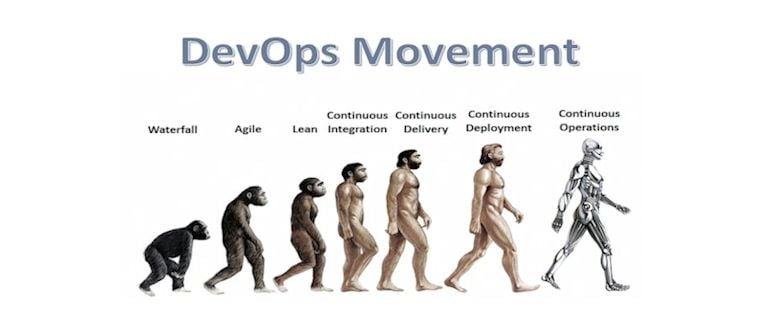
    So, back to the same question; shall we go with a few Dinosaur sized, labored releases or make multiple short and swifter runs? In my opinion, we should strive towards the leaner model. Easier said than done you say! Agree. If I have to, then I would go about it this way:

    In an environment having a suite of Distributed Applications, start with Analyzing the components which make up the Major release, List out the changes (fixes and new features) which are planned, asses functional and technological impact, Identify dependencies, upstream/downstream connectivity’s, architectural deficiencies, list out the identified subset of components or group of components by functionality, which can go as an independent release.

    I am resisting the urge to say ‘standalone’ as with the current set of complex intervened collection of applications, it would be an incorrect statement. It would rather be a subset of components which can be independently upgraded. Now the big task is to review and decide if this subset or group would add functional value to the overall suite of applications without the rest of components going in.

    Once identified, the success of this release working as expected would be in the extensive testing (Unit/ Regression/Performance) of these components, and as we gain confidence in this split and deploy procedure, we can start with, prioritizing and scheduling critical must have features or bug fixes which also should be backward compatible with other components lagging behind. We can even come up with scenarios where these components are not just getting updated frequently, but would also have multiple independent tracks. Of course it goes without saying the testing and signoff process is strictly followed albeit in a shorter window.

    Deployments to production have always been a source of heartburn to the OPS teams, we have often seen finger pointing and firefights to contain change fails. In order to maintain stability and maximize availability, stricter controls and reduced deployment windows are put in place. In promoting frequent and smaller component level changes, OPS will also be in control of what’s going in, and smaller component level releases can be rolled back quickly within the Green-Zone window if the change is not working as expected. Though I would categorize this rollback, as a process fail than a deployment fail, and should be reviewed very seriously with right mitigation plan and lessons learnt retrospection, Continuous learning after every successful or failed sprint ensures competent and confident releases.

    Another major factor impacting multiple runs of Production releases is the long Green-Zone windows, by moving to the quicker and leaner deployments cycles, these requests can be substantially reduced, and can eventually aim to reach a stage where changes are deployed online without extensive downtime.

    Similarly, frequent maintenance activities when there are no planned deployments, effectively has the same risk on environment unavailability. Analyzing and moving to a state where these activities are conducted online without a Green-Zone would alleviate the maintenance downtimes and ensure seamless availability, adding stakeholder value.

    I have not touched on the Continuous Integration or the Automation of the deployment process for obvious reasons, we can’t achieve the objective of Continuous Change without having the Integration process in place where incremental changes to code are build into a package swiftly and seamlessly, even a sanity or basic testing might be integrated to ensure the quality of the builds. Same goes for automating the deployments, develop & integrate tools required for rapid deployments. We have seen instances where automating a single activity or revisiting a process has created substantial time savings.

    While it’s easy to propose changes to the Release Process or advocate rapid deployment cycles, we have to ensure adequate checks and balances are in place, compliance adherence and audit trails are created.

    Now to the most important measure of this article, Cost Savings!

    Proponents of the Dinosaur Releases would argue that the common activities which entail a single release like the builds, Testing, Release Management, OPS availability or reduced GZ would cut costs and multiple runs to PROD would logically increase costs.

    But it’s definitely the other way around, we wouldn’t need to feed the Dino anymore, it will be a cost worthy rapid delivery with optimized resources, a leaner process where DEV and OPS are working together to ensure quality value added deliverables are made available to business faster.. This cultural change and collaborative effort also creates new vistas of growth and provides a perfect platform to excel. The cost benefit analysis would eventually be in favor of Continuous Delivery.

    Opportunity cost is another variable which has not been considered; an innovation or a new feature available to customers quickly with reduced time to market cycle will provide the much needed edge in these competitive times. I recall some conversations where a few must have’s were pushed out due to various reasons, frustrating the business.

    DEVOPS was never meant to replace the traditional approach to software development; rather it is an efficient use of the existing resources within a collaborative model to rapidly deliver quality software products. A major cultural shift in our approach is required and to reach that goal we need to embrace the shades of grays, many a times over 50 (sorry, couldn’t resist) when it’s not truly black or white.

    Thank you for the time.

    Visit my blog http://askhurram.com/

    Read On, Live On.


  • What are the most critical DevOps Tools?

    What are the most critical DevOps Tools?

    What are the most critical DevOps tools categories? According to the results of a new survey by CA Technologies the answers may be surprising. That is just one of the insights reported on. The survey results and report are chock full of other great insights about DevOps usage as well.

    The survey shows that a staggering 88% of respondents either are already utilizing or expect to be utilizing DevOps within the next 5 years.  The over 1400 respondents to the survey represented IT or line of business executives and is a significant increase over last years 66% response rate. This would certainly indicate that DevOps is crossing over in the mainstream and is no longer solely in the realm of early adopters and visionaries.

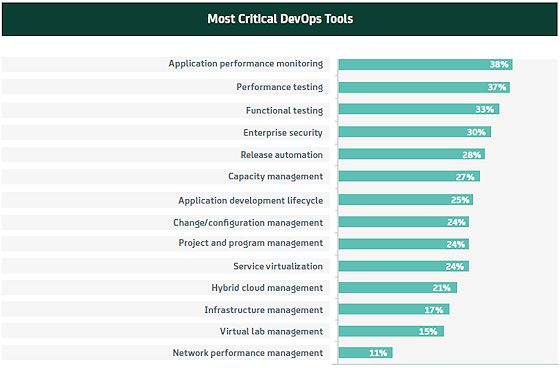
    So according to the study what are the most critical DevOps tools?

    tools

    APM as the most critical? It is a popular segment with players like New Relic, App Dynamics, Dynatrace (Compuware) and CA to name a few. But I thought that change/configuration management which would include Chef and Puppet would be number 1. Also performance testing and functional testing were 2nd and 3rd. Could this be a case of categories CA plays in being over emphasized, the “everything looks like a hammer to a nail syndrome”?  I don’t know, but the numbers speak for themselves. I was happy to see enterprise security coming in 4th on the list (another area CA plays in).  Bringing up the rear at only 11% was network performance management. I think that may have a lot to do with the fact that with the rise of the cloud, so many organizations are less invested about network as the cloud and Internet has replaced much of the internal LAN.

    I spoke to Andi Mann, VP in the CTO’s office at CA and a frequent contributor to devopsy.kinsta.cloud about the survey. Andi said that it is re-enforcement that despite all of the talk about DevOps being about culture, we should not forget that it is about tools as well.

    So what are the reasons given for this massive adoption statistic. What are the perceived benefits and reasons driving DevOps adoption?  According to the survey results:

    devops benefits

    As can be seen over 40% cited improved quality and performance of applications as the driver for DevOps.  For those who wonder about whether you can have increased speed only at the expense of quality, this would seem to show that you can have both with DevOps. Perhaps equally as rewarding was the 2nd most popular response, improving the end customer experience.

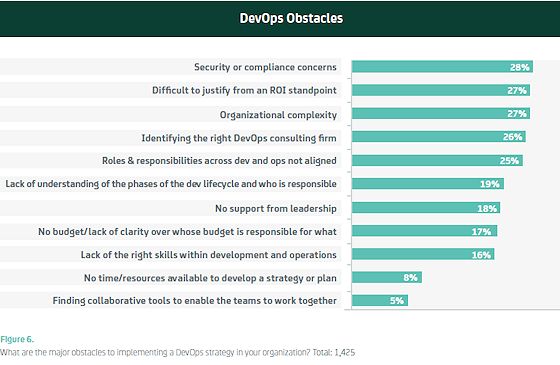
    In any case with 88% of respondents on board with DevOps, one thing is for sure, DevOps is the worst kept secret in IT. However, let’s not paint an overly rosy picture. Not every DevOps effort succeeds. What are the biggest obstacles to DevOps adoption? Again the survey says:

    devops obstacles

    So while enterprise security is a big benefit for adopting DevOps, security and compliance concerns are the biggest obstacles to DevOps adoption as well. I guess that is the Jekyll and Hyde nature of security? I don’t buy the ROI being difficult to justify. Most DevOps examples I have seen show a clear positive ROI.  Identifying the right DevOps consultant firm?  I don’t know about that one either. But then again I am bullish on DevOps, so I may be as guilty of the “hammer looks like a nail” as anyone.  I am surprised though that under obstacles we didn’t see that our culture is not trusting or some other culture related reason.

    You should go have a look at the survey yourself as there are other good insights there. In the meantime here is another indicator of just how deep DevOps is penetrating the IT market.


  • DevOps with purpose:  ACT-ing with greater agility

    DevOps with purpose: ACT-ing with greater agility

    This is Part Four in a four-part series. In Part One, I focused on the critical first step of defining DevOps with a purpose by thinking about DevOps in the context of your organization’s applications. In Part Two, I provided four tips to fostering a DevOps culture in your organization. In Part Three, I discussed the role of tools and how they can amplify (or constrain) individual and team abilities as well as work across teams.

    In this final fourth part of the series, I’m going to weave the three previous topics of (A)pplications, (C)ulture, and (T)ools together and will show how you can ACT with purpose to start your own DevOps transformation. Your DevOps strategy should incorporate all three aspects of applications, culture, and tools. Given the breadth of those three areas, it’s easy to feel overwhelmed from the start. Here’s a tip I learned from a mentor a few years ago. Whether you are a CEO, VP, or team leader, smart leaders set a vision (often at least two or three years out) and then they make small decisions every week with the goal of generally moving the organization or team in the direction of the vision over time.

    I recommend first that you set a vision for DevOps as it relates to your Applications, your Culture, and your Tools. Let’s begin with Applications. In the first article, I shared the concept of the pace-layering model developed by Gartner. To set a DevOps vision for your applications, place each of your current applications into one of the three layers – system of record, system of differentiation, or system of innovation. Then, do the same thing for any applications you are planning to add to your portfolio.

    With that context, specific to your organization, formulate a strategic vision for how DevOps will apply to your systems in each layer. Will you seek to have DevOps principles for continuous integration and continuous delivery in place for all of your systems of innovation, and if so, by when? How about for systems of differentiation? Will DevOps be the norm for each of those applications or just some, and by when? Then ask yourself the same questions about your systems of record.

    Next, turn to your culture. In Part two, I discussed the importance of baselining the degree of collaboration you have between the business, dev, and ops as well as how you view work (in workstations or in end-to-end flow terms). Then I challenged you to incentivize people to modify their behavior both with respect to their roles and as individuals. With this as context, define your DevOps cultural vision. What does collaboration between the business and development look like in the future? What does collaboration look like between development and operations? How about between dev, QA, and ops? And let’s not forget security.

    How will you recognize when your culture is optimized for flow? For example, I recommend documenting a set of indicators that you can measure at regular intervals (e.g. quarterly). Here are three good ones. How much work-in-process (WIP) do we have for Application X today vs. how much was there a quarter ago? What is the average time it takes from the definition of a requirement to its deployment in production today vs. a quarter ago? How often did we make updates to Application X in production this quarter vs. last quarter?

    Now, let’s consider tools. Take a baseline of the tools you are using today for each step of the typical DevOps tool chain from requirements management to source code control and bug tracking through to build management, automated testing, configuration management and deployment. And don’t forget project management tools too. What is the state of your tool investment in each of these areas? Do you have gaps? Do you have multiple tools in the same area, and, if so, is that okay or do you want to standardize on one? Do your tools vary based on the applications they are used with (see pace-layering discussion above)?

    Then take an inventory of your collaboration tools across dev and ops. Are you still mostly using email and sharepoint sites? What role does instant messaging play in your dev and ops teams today? What about conference calls and meetings? Once you’ve baselined where you are today, set a vision for where you want to be in the future. Are you looking to reduce the need for conference calls and meetings, and if so by how much (time or average number of participants)? What issues are you running into around email and IM communications that need to be addressed and also for SharePoint? Have you looked at the emerging class of DevOps collaboration tools and concepts such as ITinvolve and ChatOps? What role can they play in streamlining communications, keeping people informed, and presenting information to staff so they don’t have to go hunting around for it in dozens of systems or call more meetings?

    With this as background, define your DevOps tools vision by setting priorities for filling identified gaps and rationalizing existing investments, then set a general target time frame for each area.

    Now that you’ve set a vision in each area – (A)pplications, (C)ulture, and (T)ools, it’s time to ACT. I recommend you first pick one or two applications to begin your DevOps journey. Ideally, they should be applications that are visible to the business and where you can lay claim to the impact DevOps can have on business goals like time-to-market and responsiveness to customer needs.

    Once those applications are identified, take an inventory of all the people across your organization (including the business), those responsible for the development and delivery of the applications. Develop a specific plan for how you will educate those individuals on DevOps principles (e.g. attend DevOpsDays, read The Phoenix Project, read a sets of articles and watch a set of seminar or demo recordings), and also develop a specific plan for how you will incentivize behavior changes for their roles as well as what is expected of first line managers to take individual personalities, skills, and experiences into account.

    Let me also stress that you shouldn’t ignore the people who aren’t participating in this first DevOps effort as part of your Man Standing At Beginning Of Winding Roadcommunications. Educate them as well, for example through an all-hands meeting and an email from leadership. Explain why the company is investing in DevOps transformation, why these applications have been chosen, and your long-term vision across Applications, Culture, and Tools to realize the transformation. Help them understand where the organization is going and why, and how it may impact them in the future. Avoid the perception that “the best people were picked for this and you are not among them” or that this group of people is being given license to do things that others can’t (e.g. make changes outside of the standard change management process) – otherwise, you risk reducing morale, good people leaving, and even sabotage of your DevOps efforts.

    Once you’ve completed the above, map the relevant tools you have in place today for managing the development and delivery of these applications as well as the tools on your vision roadmap defined above that will be added or rationalized in the next six months.

    By following the above recommendations, you will now have an action plan for the near term and a long-term vision you can use to guide daily decisions to move you closer to that vision. Lastly, don’t be rigid about your short-term plan or long-term vision, recognize that everyone is learning, including you, and that one of the key principles behind DevOps is the feedback loop!

    Thank you for reading this series. I hope it’s been useful to you on your DevOps journey. If you have a question or just want to share a comment, you can do so here on devopsy.kinsta.cloud or send me an email at matthew@itinvolve.com.

    Best wishes on your DevOps journey!

  • ChatOps: Communicating at the speed of DevOps

    ChatOps: Communicating at the speed of DevOps

    DevOps is about knocking down barriers between developers and operations teams, and in doing so reducing organizational frictions wherever possible. And that’s certainly the spirit behind ChatOps – the term for the hyper-collaborative way of running DevOps, including operating aspects of systems and infrastructure, through online chat.

    Proponents of ChatOps say it streamlines communication in a centralized and powerful way. Born within Github, ChatOps evolved from its open source chat bot, Hubot, which has changed the way the web-based Git repository runs operations through the automation of deployment, graphing, monitoring, provisioning, and even mitigating security events.

    Think of Hubot, a Node.js app that is commonly run on Heroku, as a robot that helps keep everyone informed in a centralized place and in real-time, or in a near real-time, way. There are many benefits to ChatOps, says David Mortman, David Mortman, contributing analyst at Securosis, including the integration of ops activities with notifications into one place, making it easier for everyone to know what’s going on across the enterprise, as well as everyone throughout the organization having the ability to see error messages on events as they occur, he says.

    Github, as a highly distributed organization, with its several hundred employees spread across 103 cities, can use all of the communication efficiencies it can muster. As Mark Imbriaco, Ops engineer at Github, in his presentation ChatOps, Augmented Reality for Ops, uses Github, email, internal apps, other web systems that they’ve built to help teams communicate asynchronously – and yet they needed an option for the real-time or “semi”-real time communication. “I say semi-real time because, when we talk about chat, the social contract at GitHub around chat doesn’t require you to be immediately responsive to everything you see. Chat is still asynchronous, but it’s more synchronous than GitHub or email or other sorts of notification mechanisms,” said Imbriaco.

    Without enhancement, Hubot doesn’t do a whole lot right away. But when added to chat with one of the dozen or so connectors that include access to Google Talk, IRC, Skype, and Hubot monitors for events that come from within chat or from one’s systems and applications. “The magic happens when you build additional functionality into him to automate, well, everything,” Imbriaco said.

    Hubot will do certain things, such as notify people not present in a chatroom that they were mentioned, phrases can be registered so that notifications to those interested in certain events will be notified. Github has also plugged Hubot into the GitHub service itself. Today, when anyone creates an issue or pull request in GitHub, according to Imbriaco, a link and definition of the event is sent to chat. While Github already has ways to send notifications, by entering events real-time into the chat stream, others can jump in and comment, help, or otherwise advise on events and interact as they’re occurring.

    As for the adoption of ChatOps, Github isn’t the only one: but it’s not yet widespread among DevOps practicing organizations, either, based on our reaching out to numerous organizations. Nor, is the concept especially well known.

    That’s not slowing Owen Zanzal a developer at systems management provider VividCortex down from adopting ChatOps. Zanzal says in his blog post, ChatOps at VividCortex, that, despite ChatOps being off to a slow rise, “ChatOps has really revolutionized how we operate,” he wrote.

    The first Hubot mission at VividCortex was to help improve how code is deployed. The problem Zanzal highlights is that encryption keys and new developers apprehension around code deployment, was slowing down production.

    To streamline deployment, Zanzal moved the execution of Capistrano commands to a Jenkins (a continuous integration server), and created Hubot commands so that jobs could be created using a Jenkins exposed REST API. When done, developers needed only run a chatroom command, such as “hubot stage webapp” or to deploy “hubot release webapp,” Zanzal explained. “Now, no one is blocked by the gatekeeper from pushing code into staging or production, and every developer can push code when they are ready. The unfamiliar Capistrano commands were simplified into much easier to understand Hubot commands,” he wrote.

    VividCortex is also using ChatOps to fetch logs and more quickly remediate issues as they arise, Zanal wrote.

    Chat-as-Ops
    GitHub has also pushed ChatOps much further than simply as a place to stage and deploy code. It’s using ChatOps as a way to help actually run ops. For instance, Imbriaco spoke to how Hubot and ChatOps is used for efforts such as rebalancing shards across its file servers. “Honestly, it took me a little while to get used to some of these. We have some [Hubot actions] that do things like rebalance shards across our file server. And that’s horrifying to me, because the consequences of failure are so bad. But the reality is, I’m either going to run it from a chat room, or I’m going to run a shell script from a terminal. If I ran it here, at least everyone saw it. So at the end of the day, this is repeatable, it’s tested, it’s commonly used,” Imbriaco said. “And if it stopped working we would notice,” he said.

    And one time when Github was fending off a distributed denial of service attack, Imbriaco needed only enter the name of their service provider to direct traffic and the attack was successfully mitigated.

    Moving to ChatOps isn’t without risk, however, Imbriaco explained. A lessoned learned when it became a little too easy to deploy to Amazon Web Services. “We went from zero to way too much spend on Amazon in about two weeks, when I turned up the ability for us to provision EC2 hosts from Chat,” he said. But that issue was resolved by giving users information at the time of provisioning, such as including metadata into the instance that details who created it, as well as informing users how much it’s likely to cost,” Imbriaco said.

    Despite the efficiencies of ChatOps, don’t expect a widespread embracing of ChatOps, but more likely a slow adoption. “GitHub is a flying unicorn. They’re like Netflix,” says Mortman. “People will pick up some of what they are doing but it’s too advanced for most,” he says.

  • Q&A with Gene Kim: Bringing the auditors to DevOps

    Q&A with Gene Kim: Bringing the auditors to DevOps

    As more enterprises embrace DevOps, organizational disconnects often are created between what controls DevOps teams have in place and what IT controls auditors believe need to be in place. And if the right controls are, in fact, in place they absolutely need to be communicated to the auditing teams. Bridging these gaps is often painful for both IT teams and the auditors.

    Helping enterprises to better understand what auditors need from them to do their work is the top-line goal of the DevOps Audit Defense Toolkit, the aim of which is to “define the authoritative guidance of how management and auditors should conduct audits where DevOps practices are in place,” according to the homepage for the effort. “By doing this, the DevOps Audit Defense Toolkit will elevate the state of the management practice, defining how to understand risks to business objectives, correctly scope and substantiate the of effectiveness of controls, which reduces the costs of audits and increases effectiveness of audits.”

    The review draft of the DevOps Audit Defense Toolkit was release earlier this month for review and comment. The authors, James DeLuccia, Jeff Gallimore, Gene Kim, and Byron Miller, expect the final version to be available in coming months.

    To get a deeper understanding of the Toolkit, we grabbed a few minutes of time with Gene Kim, author of The Phoenix Project.

    Why do you think something like the DevOps Audit Defense Toolkit is necessary?
    I think at its heart DevOps is transformative. It’s the way to increase the flow of work through the DevOps value stream. DevOps increases reliability, stability, and security. And it also helps the organization win in the marketplace.

    Yet, when organizations actually embark upon this journey, probably the number one obstacle they encounter is that their “compliance guys will never let us do this.”

    I think there’s some truth to this. Because of so much that’s being proposed when you embark upon the DevOps journey, you actually take away some of the key controls that traditional IT organizations have used – like separation of duty, like change approval processes.

    So when they hear, “Hey, I’m going to be letting our developers deploys whenever they want, without necessarily getting a change approval order from the change advisory board,” auditors, compliance managers, and security people often freak out.

    And you have first-hand experience of seeing this in action, right?
    It’s why I think it’s a very important effort. The more I talk to people, the more I hear about the friction between the audit teams and audit groups in organizations trying to move this way.

    How do you see the DevOps Audit Defense Toolkit achieving this?

    The DevOps Audit Defense Toolkit was designed to train. Since we can’t bring DevOps to the auditors, we must bring auditors to DevOps. What I mean is the goal is to train practitioners in DevOps how to think like an auditor and actually walk through what an auditor will do when examining a process and systems. That’s starting from the very highest level of the top-down risk assessment into the details, just as an auditor would go through the list asking what can go wrong.

    The DevOps Audit Defense Toolkit shows how an enterprise has the environment that can prevent bad things from happening, and if we can’t prevent it, we can detect and correct for it. Then, it shows how we evidenced it. I think by doing all of that, one is doing exactly what the best auditors who examine DevOps organizations do themselves.

    By training people in in the DevOps organization to think like auditors, we can actually bring the auditors along, show our work, connect the dots, and hopefully have the auditor become DevOps’ best friend along the way.

    So, this is training IT how to think like an auditor and view the systems and processes the way that auditor would?

    In many ways, yes. This is kind of a structured thinking process that any world-class auditor would do to actually create an audit plan and then audit fieldwork.

    The toolkit asks questions like: Why is this being audited? Describe the environment Walk through the process of how code moves to production, and where the development environment comes from. It also asks: How do you prevent developers from introducing backdoor code into production; how do we ensure that untended code doesn’t make it into production?

    I’ve learned a lot just working with the other team members, in terms of showing how we have a basis to say that we know what we’re doing, and that we’re really thinking through how to have an effective control environment.

    That takes it from sort of the high-level platitudes and claims down to well, no, really, this is how we enforce peer reviews of code. We ensure that all deploys are put into the build systems. We run all the automated tests. Every time someone commits code, we run all the security tests before it can ever get into the staging environment. We can confirm that what’s deployed actually passed all the tests.

    We communicate most effectively when we write down and show our work. And we’re exposing all that is required for an auditor to be able to look at it and say, “You know what? This is actually better than my best auditors would’ve done in the field, and you know what you’re doing.”

    I would imagine that simply learning the language of auditors and how they speak is very valuable itself.

    Yes, we’re now using a language that auditors use among themselves. Even just exposing what that language looks like, I think, is helpful to connect our own dots to be able to say, “Oh, I know why it’s being phrased this way. Tons of value, just by providing that.

    Did you learn anything along the way as you created the DevOps Audit Defense Toolkit that surprised you?
    It’s funny how much I learned by working on this. You would think the person who co-wrote the Phoenix Project would know what this would look like? But I learned quite a bit when I was looking at what were the actual business flows, and where that regulated data could reside, and what specifically are the applications in-scope for the compliance domains.

    The second thing was going through the management risk analysis – to walk through the structured thinking process and look at how a company is really doing the diligence that is required, deciding what are its top business risks and if it really has a control environment that can prevent, detect, and correct.

    Of course, we all know that DevOps makes everything better, but we need to know why and how to prove it, By what standards are you holding developers accountable? You talk about peer reviewing, but where is that documented? What is the standard? How is it enforced?

    You want to be in compliance, and that’s important. But you also don’t want people to insert backdoors. You don’t want systems to crash when changes are deployed. So you really need to name all the dots, connect them, and then have that processed challenged. I have learned so much in this project.

  • Security automation with DevOps: show me the code!

    Security automation with DevOps: show me the code!

    Last week Andrew Storms put up a good post hinting at the promise of security automation in [SecDevOps: Security Automation By Example – The Firewall Change]. He included an example of automating a series of actions when a firewall rule is changed. It’s a good article, although I’m increasingly convinced there’s no such thing as SecDevOps. In my book, it’s all DevOps, but that’s fodder for another post (when I’m not battling a stomach bug). However, what Andrew describes is more of what I consider an automated assist. It isn’t necessarily full automation, since it triggers on a manual firewall rule change. Ideally we rarely manually change a firewall (or Security Group) rule, and rely more on self-configuring based on policies. Yeah, I know, the usual analyst BS, so here’s a bit of process, and a bit of code. Let’s approach this differently. Take Andrew’s process, but let’s have the security group or host firewall self configure based on the asset. My example is going to be Amazon Web Services specific, since I have some code snippets to show off how it works. (Sorry, I don’t have the time or intestinal fortitude to write out all the code today; seriously, where did this bug come from?!?) There are two techniques I generally see forming the core of dynamic Security Group policy enforcement:

    1. Tags
    2. Configuration Management integration

    Some cloud services, like AWS, support tags at the object (in this case, instance) level. These tags can tie internally to policies while also being consumable for external tools. Here is a policy I use that restricts access to an object if the “SecurityStatus” tag is “IR” (for “Incident Response”):

    {  
      "Version": "2012-10-17",  
      "Statement": [  
        {
          "Action": "*",
          "Condition": {  
            "StringEquals": {
              "ec2:ResourceTag/SecurityStatus": "IR"
              }
              },
              "Resource": [
              "*"
                          ],
              "Effect": "Deny"
          }
          ]  
        }         
    

    I could apply that tag manually or automatically, and in either case the instance can no longer be managed by any account this policy is applied to. Now this doesn’t help us change firewall/Security Group rules, since you can’t manage those directly in EC2 based on tags (but I had the policy handy to demo, so there you go). For that to work, you need to write your own code to scan for tags and then take actions. I don’t have exactly the right code examples on hand. but here are some snippets to get you close. Most of these are cribbed from my SecuritySquirrel proof of concept on GitHub. They are all in Ruby, using the AWS 2.0 developer preview SDK. First, to pull a list of all instances with a certain tag, you can use the following:

    def testing
     # testing some tag code
     instancelist = @@ec22.describe_tags(
     filters: [
     {
       name: "key",
       values: ["SecurityStatus"]
     }
     ]
     )
     puts instancelist.to_h
    end  
    

    That shows everything with the SecurityStatus tag (instances and values, shown as a hash), but you could also filter on value. From there, you could pull the instance IDs with a map (you might want to further filter only on instances, but if you made it this far you can figure that out):

     instances = instancelist.map(&:resource_id)  
    

    Then you can pump those into a method to change the Security Group. Here’s the one from SecuritySquirrel that places an instance into a “Quarantine” group:

    def quarantine
      #this method moves the provided instance into the Quarantine security group defined in the config file.
      puts ""
      puts "Quarantining #{@instance_id}..."
      quarantine = @@ec22.modify_instance_attribute(instance_id: "#{@instance_id}", groups: ["#{@QuarantineGroup}"])
      puts "#{@instance_id} moved to the Quarantine security group from your configuration settings."
    end  
    

    Want to trigger some scanning? Here’s a code snippet to trigger a Qualys scan on an instance from a virtual appliance in your AWS account (keep in mind, I’m skipping a bunch of important pieces, like configuring the service and authenticating):

      instance_IP = instance_details.reservations.first.instances.first.private_ip_address
     timestamp = Time.new
     scan =(HTTParty.post("https://qualysapi.qg2.apps.qualys.com/api/2.0/fo/scan/",
          :basic_auth => @qualysauth,
          :query => { 
            :action => "launch",
            :scan_title => "SecuritySquirrel Scan at #{timestamp}", 
            :ip => "#{instance_IP}",
            :option_title => "Initial Options",
            :iscanner_name =>  "us-west-2" 
          },
          :headers => { "X-Requested-With" => "ruby httparty"}))
          puts "Launching Qualys scan named: SecuritySquirrel Scan at #{timestamp}"  
    

    Or want to change the CloudPassage Halo host firewall rules? Well, that code uses a pre-release of their Ruby SDK, so I’ll save it for another day (I’m not employed by them, but they let me play with the pre-release gem). These examples are all based on tags, but remember that if you use a tool like Chef or Puppet you can do the exact same thing based on what software is configured and running within the instance. For example, you could create a policy to quarantine all SSL when the Heartbleed vulnerability hit by closing off port 443 on any server running the vulnerable OpenSSL package, then remove the rule when it is updated to the patched version. I’m a bit rusty since I don’t code every day, but I could probably pop that code off in an hour or two, it isn’t that hard. Also my tool is designed for demos, and doesn’t run in the background, but clearly you could have it running all the time, adjusting things based on tags or even attributes of software deployed in the instance. Security automation is insanely powerful. It can completely automate complex security tasks, or, as in Andrew’s example, supplement manual activities and policy changes. Hopefully my snippets give you some ideas, and pop me over any good examples if you are willing to share.

  • Why Vertical Collaboration Matters for DevOps

    Why Vertical Collaboration Matters for DevOps

    Vertical collaboration is defined by Rick Defour as a team of people working interdependently toward a common goal for which they are all mutually accountable.

    5699770361_566444924c_z

    Now that everyone is clear on the importance of collaboration and the different types, it’s time to delve into the importance of one type of collaboration in particular: vertical. Vertical collaboration is defined by Rick Defour as a team of people working interdependently toward a common goal for which they are all mutually accountable. You can find examples of vertical collaboration in educational settings where teachers of different levels work together to insure student success and in manufacturing settings where the supplier & retailer can better leverage themselves to enhance the bottom line for both.

    When you think of vertical collaboration in the tech space, the example of a dev team pushing out code is a good one. Each dev has a different area of specialty but they must work together in order to implement the new feature. Taking this into consideration then, it’s easy to see why a vertical collaboration tool has to be easy to use and not create any new boundaries. The more vertical a collaborative tool is built, the more useful it is to real people.

    The problem, of course, is that many companies view all collaboration tools as vertical. They only want to spend money on one tool so they pick the horizontal one (thinking that it’s the one more people will use) and it turns out to not actually be helpful to anyone. So that’s when companies start adding to their toolbox and then end up with a hodgepodge of tools. Instead of making their collaboration process more effective, they have made it more convoluted.

    I created VictorOps because there was no existing vertical collaboration platform for DevOps. Going into it, I knew I was solving a problem I’d had at a number of previous companies and therefore already knew the exact requirements needed. The collaborative platform would have to be mobile first, would have to allow for synchronous engagement while enabling asynchronous problem solving and would have to give all participants symmetric access to information from their enterprise monitoring platform.

    What I realized after creating VictorOps and using it to solve our own internal issues is that vertical collaboration gives team members the opportunity for scalable “leaning in” while also providing the freedom to lean out to reflect. What’s not to love about that?

  • Not all collaboration types are equal

    Not all collaboration types are equal

    Talking about collaboration in general terms is easy. I’ve done it and so has everyone else. It’s time now to dig deeper into the specifics of collaboration, meaning the different types – asynchronous vs. synchronous, vertical vs. horizontal – and how different companies fit into the magic collaboration quadrant. And yes, the quadrant is indeed magical.

    Let’s start with the two types of collaboration that are time-relevant, asynchronous and synchronous. Asynchronous collaboration takes place outside of real-time. The best example of a ubiquitous asynchronous collaboration tool is email. You send an email and the receiver has time to digest the information. The drawback to asynchronous communication is that it’s inadequate as a means of communicating a sense of urgency. You have to wait for someone to respond to an email and that lack of immediacy can cause damage in troubleshooting or problem solving situations. Email replies tend to include the original message for context because you can’t rely on the timing of the message to keep the context.

    On the other side of that collaboration coin, you have synchronous collaboration. Synchronous communication takes place like a conversation and more closely resembles a face-to-face interaction. A chat session is the ideal illustration of this concept. The obvious benefit to synchronous collaboration is the ability to send and receive information right away. This adds to the feeling of immediacy and tends to provide a more effective means of working together to solve issues in real-time.

    Now that we have that covered, it’s time to move to the other defining aspect of collaboration: whether it’s vertical or horizontal. Vertical collaboration consists of problem solving tools that are domain-specific. An example of a vertical collaboration tool is one built for certain parts of the business like Salesforce for the Sales & Marketing teams or Rally for the development team. Horizontal collaboration consists of non-domain specific tools, meaning that they have potential use across all teams of an organization. Project management tools like Campfire or remote meeting solutions like Join.me or WebEx are examples of horizontal collaboration tools which tend to be widely adopted but lack the ability to really go very deep in helping in a domain-specific way.

    Check out the quadrant I created to better show where different companies currently fit into the ever-growing collaboration landscape, based on the definitions provided above.

    collaboration_quadrant2

    When looking at the state of collaboration tools, it’s interesting to note where most companies land within the quadrant. Why so few vertical synchronous ones? I’ll answer that next time.

  • How to Evolve to DevOps

    How to Evolve to DevOps

    What is DevOps, and how do we do it?

    It’s a question I’m often asked, with confusion around job titles, team structures, tooling, personnel responsibilities, office layout and more as potential ingredients for a successful devops recipe. The first step in evolving an existing organization to a devops mentality is to take a step back, and level up your thinking, far from the tactics mentioned above.

    The first thing to recognize is that this is a cultural and professional movement of technology workers wanting to be more impactful for their businesses and be personally happier themselves, and this movement has three key strategic pillars of success: cultural, structural, and tooling. When we get all three right, we enable a devops mentality, the benefit of which is a business that can respond quickly to customer or market feedback (i.e., agility).

    devops-pillars

    The three pillars are foundational to the collaboration among technologists to enable this business agility.

    Evolving to DevOps

    You have a status quo of culture, structure and tools. Regardless of whether you explicitly defined each, or allowed some to more implicitly evolve than others, the fact remains that you have a status quo. How do you evolve? You need to tackle each pillar in turn, understanding your status quo, and what helps or hinders a devops mentality for your organization. The first pillar is the most critical: culture. Let’s speak to that first.

    A Culture to Enable DevOps

    What happens at your company when things go wrong? Be really honest. Do folks become defensive about their role in contributing to a problem? Do they blame others for problems? Do fingers point outward before they point inward? Do you ever hear, “It’s not my servers, it’s the change you made to the code!”, or the converse, “It’s not the code, something’s wrong with the servers!”.

    If any of the above holds true, stop everything right now, get everyone together, and talk about what you see in how you interact with each other. Your goal is to enable a shared outcome mentality across functions and jobs and roles (i.e., we all succeed or fail together), and a culture of self-improvement and introspection where the first thought when things go wrong is “what could I have done to prevent this from happening, and how do I want to change what I do in the future to make it better?”. When you get it right, people will gravitate TO problems and collaborate on solutions, not distance themselves AWAY from them to avoid blame.

    So what do you say? How do you say it? What’s necessary to evolve the culture? Every situation is unique, and you’re going to need to chart your own personal and organizational evolution to foster a culture that can enable devops. If you’re the leader of the team or business, start surrounding yourself with mentors and peers in other companies that have achieved this, and ask to learn from them.

    If you’re not the leader, again, surround yourself with mentors and peers that have built this culture, and ask to learn from them. Then be the change you seek in your organization, and lead a cultural shift from within. Either way, you’ll begin to discover your own unique path of learning, supported by many readings and mentoring conversations, that will empower you with the skills and conviction to bring about cultural change.

    If you’re the current leader of the team or business, and you’re not willing to undergo this difficult process of personal and organizational evolution of your culture, I have a rude awakening for you: you won’t be the leader for the long term. Over a period of years, either your business will succumb to competitors who are able to get this right, or a member of your team will take over for you as the rightful cultural steward. Choose wisely.

    A Structure to Enable DevOps

    Within your company, look at your organization chart, and look at the people that you are physically near or collaborate with the most, and answer the question: what are we responsible for? Now look at other parts of the organizational chart or office layout for departments or functions of the organization that you are dependent on for collective success. What you’re looking for is a physical or proverbial wall in the organization that draws boundaries on what one group of people are responsible for, and what the next group of people are responsible for; these walls create a “that’s someone else’s problem” mentality. In the most classic devops sense, we’re talking organizational (i.e., you report in to different parts of the organization from a managerial perspective, or you are accountable to metrics that put you at odds with another part of the company) and physical (i.e., you sit in different areas of the office) silos separating developers from operators. If you’ve ever heard the phrase “developers toss the code over the wall for operators to run,” you know what I’m talking about.

    Some of these physical and proverbial walls will make sense in the organization, while others you’re going to need to question why they are there. You may even find some walls that don’t make sense with other parts of your organization (say product management, or security, but we’re going to stick to the classic developers and operators example for brevity). Physical and proverbial walls that hinder collaboration toward shared outcomes must be evaluated for removal.

    The classic example from a proverbial perspective is a development function of an organization being held accountable for performance metrics such as number of features released, while an operational function of an organization being held accountable for reliability metrics. Clearly, there will be tension and angst as these metrics can easily pit two groups of people against one another. In this example, a common solution is to focus on shared outcomes, and hold everyone accountable for both feature velocity and reliability. Another common solution is to have both developers and operators report in to the same person. Another common solution is to put developers “on call”. The tactics will vary on the situation, the strategy remains the same: break down the physical and proverbial barriers to collaboration and embracing shared outcomes. If there is a wall that prevents people from working together to improve the business, tear it down.

    Tooling to Enable DevOps

    How effective are you on 3 hours sleep after being paged all night? How strategic is your thinking while typing in a command for the Nth repetitive time? How demotivating is it to put all of your energy into treading water without signs of visible forward progress? Even the greatest collaborative culture with a structure reinforcing shared outcomes will fail if everyone is burning out debugging problems and performing the same mundane tasks over and over. This is where you need to evaluate your tooling.

    Start with the repetition. Every time some task comes up a second time, make a commitment organization wide to automate it and track changes in revision control. Use this as a foundation to eventually drive to fully automated configuration management from revision control, but you have to start somewhere, and you will free up significant time and frustration over the long haul with this simple mentality shift. We’re going to invest this newly found time into the followup tooling activities.

    With that executing over time, turn your attention to telemetry. Are you collecting the right data from the right places to let you understand where problems are? Data debunks all blame, and properly aligns people toward investigating problems in a collaborative manner. Consider “monitoring” as the definition of thresholds on the right telemetry data, and “notifications” as the definition of who needs to know and when. Be diligent on getting the right threshold and right notifications; set thresholds too aggressive or notifications too broad, and folks will become numb to the system and lose trust, while setting thresholds too passive or notifications too narrow, and important issues affecting customers could get missed. Over time, improved telemetry will enable you to predict problems before they happen, and the right thresholds and notifications will ensure the right people know what to do to fix what problems right away, freeing up more time to go into the final phase of tooling.

    With common tasks automated, and a good, clear understanding of how well your systems are performing and where problems lie, you can focus your energy on improvements that will enable resilience for the future, both in your technical systems and in your teams. On technical systems, you’ll investigate refactored architectures that are more scalable and fault tolerant (e.g., horizontal scale, multi-datacenter load balancing). For your teams, you’ll invest in better collaboration systems (e.g., wiki, chat, ticketing, etc.).

    You’re Never Done

    While I’ve provided a framework to systematically tackle common barriers to enabling the business agility that comes from a devops mentality, truth be told, there will always be more to do, and there will always be more personal, organizational and technical improvement to be had. Embrace this journey, be proud for each new milestone along the evolution, celebrate every victory, and deliver wonderful things for your customers.

  • DevOps Adoption – Startups

    DevOps Adoption – Startups

    This is part 1 of a 2 part article

    DevOps is somewhat unique in that it has applications to both large enterprises and to startups.  The way DevOps is adopted in startups is incredibly different than how it happens in large organizations. The profile of how DevOps is adopted in each of these cases is the focus for this two part article series.

    In this first installment, we will study how DevOps is adopted within startups and in the second, how enterprises adopt DevOps. There are lessons for each in the way that DevOps is adopted. Organizations can leverage this information to enable better, faster, and easier adoption of DevOps.

    Much of the DevOps way is rooted in startup culture. From methodologies such as Agile, lean principles, and just in time manufacturing, startups adopted DevOps as a means to compete, innovate, and move faster. DevOps is inherently a quicker, better way to get product to market – a perfect fit for startups. They could adjust quickly, iterate again and again to get to the point where customers en masse were interested in their technology.

    In order to understand how DevOps is adopted in startups, we need to look at how startups evolve. In the high-tech world, a startup gets going when a founder or group of founders has an epiphany for a new product or service. Generally one of the founders will start to develop the solution by writing some code. The startup may add a couple of developers but it is usually just a few folks cranking out the first version of the product. There is often a business or product focused function where requirements and feedback are gathered from potential users or customers.

    In this first phase, the development team often adopts Agile as a way to quickly iterate on the development process. These short-term sprints build the initial functionality of the product. While initially, there isn’t really much to release to potential customers, the core developers are starting to build their development and release cadence. The short sprint help to keep the functionality requirements small and the team on-track to deliver a small piece of functionality in a short amount of time. This foundation also ends up being an important part of the future development process. And, just as importantly becomes the kernel of DevOps.

    As a small team building the initial releases of the product, the culture and environment of the startup is generally fast, highly communicative with little to no process. Often the development team is sitting side-by-side cranking out code quickly. No specs, just a list of what needs to be done often stored in Pivotal Tracker or some similar tool. Sometimes mockups and screens designed to describe the functionality. There isn’t a rigorous process in the choice of technology platforms – language, database, etc. are chosen often based on what the core team knows or thinks is the right solution rather than on research. This small, agile environment is critical to understand when thinking about how DevOps is adopted.

    There is little formal process at most startups. Things are evolving and moving so quickly that there just isn’t time. The goal, after all, is to get a product into market and start selling. While startups are high adopters of Agile as a development methodology, there is generally little rigor in its implementation. There doesn’t need to be because the team is so small and trying to move quickly. Adding in product management, sales, and marketing functions are often ad hoc. There isn’t a well-developed end-to-end product release process. The movement from development to operations is also less than well defined. Often, the developers building the product are the operations people deploying and managing the product or service. Process gives way to the practicality of just getting things done.

    The first phases of DevOps adoption start to occur at this early stage in a company’s life. Developers as they are building their product often encounter some basic challenges and begin to solve these issues. How they solve them often dictates whether they take a DevOps path or not. One of the first things that developers do is build an environment to test their software. Often, they will find a cloud provider and start spinning up a few instances to host their application. They also may need a database server to round out their testing. They might manually do this a few times, but as they test more and potentially on different platforms they will start to look for some tools to automate this process. Of course, at this stage, there are likely zero operations people, so the tasks fall on the developers. And, developers wanting to spend more time coding pick-up some tools to do this work.

    The tools might include infrastructure providers like AWS, Rackspace, or SoftLayer to configuration automation tools such as Chef or Puppet. There may be a variety of other toolsets chosen as well including project management tracking, libraries, language frameworks, and others. The goal with this first wave of tools is just to save time. That could be by not having to code basic functions, the setup of test environments, or manually tracking tasks. As the organization launches and brings their product or service to market, they may adopt some management and monitoring tools to help them gain visibility into their product or service. Generally at this early stage the decisions are focused on driving short-term problem solving. A developer needs a test environment quickly and repeatedly. A solution to that need is quickly found and implemented. The underlying paradigm is to move fast, solve problems, and get to market.

    While tools are hardly a complete DevOps methodology, they are the catalyst for the next step in a startup’s journey to adopt DevOps. Many of the tools chosen in this first period have APIs, can create automation, and are highly configurable. As a startup keeps moving forward and increasing their users, the flexibility of these tools and the various ways that the developers utilize them starts to drive some conversation around process. A few hiccups in the production environment with some bugs, outages, or failures, and the technical leaders begin to start to say the ‘p’ word. Process. While there may be some Agile components already embedded, the growth of the startup starts to create a desire to add in some control, accountability, and guard rails around the product development process. Many organizations will also start to loop in the business side so that there is a more comprehensive process around releasing a product to market. Agile now starts to extend up and down the organization in a more rigorous way. DevOps is starting to take hold and become more fully formed.

    The early stage DevOps lifecycle wraps up with it becoming a part of the culture. The organization now shifts into a mode where this methodology becomes a fundamental underpinning of the business. Values such as agility, intense customer focus, rapid iteration and others are a part of the fabric of the company and encompass the entire organization. Hiring decisions are made based on whether the candidates match the philosophy and culture of the company. DevOps is viewed as more than just a process that the company follows, but a competitive advantage in fulfilling its mission to its stakeholders. At this point, DevOps is firmly embedded into the organization and becomes its way of life.

    Startups are unique in their approach to adoption of technology and methodologies because of their size, focus, and evolution. DevOps adoption, as we have seen out in the wild, seems to go through some natural stages. While the stages may overlap, it generally follows a tools, process, and then culture sequence. It could be said that some startups just start with the culture of DevOps, and that can be true for some, but many that we see are often so small at that stage that the culture is largely undefined. IT leaders who understand this sequence can become more intentional about the way that DevOps is adopted, perhaps accelerating it or even shaping it earlier in the company’s lifecycle. A little bit from now, our hypothesis is that startups won’t even start without DevOps embedded into their plan.

    In part 2 of this series, we will examine the adoption of DevOps at larger companies.