Tag: testing

  • DevOps Chat: John Harris, LeftShift on DevOps Consulting and Continuous Testing

    DevOps Chat: John Harris, LeftShift on DevOps Consulting and Continuous Testing

    This episode of DevOps Chat has us speaking with John Harris of LeftShift IT. LeftShift is based in London, but has customers the world over. He speaks with us about DevOps consulting and continuous testing. John has some great insights to share that I think you will find interesting.


    Alan Shimel:                Hi, everyone. Alan Shimel – devopsy.kinsta.cloud here for another DevOps chats. This episode’s guest is John Harris of LeftShift IT. John, welcome.

    John Harris:               Thanks, Alan. Good to be here.

    Alan Shimel:                Thank you. So John, what exactly is your role with LeftShift 

    John Harris:               My role is the Head of Continuous Delivery in DevOps with LeftShift.

    Alan Shimel:                Okay. And John, you know what? Some people in our audience are probably not familiar or may have not heard of LeftShift IT before. Why don’t you give us quickly a background of LeftShift?

    John Harris:               Yeah. We’re primarily a services consultancy in the continuous delivery – DevOps continuous testing space. We work quite a lot with IBM, a lot of other different vendors. Based in London and the UK, but we have a lot of our business offices based in the U.S. as well.

    Alan Shimel:                Sure. And John, before we jump into the subject of today’s chat, which is around continuous testing, I want you to take a moment and just talk about this burgeoning field of DevOps consulting. It seems to be exploding. I was in London for the DevOps Enterprise Summit last month and I was absolutely blown away with the diversity of firms from big to small that are offering DevOps consulting services. How long has LeftShift been in the DevOps consulting space?

    John Harris:               We’ve been in the area kind of on and off I guess you could say ten years. I guess most people would say DevOps has only been around since that original kind of DevOps coining days again in Belgium, but I guess a lot of people say the discipline itself had been around before the name, so I guess the processes around DevOps you could say we’ve been involved in for quite some time I guess. 

    Alan Shimel:                Sure. And John you know I don’t think we would be seeing this explosion of DevOps consulting if there wasn’t a wanting audience for DevOps consulting continuous delivery consulting services. Is that pretty much what you’re seeing with LeftShift? I assume business is good.

    John Harris:               Yeah. It’s one of those interesting areas where one of the things I guess the DevOps consultants could say is you don’t just want to create a new DevOps practice in your company. You don’t just want to bring in these pieces, but it’s a difficult loop because you’ve got to then support those processes and you’ve got to get that knowledge into the organization somehow, so I think our model is firmly to go and help people get started and gussy up their own practice and their own good processes and then kind of lead them to it, so yeah absolutely.

    Alan Shimel:                Got it. So John, let’s pivot a little bit here and talk about continuous testing. So, I will tell you that on devopsy.kinsta.cloud the whole notion of testing, continuous testing, automated testing is one of the most hotly debated and in some ways controversial topics within DevOps. Wondering if you see similar?

    John Harris:               Yeah. I think so. I mean I think traditionally in so far development, testing has traditionally kind of been seen as just the necessary part that you have to do at the end, but I think now that continuous delivery is becoming a real discipline and people are being forced to go faster and faster for getting ahead of the market and things like – can’t afford to see testing as a poor cousin of development anymore and I think testing is really becoming – people realize I can throw stuff out into production as quick as I want really, but actually it’s throwing it out with the quality that it needs to – that product to still be viable in the market. So I think absolutely. The drive towards testing is long overdue, but it’s definitely getting started. 

    Alan Shimel:                Got it. And John, can you have continuous without the automation though?

     John Harris:               Personally I don’t think so. I think that DevOps really – one of the biggest buzz words for me – DevOps and continuous delivery is really the organization. I think you have to have the process behind it, but I think when you go towards anything delivering more rapidly through all of these stages in our development life cycle in production, I think you just cannot scale at the size that we need to in order to get that stuff out without automating the process.

    I mean when you talk about the union it forms like Netflix and Etsy and all of those guys, now three, four years ago, there’s no way you can deliver that kind of scale without putting in the automated tool in and also the processes and the culture around that to enable that to where it will have the effect that you need.

    Alan Shimel:                Sure. So John, I think one of the controversy – not controversy, but one of the big discussion points around this though is what does this mean for the traditional Q/A role and for the people in the Q/A space?

    John Harris:               Yeah. I think teams have traditionally kind of been split. I mean obviously we have these silos and DevOps as kind of trying to address the silos of development and testing and ops and those kinds of things. I think again, testing’s one of the things that gets left out of that, but certainly in the customers that we work with, we’re seeing a lot of Q/A teams being retrained in certain ways, brought into the development side of the organization, having their practices changed to more of a development software engineering kind of way of working.

    We’re certainly seeing some of the geographic splits that have been traditional in this area kind of being broken down, perhaps testing, quite a lot of off shoring work in testing. Some of that’s coming on shore. Testers are becoming more technical but yeah, retraining and the different skills required now for the Q/A role, to bring that into more of a technical automation. That’s certainly a question a lot of our customers are grappling with right now and I think the decisions they aren’t just technical, but they go into the culture side of the company and how the company has organized itself. So yeah, it is a contentious area. I agree.

    Alan Shimel:                Yeah. It certainly is and it’s really one of those – for people in the Q/A space, it’s a pocketbook issue, right? They perceive a threat to a livelihood, even though I don’t think that’s the case. I think it allows them actually to soar and higher and do bigger and better things, but there’s certainly that element to it.

    John, I want to talk for a moment about service virtualization and we actually have a webinar coming up on I think it’s August 23rd where we’re going to looking at a real unicorn company – Mertz Shipping Lines, which is I think is 80 years old or something in traditional shipping, not what you would think of as your Google, Facebook kind of company. But they’re going to be talking about service virtualization, shifting left. Thoughts on that at all?

    John Harris:               Yeah. Service virtualization is an area that we work with quite a lot, especially around the IBM tool set. And yeah, Mertz is doing great work. Almost all of the organizations that we work that are trying to do some kind of parallel development, I mean one of the patents that we see is building the y and Rex API layers on top of some of their legacy – so business services and things like that and they want to do some parallel development with the ____, with the Rex, with the user in space layers. So SV’s really able to give those teams a really solid platform because everything’s based on their service interface definitions and it can really do some proper parallel development there and we’re seeing some great shifts left with those development teams and actually the ability to identify a whole bunch of defects before they would even go and integrate with each other.

    I think we had one team who identified over 100 defects in the early testing stages using service virtualization before they even would have integrated with the other services. They were able to get those fixed even before they went into their next integration environment, so that was a really great success story – service virtualization. 

    Alan Shimel:                Yeah, absolutely. I think I interviewed the Mertz guys at Interconnect last year and it was an interesting case study. I guess we should mention – there is a Service Virtualization for Dummies book that people can download and I don’t have the URL in front of me. I’ll try to include it in our notes. I think it comes out from IBM for people who are interested in this. But John, let’s return – what do you see – what in your role with LeftShift, what do you see as sort of the next frontier where the – not the battle, but where there are points to be made, where there are battles to be won for lack of a better word in the near term future?

    John Harris:               I think the biggest one really and we’re starting to see the shift now, but it’s still early stages and the custom is that – for the unicorns and the startups, this is probably not going to be a big bull, but certainly for enterprise – user interface testing is still very prevalent and we talk about the testing pyramid how most of our tests are one of the unit tests and then we’re gonna have a good base of integration tests and then a small percentage of UI test if you want.

    I think currently a lot of our organizations have one of them that’s flipped on its head because it’s easy to do UI testing and reason about it going to the business, but now when we go faster, I think the traditional focus on UI testing is going to have to go away, but when we talk about APIs on top of everything and things like the API economy and a lot of systems now just don’t have UIs. Coming out with a lot of systems that are all API driven and smart devices.

    I think everything’s going to have to be integration tested. I think the APIs and the logic behind them is really where the core business functionality is, so I think that’s where the importance is gonna be and it’s going to be moving organizations and showing them that integration testing and API testing is not the way to go and obviously automating that as part of their delivery pipeline, which is sometimes a little more difficult to do on the UI side.

    Alan Shimel:                Yeah. Quick question on that because I thought about how to deal firsthand with this issue. Shouldn’t the API testing – at least the tests themselves come from the same people who are writing the API? In other words, where’s the burden? Should the people who are providing the APIs also provide the testing for it or is that sort of letting the wolf in the chicken coop, right? Where you’re using someone else’s API. The burden is on you to make sure that that is in fact working with your system.

    John Harris:               Yeah. That’s a really interesting point I think and there are different kind of philosophies around it. Myself, we work a lot with the virtualization and the testing side of it, so we would say that if you’re developing the interface then you’re also in charge of developing the basic virtual service for that to integrate with your consumers, but I’m very much on the side of consumers developing the API test or the APIs that you consume, because if you think about the case where I’m a consumer, I may not need every field in an API. I may just use a few if I’m developing loosely coupled micro services let’s say.

    So I’m really in favor of each team who consumes an API developing their own tests and then contributing those tests to the API team so they can be run as call, every build or every deployment. So then if I change functionality and those tests fail, I know which team gave those tests to me and I can go and alert them, “Well, look I’ve made a change and I’m just going to break your implementation or your call of this API, but I may not have broken anyone else’s.”

    I mean I think putting the burden to test every piece of functionality, especially as we go to more loosely coupled services is kind of an unreasonable burden on the team developing that API.

    Alan Shimel:                Got it. You know what, John? Believe it or not as I told you I think before we went live, time goes really quick on these and we’re coming up on the end. If someone wants to find out more about LeftShift, where can they go?

    John Harris:               I think it’s LeftShiftIT.com and we’ve just revamped out website, so they can find out all about our services and products and everything we offer on there.

    Alan Shimel:                Okay. And then finally John, I wanted to end with the kind of question I guess I ask just about every guest, which is for our audience out there, if they’re gonna read, what should – if they –hopefully if they do read everyone should read books. What do you recommend is the next book our audience reads?

    John Harris:               I’m a big Jez Humble fan and I’m not going to recommend Continuous Delivery, because I’m sure everyone’s read that who’s listened to the podcast, but is Lean Enterprise book – How High Performance Organizations Innovate at Scale and it’s Jez Humble, Joanne Molesky and Barry O’Reilly is an awesome book for any enterprise looking to get into this kind of area.

    Alan Shimel:                Absolutely. I actually have it on my book shelf in the office. Good one, John. Anyway, I think that’s gonna use up our time here on this edition of DevOps Chat. John Harris, LeftShift IT, thank you very much for being our guest and we look forward to hearing more about LeftShift and continuous testing service virtualization going forward and continued success.

    John Harris:               Great. Thanks for having me, Alan.

    Alan Shimel:                Thank you. This is Alan Shimel for devopsy.kinsta.cloud and DevOps Chats. Until next time, have a great day. 

  • Test-First Development: Processes and Tools for Success

    Test-First Development: Processes and Tools for Success

    A lot of software development teams are talking about “test-first” methodologies. The practice involves moving testing up into the very earliest stages of development so automated tests can be written before code. Making this seemingly minor shift can result in much higher quality software and greater efficiencies. Integrating development and testing avoids needless late-stage bugs and complicated redevelopment efforts. It can help software development organizations focus on usability and features and achieve faster time to market. And because of test-first’s reliance on automated tests, organizations gain reusable tests, saving time and increasing standardization for testing and quality assurance overall.

    It’s no surprise, then, that 51 percent of organizations have begun using test-first methodologies, including 37 percent in the past year, according to a recent global survey of 200 software testers conducted by our company. But, despite the enthusiasm for this practice, there are concerns: 44 percent of survey respondents said their biggest fear about moving to this approach was forcing developers to contribute tests prior to completing code, while 19 percent said they worried about removing traditional testing checkpoints on the way to production. Other barriers include the lack of standard practices or tools. That said, test-driven development promises to bring ample benefits to software development teams, the business and, importantly, customers.

    Test-first development is recognized across three broad terms today: behavior-driven development (BDD), test-driven development (TDD) and acceptance test-driven development (ATDD). TDD is an umbrella term for the practice, although it has traditionally focused more on technical, unit testing. BDD and ATDD incorporate user requirements and business benefits along with technical testing. BDD differentiates through its adoption of specific automation frameworks and language for writing and running tests.

    Key Changes for Successful Test-First Development

    Getting started requires change across a few critical areas for most teams. First, evaluate your team for hiring and skills training needs. On the one hand, developers will need to learn basic testing skills, so they can write good tests and run tests before they develop code. Meanwhile, testers must become more proficient in automated testing tools, which usually entails acquiring a fundamental knowledge of programming. Many companies will need to hire key contributors from outside; in which case, leaders should look for well-rounded individuals with past experience using test-first methodologies successfully. An individual who is an expert at one skill, or who is too independent and can’t collaborate well, won’t be an ideal member of a team experimenting with test-first approaches. Leaders also may need to adjust by balancing the ranks more closely between developers and testers so that one group doesn’t rule over the other. Hiring additional experienced testers frequently will be necessary.

    Training of existing staff is paramount, best achieved through a combination of methods including internal training, mentoring, online courses and paired development, where developers and testers can sit side by side and collaborate. More than half of the survey respondents said developers and testers would be jointly responsible for automation test creation within their organizations.

    Beyond cross-training, the cultural challenge of moving to test-first methodologies can be overwhelming. It requires the development of incentives for creating quality products, not just delivering new features at speed. It requires an appreciation and respect for the practice of testing. Unfortunately, testing too often is viewed as a necessary cost of doing business, rather than bringing a clear benefit to the organization and its customers. That mind shift is not only inaccurate, but it doesn’t fly with progressive, Agile thinking. It will take strong leaders to help traditional teams understand the need to change and modernize practices. A leader may forego the buy-in process and instead decide to lay down the law to staff: Staff must move to TDD or BDD, or else. But the results won’t be ideal. Smart developers will find loopholes, such as writing tests that aren’t comprehensive or fully aligned with project goals, so the code will pass more quickly.

    On the process front, organizations that have moved or are moving from Waterfall to Agile and DevOps will have an easier time adopting test-first methodologies. In fact, it’s pretty difficult to implement test-first processes and tools in a Waterfall environment because of the siloed nature of functions and the long release cycles. The survey results support this premise: 55 percent of respondents said their testing process was Scrum/Kanban-driven before transitioning to test-first, while 21 percent said their approach was iterative-requirements driven and 18 percent was Waterfall-requirements driven.

    Along with that shift, test-first teams will need to adopt new metrics that align with this new way of doing business. Instead of looking solely at velocity, development leads should measure how long it takes the team to move a product from feature approval to code release. With a focus on quality and testing, companies also should measure and improve upon bugs, such as number of severe defects post-production. Those types of business and customer-oriented metrics align with the new set of Agile metrics that that many teams are working for today.

    Test-first teams will need to adopt DevOps toolsets, which are designed to push code out to the pipeline faster. Specific technologies that go hand in hand with test-first development include:

    • Continuous integration (CI) platforms such as Jenkins and Team City, to assist in running the automated tests immediately for quick build feedback.
    • Container technology for rapid deployment of test and pre-production environments, to capitalize on having features production-ready soon after coding.
    • Test management platforms including qTest Scenario or Cucumber Pro.
    • Test automation frameworks including Cucumber, SpecFlow , and other open source tools which enable easier support for customization and collaboration.

    There’s a lot to think about when moving toward test-first development. While it may seem overwhelming at first, all of this is achievable in a reasonable time frame if you have the right dedicated resources to see it through. One-third of survey respondents said it took them less than three months to complete the transition to a test-first approach, while 30 percent said it took less than one year. The payoff for software teams, in terms of improving quality, customer experience and reducing costs of innovation, can deliver higher customer loyalty and even faster growth in the marketplace.

    About the Author / Kevin Dunne

    Kevin Dunne picKevin Dunne is vice president of Business Development & Strategy at QASymphony.



  • DevOps: Commoditizing Infrastructure

    DevOps: Commoditizing Infrastructure

    Hardware vendors face a quandary. How do you distinguish yourself as superior from your competitors if you are unable to continue to grow a distinct architecture as your competitive advantage? But this dilemma does not begin and end with only hardware vendors; operating system vendors and virtual machine vendors are on the same horizon. In an effort to “uncomplicate” hardware idiosyncrasies, our industry evolves efforts from open standards to least-common-denominator functionality for a “common” language or set of features, and over time technologies such as containers emerge. If I can abstract my application from the “uniqueness” of hardware vendors, from the complexity of configuration settings, and make only assumptions about basics such as CPU, disk, memory, etc., then I am free to focus on the application and allow my “hardware mitigation technology” to perform its function.

    The Relationship Between App and Storage

    But to accomplish this feat, I must agree to a basic set of features or functions I intend to call, such as making “x” amount of machine memory available to my application. Whether disk or RAM, I am looking to define what my application needs and then expect the container (or hardware mitigation/abstraction manager of my choice) to manage the actual allocation. Then the quandary begins. Asking for 1TB of disk space as an example is generic enough. But does my request include the ability to specify I am looking only for disks that spin at more than 7,500 revolutions per minute, or will I be saddled with 5,000 rpm disks? There is a clear implication in speed for my app.

    Ultimately, as I sit and tune my code because my app has become “slow,” it could be something as innocuous as having its actual execution occurring in a cloud provider who uses the slower disk revolutions as opposed to the faster ones. Worse, it simply could be that the same cloud provider has a batch of the slower ones in one of its data centers where I wind up executing (only on a temporary basis), and I am never fully able to figure out why my app got “slow” for a while. That kind of random bad ju-ju requires the execution of a chicken to fix (I prefer Popeye’s, myself).

    Different storage vendors might have additional peculiarities that make one or the other superior in speed, reliability or performance over their respective competitors. But the container’s main functionality is to provide “disk” to my app. Specifications of specific disk vendors or providers are the problem of the cloud provider, not the app developer, in theory. But hardware refresh can be pricey, and to make a claim that “all our disks” have rpm specifications above 10,000 will be meaningful only for about 10 minutes when the 12,000 rpm models come out. And of course, there are many more architectural designs in the engineering that are intended to boost speed and reliability. If these are not to be ignored, a decision must be made as to “who” has the responsibility to manage their usage (usually the cloud provider), and “who” will complain when things get slow (usually you the customer).

    And what happens when “breakthroughs” occur in a specific technology? Solid-state hard drives, for example, are not exactly new now, but they once were. When you move your app from operating on a high-speed hard drive that spins to a chip-based hard drive the operates at the speed of the RAM it is based on, the difference in speed is an order of magnitude better. The inevitable question emerges, Will my container have the ability to specify RAM-based disks instead of traditional spinning disks, as part of the disk commodity it is providing to my app?

    Since the difference in speed is so great, you would think it would come up with a way. You would equally expect that providing offline storage such as tape (from the age of the dinosaur) would have its own designation in my container structure (not be equated with offline spinning drives due to the speed differential). When you go to make a backup or restore, the difference between tape and hard drive becomes as apparent as the difference between solid-state and spinning drives on app execution. So when a platform evolves, my container mitigation must evolve with it. But to offer the uniqueness of vendor superiority requires my programmers to learn who to request (or what level of hardware specs they must know), which is the whole point of wanting a commodity in the first place: I don’t have to know.

    Impact of Commodity on Other Components

    This same dilemma can be exhibited in CPU vendors. Intel touts its superiority, AMD would disagree, and there may always be an upstart who wants to rival the current leader in any space. Lest we think Intel-based computing is the undisputed champion, quantum computing may upset that assumption (unless, of course, Intel corners that market as well). The point here is simply to ask: how many features, how many specifications, how much do we the programming team need to know about our platform provider to understand why and where our application runs better and worse? In the days before container-style ideology, hardware vendors touted their differences and their uniqueness as the reason they were better. Now what?

    Then comes our virtual machine providers, and eventually our operating systems. If I want to truly abstract from my hardware layer, I must not call an OS-unique command that only Linux or only Windows can do. I must stick to functionality that both OS instances can reasonably understand and accommodate. While this least common denominator is great for extending where my app can run (on multiple types of hardware, in multiple types of OS installations), it has the same effect on uniqueness and potentially on competitive advantage. If the intent is to come up with a one-world OS, I am generally in favor, but our journey there is sure to have certain casualties in innovation that a single OS is suited for and its competitors are not.

    The inevitable question becomes, How far down, or how far up, do we want to form commodity provisioning of computing capabilities? One could argue that the simplicity of the iPhone platform is a user-centric expression of commodity provisioning at the top of the stack. Drag-and-drop programming languages are yet another expression of bucketing computing capabilities into more simplistic expressions (that more people can understand and, therefore, utilize). Commonality and simplicity do increase audience. In many segments of our industry, this is the nirvana of sales to the public.

    Impacts to the Bottom Line

    DevOps focuses on enabling innovation. At its core DevOps is focused on software innovation. Let’s face it—changes to hardware platforms are generally less frequent. If those hardware platforms are married to a particular app (not serving a large number of apps on the same box, same virtual instance, etc.) then at least provisioning can be tuned one to one with the app. But with the desire to turn infrastructure into a generic commodity that application programmers don’t have to think about comes the fact that they stop thinking about them. Over time they will understand less and less about why things become slow, or work better, as the knowledge of uniqueness goes away.

    Depending on your market focus, ubiquity is either your friend (as it touches consumers) or your enemy (if you are the hardware vendor attempting to maintain relevance over your competitors in an increasingly commoditized market). The questions I raise in this article are designed to focus on how to keep our trend toward hardware mitigation from stifling innovation in the very hardware platforms we depend upon. In any case, I welcome your thoughts on the topic.

    To continue the conversation, feel free to contact me.

  • Continuous Testing: Shift Left and Find the Right Balance

    Continuous Testing: Shift Left and Find the Right Balance

    You may have heard the term “continuous testing,” but are struggling to understand what it is and how to achieve it. Project teams need to improve their ability to test and perform test automation when needed, not just when possible. Service virtualization allows teams to test earlier and more often in the life cycle, or “shift left,“ by mimicking unavailable systems. Combining test automation with service virtualization enables teams to provide immediate feedback on quality—so issues can be resolved faster and cheaper. Encouraging and embracing this immediate feedback on the quality of the solution enables businesses to deliver high-quality innovative solutions to the market quickly.

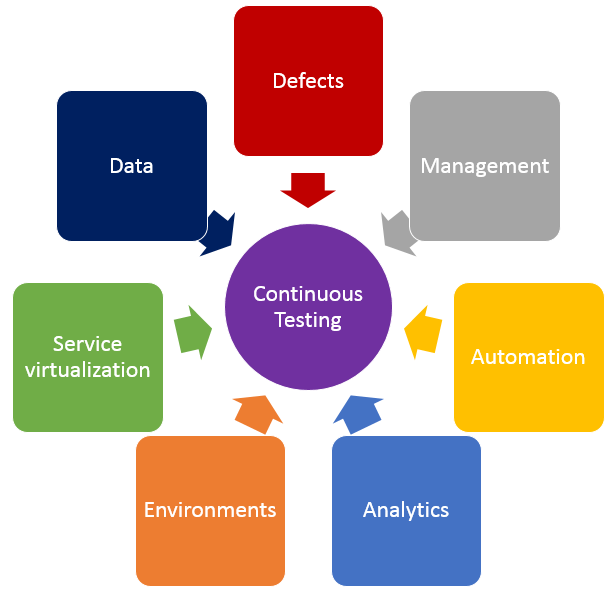
    In addition to shifting left by using service virtualization, finding the right balance of effort across all testing practices is crucial in achieving continuous testing. The diagram below shows the key test practices that enable continuous testing, and teams spend effort on each of these practices regardless of whether they want to. The questions below may help your teams understand where they are spending time, and perhaps where their time might be better spent.

    Testing

    • Defects – Are teams spending too much time logging, triaging or analyzing defects? What about time spent on defects that aren’t “real” defects—where there is a misunderstanding between the test and the code? Or what if they could prevent entire schools of defects from ever being created in the first place?
    • Test Management – Are teams spending time manually crafting status reports and rolling up test execution results? Or do they have a tool that provides that information in real time and allows stakeholders to drill down as needed? How do teams know if they are on schedule with their test effort, behind schedule or even ahead of schedule?
    • Test Automation – How efficient are teams at re-executing existing tests? Do they run most or even all of them manually? If they’ve automated tests, are they focused only on functional tests at the user interface layer, or are they running functional API-layer tests, performance tests and even security tests? Do they have a robust and maintainable test automation framework?
    • Analytics – How do teams know which tests they should run, when and even why they are running those tests at those times? How good is their test effectiveness–meaning, are they running the fewest number of tests that find the largest number of problems? Impact analysis is critical in selecting the right sets of tests to execute whenever they get a new build.
    • Test Environments – Are teams constantly waiting on test environments to be provisioned and configured properly? Do they run tests and discover after the fact that the test environment wasn’t “right,” so they have to fix the environment and then re-run all the tests again? Do they hear from developers, “It works on my machine!” but it doesn’t work in the test environment?
    • Service Virtualization – Are teams waiting for dependent systems to become available before they can “really” test? Are they using a “big bang” approach to conduct end-to-end system testing, where they throw all the components together and hope they work and interact properly? Can teams test exception and error scenarios before going to production? Are they testing the easiest parts first just because they are available, and delaying the high-risk areas for the end of the testing effort?
    • Test Data – Do teams have the needed sets of production-like test data to ensure they are covering the right test scenarios? Are there exception and error scenarios that we can’t execute because they don’t have the right sets of test data?

    If any of these problems or ideas resonate with you, here is guidance on how to get started on the journey to achieve continuous testing.

    First, identify your bottlenecks:

    • How good is your test efficiency – are you able to run the needed tests and provide feedback quickly?
    • How good is your test effectiveness – are you running the fewest number of tests that find the largest number of problems?
    • Bottlenecks may also be upstream or downstream from actual test execution effort – are you waiting on dependent systems, or test environment provisioning?

    Then, look at all aspects of your test effort and focus on the largest bottlenecks first.

    • How long are your delays in test environment provisioning, and are the environments accurate when they are provisioned? If delays are too long and environments aren’t correct, automate your test environment provisioning and configuration to eliminate manual errors and gain accuracy and reliability.
    • Are you waiting on dependent systems to start testing? If so, use service virtualization to simulate those unavailable systems so you can start testing sooner.
    • Are you unable to run all the needed tests before the next build is available? If this is the case, automate your high-risk regression tests to improve test efficiency.
    • Do you find performance problems late in the life cycle, or even in production? Outages can result in long-term damage to a business, so conduct load, performance and stress testing earlier in the life cycle.
    • Do you find significant problems when all systems are integrated? Identify and agree upon system interface and data definitions, and create automated integration level tests for the high-risk integration points.

    Teams that improve their test efficiency and effectiveness significantly reduce their expenses and the time it takes to get high-quality, innovative solutions to users. You can’t test everything, and you can’t automate all your tests, so it is critical to find the right balance. Also key is service virtualization, which allows testing to begin as soon as a build is made by mimicking missing dependencies. By combining test automation and service virtualization, teams can test earlier, or “shift left,” so they gather feedback faster than ever.

    Learn more about using service virtualization to shift left and avoid downtime in test environments in our upcoming webcast:  How Maersk Uses Service Virtualization to Shift Left and Avoid Test Downtime.

    About the Author / Marianne Hollier

    MarianneMarianne Hollier is an IBM and Open Group Master Certified IT Specialist in application development. She has strong, practical expertise in measurably improving the software development life cycle and driving the necessary cultural changes to make it work. She is instrumental in architecting, tailoring and deploying the IBM DevOps best practices as well as appropriate software development tools on many types of projects, from large to small, long to fast-track, agile to traditional. Marianne is especially passionate about all things testing—process, tools, culture and automation. Her experience is broad-based, spanning both custom projects as well as standard software packages that apply to many industries, including refining, pharmaceutical, telecommunications, health care, financial, automotive, government and retail. Connect with Marianne on LinkedIn or Twitter.

  • Integrating ARA into traditional RM

    Integrating ARA into traditional RM

    Application Release Automation (ARA) is terminology that includes several DevOps constructs from a singular, application-centric point of view. In essence, ARA implies the automation of a single app from build through deployment (even if that deployment is to production). Of course, embedded or implied in that automation terminology is build automation or construction; deployment automation, which may include provisioning; and governance automation, which includes testing and approvals.

    If your company’s portfolio of applications is small, or if the applications are fully independent from each other, using ARA to describe your DevOps continuum is more or less a complete vernacular. However, if your application portfolio contains interdependencies; you need a coordinated/scheduled release event of multiple applications into production in a particular sequence or timing;or you are required to meet blanket compliance governance requirements that exceed the scope of a single app; you will need to learn how to integrate an ARA-based DevOps strategy with the more traditional discipline of Release Management (RM).

    Clarifying ARA

    One of the nicer implications of ARA thinking is that it places the value—or, accentuates the value—where it should be; that is, on the application. Automating infrastructure is great, but if no application rides on top of it, the infrastructure is essentially nothing more than unexplored capacity. Most CIOs are not fond of having excess computing capacity sitting idle. So the idea of ARA sets the focus of the automation where it should be: moving an “application” from construction to production release.

    ARA is also development methodology-neutral, which means the build, deployment, and releasing automation will look the same regardless of whether the code was prepared using Agile or Waterfall. Mind you, Agile tends to drive the need for speedier delivery systems, but even legacy development teams can find value in consistent delivery system automation once a build is ready to begin. It is, after all, consistency that reduces support costs by reducing errors and creating predictability, thereby improving quality. It also is consistency within the automation that permits scale, whereas variability in the automation deters scale.

    ARA also allows for depth within the stack. If code reigns at the top of the stack, then the operating system of the server reigns at the bottom (perhaps networking in the wine cellar and facilities management in the root cellar). ARA incorporates the notion of automating dependent layers of technology under the code such as database services, middleware or messaging services, perhaps the provisioning of a virtual machine, even down as far as configuring the OS, if needed.

    The practicality of moving down the stack however, is that the scope of change will continue to have a broader impact than a single app. I usually do not install a single instance of Oracle for each application I create; more often, I have several applications relying upon a single instance of my Oracle setup. So the actual changes I automate as I move down the stack tend to be more of a configuration adjustment. It is more likely my particular app needs a config change to accommodate it rather than a completely new install of a supporting technology component underneath my app. It is also worth noting that the frequency of change as you move down the stack slows down considerably compared with app code riding on it, and the cost or impact of change increases greatly, as you begin to impact a wider number of things riding on it.

    Deconstructing ARA

    ARA automation, then, includes all the traditional DevOps disciplines, but limiting them to the viewpoint of a single application as follows:

    Build Automation: This includes version-controlling each particular build. It also includes packaging all the component technologies to create a deployable package used for deployments throughout the software development life cycle (SDLC). The golden rule here is create a “build once, deploy many” philosophy in your build automation. Changes to code, included configuration files or dependent technology components down the stack must occur in the DEV class environment. Once the deployable package is completed to satisfaction in DEV, it will move unaltered through any other layers of testing environments before it gets to production for ultimate release.

    Deployment Automation: Since each deployable package is tightly version-controlled during its construction in build, there is now an ability to roll forward (normal deployment) or roll backward (revert to a prior version) in the event of failed testing in a given SDLC environment. Some of the common environment classes include integration testing, performance testing, user acceptance testing and pre-production quality assurance (QA) testing. Smart DevOps deployment tools utilize the ability to deploy (or overwrite) only the components that are out of sync with the versions listed within the deployable package. This smart deployment capability reduces time and ensures consistency with what “should” be there.

    Provisioning Automation: This is an offshoot of deployment automation. For those using virtual machine or cloud technologies, the deployment automation can include the ability to provision or set up an environment of any class on the fly. When testing is completed, the same environment can be decommissioned to not waste capacity or budgets. Provisioning bare-metal servers is precluded by human interactions, although what should go on them also can be fully automated once engineering is done with the physical work.

    Governance Automation: Even though substantial testing can and should occur in development, a significant amount of it must occur in other testing-class environments later in the SDLC progression. It is, therefore, a good idea to have the ability to isolate testing automation outside of both build and deployment templates or scripts, still making it callable or executable from an overall workflow manager (often included in the release orchestration or release automation tooling within DevOps). This gives the flexibility to run a series of tests without having to rebuild the application or redeploy the application just to kick it off. In addition to testing evaluation, there may be other process regulations driven by a governance team or compliance entity within the organization. All of these flags must be met and passed before final promotion to production.

    Integrating ARA with RM

    Dependency is the hobgoblin of simplicity. Applications that are fully independent of each other can utilize an ARA strategy and deploy into production as often as they want. No one else is impacted by this. But if a given application has dependencies upstream—I get my data from, or transact with, someone else—or downstream—my data is provided to someone else—then my path to production must include testing an application different from my own. Determining where the responsibility for failure lies now requires policy instead of just common sense. Synchronizing in-state changes where two dependent applications are now undergoing change at the same time requires policy to govern as well as more sophisticated SDLC testing environments to manage.

    When a wider view than just a single application is required, the traditional DevOps discipline of RM or its synonym release orchestration (RO) becomes the solution. RM allows for the sequencing of applications going into production to occur as needed. It allows for testing to occur when a dependency spiderweb is kicked off. RM allows for corporate governance to be applied universally to all applications attempting to enter production, instead of having to build it over and over again in each deployment script or template. RM can produce sophisticated logs designed to satisfy outside regulators for compliance history automation. These kinds of tools become invaluable when there must be a wider view of deployments to production beyond a single app at a time or in a small portfolio.

    Given this reality, the key to integrating ARA with RM is to ensure automation is constructed independently by discipline, and can be executed by discipline as needed. ARA encompasses or groups four disciplines together: build, deploy, provision and governance. RM uses the ARA package and extends it with other applications to create a needed sequence, or kicks off selective smaller units such as a testing package when needed to meet certain outside app change conditions based on dependencies. RM can selectively execute the automation ARA creates as it needs to to accommodate larger goals, while ARA continues to focus on keeping its own app as efficient as possible.

    Impacts to the Bottom Line

    There is no one right answer. There is only the perspective you hold within the DevOps continuum. Knowing that both ARA and RM are ultimately dependent on traditional DevOps disciplines offers flexibility on “how” you think about delivering innovation. In my opinion, ARA is simply the next evolution of automating build and deploy. It is a logical next step.

    There are other disciplines within DevOps, however, that might benefit from a wider view of the workflow required to move innovation to production. Take, for example, the integration of monitoring automation in the process, capacity on demand provisioning, security oversight and configuration management database (CMDB) integration—a wider view of how and where these services are integrated with DevOps might reduce the labor required to create them for each app, reinventing the wheel—or worrying the wheel has not been updated properly in a while. At its heart, DevOps attempts to create singular automations to perform tasks, increasing speed, reducing risks and improving quality.

    There is no immediate financial impact of this other than to pursue a strategy of single-app focus in an environment where a wider view would have been more ideal. Calculating the cost of that error is akin to picking six lotto numbers from the sky: It is always hard to know what might have been; at that point all one can do is wish.

    To continue the conversation, feel free to contact me.

  • DevOps Chat: Steve Hazel, Sauce Labs

    DevOps Chat: Steve Hazel, Sauce Labs

    I recently had the chance to sit down and speak with Steve Hazel, CTO and co-founder of Sauce Labs. With so much being written and talked about the role of quality assurance (QA) and testing in a continuous integration/continuous delivery (CI/CD) world, it is good to hear from someone like Steve who is an actual thought leader in the space. Steve tells us what he thinks the limits of automated testing are, the future of QA and more. Have a listen for yourself to find out, or follow along with the printed transcript below!


    Alan Shimel: Hi, everyone. Alan Shimel, devopsy.kinsta.cloud here, for another DevOps Chat. Today’s DevOps Chat’s guest—that was a tough one—is Steven Hazel, co-founder, CTO at Sauce Labs. Steven, welcome to DevOps chat.

    Steve Hazel: Hi, Alan. Glad to be here.

    Shimel: Thank you. Glad to have you here, actually. So Steven, there might be some people listening who maybe aren’t familiar with Sauce Labs. So, before we start, why don’t we, if you don’t mind, give our listeners a quick overview? Tell us about Sauce Labs.

    Hazel: Yes. At Sauce Labs, we do automated testing for both web and mobile apps. We run a cloud service that gives our customers access to a wide range of platforms, whether that’s operating systems and browsers for web testing, or mobile devices and emulators and simulators for mobile testing. You can get access to all the different platforms you need to test on, and you can get access to a lot of platforms at once to run your tests in parallel to get through a large test suite rapidly, which is really what people need for today’s continuous integration and continuous delivery workflows.

    Shimel: Got it. Of course, Steven, Sauce Labs was closely linked with around Selenium and some of the open-source testing tools that are out there today, right?

    Hazel: That’s right. Selenium is the dominant web-testing technology. In mobile testing, there’s a variety of technologies, but we support Appium, which also uses the web driver protocol that underlies Selenium. We really think that fitting in with those open-source tools is the smart way to go. It fits with what people are doing.

    It gives people a lot of choices about how they want to do their testing, what kind of languages and frameworks they want to use on their end. So, we just plug right into Selenium tests, if you’ve already got Selenium tests, or Appium tests. You can just change the config and point them at Sauce Labs, and they’ll run unmodified on our systems.

    Shimel: Got it. Steven, we were talking before we started recording today, I was telling you about a recent article we had over on devopsy.kinsta.cloud. The gist of it was basically that DevOps was the death knell for QA. I told you I didn’t agree with that and you agreed with me. You said you didn’t agree with it, either. But for our audience—they’ll respect you a lot more than they respect me—why don’t you agree with that, Steven?

    Hazel: Yeah. I think that to suggest that there’s no longer a role for manual QA when you take on a DevOps process is just not in line with the facts. If you look at what we see large organizations doing, they’re not dropping manual QA for automation. They’re changing the mixture of what they have manual testers doing by quite a lot, but they still have manual testing teams. You still need a manual testing team.

    So, what I see happening, as you start to take on automation, your testing coverage improves dramatically because you can afford to do a lot more testing when you’re automating than was ever possible with a manual testing team. But automated testing, the classic example is exploratory testing. You’re just not gonna get the kind of creative, exploratory walk-through of your app with an automated test that a manual tester can do. I think there’s still a role for QA organizations, beyond just manual testing, in being the other side of the conversation, right?

    A lot of people have the concern that if developers are writing tests, it’s the inmates running the asylum. The exact developers writing the software are the ones deciding whether it’s high quality, and you want another perspective in there. You want a perspective that’s maybe closer to your end user. So, I think that the other side, beyond just manual testing, that you see with QA teams continuing to have a role is in deciding what cases should be tested, whether you have good test coverage, encouraging good testing practices, even when you are automating your tests.

    Shimel: Absolutely. Really, Steven, I guess the boogeyman in the room around the friction with DevOps and QA is automation. There’s some schools of thought that says, “Well, we can automate everything. The more we automate, the better we are.” There’s another school of thought that says, “Well, you can automate as much as you can and automation’s not a bad thing, but there are just gonna be some things that are not automatable, if that’s a word now, or may never be automated. Where do you go in on that continuum?

    Hazel: Well, being someone who’s pushing forward automated testing, I want to see automation go as far as we possibly can. I think that that’s very far. That said, I think that the way the mixture of tests changes as you adopt automation is maybe a little bit counterintuitive. You might imagine, well, we’ll automate some percentage of our manual test cases, maybe 80 percent or 90 percent. Maybe we could get to 100 percent if you’re a zealot for automation.

    But actually, what you see is, it’s not that you’re automating a percentage of what was there in manual testing. You’ll actually have more automated test cases than you were able to do with manual testing. So, if you just looked at the number of test cases, your automated cases are gonna way outnumber the original count of manual test cases just because you can, right? You can now cover a lot more edge cases, a lot more scenarios because of the power of test automation. So, that’s a real advantage to test automation.

    Shimel: Sure.

    Hazel: At the same time, certainly there are things, visual testing, there’s some interesting approaches out there, but I don’t think we’ve yet seen a way of making sure that the app looks right, especially as it changes. You really need a human being involved when there are deliberate visual changes to make sure that they came out right. I think it’s those things where automation really can’t give you an answer about, does it look right? Does it act in a way that’s gonna be acceptable to somebody?

    I think you still need a human being in there at some point, checking those things, but it’s a different process. It’s no longer this phase gate before every change is released that you used to have. It’s now a process that can be made asynchronous from the bulk of your development and release process.

    Shimel: Absolutely. If you don’t mind, Steven, a little bit of time on, you mentioned a little bit, but what do you think of the kinds of tests that lend themselves well to automation? Certainly, a visual test of an interface, different arts. What are the sweet spots for automated testing?

    Hazel: I think certainly at the bottom of the testing pyramid, unit testing brings tremendous value. It’s something that’s very easy to automate in a way that’s completely deterministic, very fast. Gives you really quick feedback as a developer as you’re making changes to the code on whether you’ve broken something. But the coverage with unit testing, the coverage of functionality that may be important to your end users, it’s really hard to achieve. It’s really hard to achieve good, solid feedback from your unit tests that you haven’t broken anything anywhere.

    Functional testing, the next layer up, which is what really we focus on, gives you that complete end-to-end check. You’re actually testing the features of your product and you’re making sure that end to end, with all the various components involved, they work properly. That’s more of a challenge for automation, but we’re seeing, I think, a majority of development organizations out there seeing success automating functional tests and real value from having that be something where you can run through hundreds of test cases in minutes and get feedback to your team. So, that works quite well for automation.

    I think it’s that next level up, as you start to get into the types of tests where you’re looking at, what’s an acceptable experience for the end user? User acceptance testing as distinguished from functional testing, where you’re really starting to look for, does it look right? Does it act right? Is the response time throughout the entire process acceptable?

    You can zoom in and measure a lot of these things very specifically, but getting the answer to, “Overall, though, was it a good experience?” That’s the kind of thing where it’s really tough to cover that with automation.

    Shimel: Yeah, agreed. Steven, if you don’t mind, I’m an old security guy prior to DevOps. One of the things within the security community that we’ve really pushed around is the idea of automated security testing shifting left in a DevOps environment and allowing security testing to be done in an automated fashion at a CI/CD-type of level. Where do you see that in this whole discussion?

    Hazel: Security testing isn’t what we focus on at Sauce Labs, so –

    Shimel: Right, I know.

    Hazel: I’m not an expert in this, but it is something that I follow and care a lot about. I think I see a lot going on with static analysis, with some of these tools that can help to constrain the types of mistakes that you could have in a program, type systems and things along those lines. I think really that’s very badly needed in making code secure. Some of the issues we’ve seen come up over the last few years, things like Heartbleed, the Glibc bug, really those kinds of things aren’t acceptable, aren’t something that we can continue to have happen, and I think the solution really is fully automated tools, like static analysis tools and type systems, that can lock down the code and just constrain the types of mistakes that could possibly happen.

    Shimel: Sure. You know, Steven, I see it as very analogous to the QA situation, which is I think a lot of security people get very territorial around job security because they’re afraid somehow that doing automated security testing earlier in the process—shifting left, so to speak—is somehow gonna affect their livelihoods, or make them obsolete.

    Hazel: I can see that. We see that among QA folks, for sure. To me, that’s a shortsighted view. If the world is getting more intense security problems, more intense quality problems, we’re shipping more software, you just can’t solve it 100 percent by throwing bodies at the problem. I think that what’s gonna happen is not that those people’s careers are in jeopardy; instead, as a society, we’re just gonna do more and better security and quality testing than we’ve been able to do in the past.

    Shimel: Yeah, agreed. Steven, we’re running a little low on time, so let me get just one or two more questions. Sauce Labs has been, in my opinion anyway, for what it’s worth, somewhat of a DevOps darling in terms of really encompassing—you’re living the DevOps model. You’re working with open-source tools, testing and automation, enabling automation. Sauce Labs is a player in the DevOps ecosystem. Where do you see it going?

    Hazel: Well, toward the enterprise is one big trend we’re seeing. Earlier on in the history of Sauce Labs, a lot of our customers were essentially software companies, companies that their primary focus is technology. Now, a lot of our customers are retailers, financial institutions—companies that you don’t think of as primarily a software company, but all of these companies have apps, they have complex web experiences. They’re really adopting DevOps in a big way. They’re moving to what is, for them, a very different process than what they’ve been doing and allows them to ship better software faster, with more complexity than they were able to handle before.

    Shimel: Absolutely. Steven, we are low on time. I’m gonna ask you the final question, which I ask most all of my guests here on DevOps Chats. That is, if you had to recommend one book to our audience that they should read, a must-read for them, over the next six months or a year, what would that book be?

    Hazel: Oh, wow. A book recommendation. I think the obvious choice in a conversation about DevOps is “The Phoenix Project.” If you haven’t read it, you’ve got to read it. It’s a quick, enjoyable read, but it really gets the concept across better than probably anything else is going to. It’s an obvious recommendation, but I still think it’s worth it.

    Shimel: Sometimes the obvious is good. I will just add to that, if you already have read “The Phoenix Project,” Gene Kim’s next book, I think co-written with John Willis and Jez Humble and someone else that I’m blanking on – oh, darn it, the guy who started DevOps, who coined the phrase. Patrick. Patrick Debois. Their new book, I think it’s called “The DevOps Handbook,” will be out, I want to say, in the fall. Not a sequel to “The Phoenix Project,” but another good book to look at.

    Anyway, Steven Hazel, CTO, co-founder of Sauce Labs, thanks for being this episode’s guest on DevOps Chat, and continued success with Sauce Labs.

    Hazel: Thanks a bunch. Thanks for having me.

  • Baselining Metrics to Measure DevOps ROI

    Baselining Metrics to Measure DevOps ROI

    Assessing the ROI of DevOps normally is done against a company’s baseline cost. The problem is, most organizations do not collect or evaluate the cost of “automating and delivering” innovation; they usually are more focused on the innovation product itself. As an example, if a company creates an application hosted on the web that offers its customers the ability to purchase inventory, the company usually is obsessed with knowing how that application performs: How many people are using it? How often does it fail due to bugs? How many sales are made? The company typically focuses on the end product—on the application as it touches customers and potential customers. The delivery process that precedes the application being loaded into production is not usually the subject of intense scrutiny. At least, most organizations are not evaluating the speed of delivery and process effectiveness of delivery prior to an embrace of DevOps methods and tools.

    This lack of scrutiny results in the lack of a baseline to compare against. Say, for example, a typical programmer (prior to DevOps) uses a mix of scripts, human intelligence and human verification to create and verify a build. Prior to DevOps, the goal is simply to create the build and get it out there to look at it, and decide what to do next. Most programmers are not obsessed with how efficient this entire process is; for them, it is a means to an end. So most programmers do not keep records of the average amount of time it takes to create the build from beginning to end. This is even more true of the deployment process. Once a build has been created (again prior to DevOps), getting it deployed to the target environment might involve a few different teams (depending on the class of test environment that is targeted). The process may involve email requests to other support teams or filling out a ticket to get it done. Once again, most organizations spend little time tracking this process from end to end; it is only ever a means to an end.

    If, in fact, an organization was watching closely how long it takes to get a build created and how long it takes to get a deployment completed, that organization would be running toward DevOps at full speed to see improvements it otherwise could not achieve. It is the things we do not measure that receive little attention—until they break. Once our deployment process has become so onerous or so complicated or so burdened with approvals required that nearly nothing gets deployed, then we begin to look at it. This creates a culture of “squeaky wheel syndrome,” which makes both our development and our operations teams focus only on reactionary issues, while proactive concerns die on the side of the road. There is no time to invent proactive improvements when you are constantly fighting the fires of something else that is seriously broken. This culture must also change if DevOps is to succeed broadly in your organization, so keep note of how far it may be infected in how you run things today.

    Preparing for Collection

    Given that most companies lack a real baseline to compare against in this area, realize that collecting one will take an investment itself. This baseline metrics collection cost is usually added to the cost of the investment in DevOps. It is a bit unfair, as you are effectively saying, the soap company will also have to bear the cost of determining how dirty we are before we invest in the soap that will clean us. The makers of soap tend to think you already have a sense of how dirty you are, or you would not be looking at buying soap in the first place. But without an accurate assessment of knowing the extent of the problems (in this case, the investment of time you spend today), you will never know the ROI of having made the improvement of DevOps (the after picture).

    Also, keep in mind that measuring anything manual is difficult. This sounds like a saying from Captain Obvious, but consider that manual work efforts require additional manual work efforts to capture them and record them in some kind of system. If, as an example, my typical programmer spends 15 minutes of every build doing human verification of the build, this amount of time is reflected nowhere. Hourly employees typically record how many hours they work per day, not what tasks they spent during the day. Even the employees who log work hours more discreetly tend to record only that they spent “x” amount of hours doing “development,” not what general task categories occurred within the heading “development.” So there are no electronic records out there that can be gathered automatically that will reflect the 15 minutes spent doing human verification of a generic build of an application. The only way to know this is a personal interview, followed by someone keying the data into a collection system of some sort.

    Knowing that the information you seek for a baseline will come in human interactions as well as some automated logs, start the collection using a tool that allows for maximum flexibility for those efforts. Spreadsheets come to mind. When the effort to collect a baseline begins, you will have some ideas about the kinds of data you wish to collect and how it might exist in your organization. But it is impossible to know exactly how the resulting efforts will be completed. In short, you don’t know what you don’t know. While you collect metrics you will invariably come across someone who reveals critical metrics-related information you were not “planning” to collect. But once the revelation is made, you will need to incorporate the “new” information to really provide an accurate baseline assessment.

    Determining the Baseline

    The next step is to begin the collection process itself. The critical data to examine usually can be gathered by looking at “human” time involved in a given core “process” of the automation and delivery of innovation, and then the “machine” time involved as well. For example, the time a programmer must spend prior to the launch of a build (not the coding time)—all the prep work doubling checking that the system is ready to launch the build scripts (or ready to manually push the buttons)—would be considered “human” time. The execution of the scripts to create the build would be considered “machine” time. Then, all the work done after the build is created to verify it and make sure things are as the programmer expected, again can be put into the “human” time category. DevOps will systemically automate both the pre- and post-time activities the “human” currently invests, so all that time will count in the ROI.

    The above example is good when one person has full control of a process from end to end. When other teams must get involved to complete a task, the “human” time begins to skyrocket. If, for example, a programmer or release manager, must get a request email (or ticket system equivalent) to deploy a particular build to a particular target environment, the entire life cycle of that ticket becomes part of the “human” time you need to track as your baseline metric. Even when shops create a two-day service level agreement (SLA) for turnaround, it still represents two days of delay (due to “process” time) in the life cycle of a deployment. The time “humans” actually spend reading requests, approving requests and routing requests is all time that DevOps will automate and eliminate. Finally, when the correct support team (usually Ops) pushes their own script buttons to do the deploy, that part of this process is once again “machine” time. As you can imagine, the end-to-end time of a given deployment can be days in the pre-DevOps methods and only minutes in the post-DevOps methods. Self-service deployments can reduce this time even farther, removing handoffs, reducing risks and delivering innovation at will.

    Further classification of this metric data can be useful as well. For example, you may wish to break down “machine” time into its relevant subcategories such as build script execution, deploy script execution, test script execution and release script execution. You also may want to break down the “human” time a bit further as well into pre-build/deploy verification, post-build/deploy verification and test script results evaluation. Finally, you may wish to break “process” time down further into request generation, request routing, request approval, request declination and request notification. DevOps will be able to give you discreet visibility into the time you saved in these subcategories, although since baselining is generally a one-and-done effort, you may not want to hunt this level of detail. It is down the road where this kind of subclassification becomes useful—for example when you are trying to determine if one set of tests runs faster than another or one cloud provider runs faster than another.

    Evaluating the Baseline

    Having gone through this exercise, a hidden or secondary benefit emerges. Your organization begins to understand much better what it has been investing in the current delivery of innovation processes. Generally, immediate areas of concern emerge and provide the DevOps services delivery with a road map for which areas to attack first to provide the company with the biggest bang for the buck. Without a baseline effort such as this in place, your DevOps services delivery plan will be based on anecdotal thinking or on executive mandate that may not be substantiated by the data on the floor. Having a baseline provides a road map for delivery based on concrete evidence on what should matter most to the business in making improvements. No one can argue with the numbers (assuming they were collected with care). The road map may reveal which applications in your organizations portfolio should be targeted first for DevOps.

    Also, your organization now understands much better “what” data in this process it sees as relevant to continue collecting even after DevOps is implemented. As DevOps is primarily an automation set of tools and methods, DevOps should be able to deliver these metrics in an ongoing basis. This allows continued metrics efforts to be automated without further human labor and can provide continuing proof of the value of DevOps to the organization, as over time the numbers continue to improve. Since the lion’s share of manual tasks disappear with DevOps in place, there should be no reason to have to manually collect metrics data as you move forward.

    Finally, having an automated metrics collection system put in place by DevOps, should lead to the next evolution in thinking: simulation. Well after the initial ROI for DevOps services has received the accolades it is due, an automated metrics collection system should provide all the raw data needed for some predictive analysis. Tweaking variables or process points or “machine” effectiveness should result in increased speed of delivery that can be measured (even before it is reality) based on the data you have been collecting systemically. Understanding the impacts of these changes is worth more than its weight in gold, because you can weed out the planned changes that simulation advises against before they even hit the road map, let alone occur in your world.

    Impacts to the Bottom Line

    There is already enough anecdotal evidence in existence to entice companies to embrace the DevOps journey. However, as your strategy begins to look to deepen down the stack from application code level to middleware, database and operating system, each layer could be assessed against a baseline to determine if your road map is sound and, more importantly, in the right order for your best ROI. This applies as well as you look to expand your DevOps journey laterally with additional services such as automated testing and evaluation, gated progression, automated provisioning, release orchestration, configuration management database (CMDB) integration, production provisioning on demand and monitoring integration. Each new service can be assessed against a baseline to determine if its ROI still meets the demands of your finance department and if your road map here is in the right order for biggest bang for the buck.

    The subtle win by performing baselining is the culture change it dispenses through your entire organization. Baseline metrics tell your development team and your operations teams (as well as the business units looking on) that you intend to measure performance and improve it systemically. Just because something was not examined before does not mean it will remain so, and a forest fire does not have to be the motivation to do so. DevOps is a proactive improvement to your delivery of automation. Collecting that baseline for your ROI, begins to seed the idea that proactive improvements are important to your executive teams. It is a demonstration of action over platitudes. It begins to eliminate the forest-fire responses in your employees, and creates a new forward thinking point of view. This cultural change is worth more to your company than any implementation of any one given tool or method, it goes back to changing how you think about delivering innovation in your individual job. That is what DevOps can do best.

    To continue the conversation, feel free to contact me …

  • Mobile Testing Delivers Big for Pizza

    Mobile Testing Delivers Big for Pizza

    Mobile applications have been disrupting industries worldwide. For some industries, the disruption focuses on business internals, as enterprise apps enable manufacturing processes to be restructured and streamlined. In other industries, the disruption focuses on the customer and how mobility can make life more convenient.

    When it comes to pizza, however, mobile development changes everything.

    I remember how, as a kid, we would hope the teacher wasn’t looking when we used the public payphone to place an order for a pizza to be delivered a few minutes after we raced back home for lunch.

    Now you can do it with the click of a button. Using a mobile application, you can order exactly the type of pizza you like, and it will be delivered to your location whenever you want.

    There are few businesses better-suited for a perfectly working mobile app.

    When we were asked by a multibillion-dollar pizza giant to deliver on its mobile testing, we knew the pressure would be on. The company needed a new quality assurance strategy to handle a mobile app that would direct traffic to its more than 3,500 pizza parlors located within the United States alone.

    The Big Step: From Manual to Test Automation

    At the onset of mobile testing, manual testing was the primary method. As the mobile universe expanded to thousands of devices, a more efficient way had to be developed to support business-critical apps being used by people with different devices and mobile operating systems running over different local networks.

    Enter the dedicated mobile testing lab.

    DevOpsPizza2

    Utilizing our cloud testing solution, a lab of 60 devices was connected to the two mobile testing teams located in the United States and India. Mobile testers had access to the devices as they needed them. With a test automation solution in place, more than 200 scripts were written and deployed to handle the regression testing.

    Every device that wasn’t actively being used by a tester would be busy conducting regression tests. The 60 devices running at the same time enabled parallel execution, wherein an app could be tested over a matrix of devices and mobile operating systems. With our performance testing solution, different network conditions were simulated, expanding the overall mobile test coverage exponentially.

    A dedicated mobile device lab meant that the devices were made available exclusively to the business. This prevented any unnecessary breaches in security. At the same time, all remote mobile testing was conducted within the customer’s virtual private network (VPN), bolstering security even more.

    One of the biggest time-savers was the ease in which test cases could be re-created. As a DevOps solution, both the developers and the testers had access to the same devices. So when a specific bug was reported on a function that wasn’t executing properly over this device running that operating system, the developer didn’t have to worry about finding that device with the right operating system. He simply read the report, clicked the link and accessed the same device in the dedicated lab. The test cases did not have to be re-created because they were available in real time to the developer.

    Mobile testing became a 24/7 operation. Right as the American team was checking out for the day, the Indian team was running the reports on their mobile testing activities, and continuing their work. At the end of the day in India, the Americans came back to work to read the Indian team’s testing results.

    Mobile Testing Produces Sizzling ROI

    DevOpsPizza1

    By upgrading their regression testing from a manual process to an automated one with parallel execution through the mobile lab, the regression testing cycle went from 10 days to 17 hours. The testing coverage also increased to 90 percent for the native mobile app.

    As a result, the company was able to get the latest version of its mobile application to market sooner. The impact was felt beyond the DevOps team as the entire IT department began to plan their strategy based on the dramatically shorter release cycle.

    “What makes mobile testing a DevOps success is test re-creation and CI integration.” says Tal Barmeir, Experitest CEO.

    The customer uses Jenkins for its CI platform, uniting developers and testers toward automating as much of the DevOps process as possible. Granting the developers and testers access to the same devices established a powerful tool for test re-creation.

    Their entire DevOps process was retooled to generate returns that truly deliver!

  • LogiGear Launches Continuous Testing Solution and Service to Enable Faster High Quality Testing 

    New solution is an addition to the company’s evolving frameworks and technologies

    Foster City, CA, July 12, 2016— LogiGear, a world leader in software testing solutions, today announced the launch of its Continuous Testing (CT) solution and service to enable improvements in automated testing in DevOps environments. LogiGear’s Continuous Testing solution and its full-range of testing automation services will help customers with the transformation from manual to continuous testing methods.

    Continuous Testing is a process of executing automated tests at every stage of the software delivery pipeline. CT allows for fixing errors quickly, enhancing the speed of delivery, thereby reducing time to market, allowing firms to save time and resources. CT is an integral part of Continuous Delivery and DevOps practices and LogiGear’s experts help companies achieve maximum ROI by supporting the transformation to Continuous Delivery (CD) and DevOps initiatives.

    “DevOps and Continuous Delivery are gaining traction because of its potential to deliver high quality results faster. Continuous Testing is essential to achieving success. However, many companies face challenges in completing the transformation,” said Hung Nguyen, CEO of LogiGear. “With the Continuous Testing solution and services, LogiGear will ease the pain of transformation for them.”

    LogiGear’s CT solution and service helps solve common challenges associated with Continuous Testing, including creating a unified platform for quality reporting and collaboration as well as enabling companies to achieve Continuous Testing with Legacy systems. LogiGear’s solution also removes high start-up costs, a popular challenge associated for most firms looking to adopt DevOps.

    For additional information on Continuous Testing Solution, or on the full range of software testing and development services provided, visit LogiGear.com.

    About LogiGear

    LogiGear Corporation (http://www.logigear.com) provides leading-edge software testing technologies and expertise, along with software development services that enable companies to accelerate business growth while having confidence in the software they deliver. Founded in 1994 by top thought leaders in the software testing industry, LogiGear has completed software testing and development projects for prominent companies across a broad range of industries and technologies.

    #

    For more information or interview requests:

    Joanne Hogue

    Smart Connections PR

    (410) 658-8246

    joanne@smartconnectionspr.com

  • How to Fail at Test Automation

    How to Fail at Test Automation

    Let me start by admitting that I am not a test automation expert. I have done some work with test automation and have supervised teams who practiced it, but when it comes to the intricacies of it, I have to call a friend. It is from such friends that I have learned why so many test automation efforts fail. Talking to people about test automation validates my impression that this is the DevOps-related practice that people most often fail at.

    Let me share the four reasons why test automation fails, in the hope that it will help you avoid these mistakes in your test automation efforts.

    Before I go into the four reasons, allow me one more thought: Test automation is actually a bad choice of word. You are not automating testing, you automate quality assessments. What do I mean by that? It is a mistake to think of test automation as automating what you otherwise would do manually. You are finding ways to assess the quality of your product in automated ways and you will execute it way more often than you would do manual testing. This conceptual difference explains to a large degree the four reasons for test automation failure below.

    Reason 1: Underestimating the Impact on Infrastructure and the Ecosystem

    There is a physical limit of how much pressure a number of manual testers can put on your systems. Automation will put very different stress on your system. What you otherwise do once a week manually you might now do 100 times a day with automation. And into the mix an integrated environment, which means external systems need to respond that frequently, too. So you really have to consider two different aspects: Can your infrastructure in your environments support 100 times the volume it currently supports, and are your external systems set up to support this volume? Of course, you can always choose to reduce the stress on external systems by limiting the real-time interactions and stub out a certain percentage of transactions or use virtual services.

    Reason 2: Underestimate the Data Hunger

    Very often test automation is used in the same system where manual testing takes place. Test automation is data-hungry, as it needs data for each run of test execution and, remember, this is much more frequent than manual testing. This means you cannot easily refresh all test data whenever you want to run test automation and have to wait until manual testing reaches a logical refresh point. This obviously is not good enough; instead, you need to be able to run your test automation at any time. There are a few different strategies you can use (and you will likely use a combination):

    • Finish the test in the same state of data that you started with;
    • Create the data as part of the test execution;
    • Identify a partial set of data across all involved applications that you can safely replace each time; or
    • Leverage a large base of data sets to feed into your automation to last until the next logical refresh point.

    Reason 3: Not Thinking About the System

    Test automation often is an orchestration exercise as the overall business process in test flows across many different applications. If you require manual steps in multiple systems, then your automation will depend on orchestrating all those. By just building automation for one system you might get stuck if your test automation solution is not able to be orchestrated across different solutions. Also, some walled-garden test automation tools might not play well together, so think about your overall system of applications and the business processes first before heavily investing in one specific solution for one application.

    Reason 4: Not Integrating it into the Software Development Life Cycle

    Test automation is not a separate task; to be successful it needs to be part of your development efforts. From the people I have spoken to there is general agreement that a separate test automation team usually doesn’t work for several reasons:

    • They are “too far away” from the application teams to influence “ability to automate testing,” which you want to build into your architecture to be able to test the services below the user interface;
    • Tests often are not integrated in the continuous delivery pipeline, which means key performance constraints are not considered (tests should be really fast to run with each deployment);
    • Tests often are not executed often enough, which means they become more brittle and less reliable. Tests need to be treated at the same level as code and should be treated with the same severity. This is much easier when the team has to run them to claim success for any new feature and is much harder to do when it is a separate team who does the automation. It also will take much longer to understand where the problem lies.

    Of course, absence of failure does not mean success. But at least I was able to share the common mistakes I have seen and, as they say, “Learning from others’ mistakes is cheaper.” Perhaps these thoughts can help you avoid some mistakes in your test automation journey. I do have some positive guidance on test automation, too, but will leave this for another post.

    And in the case you found your own ways of failing, please share it in the comments to help others avoid those in the future. Failures are part of life and even more so part of DevOps life (trust me, I have some scars to show). We should learn to share those and not just the rosy “conference-ready” side of our stories.

    Test automation is for me the practice that requires more attention and more focus. Between some open-source solutions and very expensive proprietary solutions, I am not convinced we in the IT industry have mastered it.

    One bonus thought: If you cannot automate testing, automate the recording of your testing.

    If you cannot automate testing, find a way to record the screen with each test by default. Once you identify a defect you can use the recording to provide much richer context and make it a lot easier to find the problem and solve it. Verbal descriptions of error are very often lacking and don’t provide all the context of what was done. I keep being surprised how long triage takes because of the lack of context and detail in the defect description. There is really no excuse for not doing this. Record first, discard if successful, attach it to the defect record if you find a problem.