Tag: testers

  • Collaboration: The Glue for Test Automation Maturity

    Collaboration: The Glue for Test Automation Maturity

    QA’s role in DevOps continues to evolve in positive ways. In a recent survey on test automation conducted by QASymphony and TechWell, nearly one-third of organizations reported that among organizations where testers and developers share testing responsibilities, about a third of test cases are automated. This survey and others show that on average, fewer than 20 percent of organizations have adopted test automation.

    What we can discern here is that when testers and developers work closely together, organizations can achieve greater levels of test automation maturity. This is important, because test automation ties in closely with the primary goal of DevOps, which is to develop high quality software, rapidly and reliably. There’s no way to reach velocity at scale without test automation maturity—and QA teams play a critical role in getting there.

    Let’s break this down a bit further. How does developer-tester collaboration contribute to test automation maturity, and what exactly do we mean by that?

    Once developers complete unit testing, their job is to communicate the findings of those first level tests and code verifications to the testing team. If they don’t, testers are somewhat in the dark when determining what other tests—whether functional, API or performance—to build from there. Developers have the first line of vision on problem areas in their builds. It’s not enough for testers to look at a dashboard to see that a code branch has passed a test. Test automation requires speed and accuracy, so the more detailed information testers receive upfront the more successful they will be in writing automated tests and in determining manual testing needs.

    Developers should also automate unit-level testing. DevOps requires more tests, more often; everyone should take advantage of the efficiencies that test automation brings.

    Making Collaboration Work

    How to exchange information is less important than just doing it. There are lots of options these days: Developers and testers can share information back and forth within DevOps code repositories and pipeline tools systems, such as GitHub and Jenkins, or by using collaboration tools such as Slack. Geographically-dispersed teams may prefer web conferencing systems to facilitate live discussions on the fly.

    Team members can sit side by side, doing what’s called paired development. It’s powerful for testers to watch the code as developers write it so they can ask questions during the process. That gives the tester more knowledge about the product and in turn, developers understand the tester’s objectives. The point here is that achieving a high level of test automation coverage isn’t easy; testers and developers are both learning new skills and processes. Through frequent exchange of information, they can make progress faster and always be on the same page.

    Clearly though, with such low average test automation adoption levels, we need to work on closing the collaboration gap.  Here’s how I see the barriers:

    • Developers are fiercely independent. While that’s not a surprise, it requires incentives and education to help developers understand the need to get out of their silos. Developers must adopt test automation and talk to the testers. If they don’t adapt, they won’t last—at least that’s what a CIO told me recently.
    • Testers and developers have been in opposition for too long. It’s time to get rid of this “us versus them” mentality. Developers sometimes think testers are just trying to break their code and criticize their work. Testers sometimes complain that developers could care less about writing buggy software. This is a cultural problem and leadership can help resolve it by promoting software quality as an organization-wide priority for which everyone shares responsibility.
    • Testers and developers don’t always speak the same language. The thinking behind how developer writes code is not the same as how the tester writes automated scripts. Developers don’t consider all the scenarios a tester might when they write code. As a result, they may not write clear object identifiers in the code which help testers write scripts.

    Overcoming these barriers comes back to collaboration. Developers and testers need to find ways to understand each other’s world view. Begin by obtaining a joint understanding of completion. If developers and testers can agree on the release criteria, meaning that testers are comfortable with the level of automation in place to support future releases, it avoids a huge backlog of tests to automate later. Backlogs lead to delays and frustrations all around. Using a common development language for coding and test automation is also helpful; otherwise, it’s more difficult for both sides to speak the same language when working together. In the same vein, testers should have access to all the tools that developers use: source code repositories, continuous integration, project management and so on.

    We live in a digital world and have endless instant communication options, but even on a software development team, there’s nothing that replaces the value of a face-to-face conversation. It’s going to take more than one tactic to make collaboration work in your organization. Keeping the lines of communication open should be a central goal to increase test automation coverage and streamline the DevOps release process.

    — Ryan Yackel

  • Best Practices for Application Security Testing in the Era of DevOps and AI

    Best Practices for Application Security Testing in the Era of DevOps and AI

    Application security testing is no easy feat. And yet, it’s usually the first topic that most articles about application security address. The reasons are simple: As the pace of application development techniques (and their inevitable vulnerabilities) evolve, AppSec personnel have found themselves caught between the desire to keep pace with their management of security testing requirements and their ability to allow the developer teams to operate in the modern, fast-paced ecosystem of DevOps and artificial intelligence.

    To better understand the best practices for conducting AppSec testing in the era of DevOps and AI, it is important to first appreciate the technologies available to us, that allow us to do so.

    At the heart of the modern application security testing,  there are five main technologies to be aware of:

    1. Static application security testing (SAST)
    2. Dynamic application security testing (DAST)
    3. Software composition analysis (SCA), third-party code
    4. Fuzzing
    5. Penetration testing

    These five technologies account for the bulk of most of the activities around application security testing. However, many aspects of application security testing are rapidly changing, including efforts to incorporate automation and artificial intelligence into the equation.

    By including automation or AI, for example, code testing is allowed to be released in rapid fire sequence, with production use approvals baked inline through automated logic and decision-making. This idea of continuous integration/continuous delivery (CI/CD) can lead to a widening of fractures between the security and development teams. Therefore, DevOps users today need the ability to program their code and test it through automated code scanning techniques before pushing the code into secure staging environments.

    To successfully conduct application security testing in today’s era of advancing developer operations through automation and artificial intelligence, there are three critical best practices to keep in mind.

    1. The Earlier, the Better: Introduce appSec testing into the software development life cycle early on for maximum results: Regardless of the type of testing being conducted, waiting until the very end of the development process will only create more work. Users will either end up with more bugs than they could feasibly fix or find themselves a part of an overworked AppSec team as they attempt to document and deliver on discovered vulnerabilities and code flaws. Statistically speaking, code changes that happen later in the development life cycle are also more costly to the business.
    2. Conduct testing of business-critical applications as often as possible: When deciding which assets are next in line for application security testing, one should consider the applications and systems that are of critical business value to the organization’s revenue stream. Think of these systems in particular as the “crown jewels” for the majority of attacker motives, since they define the amount of money a given organization will procure for that day and, if attacked, could disrupt the business in myriad other ways.
    3. Test for third-party code security and interoperability flaws as you would your own software: The growing complexity of modern applications means there is a need to leverage open source or third-party components. As this is the case, these components must also receive the same level of scrutiny as the applications in one’s own enterprise. All third-party code referenced in the software delivery process must also be checked by performing software composition analysis for security and interoperability flaws.

    While the pace and techniques for AppSec testing will undoubtedly continue to advance, and while there are some AppSec testing techniques that may never become obsolete, it is imperative to ensure that one’s system for maintaining application security testing always adheres to the best practices to preserve a secure software environment for the future.

    — Anthony Lauro

  • Testing’s Role in Delivering Digital Transformation

    Testing’s Role in Delivering Digital Transformation

    “We have a quality philosophy now…but it took the rise of the middle child to make it happen.”

    • Ann Lewis, ExxonMobil

    Ann Lewis’ metaphor of testers being the “middle child” between software development and IT operations was present throughout Accelerate 2017, Tricentis’ annual user conference. Nearly every head in the room nodded as Lewis described how testers, like middle children, tend to get less attention than their professional or familial siblings, but she insisted that there’s never been a better opportunity for testers to receive the respect they deserve. Digital transformation, no matter how you define it, requires new commitments to quality, and it’s up to testers to claim be the change agents in the transformations that CIOs are tasked with delivering.

    Tricentis CEO Sandeep Johri and other CxOs who spoke at Accelerate echoed this sentiment. Johri pointed out that speed continues to be a primary focus of maintaining or gaining competitive advantage, and manual testing processes that prevent agility or DevOps success at the enterprise level must be automated going forward.

    What was also made clear is that scaling investments in automation is not the single key to success. The pressure CIOs are under today, especially around digital transformation, requires new investments in a number of different areas, many of which are only just being realized. While CIOs may understand the necessity of quality, it’s up to testers to get the buy-in required for the continuous testing required to deliver it at scale.

    Testers with an oft-ignored middle child mindset may find the concept of being recognized as a “champion” by their CIO or CEO unlikely. But, Todd Pierce’s impassioned session on “What CxOs really think about testing” was designed to inspire testers to change the way testing was viewed too often in the past.

    As a current Rock Health and Dignity Health board member, and former Bill & Melinda Gates Foundation chief digital officer, Pierce shared his peers’ all-too-common beliefs that testing takes too long, costs too much and constrains developer productivity. And, while it may hurt to admit, with manual testing that should be automated and insufficient testing time that results in bugs making it to production, it’s not surprising that CIOs would feel this way.

    Pierce explained that testers who adopt innovative, scriptless “high-precision testing,” are able to shorten their test cycle, reduce defects that make it to production and eliminate costly rework for themselves and developers alike. When high-precision testing is performed continuously throughout the software development life cycle (SDLC), those beliefs that testing takes too long, costs too much and impedes innovation lose all validity. “Everyone in this room should be the drivers of agility in the enterprise,” remarked Pierce.

    Emmet Keeffe at Insight Venture Partners hosted a CIO roundtable later in the day where four CIOs detailed their personal experiences with taking enterprises through digital transformations. Each CIO admitted that in the past they had underestimated the the time being spent on testing, and one somewhat bravely stated that he’d always found testing somewhat “boring.” One might expect a room of testers to storm the stage with charges of heresy, but, given that many testers have suspected that management felt this way for years, I got the feeling that many were simply impressed that someone who felt that way had admitted it.

    But the panel, Pierce, Lewis and countless other speakers at Accelerate also made sure that the attendees of their sessions understood one thing: As more organizations undergo digital transformation—and no matter what stage of digital transformation they’re in—testing has never been in a better position to drive positive changes that will have monumental impacts on the business.

    Whether CIOs have been tasked with delivering greater agility, DevOps shifts, increased security, enhanced user experience, reliability and performance or legacy app modernization, testing may not be the first organization that CIOs turn to for help. But, as Keeffe explained, testing leaders who truly understand the incredible opportunity they have to make those CIOs heroes will make themselves heroes in the process.

    About the Author / Noel Wurst

    Noel Wurst leads influencer relations for Tricentis, and collects stories around cultural shifts and evolving technology’s impact on the software testing industry. By attending global conferences, interviewing passionate software professionals, and working closely with product, engineering and customer success teams, Noel looks for stories that matter and innovative ways to share them with audiences that lead to business growth. You can follow Noel on Twitter and LinkedIn.

  • Codeless Automation: Shattering the Testing Bottleneck

    Codeless Automation: Shattering the Testing Bottleneck

    In his article, “Moving from ‘Tester’ to ‘Quality Enabler’,” Scott Edwards clearly lays out the predicament in which QA testing is currently at: with one foot in the quicksand of manual testing, while the other tries to jump over the hurdle of automation. Ever tried hurdle racing with one foot? You probably won’t reach the finish line.

    Edwards mentions the infamous label that is attached to testing—bottleneck—and cites the “DevOps Review 2017” research paper of Computing.co.uk that found two-third of DevOps practitioners report QA testing as the bottleneck of the development process.

    Why is that? Why is testing bottlenecking development, and how can it be untangled?

    What Creates the Development Bottleneck?

    The testing bottleneck is created primarily due to two reasons:

    1. The reliance on manual testing, and
    2. “All the code that is getting thrown” QA teams’ way.

    Manual testing is extremely time-consuming, sometimes to the point that it’s close to impossible for test teams to keep up with the fast pace of DevOps. Manual testing is also error-prone, simply because the testing is performed by humans.

    The code issue is related to automation. Due to the pressure imposed upon test teams, automation is being hailed as the great savior. While the word “automation” has the flair of hands-free simplicity, the reality of automated testing is quite the opposite.

    Automation relies on code and testers aren’t coders. So instead of simplifying and speeding up testers’ work, the opposite is being achieved. Testers are thrown out of their comfort zone, being bogged down by tasks that aren’t in their “job description.” The frustration of all involved is easy to understand. The development team feels that testing is slowing them down, while the testing team feels they are required to jump through hoops.

    Add to that the complex setup and heavy maintenance required of automation, and you start to doubt whether it is indeed the right path for testing.

    Well, it is. With the ever-faster pace of DevOps, the pressure to shorten release cycles and the cutthroat competition software and web application companies are facing, test automation is the right path, despite all the challenges.

    What must be done to clear that path is remove coding from automation.

    Codeless Test Automation to the Rescue

    Codeless is a growing force in mass technology. It has liberated the web. Codeless platforms such as Wix and Shopify allowed millions of businesses to create an online presence quickly and effortlessly and led to the incredible expansion of the web. On the enterprise side, codeless platforms are making strides with the likes of Salesforce, FileMaker and Nintex, which offer drag-and-drop solutions to speed up and optimize efficiency of large-scale administrative tasks.

    The idea behind codeless is the modern-day “power to the people.” Just a decade ago, a small family business from Minnesota would have never been able to afford and maintain an online presence, but now their 22-year-old can set up an online shop, promote it on Facebook and in no time start selling their goods to a consumer across the ocean.

    Applying the same logic to testing instead of coding from scratch test after test—which is time-consuming and costly, and requires acquired skill—codeless test automation allows for quick and simple creation of tests, no coding skills required. It allows QA testers to focus on what they do best: testing.

    Automation shouldn’t be a hurdle that testers need to jump above; it should be a tool that pushes them forward. As things stand now, automation in testing is at a counterproductive standstill. Don’t get me wrong: Automation means well, but at the moment it’s like a misguided teenager that brings havoc even when he aims for harmony.

    How Does Codeless Test Automation Actually Work?

    Codeless test automation functions very similarly to enterprise codeless platforms. Both take complex tasks traditionally achieved by coding and simplify them through automated code generation.

    With test automation a tester creates a flow by visually binding elements that represent “clicks” in the software or web application. The tester simply goes through motions of the scenario he wishes to test, and the code for the test is generated under the hood.

    We can get more technical than this, but there’s no need. That’s exactly the idea with codeless, isn’t it? Testers could focus their efforts on testing functionality and evaluating the user experience rather than struggling with test creation.

    This ties back to Edwards’ main point: Testers get so entangled with test creation that the whole point of testing—quality assurance—gets lost.

    Side Note: The proposed job title change suggested by Edwards—Tester to Quality Enabler—might sound merely cosmetic, but it can deliver real value. As illustrated in this collection of QA testers’ venting from a reddit forum, QA testers often harness feelings of underappreciation and of being looked down on by their developing colleagues. Recognizing testers’ valuable contribution to the overall quality of the product will surely elevate their feelings of self-worth and enable them a stronger sense of pride in their position.

    Using Codeless for Deeper Integration of Testing Into DevOps

    Codeless automation is best utilized in sanity and regression testing, the two most basic and frequently applied tests. Sanity testing ensures that all incorrect inputs a user could enter are accounted for. Regression testing is like inventory counting, in a way: you just need to go over your stockpiles and see that everything is in order.

    Thinking on inventory: Let’s say I have a huge warehouse full of thousands of items. Checking inventory by hand is a very time-consuming and error-prone process. How many boxes on a piece of paper (representing real boxes on shelves) can you tick before you’ll make a mistake? Now think of Amazon’s warehouse. Inventory counting is done using automation with the press of a button. It is instantaneous and error-free. It’s an action that’s been done so many times before, there’s no need to plan it—or to code it—all over again. Simply run the same command—“inventory”—and you’re done.

    If you’re using codeless automation, all you need for regression testing is to click a button and the scripts run. You are done and able to divert your attention to sanity testing, making sure the new iteration is solid.

    For the next iteration, you simply pile the sanity testing of the previous round on top of the regression scripts and, again, you’re done.

    Continuous testing is getting a whole new meaning with codeless automation as part of the equation. If regression testing is done with the click of a button, and sanity taken care of simultaneously, the reporting back to development is swift and focused and the bottleneck is shattered.

    Codeless enables deeper integration of testing into the development process simply by arming testers with automation tools that simplify tasks, not complicate them.

    About the Author / Assaf Dudai

    Assaf Dudai is the content marketing manager at TestCraft, a pure SaaS continuous test automation solution for QA professionals. Assaf is mostly looking into the future of testing, how automation, codeless and machine learning can and will help testing evolve. You can connect with Assaf on LinkedIn.

  • Using Application Deltas in Deployments

    Using Application Deltas in Deployments

    Developers have been versioning their source files since the early days of Unix. Anyone else remember SCCS? Back in those days, storage was at a premium: Disks were small and very expensive and it was too inefficient to store a complete copy of each version of the source file. So version control tools would simply store deltas—the changes made from one version of the file to another. This was more efficient; if you only changed one line in a 3,000-line file, the system would simply store the new line and some metadata about where it fit in the file and who made the change.

    Some tools would save the latest version of the file and use reverse deltas to record the changes if you wanted to revert to an earlier version. This was usually more efficient, since generally developers want the latest version of a file. As such, it was more efficient to apply deltas to get earlier versions than it was to start with a 3-year-old file and roll forward through 472 changes to get the file you wanted.

    These days, disk storage is literally 3 million percent cheaper than it was in 1981. (The storage in my phone would have cost $38 million in 1981!) Because of this, storing deltas is not the panacea it used to be. In addition, CPUs now can crunch numbers faster than they used to, so it’s possible now to use math to compress and store a complete copy of the new version of the file. That’s what modern revision control tools such as Git do.

    Now that’s all very interesting, but the title of this post is, “Using Application Deltas in Deployments.” So why am I rattling on about source code versioning?

    Well, here’s the rub: While deltas may no longer have much of a part to play in tracking changes to source files, they most certainly do when it comes to deploying applications, and for similar reasons that plagued us (or our parents!) 30 years ago.

    Applications are Made of Components

    Let’s be frank: An application that consists of a single binary on a single server is not going to need deltas. That would be akin to a change to a single-line source file. All you need to do is to replace the old binary with the new and you’ve deployed. But applications are getting more complex:

    • The application may be split across multiple servers. An n-Tier application may have different tiers running on different servers (and even different operating systems).
    • The application could be wholly or partially containerized. You can have multiple containers each running different microservices.
    • There could be database changes associated with an application change. Indeed, the application change could consist solely of a database change. Database updates are pretty much always deployed as deltas; alter scripts are used to add and remove columns, tables and indexes.

    In the same way a single binary can be built from lots of different source files (each of which is under its own version control), an application can be made up of lots of different binary components. Clearly, if the application consists of lots of different components and those components are resident on different servers or containers, then deploying every component every time a new application version is deployed would be wasteful, time-consuming and error-prone.

    An application version “delta,” therefore, would track which components have changed between the version of the application being deployed and the versions of the components on the target environment. This allows the deployment tool to only deploy the components that have changed. So what do we need to track to make this work?

    • Component Versions. Obviously, we need to version each individual component so we know which version of which component is included in any particular application version.
    • Which component version is present on any particular endpoint within a target environment. That way, if the application we’re about to deploy has version 5 of a component (a DLL or a WAR file, say) and version 5 is already present in the target environment, then we don’t deploy that particular component.

    This approach has a number of advantages. You can deploy to an existing environment and only deploy the components that have changed, minimizing the downtime and reducing the risk of failure. You can deploy to a newly provisioned environment and deploy all the components within the application. Then, if you need to fire up a new virtual machine (or a container), the deployment pushes everything. But the next time you deploy to that environment, only the components that have changed are deployed.

    Database Deltas

    We may need to consider special cases when it comes to database components. Remember we mentioned that database changes are nearly always delivered as deltas, SQL “alter” scripts that make changes to the previous version of the database schema? Well, if all you’re doing is deploying the next version of the application, then that works fine. However, what if you’re deploying a version that’s several releases ahead of what’s in the environment? This can easily happen if the test and production environments are “pulling” deployments into their environment (as opposed to having them “pushed” via a continuous delivery process). Now, just applying the alter script that is associated with this application version won’t work in any environment that doesn’t contain the previous version of the application.

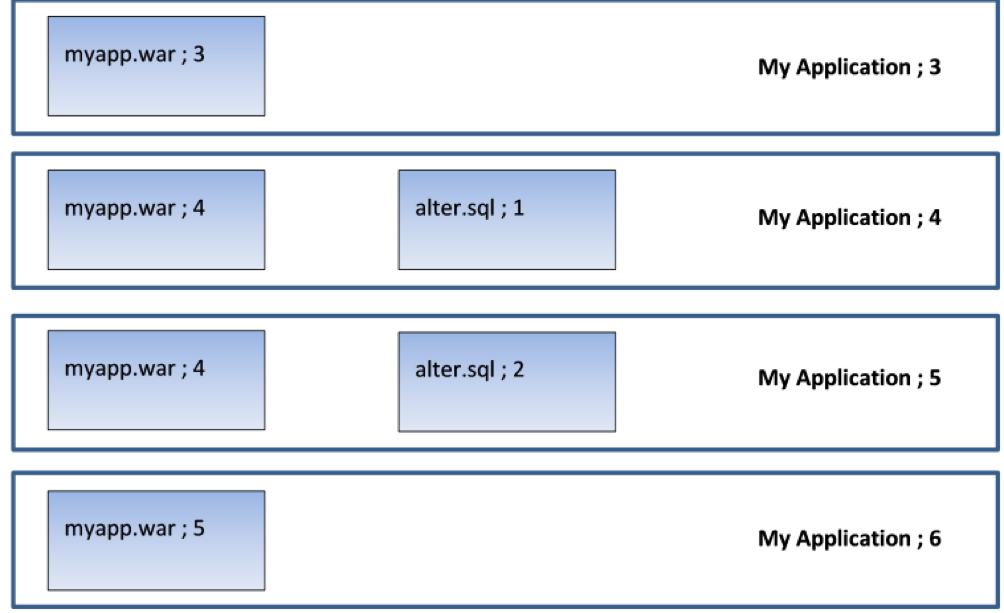
    Picture an application (“My Application”) that is up to version 6. It has two components: a WAR file and a database component that contains alter scripts that roll the database schema forward. Here is what the last four versions look like:

    So version 3 has a new version of the WAR file; version 4 has a new version of the WAR file and a database alter script that adds a column to a table. Version 5 only changes the database (it amends a stored procedure which uses this new column). Version 6 applies a new change to the WAR file.

    Now, in a continuous delivery process, the test rig being targeted will receive each new version. So when version 4 is deployed, the rig will receive version 4 of the WAR file and the alter script will be executed to add the column to the table. Then, when version 5 is deployed, only the DB alter script will run (alter.sql;2) to amend the stored procedure. The WAR file is not deployed, since the server already contains version 4 of the WAR file. When version 6 is deployed, only version 5 of the WAR file is deployed. This is exactly what we want.

    But now what happens when we move to user acceptance testing (UAT)? By this stage, we’ve done as much automated testing as we can get away with; in UAT, real users need to log on to our test system to make sure they’re happy with everything. So we’re not going to do a “push.” In UAT, the test lead does a “pull” when they’re ready to accept the new version of the application for testing. So they pull “My Application Version 6” into their test environment and get their testers lined up with coffee and pizza.

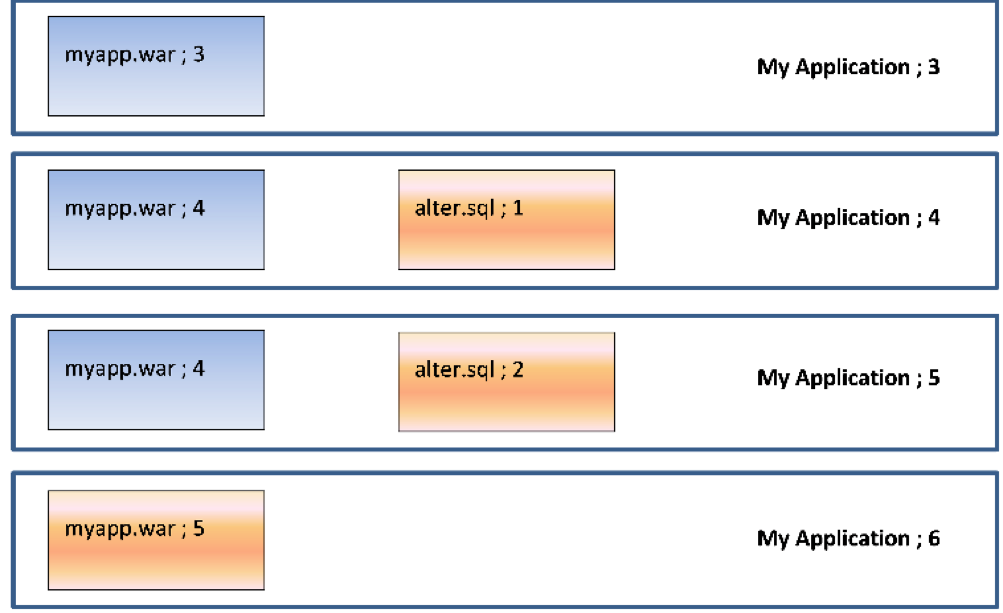
    But what happens if the test environment is currently on version 3? Well, for the WAR file, there’s no problem—there’s a difference in the component version for the WAR file so the new version is deployed. But what happens to the database? There are no alter scripts associated with version 6 of the application, but without applying alter.sql;1 and alter.sql;2, the database schema is not going to be valid for use with myapp.war;5. The testing will fail, not so much “falling at the first hurdle” as “falling in the paddock.”

    Deltas allow us to cure this issue. What we need to do is identify the components that represent the database changes and get them to be applied in sequence for each interim version. In that way, successive database “deltas” are applied to roll the database forward to the correct schema version before the required version of the application is deployed.

    So, in our case, going from version 3 to version 6 would deploy the following components:

    So we will deploy (and run) alter.sql;1 to add the new column, then alter.sql;2 to amend the stored procedure and, finally, deploy myapp.war;5. Deltas mean we do the minimum required to get the application version to the desired state.

    Conclusion

    Versioning the components that make up an application means it is easy to determine the deltas (changes) between one application version and another. Recording what version(s) of the components are on the endpoints in a target environment makes it easy to only deploy the components that have changed, minimizing downtime and making the deployment quicker and less error-prone. Identifying the deltas for a database gives us the ability to roll databases forward and jump between releases, which is invaluable when transitioning from an agile “push” to a waterfall-centric “pull” deployment model.

    — Phil Gibbs

  • How Much QA is Enough in Software Development?

    How Much QA is Enough in Software Development?

    People working in quality assurance as testers, managers or engineers know what it’s like having to justify their existence; it’s been part of the job for many years. QA experts have had to fight the perception that what they do is a bottleneck, overkill and it slows everyone down.

    Finally, however, QA is getting the attention that it deserves. Companies are gradually investing more in QA skills and tools. This began with the onset of Agile and DevOps—methodologies which have now infiltrated mainstream software development practices everywhere. Since those practices focus on speed, efficiency and quality, engineering leaders have grown to understand that great products are not achievable without adequate QA checks and balances. Another risk is the unflinching nature of high user expectations: Thanks to social media, one user complaint can quickly escalate into others across the web, creating an uncomfortable perception problem for the software provider.

    Robust testing practices can prevent egregious flaws in the software that result in poor user experience and performance—or, worse, a breach. True, testing can sometimes get in the way of speed. Yet no matter how fast you release a product, if it doesn’t work well, no one’s going to buy it, much less use it.

    Nevertheless, we can continually improve the QA practice to fit into modern development teams’ workflow. Testers need to work with developers and master automated testing, while developers need to sometimes engage in testing; everyone should think about the appropriate level and amount of testing. You can have too much of a good thing.

    The Right QA Balance

    The below ideas can help your organization reduce conflict between QA aficionados and those who would rather code and release as fast as possible.

    1: Assess, analyze and report. Developers and testers alike are highly technical; they like numbers. Therefore, the more that the QA team can quantify the risk of an application, provide evidence as to the effectiveness of current QA practices and use metrics to show the need for more QA resources when warranted, the faster that everyone will get on board.

    There are plenty of tools that can deliver common quality metrics such as total number of defects, defect leakage, test coverage, test pass/fail rates, test completion rates, code coverage and application uptime. It’s important to share and discuss these metrics throughout the development team and with product and business managers. What constitutes high quality for the development team may not be the case with executives who are closer to the end user/customer.

    2: The gut check. After metrics, take into consideration the comfort level of your team and company concerning product flaws. In regulated spaces, or for applications that collect sensitive private data, the tolerance for bad code and security gaps is usually low. Gather feedback from different perspectives and roles in the organization for a balanced perspective on the QA practice and areas for improvement.

    3: Get people involved. Quality assurance is no longer a separate activity from development; especially when you are practicing Agile and DevOps, the responsibility for quality is shared. Therefore, developers, business analysts and operations managers all should be doing their work with an eye to quality, delivering feedback regularly to the QA team. Provide opportunities and incentives for any team member to attend events and training related to software quality.

    4: Streamline testing. Test automation tools are helping product teams be more comprehensive in testing, by automating low-risk test cases so that testers can focus their exploratory and manual methods on high-risk or new features. This is a positive development, although testers must take time to learn how to use the tools. Some other ways that can help teams be more efficient in testing include:

    • Conducting more testing early in the sprint. This avoids the 11th hour disaster of finding a major flaw right before the release deadline.
    • Per Agile methods, dividing development tasks into smaller chunks with team members from different disciplines to ensure testing is being done all the time and with visibility by all.
    • Using test driven development (TDD) or behavioral driven development (BDD), which requires that QA, developers and business stakeholders meet at the beginning of a project to agree upon requirements and test cases. Developers then write code against the test, until it passes. New tools are helping bridge the gap by writing requirements and user stories in plain English.
    • Outsourcing part of the testing load during a major project, which can help increase coverage and reduce stress on your team. However, understand that too much outsourcing will undermine any efforts to develop QA as an internal best practice and “mindset” for software teams.

    If your team is committed to QA as a best practice, not an afterthought, those at the top will need to invest properly in the right tools, training and people to get results. Misconceptions about QA still exist; contrary to the view of some DevOps experts, we can’t (and shouldn’t) automate every test. As well, even though developers are now testing the code they write, you still need experienced testers on your team. With the pace of innovation and the high stakes in the marketplace, organizations need more—not fewer—people engaged in testing.

    For testers who love their job, as many of them do, it’s an exciting time to be in the field. Companies increasingly are seeing the value of QA and testers continually are gaining more tools and tactics to excel at helping their organizations produce really great software.

    About the Author / Kyle McMeekin

    Kyle McMeekin is Senior Sales Engineer at QASymphony. Prior to QASymphony, he was a programmer analyst at Cognizant Technology Solutions. Connect with him on LinkedIn.

  • The Tester: Saving Your Soul in a DevOps World

    The Tester: Saving Your Soul in a DevOps World

    Software testers have seen their careers go through some ups and downs in recent years. In the days of Waterfall, the tester’s job was clearly defined. Like other functions of software development and delivery, testers lived in a neat and tidy universe, testing features and design, finding bugs, sending back feedback to developers for correction and eventually, passing off code to the production people to work their magic. Testers had discrete roles with strong value propositions in the software organization.

    Then, Agile came along and new teams were created, lumping together developers, QA and Ops people for the sake of better collaboration and efficiencies. This began to create some confusion regarding who was responsible for what, when.

    DevOps brought order to the process, adding automation to every step, speeding cycles and reducing bottlenecks in a highly standardized, streamlined approach. In the continuous delivery pipeline, each step of the process creates its own contract for software quality—and that’s good.

    Development teams still value high quality, which customers demand. Yet in some DevOps circles, there’s been talk that testers aren’t needed much anymore. They bring bottlenecks to the process, forcing developers to work outside of the DevOps toolsets for code management and testing to respond to a defect ticket posted by the tester in an issue tracking tool.

    Eliminating that layer of process helps developers be as efficient as possible using continuous integration (CI) tools, proponents say. As well, some developers are more than comfortable handling testing, using test-driven development (TDD) methodologies.

    On the other hand, there’s faulty thinking here. Testers, whether deploying manual or automated testing methods, provide a valuable second set of technical eyes. Testers have a solid take on the user experience perspective, not just the fact that the code executes correctly.

    This human behavior and design insight is critical to the ultimate success of a software application. Finally, not all developers want to spend time testing nor have the skills to do so outside of unit testing.

    Moving forward into this new age of DevOps, testers play a vital role. The distribution of the tester into each phase of development (rather than at the end) is necessary to maintain both high standards of delivery and to keep communications fluid between different parties.

    Here’s how testers can contribute to DevOps teams:

    Testers need to be included in the continuous integration process

    Developers might be automating their unit test coverage, but they don’t replace all the test activities a tester can bring to the table. There are still other types of functional and non-functional test activities that must occur to validate the health of the product. Instead of transferring more testing responsibilities to the already overworked developer, testers can integrate their processes and systems with those of developers.

    Although there are version control tools (GitHub) and feature tracking systems (JIRA) to help developers, testers are often disconnected from these central tools. To connect with developer tools, testers can start creating and versioning their test cases within those development platforms. By doing so, testers can radiate feedback to the development team on issues to fix quickly through source code check-ins and in a way that won’t disrupt the normal flow of work.

    If testers can learn to use the DevOps tools developers love, much of the conflict goes away.

    Testers should increase their adoption of test automation, no matter their skill level

    Testers can learn newer test automation driven frameworks, especially those that help with transitioning manual test cases into automated scripts that can be reused, such as Cucumber or Gauge.

    For example, Gauge allows testers to write test specifications in Markdown, which provides a simple transition to automate your favorite programming language. These newer tools help testers transition to test automation despite not having experience writing tests this way—a common issue for testers working in DevOps.

    A growing number of test case management providers are starting to integrate their test design and execution around these automation frameworks to make the manual to automation transition smoother.

    Although developers might have automated unit test coverage, they struggle with developing functional and user acceptance automated tests. Testers can provide value by suggesting to the development team which are the best areas for test automation based on common issues and their unique knowledge of the application.

    They also can recommend areas for exploratory or manual test execution, depending on application complexity. This is especially helpful when teams starting down the path of DevOps do not have a regression test suite built that can be triggered through CI.

    Testers should focus on quality over finding defects

    Developers often complain that when testers find defects, it slows down their development processes. On a fast-moving Agile or DevOps team, filing bugs in a defect or issue tracking system is a total waste of time and creates unnecessary clutter.  Developers want instant feedback on code that’s broken and the related feature, rather than seeing another defect ticket they must open and close upon fixing.

    Therefore, testers should be giving feedback directly to the features that are being developed within a branch of code. They can do this through adopting tools that facilitate “ChatOps,” such as HipChat and Slack, which can integrate with version control systems. Testers can also provide direct feedback through a commenting system on the feature itself.

    With the advent of Agile and DevOps, which emphasize speed and frequent releases, testing is more important than ever in software development. By making some slight modifications to how they work and the tools they use, experienced testers can add considerable value to these teams by providing another layer of quality checks and a holistic view of an application’s performance and usability.

    About the Author / Ryan Yackel

    Ryan Yackel is Director of Product Marketing at QASymphony. He is responsible for all marketing activities around product releases, including development of strategic messaging. Ryan also helps to train the Sales teams on key value propositions for new products and features, and he provides customer feedback to the product team for roadmap initiatives. He can be found online at Twitter and LinkedIn.

  • Test-First Development: Processes and Tools for Success

    Test-First Development: Processes and Tools for Success

    A lot of software development teams are talking about “test-first” methodologies. The practice involves moving testing up into the very earliest stages of development so automated tests can be written before code. Making this seemingly minor shift can result in much higher quality software and greater efficiencies. Integrating development and testing avoids needless late-stage bugs and complicated redevelopment efforts. It can help software development organizations focus on usability and features and achieve faster time to market. And because of test-first’s reliance on automated tests, organizations gain reusable tests, saving time and increasing standardization for testing and quality assurance overall.

    It’s no surprise, then, that 51 percent of organizations have begun using test-first methodologies, including 37 percent in the past year, according to a recent global survey of 200 software testers conducted by our company. But, despite the enthusiasm for this practice, there are concerns: 44 percent of survey respondents said their biggest fear about moving to this approach was forcing developers to contribute tests prior to completing code, while 19 percent said they worried about removing traditional testing checkpoints on the way to production. Other barriers include the lack of standard practices or tools. That said, test-driven development promises to bring ample benefits to software development teams, the business and, importantly, customers.

    Test-first development is recognized across three broad terms today: behavior-driven development (BDD), test-driven development (TDD) and acceptance test-driven development (ATDD). TDD is an umbrella term for the practice, although it has traditionally focused more on technical, unit testing. BDD and ATDD incorporate user requirements and business benefits along with technical testing. BDD differentiates through its adoption of specific automation frameworks and language for writing and running tests.

    Key Changes for Successful Test-First Development

    Getting started requires change across a few critical areas for most teams. First, evaluate your team for hiring and skills training needs. On the one hand, developers will need to learn basic testing skills, so they can write good tests and run tests before they develop code. Meanwhile, testers must become more proficient in automated testing tools, which usually entails acquiring a fundamental knowledge of programming. Many companies will need to hire key contributors from outside; in which case, leaders should look for well-rounded individuals with past experience using test-first methodologies successfully. An individual who is an expert at one skill, or who is too independent and can’t collaborate well, won’t be an ideal member of a team experimenting with test-first approaches. Leaders also may need to adjust by balancing the ranks more closely between developers and testers so that one group doesn’t rule over the other. Hiring additional experienced testers frequently will be necessary.

    Training of existing staff is paramount, best achieved through a combination of methods including internal training, mentoring, online courses and paired development, where developers and testers can sit side by side and collaborate. More than half of the survey respondents said developers and testers would be jointly responsible for automation test creation within their organizations.

    Beyond cross-training, the cultural challenge of moving to test-first methodologies can be overwhelming. It requires the development of incentives for creating quality products, not just delivering new features at speed. It requires an appreciation and respect for the practice of testing. Unfortunately, testing too often is viewed as a necessary cost of doing business, rather than bringing a clear benefit to the organization and its customers. That mind shift is not only inaccurate, but it doesn’t fly with progressive, Agile thinking. It will take strong leaders to help traditional teams understand the need to change and modernize practices. A leader may forego the buy-in process and instead decide to lay down the law to staff: Staff must move to TDD or BDD, or else. But the results won’t be ideal. Smart developers will find loopholes, such as writing tests that aren’t comprehensive or fully aligned with project goals, so the code will pass more quickly.

    On the process front, organizations that have moved or are moving from Waterfall to Agile and DevOps will have an easier time adopting test-first methodologies. In fact, it’s pretty difficult to implement test-first processes and tools in a Waterfall environment because of the siloed nature of functions and the long release cycles. The survey results support this premise: 55 percent of respondents said their testing process was Scrum/Kanban-driven before transitioning to test-first, while 21 percent said their approach was iterative-requirements driven and 18 percent was Waterfall-requirements driven.

    Along with that shift, test-first teams will need to adopt new metrics that align with this new way of doing business. Instead of looking solely at velocity, development leads should measure how long it takes the team to move a product from feature approval to code release. With a focus on quality and testing, companies also should measure and improve upon bugs, such as number of severe defects post-production. Those types of business and customer-oriented metrics align with the new set of Agile metrics that that many teams are working for today.

    Test-first teams will need to adopt DevOps toolsets, which are designed to push code out to the pipeline faster. Specific technologies that go hand in hand with test-first development include:

    • Continuous integration (CI) platforms such as Jenkins and Team City, to assist in running the automated tests immediately for quick build feedback.
    • Container technology for rapid deployment of test and pre-production environments, to capitalize on having features production-ready soon after coding.
    • Test management platforms including qTest Scenario or Cucumber Pro.
    • Test automation frameworks including Cucumber, SpecFlow , and other open source tools which enable easier support for customization and collaboration.

    There’s a lot to think about when moving toward test-first development. While it may seem overwhelming at first, all of this is achievable in a reasonable time frame if you have the right dedicated resources to see it through. One-third of survey respondents said it took them less than three months to complete the transition to a test-first approach, while 30 percent said it took less than one year. The payoff for software teams, in terms of improving quality, customer experience and reducing costs of innovation, can deliver higher customer loyalty and even faster growth in the marketplace.

    About the Author / Kevin Dunne

    Kevin Dunne picKevin Dunne is vice president of Business Development & Strategy at QASymphony.


  • 7 Reasons to Move to Parallel Testing

    7 Reasons to Move to Parallel Testing

    While development operations are more scalable now than ever, there is one area that continues to constrain the ability of organizations to scale: functional testing.

    Most organizations still rely on sequential tests to deliver quality assurance. No matter how rapidly a business can produce great products, its ability to bring them to consumers quickly is limited by its dependency on a slow, tedious testing process that does not adapt well to changing development needs or ever-faster business processes.

    That, at least, is the way things traditionally have been. But today there’s a replacement for sequential testing: parallel testing, which lets you leverage the cloud and virtualization to perform more tests at faster speeds than your physical infrastructure or homegrown testing grid could support on its own.

    What is Parallel Testing?

    First, a definition: Parallel testing is the process of running multiple test cases on multiple combinations of operating systems and browsers at the same time. The process is automated, and it often runs on virtual machines. For the QA professional, no additional effort is required once the appropriate test scripts have been developed. All the testing solution needs is the test suite and a pool of resources.

    Granted, new does not always equal better. But it is hard to make an argument against parallel testing, especially if you leverage a robust testing cloud. Here are seven key advantages of parallel testing to consider over sequential testing:

    You Can Test for Wider Compatibility

    Because parallel testing is faster, it allows you to test for wider compatibility in the same amount of time. If you’re releasing a new app and want to test the user interface (UI) functionality, you don’t have to limit yourself to testing against only the most popular OS and browser combinations or mobile devices—you can test all the combinations that are important to your users.

    You Can Radically Reduce Testing Time

    Good software testing must be thorough and comprehensive. In a sequential testing environment, it can be (and usually is) a very time-consuming process. Parallel testing can divide invested time (roughly) by the number of test machines being used in parallel, so that overall testing time is a fraction of that required for sequential testing.

    For example, if you are running 10 concurrent tests, you can reduce your testing time by a factor of about 10. This can cut days or even weeks from delivery time. This reduction in testing time also allows you to make more efficient use of your engineering team. They are freed from a set of necessary but time-eating and repetitive tasks, allowing them to concentrate on more forward-looking and innovative projects.

    Parallel Testing Optimizes Continuous Integration and Delivery

    Modern development best practices such as continuous integration and delivery require frequent and rapid functional tests. The execution of pre-scripted tests on a web or mobile app saves considerable time, plus having test data accessible in detailed reports is valuable to development teams who can use this information to quickly identify issues. Parallel testing in the cloud allows you to execute test suites continually as developers submit and integrate code changes throughout the day.

    The Cost per Each of Your Tests is Less

    Because parallel testing is automated and and can run at high concurrency in the cloud, the cost per test is considerably less. Leasing test time on a cloud testing service generally will be much less expensive than building and maintaining your own test infrastructure.

    Even the common practice of using development hand-me-down computers as test machines has its costs and practical limits. For example, as used systems age, they require more maintenance and they become less capable of duplicating real-world deployment conditions. Cloud-based testing grids mean environments have high availability, and they are up-to-date, making parallel tests the better option.

    It Supports Testing Science

    Parallel testing enables teams to focus on making tests repeatable, measurable and accurate. By simply testing faster, you can test more, and testing more produces more actionable data to find bugs and also improve test cases. Automated parallel testing delivers strong data on test results with key indicators of where tests can be improved. The net result is a test process that is more scientific.

    You Can Still Perform Sequential Tests, If and When Needed

    Parallel testing simply offers a different framework for testing, which can easily accommodate most or all of your existing test regime. This means that transitioning from sequential to parallel testing does not force you to sacrifice test targets, strategic testing goals or test quality.

    If anything, moving to parallel testing increases the range and depth of your test program, allowing you to better meet your test goals and it improves the quality of your testing. When you make the move to parallel testing, you are not abandoning traditional software testing. You are simply applying modern development practices and technology to it.

    You Do Not Need to Make the Switch to Parallel Testing All at Once

    The great thing about parallel testing is that you can transition to it in steps, starting with the tests that are most easily converted to parallel, then adapting some or all of the remaining tests after your team has had time to adjust to the parallel testing environment. Once you have started to use parallel testing and have integrated it into your development process, it is easy to expand the quantity and scope of parallel tests as the need arises.

    Conclusion: A Faster Test Run is a Penny Earned

    The faster you run a test, and the more tests you run, the more frequent the releases and the more defects you can find. The math is simple. Parallel testing in the cloud decreases the cost of maintaining test infrastructure, the cost of lengthy testing cycles, the cost of delayed releases and, finally, the branding cost of unhappy customers due to poor application quality.
    Even without changing the way you test, a shift to a parallel testing environment will provide an immediate speed enhancement—which means every test that still runs serially is a cost that can be avoided. And every test run in parallel is an opportunity to test your application better and faster at the same time.

    About the Author / Lubos Parobek

    Lubos ParobekAt Sauce Labs, Lubos Parobek leads strategy and development of Sauce Labs’ web and mobile application testing platform as VP of product. His previous experience includes leadership positions at organizations including Dell KACE, Sybase iAnywhere, AvantGo and 3Com. Parobek holds a Masters in Business Administration from the University of California, Berkeley.