Tag: test

  • Improvement Cycles and AI

    Improvement Cycles and AI

    It’s that time of year when pundits start to crank out their predictions for the next twelve months! I’ve been asked to contribute to a private group (and occasionally, Techstrong Group asks me to contribute to their annual list), so I won’t thrill you with my predictions just yet; but I will discuss the cycles and trends that previous predictions have shown.

    Back when I was testing physical servers, we thought of throughput bottlenecks in terms of where the problem was. The circle would go disk->memory-> CPU, and in the case of things like NAS, insert network in there somewhere, too. When one bottleneck was resolved, another would crop up. And users will always seem to be pushed to the next bottleneck.

    We see similar cycles in DevOps. First, Agile made development faster, and that caused us issues throughout the rest of the process. Then, DevOps helped with the build and a little with the testing and deployment steps, but in the early days it was more standardization than speeding up. And since then, we have been in that cycle. We’re seeing GitOps speed up and automate deployment and upgrades—based upon the automation that came before—we’re seeing test and security tools feeding directly into the IDE to speed resolution, we’re seeing container automation cause “cloud-first development” (I hate that name; Kubernetes has cloud-like interfaces, but is not precisely cloud) to be fully automated, and thus faster.

    And we’re looking at that cycle continuing. No doubt you will hear a lot of predictions that start with “AI …” For the most part, AI is a tool and/or technique. Listen for what it is improving because it is doing very little that’s actually new. (Delete list of things that sounded alarmingly like those predictions I said I wouldn’t make.)

    All in all, we are still living in a very cool technological time. We can have a tool generate code snippets of the dull work for us so we can focus on the important bits. Some shy away from this use of “AI,” but honestly, we already use libraries to do the grunt work—I haven’t written to a screen buffer in forever—because we don’t have to. Same story—use the tools that make you productive. Some of the more obscure bits of Linux command lines are far better dealt with by asking an AI to give me examples than searching through tons of docs across several platforms. Never was much of a fan of man output for complex commands, this makes it easier. The nice bit is that bash and UNIX utilities don’t change much over time, so answers can be a bit dated and perfectly accurate. That’s not true for much of IT.

    The environment has consistently gotten more complex, while the building blocks have gotten easier to use. This allows things to keep moving and changing while it offers us better ways to serve the organization’s needs. This does change at some point—infinite change is indeed a thing, but any technology does have its limits—but I honestly can’t see the point at which we are content with our IT tools and stop looking for more. Oh, most organizations go through those cycles—organizationally, once an infrastructure and process works correctly, it is likely to hang around until better is found—but the industry will keep changing.

    And you’ll keep learning and changing. That’s one prediction I will make for next year. Teams and IT staff will grow and learn new things, because at its heart, that is what we do. We learn new things and keep the lights on. In good years, we offer sweet new tools and functionality to the company or our customers. But either way, we keep things online. Year after year. You all rock, so that’s an easy prediction.

  • Unused Code: Proving a Negative

    Unused Code: Proving a Negative

    We have a ton of code that is no longer being exercised. We really don’t talk about it much, but it’s out there. From feature flags shutting off code to API versioning making an interface obsolete, it’s just hanging around out there. Like an albatross. Waiting for someone to misuse it. Or, to address the more pedestrian concerns, confusing people new to the codebase. But that code is not contributing a thing.

    Easy example. You are on version 3.2 of your API. Version 2.1 is not called by anything, but the code is still hanging out there. It is not that 2.1 cannot be called, but that it is not currently called. The problem with that is that new devs have to work through what’s current, and since 2.1 and 3.2 probably share 95% of their code bases, what portion of that code base is unused? And the API is sitting there, waiting for someone to penetrate your network and find malicious uses for it.

    Proving a Negative

    But here is the problem: Identifying that a bit of code–be it an API, a method, just a few lines in an if statement, whatever–is never exercised is terribly difficult and, in highly complex environments, borders on the impossible (it is never impossible, assuming IT owns all of the code that could exercise that bit). The old adage about proving a negative absolutely applies. We can–and testing tools in both the functional and security spaces do–generate a list of code that is exercised, or identify code that isn’t being exercised. But not a list of code that is never exercised. That functionality in test tools is super useful, because it helps prioritize issues that are being used a lot and leaves the ones not seeing a ton of traffic for later resolution.

    But I’ll say that in most organizations, that’s no longer far enough. The cruft in your code causes problems, and you need to clean it up. If you’ve worked in IT for any length of time, you’ve been through the “Oh, that bug is because the developer called something no longer used” scenario at least once. And it is a straight-up waste of time.

    So here is my proposal. Test tools generate a list of what isn’t called from systems under test. Pick one–security testing or functional testing–and require it for any bit of code, no matter how small, to go into production. That means that the system knows about all source code and thus knows definitively if a bit of code has been exercised.

    Clean Up as You Go

    Is that a tall order? Yes. Testing isn’t free. But given a scenario where you reduce technical debt by eliminating excess code, I think it will pay for itself. And that is not counting the security posture improvement that reducing the code base implies.

    You’re running the systems that present your organization to the world, so you may as well do some due diligence on yourselves. Keep making cool new stuff and upgrading the old, but clean up as you go with some form of monitoring, this or a more procedural one, so the quality is high and the excess is low.

  • Shift That [bleep] Left

    Shift That [bleep] Left

    Seriously. The more you can shift things like security and test to the left, the more responsive the DevOps process will be. Some things are better shifted right … But only while solving the problem with shifted-left work. A good example is blocking zero-day attacks proactively while the development process fixes the code to stop the attacks permanently.

    One thing we in IT are terrible about is following up on that “fix it” part—because we are very busy. Once a problem is blocked, we tend to fight other fires because we have too many things going on. We have absolutely got to get better about that. But I don’t want to get sidetracked. Today’s topic is about fixing bugs/vulnerabilities as they are created.

    One of the issues with the way we used to handle test and security was that by the time we had “This is an issue we need to fix,” feedback, the developer was off doing other things. But with the increasing inclusion of security and testing in the DevOps process, we now have the ability to provide feedback far more quickly.

    My favorite innovation in the DevOps space is not some wild new bug/vulnerability detection feature, nor is it rampant use of AI (though some uses of AI do come close to being my favorite). It is the humble IDE plugin.  As a developer, writing buggy or insecure code is never the goal, but it happens every day. IDE plug-ins, hooked into test and security software, allow developers to get a heads-up that there might be an issue while writing the code. This not only addresses the problem while it is fresh in the developer’s mind, it also allows developers the opportunity to improve their craft simply by understanding which issues they create often and learning how to avoid them.

    We have all written bad code. I once actually over-wrote databases for a bank; it was a great humbling and learning experience for a young hotshot who needed to be reminded he was not perfect when coding. Others no doubt have similar, if less catastrophic, stories to tell. The ability to get warned about issues—but quality and security—while writing the code cannot be overestimated. Some developers will hate it because it is more intrusive than the old school “Okay, all the code is written, you can test now,” process, but it is powerful precisely because it is more intrusive and proactive.

    The challenge for those in the testing and development security spaces will be to keep false positives at a minimum. I’d say zero, but I’d rather get the occasional “Oh, that. Yeah, not an issue in this case,” than go through having it tell me things throughout development and still end up with buggy/insecure code.

    You all are still rocking it. The amount of software in use every day across the world is staggering, and you’re cranking it out and keeping it maintained—whether you’re working on internal applications or commercial packages. You’re making it work. Take a look at QA and security IDE plug-ins, make an honest assessment of whether they could make your work more secure and/or higher quality. I think they can for nearly all of us. And they can save time by doing it earlier in the development process. And maybe you’ll get recognized for rocking it. Okay, probably not, but it is possible.

  • This Has Been a Test

    This Has Been a Test

    For nearly the entire history of application development—certainly since application development became available to a larger market with the adoption of the personal computer for expansive business use—testing has taken a back seat across most of the industry. This is not because we don’t care about code quality but because it takes resources away from developing cool new tools—or even products—and slows down release cycles. Historically, both of these issues have been huge. Manual testing staff grows quickly from a few people to a massive department and waiting for that process to complete could take forever.

    So, we’ve not done a lot of it. Oh, when executives or someone in leadership demanded more thorough testing, IT management would promise to do so and then—to fit within budget and time constraints—would tell developers to test their own code. There are several areas where you don’t ask the person responsible for creating the final product to review that final product—because if they knew they were doing something wrong, they’d fix it. Writing is one such area—that’s why good editors are worth their weight in gold, even in the age of the internet where anyone can (and too many do) spew onto the digital page whatever they like without the benefit of an editor. Another is testing application code. I test as I write my code, and like every person who has spent time as a professional developer, I have made a couple of stupendous errors. If I’d known that the particular weakness I left in the system was there, I would not have said it was done.

    When DevOps came along, I expected things to change—until I understood that DevOps (and Agile, in lockstep) was all about delivering faster, not better. Anything that slowed down the process—testing, security, even compliance, to an extent, that cannot be avoided—was frowned upon. When test-driven development (TDD) came along, I instantly developed a love/hate relationship with it. We used it for a project I was on and, frankly, it shifted quality concerns to the tests—the code could be forced to pass all of the tests, but how thorough and accurate the tests themselves were—particularly as the project grew and changed—became the question. Done right, TDD would solve a lot of our testing problems. Heck, even done wrong it would have taken care of most problems that simple unit testing could cover.

    But after decades, I think we are finally at the point where we can demand and require thorough testing with acceptable and growing coverage numbers. And you need to consider it. Test automation has come a long way and far too many of you haven’t come along with it. If you struggle to justify investing in test suites, I get it. I’ve been the manager that had to choose between improving DB performance and testing. But the modern iteration includes security testing. So if, out-of-the-box, you could get a  tool that checked for valid inputs and alerted to places where invalid data might break the application, that might help. And that’s just the simplest case. I’m currently working in an adjacent space, so I don’t want to get too crazy selling you here. I’ll just say, “Testing isn’t what it was even a couple of years ago. Check it out.” Both application and security testing. And the changes will continue to come as claims of using AI/ML turn into applying actual algorithms that your AI or data science people can compare to help choose a high-quality product.

    We could debate all day whether DevOps made apps more or less stable and secure, but we don’t need to. Finally, continuous testing is real. Check out the vendors doing this, compare them and see how easy it is to fit them into your environment. More stable, more secure, not the hold-up you have stuck in your head. What’s not to like? You are already rocking it; automated testing could make you look even better.

  • The Real Pipeline

    The Real Pipeline

    I’ve made no secret of the fact that DevOps was a game-changing advance in how the business of IT was done. But people tend to get religious about the methodology and forget the point. That’s okay, DevOps has its roots in that mentality. After years of thinking bad things about the authors of The Phoenix Project for portraying anything that slows the process–you know, like code quality or security–as bad, I have come to accept that absolutes were required to drive forward motion in the market. “We’ve always done it this way!” was king in IT, but the rest of the business was fed up. That book got the ball rolling and we’ve slowly but surely pushed back against the mentality that adding milliseconds (or even a week) to build times in the average enterprise has any impact worth mentioning. Oh, some people still claim it does, but we can convincingly make the code quality/security argument.

    It is funny to me that the first few years of DevOps were focused on “We’re gonna change your religion!”—wanting to force upheaval of the entire IT org chart without a thought to the fact that you still needed specialists in storage, ops, etc. to keep the lights on. The mentality was that development issues were a people problem. To a large extent, they were right; they just missed one people problem in the set of equations. Let’s look at the real pipeline that we all don’t talk about, but really should:

    Notice there aren’t tools in this chain; instead, there are groups of people. It is sad but true that the last two–representing acceptance testing and customer rollout–are almost always merged these days in all but a few organizations.

    This isn’t controversial; we still do the dev bit largely before the ops bit; the business has to decide what we want to offer the customer and customers are at the end of the line. And that is the key. Customers are at the end of the line. Now, I get to make you uncomfortable. Nothing in the above diagram matters except the first and last arrows. Think of it like this:

    What’s important in what we do comes down to two questions: “What does the business unit want to offer customers?” and “What do the customers expect of the business unit?” In this sense, “business unit” might be IT and “customers” might be co-workers. That changes nothing. What the business unit offers and what customers want is all that matters. The rest is implementation detail.

    Don’t believe me? It is an easy case to prove. Let’s try this one, with or without IT involvement, depending upon the problem being solved and the organization:

    The business unit determines what they want to offer, customers let their demands be known (one way or another) and the business offers the solution they think fits for the customers. As I said above, the rest is implementation details.

    What is your point?

    This leads me to the inevitable observation. Testing and security are:

    • Completely expected by users. They don’t want buggy software, and they don’t want to enter information assuming it will get nicked by hackers. There is no compromise here; users don’t “kind of want a product that works” nor do they want a product that “might be secure, but we’re not sure.”
    • Desired by the business. They have constraints on what is reasonable–the old meme of a server with the network cable cut is only funny because it shows extremes. But they absolutely do want the product or service they are offering customers to be stable and secure. “We can just spin out a new version” only works so often and for so long.

    So, your toolchains need to include stability and security tools—I would argue at every step of the process, but where and how much is really a business call. My security peeps will get upset that I called security a business call, but it is. You can choose to be non-compliant and insecure; the impact of those decisions on your organization is all on you. OTOH, of all the things that the organization (both the business generally and IT specifically) are focused on, you can afford to drop a few and get security and stability right the first time.

    Meanwhile, you’re keeping things running while we debate things like this. While I repeatedly refer to a large portion of my target audience as “implementation detail,” I’m sure you all know how much I (and many others) appreciate the rockstar job you’re doing keeping the IT org supporting the greater org.

  • Where Has All the Testing Gone?

    Where Has All the Testing Gone?

    Testing has long been a problem child of IT in general, AppDev in particular, and now it is DevOps’ problem. There are things that DevOps can do to improve the chances of tests actually occurring for your application(s). Interestingly, there are some that think we no longer need testing; the argument is that because new releases can be cranked out so quickly if something needs to be fixed that it is irrelevant. Combining feature flags with the ability to roll out a new version and, well, there may be some truth to that—at least for a limited subset of testing.

    If an organization implemented feature flags for user acceptance and new feature testing and then standardized on test-driven development for DevOps development teams, that would leave systems and security testing. Systems testing could, theoretically, be replaced by the ability to roll out a new version. Although systemic issues can be complex and difficult to fix, this is a riskier proposition than extending test-driven development to the systems level. For the sprint, assign a person responsible for the overall integrated system and have the rest of the team support them through the process of making certain all works as expected.

    Testing—particularly systems testing—slows releases. I get that. The rate at which most of us can iterate once DevOps systems and processes are in place is fast enough that you can afford a bit of slowdown. This leaves security testing as the last standalone bit. But some security validation can happen during the development process if DevSecOps tools are being utilized. That still leaves some security issues to test for but does remove a large chunk.

    The key to these last bits is to get them integrated into the process/toolchain. DevOps runs straight through, over and over. Any bit worked into the “runs straight through” will be executed. If today’s iteration falls for the “We ran over, we’ll make the deadline with less testing” mentality; not an issue—it’s one iteration. Just don’t let that become the default answer to someone not completing an iteration’s work on time. Development can have unexpected speed bumps that delay delivery and acknowledging that and documenting what it was for future reference is important. Covering it up by reducing testing time risks a less stable product and does not help overcome the issue in the future.

    So start thinking in terms of DevOpsTest. Make sure the product you are delivering represents the massive time investments you’ve made producing and maintaining it. You’re rocking it—and something like integrated testing ensures that users see how great you are rocking it and not an error page.

  • All Day DevOps: Capital One Gives Credit Where It’s Due

    All Day DevOps: Capital One Gives Credit Where It’s Due

    Listening to his talk, it seems as though George Parris and his team at Capital One aren’t keeping “banker’s hours.” George is a Master Software Engineer, Retail Bank DevOps at Capital One. At the All Day DevOps conference, George gave a talk, titled “Meta Infrastructure as Code: How Capital One Automates our Automation Tools with an Immutable Jenkins,” describing how the team automated the DevOps pipeline for its online account opening project for Capital One, a major bank in the United States. Of course, there is a lot to learn from their experience.

    George started by pointing out that software development has evolved, coming a long way even in just the last few years. Developers now design, build, test and deploy, and they no longer build out physical infrastructure—they live in the cloud. Waterfall development is rapidly being replaced by Agile, infrastructure as code and DevOps practices.

    Where we see these technologies and methodologies implemented, IT operations teams are acting more like developers, designing how we launch our applications. At the same time, development teams are more responsible for uptime, performance and usability. And, Operations and Development work within the same tribe.

    George used the Capital One Online Account Opening project to discuss how they automate their automation tools, now a standard practices within their implementation methodology.

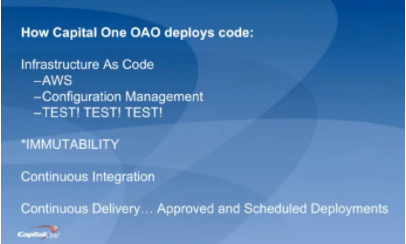
    For starters, George discussed how Capital One deploys code (hint: they aren’t building new data centers). They are primarily on AWS; they use configuration management systems to install and run their applications; and they “TEST, TEST, TEST, at all levels.” Pervasive throughout the system is immutability; that is, once created, the state of an object cannot change. As an example, if you need new server configurations, you create a new server and test it outside of production first.

    They use the continuous integration/continuous delivery model, so anyone working on code can contribute to the repositories that, in turn, initiate testing. Deployments are moved away from the scheduled release pattern. George noted that, because Capital One is a bank, regulations prevent its developers from initiating a production change. They use APIs with the product owners to automatically create tickets, and then product owners accept tickets, making the change in the production code. While this won’t apply to most environments, he brought it up to demonstrate how you can implement continuous delivery within these rules.

    Within all of this is the importance of automation. George outlined their four basic principles of automation and the key aspects of each:

    Principle #1 – Infrastructure as Code. They use AWS for hosting and everything is in a Cloud Formation Template, which is a way to describe your infrastructure using code. AWS now allows you to use CFTs to pass variable between stacks. Using code, every change can be tested first, and they can easily spin-up environments.

    Principle #2 – Configuration as Code. This is also known as configuration management systems (they use Chef and Ansible). There are no central servers, changes are version-controlled, and they use “innersourcing” for changes. For instance, if someone needs a change to a plugin, they can branch, update and create a pull request.

    Principle #3 – Immutability. Not allowing changes to servers once deployed prevents “special snowflakes” and regressions. Any changes are made in code and traverse a testing pipeline and code review before being deployed. This avoids what we all have experienced: the server that someone, who is no longer around, set up and tweaked differently than anything else and didn’t document what was done.

    Principle #4 – Backup and Restore Strategy. A backup is only as good as your restore strategy. You know the rest.

    George also dives into how they do continuous delivery/continuous integration in his talk, which you can watch online here.

    If you missed any of the other 30-minute long presentations from All Day DevOps, they are easy to find and available free of charge here.  Finally, be sure to register you and the rest of your team for the 2017 All Day DevOps conference here.  This year’s event will offer 96 practitioner-led sessions (no vendor pitches allowed).  It’s all free, online Oct. 24.

    — Derek E. Weeks

  • What Happens to Test in a DevOps World?

    What Happens to Test in a DevOps World?

    I am always surprised by the urban legends around DevOps. One of my favorites is, If you implement a DevOps methodology, you can stop doing test. People famously quote that Netflix only tests in production as evidence of this. This is perhaps more like of game of Telephone, where much of the story gets lost in translation. It is true that Netflix created a tool called “Chaos Monkey” which generates failures in production as a way to test the fault tolerance of its software in large-scale production use.  However, this is not Netflix’s only test; it is an additional type of testing at scale that allows the company to test in new and different ways. Netflix still tests in software development.

    Okay, now that we are past the notion that DevOps is about eliminating testing, let’s look at what really happens with test in the DevOps world. In fact, the goal is for testing to happen everywhere and all the time. Let’s look at the two directions test can shift: left or right.

    Shift Left

    DevOps methodology encourages automation of activities across the entire development process. This can be realized by automating the link between development and test. Often implemented with an automated build tool such as Jenkins, a set of automated tests are triggered whenever a developer completes a build of new code. Of course, this means that both development and testing processes must be automated. Once you reach this goal, then testing can happen all the time. Every time developers want to check in new code, they can trigger a small set of “smoke tests.” If those succeed, they can check in code and when the build happens, they can trigger a larger set of regression tests. The result is a left shift of testing into development.

    Benefits of left-shifting test include:

    • Move testers into scrum teams to work on stories together with developers.
    • Design tests in parallel with development.
    • Give developers and testers the flexibility to help each other to reduce bottlenecks.
    • Early detection of bugs, shortening the critical metric for time between creating a bug and fixing it.
    • Increased transparency of code dependency issues because they are raised during the nightly (or more often) regression testing.
    • Virtual elimination of the test bottleneck that occurs after development is completed.

    Shift Right

    The urban legend about Netflix may be wrong, but that doesn’t mean that there isn’t merit to right-shifting test into production. Automated testing in production is effective for tests that would be impossible to perform outside of production, including scale testing and resiliency testing. Production is also a great place to introduce A/B testing by offering different interfaces to some customers and measuring the differences in business results.

    Benefits of testing in production include:

    • Better understanding of the real production environment and workloads.
    • Early feedback from customers on new features and user experience.
    • Better resiliency.
    • Overall better user experience for customers.

    No Shift

    Wait, if we shift left and shift right, is there any testing left to be performed in test? There are still a range of tests that need to be performed by the test team. With full automation, these tests can be performed at a variety of times and don’t need to be a bottleneck to release.  These tests include:

    • Performance testing
    • End-to-end use-case testing
    • Security testing (don’t think about doing this in production!)
    • Manual testing – often for user interface or mobile testing that is most difficult to automate

    DevOps methodology is not promoting the end of testing, but in fact a widening of testing to encompass all of the steps in the DevOps cycle. You know what they say: Test early and often! And next time you are sitting around the campfire discussing urban legends, let’s leave Netflix out.

    About the Author/Joan Wrabetz

    Joan's image croppedJoan Wrabetz is the CTO for QualiSystems. Most recently, she was the VP and CTO for the Emerging Product Division of EMC. Joan received her MBA at the University of California, Berkley, and MSEE at Stanford, and a BSEE at Yale. She has held teaching positions at the University of St. Thomas, St. Mary’s University and the University of St. Thomas, St. Mary’s University. Joan holds patents in load balancing, distributed systems, and machine learning classification and analytics. Her experience inclues: founder and CEO of Aumni Data, CEO of Tricord Systems, Vice President and General Manager for SAN operations at StorageTek, Founder and CEO of Aggregate Computing, Management and senior technical positions at Control Data Corporation and SRI International, Partner with BlueStream Ventures.

  • Test-Driven Development (TDD) Drives Smart Developers at Smartling

    Test-Driven Development (TDD) Drives Smart Developers at Smartling

    Supporting Swift Cyber Business Ramp Ups Around the World with Translation and Localization Sped by CD

    Smartling technology enables the business to quickly translate content in websites, apps, and documents into any language in the world. “We streamline all the non-linguistic work associated with the translation,” says Andrey Akselrod, CTO / Co-Founder, Smartling, a translation management platform provider for localization anywhere, globally. Using the Smartling platform, companies upload content, making it instantly accessible by a Smartling translator partner or a translator that the company acquires independently.

    I viewed the Smartling demo and I can tell you that the platform offers many innate, seamless, intuitive abilities. Briefly, it allows the translator to largely automate translation, localization, and content re-use and editing against a backdrop of how it will appear on a website, in an app, and in electronic documents. The platform includes workflow automations to speed translation along to the next stage in the project. “This allows for a reduction in complexity, cost, and time for the translation process, without sacrificing the high-quality translation that only a human can do,” says Akselrod.

    The TDD Testing Secret Sauce

    Smartling developers first write automated regression tests for the code they are about to create. Then they confidently code their software knowing how the tests will challenge the code because they wrote the tests themselves AND did so before they wrote the new feature or innovation. This process accelerates development because the programmers write the code knowing what it takes to ensure that it won’t break anything. This enables Smartling to deploy live code as many as ten times per day, according to Akselrod.

    Test-Driven Development (TDD) saves on refactoring and validates the tests. Smartling discovered this when certain test and development issues disappeared after they moved to TDD. When you code the tests after writing the software that you need to test, you may have to refactor your code so that it is suitable for testing. “You find yourself in a position of doing refactoring without tests to validate that the code still works,” says Akselrod. There’s an old carpenter’s saying that you should “measure twice and cut once” to make sure you don’t waste what you cut or have to cut again. But this sounds like the reverse, expecting the coder to cut (code) twice and then measure. The absurdity in that is self-evident.

    Developers who must create tests after they innovate their software don’t test whether the tests could fail. “This results in low-quality tests. We’ve discovered this the hard way—we had pretty good test coverage, but a number of bugs in the code base led us to discover that our tests were failing,” says Akselrod. TDD resolved all this, saving time, energy, and investment, and satisfying customers.

    Though these automated tests run much faster than manual regression tests do, Smartling gauges test performance over time and refines testing efficiencies to ensure that tests keep pace with accelerating deployments. “We distribute test execution among multiple servers to make sure that the tests run as quickly as possible,” says Akselrod.

    Can Get Enough of That TDD

    Developers find themselves obsessed with the TDD development process for the prompt props they receive as they deploy code directly rather than wait to see it run successfully. “TDD makes for quick customer feedback. Customers are thrilled because we react to their requests quickly. This fosters an exciting and fulfilling conversation between developers and customers,” adds Akselrod.

    TDD’s competitive advantage wets the appetite for market penetration. TDD moves Smartling through the OODA decision cycle at an accelerated rate. “Modern software development cycles through an OODA loop such that developers Observe, Orient, Decide, and Act. If your OODA loop is faster than your competitor’s is, you win,” says Akselrod. TDD enables Smartling to rapidly deploy, respond to the customer base, and instantiate innovations, expediting aggressive market growth.

    Results

    Customers are seizing the benefits that savvy platform provider Smartling serves. As this throng of growing businesses increasingly hitches its wagons to Smartling, Smartling in turn sees three-billion page views per month in traffic flowing through its Global Delivery Network of translated dynamic pages, according to Akselrod. No matter how you slice it, three-billion is a number you simply cannot explain away.

  • Choosing a Mobile Test Automation Solution: What You Need to Know

    Choosing a Mobile Test Automation Solution: What You Need to Know

    Organizations today rely more and more heavily on mobile apps to drive their business. In fact, many companies are already seeing more than half of their web traffic coming in via mobile devices. In some cases, their mobile app is the only way customers interact with their products.

    It’s no surprise, then, that developing, testing, and releasing quality mobile apps quickly and efficiently is a high priority for most organizations—as it should be! Fortunately, mobile development tools are evolving to meet these needs, with modern dev teams having access to better test automation than ever before.

    Of course, the effectiveness of a mobile testing process is only as good as the technology behind it. This makes it even more crucial for organizations to know what factors are most important to take into account when choosing or building a robust mobile testing solution. Below, we outline some key things to consider:

    Native, Hybrid, and Mobile Web Support
    Modern mobile applications come in three different flavors: native, hybrid and web. Native apps are built using the vendor-provided SDKs. Hybrid apps run some or all of their functionality inside a webview embedded in a native app. Finally, mobile web apps are simply mobile-optimized website that users access through their mobile browsers. While there is a growing trend towards mobile web and hybrid applications (rather than native), to ensure maximum flexibility and impact of your QA solution, it’s important that you choose a tool that supports all three kinds of apps.

    On-Demand Cloud Testing
    With QA teams becoming more and more distributed, it makes sense to ensure that your mobile application testing solution includes a cloud component. Leveraging an automation cloud enables teams to use organize around a single implementation of test architecture, with devices and test result data accessible from anywhere in the world. You can spend your time worrying about your testsuite, not the cost and maintenance headaches associated with keeping up multiple home-grown device grids and architectural patterns.

    Automation
    When it comes to mobile testing, automation is essential. Choosing the right automation frameworks (Selenium, Appium, etc…) and test tools (languages, test runners, etc…) can be a challenge, and it’s important to think about all the factors involved in getting a solid mobile build process going, relative to the expertise your QA team possesses. What kinds of user flows will you need to automate, and can the automation tool support them? Do you want automation code mixed in with your app code or cleanly separate? Is automation support available for the languages and tools you know best? Think about building a testsuite with the same level of architectural foresight as you would building an app.

    Integration with Key Support Systems
    It’s also important to consider what level of integration is needed with support systems in your environment – whether it’s a test management system, a CI server, or defect tracking system. A strong solution will be able to easily integrate with all of these other systems, perhaps all the way down to the IDEs your developers are using.

    Cross Platform Support
    With the majority of applications being developed for iOS and Android, it’s a minimum requirement for your mobile application testing solution to support automation on both platforms. Of course, this will no doubt expand as you consider other devices and operating systems such as Windows, FirefoxOS, etc…, based on your customer base.

    Scalability
    As the number of device types and operating systems being tested increases, it becomes increasingly important that your test architecture is able to scale automatically based on the number of tests you want to run and the amount of time you want your build to take. Building your automation on a framework like the open source Appium project is a good architectural investment; Appium’s client/server architecture makes it easy to build a testsuite than can automatically utilize a cloud service as your need for more emulators, simulators, and real devices grows.

    The proliferation of web and mobile applications across a myriad of devices and operating systems is fueling a demand for faster and faster delivery of software experiences, without any sacrifice of quality. Today’s leading software companies know that successful apps are built on the foundation of their mobile application testing processes and tools. By keeping in mind the key features mentioned above, organizations can work towards building and identifying the best testing solution for them. The QA process should be a breeze, rather than a hassle.

    About the Author/Jonathan Lipps

    jlipps Jonathan Lipps serves as the director of ecosystem and integrations at Sauce Labs, where he leads a team of developers to ensure that the open source ecosystem surrounding the company’s core products is always maintained. He is a frequent speaker on automated web and mobile app testing, and holds advanced degrees in Linguistics and Philosophy.  Reach Jonathan on twitter.