Tag: test automation

  • Codeless Automation: Shattering the Testing Bottleneck

    Codeless Automation: Shattering the Testing Bottleneck

    In his article, “Moving from ‘Tester’ to ‘Quality Enabler’,” Scott Edwards clearly lays out the predicament in which QA testing is currently at: with one foot in the quicksand of manual testing, while the other tries to jump over the hurdle of automation. Ever tried hurdle racing with one foot? You probably won’t reach the finish line.

    Edwards mentions the infamous label that is attached to testing—bottleneck—and cites the “DevOps Review 2017” research paper of Computing.co.uk that found two-third of DevOps practitioners report QA testing as the bottleneck of the development process.

    Why is that? Why is testing bottlenecking development, and how can it be untangled?

    What Creates the Development Bottleneck?

    The testing bottleneck is created primarily due to two reasons:

    1. The reliance on manual testing, and
    2. “All the code that is getting thrown” QA teams’ way.

    Manual testing is extremely time-consuming, sometimes to the point that it’s close to impossible for test teams to keep up with the fast pace of DevOps. Manual testing is also error-prone, simply because the testing is performed by humans.

    The code issue is related to automation. Due to the pressure imposed upon test teams, automation is being hailed as the great savior. While the word “automation” has the flair of hands-free simplicity, the reality of automated testing is quite the opposite.

    Automation relies on code and testers aren’t coders. So instead of simplifying and speeding up testers’ work, the opposite is being achieved. Testers are thrown out of their comfort zone, being bogged down by tasks that aren’t in their “job description.” The frustration of all involved is easy to understand. The development team feels that testing is slowing them down, while the testing team feels they are required to jump through hoops.

    Add to that the complex setup and heavy maintenance required of automation, and you start to doubt whether it is indeed the right path for testing.

    Well, it is. With the ever-faster pace of DevOps, the pressure to shorten release cycles and the cutthroat competition software and web application companies are facing, test automation is the right path, despite all the challenges.

    What must be done to clear that path is remove coding from automation.

    Codeless Test Automation to the Rescue

    Codeless is a growing force in mass technology. It has liberated the web. Codeless platforms such as Wix and Shopify allowed millions of businesses to create an online presence quickly and effortlessly and led to the incredible expansion of the web. On the enterprise side, codeless platforms are making strides with the likes of Salesforce, FileMaker and Nintex, which offer drag-and-drop solutions to speed up and optimize efficiency of large-scale administrative tasks.

    The idea behind codeless is the modern-day “power to the people.” Just a decade ago, a small family business from Minnesota would have never been able to afford and maintain an online presence, but now their 22-year-old can set up an online shop, promote it on Facebook and in no time start selling their goods to a consumer across the ocean.

    Applying the same logic to testing instead of coding from scratch test after test—which is time-consuming and costly, and requires acquired skill—codeless test automation allows for quick and simple creation of tests, no coding skills required. It allows QA testers to focus on what they do best: testing.

    Automation shouldn’t be a hurdle that testers need to jump above; it should be a tool that pushes them forward. As things stand now, automation in testing is at a counterproductive standstill. Don’t get me wrong: Automation means well, but at the moment it’s like a misguided teenager that brings havoc even when he aims for harmony.

    How Does Codeless Test Automation Actually Work?

    Codeless test automation functions very similarly to enterprise codeless platforms. Both take complex tasks traditionally achieved by coding and simplify them through automated code generation.

    With test automation a tester creates a flow by visually binding elements that represent “clicks” in the software or web application. The tester simply goes through motions of the scenario he wishes to test, and the code for the test is generated under the hood.

    We can get more technical than this, but there’s no need. That’s exactly the idea with codeless, isn’t it? Testers could focus their efforts on testing functionality and evaluating the user experience rather than struggling with test creation.

    This ties back to Edwards’ main point: Testers get so entangled with test creation that the whole point of testing—quality assurance—gets lost.

    Side Note: The proposed job title change suggested by Edwards—Tester to Quality Enabler—might sound merely cosmetic, but it can deliver real value. As illustrated in this collection of QA testers’ venting from a reddit forum, QA testers often harness feelings of underappreciation and of being looked down on by their developing colleagues. Recognizing testers’ valuable contribution to the overall quality of the product will surely elevate their feelings of self-worth and enable them a stronger sense of pride in their position.

    Using Codeless for Deeper Integration of Testing Into DevOps

    Codeless automation is best utilized in sanity and regression testing, the two most basic and frequently applied tests. Sanity testing ensures that all incorrect inputs a user could enter are accounted for. Regression testing is like inventory counting, in a way: you just need to go over your stockpiles and see that everything is in order.

    Thinking on inventory: Let’s say I have a huge warehouse full of thousands of items. Checking inventory by hand is a very time-consuming and error-prone process. How many boxes on a piece of paper (representing real boxes on shelves) can you tick before you’ll make a mistake? Now think of Amazon’s warehouse. Inventory counting is done using automation with the press of a button. It is instantaneous and error-free. It’s an action that’s been done so many times before, there’s no need to plan it—or to code it—all over again. Simply run the same command—“inventory”—and you’re done.

    If you’re using codeless automation, all you need for regression testing is to click a button and the scripts run. You are done and able to divert your attention to sanity testing, making sure the new iteration is solid.

    For the next iteration, you simply pile the sanity testing of the previous round on top of the regression scripts and, again, you’re done.

    Continuous testing is getting a whole new meaning with codeless automation as part of the equation. If regression testing is done with the click of a button, and sanity taken care of simultaneously, the reporting back to development is swift and focused and the bottleneck is shattered.

    Codeless enables deeper integration of testing into the development process simply by arming testers with automation tools that simplify tasks, not complicate them.

    About the Author / Assaf Dudai

    Assaf Dudai is the content marketing manager at TestCraft, a pure SaaS continuous test automation solution for QA professionals. Assaf is mostly looking into the future of testing, how automation, codeless and machine learning can and will help testing evolve. You can connect with Assaf on LinkedIn.
  • Continuous Testing vs. Test Automation: 3 Key Differences

    Continuous Testing vs. Test Automation: 3 Key Differences

    Testers have been wrestling with test automation for years, yet most teams are not satisfied with their current level of test automation or the overhead required to maintain it. Additionally, the past few years have brought a sea change in the way that applications are architected, developed and consumed—increasing both the complexity of testing and the business impact of software failures.

    How can software testing professionals help the business control risk in light of the increased complexity and pace of modern application delivery? Enter continuous testing.

    What is Continuous Testing?

    Continuous testing is the process of executing automated tests as part of the software delivery pipeline to obtain feedback on the business risks associated with a software release candidate as rapidly as possible.

    Test automation is designed to produce a set of pass/fail data points correlated to user stories or application requirements. Continuous testing, on the other hand, focuses on business risk and provides insight on whether the software can be released. To achieve this shift, we need to stop asking, “Are we done testing?” and instead concentrate on, “Does the release candidate have an acceptable level of business risk?”

    Why Do We Need Continuous Testing?

    Today, changes across the industry are demanding more from testing while making test automation more difficult to achieve (with traditional tools and methods, at least):

    • Application architectures are increasingly more distributed and complex, embracing cloud, APIs, microservices, etc., and creating virtually endless combinations of different protocols and technologies within a single business transaction.
    • Thanks to Agile, DevOps and continuous delivery, many applications are now released anywhere from every two weeks to thousands of time a day. As a result, the time available for test design, maintenance and especially execution decreases dramatically.
    • Now that software is the primary interface to the business, an application failure is a business failure—and even a seemingly minor glitch can have severe repercussions if it impacts the user experience. As a result, application-related risks have become a primary concern for even non-technical business leaders.

    How Is Continuous Testing Different From Test Automation?

    The main differences between continuous testing and test automation can be grouped into three broad categories: risk, breadth and time.

    Risk

    Businesses today have not only exposed many of their internal applications to the end user, they also have developed vast amounts of additional software that extends and complements those applications. For example, airlines have gone far beyond exposing their once-internal booking systems. They now let customers plan and book complete vacations, including hotels, rental cars and activities. Exposing more and more innovative functionality to the user is now a competitive differentiator—but it also increases the number, variety and complexity of potential failure points.

    Large-scale “software fails” have such severe business repercussions that application-related risks are now prominent components of a business’ public financial filing. Given that notable software failures resulted in an average -4.06 percent decline in stock price (which equates to an average of negative $2.55 billion loss of market capitalization), it’s not surprising that business leaders are taking note—and expecting IT leaders to take action.

    If your test cases weren’t built with business risk in mind, your test results won’t provide the insight needed to assess risks. Most tests are designed to provide low-level details on whether user stories are correctly implementing the requirements—not high-level assessments of whether a release candidate is too risky to release. Would you instantly stop a release based on test results? If not, your tests aren’t properly aligned with business risks.

    To be clear: We’re not suggesting that low-granularity tests aren’t valuable; we’re stating that more is needed to stop high-risk candidates from going out into the wild.

    Breadth

    Even if a business manages to steer clear of large-scale software fails that make the headlines, even seemingly minor glitches can still cause trouble these days. If any part of the user’s experience fails to meet his expectations, you not only risk losing that customer to a competitor—you also risk brand damage if that user decides to take his issues to social media.

    Just knowing that a unit test failed or a UI test passed doesn’t tell you whether the overall user experience is impacted by recent application changes. To protect the end user experience, you need tests that are broad enough to detect when an application change inadvertently impacts functionality which users have come to rely on.

    Time

    Now that the speed at which organizations ship software has become a competitive differentiator, the vast majority of organizations are turning to Agile and DevOps to accelerate their delivery processes.

    When automated testing emerged, it focused on testing internal systems that were built and updated according to waterfall development processes. Systems were all under the organization’s control, and everything was completed and ready for testing by the time the testing phase was ready to start.  Now that Agile processes are becoming the norm, testing must begin in parallel with development; otherwise, the user story is unlikely to be tested and deemed “done done” within the extremely compressed iteration time frame (often two weeks).

    If your organization has adopted DevOps and is performing continuous delivery, software may be released hourly—or even more frequently. In this case, feedback at each stage of the process can’t just be “fast”; it must be nearly instantaneous. If quality is not a top concern for your application (e.g., if there are minimal repercussions to doing a rollback when defects are discovered in production), running some quick unit tests and smoke tests on each release might suffice. However, if the business wants to minimize the risk of faulty software reaching an end user, you need some way to achieve the necessary level of risk coverage and testing breadth—fast.

    For testing, there are several significant impacts:

    • Testing must become integral to the development process (rather than a “hygiene” task tacked on when development is complete)
    • Tests must be ready to run almost as soon as the related functionality is implemented
    • The organization must have a way to determine the right tests to execute at different stages of the delivery pipeline (smoke testing upon check-in, API/message layer testing after integration, end-to-end testing at the system level, …)
    • Each set of tests must execute fast enough that it does not create a bottleneck at the associated stage of the software delivery pipeline
    • A way to stabilize the test environment is needed to prevent frequent changes from causing an overwhelming number of false positives

    Continuous Testing> Test Automation

    If you only take one idea away from this article, we hope that it’s this:

    Test automation ≠ continuous testing

    Continuous testing > test automation

    Even the teams that have achieved fair levels of success with traditional test automation tools hit critical roadblocks when their organizations adopt modern architectures and delivery methods:

    • They can’t create and execute realistic tests fast enough or frequently enough
    • The constant application change results in overwhelming amounts of false positives and requires a seemingly never-ending amount of test maintenance
    • They can’t provide instant insight on whether the release candidate is too risky to proceed through the delivery pipeline

    It’s important to recognize that no tool or technology can instantly “give” you continuous testing. Like Agile and DevOps, continuous testing requires changes throughout people, processes and technology. However, trying to initiate the associated change in people and processes when your technology is not up to the task will be an uphill battle from the start … and ultimately a losing one.

    If your organization is starting or scaling your continuous testing automation efforts, we encourage you to review two new pieces of research by Forrester and Gartner. Both reports provide insight into continuous testing and test automation trends as well as how the top continuous testing tools compare.

    About the Author/Wayne Ariola

    Wayne Ariola (1)Wayne Ariola, CMO of Tricentis, is a recognized thought leader on software testing topics such as continuous testing, risk-based testing, service virtualization, and API testing. Wayne has created and marketed products that support the dynamic software development, test, and delivery landscape. He has driven the design of many innovative technologies and received several patents for his inventions. He has been a contributor to the software testing space for fifteen years and in the software industry for more than 20 years. Connect with him on LinkedIn.

  • DevOps: The Innovation Power Couple

    DevOps: The Innovation Power Couple

    If “Dev” and “Ops” are the power couple of tech, “DevOps” is the holy matrimony that takes innovation from trainwreck to fast and repeatable. At most businesses, however, Dev and Ops still sleep in separate rooms and agree only on their mutual contempt.

    Dev (Development) and Ops (IT Operations) usually are divorced or ready to serve the papers because their incentives clash. In Ops’ opinion, Dev is an idiot—always out late drinking with friends, he comes up with wild ideas and wants to implement them immediately. Dev can’t make anything work on real servers and can’t write scalable, stable code.

    To Dev, Ops is a total code-blocker—she makes Dev go through “change management boards” and slows down progress. She lets the competition get to market first. So every day, Dev and Ops have an angry shouting match that ends in tears.

    I wish I were exaggerating. My coworker Brandon Cipes once walked into an interview for a product development position. The interviewer broke down crying because the relationship between Dev and Ops had gotten that nasty. They refused to meet with each other, let alone be in the same room.

    When Dev and Ops have a dysfunctional relationship, they struggle to communicate, collaborate and get results. Their organization will fail at innovation because it lacks the cultural, technological and procedural base to do otherwise.

    The missing base is DevOps. It’s a unified strategy for Development and IT Operations, and implementing it can have the following effects:

    1. Communication Becomes Unavoidable

    Normally, Dev and Ops play “telephone” because they’re physically separated and have too many points of communication. Emails, IMs, grudgingly accepted meetings and passing conversations ensure Dev and Ops never get the full message.

    DevOps fixes communication by assigning Dev and Ops personnel to the same teams. They sit in one room and work in a single squad (a.k.a. a pod or team) of no more than eight to 10 people. If they turn their heads, they see each other’s beautiful faces. Until promotions or career change do them apart, they can’t avoid talking and working toward common goals.

    In essence, DevOps puts “cross-functional” teams together and thereby eliminates hand-offs. Fewer points of contact, less telephone, better communications.

    1. Collaboration Gets Automated

    For many Dev and Ops teams, “collaboration” is another word for bureaucracy. It’s TPS report-ish stuff characterized by change review board meetings and laborious documents that tell Ops how to deploy new code. Dev and Ops might accidentally (or intentionally) withhold information from each other.

    In DevOps, collaboration is automated. Instead of change review board meetings, you use version-controlled software. The hand-offs from Dev to QA and QA to Ops are done by machine. A script deploys the code for Ops so there’s no risk of misfiring.

    “Collaboration” is no longer an ordeal or choice. Documenting and sharing the squad’s collective knowledge is wired into the process.

    1. Fast and Stable Releases

    Normally, a software deployment is like a sloth trying to cross US 101: slow, awkward and soon to be roadkill. That’s all thanks to bad communication and bad collaboration.

    With DevOps, you catch problems before they go live. Test automation prevents any need for manual checks. One person corrects the problem in a matter of minutes whereas before, a team of five might spend eight hours tracking down and fixing one bug. Ops feels confident that tested code won’t cause havoc.

    Thus, the upshot of DevOps is speed and stability. Before, Dev and Ops delivered maybe a few times a year and faced regular breakdowns. DevOps can deliver multiple times daily without a hitch.

    Say ‘I Do’

    DevOps is a cultural, procedural and technological transformation. As in a marriage, both partners are responsible for good outcomes. Linked as they are on one squad, Dev learns to care about stability and Ops begins to value innovation.

    If “agile” is about making businesses nimble and quick, DevOps is about applying agile principles to technological development and operations. Ultimately, it’s about beating your competition to the next big thing.

    Dev, easy on the drinking escapades. Ops, live a little. Tie the DevOps knot and make some innovation babies.

    About the Author / Zubin Irani

    Zubin Irani is co-founder and CEO of cPrime, a full-service consultancy that focuses on agile transformations and project delivery solutions for hundreds of software teams, including more than 50 of the Fortune 100. Connect with him on LinkedIn.

  • DevOpsQA NJ Meetup – Test Automation Tech Talk

    DevOpsQA NJ Meetup – Test Automation Tech Talk

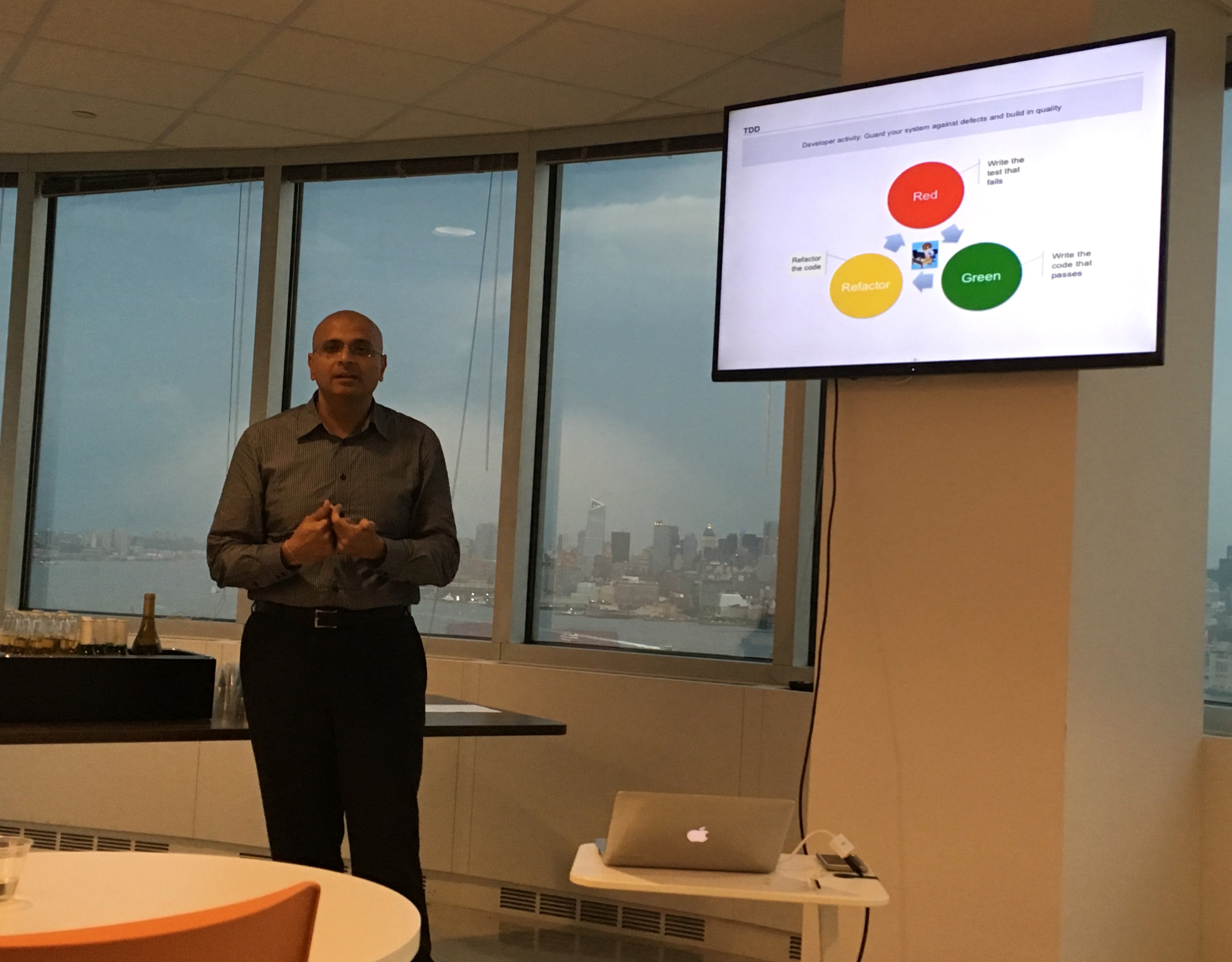
    DevOpsIMG_9994QA NJ just held our AIMG_9990ugust Meetup on Test Automation Tools and Processes with Polina Rodov and Kamlesh from Medidata, Anil Jaising from JP Morgan Chase and myself, Tanya Kravtsov, from Audible.   The venue, food and refreshments were provided by  Audible at a state-of-the-art, vast office space in
    Jersey City with amazing views of the  NYC skyline.  The main topic of the meetup was Testing and Test Automation tools and processes and how they are used in different companies.


    Takeaways from QUEST and StarEast    

    After fun netwIMG_9988orking over pizza, wine and beer, I kicked off with an overview of my takeaways from Quest and StarEast QA Conferences. I gave a brief summary of the session that I presented at the conference titled “The Road to DevOps” followed by highlights from the most memorable sessions on Test Automation, Metrics and Mobile Testing. I focused on the importance of identifying and addressing the bottlenecks in the product delivery cycle which include manual processes such as test data management, environment configuration and test IMG_0001execution.


    WOW (W-What we do O – on time W- with tools) at Medidata

    Next, Polina and Kamlesh from Medidata presented Tools and Frameworks used at Medidata (which provides cutting edge clinical solutions).   The unique presentation style portrayed the overall solution as a cooking pot, with tools presented as ingredients and testing as degustation. Medidata solutions are built on top of Service Oriented Architecture and utilize tools such as Jasmine and Cucumber for automation, Github, TravisCI and HipChat for CI, Medistrana and GoCD for deployment, Mist, JIRA Capture and Bug Magnet for testing, and SumoLogic and NewRelic for monitoring. IMG_0010Polina and Kamlesh also spent some time describing VCR, an alternative way of mocking APIs.   VCR allows to run the tests against prerecorded response, but still faces challenges if cassette files become stale due to backend service changes.   The session was followed by intense Q &A covering Code Coverage tools, PACT and minimizing cycle time.


    Acceptance Test Driven Development

    Our last session of the day was ATDD (Acceptance Test Driven Develoment) with Anil Jaising, Executive Director at JP Morgan Chase. Anil set the background by talking about history of Lean which came from manufacturing, specifically Toyota factory. It isIMG_0004 very important f
    or Testers and to be able to pull the chord whenever they find a critical defect. Anil suggested reading the IEEE paper by Robert Martin and Grigori Melnik, the primary point of which is that we need to start thinking about testing while requirements are still developed and avoid assuming that testing is testing.   He then gave a great definition of ATDD – from user stories to business value, ATDD is a team sport as opposed to test driven development which is more individual.

    At the end of the sessions, we had some great conversations with group members who stayed behind.    Looking forward to our next session. To learn more about exciting opportunities at Audible visit http://about.audible.com/

    IMG_0012

  • Test-First Development: Processes and Tools for Success

    Test-First Development: Processes and Tools for Success

    A lot of software development teams are talking about “test-first” methodologies. The practice involves moving testing up into the very earliest stages of development so automated tests can be written before code. Making this seemingly minor shift can result in much higher quality software and greater efficiencies. Integrating development and testing avoids needless late-stage bugs and complicated redevelopment efforts. It can help software development organizations focus on usability and features and achieve faster time to market. And because of test-first’s reliance on automated tests, organizations gain reusable tests, saving time and increasing standardization for testing and quality assurance overall.

    It’s no surprise, then, that 51 percent of organizations have begun using test-first methodologies, including 37 percent in the past year, according to a recent global survey of 200 software testers conducted by our company. But, despite the enthusiasm for this practice, there are concerns: 44 percent of survey respondents said their biggest fear about moving to this approach was forcing developers to contribute tests prior to completing code, while 19 percent said they worried about removing traditional testing checkpoints on the way to production. Other barriers include the lack of standard practices or tools. That said, test-driven development promises to bring ample benefits to software development teams, the business and, importantly, customers.

    Test-first development is recognized across three broad terms today: behavior-driven development (BDD), test-driven development (TDD) and acceptance test-driven development (ATDD). TDD is an umbrella term for the practice, although it has traditionally focused more on technical, unit testing. BDD and ATDD incorporate user requirements and business benefits along with technical testing. BDD differentiates through its adoption of specific automation frameworks and language for writing and running tests.

    Key Changes for Successful Test-First Development

    Getting started requires change across a few critical areas for most teams. First, evaluate your team for hiring and skills training needs. On the one hand, developers will need to learn basic testing skills, so they can write good tests and run tests before they develop code. Meanwhile, testers must become more proficient in automated testing tools, which usually entails acquiring a fundamental knowledge of programming. Many companies will need to hire key contributors from outside; in which case, leaders should look for well-rounded individuals with past experience using test-first methodologies successfully. An individual who is an expert at one skill, or who is too independent and can’t collaborate well, won’t be an ideal member of a team experimenting with test-first approaches. Leaders also may need to adjust by balancing the ranks more closely between developers and testers so that one group doesn’t rule over the other. Hiring additional experienced testers frequently will be necessary.

    Training of existing staff is paramount, best achieved through a combination of methods including internal training, mentoring, online courses and paired development, where developers and testers can sit side by side and collaborate. More than half of the survey respondents said developers and testers would be jointly responsible for automation test creation within their organizations.

    Beyond cross-training, the cultural challenge of moving to test-first methodologies can be overwhelming. It requires the development of incentives for creating quality products, not just delivering new features at speed. It requires an appreciation and respect for the practice of testing. Unfortunately, testing too often is viewed as a necessary cost of doing business, rather than bringing a clear benefit to the organization and its customers. That mind shift is not only inaccurate, but it doesn’t fly with progressive, Agile thinking. It will take strong leaders to help traditional teams understand the need to change and modernize practices. A leader may forego the buy-in process and instead decide to lay down the law to staff: Staff must move to TDD or BDD, or else. But the results won’t be ideal. Smart developers will find loopholes, such as writing tests that aren’t comprehensive or fully aligned with project goals, so the code will pass more quickly.

    On the process front, organizations that have moved or are moving from Waterfall to Agile and DevOps will have an easier time adopting test-first methodologies. In fact, it’s pretty difficult to implement test-first processes and tools in a Waterfall environment because of the siloed nature of functions and the long release cycles. The survey results support this premise: 55 percent of respondents said their testing process was Scrum/Kanban-driven before transitioning to test-first, while 21 percent said their approach was iterative-requirements driven and 18 percent was Waterfall-requirements driven.

    Along with that shift, test-first teams will need to adopt new metrics that align with this new way of doing business. Instead of looking solely at velocity, development leads should measure how long it takes the team to move a product from feature approval to code release. With a focus on quality and testing, companies also should measure and improve upon bugs, such as number of severe defects post-production. Those types of business and customer-oriented metrics align with the new set of Agile metrics that that many teams are working for today.

    Test-first teams will need to adopt DevOps toolsets, which are designed to push code out to the pipeline faster. Specific technologies that go hand in hand with test-first development include:

    • Continuous integration (CI) platforms such as Jenkins and Team City, to assist in running the automated tests immediately for quick build feedback.
    • Container technology for rapid deployment of test and pre-production environments, to capitalize on having features production-ready soon after coding.
    • Test management platforms including qTest Scenario or Cucumber Pro.
    • Test automation frameworks including Cucumber, SpecFlow , and other open source tools which enable easier support for customization and collaboration.

    There’s a lot to think about when moving toward test-first development. While it may seem overwhelming at first, all of this is achievable in a reasonable time frame if you have the right dedicated resources to see it through. One-third of survey respondents said it took them less than three months to complete the transition to a test-first approach, while 30 percent said it took less than one year. The payoff for software teams, in terms of improving quality, customer experience and reducing costs of innovation, can deliver higher customer loyalty and even faster growth in the marketplace.

    About the Author / Kevin Dunne

    Kevin Dunne picKevin Dunne is vice president of Business Development & Strategy at QASymphony.



  • Continuous Testing: Shift Left and Find the Right Balance

    Continuous Testing: Shift Left and Find the Right Balance

    You may have heard the term “continuous testing,” but are struggling to understand what it is and how to achieve it. Project teams need to improve their ability to test and perform test automation when needed, not just when possible. Service virtualization allows teams to test earlier and more often in the life cycle, or “shift left,“ by mimicking unavailable systems. Combining test automation with service virtualization enables teams to provide immediate feedback on quality—so issues can be resolved faster and cheaper. Encouraging and embracing this immediate feedback on the quality of the solution enables businesses to deliver high-quality innovative solutions to the market quickly.

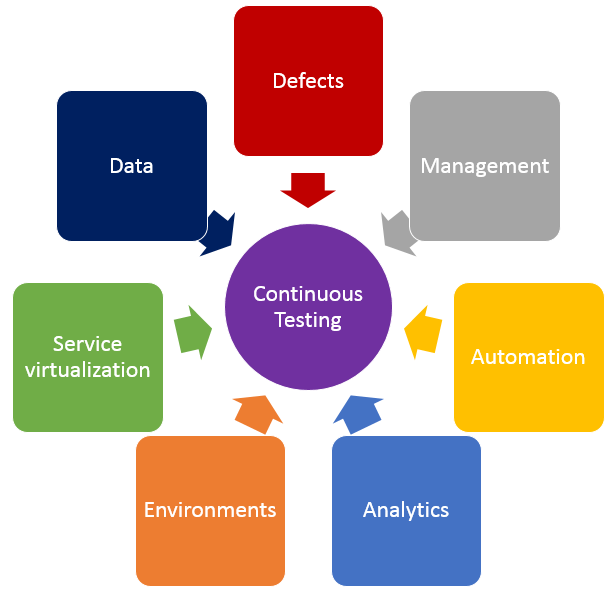
    In addition to shifting left by using service virtualization, finding the right balance of effort across all testing practices is crucial in achieving continuous testing. The diagram below shows the key test practices that enable continuous testing, and teams spend effort on each of these practices regardless of whether they want to. The questions below may help your teams understand where they are spending time, and perhaps where their time might be better spent.

    Testing

    • Defects – Are teams spending too much time logging, triaging or analyzing defects? What about time spent on defects that aren’t “real” defects—where there is a misunderstanding between the test and the code? Or what if they could prevent entire schools of defects from ever being created in the first place?
    • Test Management – Are teams spending time manually crafting status reports and rolling up test execution results? Or do they have a tool that provides that information in real time and allows stakeholders to drill down as needed? How do teams know if they are on schedule with their test effort, behind schedule or even ahead of schedule?
    • Test Automation – How efficient are teams at re-executing existing tests? Do they run most or even all of them manually? If they’ve automated tests, are they focused only on functional tests at the user interface layer, or are they running functional API-layer tests, performance tests and even security tests? Do they have a robust and maintainable test automation framework?
    • Analytics – How do teams know which tests they should run, when and even why they are running those tests at those times? How good is their test effectiveness–meaning, are they running the fewest number of tests that find the largest number of problems? Impact analysis is critical in selecting the right sets of tests to execute whenever they get a new build.
    • Test Environments – Are teams constantly waiting on test environments to be provisioned and configured properly? Do they run tests and discover after the fact that the test environment wasn’t “right,” so they have to fix the environment and then re-run all the tests again? Do they hear from developers, “It works on my machine!” but it doesn’t work in the test environment?
    • Service Virtualization – Are teams waiting for dependent systems to become available before they can “really” test? Are they using a “big bang” approach to conduct end-to-end system testing, where they throw all the components together and hope they work and interact properly? Can teams test exception and error scenarios before going to production? Are they testing the easiest parts first just because they are available, and delaying the high-risk areas for the end of the testing effort?
    • Test Data – Do teams have the needed sets of production-like test data to ensure they are covering the right test scenarios? Are there exception and error scenarios that we can’t execute because they don’t have the right sets of test data?

    If any of these problems or ideas resonate with you, here is guidance on how to get started on the journey to achieve continuous testing.

    First, identify your bottlenecks:

    • How good is your test efficiency – are you able to run the needed tests and provide feedback quickly?
    • How good is your test effectiveness – are you running the fewest number of tests that find the largest number of problems?
    • Bottlenecks may also be upstream or downstream from actual test execution effort – are you waiting on dependent systems, or test environment provisioning?

    Then, look at all aspects of your test effort and focus on the largest bottlenecks first.

    • How long are your delays in test environment provisioning, and are the environments accurate when they are provisioned? If delays are too long and environments aren’t correct, automate your test environment provisioning and configuration to eliminate manual errors and gain accuracy and reliability.
    • Are you waiting on dependent systems to start testing? If so, use service virtualization to simulate those unavailable systems so you can start testing sooner.
    • Are you unable to run all the needed tests before the next build is available? If this is the case, automate your high-risk regression tests to improve test efficiency.
    • Do you find performance problems late in the life cycle, or even in production? Outages can result in long-term damage to a business, so conduct load, performance and stress testing earlier in the life cycle.
    • Do you find significant problems when all systems are integrated? Identify and agree upon system interface and data definitions, and create automated integration level tests for the high-risk integration points.

    Teams that improve their test efficiency and effectiveness significantly reduce their expenses and the time it takes to get high-quality, innovative solutions to users. You can’t test everything, and you can’t automate all your tests, so it is critical to find the right balance. Also key is service virtualization, which allows testing to begin as soon as a build is made by mimicking missing dependencies. By combining test automation and service virtualization, teams can test earlier, or “shift left,” so they gather feedback faster than ever.

    Learn more about using service virtualization to shift left and avoid downtime in test environments in our upcoming webcast:  How Maersk Uses Service Virtualization to Shift Left and Avoid Test Downtime.

    About the Author / Marianne Hollier

    MarianneMarianne Hollier is an IBM and Open Group Master Certified IT Specialist in application development. She has strong, practical expertise in measurably improving the software development life cycle and driving the necessary cultural changes to make it work. She is instrumental in architecting, tailoring and deploying the IBM DevOps best practices as well as appropriate software development tools on many types of projects, from large to small, long to fast-track, agile to traditional. Marianne is especially passionate about all things testing—process, tools, culture and automation. Her experience is broad-based, spanning both custom projects as well as standard software packages that apply to many industries, including refining, pharmaceutical, telecommunications, health care, financial, automotive, government and retail. Connect with Marianne on LinkedIn or Twitter.

  • How to Conquer Test Automation for Your Mobile Testing

    How to Conquer Test Automation for Your Mobile Testing

    Developing your mobile app is just the initial step toward preparing it for market. It first needs to work flawlessly over thousands of different devices, each running over different mobile operating systems with their own version, and inside any of hundreds of unique local networks. On top of that, every feature has to be tested for fast performance.

    That’s a lot of work!

    On top of that, today’s DevOps standard demands that you get it all done in a matter of weeks, instead of months. Eventually, it will be days instead of weeks.

    DevOps1

    This demands test automation. Manual testing beyond going over new code for the next version of your app no longer is acceptable. Mobile applications are ultra-competitive; If an app doesn’t rise to a certain rank within days, it is considered a failure. Mobile test automation underwrites the rapid release cycle necessary to sustain the latest and greatest features on your mobile offering to the public.

    Four Hurdles to Achieve Mobile Test Automation

     Find the Right Test Automation Tool

    The capacity to automate test scripts scratches the surface, but the right mobile testing tool should have more. To support a greater DevOps strategy, it should be able to connect to the cloud and integrate seamlessly to continuous integration servers such as Jenkins to automate as much of the DevOps process as possible.

    In addition, it must run on both native and object web properties, making identification of the components of the app as precise as possible. It should be able to perform more than just functional testing—an automation tool must also allow for good performance testing with network virtualization and load testing options.

    Integration into Existing Testing Environments

    What happens when your test script is perfect but the tool doesn’t accept the language the script was written in? To solve this challenge, you need a tool that can handle all the big testing environments: Selenium, QTP, Microsoft Visual Studio, IBM RFT, Smartbear Testcomplete, Java, Pearl, Python and Ruby. You should be able to write a test script in one of these languages and be able to convert it to any of the others instantly.

    devops2

    Parallel Execution and Adaptability to New Technologies

    The advantage of automated mobile testing is that the scripts run while you are fast asleep, doubling your testing productivity. If you can run the same test on more than one device at the same time, you are increasing the productivity of your mobile testing exponentially. The right test automation solution allows for parallel execution, either by running multiple tests on devices connected to your local computer, or really scaling up by running a single script over tens or even hundreds of devices connected through the cloud. This can be accomplished by setting up a dedicated mobile device lab.

    With the matrix of devices, operating systems, versions and local networks expanding rapidly, parallel execution is a must to enable you to increase your test coverage as fast as the test coverage itself is multiplying.

    The biggest reason for the increase in test coverage is the myriad new mobile devices with new technologies coming to market. The best test automation tools are those that anticipate and are ready to test over new platforms the moment they are made available to the public, and even while still in beta.

    Support and Learning: As Painless as Possible

    Even with the best of everything, you still need to learn the testing tool. You also need to be able to react quickly to every technical issue in your mobile testing. The right mobile testing provider gives you a practical training program, even a certification process, and provides you with 24/7 support. You are investing huge amounts of money to reduce your release time by days, even hours per cycle.  To lose this advantage because of a third party’s inability to reply to your needs in a timely manner is ludicrous. The right mobile testing providers know what’s at stake for you and prioritize their response times accordingly.

    The return on investment in the right test automation strategy is priceless. But to realize it, you have to make sure the biggest hurdles are cleared.

  • How to Fail at Test Automation

    How to Fail at Test Automation

    Let me start by admitting that I am not a test automation expert. I have done some work with test automation and have supervised teams who practiced it, but when it comes to the intricacies of it, I have to call a friend. It is from such friends that I have learned why so many test automation efforts fail. Talking to people about test automation validates my impression that this is the DevOps-related practice that people most often fail at.

    Let me share the four reasons why test automation fails, in the hope that it will help you avoid these mistakes in your test automation efforts.

    Before I go into the four reasons, allow me one more thought: Test automation is actually a bad choice of word. You are not automating testing, you automate quality assessments. What do I mean by that? It is a mistake to think of test automation as automating what you otherwise would do manually. You are finding ways to assess the quality of your product in automated ways and you will execute it way more often than you would do manual testing. This conceptual difference explains to a large degree the four reasons for test automation failure below.

    Reason 1: Underestimating the Impact on Infrastructure and the Ecosystem

    There is a physical limit of how much pressure a number of manual testers can put on your systems. Automation will put very different stress on your system. What you otherwise do once a week manually you might now do 100 times a day with automation. And into the mix an integrated environment, which means external systems need to respond that frequently, too. So you really have to consider two different aspects: Can your infrastructure in your environments support 100 times the volume it currently supports, and are your external systems set up to support this volume? Of course, you can always choose to reduce the stress on external systems by limiting the real-time interactions and stub out a certain percentage of transactions or use virtual services.

    Reason 2: Underestimate the Data Hunger

    Very often test automation is used in the same system where manual testing takes place. Test automation is data-hungry, as it needs data for each run of test execution and, remember, this is much more frequent than manual testing. This means you cannot easily refresh all test data whenever you want to run test automation and have to wait until manual testing reaches a logical refresh point. This obviously is not good enough; instead, you need to be able to run your test automation at any time. There are a few different strategies you can use (and you will likely use a combination):

    • Finish the test in the same state of data that you started with;
    • Create the data as part of the test execution;
    • Identify a partial set of data across all involved applications that you can safely replace each time; or
    • Leverage a large base of data sets to feed into your automation to last until the next logical refresh point.

    Reason 3: Not Thinking About the System

    Test automation often is an orchestration exercise as the overall business process in test flows across many different applications. If you require manual steps in multiple systems, then your automation will depend on orchestrating all those. By just building automation for one system you might get stuck if your test automation solution is not able to be orchestrated across different solutions. Also, some walled-garden test automation tools might not play well together, so think about your overall system of applications and the business processes first before heavily investing in one specific solution for one application.

    Reason 4: Not Integrating it into the Software Development Life Cycle

    Test automation is not a separate task; to be successful it needs to be part of your development efforts. From the people I have spoken to there is general agreement that a separate test automation team usually doesn’t work for several reasons:

    • They are “too far away” from the application teams to influence “ability to automate testing,” which you want to build into your architecture to be able to test the services below the user interface;
    • Tests often are not integrated in the continuous delivery pipeline, which means key performance constraints are not considered (tests should be really fast to run with each deployment);
    • Tests often are not executed often enough, which means they become more brittle and less reliable. Tests need to be treated at the same level as code and should be treated with the same severity. This is much easier when the team has to run them to claim success for any new feature and is much harder to do when it is a separate team who does the automation. It also will take much longer to understand where the problem lies.

    Of course, absence of failure does not mean success. But at least I was able to share the common mistakes I have seen and, as they say, “Learning from others’ mistakes is cheaper.” Perhaps these thoughts can help you avoid some mistakes in your test automation journey. I do have some positive guidance on test automation, too, but will leave this for another post.

    And in the case you found your own ways of failing, please share it in the comments to help others avoid those in the future. Failures are part of life and even more so part of DevOps life (trust me, I have some scars to show). We should learn to share those and not just the rosy “conference-ready” side of our stories.

    Test automation is for me the practice that requires more attention and more focus. Between some open-source solutions and very expensive proprietary solutions, I am not convinced we in the IT industry have mastered it.

    One bonus thought: If you cannot automate testing, automate the recording of your testing.

    If you cannot automate testing, find a way to record the screen with each test by default. Once you identify a defect you can use the recording to provide much richer context and make it a lot easier to find the problem and solve it. Verbal descriptions of error are very often lacking and don’t provide all the context of what was done. I keep being surprised how long triage takes because of the lack of context and detail in the defect description. There is really no excuse for not doing this. Record first, discard if successful, attach it to the defect record if you find a problem.

  • Infrastructure-Testing Dominoes

    Infrastructure-Testing Dominoes

    Understanding the artifacts of a given technology component is critical to an enterprise-class DevOps service offering. Second-most critical is understanding the dependencies between given components. Testing helps illuminate those dependencies.

    For example, let’s assume I have a server running the previous version of the Windows operating system (OS) that I now want to upgrade to the latest version. The previous deployment package of this version of the OS would be an artifact. It should also include all of the test automation I run to validate that version of the OS is working after I install it. The artifact also might include configuration files I deploy when I install that version of the OS on this type of server in this class of environment. Having these bits of automation bundled together allows me to do a successful install of my OS (assuming no hardware errors) on perhaps many servers.

    As I create a new artifact for the latest Windows OS, I keep in mind all the things I had in my last version. I might include a newer config file and perhaps a set of tests (albeit new ones) to make sure it is working when I am done. Bundling all these bits gives me a new Windows OS artifact or package that I can use over and over on this kind of server in this class of environment. The idea is that I am creating a single kind of artifact or package to cover this kind of technology—in this case the latest version of the Windows OS operating system. All my artifacts should be version-controlled. So when I’m done I have an artifact for the previous Windows OS and one for the latest version. Each artifact version has embedded or included testing (pointers to, or discreet automation) to verify the validity of the install, and perhaps a little more to prove the OS works.

    Within my DevOps tooling, I likely have some sort of artifact management system. It may not be as formal as a full-on configuration management database (CMDB) system, but whichever tool I use will have some sort of database to manage my artifacts or packages by version. How long I retain these artifacts will be defined in my retention policies, but likely I will retain every version in use at my company today. This is step one, and it forms the foundation for my next effort in cataloging the dependencies that exist between artifacts.

    Enter the Spider’s Web

    Under the scenario I have described, when I deploy either the previous OS or the latest one, I would run a series of tests specific to that version to ensure the OS is working properly. As an infrastructure engineer, I tend to think my job is done at this point. But it isn’t. To truly validate that my OS is working, I really need to know what is running on the server I just deployed to. If my server was bare or new, then I am really done. But if my server has middleware running on it, then the job is not finished until I re-deploy the right version of the middleware on top of my new OS and verify it is still working properly.

    To pull this off, I will need a catalog of the technologies that depend on each other. The OS example is kind of simple, because it lives at the bottom of the stack where a server is concerned. But on top of the OS might reside a middleware platform (perhaps messaging or a database). On top of the middleware might reside an application or perhaps several applications, depending on the horsepower of the server in question. Upgrading the OS component implies I am redeploying the middleware layer and then the application layer on top of that.

    Enter full-stack engineering. It takes an application-centric view of the world, but this implies a single application-centric view. It looks at one app from top to bottom and treats the entire stack as a single version-controlled artifact. But if you have legacy environments that run multiple applications on the same physical box, perhaps on the same virtual instance, you have the makings of a spider web of dependencies. There are no full-stack solutions (to my knowledge) that have figured out how to incorporate multiple applications at the top of the same stack, varying middleware in the middle and “n” number of virtual instances that ride on one OS on one physical box. Instead, each piece of the technology tends to be treated separately. Thus the need for some sort of catalog that tracks the interdependencies between them all.

    Starting the Domino Testing

    So once I have discreet testing that is version-controlled (or associated with) each type of technology component, I will have to re-execute those tests if anything “under” me undergoes a change. For example, if the version of my WebSphere is upgraded, beyond just the core WebSphere testing that occurs, I really should execute the tests associated with each application to ensure “that app” is still working after the upgrade. You could apply this premise to a database layer (say, upgrading the current version of Oracle, as an example). To really know if the database upgrade was successful, you should run the testing of each dependent app and ensure “that app” still works after the upgrade. The results are likely to be surprising.

    To execute this kind of domino testing, even if you have the web of dependencies defined and the artifacts or packages managed, you can take one of two approaches: redeploy everything, although this method may not actually kick off tests if it detects the versions did not change from the last deployment (smart overwrite), or set up discreet testing jobs within your release orchestration software to execute the entire web of dependencies and track the results. In either case, you are going to need human oversight on whether it is better to keep the new version or roll back to the old one. Only a human can prioritize the impact of what might seem small or catastrophic (based on a human perspective) of a given app or series of apps.

    Impact to the Bottom Line

    True quality can be assessed only through testing. Part of breaking down silo-thinking is taking a holistic view of the technology your organization supports. Just because the OS support engineer’s testing passes does not mean the upgrade was a success. For an upgrade to be a success, the tests of everyone else who relies on that technology underpinning must pass to prove it worked. The entire team needs validation when the underlying infrastructure undergoes change. The dominoes of tests must pass from end to end. Only then can true quality or true success be measured.

    Of course, most engineers are reluctant to have “app software” guys influence whether they did their own jobs right. After all, most software quality problems are in the code, not due to infrastructure errors. However, if the applications upon which your business relies cannot work, no matter what the reason, after an infrastructure upgrade, it is a problem for the entire business, not just the software guys. To tear down the silos, we need to look at impacting events for change across boundaries and drive toward overall results, not just departmental ones. When this occurs, the cost of quality is significantly reduced.

    To continue the conversation, feel free to contact me.

  • The Nirvana of Gated Progression

    The Nirvana of Gated Progression

    A highly functioning enterprise-class DevOps set of services has a fundamental goal of full automation. To be honest, having the right DevOps strategist (or visionary) leading this effort is as important to achieving this goal as the combination of all the challenges and topics that must be addressed. So for the sake of argument, will we assume you have one (if not, feel free to contact me—I am looking at the moment 🙂 ).

    With key leadership in place, the first target is always the automation of the build and deploy process. This could easily be considered the core of DevOps or its heart. But once this automation has been achieved, the trickier topic of release orchestration begins to emerge. Strategy is to release orchestration what taste is to food: Having the right one does make all the difference.

    To progress our code to production, the inherent assumption is that all testing has been completed successfully. Sounds like common sense. But then, how much of that testing occurs with human hands on it? The user acceptance testing (UAT) discipline inherently requires a human at the wheel. But the reality is, for every time a human must interact with the progression of code from the development-class environment through all the testing environments (integration, performance, user acceptance and QA) on its way to production, the momentum of innovation is slowed down—all the way down to human levels.

    The Complexity of Testing Types

    The first automated testing begins to occur in development or (DEV) class environments, where the programmer is under strict instructions to implement test-driven development. This requires new feature/functional testing as part of the build or deployment automation into DEV. Either the build or the deployment cannot be said to be successful “if” the accompanying tests are not “passed.” This also represents our first “gate.” Sophisticated release orchestration (RO) software can examine “flags” set during the build or deployment process to see if the testing has been completed successfully. If so, the code can progress to the next testing level environment within the software development life cycle (SDLC).

    Another useful type of testing completed early in the SDLC (most often in DEV) is the examination of code coverage. Development organizations can begin to examine how much of their code is put to the test, and set arbitrary percentages as a minimum standard before the target application is able to progress. The addition of alternate types of testing occurring in DEV class environments does add to the quality of the innovation effort. However, it brings with it an increased labor effort to automate both progression—and audit—of the version under test.

    For instance, feature/function testing may use a single repository to store the results for a given version of the code. I go to my testing repository and I can look up the results from version 1.4 of my application, or version 1.5 of my app, as many as I desire. Should a regulatory official or internal auditor ever ask me to prove the quality of version 1.5 of my app, I need only consult my testing repository and show them how many tests were executed, and how many passed or failed before this version of my app was ever deployed into production.

    When you add code coverage testing to the process, I now need to consult two different testing repositories, producing two separate reports to assess the quality of this same version of my app. There is nothing wrong with this, but it does create more work or effort to produce than it would if a single testing repository was used. The problem only increases as we keep increasing the types of tools we use to prove quality. Security testing, for example, (ensuring code does not have inherent security holes) tends to use different tools, or, worse, processes that require human peer observation, which again can add effort to create the automation and the traceability for audit. These are critical types of testing (and/or processes) so they must be done, but they also come with an inherent cost in automation effort.

    Small shops may not worry about these kinds of concerns, but large organizations will, particularly if they are still in the process of transitioning from legacy waterfall methods (where controls were high) to new agile methods (where it feels to auditors like the wild, wild west). Compiling a test log that matches the version of code under scrutiny such that it can be reproduced automatically will restore the faith of both internal auditors and regulatory officials who come asking. But the addition of each new type of testing tool will require more effort to maintain the ability to compile those test logs.

    The Complexity of Testing Responses

    Next, consider the impact of non-binary responses to automation efforts for gated code progression. Does my feature work (yes/no)? This is a binary evaluation, a true/false or yes/no that is easy to set my progression flag for testing response. It is another matter to evaluate the results of my code coverage and ensure this app is above 70 percent or between 70 percent and 90 percent. These kinds of questions are not binary (in other words, there is a real result to compare to, not just a pass/fail), and require further effort to set a binary flag for the gated pass/fail. When the evaluation question does not intend a binary answer at all, such as a grading of 1 to 5 where 1 equals horrible and 5 equals outstanding, I am now most often forcing a human to make an intelligent decision as to whether this code should progress.

    Multiple testing repositories require additional automation effort. Multiple kinds of responses require additional automation effort, and the standards by which the gates pass or fail also may change over time, requiring tracking of the goals at the time the tests were taken. Creating independent test automation that can be called from the build process or the deployment process is wise. Associating this test automation (whether scripts or simulations, etc.) with the version of the application code is wise. And working to reduce the number of repositories to examine is wise. Having de-coupled test automation strictly from a build allows it to be re-executed in more advanced testing environments when the need arises.

    Charting the Course to Nirvana

    RO benefits from as full a level of automation as possible. I will discuss the RO topic more fully in another article, but the foundation of automated change progression relies on a gated history of proving quality. As long as the code under review continues to pass testing, setting progression flags to green or yes or pass, the RO software can continue to progress it along its way to production. Failing code must be sent back to the DEV environments where development teams can address the issues before making its way back through the automated process once again from beginning to end.

    If the organization has made the intentional decision to keep humans substantially involved in the testing and evaluation cycle, it must realize a few impacts of that decision. Daily movement to production becomes less likely—most often it takes a week or two for changes to undergo significant human scrutiny (depending on the level of testing automation). The results of human intelligent decisions also must be chronicled in the testing repository to preserve the history for audit. This can lead to a “blame game” kind of thinking when something goes wrong, as it is immediately attached to “who” approved it, instead of to “why” they did so. And obviously the cost of labor is always the highest cost element in any innovation cycle, so buyer beware in this scenario.

    On the other hand, “Nirvana” is the state when all testing (except UAT) is fully automated and gated, and provides the foundation for RO software to move code into production as often as it can prove quality. This could mean fully automated releases instead of release weekends. This could mean multiple releases per day into production. This could mean that releases themselves are no longer considered “events,” but by default are now “non-events.” Nirvana does not endanger the lives of change and release managers—it actually gives them one. For a “change” (pardon the pun), they get to discover something they vaguely remember … a life outside of work.

    To continue the conversation, feel free to contact me.