Tag: SQL

  • The Benefits of a Streaming Database

    The Benefits of a Streaming Database

    Streaming databases offer an innovative approach to data processing that combines the familiarity of traditional models with a powerful data transformation engine. This hybrid system provides DevOps and DataOps teams with extremely fast results for complex SQL queries, aggregations and transformations that are impossible or take hours to process in the traditional batch computation model.

    By pre-specifying query results upfront (in materialized views) and then incrementally updating them as new data comes in, streaming databases offer a valuable alternative to traditional databases that require complex ETL pipelines or overnight batch processing.

    As the demand for faster results continues to rise, streaming databases are emerging as a fundamental new building block for data-driven organizations.

    streaming database

    History

    Streaming database concepts originated in capital markets, where fast computation over continuous data is highly valued. The first products were basic event processing frameworks that addressed specific needs within hedge funds and trading desks. However, their creators quickly recognized that SQL works as the declarative language for streaming data just as well as it does for traditional static databases.

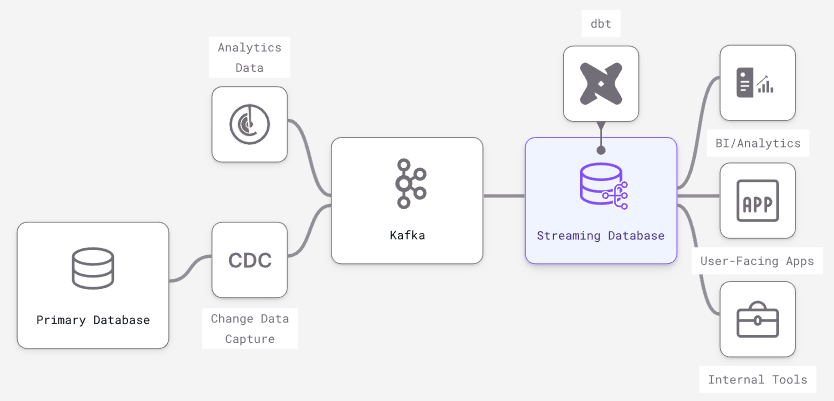
    Today, modern streaming databases are most often used downstream of primary transactional databases and/or message brokers, similar to how a Redis cache or a data warehouse might be used.

    Trade-Offs

    Experienced engineers understand that no software stack or tooling is perfect and comes with a series of trade-offs for each specific use case. With that in mind, let’s examine the particular trade-offs inherent to streaming databases to understand better the use cases they align best with.

    Unique Features

    • Incrementally updated materialized views – Streaming databases build on different dataflow paradigms that shift limitations elsewhere and efficiently handle incremental view maintenance on a broader SQL vocabulary. Other databases like Oracle, SQLServer and Redshift have varying levels of support for incrementally updating a materialized view. They could expand support, but will hit walls on fundamental issues of consistency and throughput.
    • True streaming inputs – Because they are built on stream processors, streaming databases are optimized to individually process continuous streams of input data (e.g., messages from Kafka). Scaling streaming inputs involves batching them into larger transactions, slowing down data and losing granularity. In traditional databases (especially OLAP data warehouses), larger, less frequent batch updates are more performant.
    • Streaming outputs on queries – Many databases have some form of streaming output (e.g., the Postgres WAL), but what’s missing is output streams involving any kind of data transformation. Streaming databases allow for streaming output of complex joins, aggregations and computations expressed in SQL.
    • Subscribe to changes in a query – As a side effect of streaming outputs, streaming databases can efficiently support subscriptions to complex queries: Updates can be pushed to connected clients instead of forcing inefficient polling. This is a key building block for pure event-driven architectures.

    Missing Features

    • Columnar optimization – OLAP databases have advanced optimization techniques to speed up batch computation across millions of rows of data. Streaming databases have no equivalent because the focus is on fast incremental updates to results prompted by a change to a single row.
    • Non-deterministic SQL functions – Non-deterministic functions like “RANDOM()” are common and straightforward in traditional databases. But imagine running a non-deterministic function continuously, resulting in chaotic noise. Therefore, streaming databases don’t support non-deterministic SQL functions like “RANDOM().”

    Performance Gained

    • Minimized time from input update to output update – The time between when data first arrives in the streaming database (input) and when changes to results reflect the change (output) is sub-second. Additionally, it keeps up as the dataset scales because results are incrementally updated.
    • Repeated read query response times – When a query or query pattern is known and pre-computed as a persistent transformation, reads are fast because they require no computation: You’re just doing key-value lookups in memory, similar to a cache like Redis.
    • Aggregations – The resources needed to handle persistent transformations are often proportionate to the number of rows in the output, not the scale of the input. This can lead to dramatic improvements in performance in aggregations in a streaming DB versus a traditional DB.

    Performance Sacrifices

    • Ad-hoc query response times – While running ad-hoc queries in a streaming database is possible, response times will be much slower because the computation plan is optimized for continuously maintaining results, not answering point-in-time results.
    • Window functions – A window function performs calculations across table rows that are related to the current row. They are less performant in streaming databases because updating a single input row requires updating every output row. Consider a “RANK()” window function that ranks output by a computation. A single update can force an update to every row in the output.

    Factors Impacting Scalability

    • Throughput of changes – The changes or updates to input data are what triggers work in the system, so changing data will often require more CPU than data that changes rarely.
    • Cardinality of the dataset – The total number of unique keys will slow down read queries in traditional databases. In streaming databases, high cardinality increases the initial “cold-start” time when a persistent SQL transformation is first created and requires more memory on an ongoing basis.
    • Complexity of transformations – Unlike the on-request model in a traditional DB, SQL transformations are always running in a streaming database in scale in two ways:
      • Memory required to maintain intermediate state – Imagine how you would incrementally maintain a join between two datasets: You never know what new keys will appear on each side, so you must keep the entirety of each dataset in memory. This means that joins over large datasets can take a significant amount of memory.
      • Quantity and complexity of transformations – When a single change in inputs needs to trigger a change in outputs in many views, or when many layers of views depend on each other, more CPU is required for each update.

    Use Cases

    Like any software primitive, there are many use cases. Here are some categories of products and services particularly well-suited to streaming databases:

    • Real-time analytics – Use the same ANSI SQL from data warehouses to build real-time views that serve internal and customer-facing dashboards, APIs and apps.
    • Automation and alerting – Build user-facing notifications, fraud and risk models, and automated services using event-driven SQL primitives in a streaming database.
    • Segmentation and personalization – Build engaging experiences with customer data aggregations that are always up-to-date: personalization, recommendations, dynamic pricing and more.
    • Machine learning in production – Power online feature stores with continually updated data, monitor and react to changes in ML effectiveness – all in standard SQL.

    Conclusion

    Streaming databases offer a powerful yet accessible way for data and software teams to leverage stream processing capabilities. By using familiar SQL DB concepts and a stream processor to compute SQL transformations, data and software teams can focus on shipping complex data-driven products quickly, with improved performance and scalability. With a streaming database, organizations have the power to transform data in real-time and build the applications of tomorrow.

  • How Database DevOps Fuels Digital Transformation

    How Database DevOps Fuels Digital Transformation

    In today’s real-time, hyperconnected reality, data is a core driver behind most digital strategies. User data is constantly gathered and shared across various technology backends and platforms—as is system performance data to inform engineers. Data is pivotal for everything, from generating machine learning models, refining user experiences and even supporting new data-centric services. But although data is a clear backbone to many enterprises, there is no clear winner regarding which database to use.

    Large organizations often find themselves supporting different database styles, from relational databases to NoSQL and distributed SQL. And as organizations continue to adopt multiple databases, safely managing the processing and storage of data becomes more challenging to enact at scale.

    I recently met with Jakub Lamik, CEO, Redgate Software, to understand the role DevOps, specifically database DevOps, is playing in advancing data-driven digital transformations. According to Lamik, applying DevOps practices for database management can improve performance, increase productivity and help organizations stay compliant. Below, we’ll consider the state of today’s data-driven digital transformations and highlight ways to improve how DevOps is applied to database management.

    State of Data-Driven Digital Transformations

    The 2022 StackOverflow Developer Survey found the most popular databases to be MySQL, PostgreSQL, SQLite, MongoDB and Microsoft SQL Server. But most often than not, businesses deploy more than one of these in production. Redgate’s 2021 State of Database DevOps report found that 70% of businesses had more than one DBMS in use, and 48% had teams working on three or more different databases.

    Engineers operate in increasingly hybrid and distributed technology environments. This isn’t for no reason—in fact, 90% of organizations said multi-cloud is helping them achieve their business goals. Lamik also notes a diverse array of software technologies in practice today, from multiple clouds to decoupled microservices architectures and database types. But the desire to work with diverse toolsets causes fragmentation, which could hinder software delivery efforts. For example, organizations want to deploy the same framework and similar methodologies across different databases, said Lamik, and have it be database- and cloud-agnostic.

    Tips to Improve Database DevOps Operations

    To increase the pace of software delivery, infrastructure automation is often needed. And like other roles, database professionals are increasingly trying to automate operations and free themselves from mundane tasks. So, what are some ways to streamline database DevOps? First off, Lamik encourages adopting a common approach across multi-database environments, using standard toolsets that are flexible and portable. “The organizations that standardize deployments across different database environments can increase the frequency and reliability of deployments,” he said.

    Catching and resolving errors quickly is also becoming increasingly essential to meet objectives. And although DevOps brings many advantages, the CI/CD pipeline has gaps. “Observability supported by intelligent automation is key to closing those security gaps,” said Lamik.

    Thus, he encouraged additional oversight and tracking of changes to ensure stability throughout the database deployment pipeline. Also helpful is encouraging collaboration with security professionals (also known as DevSecOps) and integrating security principles into the DevOps workflow to ensure the process is secure by design.

    Another element of database security involves the proper observability and classification of sensitive data. As Lamik describes, organizations must be careful to distinguish between data used for production purposes and data used for development purposes. Ensuring sensitive data is cataloged correctly is imperative to avoid production data from being breached or accidentally publicly exposed.

    Final Thoughts

    In summary, applying DevOps ideals to database management could be a boon for development efforts. For those who haven’t yet considered it, a DevOps transformation will pay dividends, says Lamik. Furthermore, a common management layer could help wrangle multiple database types and help adopt new emerging database types, such as Snowflake and Postgres. Yet, when acquiring new database toolsets, Lamik admitted it may not be a quick transition. He recommends a land-and-expand strategy rather than a top-down approach (which typically isn’t as effective in empowering individual developers).

    Commenting on the industry’s recent move toward platform engineering, Lamik sees it as the next evolution of DevOps. Whereas DevOps brought helpful toolsets to streamline deployment and digitization, platform engineering is taking these practices and productizing them to be reusable at scale across teams and departments, he explained.

    Also, in the new cloud-native stack, containers are designed to be ephemeral, causing engineers to craft workaround solutions to enable stateful storage on platforms like Kubernetes. Regardless of deployment, data must have proper backup and recovery controls as well. In this new cloud-native paradigm, the role of database professionals is changing, explained Lamik, and “APIs are becoming the focal point of communication.”

  • SQL Server MDF to NDF Distribution

    SQL Server MDF to NDF Distribution

    Do you have massive MDF files on your database? Have you noticed that your SQL Server disk stall metrics for these data files are higher than the storage latency metrics exhibited on the underlying operating system? It could be that your SQL Server data files are being hammered too hard and you don’t have enough data files to help the SQL Server storage engine distribute the load. We do this for tempdb, right? Let’s do this for our user databases as well. It’s easy for a brand-new database. But existing databases may be out of control with a single data file. Let me show you how to adjust this for existing databases without an outage!

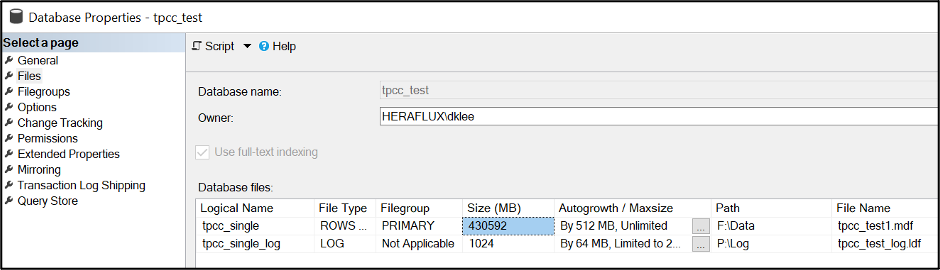
    I’ll be taking the SQL Server database generated by the HammerDB benchmark, appropriately named tpcc_test. It’s just a backed-up-and-restored copy of the (appropriately named) database tpcc_single to represent a single MDF file present. 

    I did a restore onto the F: drive of this server. The MDF size is rather substantial at 420GB. The log size is inconsequential for the purposes of this task.


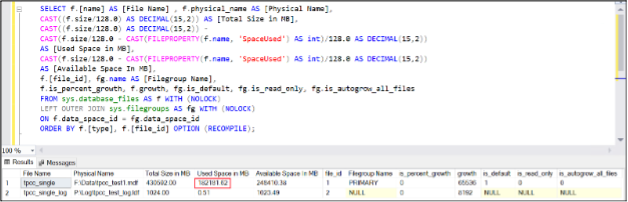
    Here’s the interesting part. Take a look at the current file system size versus the internal fill size. Record the internal fill size, as that’s what we’ll be using to help with some math shortly.

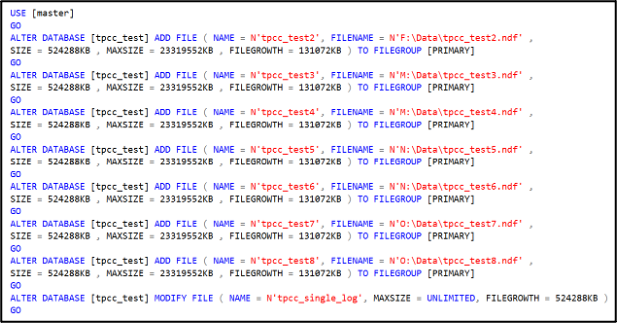
    Now, how many files do you need? Here’s my standard DBA response—it depends. For the purposes of this test, I’m going to add seven NDF data files to complement the primary MDF. Your mileage may vary based on your workload. 

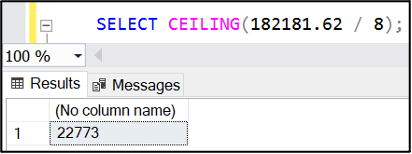
    How large do these files need to be? Take the internal fill size on the MDF, divide by the number of data files you want in total and round up to the nearest megabyte. If the database is active with a lot of data being added, you might want to add a bit more just to have it balance by the time we’re done with this task.

    SELECT f.name AS [File Name] , f.physical_name AS [Physical Name], 

    CAST((f.size/128.0) AS DECIMAL(15,2)) AS [Total Size in MB],

    CAST(f.size/128.0 – CAST(FILEPROPERTY(f.name, ‘SpaceUsed’) AS int)/128.0 AS DECIMAL(15,2)) 

    AS [Available Space In MB], f.[file_id], fg.name AS [Filegroup Name],

    f.is_percent_growth, f.growth, fg.is_default, fg.is_read_only, 

    fg.is_autogrow_all_files

    FROM sys.database_files AS f WITH (NOLOCK) 

    LEFT OUTER JOIN sys.filegroups AS fg WITH (NOLOCK)

    ON f.data_space_id = fg.data_space_id

    ORDER BY f.[file_id] OPTION (RECOMPILE);

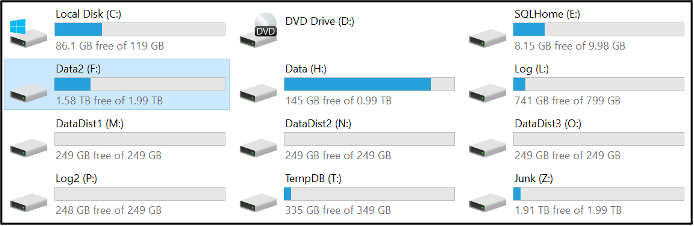
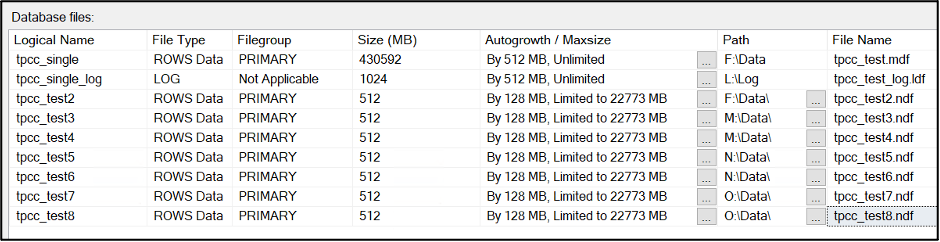
    Now is the time to determine if these should be placed on the same disk or if they should be distributed across more disks. I’m doing that on this server to leverage the disk controller queues to more widely distribute the storage activity and see better overall performance when under pressure. I’ve attached three more virtual disks to this virtual machine, and the four are spread on the four disk controllers on this virtual machine. All disks are formatted with a 64KB NTFS allocation unit size with the large FRS flag enabled. Let’s place two of these files on each disk with the fourth holding the last NDF with the MDF. 


    Here’s a trick: I set the maximum file size of each of the new NDF files to be the percentage of the current main file space consumed. 

    Now, we’re going to use a little-known command to empty the MDF file. It’ll drain the file completely, but since we capped the file growth of the NDF files that we attached to limit their growth rate, this command will run until we have filled the NDFs, then fail. It will take longer to perform this operation, but it keeps the database online while it runs. You might have a bit of a performance hit from the CPU and I/O impact of this running process, so it’s important to think about timing when running this operation.

    You can watch the process work with the internal used space query listed above; the primary MDF is draining while the other NDF files are slowly filling up.

    Again, it takes time for this process to finish. When it finally ‘completes’, the EMPTYFILE command will fail due to maximum file size limit on the NDF files.

    FYI—Index optimization routines can cause a circular block with this process that I have encountered twice while running this process, so keep an eye out if you see this occur.

    Now, your internal data consumed space rates are almost identical. 

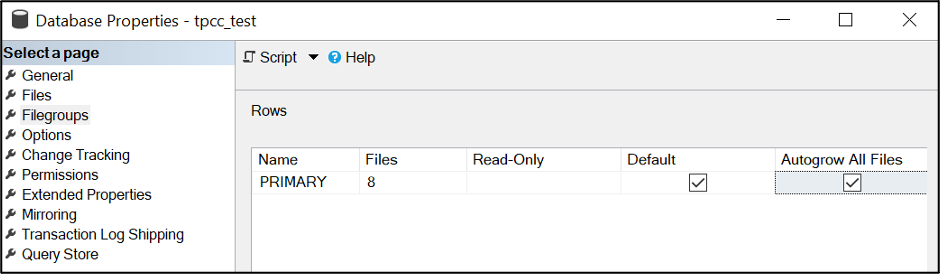
    Verify the autogrow rates are now the same between the data files. Remove the file growth limit on the NDF files. 

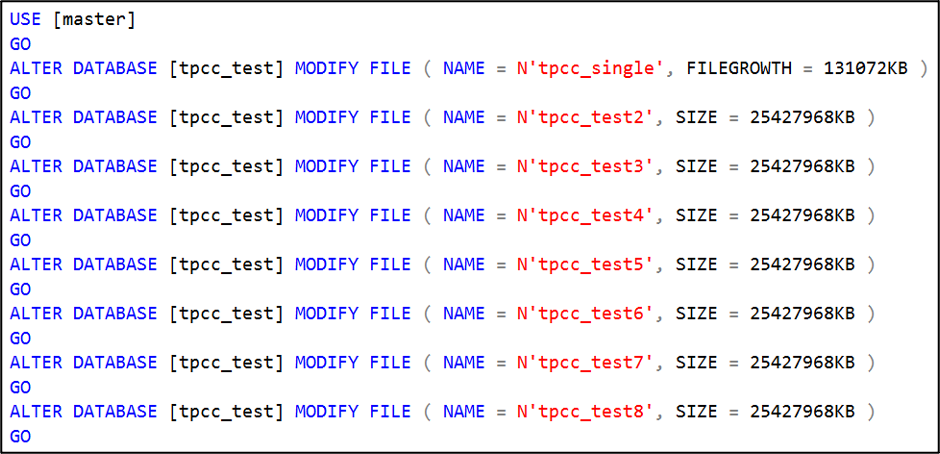
    Perform a one-time shrink of the primary MDF file to shrink it down to where it is the same size as the others.

    It will most likely be slightly out of balance. SQL Server does a pretty good job with the round robin algorithm for internal file fill rates, and it will finish balancing and then round robin filling internally as you continue to add data through normal usage. If you need to increase the size on some of the files so they match, go for it, and SQL Server will fill accordingly so it finally balances.

    You might also check if you need to enable autogrow all files at the same rate. This could mean that the database users might need to be punted from the database to enable the change.  Do this during a maintenance window.

    Sample your SQL Server disk stall rates and see what different you experience once this goes live.

    I hope this helps you improve the operational efficiency of your SQL Server database data files, and you get better performance as a result. Let me know how this works for you!

    Update: If you encounter an error like the following, just shrink the main MDF file down and repeat the emptyfile operation.

  • Microsoft Expands Azure DevOps Portfolio

    Microsoft Expands Azure DevOps Portfolio

    Microsoft has made available a bevy of updates to its DevOps portfolio that, collectively, are intended to increase its share of a wave of applications that will be rolled out across the extended enterprise.

    Additions to the Microsoft DevOps portfolio were announced at the Microsoft Ignite 2021 conference and include DevOps Workflow Generator, a free tool designed to help DevOps teams visualize their toolchain, and updates to Azure Automanage, a framework for automating the management of virtual machines on Windows Server and, in preview, on Linux.

    At the same time, Microsoft has added support for open source OpenTelemetry agent software to Azure Monitor and made available a preview of Azure Chaos Studio, a service for testing application resiliency.

    Microsoft is also making available a preview of Windows Server 2022 that adds secure-code capabilities for workloads deployed on the platform. Microsoft also previewed updates to backed databases such as SQL Server 2022, Cosmos and its implementation of the Redis database created by Redis Labs.

    Finally, Microsoft has also made available a preview of integration between GitHub Actions for automating software development tasks and Azure Active Directory (Azure AD) using Open ID Connect, an authentication protocol advanced by the OpenID Consortium.

    Microsoft CEO Satya Nadella told conference attendees the next 10 years will witness more digitization than the previous four decades as IT shifts from an era defined by mobile and cloud computing to one defined by ubiquitous computing and ambient intelligence.

    Applications built in everything from procedural code to the Microsoft Power Fx, a low-code tool that Microsoft created using the programming language it originally built for users of the Microsoft Excel spreadsheet. Microsoft envisions those applications will primarily be built on its cloud and distributed everywhere. On the backend, a range of database and artificial intelligence (AI) services will be invoked primarily via application programming interfaces (APIs).

    Of course, every major cloud service provider has similar ambitions. Most organizations today are not standardizing on a single cloud. Rather, they are determining which class of workloads run best on which cloud computing platform regardless of whether that approach increases the total cost of IT. Each additional platform adopted typically requires IT teams to master separate tools. However, Microsoft is now also making a case for a cloud-native framework that can be deployed anywhere to build, deploy and manage applications.

    In the meantime, the number of workloads deployed on cloud services continues to grow. The market research firm Canalys reported worldwide spending on cloud infrastructure services reached $49.4 billion in the third quarter of 2021, a 35% increase. Microsoft currently trails Amazon Web Services (AWS) in overall market share but continues to steadily make gains. Microsoft and AWS collectively account for roughly half of all cloud infrastructure service consumption.

    DevOps best practices will need to evolve to meet the challenges of multi-cloud computing. In addition to cloud platforms and on-premises IT environments, applications are now starting to be deployed at the edge in greater numbers. DevOps teams need to be able to continuously deploy applications and their associated updates across a wide range of platforms. The challenge, of course, is that all those platforms have unique attributes that make truly automating the entire process on an end-to-end basis an elusive goal.

  • The Power and Potential of Stored Procedures

    The Power and Potential of Stored Procedures

    One way of saving time when writing code is with stored procedures; prepared SQL code that you can save so the code can be reused over and over again. Stored procedures are a powerful vehicle for speeding up your code and giving you gains in performance. 

    Stored procedures have many benefits—they can be easily modified, are reusable and they possess the ability to automate a task that requires multiple SQL statements. Another advantage of stored procedures is the ability to access or modify data in a database.

    Before incorporating stored procedures, it’s important to know exactly what a stored procedure is, how it differentiates itself, how to create a stored procedure and how to use them in embedded analytics.

    Performing Tasks With Stored Procedures

    A stored procedure is defined as a set of SQL statements and other PL/SQL constructs that are stored in a relational database management system as a group that you can save and reuse. A stored procedure can be comprised of multiple SQL statements like SELECT, INSERT, UPDATE or DELETE. These statements run as a unit and are used to solve a specific problem or perform a set of related tasks.

    Stored procedures are among the most frequently used and most popular database subjects. Using stored procedures can help simplify and speed up the execution of SQL queries.

    Stored procedures can reduce network traffic between servers and clients, for example. This is a result of the commands being executed as a single batch of code rather than multiple. Rather than every single line of code being sent for execution individually, only the call to execute the stored procedure is sent to the server.

    The other benefits of using stored procedures include maintainability, performance and efficiency and complex business logic. And maintaining one stored procedure is easier on the server than maintaining copies on multiple machines. Procedure scripts are stored in one location and they can be freely used in other applications, too. In the event of a definition change, only the stored procedure will be affected—not the application that calls it.

    Advantages of Stored Procedures

    Once you compile a stored procedure, it can then be used many times. This can save a lot of time writing, especially if you are doing ad-hoc queries. This also gives you a slight performance edge on the first execution of a stored procedure over the first execution of an ad-hoc query.

    A stored procedure is ultimately a function call on a database. You may include IF statements, LOOPS, security checks and more to ensure the correct data is being sent back to the call of the stored procedure.

    Another advantage of stored procedures is that they are easily modified. Simply change one or more statements in a stored procedure with the ALTER PROCEDURE command and it quickly updates the results sent back to the calling app. Unlike a middle-tier component which includes business logic that would need a potentially costly re-deployment, a quick change to a stored procedure takes seconds.

    Another benefit of using stored procedures is the security it provides to its data source. The security of an application can be enhanced when using stored procedures by restricting unauthorized access. You may grant someone access to a procedure that updates the database table without allowing access to the table itself. You may also use stored procedures to “hide” the underlying table names from the end user of the stored procedure. Since the caller of the stored procedure has the name of the stored procedure and not the name of the tables used in the stored procedure, they cannot directly access the tables with your data.

    Best Practices For Creating a Stored Procedure

    Creating a new stored procedure is fairly straightforward. Here are the three basic steps:

    1. Within the SQL Server Object Explorer, right-click on the Stored Procedures node under Programmability.

    2. Within the New Stored Procedure Template, modify the CREATE PROCEDURE statement to include the tables, parameters and query options to return the desired data from the stored procedure.

    3. Within the Toolbar, click the Execute button to compile and save your stored procedure.

    There are multiple tools you can use to create stored procedures. Using the interactive SQL Server Management Studio is the easiest, as it gives you an easy way to start connecting to many different types of database servers, including Azure and SQL Server Analysis Services.

    Behind the Scenes in Embedded Analytics

    More organizations are using data to predict future outcomes and stay competitive, offering their customers what they want when and where they want.

    Embedded analytics business intelligence software holds the key to unlocking the power of data. Stored procedures can be incorporated into embedded predictive models and continuous computational language code for data streaming scenarios.

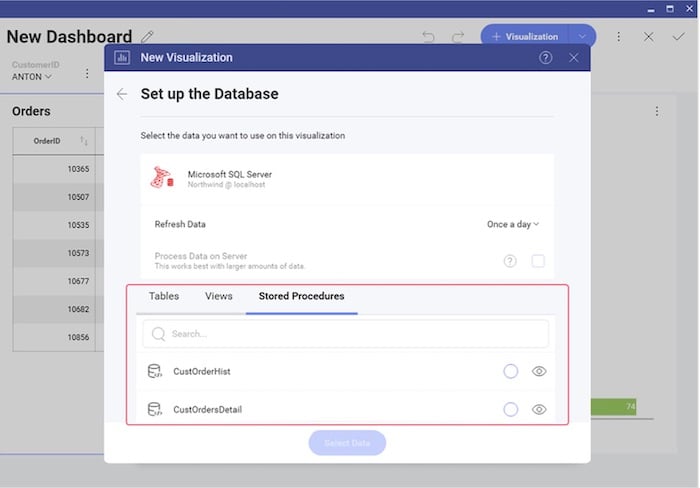
    To create a new visualization on a database that supports stored procedures, first review the list of stored procedures that are available. You will treat the stored procedure you select just like any other data source. The only difference is a parameterized stored procedure, which you can use in a Filter by passing variables to the stored procedure.

    Some embedded analytics platforms, for example, offer complete programmatic control over stored procedures and parameters via code. To pass a stored procedure name, as well as any required parameters, use the ChangeVisualizationDataSourceItemAsync function. This is an example of passing a stored procedure named CustOrderHist and passing the CustomerID parameter in the Reveal platform.

    The Power of Stored Procedures

    Stored procedures are a powerful tool to query a database and return results to a calling app. They are secure, offer performance advantages and are easy to maintain and modify. Stored procedures can be a good avenue for simplifying the way you present data and deal with parameters in your application code versus using error-prone and lengthy ad-hoc queries. As you develop applications, you may want to consider incorporating useful stored procedures in your next project or visualization database.

  • Couchbase Revamps DBaaS Based on Document Database

    Couchbase Revamps DBaaS Based on Document Database

    Couchbase Inc. has unfurled a revamped database-as-a-service (DBaaS) platform dubbed Couchbase Capella hosted on the Amazon Web Services (AWS) cloud.

    Scott Anderson, senior vice president for product management for Couchbase, said that as application development continues to evolve, it’s becoming apparent more organizations prefer to have providers of databases manage those platforms on their behalf. That approach frees up database administrators (DBAs) to spend more of their time building and deploying applications, he noted.

    Couchbase Capella is based on Couchbase Server 7, which added multi-statement SQL transactions capabilities to the document database, based on a JavaScript Object Notation (JSON) format, to make it possible to also run in microseconds transaction processing applications that previously would have required a relational database to process SQL ACID transactions.
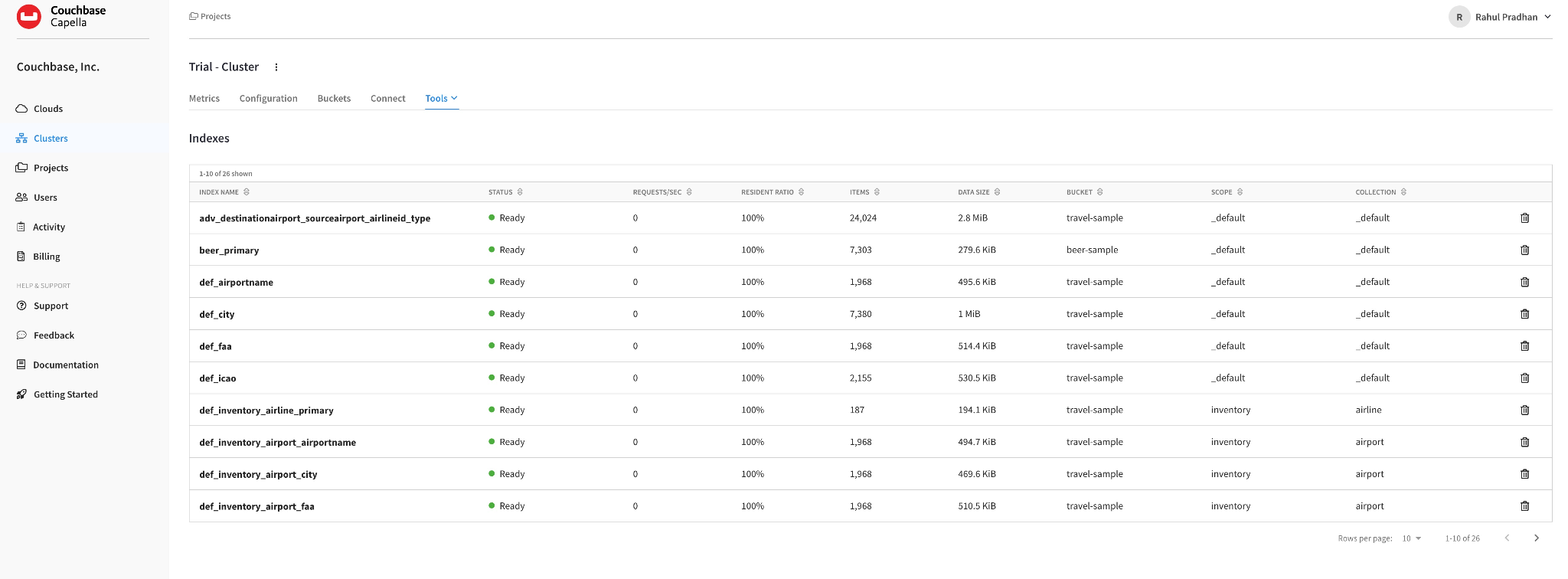
    That release of Couchbase Server 7 also added schema and table-like organizing structures, called “scopes and collections,” within the schemaless database to make it possible to add a table while transactions are running.

    As a document database Couchbase has gained traction mainly thanks to developers who have opted to employ a database they could download and deploy themselves to build applications instead of requiring a DBA to set up a relational database. However, as the number of instances of a document database proliferates, a need to manage them across fleets of servers and cloud services has emerged.

    The challenge then becomes determining whether to hire a dedicated administer or employ a DBaaS managed by a vendor. Many organizations are opting for the DBaaS approach because it eliminates the need to hire a full-time administrator. Once an organization opts for the DBaaS approach, however, it next needs to integrate that service within its DevOps workflow to build those applications.

    There is, of course, no shortage of options when it comes to DBaaS platforms. The global cloud database and DBaaS market size is expected to reach $26 billion by 2025, according to a report from Adroit Market Research. Overall, the as-a-service market reached a record $13.4 billion in the third quarter, up 55% from prior year, according to a report published by Information Services Group (ISG).
    It’s not clear to what degree organizations will ultimately wind up relying on as-a-service platforms, but since the start of the COVID-19 pandemic, the shift to this approach to consuming IT resources has increased significantly. As a result, the way internal IT teams are organized is shifting as lower-level tasks are either automated or handled by an external IT team that works for a vendor.

    Regardless of approach, the amount of data being created and analyzed within organizations is only going to grow. Organizations will need to determine to what degree it makes sense for them to manage that data versus relying on an external services provider. The challenge, of course, when relying on an external service provider isn’t just technical; it introduces a new cultural dynamic that takes some time for many IT teams to appreciate fully.