Tag: source code

  • Universal Code Search Combinations

    Universal Code Search Combinations

    More potential searches than there are stars in the universe.

    Source code search is not like searching for text on the web—it is more complex and has many more nuances. When we set out to create a Universal Code Search engine, we knew there were many permutations that we had to account for—so many. So we began speculating over how many search permutations we would have to account for.

    First, let’s cover what Universal Code Search is. Search today is not just “Grep and go.” The modern era of big code requires code search to cover many dimensions: repositories, file formats, programming languages, etc. Universal Code Search ties together information from many tools, from repositories on your code host to dependency relationships among your projects and application runtime information, to give developers a single place to quickly explore and better understand all code faster.

    A Universal Code Search must satisfy the following requirements:

    • Search through repositories on any major code host.
    • Search across all commits, making both the current (up-to-date) and past codebases discoverable.
    • Support all programming languages.
    • Support code intelligence for all major languages.

    To quantify how expansive Universal Code Search is, the best metric is the number of search combinations. 

    Developers can search across more than 18 dimensions of code to navigate, explore and understand code.

    Repositories

    Sourcegraph can search across any repository, spanning all Git providers in addition to other source code version control systems. GitHub hosts over 100 million repositories, so using a 17.31% market share, we can estimate there are 577,700,751 searchable repositories. 

    Commits

    Sourcegraph can search any repository, and any commit within the repository. For instance, if the average repository has five developers contributing five commits for 300 days per year over five years, Sourcegraph would be able to search all 37,500 commits using repo:<REPONAME>@<COMMIT>. 

    Branches

    As with commits, Sourcegraph can search all of a repository’s branches. Using the same methodology, we can assume that each of the five developers works on five feature branches per month over five years. This would lead to 1,500 branches on the repository that could be searched using repo:<REPONAME>@<BRANCHNAME>.

    File Type

    Sourcegraph supports all programming languages and developer files, in addition to other text files. Between text and developer files, we conservatively estimate this number to be 1,155 total file types supported.

    Pattern Type

    Sourcegraph allows your search to be interpreted three ways: literally, as a regular expression (regex) or as a structural search pattern. Structural search lets you match richer syntax patterns specifically in code and structured data formats like JSON.

    Search Type

    Four search types are permitted. Whether you need to search over all your code at a given point in time, changes to code or commit messages (diffs or commits), Sourcegraph gives you access to all depths, past and present, of your codebase. *file* *repo*

    Repo Forks and Archives

    Include repository forks in your search, or don’t. Include repository archives, or don’t. These are the four options for searching forks and archives among your codebase in Sourcegraph search. *yes, no, only*

    Case

    Sourcegraph search supports both case insensitive and sensitive search. And when performing a diff or commit search type, there are five more filters you can use.

    Developer

    Search for the author of the code, or for the committer. These are the two options when performing a diff or commit search.

    Time

    Sourcegraph supports searching both before and after a time frame, such as before: “last Thursday,” after: “6 weeks ago” or after: “November 1, 2019.”

    Message

    You can also search diff and commit searches for which the commit message contains a particular string.

    IDE

    Four IDE integrations are supported: VS Code, Atom, IntelliJ and Sublime Text. This helps improve developer productivity by reducing context-switching. The limitations on Sourcegraph’s IDE integrations are limited in performing structural searches, use filters and search past commits. Therefore, most of the dimensions described above don’t apply to IDEs.

    What does this add up to? 2,702,343,531,371,460,001,448 potential code searches across all repos, all programming languages, all code changes, all file formats and all code hosts. Universal Code Search makes it easier and faster to explore, navigate and better understand all code, everywhere. Don’t believe it? Go ahead and see for yourself. Change the assumptions to match your organization.
    — Quinn Slack

  • DevOps Deeper Dive: DevOps Accelerates Open Source Innovation Pace

    DevOps Deeper Dive: DevOps Accelerates Open Source Innovation Pace

    In the span of a few short years, open source software has evolved from being a means to create the free equivalent of an existing commercial platform to now becoming the primary means of driving innovation across the IT industry.

    That rate of innovation has increased dramatically in the last few years. However, much of that innovation would not have been possible if large swaths of the open source community hadn’t been able to employ best DevOps practices to collaborate, said CloudBees CEO Sacha Labourey.

    Early on, the adoption of open source software was driven by a desire to commoditize operating systems and databases by making available a free equivalent.

    “It was all about replacement software,” said Labourey.

    Open source adoption got a major boost in the enterprise during the last economic downturn. Many organizations implemented an “open source first” strategy to lower their IT acquisition costs. As part of that mandate, developers began making greater use of cloud infrastructure to build applications based on an open source stack of software using best DevOps practices.

    In some cases, that preference for open source software turned into religious fervor. In other cases, it simply became a means to bypass IT purchasing processes that developers considered obstacles to writing code. Of course, it was only a matter of time before the open source software used to build applications made its way into production environments managed by IT operations teams.

    Just as significantly, open source software was leveraged to build public clouds that today are transforming the way IT is consumed.

    None of this shift has been lost on IT vendors. As the demand for proprietary code slackened, many found it profitable to offer support services for open source software. The more there is to consume, the more the support services contracts grew. Now every vendor from IBM to small IT services providers such as Fairwinds has launched open source projects that help drive demand for IT services expertise.

    “There’s pain around integrating a lot of disparate open source projects,” said Robert Brennan, director of open source software for Fairwinds. “Organizations may be getting software for free, but there’s usually not a lot of help around.”

    Now almost every IT vendor in the world is making software engineers available to work on open source projects. All that talent focused on open source projects has led to the development of new platforms such as Jenkins, GitHub, Kubernetes and, more recently, a raft of smaller projects. With the rise of containers and cloud-native applications, open source software projects are entering another era that will see many of those same software engineers leveraging DevOps practices more broadly to drive even more innovative projects at increasingly faster rates.

    “All the innovation is now being driven by open source,” said Joe Fernandes, vice president, products for cloud platforms at Red Hat. “You no longer have to wait for a single vendor to move something forward.”

    The challenge many organizations now face is keeping pace with the rate of innovation. Most major open source projects, thanks to DevOps practices, are updated once a week. To shield themselves from having to work with raw bits of code, many IT organizations rely on curated distributions of open source code from vendors such as Canonical, SUSE and Red Hat.

    Today, the economics of software development have changed. Providers of proprietary software are at a distinct disadvantage when competing against open source projects that can marshal more developer resources. A vendor selling proprietary software needs to keep a smaller team of developers highly focused on adding compelling, innovative features faster than an open source project can replicate them. As many vendors continue to show, that goal isn’t impossible to achieve; however, it is a pace of innovation that is exceedingly difficult to maintain.

    It remains to be seen just how much of the software deployed in IT environments will be based on open source code going forward. But with each passing day, the balance on the scale continues to lean further away from proprietary code.

    — Mike Vizard

  • Best Practices for DevOps in the Cloud

    Best Practices for DevOps in the Cloud

    DevOps is commonly defined as a methodology that combines software development with IT operations. The goal is to shorten a system’s development life cycle while delivering features, fixes and updates frequently in close alignment with business objectives. Putting DevOps into practice is an ongoing experiment for many organizations.

    Developers often struggle with continuous integration (CI) or continuous delivery (CD) performance, testing delays and other bottlenecks. In fact, one survey reported that only 34% of projects finish on time and only 42% come in on budget. Security and development teams must collaborate to keep up with the rapid development life cycle without sacrificing security with every update.

    Enterprise SaaS apps are not distributed like traditional software—they are continuously running services. So, CD is all about updating the service with a set of changes. In public clouds such as AWS and Heroku, this is done through pipeline stages (e.g. dev, test, staging and production). In platforms such as Salesforce, stages become sandbox environments, ephemeral scratch orgs and production instances.

    How can development teams shorten the development life cycle without sacrificing the integrity of the features and updates? In this article you will learn key DevOps practices to achieve predictable, reliable release management.

    Advanced Planning Ensures All Boxes Are Checked

    Agile planning is now de rigueur for enterprise development. It is best used if:

    • The product itself will most benefit from flexibility.
    • Regular face-to-face interactions and collaborations are needed between team members.
    • The end product requires regular updating, monitoring and continuous delivery to the client throughout the life cycle.

    For CD, ensure your user stories are sized correctly and that each story rolls up to an Epic that represents a standalone feature. This enables your team to release bite-sized pieces of functionality that are consumable by users and traceable back to your release plan. Also, define acceptance criteria for use in the verify stage so you know when something is done-done.

    Manage the Source Code, Especially When Working in a Shared Environment

    There are a few practices of app creation that impact CD. First, source code is not the only element of an enterprise solution. Schema, user interface, access control rights and static resources such as icons and images are all part of the creation process and should be managed just as diligently as source code. They should all be checked in to a version control system (VCS) as a single source of truth.

    Second, ensure that developers are making changes in a segregated environment. In some low code platforms, such as Salesforce.com, this becomes a challenge, but even in a database, multiple database administrations (DBAs) can step on each other’s changes when working in a shared environment.

    Functional Testing

    Automated quality processes are difficult to implement, but essential Selenium is a great tool for testing functionality and should be part of your DevOps practice. But there are several verifications that should be made before you get to functional testing. Static code analysis tools, such as PMD, are essential to ensure your development team is coding against a single style.

    Define a team style and enforce its use. Unit test coverage is also essential—incorporate them with a coverage of at least 75%. Finally, after these automated tests pass, implement a manual peer review. Old hands are able to spot opportunities for performance improvement where automated tools may not.

    Changes Should be Released in a Defined Pipeline with Strict Quality Gates

    Packaging for CD is about capturing changes that can be incrementally released into the next stage or environment. Development teams should dedicate a branch for each stage and bundle incremental changes into a promotional branch to leverage the merge conflict detection in your VCS.

    Changes should be released in a defined pipeline with strict quality gates that ensure the verification steps and enforce the order of release stages. Developers should not be able to bypass key stages throughout the development cycle—for example, moving from development to production.

    Focus on making smaller changes, which result in reliable, predictable releases. Finally, be sure to automate promotions. This enables your team to validate the promotion scripts in integration, test and staging before releasing to production, which decreases the likelihood of an unhappy surprise.

    Automate Configuration, Especially for End User Access Rights

    Make testing for proper configuration part of your verification process. Platforms such as Salesforce have powerful profiles and permission sets that enable user access to only the right information. Improper configuration can expose personally identifiable information (PII), credit card numbers or medical health data.

    Monitor for More Than Just Service Availability and Performance

    Most SaaS companies monitor service availability and performance. But excellent companies also monitor data access to detect improper configuration changes and monitor end user feature usage, which gives product managers visibility to their usage.

    — David Brooks

  • Helping the Little Guy: The Power of Open Source Software for Startups

    Helping the Little Guy: The Power of Open Source Software for Startups

    It’s no secret that open source software holds many benefits for businesses looking to reap the rewards of these innovative, collaborative and incidentally free efforts of developers around the world. Even major companies such as Salesforce have opened up their software for developers to test, debug and improve. Other huge players that run on open source software include Netflix and Twitter. In fact, 78 percent of companies run on open source. So, what if I told you these benefits improve exponentially for startups using OSS to launch and scale their business?

    Open source software has leveled the playing field so that even small startups can leverage advanced technologies, without needing the big budget to go with it. Here are the top ways that startups seriously benefit from running on open source software solutions.

    Power and Control

    Startups are always are running under strict budgetary restrictions as they’re just starting out. This means executing their business model in the most economical way, and open source software undeniably allows this by relieving businesses of the need to pay the expensive initial fees of proprietary software. In fact, Linux found that its users save up to 55 percent over commercial solutions, and Barclays bank reduced its software development costs by 90 percent using Linux.

    While it’s likely that down the line they may have to spend money on support, training or bespoke development needs, these choices can be made as per their business plan and actual business traction, and deployed as and when needed.

    Power in the form of expanded capabilities that comes from open source software is also in large part due to the community of talented programmers who build and craft the solution, allowing for quicker troubleshooting and accelerated development. Many hands can deliver powerful results.

    Innovation, Productivity and Agility

    Startups need to be able to experiment freely to understand what works for their business and what doesn’t. If this need to try different options is shackled down by high costs or contractual commitment, they won’t be trying out the necessary paths or making the necessary mistakes to understand which is the best route to take—not to mention the benefit of being able to take advantage of new tools as soon as they become available, especially before other big players that have developed their own proprietary software.

    Open source software allows for this kind of agility, which breeds innovation. Without the requirement to follow the dictates of a particular vendor, startups can explore all the avenues that they need to, until they know the right way for them.

    For example, startups working within AI will need to identify the algorithm that works best for their particular business needs. To identify these algorithms from the library, data scientists have to perform many trial-and-error iterations. This is usually followed by a detailed data analysis and discovery phase. Only after going through these iterative cycles will the data scientist have a full understanding of which algorithm to use, how best to slice and dice the data and how best to get the expected business results.

    If it wasn’t for open source software, going through these cycles would be prohibitively expensive. This is how top companies were expected to create AI algorithms in the past—with huge expenses on manpower and resources. Now, these open source technologies are mature enough to apply predictably, making AI startups easier and cheaper to build.

    Open source software helps startups take huge strides in their productivity levels, too. A study conducted by Frank Nagle, assistant professor of strategy at the Marshall School of Business at the University of Southern California, measured the impact of free open source software on productivity, especially since a growing number of businesses are increasingly using open source software as a key input.

    The study found productivity either always increased or stayed neutral, as a result of open source software—the impact was never negative. For every 1 percent increase in the use of free open source software, profits can go up by $100,000. This is a “huge amount for small firms,” said Nagle.

    Security and Reliability

    Due to its public nature, the software’s source code is likely more reliable than anything built by independent groups of developers. And although open source software is not automatically more secure than proprietary programs, unlike closed solutions, open source software is transparent and available for inspection. So, by opening up the software and allowing anyone to fix broken code that might put it at a risk, companies can utilize the proactivity of the community to enhance the security of their programs.

    Startups that are just starting out may be intimidated by the amount of open source software options that are out there, but this shouldn’t put them off—there’s a huge amount to gain by opting for open source technologies. Between saving on costs and resources, increased capacity for innovation and agility, and having the security of your systems granted by the open source software community and their dedication to great code, the options are countless for forward-thinking startups.

    — DJ Das

  • Steps for Migrating Code Between Version Control Tools

    Steps for Migrating Code Between Version Control Tools

    Code migration can be tricky if you’re not prepared. Follow these steps for a worry-free migration.

    Almost all source code contains some format of delicate information, whether it be configuration-related information such as database credentials or information on how the web application functions, such as a web template.

    If such information is disclosed, this information potentially could be used by an attacker to discover logical flaws and escalate into a successive chain of attacks. These include attacks such as SQL injection, database takeovers, cross-site scripting, remote code execution and, sometimes distributed denial of service.

    To achieve solution for conducting a risk-free and systemic migration, we need to plan three stages for the code migration process: pre-migration, migration and post-migration.

    Key Considerations During Pre-Migration

    • License cost
    • Administration cost
    • Developer productivity
    • Security of data
    • Training of team
    • Total cost of ownership
    • Knowledge on all connected tools with application lifecycle management
    • Agile adoption policies and CI practices
    • Team structure – distributed or co-located?
    • File types – Do you have large binary files?
    • Need file locks?
    • Users have the appropriate permissions to fetch and push
    • Builds are successful, and all your tests are passing

    Key Considerations or Challenges During Migration

    • Test environment
    • Capacity planning
    • Compute capacity
    • Benchmark the current version control system
    • Network connectivity
    • Access between source and target servers
    • Load testing
    • Access control
    • Aim to migrate over a weekend when nobody needs to check-in

    Key Considerations During Post-Migration

    • Data integrity verification
    • Data size check
    • Automated acceptance testing and reporting
    • Dependencies are intact and build doesn’t break
    • Link between files and folders is not broken
    • Load testing
    • Backup and sync jobs

    Moving to Distributed Version Control from Centralized Version Control

    When migrating code from a centralized version control system such as Apache Subversion (SVN) to a distributed version control such as GIT, here are the steps to take:

    • Evaluate the tools and methods you’re planning to utilize
      • Build and test
      • Code reviews
      • Release management
    • Select a branching strategy for GIT
      • long-lived feature branch
      • Short-lived feature branch
      • Bug fix branch
      • Dev branch

    Reference: https://guides.github.com/introduction/flow/index.html

    https://nvie.com/posts/a-successful-git-branching-model/

    • Decide whether you want to migrate history; if yes, then determine how you will achieve this—you may need another third-party tool to resolve your task.
      • There are many tools available in market that can migrate a whole history of all branches from a centralized tool to GIT.
      • Almost all version control systems collect how files change between versions, including rename, merge and rollback. GIT version control tool stores versions as a snapshot of the entire repository.
    • Retain your old version control system for a set time after migration.
      • During and after a migration, developers sometimes need access to the history in the old version control system, so you can’t just shut the old system down once you’ve migrated.
      • There should be some text file committed in GIT which should explain how/when the GIT branches were migrated from the old system and what all branches are migrated.
    • Remove binaries and executables from source control.
      • You should avoid commit large binary files to a repository. Once they’ve been committed to a repository, they will remain in the repository history and in every upcoming clone.
      • Migrating to Git provides you the opportunity to remove these binaries from your codebase and instead use a package management system.
    • Give knowledge transfer to your team in the concepts and practice used in GIT.
      • It is mandatory for developers to understand how Git stores change and how commits form a history of development and how all things work in GIT.
      • Identify training materials.
    • Perform the actual migration to GIT.

    Suggestions:

    • Keep the following types of files: code files, versioned assets such as graphics and large configuration files.
    • Remove the following types of files: database dumps, log files.
    • Use a vulnerability checking tool.

    Conclusion

    By following the above key steps, you can have a systemic and risk-free migration. Planning, then acting, is critical in a successful code migration process.

    — Amit Anan

  • Handing Your Software’s Source Code to Someone Else: When, Why and How?

    Handing Your Software’s Source Code to Someone Else: When, Why and How?

    While keeping a tight hold on your company’s valuable source code is often seen as the preferred option, there are times when you may be required to hand it over to someone else; there may even be times when handing over your software is actually hugely beneficial to business, too. However, in these scenarios, it’s always important to understand under what conditions this situation may arise, exactly why you may need to do so, and how you can transfer your source code to another party safely.

    When and Why to Transfer Source Code

    Quite simply, source code should never be handed to someone outside of your company unless there is a specific and necessary reason to do so. Here are some situations in which you may need to transfer code:

    Bespoke Development

    As a software company, you may be tasked with creating bespoke solutions to fulfill specific and/or niche business needs. Following development, both the software and its source code will be transferred to the customer, who will, in most cases, then own the intellectual property rights for the software in question.

    When: You will usually be required to provide the source code to the customer at agreed milestones.

    Licensing/Collaborative Development

    If your company (the licensor) opts to partner with another (the licensee) to extend development of one of your products, either with your branding or as a white-label, you will need to provide the licensee with access to the source code for the product they are licensing for the duration of the contract.

    When: Once again, you will usually need to keep providing updated source code at agreed milestones.

    Escrow

    If your customer purchases your software but wants to protect themselves from supplier contractual or business continuity issues, source code can be handed to a third-party software escrow provider. This means that, should the worst happen to your business, your customers can gain access to the code.

    When: Code will usually be transferred at agreed milestones; in many cases, following formal releases.

    Acquisition

    Mergers and acquisitions are somewhat common within many sectors, including the technology industry. Should you enter into an M&A process and are acquired by another business, your source code will be transferred to the new owner, who will then own the intellectual property rights to the software.

    When: Under merger and acquisition conditions, you will only need to hand over your source code once.

    Legal Discovery

    While this situation is very uncommon, there is the possibility that a business may be accused of intellectual property theft by a competitor. In this scenario, source code must be made available to intellectual property experts for analysis to determine if infringement has taken place.

    When: Again, in a legal discovery situation, source code will only need to be transferred once.

    How to Transfer Source Code Safely

    The safest way to hand over code will largely depend on when and how often you need to transfer.

    For a One-Off Delivery …

    … the safest option is usually in person, using multiple, highly durable, solid-state devices and secure, public-key encryption. With the addition of multiple drives, this method also provides the fastest way to exchange a large amount of data. It is important to manage the physical security of the transit and the exchange. However, a face-to-face exchange is often impractical due to scheduling, geography or a whole host of alternative reasons. If you need to undertake a virtual delivery, choose file-hosting services with rich access controls that allow you to explicitly specify who has access to which of the files.

    For a Recurring Delivery …

    … the face-to-face and virtual options of a one-off delivery can also be utilized for recurring deliveries, although a recurring physical delivery is usually not sustainable unless the two parties are geographically close. Therefore, virtual deliveries may be the preferred option and can be undertaken in the same way each time as necessary; either as complete releases of the source code, or alternatively as a delta since the previous delivery. If the data involved in the transfer is particularly large, it is recommended that an initial delivery is completed physically, followed by smaller deltas delivered virtually via servers.

    A Collaborative Approach

    In some instances, particularly when the relationship between the parties is two-way, rather than being a simple client-vendor setup, a collaborative approach to sharing source code may be more appropriate. The easiest way to achieve this would be for one side to host the code, providing the other with access rights to the repository. Alternatively, modern distributed version control systems offer each side the opportunity to have a copy of the repository, with changes synchronized between them, or for a common server to exist between the servers on both sides. A collaborative approach can be useful, but may also introduce complexities relating to reconciliation of changes from both sides of the equation.

    Protecting Your Code

    Depending upon the reason behind your need to hand your software to someone else, you may wish to take measures to protect your intellectual property. Patents can be used to protect the factual aspects of software, while software copyright can be used to protect the “artistic” side of things, including your code. While handing your code to another party is a relatively common behavior in the software world, it never hurts to be prepared, to be aware of the risks and to protect yourself throughout the process.

    — Jorge Sagastume

  • Should You Migrate to Git? Part 1

    Should You Migrate to Git? Part 1

    There are many factors to consider when making the decision whether to migrate your source code. Is it appropriate for the project? Will it work? How might it impact the quality and performance of the finished product?

    Git can help make the decision easier. Git is an open source version control system for tracking changes in computer files and coordinating work on those files among multiple people (Wikipedia’s definition, not mine).

    Git is gaining in popularity and many industries are now moving to it for a number of reasons. For one, Git’s design and performance are remarkably good among all distributed version control system (DVCS) tools. Also, Git can move work quickly between servers without losing history.

    Git has a wide variety of plug-ins for IDEs, and it also comes equipped with a wide variety of tools to help users navigate the history system. Each occurrence of the source contains the complete history tree, which can be useful when developing without an internet connection.

    Plus, Git was created by Linus Torvalds, who also created Linux, which gives it a certain caché.


    Related Content:

    5 Open Source SIEM Tools Worth Checking Out

    Configuration Files and DevOps


    Git’s popularity has been bolstered by killer apps and services such as GitHub, and some very popular projects used it, which further increased its visibility.

    Git nowadays is very popular, but it is recommended companies don’t migrate tools so frequently. Also, there are challenges in  pre-migration and post migration worth considering.

    Distributed revision control uses a peer-to-peer model rather than using a centralized server to store code updates. While a peer-to-peer model would work better for global, open source projects, it may not be ideal in other situations. The downside to a dedicated server approach is that when the server is down, no clients are able to access the code.

    Pros:

    • Great for those who hate centralized version control system (CVCS)
    • Dramatic increase in operation speed
    • Full history tree available offline
    • Distributed, peer-to-peer model
    • Cheap branch operations
    • Attracting lot to non-technical due its open source features (Git is GPLv2)

    Cons:

    • Learning curve for those used to SVN
    • Not optimal for single developers

    Companies That Have Migrated

    Many of today’s new enterprise technologies are centered around free, “open source” technology. As a result, many big companies, from financial giants to retailers to services firms, prefer open source platforms. With the introduction of GitHub many companies have migrated their code base to Git.

    The most popular open source project serves as a “version-control system” for tracking changes and coordinating work between software developers.

    Some very well-known names use Git, including:

      • AWS
      • Reddit
      • Twitter
      • PayPal
      • LinkedIn
      • Gnome
      • Adobe
      • HubSpot
      • Mozilla
      • DropBox

    Terminology

    Git has it own terminology that users, or those considering using it, should become familiar with. Here are some terms worth knowing:

    • Master – the repository’s main branch. Depending on the workflow, it is the one people work on or the one where the integration happens.
    • Clone – copies an existing Git repository, normally from some remote location to your local environment.
    • Commit – posting files to the repository (the local one); in other VCSes it is often referred to as “check-in.”
    • Fetch or pull – Also known as “update” or “get latest” in other VCSes. The variance between fetch and pull is that pull combines both fetching the latest code from a remote repo and performing the merging.
    • Push –  submitting the code to a remote repository.
    • Remote – these are “remote” locations of your repository, normally on some central server.
    • SHA – every commit or node in the Git tree is known by a unique SHA key. You can use them in various commands to manipulate a specific node.
    • head – a reference to the node to which our working space of the repository currently points.
    • branch – similar to other VCSes; however, a branch in Git is actually nothing more special than a particular label on a given node. It is not a physical copy of the files as in other popular VCSes.

    — Amit Anan

  • Using Application Deltas in Deployments

    Using Application Deltas in Deployments

    Developers have been versioning their source files since the early days of Unix. Anyone else remember SCCS? Back in those days, storage was at a premium: Disks were small and very expensive and it was too inefficient to store a complete copy of each version of the source file. So version control tools would simply store deltas—the changes made from one version of the file to another. This was more efficient; if you only changed one line in a 3,000-line file, the system would simply store the new line and some metadata about where it fit in the file and who made the change.

    Some tools would save the latest version of the file and use reverse deltas to record the changes if you wanted to revert to an earlier version. This was usually more efficient, since generally developers want the latest version of a file. As such, it was more efficient to apply deltas to get earlier versions than it was to start with a 3-year-old file and roll forward through 472 changes to get the file you wanted.

    These days, disk storage is literally 3 million percent cheaper than it was in 1981. (The storage in my phone would have cost $38 million in 1981!) Because of this, storing deltas is not the panacea it used to be. In addition, CPUs now can crunch numbers faster than they used to, so it’s possible now to use math to compress and store a complete copy of the new version of the file. That’s what modern revision control tools such as Git do.

    Now that’s all very interesting, but the title of this post is, “Using Application Deltas in Deployments.” So why am I rattling on about source code versioning?

    Well, here’s the rub: While deltas may no longer have much of a part to play in tracking changes to source files, they most certainly do when it comes to deploying applications, and for similar reasons that plagued us (or our parents!) 30 years ago.

    Applications are Made of Components

    Let’s be frank: An application that consists of a single binary on a single server is not going to need deltas. That would be akin to a change to a single-line source file. All you need to do is to replace the old binary with the new and you’ve deployed. But applications are getting more complex:

    • The application may be split across multiple servers. An n-Tier application may have different tiers running on different servers (and even different operating systems).
    • The application could be wholly or partially containerized. You can have multiple containers each running different microservices.
    • There could be database changes associated with an application change. Indeed, the application change could consist solely of a database change. Database updates are pretty much always deployed as deltas; alter scripts are used to add and remove columns, tables and indexes.

    In the same way a single binary can be built from lots of different source files (each of which is under its own version control), an application can be made up of lots of different binary components. Clearly, if the application consists of lots of different components and those components are resident on different servers or containers, then deploying every component every time a new application version is deployed would be wasteful, time-consuming and error-prone.

    An application version “delta,” therefore, would track which components have changed between the version of the application being deployed and the versions of the components on the target environment. This allows the deployment tool to only deploy the components that have changed. So what do we need to track to make this work?

    • Component Versions. Obviously, we need to version each individual component so we know which version of which component is included in any particular application version.
    • Which component version is present on any particular endpoint within a target environment. That way, if the application we’re about to deploy has version 5 of a component (a DLL or a WAR file, say) and version 5 is already present in the target environment, then we don’t deploy that particular component.

    This approach has a number of advantages. You can deploy to an existing environment and only deploy the components that have changed, minimizing the downtime and reducing the risk of failure. You can deploy to a newly provisioned environment and deploy all the components within the application. Then, if you need to fire up a new virtual machine (or a container), the deployment pushes everything. But the next time you deploy to that environment, only the components that have changed are deployed.

    Database Deltas

    We may need to consider special cases when it comes to database components. Remember we mentioned that database changes are nearly always delivered as deltas, SQL “alter” scripts that make changes to the previous version of the database schema? Well, if all you’re doing is deploying the next version of the application, then that works fine. However, what if you’re deploying a version that’s several releases ahead of what’s in the environment? This can easily happen if the test and production environments are “pulling” deployments into their environment (as opposed to having them “pushed” via a continuous delivery process). Now, just applying the alter script that is associated with this application version won’t work in any environment that doesn’t contain the previous version of the application.

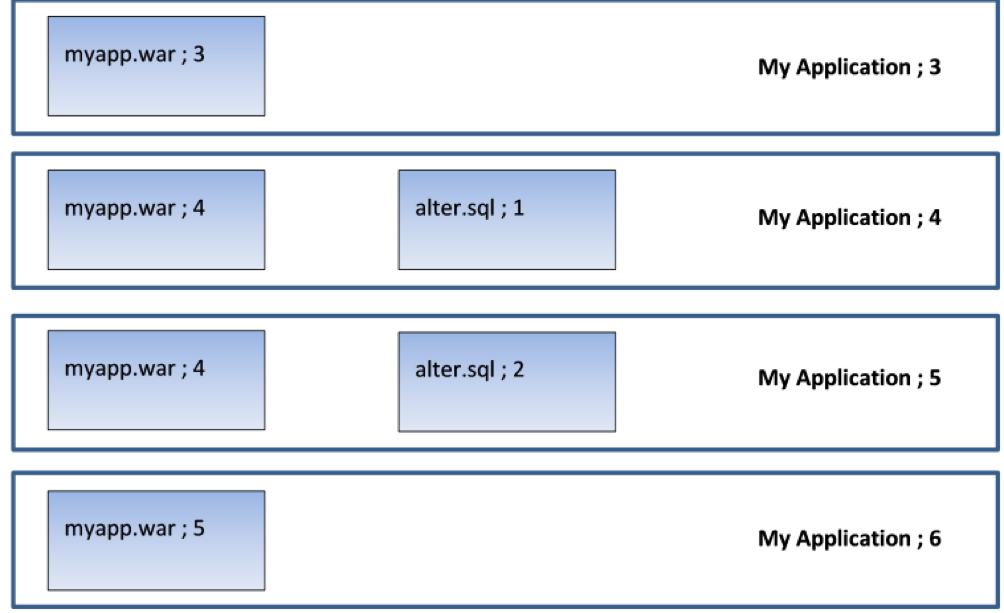
    Picture an application (“My Application”) that is up to version 6. It has two components: a WAR file and a database component that contains alter scripts that roll the database schema forward. Here is what the last four versions look like:

    So version 3 has a new version of the WAR file; version 4 has a new version of the WAR file and a database alter script that adds a column to a table. Version 5 only changes the database (it amends a stored procedure which uses this new column). Version 6 applies a new change to the WAR file.

    Now, in a continuous delivery process, the test rig being targeted will receive each new version. So when version 4 is deployed, the rig will receive version 4 of the WAR file and the alter script will be executed to add the column to the table. Then, when version 5 is deployed, only the DB alter script will run (alter.sql;2) to amend the stored procedure. The WAR file is not deployed, since the server already contains version 4 of the WAR file. When version 6 is deployed, only version 5 of the WAR file is deployed. This is exactly what we want.

    But now what happens when we move to user acceptance testing (UAT)? By this stage, we’ve done as much automated testing as we can get away with; in UAT, real users need to log on to our test system to make sure they’re happy with everything. So we’re not going to do a “push.” In UAT, the test lead does a “pull” when they’re ready to accept the new version of the application for testing. So they pull “My Application Version 6” into their test environment and get their testers lined up with coffee and pizza.

    But what happens if the test environment is currently on version 3? Well, for the WAR file, there’s no problem—there’s a difference in the component version for the WAR file so the new version is deployed. But what happens to the database? There are no alter scripts associated with version 6 of the application, but without applying alter.sql;1 and alter.sql;2, the database schema is not going to be valid for use with myapp.war;5. The testing will fail, not so much “falling at the first hurdle” as “falling in the paddock.”

    Deltas allow us to cure this issue. What we need to do is identify the components that represent the database changes and get them to be applied in sequence for each interim version. In that way, successive database “deltas” are applied to roll the database forward to the correct schema version before the required version of the application is deployed.

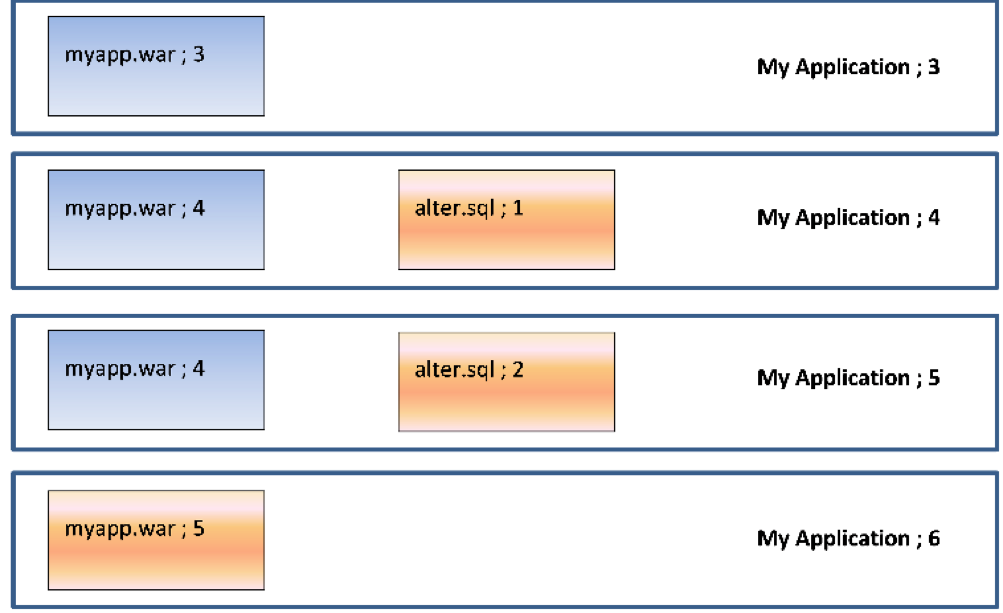
    So, in our case, going from version 3 to version 6 would deploy the following components:

    So we will deploy (and run) alter.sql;1 to add the new column, then alter.sql;2 to amend the stored procedure and, finally, deploy myapp.war;5. Deltas mean we do the minimum required to get the application version to the desired state.

    Conclusion

    Versioning the components that make up an application means it is easy to determine the deltas (changes) between one application version and another. Recording what version(s) of the components are on the endpoints in a target environment makes it easy to only deploy the components that have changed, minimizing downtime and making the deployment quicker and less error-prone. Identifying the deltas for a database gives us the ability to roll databases forward and jump between releases, which is invaluable when transitioning from an agile “push” to a waterfall-centric “pull” deployment model.

    — Phil Gibbs

  • 3 Simple Steps to Rugged DevOps 101

    3 Simple Steps to Rugged DevOps 101

    As the CEO of WhiteSource, I regularly consult enterprises about building and enforcing their open-source security policies.

    In the course of my consultations, I discuss open-source security protocol with many software companies and enterprises, and I’m often baffled by the fact that many organization aren’t boosting their software development performance and speed by bringing their development and operations teams together via DevOps. In fact, only 25 percent of enterprises are currently doing DevOps. I mean, if you were a CTO and someone said you could make your software development 200 times faster and reduce unplanned work/rework by 22 percent, wouldn’t you jump at the chance?

    Now, I know DevOps still is not being implemented even though it has proven to improve deployment rates, so I shouldn’t be surprised that security isn’t joining the DevOps party. But I am. Just imagine the benefits of giving security the DevOps treatment. There’d be no more (or, at least, significantly fewer) last-minute security issues, no more unrealistic security policies, and engineers, IT and security professionals who actually understand each other and improve their own processes to work better together. This is the essence of rugged DevOps.

    Implementing rugged DevOps is a huge decision for any enterprise, and it requires a lot of planning and time to implement. However, you don’t need to completely remodel your organization to start enjoying some of what rugged DevOps has to offer.

    So, what can you start doing today?

    Shift Left Your Security

    DevOps is all about shifting left security to find security issues as early in the software development life cycle (SDLC) as possible. The earlier you find an issue, the cheaper and easier it is to fix.

    So, how can you shift left your security? Start by integrating security tools into your continuous integration (CI) process to find vulnerabilities as soon as they’re added to your build and sometimes even your repositories. Tools exist that can integrate with your build tools and identify potential issues in your build.

    Also available is a browser plug-in that allows developers to detect security vulnerabilities while they are searching for open-source components online. This tool helps developers say no to vulnerable components long before downloading or integrating them with their code.

    Shifting left security is the hardest part of any enterprise’s rugged DevOps journey. Yet by taking some small steps, you can start to enjoy the benefits of DevOps with a twist of security.

    Adopting a Micro Approach to Security

    Just as operations has adopted a DevOps mindset to understand and become involved in development, it’s now security’s turn.

    Security needs to stop being on the outside of development, looking to control it through detailed security policies. Instead, it needs to take an active part in it, steering it toward security. Security can do this by focusing on understanding development and deployment processes, and searching for possible quick wins.

    From my own experience, every time a security team takes the time to understand the peer code review process, small changes are made with significant contribution to code security.

    I also often notice that security teams are unaware that some developers may still use the old “copy and paste” method in using open-source components. This makes it impossible to track known open-source vulnerabilities. Once security teams understand this, they can improve guidelines to ensure they are not blindsided.

    The good news is you don’t have to overhaul your whole organization to give security a micro-makeover. Your security team simply needs to start getting into the finer details rather than planning long-term security programs and road maps.

    Speaking the Same Language

    A good sign that an enterprise is doing DevOps is when developers and operations call software issues by the same name. This means the two teams have defined their issues and objectives together, and are working toward joint goals. The same is 100 percent true for rugged DevOps.

    If development sees a problem in terms of unplanned work, operations sees a glitch and security sees a vulnerability, collaboration will be very difficult. Introducing a shared vocabulary for issues throughout software development is an effective way to get your professionals on the same page.

    With this shared vocabulary, development and security can sit together and define shared key performance indicators (KPIs). For example, development’s goal of faster deployments can be linked with security’s aim of reducing mean time to release (MTTR). Once each team knows what the other wants to achieve, they can understand how to help each other.

    At the end of the day, security is more likely to be taken seriously if it is understood. And this is key. With the typical enterprise ratio of 100:10:1 development, operations and security professionals, security needs all the friends it can get.

    Ready to Try Rugged DevOps on for Size?

    As you can see, you don’t need to turn your enterprise upside down or even have a rugged DevOps team to start getting some of its benefits. Just follow these three steps, and your enterprise can get a taste of what rugged DevOps has to offer.

    So what about you? Are you ready to take rugged DevOps for a test drive?

    About the Author / Rami Sass

    Rami SassRami Sass is an experienced entrepreneur with deep background in R&D and product management. At Eurekify. and later CA, became an expert in designing and implementing complex security management and compliance software systems, and in delivering them to the market. Currently he is co-founder and CEO of WhiteSource.