Tag: software development lifecycle

  • The DevOps Workflow is Broken. Here’s How to Fix It

    The DevOps Workflow is Broken. Here’s How to Fix It

    While great progress has been made in bridging the gap between developers and operations engineers, fundamental differences in roles and responsibilities, alignment, and access to information hinder further progress. 
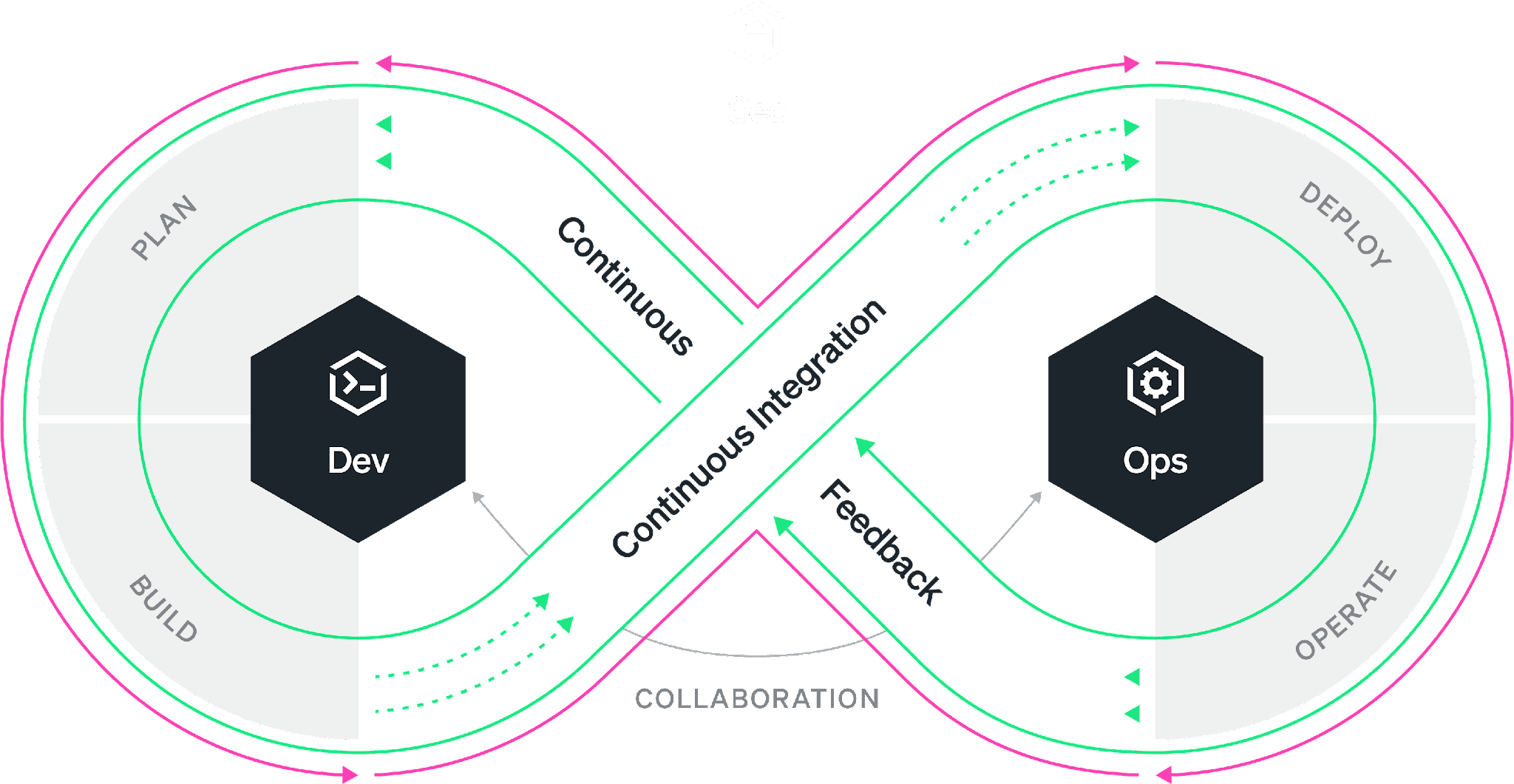
    Everyone is familiar with the DevOps infinity loop: This is an ideal workflow where every stage of the software development life cycle feeds into the next. While the philosophy is well understood, organizations have worked on bringing developers and SREs closer together under the DevOps banner. The reality is most of the time, the DevOps infinity loop is broken. Developers continue to focus on building features without the benefit of data-driven insights that production data can provide. Developers often “push and pray” without fully understanding how their changes will affect performance and the user experience. As a result, companies miss the opportunity to improve products faster and delight the customer sooner.

    According to Gartner, 90% of DevOps initiatives will fail to fully meet expectations. And yet, the global DevOps market, which accounted for $7.3 billion in 2021, is expected to reach $37 billion by 2030. So to summarize, we’re all spending billions of dollars on the implementation of initiatives that are expected to fail in some meaningful way 90% of the time. The question is: What is failing and what can be done about it? 

    As the DevOps toolchain continues to expand, collaboration across tools is difficult and success depends on your organization’s ability to simplify and automate while achieving alignment. Developers use a variety of tools from various vendors in their daily work. The most widely used are VS Code from Microsoft, Jira from Atlassian and Slack from Salesforce. The most popular code hosts/repositories include GitHub, GitLab and Bitbucket. Bridging the gap are CI/CD vendors such as Jenkins and CircleCI. Ops engineers typically rely on other vendors for their daily work, such as New Relic, Datadog and Dynatrace. So, how do we ensure that all stakeholders in the SDLC have access to all the relevant information simultaneously, understand the objectives and get an integrated perspective of the different inputs and workstreams independently of the tools used?

    There are three essential areas that DevOps initiatives must tackle to create alignment, collaborate successfully and streamline workflows. Let’s tackle each of these areas individually.

    1. Collaboration. The first step is good collaboration. Most organizations rely on Slack or Microsoft Teams for this purpose, but they are both suboptimal when it comes to collaborating on code and incidents that point to code. Having code and data at the center of DevOps collaboration ensures that everyone has access to the information needed to tackle issues, reducing and even eliminating differences of opinion in the process.
    2. Visibility. Second, ops engineers and developers must have visibility into the performance of applications across the entire tech stack. These three barriers can occur in different aspects of an organization’s operations and their impact can limit the team’s ability to deliver value to the customer just as much as workflow inefficiencies. Visibility helps the organization reach alignment on common objectives.
    3. Context Switching. Third, given the number of processes and tools involved in a successful DevOps implementation, it’s important to work toward reducing context switching and integrating tools within established workflows. Integrating collaboration, tracking, history and observability into a single pane of glass can greatly improve clarity and time to resolution.

    For DevOps teams, increased velocity and transparency are always worthwhile pursuits. However, it’s important to avoid myopic focus on workflows when other nagging problems could be hiding in plain sight.

    By committing production telemetry, developer teams can adopt an objective, data-driven approach to software engineering—saving time and avoiding potentially misguided approaches based on opinions rather than facts. Visibility, transparency and velocity can help engineering teams meet ever-increasing requirements and provide their organization with the best possible business outcomes.
  • Best of 2021 – Software Developer Life Cycle

    Best of 2021 – Software Developer Life Cycle

    As we close out 2021, we at devopsy.kinsta.cloud wanted to highlight the most popular articles of the year. Following is the eleventh in our series of the Best of 2021.

  • The DevOps Sweet Spot: Inserting Security at Pull Requests (Part 1)

    The DevOps Sweet Spot: Inserting Security at Pull Requests (Part 1)

    Today’s organizations are increasingly benefiting from the modernization of the software development lifecycle (SDLC), including the adoption of cloud, DevOps, Agile methodologies, containers and more. Thanks to this modernization, organizations are innovating and releasing updates faster than ever before. But these benefits aren’t without challenges.

    Application security arguably tops the list of challenges. Security has inherently manual bottlenecks, and is unable to keep up with the pace of automated DevOps pipelines. The result is that security is often left behind, overlooked or simply ignored in the development process. Developers aren’t willing to slow innovation down today for the potential of security breaches tomorrow.

    As a result, more and more applications are being shipped into production with vulnerabilities and security flaws. Today, most of the vulnerabilities are found in post-production either via red teams, bug bounty programs or siloed and irregular code analysis scans. At best, these vulnerabilities are fixed in the next version that’s shipped. At worst, your organization is making headlines for millions of personal records being breached.

    However, security in the modern SDLC is becoming more symbiotic thanks to two key advancements—speed and accuracy. Overcoming these two challenges enables security to be inserted into developer workflows earlier than ever before. By automating security with every pull request, development organizations can finally embrace security without slowing down innovation.  

    Automation — Security at the Speed of DevOps

    These days, many vendors claim to insert security into DevOps pipelines, often during the build. While it’s true that security scans may be automatically started, they still finish in siloed processes that don’t keep up with the pace of releases. We call this “automation for automation’s sake.” It does not measurably improve defect density, slow the accrual of technical debt or reduce mean time to repair (MTTR). The only value that automating this way provides is checking a box on a compliance form.  

    So, how can organizations more effectively automate security quality decisions? 

    First, security tests and scans need to be dramatically faster. Legacy code analysis takes such a long time that many vendors recommend sacrificing comprehensiveness by scanning only differentials. Even then, they still aren’t fast enough to keep up with CI/CD. It goes without saying that organizations cannot meaningfully automate security into processes such as builds or pull requests, that take just a fraction of the time.

    Second, the results need to be more reliable. The goal of security automation should be to fail insecure code. However, historically, code analysis tools are plagued by so many false positives that no code would ever pass any test. Only with reliable results can insecure code be confidently failed. 

    Third, security scans must be comprehensive as false negatives lead to vulnerabilities going undetected into production. This is, in part, because developers are not asking the right security questions when scanning their code. Traditional code analysis tools leverage pattern matching techniques—they look for symptoms of a vulnerability that are common across all code bases. For example, lack of input validation from sources is a classic cause of injection vulnerabilities. However, there are many vulnerabilities that are unique to each code base, such as business logic flaws, data leakage, hard-coded literals and insider threats.

    For example, all applications are purpose-built to meet specific business needs, meaning vulnerabilities may go beyond coding errors and present themselves as business logic flaws in the design of an application. Take the First American Financial breach. Thanks to an insecure direct object reference (IDOR), an attacker has the potential to manipulate an internal implementation object. In the case of First American Financial, this was a URL or form parameter. Given the asymmetrical advantage that attackers have, defenders must protect from all possible vulnerabilities, but attackers need to only find one vulnerable route. As such, partial security can be as problematic as no security.

    Only when security is completely comprehensive—reliable enough to fail with confidence and fast enough to keep up—can it be meaningfully automated into developer workflows without slowing them down.

    Yet, comprehensive security scanning is only part of the equation. In the second article of this series, I’ll dig into where these security scans should be taking place in the development cycle to make them most effective.

    — Chetan Conikee

  • 5 Tips to Eliminate Knowledge Gaps in Dev and QA

    5 Tips to Eliminate Knowledge Gaps in Dev and QA

    To create and release high-quality software, the software development lifecycle (SDLC) was established using different roles and processes designed to work seamlessly together. This approach is of critical importance because it spans the initial planning phase, all the way through production release and monitoring.

    Roles vary within projects but typically include designers, business analysts (BA), developers, testers, scrum masters, project managers, product owners (PO) and technical architects (TA). Each one brings different expertise and skills to a project but ultimately, they are meant to collaborate and determine how to implement different aspects of the software.

    The amount of processes can also vary for projects based on team size, release schedules, availability of resources and the complexity of the software.

    What is the Knowledge Gap?

    Without a distinction of responsibilities or a roadmap that identifies who owns each task in the SDLC, everyone assumes someone else will complete the tasks. The result is that the majority of these important steps remain incomplete or undone.

    The reason this happens is because a knowledge gap exists among the team. This is especially true when teams are a mix of entry-, mid- and expert-level individuals. Sometimes, assumptions are made regarding the skill set, experience and domain knowledge that each individual brings to the project. Knowledge gaps can also develop at a more granular level, with teams using the same tools but in different ways. As an example, developers and testers might be using a single testing platform quite differently.

    As teams begin collaboration on features for the software, they may encounter the following situations:

    • Each team member has a different interpretation of the project requirements
    • Developers assume testers have their same level of technical expertise
    • A lack of ownership and assigned responsibilities among the team
    • A PO has a feature idea and each team member has different ideas for how that feature should work
    • The TA explains how a feature should be implemented using technical jargon that designers, POs, BAs and testers don’t understand
    • A tester is not allowed appropriate time to complete testing due to tight release schedules

    Identifying Knowledge Gaps

    Knowledge gaps not only negatively impact the release of high quality software, but also team morale, productivity, job satisfaction and empowerment. The first step to finding acceptable solutions is to identify exactly where a knowledge gap exists. Some questions to help teams do this include:

    • What are the common problems that occur in each phase of the SDLC?
    • What processes are in place during the requirements, design, development, testing, acceptance and release phases of the SDLC?
    • How effective is the communication between different roles in the team?
    • Are the responsibilities of each team member clearly identified?
    • How visible is the status of the project at any given time?
    • How often are release cycles pushed to accommodate for more development and testing?
    • Are the teams aware of what kind of customers are going to use the product?
    • Is the velocity of the team stable? How often does it fluctuate and by how much?

    Bridging Knowledge Gaps

    Finding gaps in a team’s knowledge is the first step. The next step is determining how to narrow the divide. The following key factors help bridge the knowledge gap in teams:

    Training

    Sufficient training and tools should be provided to help teams do their jobs better. Proper training has a domino effect on the success of the project. It helps designers understand how to design mockups so developers can effectively implement the feature; testers can attend code reviews without intimidation and use tools more effectively; developers will understand why the testability of a feature is important and understand which tools can aid the development testing effort; the scrum master can better manage project tasks; the project managers can ensure the team collaborates to meet release schedules and deadlines; and finally, stakeholders can have an overview of the project through reports that are generated using various tools.

    Visibility

    For teams to work seamlessly together, we need to ensure the results of everyone’s efforts are visible to the entire team. It is important to understand how each contribution maps to the overall goals of the project. To increase visibility, teams can consider using the following:

    1. Checklists: a list of items to be completed during each phase of the SDLC. If the items in the list are marked as done, then there is no ambiguity about which tasks need attention.
    2. Visual Dashboards: give a high-level overview of the project’s health and status. These can be created on whiteboards, easel boards or in software and during daily meetings, teams can address the dashboard to ensure everyone, including business stakeholders, are aware of the high-level project status.

    Clear Definition of Roles and Responsibilities

    Each person needs to understand his/her role on the team, as well as the tasks they must accomplish on a daily, weekly, monthly or quarterly basis. Goals, objectives and expectations for each team member should be defined and discussed with respective peers and/or managers. This eliminates confusion and increases productivity and task completion.

    Empowerment

    In an age where individuals are increasingly more technical and skilled, what they still lack in their job functions is empowerment and autonomy. Contrary to the conventional wisdom that a project needs a single leader, the leadership responsibility can be effectively divided within each role on the team. Having one point of contact each from the design, development and testing teams means each can help to lead their respective sub-teams and help to ensure everyone within the project is working toward the same goals and objectives. By operating within this structure, the whole team becomes empowered.

    Experimentation

    Once sprints are completed and knowledge gaps have been identified, the whole team should come together to discuss solutions to existing problems. Based on this discussion, the team can start experimenting with different solutions to determine what works well or doesn’t. This constant experimentation and feedback loop helps to make the team more creative and empowers them to come up with solutions that work for their organization.

    In summary, the knowledge gap has been a major obstacle for development teams in reaching their fullest potential. By identifying and reducing these gaps, teams can be more efficient and achieve faster release cycles with higher quality software.

    — Raj Subramanian

  • source{d} Delivers Enterprise Edition of SDLC Platform

    source{d} Delivers Enterprise Edition of SDLC Platform

    source{d} has made available an enterprise edition of its software development lifecycle (SDLC) platform that includes visualization and analytics tools along with additional management capabilities. A free community edition of the core source{d} platform, which is stripped of most of the enterprise-class tools, also is now available in beta.

    Company CEO Eiso Kant said the enterprise edition of source{d} provides the additional tools enterprise IT organizations require to employ the platform as the equivalent of a business intelligence (BI) application for managing DevOps processes.

    The tools can launch queries against a big data repository based on the Apache Spark in-memory analytics engine running on a Kubernetes cluster, which can be populated with actual data or metadata pulled from multiple DevOps tools and platforms. That capability enables IT leaders to then query data that has been joined together in a way that surfaces actionable intelligence, said Kant.

    source{d} Enterprise achieves that goal by including Apache Superset, an open source business intelligence web application. The platform also can be extended to support SQL queries launched from other BI tools and project management applications. The enterprise edition also provides access to advanced queries and user-defined functions to address tasks such as code duplication analysis or identity matching.

    Finally, source{d} Enterprise provides authentication integration with LDAP and OpenID to limit who can edit or view queries, data sources, charts and dashboards.

    Longer-term, source{d} plans to leverage predictive analytics and machine learning algorithms more aggressively as the amount of SDLC data that gets collected by enterprise IT organizations increases.

    Kant said many enterprise IT organizations have tried and failed to build the equivalent of source{d} platform mainly because bringing together and then maintaining all the required technologies often becomes too complex an undertaking. Those efforts also have been confined largely to managing processes such as bug fixes versus including all the BI tools needed to manage software development in a way business and IT leaders can align technology initiatives to specific business goals, he said, noting the source{d} approach brings together enabling technologies such as Spark and Kubernetes to enable IT organizations to deploy an SLDC platform on-premises or in a public cloud.

    As software development increasingly grows more complex, the days when it could be managed efficiently through a project management application alone have come to an end. At the same time, more organizations realize their success ultimately comes down to how consistently they can deliver a high-quality application experience. For all the hype surrounding digital business process transformation, the core tenet is that most organizations are indeed becoming software companies. As such, they need to borrow many of the SDLC processes that successful software companies employ routinely. The only real difference is they don’t need to develop those processes from the ground up when more turnkey SDLC platforms are emerging.

    — Mike Vizard

  • The Impact of DevOps and Continuous Testing in 2018

    The Impact of DevOps and Continuous Testing in 2018

    At its core, DevOps is meant to touch an entire organization; however it’s heavily weighted in the software development life cycle (SDLC). That’s why DevOps is going mainstream in 2018. Companies are making the business benefits of DevOps a top priority—it’s all about delivering value to the customer faster through maximum automation of the release cycle/processes. And that begins with organizations realizing that to mature their DevOps processes, they need continuous testing as part of their continuous integration practice.

    Cross-platform Engagement and IoT Will Mean More Devices—and More Apps

    With organizations shifting processes and innovation to a mix of digital technologies—a concept known as digital transformation—consumers are engaging with different apps across various platforms 24 hours a day, seven days a week. Add in the rise of internet of things (IoT) devices, which allow for seamless transitions across smartphones, TVs, tablets and other devices. Now is the time for optimum user experience (UX).

    In 2018, industries such as financial services, health care, retail and automotive will fully embrace IoT. We may also see new types of applications replacing current ones, as consumers and developers embrace the constantly evolving innovative capabilities coming in 2018. However, until the C-suite implements the tools needed to keep up with the growing demand for cross-platform upkeep and testing, other industries will experience slow adoption.

    A critical step in delivering flawless UX is testing, and lots of it. Never has there been more to test, measure and develop than in this digital revolution we are seeing today.

    Frequent New Releases Will Require Even Faster Updates

    As the number of platforms consumers engage with rapidly grows, so does the pressure for developers to ensure apps are running as they should at all times. Same goes for the pace of cloud adoption: Cloud test labs will need more sophisticated capabilities, meaning more platforms and blind spots which require continuous optimization to ensure market readiness. This need for faster turnarounds on update releases and bug fixes will multiply in 2018.

    To maintain and grow customers and profitability, CIOs must recognize the importance of empowering developers with the tools and time to implement continuous testing across the SDLC. Tools, such as those powered by automation and the cloud, increase efficiencies and free up time developers previously spent on manual quality-checking, allowing them to ensure the apps they are producing are keeping up with consumer expectations. If users feel their app is not delivering on the experience they want, they will delete it and move on to the next competitor, which has a direct negative impact on the company’s bottom line.

    Outdated Technologies Will Make for Even Slower Updates

    There is a suite of new tools being introduced to the market for all stages of the SDLC in the hopes of keeping up with the heightened speed of testing. As many DevOps environments struggle to adapt their pipelines to these new tools, many are powered by emerging technologies including machine learning and automation. In 2018, developers should ditch outdated infrastructure and processes in favor of more modern architectures, including implementing microservices.

    Modernizing pipelines will allow developers to design in next-gen engagement methods such as artificial intelligence (AI), augmented reality (AR) and virtual reality (VR) without compromising velocity.

    AI Will Experience Its Shining Moment (for Some)

    In the coming year, AI will start to move from a theoretical concept to a commonly applied technology, especially within the DevOps space. However, developers first must understand what they want AI to help them accomplish—and how—within the SDLC and across the DevOps pipeline. One logical place to start is figuring out how they can best leverage it to analyze test automation strategies.

    The value of a well-oiled, or not-so-well-oiled, DevOps process can make or break an organization. As the new year begins, be sure to include the IT leadership in these conversations to ensure developers are getting what they need, when they need it, to keep business moving as usual. IoT, AI and the cloud are just a few things to keep in mind as the industry moves to implement the latest tools in 2018.

    About the Author / Eran Kinsbruner

    Eran Kinsbruner is the lead technical evangelist at Perfecto and the author of the “Digital Quality Handbook.” He is a software engineering professional with nearly 20 years of experience at companies such as Matrix, Qulicke & Soffa, Sun Microsystems, General Electric, Texas Instruments and NeuStar. He holds various industry certifications such as ISTQB, CMMI, and others. Eran is a recognized mobile testing influencer and thought leader. He is also a patent-holding inventor (test exclusion automated mechanism for mobile J2ME testing), public speaker, researcher and blogger. Follow him on Twitter, connect with him on LinkedIn and check out his professional mobile testing blog.

  • Cohesion Critical in a Successful DevOps Team

    Cohesion Critical in a Successful DevOps Team

    In the push to adopt DevOps among enterprise IT organizations, cohesion has been one of the biggest challenges in collaborating effectively. Historically, departments within a business existed in disparate locations, or silos. Marketing, IT and operations all had their own teams and their own communication channels, which made it difficult for members of separate teams to work successfully with one another despite the fact that they were working toward a common goal.

    However, with the continuing adoption of DevOps, IT admins are finding that projects are easier and more well-executed when all the parts of the development cycle—creation, coding, testing and deployment—are working in tandem. Therefore, it’s becoming ever more critical that agile product teams are on the same page when it comes to their DevOps projects.

    Cohesion Matters

    Why is it so important to have a development team that coheres as one entity and communicates effectively among all its members? Let’s take a look:

    Quicker feedback cycles

    When team members are working as one unit instead of disparate entities, testing and development cycles don’t have to be long, drawn-out affairs. One of the biggest benefits of DevOps itself is the ability to shorten time to market and deploy code more quickly, with fewer errors—so enabling teams to communicate can only enhance that benefit.

    According to devopsy.kinsta.cloud contributor John Balena, facilitated collaboration allows teams to achieve continuous testing goals and streamline processes. This can lead to a continuous delivery cycle, which is the goal of DevOps in the first place.

    “DevOps can best be realized when IT operates in a social, collaborative environment that ensures all groups are working with a visual model in their context with the necessary information from downstream and upstream teams, as well as in collaborating with relevant experts at the moment when clarifications are needed or issues arise,” Balena wrote.

    Shared responsibility

    With a collaborative DevOps culture, no one person or group of people is responsible for the entire project. It is a team effort that doesn’t rest on anyone’s shoulders unnecessarily. This makes the project more of a shared endeavor, which everyone is invested in and cares about. With silos, when something goes wrong, members of different teams may try to lay blame on one another, which lowers morale and may defeat the entire purpose of DevOps. But when teams are communicating effectively, they can share blame—but they also share success.

    This mindset enhances the teamwork aspect of software development and can help get rid of the culture of fear, according to devopsy.kinsta.cloud contributor Claire Agutter. When teams work together within a blameless culture, they can more quickly see and learn from their mistakes.

    Common goal

    Throughout all of the steps of the software development life cycle, another important advantage of teams working together is that they share a common vision of how the company should progress. Business needs and customer satisfaction are both critical factors in the DevOps cycle, and team members should all be on the same page when it comes to these goals.

    In all, it’s critical for IT managers to support a culture of collaboration and communication if their DevOps endeavors are going to succeed. You need the right tools for the job, but you also need to have the right attitude.

    “Culture is like quality,” DZone contributor Jim Bird wrote. “You don’t build culture, or quality by talking about it. You build it by doing things, by acting, by making things happen and making things change, and reinforcing these actions patiently and continually over time.”

    A collaborative DevOps culture can improve project success.

    About the Author/Sanjay Zalavadia

    SanjayHeadShot (1)As the VP of Client Service for Zephyr, Sanjay brings more than 15 years of leadership experience in IT and Technical Support Services. Throughout his career, Sanjay has successfully established and grown premier IT and Support Services teams across multiple geographies for both large and small companies. Most recently, he was Associate Vice President at Patni Computers (NYSE: PTI) responsible for the Telecoms IT Managed Services Practice where he established IT Operations teams supporting Virgin Mobile, ESPN Mobile, Disney Mobile and Carphone Warehouse. Prior to this Sanjay was responsible for Global Technical Support at Bay Networks, a leading routing and switching vendor, which was acquired by Nortel. Sanjay has also held management positions in Support Service organizations at start-up Silicon Valley Networks, a vendor of Test Management software, and SynOptics.

    Connect with Sanjay:

    Facebook: https://www.facebook.com/getzephyr?_rdr=p

    LinkedIn: https://www.linkedin.com/in/sanjayzalavadia

    Twitter: https://twitter.com/yourzephyr

    Google+: https://plus.google.com/+Getzephyr/about

  • DevOps in a Hybrid Model

    DevOps in a Hybrid Model

    As enterprises have begun to demystify the value proposition around cloud adoption, several best practices, optimization techniques and delivery models have been described in the technical community around cloud enablement and large scale adoption. While the debate between choosing private cloud vs. public cloud model has been longstanding, enterprises have been looking to mitigate the level of software disruption caused by such large transformation. A Hybrid model is thus a very appealing prospect since enterprises can still technically control the security policies and governance models, while also taking advantage of capacity bursting and other benefits of the cloud.

    As with most technologies, adopting a hybrid cloud solution doesn’t buy you a free lunch either. There are several complications that are being discovered as enterprises mature into this model. One of the biggest challenges is to keep the software development lifecycle in sync across multiple target environments that are the basic backbone of a hybrid cloud model. Thus, having a robust DevOps solution is one of the key necessities for making a hybrid model work.

    The Business Case for a Hybrid Cloud Model

    In today’s complex business world, enterprises either by choice, or by circumstances, are choosing a hybrid model of IT solution. Enterprises are best served by implementing a “best of breed” solution, which means a combination of several domain specific SaaS (Software as a Service) and PaaS (Platform as a Service) solutions. This also eliminates any risks of a “vendor-lock in”.

    So by design, a hybrid model will have a combination of the following characteristics:

    • Multiple platforms within an enterprise architecture
    • Both traditional as well as virtual platforms
    • Domain specific SaaS/PaaS solutions, typically in a multi-vendor scenario
    • Lack of standardization across cloud platforms (hypervisors, hardware types supported, so on and so forth)

    Now, the challenge is to make IT delivery work seamlessly around these characteristics. This is only possible by a high degree of automation in the delivery process, operations process as well as the business planning processes. Those are the very elements a DevOps platform attempts to solve.

    The Challenges of Cloud Adoption

    Let’s take a quick look at some of the core existing IT capabilities built into a large enterprise.

    •  Security model

    One of the biggest challenges towards cloud adoption is the notion of extended or revamping existing enterprise security model for cloud (and as a consequence, into DevOps solutions). How can one make sure the same security policies for data classifications and user management are applied especially on a public cloud model? Will existing audit processes suffice in a cloud model? Can existing security policies be leveraged as-is or with minor modifications and still be able to take advantage of a cloud model? These challenges will drive enterprises into a hybrid solution.

    •  Support and Governance models

    Many enterprises have built up a history and matured best practices around IT governance and support structure (think ITIL). The cloud model in many ways disrupts those practices. One of the ways to mitigate the disruption is to adopt some form of a hybrid model so some best practices and core support capabilities can still be leveraged while taking advantage of the cloud.

    One of the emerging business models for enterprises is to avail a more “managed services” model so they can focus more on their core business capabilities rather than on IT. In a managed services model, one or more service providers will be responsible for portions of the overall cloud solution while the enterprise would retain responsibilities over centralized capabilities like security. So the “hybrid” nature is not just limited to physical environments, but also around support models.

    Implementing a DevOps strategy could help mitigate a lot of these issues.

    Hybrid DevOps Scenario

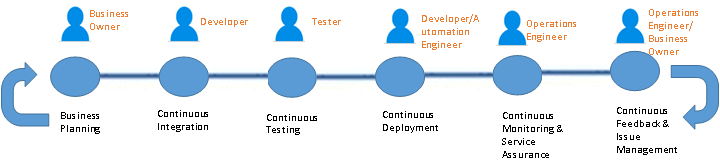
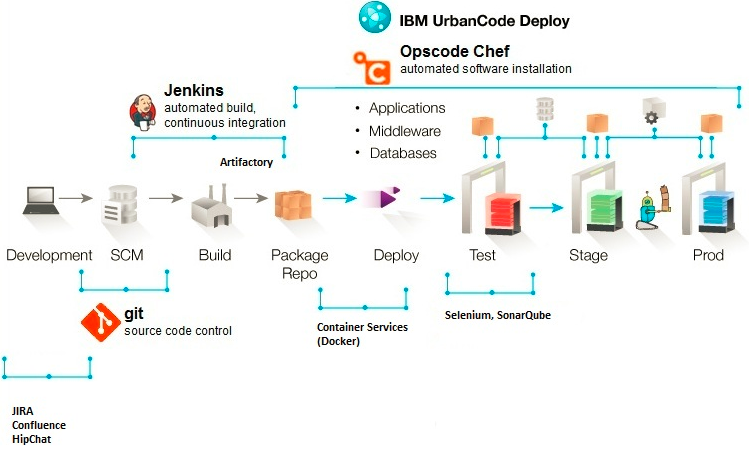
    A typical SDLC (Software Development Life cycle) DevOps looks like the following.

    Sunil's Blog 1

    Figure 1 – A Typical DevOps Pipeline

    The aforementioned actors in figure 1 may or may not actually be “people” since in a true DevOps world, those actors are replaced with some degree of automation. But it sets the context on what types of roles & responsibilities are expected in a typical pipeline.

    Now, imagine this pipeline that is multi-folds, across several application or components. This is the real nightmare of deployment and release management issues that one has to account for since in a hybrid model. Each of these applications/components may technically reside in a totally different environment developed and managed by totally separate groups with different service level agreements.

    A centralized DevOps platform, standardized across these application environment boundaries (for the most part) to provide a single pane of control over code, release and deployment management is what is required for a successful adoption of hybrid solutions.

    Here is an indicative centralized architecture to solve the deployment and release management issue described above:

    Sunil's Blog 3

    Figure 2 – DevOps Platform Architecture Example

    The components listed in figure 2 is purely indicative and shouldn’t be misconstrued as any product marketing or messaging. The main challenge will be to standardize components to the extent possible (this is easier said than done) and stitch together a meaningful platform that works within an enterprise (based on existing tooling & processes, skills, funding etc.). Bear in mind I’m merely touching the surface in this article with regards to a DevOps platform, and limiting this to a tooling discussion. Bigger challenges do exist in the form of process and organizational transformation, which are also necessary to make a DevOps implementation successful. I’ll pen those topics in a separate article 🙂

    Summary

    DevOps for Hybrid cloud implementations will soon become the de facto model for process transformation in large enterprises. There is simply no other way to go about such large transformation in a purist way. There is a wide verity of use cases for a hybrid model, and most enterprise situations would fall under one or more of those categories. A robust DevOps platform is absolutely critical to making a Hybrid cloud adoption successful.


    About the Author/ Sunil Joshi

    Sunil JoshiSunil is an Executive Architect with IBM. He is currently the Application Development & Innovation (AD&I) DevOps offering owner for Global Business Services. He is IBM Senior Certified and Open group certified Distinguished Architect. His specialization are in the areas of hybrid cloud solutions, platform as a service and DevOps strategy. He’s created complex hybrid solutions on cloud and DevOps for large enterprises. Sunil has authored several IBM Redbooks, blogs and also a co-author of the IBM Cloud Computing Reference Architecture (CCRA).

    Sunil is passionate about international music, multi-cultural cuisine, active sports and mentoring school & college students on career path and technology.

    Contact Sunil on  linkedin twitter

  • 5 Ways Continuous Integration Reduces Risk in Development

    5 Ways Continuous Integration Reduces Risk in Development

    ***This post is based on themes and ideas from the great e-book, “Continuous Testing,” by our friends at Parasoft.

    There’s a lot of talk about DevOps and Continuous Integration in the tech space right now, but sometimes the implementation of those methods can be tricky.

    An effective Continuous Integration strategy requires DevOps teams to manage risks in software development with a range of practices.

    Here are five processes you can use to make Continuous Integration work for you.

    Automated and Self-Testable Builds

    DevOps professionals can use separate machines for software integration to eliminate the tight coupling between the build process and Integrated Development Environment (IDE) that leads to last-minute integration concerns.

    Everything needed to build the software should be contained in a separate version control repository.

    Dedicated Continuous Integration servers and open source build automation tools can run these builds through continuous testing processes and deploy the product in the required environments.

    Automated deployment further eliminates the bottleneck of waiting for other team members to deploy testable versions of the latest software.

    Synchronize Version Control Repository

    Continuous integration is only possible as long as Dev, Ops, QA and the wider IT team is tightly integrated, collaborative and supportive of each other’s efforts.

    From a tooling perspective, effective collaboration requires a separate-but-unified master database updating changes in real-time.

    All database artifacts — including scripts, procedures and other assets should be placed in this version control repository.

    DevOps teams can enable Continuous Database Integration by using automated database integration, local database sandbox and version control repository to share database assets, as well as empowering developers with capabilities to modify the database and making DBAs a part of the Dev team.

    Build a Stronger Foundation and Expand Test Coverage

    Limiting test cases to individual assets executed at every check-in to the version control repository ensures the continuously integrated builds are defect-free in combined form.

    Tests should be repeatable and performed continuously in virtualized systems replicating unavailable testing environments.

    Continuous Integration methodologies allow you to determine how much of the code was actually tested without much manual intervention.

    Although some code coverage tools can assess the percentage of test coverage by package or class, Continuous Integration systems ensure this coverage is updated in real-time.

    For instance, DevOps teams can run these tools as part of the Continuous Integration server build script every time the version control repository is updated with a code change.

    With this information, untested code would never get through to the next stage and the latest test will be conducted across all areas as required.

    Enhance Project Visibility

    With automated build testing and deployment using a centralized code repository, build feedback mechanisms update Devs and Ops with the latest test results and the necessary progress information.

    In cases when the same level of automation for complex builds seems impractical, DevOps teams using manual procedures must establish a feedback loop to bring everyone on the same page with real-time communication and notification of accurate performance and results.

    These capabilities ensure the same high standard of reporting is maintained for manual testing practices as available for automated build testing systems.

    Follow Consistent Dev Standards

    Quality code forms from the ground up, with adherence to common code and architectural standards established for an organization’s specific requirements.

    Automated inspection tools enable Devs working on short and quick builds to maintain their focus on quality from the very foundation of the software itself.

    DevOps teams should assess every integration build for potential defects that surface after integrating several iterative builds but should be taken care of far earlier during the development stages.

    In Conclusion

    The right toolset is key to Continuous Integration, as is the cultural change that facilitates this DevOps practice.

    Continuous Testing presents several areas of improvement for DevOps teams to develop iterative builds in individual, isolated branches and then merge the latest builds in a unified, single and well-synchronized Master branch.

    The idea is to ensure all risks are mitigated beforehand so DevOps professionals are not bogged down with endless needs to rework the product — and that gives them time to focus on true Continuous Integration.