Tag: shift left security

  • Why DevOps is Key to Software Supply Chain Security

    Why DevOps is Key to Software Supply Chain Security

    DevOps is designed to increase business value and responsiveness through rapid, high-quality service delivery, made possible through fast-paced, iterative IT service delivery. The term DevSecOps emerged as a way to remind us that security was always intended to be part of the software delivery process. However, with the barrage of attacks on the software supply chain showing no signs of abating, the question now is whether even the tightest DevOps pipelines can maintain the pace-protection balance.

    It’s important to note that the term “software supply chain” has been used primarily to refer to the tools and processes used to build and deploy software applications. Now, however, with the rise of infrastructure-as-code (IaC), the term also refers to tools and processes used to build and deploy IT infrastructure.

    Meet Mandates, Reduce Risk

    Software supply chain attacks such as SUNBURST, HTTP/2 Rapid Reset or the breaches associated with the MOVEit vulnerability have fed news cycles for the last few years, and that likely won’t change anytime soon. Attacks on the software supply chain increased 742% since 2020. What we are seeing as a result are new concerns about supply chain security and DevOps requirements. This has led to confusion and often a mish-mash of tooling that may exacerbate rather than mitigate supply chain security issues.

    Arguably the most impactful salvo over the software supply chain security line was president Biden’s 2021 Executive Order 14028, which established new mandates, including the delivery of SBOMs, as minimum requirements for software used by the U.S. federal government. More recently, the FDA has mandated that “all medical devices running software must create and maintain” SBOMs. I expect to see government and industry requirements increase over time.

    These are just a couple of relatively recent examples. There are many more—and no doubt many more to come.

    So, if you’re moving at the speed of DevOps, how do you address these current and future mandates for software supply chain security, as well as the continually emerging vulnerabilities and attacks? I would venture to say that only by moving at the speed of DevOps—and within the parameters of the DevOps model—can organizations not only meet mandates but also effectively reduce risk for the business.

    Indeed, it’s not a matter of whether DevOps is viable within the current security climate but what requirements need to be added to support and enhance current DevOps work.

    New Guidelines, New Processes, New Tools and New Data

    In response to these new threats and regulations, the software community has been working on developing and updating guidelines to help organizations improve the security of their supply chains—for example, SLSA, NCSC UK supply chain security guidance and NIST cybersecurity supply chain risk management. However, these new guidelines can be complicated and require new processes and new tools.

    Before adding any new tooling or changing any processes, it’s critical to examine existing tools to determine whether and to what extent they satisfy supply chain security mandates. Organizations must also evaluate how well existing processes work to protect the business, then strategically add/subtract from there as needed.

    No matter what solutions are leveraged, more and different tools generate reams of more and different data. What’s important — and to whom? How do I manage the data? When can I trust it? Where do I store it? What problems does the new data help me solve? Organizations will need a way to effectively sift this information and deliver the right data to the right teams at the right time. To preserve the ability to quickly and continuously innovate, it will be important to focus on shifting security left as well as integrating automation whenever and wherever possible.

    As new security metadata becomes available, such as from SBOMs, new solutions for managing that metadata will be key. An open source initiative sponsored by Google, GUAC is designed to integrate software security information, including SBOMs, attestations and vulnerability data. Users can query the resulting GUAC graph to help answer key security concerns, including proactive, preventive and reactive concerns.

    Continue to Shift Security Left

    Another way that organizations can maintain their DevOps momentum while protecting the software supply chain is to continue to invest in shifting security left in the software supply chain. The software community has been talking about this for some time, but many organizations struggle to implement impactful changes. Security teams must work to understand how software is built and collaborate with development and DevOps teams to ensure that improvements are made to both application and infrastructure-as-code supply chains.

    We need to go beyond shift-left vulnerability analysis to ensure that we are evaluating the quality of configuration-as-code (for both applications and infrastructure), that we are taking advantage of new recommendations, and that we are leveraging new attestation solutions designed to work with pipelines such as sigstore and Tekton Chains. After all, the sooner an issue is discovered, the more quickly it can be addressed and the less disruptive and costly it is to fix it.

    No One-Size-Fits-All Solution

    While all of these solutions mentioned here are helpful, there is no single product or framework that will enable organizations to maintain the security-innovation balance. Success, rather, will require a focus on agility, flexibility and effective communication and collaboration—the very hallmarks of the DevOps model.

    Rather than being obviated by the demands of software supply chain security, DevOps provides the opportunity to integrate the kinds of protections that can prevent or mitigate supply chain vulnerabilities and breaches. DevOps also enables organizations to quickly and effectively respond to new threats and new requirements.

    With that said, there’s no doubt that organizations will need to think differently about how they manage software security, including the strategic evaluation and integration of tools that will meet current and future regulatory mandates and, more importantly, protect the business over time. Organizations may also need to think about weighing security over speed, at least until all of the pieces of the software supply chain protection puzzle are in place—but also when future circumstances warrant a fresh look at how to best balance the DevOps pace-protection balance.

  • Self-Service Workload Protection for DevOps Teams

    Self-Service Workload Protection for DevOps Teams

    Everyone (or almost everyone) in the DevOps world likes to talk about the importance of security. But too often, these DevOps security conversations end with generic recommendations such as, “Follow the OWASP Top 10.”

    Don’t get me wrong—reference frameworks such as OWASP are great resources for helping to guide DevOps security. But it’s usually far from obvious to many DevOps teams how to bridge the gap between the abstract theory of these frameworks and actual practice. That’s especially true given that many DevOps teams spend their days putting out fires in fast-moving CI/CD environments and have little time to step back and operationalize security best practices, even if they know they should.

    In this article, I’d like to present one real-world strategy for implementing the DevOps security best practices outlined by organizations such as OWASP. That strategy is what I call self-service workload protection. The term refers to making security not just something that DevOps teams recognize as important in the abstract but an easy-to-use service that anyone on the DevOps team can operationalize just like any other process within the CI/CD pipeline.

    In other words, we need a self-service approach for offering workload protection through an accessible library of policies and tooling that DevOps teams can leverage on demand. Let’s take a look at how we can achieve that in practice.

    Understanding Self-Service Workloads

    To understand how self-service workloads work, we need to know the common parameters that define a secure and properly configured application deployment. With that information, security teams can automate the process and offer a complete set of reusable and adaptable tools for DevOps service teams to run.

    The common parameters usually boil down to the following factors:

    • Making sure that all required compliance and security scans run at least once for every deployment. Those scans need to use preventive actions and block insecure deployments.
    • Making sure that for any new vulnerabilities found, we add them to the list of checks. (For example, we should be able to see updated reports for new issues as they’re discovered.)
    • Performing audit reports and continuous security monitors over the development and production sites to capture security issues.
    • Establishing sane and pragmatic secure default policies and authorization profiles.

    The above parameters should be captured and packaged as a self-service solution and used during the normal flow of operations—for example, CI/CD pipelines, validation and compliance checks, creating and uploading a new image to a container registry, etc. This means the security team will have to spend some time to make sure the application of workload protection policies is a team effort.

    For more tips on automating security, check out Symantec’s recent webinar on security and compliance for DevOps.

    How to Make Security Better Via Self-Service Workload Protection

    From the perspective of the security team, the main goal is to make security accessible to everyone in the organization. Not only that, but the tooling and resources they offer need to be documented and easy to use. The DevOps team should be able to plug in security controls without knowing their ins and outs, though they need to have the means to let the security team know if something goes wrong. Let’s explore how we can make this process better.

    Shift-Left Security Through CI/CD Pipelines

    Shift-left security is the main focus point of the security team, and it’s also the most tricky to get right. By adding more security checks and audits earlier in the development process, there’s a risk of stepping into other people’s ponds (which may degrade their workflow experience).

    A better approach is to give more responsibility to the DevOps team and let them determine the best possible integration point. Mistakes will be made, but important lessons will be learned. Gather feedback from the process and, if required, iterate over the agreeables. That way, everyone will benefit. If the appropriate steps are taken, the security team will have a way to apply its security checks during the development process, and the DevOps team will have its infrastructure protected (at least from known risks).

    Test automation and continuous integration points are the most obvious solutions, as they are the most automated parts of the system. The security team can go the extra mile and offer reusable policies and deployment steps that can be added on each deployment type. For example, they could offer a container image that is bundled with security checks and frameworks that test common security issues. The DevOps team can simply enable the checks via the CI/CD dashboard and during the build stage the check would act as a gateway if a security check fails.

    In addition, the security team can share infrastructure policies and secure default configuration via infrastructure-as-code tools such as Terraform using remote state. This could be enabled during infrastructure provisioning by the DevOps team, without configuring anything. Sharing state this way often improves collaboration between departments.

    Pre-Baked Secure Images

    Developers use VMs and containers to package their apps for the DevOps team to deploy them to production. Usually, those images host crucial configuration and services that are specific to that application. What’s more ideal than to have the security team prepare a list of safe-to-use images that are preconfigured with secure defaults and scanned against vulnerabilities? Developers just have to specify the required image by ID so that the DevOps team can use it for all deployments.

    Tip: Symantec’s CWP product is integrates with Jenkins to enable simple, automated vulnerability scanning during the CI/CD process.

    For example, tools such as Packer are used to create identical images for AWS compute instances, and features such as seccomp profiles are enforced to Docker images. With Packer, you can deploy consistent images to the cloud and integrate vulnerability scanning into the process to ensure the deployed images meet GSO guidelines. There is a small caveat here, though: If developers decide to add an external library that needs more capabilities and they don’t inform the security team, then the application might misbehave in production and the DevOps team would be caught unaware. So, it’s important to have a good communication channel and do a security assessment for each new dependency or change introduced to the system. This keeps the self-service agreement working without interruptions or misunderstandings.

    Conclusion

    Letting the DevOps team manage its own self-service affairs when it comes to security controls and compliance requirements is the next major step toward a more productive business model. There are additional costs, but the end results have long-term advantages.

    By having a preset repository of tooling, configuration policies and pre-baked images accessed from secure portals, teams can integrate security from the start while maintaining the benefits of accelerated development. And by doing that, security and DevOps teams can improve their collaboration.

    That’s great news. What’s even better is that we can use a tool that is suited for all the above tasks—Workload Security Protection from Symantec. If you want to learn more about the platform, see how it can help secure your cloud with a free trial.

    This sponsored article was written on behalf of Symantec.

    — Theo Despoudis

  • 4 Things Developers Should Know About Security in the Age of DevSecOps

    4 Things Developers Should Know About Security in the Age of DevSecOps

    If you’re a developer, most of your experience when it comes to security probably centers on designing and writing secure code. You know how to prevent buffer overflows, architect your microservices in a way that helps mitigate the impact of a breach and otherwise churn out secure application code.

    But the fact is that today, knowing how to keep the application itself secure is not enough—even if you are a developer. We’re living in the age of DevSecOps, and developers everywhere are being asked to play broader roles in security at all stages of the application delivery pipeline, from code implementation through to production release and management.

    With that reality in mind, here’s a look at four things developers should know about security today.

    What is DevSecOps, and What Does It Mean for Developers?

    Before diving into four critical things for developers to know in the age of DevSecOps, let’s take a look at what DevSecOps means.

    You’ve probably heard of DevOps, an approach to software delivery that emphasizes constant collaboration between developers and IT teams.

    DevSecOps extends that concept by adding security to the equation. For organizations that have embraced DevSecOps, the entire software delivery team becomes responsible for helping to secure the application. Security is no longer the exclusive domain of security engineers.

    In practice, DevSecOps includes work such as integrating vulnerability scanning into the build process using tools such as Packer and ensuring that images used for deployments meet GSO guidelines. Applying OWASP’s “Security by Design” principles is also a good best practice.

    What that means for developers (to put it simply) is that being a security-minded developer means more than just writing secure code. Developers must now understand security challenges and best practices at all stages of the software delivery pipeline, starting with the design and implementation of code—developers’ traditional domain—and continuing through with testing, staging, deployment and post-release management—all of which traditionally were not areas in which developers played much of a role.

    This isn’t to say that developers now have to bear primary responsibility for all of the things that happen after code is written. They don’t. Their main job is still to write code. But developers should have a solid understanding of the security implications of everything that happens once they hand off code to other members of the software delivery team, to ensure they are doing their best to write code that will stay secure as it travels down the pipeline.

    DevSecOps Security Lessons for Developers

    If you’re a developer, the DevSecOps trend means you should now have some expertise in the following:

    Microservices Security is Difficult (and Developers Can Make it a Little Easier)

    Microservices architectures, which have become very common because of the agility they provide to applications, create extra security challenges that were not present in monolithic architectures. The main reason why is that microservices add many more moving pieces to an application. As a result, there are more potential security vulnerabilities within the application, and detecting those vulnerabilities can be more difficult because there is more activity to monitor.

    Developers can help to address this challenge, and one way is to think about security monitoring complexity when they are deciding how many microservices to create. If developers can reduce the total number of microservices in an application without sacrificing agility, they can simplify security monitoring and enable a more secure application overall.

    Developers also can make sure the microservices they write log security-related information sufficiently and clearly. You don’t want to make it more difficult for your colleagues who are monitoring an application to keep track of security events because the application doesn’t log authentication information in sufficient detail, for example.

    You Can No Longer Count on Firewalls

    In the days when most software ran on-premises, firewalls were a handy way of isolating applications from most security threats.

    Today, organizations face a string of cloud security challenges that didn’t exist when firewalls were designed. Firewalls can still be helpful in some circumstances, but in many cases, you can no longer neatly segment applications or services off from the public internet, because you need the internet for services that are spread across a hybrid infrastructure to communicate with each other.

    For developers, the lesson here is that it’s especially critical to design and write code that can resist threats that originate from the internet. Even if you don’t expect a particular part of the application to be exposed to the public internet, assume it might be, either because deployment patterns change in the future or the component is exposed without anyone realizing it.

    To put this another way: Developers can’t and shouldn’t expect the IT team to be able to erect firewalls that will keep applications secure. More of the burden has shifted to developers to write applications that can resist network-based security threats because the IT team can no longer deploy firewalls like it used to.

    Shift Security Testing Left

    DevSecOps goes hand in hand with the mantra of shift-left testing. The latter term refers to the practice of performing tests earlier in the software delivery pipeline, rather than waiting until just before deployment to do the tests.

    Shift-left testing can apply to any type of software testing, including security tests. For developers, taking advantage of shift-left security testing is a useful way of identifying security flaws within newly written code early, when they can be fixed with less effort because they have not yet been integrated into the broader application code base.

    Security testing at later stages of the delivery pipeline is important, too, especially because you won’t be able to detect all security flaws until you can monitor all of your microservices as they interact with each other. But the time developers have to spend rewriting code to address security issues will be reduced greatly if their organization takes advantage of shift-left security testing.

    Don’t Be Afraid to Ask for Compliance Help

    A final point worth mentioning relates to compliance. Compliance is becoming ever-more challenging. And so is creating applications that meet the security requirements of compliance frameworks.

    In the past, developers were often left on their own to figure out how to address compliance needs. Given the spirit of collaboration that DevOps and DevSecOps champion, however, developers should no longer feel like they have to go at it alone when it comes to interpreting and addressing compliance requirements. And indeed, they shouldn’t. If you are a coding expert, you’re probably not an expert in figuring out what complex compliance frameworks require.

    The point here is that developers should not be afraid to ask for help—from legal experts, management or the IT team (which is more likely to have some experience with the compliance issues that arise once the software is in production) to make sure that the applications they design and write meet compliance requirements.

    Conclusion

    The developers’ main job is still writing code. But by having a greater awareness of the types of security risks that can arise within the code as it is pushed down the delivery chain, developers can do much to improve the security of the applications they write. They might even save themselves some time and headaches by reducing the number of complicated security issues they end up having to address by rewriting code.

    This sponsored article was written on behalf of Symantec.

    — Chris Tozzi

  • Why Unikernels Are Great for DevOps

    Why Unikernels Are Great for DevOps

    DevOps tooling seems to be in a never-ending state of self-transformation. The continuing evolution of infrastructure and the tools that go with it are forever creating new ecosystems. On the infrastructure side, we saw VMWare, Citrix and other companies bring to market massive virtualization in the late ’90s and early ’00s. This, of course, prompted a little bookstore in Seattle to unleash something known as “the cloud,” forever changing the way developers push code to production.

    The cloud, of course, is just an API around virtualization. A lot of the infrastructure changes prompted configuration management software, including Chef and Puppet, to emerge. Puppet is now 15 years old and Chef is around 10; even Ansible is now 7 years old.

    In the past years, we’ve seen tools such as Terraform emerge and other higher-layer infrastructure, such as Docker, which led into Kubernetes. There’s a lot of tooling out there to make applications run on servers. Just as the containers/Kubernetes ecosystems have tried to implement change on top of virtualization infrastructure, we are starting to see developers dig back down into the operating system layer to improve infrastructure there. This leads us to our topic today: unikernels.

    Unikernels are single-purpose virtual machines (VM). They only run one application—which is interesting when you think about it, because that’s precisely how a lot of DevOps practitioners provision their applications today. There is way too much software to provision nowadays—pools of app servers, clusters of databases, etc. Unikernels are fast to boot, fast to run, small in size, way more secure than Linux or containers and, if you have access to your own bare metal—either in your data center or through a provider—you can run thousands of them per box.

    Some stats? Some can boot in less than five milliseconds—that’s slightly slower than calling fork (three milliseconds) but orders of magnitude faster than Linux. Some can run databases including Cassandra and MySQL, 20 percent faster. Some people (yours truly included) have provisioned thousands of them on a single box with no performance degradation. Some are reporting them running as a VM faster than a comparable bare-metal Linux installation of that application. Clearly, this is worth investigating.

    There are many different methods that a given organization can take to provision software, but it’s pretty clear that popping into a server over SSH and sudo apt-get install something is very much of a downtrend. Phrases such as “immutable infrastructure” and “continuous deployment” fly right in the face of this sort of practice. You are either rebuilding your containers, rebuilding your instance or both. Unikernels really embrace this model as there is no apt-get-like functionality in them and you can’t log in to them remotely. They don’t even have the concept of users, mainly because at the end of the day, why do you even need them?

    At scale, it’s getting more difficult by the day to make the argument for this construct. If the app is misbehaving, shoot it in the head and take it down. Debug the reason locally. It’s extremely rare for an end user to reason that there is something wrong with the host operating system.

    In a unikernel, the only reason you’ll see a reference to a user is that most apps will demand to be run as a particular user or do things such as check for root privileges. In our case, if you look at underlying calls such as getuid, they are just stubs because we don’t need or use them. Keep in mind that this isn’t the mid-’90s anymore. We don’t have boxes laying around, where there are half-dozen users all running their code on the same box anymore. That model has long been gone. Unikernels don’t have shells and don’t have the notion of running other programs besides the one that is running.

    If it’s easier to think about, consider that unikernels are much more like processes than they are like operating systems, although they share characteristics of both. While many link, the application in others will load. Unikernels are a concept that are largely misunderstood because everyone assumes it’s somehow like Linux. Just as unikernels are not just “containers 2.0,” unikernels are very different from Linux as well. Linux is a general-purpose operating system, while unikernels only run one application. Linux was made to run on bare metal, while unikernels are made to run as VMs. Keep in mind Linux predates VMWare by a solid eight or nine years and the cloud by many more. Operating system researchers wanted to go this route in the ’90s, but we just weren’t ready yet.

    Another way to think about them is that they implement a sandbox for server-side applications. Much in the same way that the Chrome browser isolates each tab from each other to prevent one evil site from messing with another browser tab, unikernels prevent one application from messing with another application. Although under the hood, the technical implementation is quite different. More importantly, the unikernel single-process model eliminates the capability of running other ad-hoc programs inside the same VM. This is a huge blow to attackers who wish to run other programs on the same machine. It doesn’t prevent things such as remote file inclusion (RFI) attacks for various scripting languages, but for compiled and VM runtimes, it’s a striking blow because it deals with the fundamental problem of attackers using exploits only as a key to enter the server. Once they are on the server, they want to run their programs such as mysqldump or a cryptominer. They could care less about your software. Those organizations practicing shift-left security, or zero-trust infrastructure, should be keeping the development of unikernels on their radar.

    However, unikernels are not without their problems. These are computers we are talking about here. One of the larger problems for unikernel adoption was that to build them, you had to be a lower-level systems engineer doing things such as twiddling CFLAGS in makefiles or patching foreign codebases you’d never patch yourself. This was problematic and something we wanted to fix with a new open source tool. So, we opened up OPS—which can take any existing Linux application and run it as a unikernel, making their use a lot easier.

    If you’ve made it this far, I’m going to reward you: Let’s build and run a unikernel right now. Then, at least, the next time someone asks you if you’ve used them before, you can say yes.

    First thing is, you’ll want to grab OPS. You can paste this into a Linux or Mac shell, and it will download and install itself:


    curl https://ops.city/get.sh -sSfL | sh

    If you’d like to examine the source and build it yourself go to https://github.com/nanovms/ops.

    Next, let’s create a project directory:


    mkdir nodejs && cd nodejs

    Put this into a hi.js file:


    var http = require('http'); http.createServer(function (req, res) { res.writeHead(200, {'Content-Type': 'text/plain'}); res.end('Hello Worldn'); }).listen(8083, "0.0.0.0"); console.log('Server running at http://127.0.0.1:8083/');

    This is simply a small little web server that listens on port 8083.

    At this point you might be asking yourself, Do I need to install node on my system? The answer is no—not unless you plan on using external packages.

    Now we can run it:
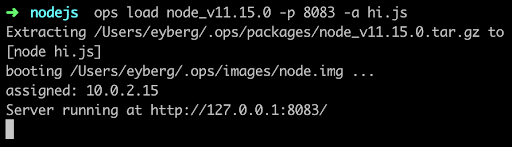
    If it’s the first time you run ops, it will first download a node “package,” which is the interpreter and anything else it needs to run. For some languages, such as Python and Ruby, this can be substantial.

    Then it builds a small disk-bootable disk image that contains your application code and, as you can see, boot straight into it. There is no init manager like Linux and there aren’t 30 different services that get fired off. Keep in mind this is a single process running.

    Now you should be able to hit it up with curl and see it run:
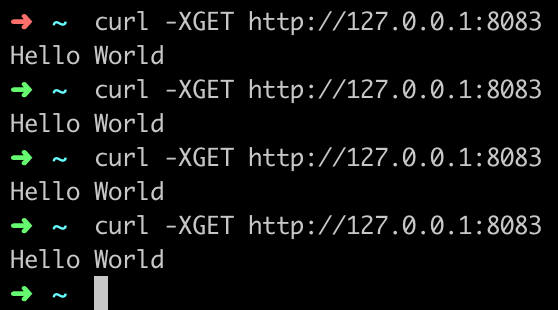
    You’ve just built and run your first unikernel. How cool is that?

    As certain trends such as “serverless,” “functions as a service,” and “no ops” gain steam, these concepts go hand in hand with unikernels. DevOps practitioners at organizations that use microservices and containers will also want to take notice as the amount of work to deploy artifacts such as these decrease considerably. Why is that? One of the many problems that containers had to struggle with was that all the existing underlying infrastructure layers that live at the virtualization layer, such as file systems and networking, had to be shifted up a few layers. Not only did this introduce performance and security challenges, but it also threw out the 20 years of virtualization software and ecosystem development that already existed. What’s interesting about unikernels is that they are always deployed as VMs, so they get to re-use a lot of the underlying ecosystem that has been existent, with very little or no change required.

    From an adoption standpoint, unikernels are flying at ultra-sonic speeds under the radar. A lot of people are not aware of how many projects or organizations are working on unikernels today. Unikernels are starting to attract major attention from many various groups and institutions. Even famous, old stalwart Linux contributors such as Ulrich Drepper, the maintainer of libc, are working on unikernel projects today. Now there are even foundations and consortiums for unikernels. One recently announced was the UNICORE project. IBM even listed its No. 1 cloud patent recently as a hypervisor built for unikernels.

    If you’re are a self-described DevOps person, it’d behoove you to learn more about unikernels and start playing around with them to understand them better. They aren’t going to kill Linux and they’re not going to kill containers, but do expect to see massive adoption in the coming years—not just because of their security and performance benefits, but because of the new forms of compute they unlock.

    — Ian Eyberg