Tag: service virtualization

  • DevOps Chat: App Modernization and Service Virtualization with IBM’s Matt Tarnawsky

    DevOps Chat: App Modernization and Service Virtualization with IBM’s Matt Tarnawsky

    While everyone wants to focus on building a new app, the fact is there are many, many apps already out there. They need to be maintained, updated and modernized. How do you upgrade these legacy apps to new infrastructure, frameworks, languages and more? App modernization is a thing.

    In this DevOps Chat we speak with Matt Tarnawsky of IBM about app modernization and service virtualization, testing and more.

    As usual, the streaming audio is immediately below, followed by the transcript of our conversation.

    Transcript

    Alan Shimel: Hey everyone. Alan Shimel, devopsy.kinsta.cloud, and you’re listening to another DevOps Chat. In this episode of DevOps Chat we’re going to spend time talking about app modernization, testing, service virtualization. We will see what else kind of gets dragged in within our time frame.

    Our guest, you know, who’s going to serve as the expert today, Matt Tarnawsky. Matt, hopefully I didn’t mess that up too bad. Matt is with IBM. And Matt, welcome to DevOps Chat.

    Matt Tarnawsky: Thank you, Alan. Good to be here.

    Shimel: Absolutely. Pleasure to have you here. So Matt, first of all, I did not mangle your name too badly, I hope.

    Tarnawsky: No, you got it pretty good.

    Shimel: Fantastic. So Matt, following our tradition here on DevOps Chat, we like our guests to introduce themselves. So why don’t you tell us a little bit about your current role at IBM and also a little bit about your own personal journey that led you to be here today.

    Tarnawsky: Sure thing. So I am the product manager for IBM’s Rational Test Workbench and Rational Test Virtualization Server, specializing in API testing and service specialization. In terms of how I got here, I have had an interesting journey, starting off with working with a lot of the circuit boards and SPGAs, working with those and then testing those as well.

    I ended up migrating across to working with a small company called Green Hat Software building, AGI testing and service specialization tools. We were acquired by IBM several years ago and I’ve been enjoying the journey ever since.

    Shimel: Good for you. That’s a great story met. And you know, it’s fairly – it’s more usual than unusual in the IT space when you see someone – when we look at the arc of our careers, five years from now who knows what we will be working on. It may not even exist or we even know about it today. So it’s kind of right par for the course.

    So Matt, as I mentioned earlier, I wanted to talk a little bit about app modernization. In my mind, anyway, it’s a loaded – that phrase is a loaded phrase. We hear it bandied out about a lot but when you talk to people – to some people they are talking about, “Well, I am modernizing my existing app. So I’m taking my legacy applications and modernizing them for new infrastructures, new delivery methods, new imports, what have you.” So really about modernizing your existing legacy applications.

    To other people, though, it’s more about modernizing the way you develop, deploy, and manage applications. So modern – application modernization. Of course, no matter how we are talking about it, testing plays a vital role in this. So why don’t we first do a little level set. You know, Matt, what you – when you hear app modernization, what does it mean to you?

    Tarnawsky: So to me, it encompasses a lot of things you mentioned _____ _____ _____ _____ people talk about is, how to do I _____ _____ my app to new markets, new interfaces. That can be things like mobile. It can be things like presenting apps _____ _____ _____. And that often does require _____ _____ _____ _____ their interfaces to actually bring them into the _____ away from our systems that they may have had in the past.

    But often, it also means they want to look at the faster methods of delivery, new development styles. These things often go hand in hand. You often can’t get those faster methods of development with rapid feedback and everything else without looking at, how do we change our entire development life cycle; trying to be stuck in a waterfall method doesn’t really get you that same acceleration that you can get when you start looking at, how do we automate everything and moved to DevOps.

    Shimel: Got it. Got it. Now you broke up there a little bit back on – and I’m hoping people listening will be able to catch all of that. But let’s – so we may fill in. But let’s talk a little bit about the role of testing and that framework of app modernization. Obviously, testing is important, but how so and in what context?

    Tarnawsky: So I actually see – you know, if we are taking older, monolithic applications and looking to migrate them towards micro-services, it’s a great opportunity for testing. You are putting things into small units that can be tested on their own. You get things like – let’s say you’re migrating to a _____  based _____ based service, you get the opportunity to describe it with _____ Swiger or _____ or open API. And you’ve got a contract there that you can then test against.This means that things now have the parameters, the what needs to be tested, how to test it, and it can be imported into many different test tools to help them start testing, but it’s smaller bits of functionality. So it’s a great opportunity to break things up and really look at how those can be worked with at a smaller level.

    At the same time though, it also introduces new opportunities for more complex interactions that we didn’t previously anticipate. So let’s just say you’ve taken that big monolith. You want to expose micro-services to the rest of the world or indeed to other teams in your organization well, suddenly the integration that you had relied on in the past might not be the same ones that you are looking at using in the future. You need to start looking at how we test not just those smaller levels of the micro-services, but also looking at how we test each of those integrations over time.

    One of my customers has a great analogy that they like to use in terms of the testing. They said when you’re testing a car, you don’t just test the car. You test little pieces of it. So you might start off by testing the spark plug. Then you might say we will integrate some pieces and see how those work together. We test the engine out. Then at some point in the future, we will put the engine in the car and we will test that as – you know taking it for a test drive, taking it for a spin, and make sure the entire end-to-end system works as well.

    Shimel: Excellent. Excellent. Actually, that’s a great analogy. Great analogy. So Matt, another phrase we hear, and we’ve all been hearing it, a lot of us, in IT for a long time now, is service virtualization. I think people have a better handle on what we mean when we talk about service virtualization. But again, let’s lay a foundation. When you talk about service virtualization, especially in terms of app modernization and testing, what does that mean to you?

    Tarnawsky: So service virtualization is where we take some sort of interface that we might have had that could be something silent rest. It could be something like Mqueue. It could be a legacy mainframe interface like Kicks. We provide some sort of mock that is going to handle the interactions with the interface. That can be coupled on the rest of the application. It starts to be providing us – I’m sorry.

    It starts providing us with the ability to look around and – I’m sorry about that. Got myself a little bit jumbled there.

    Shimel: No problem.

    Tarnawsky: Basically, it gives us the ability to remove restrictions from ourselves. So if we had legacy items in our environment that we might not have in the cloud yet, well actually, we can do is we can say, well, look, that mainframe connection, that SAP connection, whatever it might be that’s in our current on-prem environment, we can virtualize that, we can house something that sits in the cloud. And in fact, our developers can have an entire environment in the cloud that is no longer linked to those legacy systems.

    Shimel: Fair enough. So how does this all play out then, Matt? Right? So now we’ve got our little parts here and we’ve defined what we mean by this. In your world, where are you seeing sort of rubber meets the road, if you will, in terms of organizations deploying, employing, doing this kind of stuff? Make sense?

    Tarnawsky: So we see all sorts of things. We do see people looking at that – we want to do a migration. So we are going to record various pieces of environment and have them available to replay. Just very, very basic style of creating virtual services, but it can be effective. And indeed, they can do the same sort of thing for their API testing as well and just say, “Have we migrated this correctly? Does it still have the same functionality we had last week when we had it on-prem as we got on the cloud now?”

    That’s a very effective way to look at things. But equally, we see all sorts of interesting stories come up from customers, whether that’s looking to virtualize the way a third party – so we’ve seen customers look at things like Apple Pay or Experian or whatever, where they have to pay every time, they had that third-party service. Or indeed, that might just don’t have control over it and they want to simulate what happens if that third-party service responds or throws an error code or whatever.

    We see customers who do some really – one of my favorite stories comes from a customer who was looking at testing out their credit card issuing systems. Now, you can imagine that as you’re looking at issuing a credit card, at some point you’re going to print a credit card. Now, just imagine test automation for that sort of thing. Do you really want credit cards popping out of the machine? No you want to be able to test things effectively, but not have these physical dependencies.

    So what they did what they looked at the traffic that was going through that credit card machine, the issuing machine. They said, here we got a point where we can virtualize some things in our environment and remove this dependency that we currently have. We don’t want to print real credit cards. It’s a waste of time, waste of resources, and in fact, it slows that test automation down. So if we can virtualize that out, we can get faster feedback back to the development team. So that’s exactly what they did.

    Shimel: So Matt, we recently did a webinar over on devopsy.kinsta.cloud you are probably aware of it, modernizing testing as apps re-architect. Is this the kind of stuff we are talking about?

    Tarnawsky: Very much so. You want to make sure that your testing stays in pace with that re-architecting of the apps. A lot of that does come down to developers delivering fast from the cloud. And tests more and more need to be automated. That doesn’t remove the value of exploratory manual testing or anything like that. But we do see that need for testing to become more and more automated in the future as well, as this change happens.

    Shimel: Absolutely. You know, another thing, and I get this a lot, Matt, when I’m traveling around the world. Is this a sort of – not to use the – abuse the term, but first world problems, right? Is this where… In terms of the market, is it sophisticated, large enterprises who already have legacy infrastructures, a history of service virtualization and so forth? Or is this something that’s really kind of more grassroots that’s happening across the board, across the globe, as organizations are starting to move to app modernization and dealing with the realities of having to test around this stuff?

    Tarnawsky: So we see all sorts. Actually, the example I gave you earlier, the bank that was looking at the credit cards, was a fairly new bank here in the UK.

    Shimel: It was? Okay.

    Tarnawsky: They were – that they are very much based on looking at how they can do things in the cloud, trying to keep things as modern as they can. They are looking for all the latest techniques, all the newest tools that can help speed up their development and their time-to-market. So yes, we do have a number of customers using this stuff for legacy enterprise systems. They are looking to virtualize the way a mainframe, for example.

    But equally, we see other customers come to us and say, “I want to accelerate my development and my testing as fast as we can. What can you do to help us?”

    Shimel: Good.  Interesting. You know, Matt, I mentioned when we started that the time goes pretty quick. We are coming up on the end of our time frame here. But for people who maybe want to get more information on this, where can they – where can we dig? I mean, I should mention that the webinar I referenced earlier is available on devopsy.kinsta.cloud and YouTube, a recording of it along with the slides. So people who are interested there should absolutely head on over and get that. We will try to include the URL in our show notes for today’s podcast.

    But where else should they go, Matt? How do people get smart on this?

    Tarnawsky: So I would invite them to come on to IBM.com, searching for Rational Test Workbench or Rational Test Virtualization Server, depending on whether they are interested in test automation or service virtualization, as a starting point. And we’ve got loads of white papers. We’ve got customer stories. We’ve got all sorts of things you can look at for more information just to see how other people have been doing things.

    Shimel: Fantastic. Matt Tarnawsky, thanks for being our guest on DevOps Chat today. Pleasure to have you on. Hopefully we will have you on again soon.

    Tarnawsky: And thank you very much for having me.

    Shimel: All right Matt. Hey, this is Alan Shimel for devopsy.kinsta.cloud. You just listen to another DevOps Chat. Have a great day, everyone.

    — Alan Shimel

  • Selecting the Right Service Virtualization Tool

    Selecting the Right Service Virtualization Tool

    Once you have established that implementing service virtualization (SV) as a means to remove the bottlenecks formed by critical yet hard-to-access dependencies in your test environments is the way to go forward, one important decision to make is which SV tools to use for the process. Most major testing solution vendors (including CA, Micro Focus, Parasoft, Tricentis and more) offer an SV tool as part of their product range. Next to that, smaller companies have emerged for which an SV tool is their primary offering (TrafficParrot, for example). Finally, similar to the test automation ecosystem, many open source offerings have seen the light of day, most notably including WireMock and Hoverfly.

    Similar to what has been going on in the test automation world for a while now, open source SV tools seem to have become the default choice for many development teams when looking for a solution that satisfies their SV needs. In this blog post, I’d like to take a closer look at the pros and cons of this bias toward open source products, as well as provide some tips on how to decide what type of tool works best for your organization and situation.

    Benefits of Open Source and Commercial Solutions

    There are several benefits associated with the use of open source service virtualization tools in general, and these benefits apply equally to SV tools:

    • There’s no risk of vendor lock-in when you’re using an open source tool.
    • There are no license costs associated with open source tools, whereas commercial off-the shelf (COTS) tools obviously do.
    • Open source tools can be extended with specific features in case you need them (and you’ve got the development skills to do so). With COTS tools, you can file a feature request with a vendor, but that’s no guarantee when your request will be addressed (and if it will be addressed at all).

    COTS solutions, on the other hand, have benefits of their own:

    • They come with a richer set of features out of the box, such as support for a wide variety of transport protocols and message formats, etc., whereas open source tools often focus on a specific protocol and/or message format.
    • They generally have a lower level of entry, for example because they offer graphical user interfaces that make them accessible for a larger audience, whereas open source tools may require you to write code or other forms of technical specifications to get them running.
    • Professional support, both online and in house, may be included in the license purchase price, whereas open source tools offer support on a best-effort basis only, most of the time.

    This is by no means a complete list of the pros of both types of tools. Also, some of the benefits mentioned here come with a caveat of their own. For example, the lower initial cost of open source tools (no need to buy a license) is often being made undone by the additional effort it might require to build simulations that are as powerful as those that can be created by commercially licensed tools out of the box. Always consider the total cost of ownership when you’re looking to implement an SV tool, and don’t forget that this TCO extends beyond licensing fees.

    One other important aspect to understand when comparing open source and commercial tools is that they’re typically sold to different audiences and therefore, their creators must appeal to these different audiences accordingly. Open source tools are generally adopted in a bottom-up manner: they’re downloaded and experimented with by a developer or development team and, when successful, might slowly be adopted by a larger audience within the organization. Commercial tools, on the other hand, are often sold to development managers or C-level executives instead, since they hold the budget that is needed to make the purchase of licenses possible. Note that this is a generalization, and it might not work this way in your organization, but in general, I feel the above holds true. (Footnote: I have to say thanks to Tom Akehurst, the creator of the open source SV tool WireMock, for pointing out this important distinction to me.)

    So, now that we’ve seen some of the benefits of both open source and COTS SV tools, I’d like to give you some advice on how to choose the right tool for your organization and situation.

    First of all, understand that no tool is inherently better than another one (even though some tool creators and vendors seem to think otherwise, judging by their promotional and social media outings). Tool A, however, might under certain circumstances be a better fit for a given situation compared to tools B, C and D. What tool works best for a given situation depends on many factors including, but definitely not limited to:

    • The extent to which the required transport protocols and message formats are supported out of the box (better support makes for easier implementation).
    • The level of experience with SV of the people that are going to wield the SV tool.
    • The complexity of the behavior that is to be simulated.

    When you’re looking for the best fit for your SV needs, it is wise to take into account a range of tools, both open source and commercially licensed. Don’t discard the latter category because of the seemingly high initial investment due to licensing costs. As I’ve pointed out before, it might just be that the ease of implementation and the richer set of features provided by a commercially licensed tool give you a return on investment that warrants the initial expense many times over. I’ve seen this happen in practice multiple times, and that’s the reason I now prefer to include a range of tools in my test automation and service virtualization training courses, rather than focusing on a specific tool. I sincerely believe there is no one-stop solution for every situation and I’d rather show people what’s available on the market and help them see what would be the best fit for their own organization than train them in a single solution (with the risk of giving them a hammer and making them see everything as a nail).

    Also, don’t simply go with the first tool promoted by a Google search or a friendly sales representative, as there’s a good chance that it might not be the most efficient choice for your specific situation. Take the time to select a tool carefully. Conduct a proof of concept (or more than one, ideally) that demonstrates the actual value that a tool can bring you, and that proves that a tool fits your development and testing requirements and is a good match for the skill set of your development team (or anybody that is to be made responsible for creating and maintaining the simulations). Consider hiring an independent expert that can help you make the right choice.

    The field of service virtualization has rapidly become mature in recent years, going through the same maturing process we’ve seen happen to test automation in the past. That means that it’s time to take the implementation of SV seriously as well. With software development becoming more distributed, more complex and delivery cycles becoming ever shorter, you can’t afford not to at least consider SV seriously if you want to be able to keep up.

    Hopefully, this blog post has given you valuable information that can help you choose the best SV tool for your situation, no matter if that’s an open source or a commercially licensed tool.

    — Bas Dijkstra

  • CA Technologies Positions Automic at the DevOps Core

    CA Technologies Positions Automic at the DevOps Core

    After acquiring Automic earlier this year, CA Technologies suddenly found itself with an embarrassment of IT automation riches. Now the company is moving forward by further integrating the Automic IT automation platform with the rest of the portfolio of tools and services that it says are required to construct a software factory.

    Ron Gidron, technology evangelist for Automic, says the latest version of Automic increases the number of integrations with the rest of the CA Technologies portfolio to include support for CA Test Data Management, Service Virtualization, Privileged Access Governance, Application Performance Management and Veracode application security software, among others.

    CA Technologies has made it clear it intends to make the release automation software originally developed by Automic the foundation of its overall DevOps strategy. Most of that effort is now focused on integrating the various elements of the CA Technologies portfolio. Longer term, CA Technologies will eventually move to rationalize any duplication in functionality.

    Version 12.1 of Automic also brings forward orchestration tools and self-service capabilities to enable developers to provision resources within guidelines defined by IT. Gidron says that while there will always be a need for IT operations specialists, CA Technologies is making a concerted effort to “shift left” to provide developers with more programmatic control over the IT environment. To facilitate that process, Automic and the rest of CA Technologies have been investing in creating a standard set of external-facing REST APIs, which also will be used to make it easier for products and services created by the company to consume a wide variety of external data and metrics.

    Via acquisitions and internally developed software, CA Technologies is clearly trying to unify application, infrastructure and security management with the context of a single DevOps framework. The company doesn’t plan to force organization to consume that entire stack of software. But it will try to make acquiring as much of its portfolio as financially attractive and frictionless as possible to drive what the company describes as intelligent automation across a modern software factory. Driving that need is the realization that just about every company in every industry is now dependent on some form of custom software to drive one digital process or another.

    The rate at which CA Technologies has been expanding its DevOps portfolio via acquisition is a major contributor to what appears to be a wave of consolidation starting to occur across the DevOps category. Regardless of how advanced any organization might become in terms of building a software factory, major IT vendors realize that it’s only a matter of time before IT organizations start to pressure them to bundle more DevOps-related functionality together. In fact, the line between what’s DevOps today and tomorrow versus what was considered traditional IT management appears to be getting more blurred with each passing day.

    — Mike Vizard

  • Continuous Testing: Shift Left and Find the Right Balance

    Continuous Testing: Shift Left and Find the Right Balance

    You may have heard the term “continuous testing,” but are struggling to understand what it is and how to achieve it. Project teams need to improve their ability to test and perform test automation when needed, not just when possible. Service virtualization allows teams to test earlier and more often in the life cycle, or “shift left,“ by mimicking unavailable systems. Combining test automation with service virtualization enables teams to provide immediate feedback on quality—so issues can be resolved faster and cheaper. Encouraging and embracing this immediate feedback on the quality of the solution enables businesses to deliver high-quality innovative solutions to the market quickly.

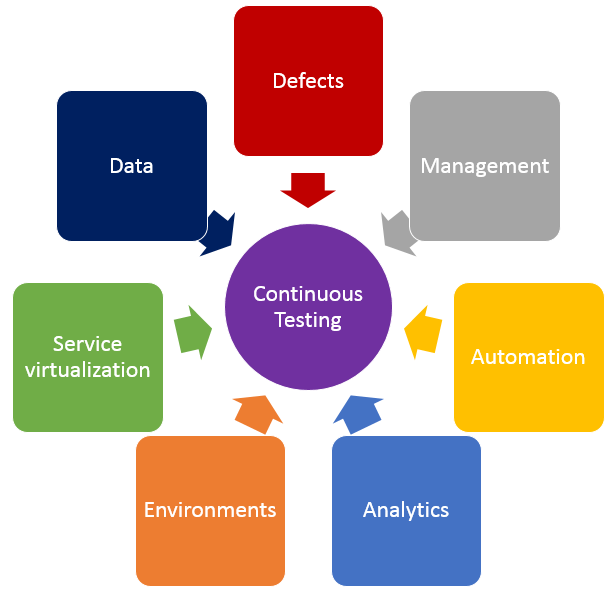
    In addition to shifting left by using service virtualization, finding the right balance of effort across all testing practices is crucial in achieving continuous testing. The diagram below shows the key test practices that enable continuous testing, and teams spend effort on each of these practices regardless of whether they want to. The questions below may help your teams understand where they are spending time, and perhaps where their time might be better spent.

    Testing

    • Defects – Are teams spending too much time logging, triaging or analyzing defects? What about time spent on defects that aren’t “real” defects—where there is a misunderstanding between the test and the code? Or what if they could prevent entire schools of defects from ever being created in the first place?
    • Test Management – Are teams spending time manually crafting status reports and rolling up test execution results? Or do they have a tool that provides that information in real time and allows stakeholders to drill down as needed? How do teams know if they are on schedule with their test effort, behind schedule or even ahead of schedule?
    • Test Automation – How efficient are teams at re-executing existing tests? Do they run most or even all of them manually? If they’ve automated tests, are they focused only on functional tests at the user interface layer, or are they running functional API-layer tests, performance tests and even security tests? Do they have a robust and maintainable test automation framework?
    • Analytics – How do teams know which tests they should run, when and even why they are running those tests at those times? How good is their test effectiveness–meaning, are they running the fewest number of tests that find the largest number of problems? Impact analysis is critical in selecting the right sets of tests to execute whenever they get a new build.
    • Test Environments – Are teams constantly waiting on test environments to be provisioned and configured properly? Do they run tests and discover after the fact that the test environment wasn’t “right,” so they have to fix the environment and then re-run all the tests again? Do they hear from developers, “It works on my machine!” but it doesn’t work in the test environment?
    • Service Virtualization – Are teams waiting for dependent systems to become available before they can “really” test? Are they using a “big bang” approach to conduct end-to-end system testing, where they throw all the components together and hope they work and interact properly? Can teams test exception and error scenarios before going to production? Are they testing the easiest parts first just because they are available, and delaying the high-risk areas for the end of the testing effort?
    • Test Data – Do teams have the needed sets of production-like test data to ensure they are covering the right test scenarios? Are there exception and error scenarios that we can’t execute because they don’t have the right sets of test data?

    If any of these problems or ideas resonate with you, here is guidance on how to get started on the journey to achieve continuous testing.

    First, identify your bottlenecks:

    • How good is your test efficiency – are you able to run the needed tests and provide feedback quickly?
    • How good is your test effectiveness – are you running the fewest number of tests that find the largest number of problems?
    • Bottlenecks may also be upstream or downstream from actual test execution effort – are you waiting on dependent systems, or test environment provisioning?

    Then, look at all aspects of your test effort and focus on the largest bottlenecks first.

    • How long are your delays in test environment provisioning, and are the environments accurate when they are provisioned? If delays are too long and environments aren’t correct, automate your test environment provisioning and configuration to eliminate manual errors and gain accuracy and reliability.
    • Are you waiting on dependent systems to start testing? If so, use service virtualization to simulate those unavailable systems so you can start testing sooner.
    • Are you unable to run all the needed tests before the next build is available? If this is the case, automate your high-risk regression tests to improve test efficiency.
    • Do you find performance problems late in the life cycle, or even in production? Outages can result in long-term damage to a business, so conduct load, performance and stress testing earlier in the life cycle.
    • Do you find significant problems when all systems are integrated? Identify and agree upon system interface and data definitions, and create automated integration level tests for the high-risk integration points.

    Teams that improve their test efficiency and effectiveness significantly reduce their expenses and the time it takes to get high-quality, innovative solutions to users. You can’t test everything, and you can’t automate all your tests, so it is critical to find the right balance. Also key is service virtualization, which allows testing to begin as soon as a build is made by mimicking missing dependencies. By combining test automation and service virtualization, teams can test earlier, or “shift left,” so they gather feedback faster than ever.

    Learn more about using service virtualization to shift left and avoid downtime in test environments in our upcoming webcast:  How Maersk Uses Service Virtualization to Shift Left and Avoid Test Downtime.

    About the Author / Marianne Hollier

    MarianneMarianne Hollier is an IBM and Open Group Master Certified IT Specialist in application development. She has strong, practical expertise in measurably improving the software development life cycle and driving the necessary cultural changes to make it work. She is instrumental in architecting, tailoring and deploying the IBM DevOps best practices as well as appropriate software development tools on many types of projects, from large to small, long to fast-track, agile to traditional. Marianne is especially passionate about all things testing—process, tools, culture and automation. Her experience is broad-based, spanning both custom projects as well as standard software packages that apply to many industries, including refining, pharmaceutical, telecommunications, health care, financial, automotive, government and retail. Connect with Marianne on LinkedIn or Twitter.

  • Service virtualization – The hows and the whys.

    Service virtualization – The hows and the whys.

    Close your eyes and take a deep breath. You are on an island, smelling the iodine coming from the sea, the sun is gently caressing your cheeks and you are sipping on a cocktail in the middle of the afternoon. Your phone is off, in a place you forgot and you do not have direct access to the internet. You are a sysdamin and for the first time since the beginning of your career, you take a break, an actual break to reload your batteries and you are not even thinking about work because you KNOW. You know it is all going to be alright, as it has been since you implemented service virtualization in a really DevOps oriented way.

    What is service virtualization?

    First of all, let me say that service virtualization is not something new but many are still unaware of what it actually is and only a few good products are available.

    You can find a really good explanation of what it is in this post from Chris Riley: https://devopsy.kinsta.cloud/blogs/service-virtualization-window-advanced-devops/ but I will try to sum it up.

    In order to avoid confusion, it is also necessary to briefly explain mocks and stubs. Mocks are usually programmers written tests that check the behaviour of a specific piece of code like which methods are called, in which order and if sub processes were created. Stubs on the other hand check that for any given input, the expected result is outed. I often refer to them as logic tests and I/O tests.

    Service virtualization has nothing to do with mocks or stubs. It mimics the entire behaviour of an application as if it was an actual one deployed on a server and connected to a database, backend etc. In order to enable this, data will be recorded from QA (and anonymized) and the whole behaviour of the application will be recorded. Going through security layers, calls to a database, updating some values, even timings can be recorded for performance testing. Absolutely every single operation is stored and if the test data is well chosen at the time of recording, all cases can be covered.

    For those of you who are into gaming, think of it as an emulator. You do not need a SNES, Genesis or Neo Geo to play your favourite oldies, instead, all you need is an emulator software and the ROMS. The emulator will behave like a gaming console on your computer, reproducing inputs and outputs with high fidelity and translating CPU instructions into different ones your computer can understand.

    If you are not into gaming, and that is a shame if you ask me, think about virtual machines. When you install a Fedora in a confined environment on top of your favourite edition of Windows (or Mac OS), what you do is pretty similar to service virtualization as well. Your Guest OS will send instructions to the different components of your computer which the virtual machine will catch, translate into commands your Host OS can understand and send to the concerned components. It sounds complicated but it works like a charm.

    What it can do for you.

    As it operates on local servers or even better, on containers (check out Docker if you have not done so yet), it is virtually always on. Downtime is a thing from the past and updates can be scheduled and performed when people are not at work. How much of your project you want to cover is up to you and your needs but once you have started the process, why not go all the automated way? If you do, that means that your programmers will have access 100 percent of the time to environments that are up, running and that reflect actual services.

    What is the point of having test environments then you might ask. And here is the answer you can give stakeholders: none. You can achieve good environment resilience, actual data tests and higher-than-ever response time through service virtualization. If well applied, and I really want to emphasize on that, service virtualization makes good ol’ test-environments obsolete.

    Once again here, the benefits mentionned by Chris Riley will speak for themselves: https://devopsy.kinsta.cloud/blogs/service-virtualization-window-advanced-devops/

    Taking DevOps one step further.

    Like all great things, service virtualization comes at a cost. In order to fine tune it to your requirements, it is going to take great efforts. You have to decide which services, ideally all of them, you will provide your programmers, which data sets are representatives of a functional application and of course, install and configure it all. The biggest benefit that you can identify here already is that developers, testers and operations have to be involved and work in a close collaboration. This is your opportunity to make different teams understand what others do. Get them all together, make them work together in a form they are not necessarily familiar with: cross-teams brainstorming.

    Brainstorming, if well done, can be a very powerful tool to come up with creative solutions to problems that were not identified as such beforehand. It has to be directed though. To brainstorm doesn’t mean talking nonsense about non topic related things. Having a neutral person in the room who focuses the discussion around a few pre-established points and who keeps track of time is the way to go. Scrum masters are generally good at this since they have an overview of the project and its problems and can quickly identify the right persons for a task.

    Getting developers to update their own service virtualization server with the latest data from QA means better communication with testers. Operations have a critical role here too since they setup the environments and give the how-to to the different teams.

    Another glass sir?

    Once your teams work together on an almost 24/7 available server and understand how it works, all you have to do as a sysadmin, is to relax a bit for once and focus your brain and time on how to improve processes even more, enhance the quality of deliverables and tighten up the now-existing bonds with your colleagues. Oh yeah, and if you’re on holidays, stop worrying about that potential catastrophic phone call, just worry about yours and yourself.

  • Service Virtualization – Window into “Advanced” DevOps

    Service Virtualization – Window into “Advanced” DevOps

    The new style of IT is pushing DevOps teams to reinvent software building, validation and delivering processes with an aim to shrink development cycle time and reducing defects in production. But in constrained testing environments, DevOps teams face a range of challenges in following the continuous integration and delivery approach for large multi-tier applications. Because release cycles are compressed application testing coverage, and what you test is constrained. And on top of that, consumers demand for an always-on, easily enhanced and mobile experience that comes with cloud-sourced and cloud-delivered composite mobile app offerings.

    (more…)

  • IBM Webcast Nov 12: Use Discovery to accelerate testing and virtualization

    IBM Webcast Nov 12: Use Discovery to accelerate testing and virtualization

    Many of today’s business applications offer a multitude of services (APIs) across many different technologies. These same applications also reach out into a web of already-existing services in order to retrieve and update information necessary to successfully deliver the end to end business processes. In many cases, these applications are being built by multiple development teams distributed around the world with architectural approaches and middleware changing over time and yet we point test teams at the mere tip of the iceberg and say, “Test it!”. Testers know the benefits service-based testing and service virtualization bring but to successfully use these capabilities they first have to understand not only the application’s architecture but also the way in which it communicates with everything around it. Finding this information can be a forensic-like exercise; even if there is documentation there is only one real truth – the environment itself. Watching and interrogating the real systems allows testers to understand what’s really happening under the surface, sometimes with surprising results.


    Date: Wednesday, November 12th, 2014

    Time: 1:00pm – 2:00pm eastern standard time

    Registration link: https://ibm.biz/BdEqEf

    About the Speakers:

    Join Nick Portalski, IBM Development Manager for Integration Testing and Service Virtualization solutions as he explains the rationale for using various discovery techniques and explains how their use can accelerate project initiation making it possible to reduce testing cycles and mitigate risk. Al Wagner will be your host for this event. Al drives thought leadership, strategic initiatives, and tangible solutions with a specific focus on quality management, test automation, and service virtualization.


  • Building Security and Compliance into the SDLC

    Building Security and Compliance into the SDLC

    As the concept of DevOps has become more popular in recent years, there are some common themes that always seem to come up in discussions about it. For example, how often do we talk about ways to speed up the software development life cycle (SDLC) in order to bring innovative applications to market faster and meet ever-increasing customer demands?

    As important as this and other popular DevOps themes may be, though, they often have the side effect of overshadowing some of the less glamorous topics, such as security and compliance, which is often viewed as a sort of “necessary evil.” That said, the risks of putting an unsecure application into production can create massive challenges for organizations – from breaches to loss of company IP to brand damage – making security and compliance a topic that must be tackled as enthusiastically as accelerating innovation.

    Three Critical Areas of Focus

    When it comes to considering how security and compliance can become more integrated with DevOps practices, there are three critical areas on which all organizations should focus: shifting security left in the SDLC, building security into policies and creating an audit trail throughout development.

    Shifting Security Left in the SDLC

    Organizations that incorporate security in the earliest stages of the SDLC will ultimately benefit from products and applications that are secure by design. But in order to accomplish this, they can’t wait until the software hits production to test it for vulnerabilities.

    Service virtualization can help by simulating the application delivery run-time environment and its data, allowing developers and testers to focus on security immediately, instead of waiting for access to crucial resources. In addition, a release automation tool can help collapse development cycle times from days to minutes, enabling IT teams to spend more time improving the functionality, quality and security of their applications – and less manually promoting them from stage to stage.

    Building Security into Policies

    It used to be that every element of application development took place between an organization’s four walls, but with the rise of cloud and software-as-a-service (SaaS) technologies, it’s not uncommon for different stages of the SDLC to occur on different infrastructures. So if the environments are always changing, how do we ensure security is consistently addressed? By building it into the policies that comprise our continuous validation methodologies.

    Release automation enables development teams to create policy-driven infrastructure provisioning rules that automatically determine what application elements can and cannot be staged on specific infrastructure types. For example, a common policy would be to never let customer or database information move to a public cloud environment, where sensitive information could be lost or stolen.

    Creating an Audit Trail through Development

    To this point we’ve centered the conversation mostly on security, but being able to maintain – and prove – compliance throughout the SDLC is an equally important challenge that IT development and operations teams must solve.

    So when we think about compliance, we’re really asking questions like “What application moved from this stage to that stage?”, “Who released the application into production?” and “If there was a rollback, what was the cause and who rolled it back?” In other words, we’re talking about audit trails and logging all activities within the SDLC – something that can be difficult when numerous manual steps are involved. However, a release automation tool will capture all of this data as a matter of course as it automates release deployments through orchestration and promotion of applications from development through production. This means you’ll always be able to answer those who, what, where and when questions that pop up during audits.

    Eliminating Vulnerabilities and Getting Back to the “Good Stuff”

    I’ll admit that security and compliance are not the most exciting topics in DevOps. If application development were a meal, they’d be the pile of lima beans you have to eat before you get to the dessert that is innovative feature development. The good news is, service virtualization and release automation tools can help you speed and simplify the process of building security and compliance into the SDLC, which ensures your applications will hit the market without vulnerabilities – and lets you get back to the fun stuff.

  • A Winning DevOps Approach for Established Enterprises: Pace-layered

    A Winning DevOps Approach for Established Enterprises: Pace-layered

    Does your bank offer the ability to deposit a check by taking its picture with your smartphone? When that feature debuted a few years back, I remember thinking it was interesting and convenient enough that if my bank didn’t offer it soon, I’d be willing to switch to one that did.

    I bring this example up for two reasons: one, it’s a microcosm of the larger race to innovation that is happening in every company and industry as we speak; and two, it involves banks, which are good touch-points for a discussion about the unique challenges established enterprises face as they attempt to implement DevOps practices in their IT organizations.

    We know that DevOps means incorporating best-practice application delivery methods that improve communication, integration and collaboration between development and operations, but what is its ultimate goal? Quite simply, getting high-quality services to market faster than competitors – at a cost that aligns with both IT budgets and business goals. And as my check-depositing story illustrates, if you’re not first in the market, you at least need to be nimble enough to catch up, or you risk losing customers.

    For long-time enterprises, this can be easier said than done. In my previous blog about DevOps culture, I used Etsy as an example of an organization that has had great success with its DevOps transformation, but the e-commerce company has been around for less than a decade. Its young IT architecture is apples to the oranges of established enterprises, whose complex environments often comprise a mix of legacy and modern technologies that have been cobbled together over time.

    As a result, the DevOps journey is typically longer and more difficult for such organizations – but that doesn’t mean they can afford not to pursue it.

    Improving Deployment Practices at Every Infrastructure Layer

    When you look at the IT infrastructure of an established enterprise, you normally find three layers of technology. Let’s call the first “systems of record.” These are the legacy transactional systems (often mainframes) that have been with a company since the beginning. They do their jobs well, but their size and inflexibility make them resistant to the type of Agile development that DevOps typically embraces.

    The next layer is “systems of differentiation,” or the various hardware, software and middleware components an organization accumulates as it grows, merges with/acquires companies and enters new markets. While these systems are often more Agile-ready than the systems of record, their decoupled/distributed nature can complicate and slow down development and deployment processes.

    Finally, there is the “systems of innovation” layer, which is made up of mobile and Web applications and leverages the latest technologies. Because of its light footprint and flexibility, this layer is the most adaptable to DevOps practices. In fact, as you move up the layers from systems of record to systems of innovation, the holy grail of high-quality, fast and low-cost deployment becomes more and more attainable.

    What does this mean from a macro perspective? Basically that established enterprises need to take a pace-layered approach, where application delivery occurs at different paces within the different areas of their architectures. The point, though, is to improve in each layer.

    So if an organization pushes out a mainframe update once per year, perhaps it can move to a bi-annual schedule (with support from the right people, processes and technology, of course). On the other hand, a Web team that publishes updates once or twice a week could leverage DevOps tactics and technologies to adopt a daily update cadence. Bottom line: Different deployment paces are fine across layers, as long as improvements are occurring across the board.

    Kick-starting the Journey with Service Virtualization

    Now that we know why the DevOps journey can be difficult for established enterprises, let’s look at how one such organization, namely Union Bank, overcame these challenges and achieved success.

    According to an article on Bank Systems & Technology, Union Bank was looking for ways to compete with top-tier banks, so it began “acquiring other institutions, updating legacy systems and launching new front-end applications.” In order to support these efforts, the bank implemented a service virtualization solution, which simulates constrained or unavailable systems across the software development lifecycle (SDLC). This allowed its developers, testers and performance teams to work in parallel for faster delivery and higher application quality and reliability.

    Here are some of the results Union Bank has achieved since:

    • Cut testing environment setup time from 42 days to 3 days
    • Slashed three and a half months from mobile and Web application development time
    • Reduced the cost of testing cycles by 65 to 85 percent

    Obviously, a service virtualization solution is only one piece of the DevOps puzzle, but Union Bank stands as a powerful example of how a long-standing enterprise can leverage such a tool to be more innovative and nimble in the marketplace.