Tag: service level agreement

  • Multi-Tenant Database Strategies for Mixed Workloads and Real-Time SLAs

    Multi-Tenant Database Strategies for Mixed Workloads and Real-Time SLAs

    Multi-tenancy—where a single instance or multiple instances of one or more applications operate in a single shared infrastructure environment—is not a new concept. First used in mainframe hardware, timesharing enabled a single massive piece of computing iron to be sliced up and used by multiple applications on a single hardware instance. This simplified both the hardware landscape as well as the skills and resources needed to manage environments. With the rise of software-as-a-service (SaaS) in today’s modern private and public cloud environments, multi-tenancy is now a common and critical function. It allows cloud companies to scale and customers to save money by essentially pooling resources. As more applications demand more and more data, multi-tenancy is now a core function at the database layer.

    But when you have a lot of different applications running on the same infrastructure and accessing the same database, how do you prevent one application from impacting the data performance of another? And how do you determine from the underlying database infrastructure which tenants get what infrastructure and at what performance level?

    Here’s a look at the driving forces behind today’s real-time data needs and how they impact multi-tenant data architecture management.

    SLAs Are at the Heart of Multi-Tenant Data Management

    Everyone wants faster performance and more resilient systems. We’re impatient, so reliable, real-time performance delivers large, competitive business benefits. However, every tenant does not require the same level of performance. Actual performance needs may be plenty fast for a user or machine without requiring the fastest execution path possible with the available resources.

    Service-level agreements (SLAs) ultimately govern the resources delivered to a tenant. Real-time may need to be measured in sub-milliseconds in one instance (i.e., for a stock trade) but in sub-seconds for others (i.e., in a Zelle funds transfer). This is where developers, architects and operators partner with a business to understand its actual user or system needs and to build a system that can deliver the SLA using the minimum amount of resources possible.

    Mixed Workloads and the ‘Noisy Neighbor’ Problem

    As soon as workloads are shared, there’s the potential for one application to quickly grab and use resources in a way that impacts other applications. Often called a “noisy neighbor,” the impacting applications can dramatically interfere with real-time response time SLAs when multi-tenant apps share an infrastructure base. For example, one node in a database cluster becomes heavily loaded, and the performance of other nodes begins to be impacted, causing SLAs to be missed.

    Typically, multiple virtual machines (VMs) are hosted on a single physical machine or node but share system resources (i.e., processor, network, storage, etc.) with the other VMs. It’s possible for applications to overuse those shared resources, impacting other applications and sometimes even the database itself. Such overusage of the infrastructure layer (in this case, sharing compute, storage, network queues, etc.) leads to poor database and end-to-end system performance. It’s like plugging a 100-amp appliance into a 50-amp circuit. All the circuit breakers will trip, and the entire system comes to a screeching halt!

    Strategies to Maximize Performance for Database Multi-Tenancy

    Configuring and managing the database itself (not just infrastructure) with multi-tenancy in mind can maximize performance and avoid problems like noisy neighbors. Isolating databases in your multi-tenant architecture can help minimize non-database problems that can be the root cause of poor performance and missed SLAs.

    Start by picking databases that allow applications to isolate their data access based on sets (or tables in relational parlance) that can have storage limits attached to them. When combined with rate limits for transactions on a per-user basis, applications can be guaranteed their quota of runtime resources. Using the per-app quota configurations for items like storage and TPS (transactions per second), the database can evaluate the total capacity available in the system and ensure that enough resources are reserved and available to ensure that the SLAs of all applications are met all the time.

    Note that unexpected events that cause rebalancing of data within the distributed database, such as node and network failures, require additional resources. The database system will subtract that resource capacity from what is available for apps so that the system is not overcommitted during failure situations.

    Enterprises also need very good automation and observability to fix immediate problems quickly and have the requisite visibility into long-term trends that impact performance and SLA compliance. Otherwise, by the time a human notices a problem, the SLA may already have been missed and the business impacted.

    Good observability can help you understand how data is used and create those automations. As more applications access and use the same data set in different ways, you need modern observability tools integrated into (or interoperable with) the underlying database.

    With a good understanding of how your data-rich applications interoperate with other tenants in mixed-load environments, you can begin to deploy these strategies to make sure you conform to all required SLAs and keep all that data working hard for the business.

  • NetApp Acquires Spot to Rein in Cloud Costs

    NetApp Acquires Spot to Rein in Cloud Costs

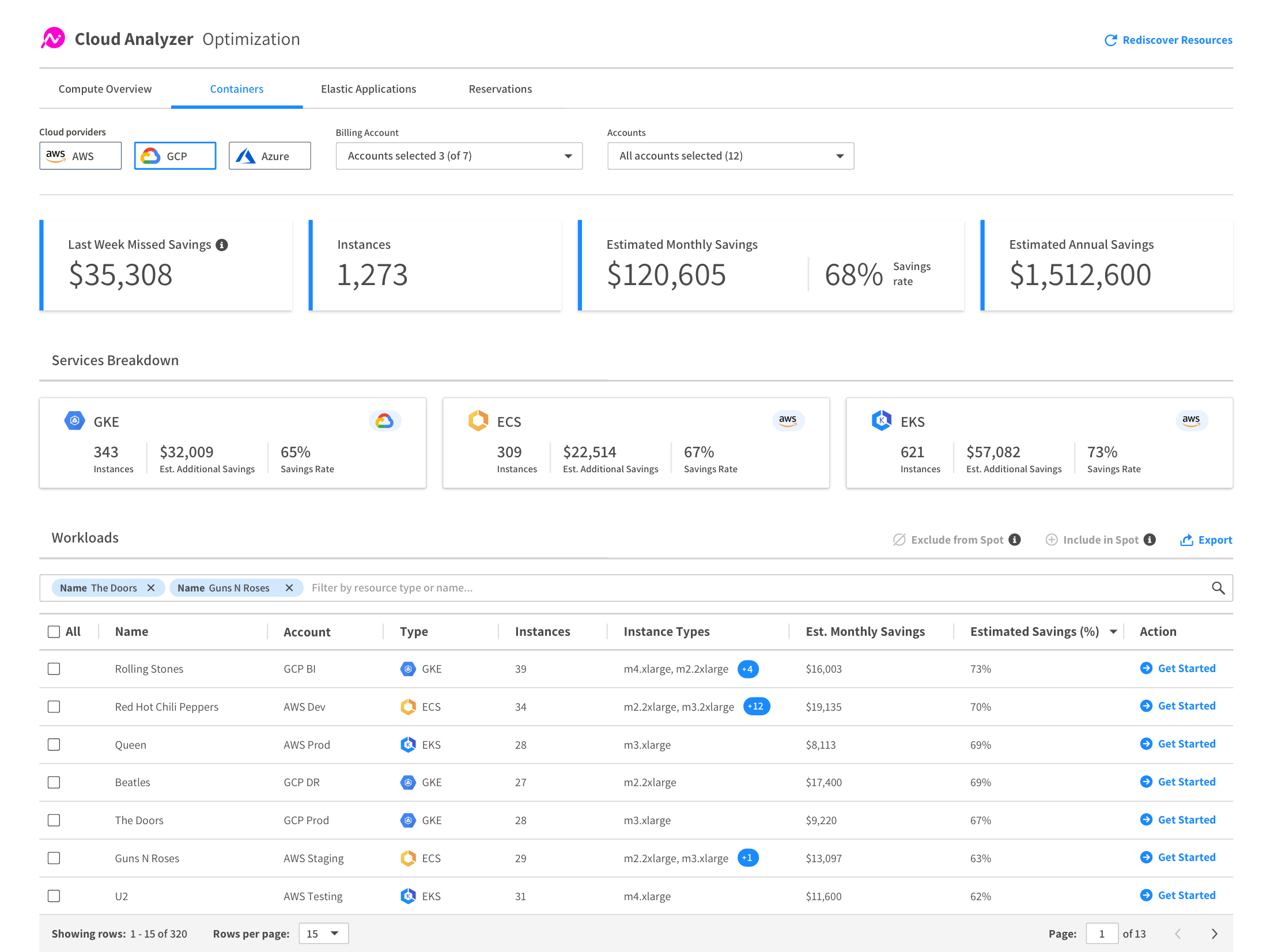
    NetApp this week announced it has acquired Spot, a provider of a service that enables IT teams to continuously optimize costs for cloud workloads.

    Anthony Lye, senior vice president and general manager for public cloud services at NetApp, said the Spot service is based on an application programming interface (API) that IT teams add to each application workload. That API then makes regular calls to Spot, which leverages algorithms that determine when and on what types of instances a workload should run to reduce cloud costs.

    The Spot service will then move workloads automatically between on-demand, reserve and spot instances on Amazon Web Services (AWS), Microsoft Azure or Google Cloud Platform (GCP). It is not designed to enable arbitrage across different cloud services; rather, it optimizes the allocation of compute resources on whatever cloud platform an IT team decides to deploy a workload on.

    Lye said cloud computing often winds up being more expensive than on-premises IT environments because IT teams don’t have the tools required to cost-optimize cloud platforms in real-time. Developers often programmatically deploy workloads in the cloud without understanding many of the implications of using one tier of service versus another. Even when they do appreciate the cost, most IT teams don’t provide them with the tools needed to do anything about it. In fact, it’s usually assumed the IT operations team will find some way to optimize costs as they monitor the cloud environment.

    Then, at the end of the month, the IT operations and finance teams receive a bill from a cloud service provider that is all but indecipherable in determining what workloads consumed what level of compute resources and when. In the absence of the Spot service, Lye said the best IT teams could hope for was an analytics report that offered suggestions about how to optimize cloud instances after the fact.

    NetApp views Spot as a complement to its approach to optimizing the consumption of cloud storage resources by deploying its software on a public cloud to manage those resources, said Lye. Collectively, those offerings enable IT teams to address what has now become the single largest cost in the enterprise.

    In addition, Lye noted that Spot can play a key role in enforcing service level agreements (SLAs) because, among other things, it automatically detects whenever a spot instance of a virtual machine is going away. It then automatically spins up additional instances to ensure a workload remains available.

    The debate over the real cost of cloud computing has been going on for years. Initially, most cloud service providers claimed cloud platforms were less expensive than on-premises IT environments because compute resources were paid for on a consumption basis. While that proved to be true for workloads that ran for a finite amount of time, longer-running workloads have proven to be in most cases more expensive to run in the cloud.

    As organizations look to the cloud to deploy cloud-native applications that are more flexible and resilient in the wake of the COVID-19 pandemic, which has made many on-premises IT environments less accessible, the debate over costs is flaring up again. While organizations need a more flexible approach to IT, they are simultaneously trying to reduce the total cost of IT in the wake of the economic downturn brought on by the pandemic.

    It’s too early to say to what degree IT organizations will embrace continuous optimization alongside continuous integration (CI) and continuous delivery (CD). However, given the current economic climate, it’s more now a question of when, not if, cloud cost optimization will become a major area of focus for IT teams large and small.

  • How to Improve Your Uptime Strategy

    How to Improve Your Uptime Strategy

    Outages happen, it’s inevitable. But, unplanned downtime often comes with substantial costs—not only in terms of recovery and revenue loss, but also customer happiness, brand reputation and employee morale.

    While there is no foolproof way for companies to avoid outages, there are steps they can take to help improve uptime. Development teams should determine what measurements and thresholds for uptime are sufficient for the company, take preventative actions to reduce the mean time between failures (MTBF) and implement tools that provide awareness of coding errors to minimize the mean time to repair or resolve.

    Defining and Measuring Uptime

    Uptime is defined as the time when an application or service is operational. A service-level agreement (SLA) between service providers and customers defines the level of uptime providers have to meet. But “operational” can mean different things to different organizations. For example, a provider may have an SLA for how long it takes its system to process an event. Events processed too slowly violate the SLA even though the system is still operational at some level.

    Companies that provide digital services and applications should clearly define SLAs with customers and then measure their performance against those objectives. Dropping below the agreed-upon expectations can lead to customer frustration and contract termination. Also, the time and effort development teams spend updating customers, tickets and status pages can distract them from working on new service features.

    In SLAs, uptime is measured by “nines,” with each nine hard to achieve as it means significantly less downtime. Here’s a common breakdown for measuring uptime:

    • One nine (90% uptime) is 36.5 days of downtime per year.
    • Two nines (99% uptime) is 3.65 days of downtime per year.
    • Three nines (99.9% uptime) is 8.77 hours of downtime per year.
    • Four nines (99.99% uptime) is 52.6 minutes of downtime per year.
    • Five nines (99.999% uptime) is 5.26 minutes of downtime per year.

    Not all companies need five nines. Because each additional nine requires increased effort and cost, development teams should determine how to balance this investment of time and resources in a way that best meets business needs, while focusing on resolving issues quickly when they occur.

    Preventing Errors in Production

    Validating code can prevent errors in production and minimize MTBF. This type of testing needs to be done in the early stages of the development cycle. To reach the three, four and five-nines levels of uptime, automated testing is necessary. While such testing involves an upfront investment in writing unit tests, it saves time and increases efficiency, as a failing unit test means a specific block of code is not working as expected.

    After validating code, another step developers can take is to use a canary deployment. This is a strategy where new code is pushed out to a subset of users. If something goes wrong, then only a small percentage of users are affected, and developers can roll back to a stable version. Once developers are comfortable with the results of the new version, they can gradually deploy the new code to all users.

    Uncovering Context with Errors 

    Receiving an alert for an error is not enough to enable quick remediation. Developers need to know when errors occur, what the impact was, and where the errors reside in the code. Having this level of awareness and context minimizes mean time to repair, and the best way to achieve this is through application monitoring.

    Monitoring provides developers with automated real-time insights into how their service is performing. When alerted to issues, developers can use source code management information with monitoring insights to identify the change that caused the problem and get the issue to the appropriate developer to resolve it. Developers can’t rely on manual processes and customer feedback to be alerted to issues. These methods are not fast enough. It can take hours to receive and understand an issue and then manually roll back to an earlier version or forward to a new version.

    Code can be complex and fragile. It touches virtually every aspect of business and life. When code stops working, it’s expensive and disruptive. Downtime, even for a brief moment, has a disastrous impact on reputation, retention and revenue.

    To improve uptime, developer teams should adopt code validation and monitoring strategies. By balancing prevention and awareness of errors, they can reduce broken code in production, decrease time to resolution when errors do occur and improve service uptime.

    — Neil Manvar

  • AIOps: The Path to Greater Resilience and Uptime

    AIOps: The Path to Greater Resilience and Uptime

    Large organizations with complex IT infrastructures are facing a significant challenge when it comes to data. The complexity is such that many IT operations teams are struggling to detect, or predict, the complex failure conditions and circumstances that can adversely impact resilience and uptime.

    Monitoring a multitude of systems is a complex task, as the data generated by any system can be vast and far too overwhelming for manual IT operations processes, particularly in relation to analyzing, correlating and prioritizing alerts and remediation.

    Companies have much to gain from a better understanding of the data being created from monitoring tools and practices: increasing the resilience of systems, and the speed of remediation cycles delivers significant cost and time savings. Harnessing advanced technologies to deliver more intelligence to teams in charge of performance monitoring is becoming increasingly important, which is where AIOps can deliver significant value on top of existing monitoring and automation tools.

    Cutting Through the Noise

    Telemetry tools deliver staggering amounts of data. The Microsoft Azure telemetry platform, for example, records 10 petabytes of data per day. When dealing with this volume, the ability to intelligently decipher the severity of alerts becomes vital, especially as many of them may be duplicates or not meaningful in any way. Yet it is IT operations teams that are tasked with understanding how systems are performing, and where resources should be diverted to ensure services are always up and running. To do this effectively, the root causes of alerts must be identified quickly and correctly.

    AIOps is increasingly becoming the go-to solution to the problems inherent in dealing with big data. By applying data collection, data modeling and data analytics techniques and using machine learning algorithms to establish patterns, the noise of the data is reduced as operations teams gain more intelligent insights into alerts. So, providing more context to issues flagged within systems is the goal. Eventually, somebody has to take action when an alert is created, so the more intelligence engineers have, the easier it will be to remediate.

    The less context delivered with alerts, the more time engineers will need to resolve the issue, as the manual remediation process will likely involve interaction with other teams. Take application performance monitoring as an example. In my experience, operations teams do not have an end-to-end understanding of the applications that are live in the production environment. If an alert is created, the ops team will typically seek assistance from a member of the developer team who built it, or another colleague with a deeper understanding of the application, which of course extends the lead time of the remediation process.

    Key Considerations for Deploying AIOps

    By establishing data patterns through machine learning and other advanced analytics technologies, the following key drivers for alerts assessment using AIOps can be established:

    Frequency: Discovering how regularly alerts are created and whether it warrants automation for analysis, correlation, prioritization and remediation.

    Coverage: Telemetry is of course vital to AIOps, as the machine learning algorithms will only be as good as the data they ingest. Putting in place the right telemetry tools is therefore vital to ensure the right data is being gathered. Failing to do so increases the risk of missing critical issues.

    Impact: Not all problems require equal energy and resources. Certain issues might only occur every few months and may not be critical. In such situations, it is not prudent to invest significant amounts of time and money into developing the machine learning algorithms that will identify where and when an alert will be created. Again, cutting through the noise of the telemetry will help to identify high-priority alerts.

    Probability: What is the likelihood of certain issues recurring? Can automation tools, informed by the machine learning algorithms, be implemented to deal with these, i.e. learn where and when they are likely to occur so they can be dealt with by the AIOps platform autonomously?

    Take, for example, the issue of CPU or memory going beyond a certain threshold. Rather than manually contacting customers when an issue is flagged to inform them that services are about to go down before being spun up again, an AIOps platform can automate this process, so remediation happens seamlessly.

    Latency: Automation of the remediation process for an alert deemed critical requires increased investment in AIOps. Getting good data from the early stages of AIOps processes will reduce the amount of time taken to both flag and deal with a problem. Containerized microservices, for example, take very little time to recover, so very little investment is needed when applying AIOps tools that automate remediation. Database recovery, however, is a more complex process, the automation of which would require significant investment.

    What’s the Customer Value?

    For service providers, AIOps is essential if they are to attain the highest levels of resilience, the measure of which all comes down to the Service Level Agreement (SLA). The SLA is measured by a percentage that corresponds to the time systems and are up and running over a year. So, 99.99% uptime is good, 99.999% is great, but 99.9999% is where service providers want to be. To put this into context, downtime for an entire year in the latter scenario amounts to just 32 seconds.

    Increased automation is the only way to achieve optimal SLA. To do this, service providers are increasingly turning to AIOps solutions.

    Operations teams are in charge of the IT strategies that align with business objectives. For service providers, a key part of this is, of course, ensuring maximum availability and optimal performance of the customer-facing environment. Understanding when and where faults appear, and improving resilience against them, is the best way to ensure this. That is where AIOps truly adds value.

    — Prashant Jain

  • Moving to the Cloud? Consider These Questions

    Moving to the Cloud? Consider These Questions

    The cloud is going mainstream. That’s the word from a recent Cisco Systems-sponsored study, which found that more than two-thirds of organizations are using the cloud to “help drive business outcomes”—a whopping 61 percent increase from the previous year’s study. But almost the same number aren’t maximizing the true value of cloud computing.

    What does this mean for your business? It means that while the cloud is quickly becoming a necessity rather than “nice to have,” it’s worth asking some hard questions before you make the move. You can get the most from your deployment after determining the answers to these five questions, and even more from the accompanying infographic.

    What’s the Line-of-Business Benefit?

    You’re not just moving to the cloud because everyone else is doing it; you’re looking for benefits that boost your bottom line. The notion such benefits exist is not just hype: Many companies report lower IT spending and increased agility in the cloud. Before you make the move, however, it’s worth asking about the specific line-of-business (LOB) benefits you hope to achieve. Otherwise, you’re putting the cart before the horse, hoping a cloud deployment will inspire some kind of revolutionary use. One firm directly tapped the benefit of agile cloud computing by writing a script that closed down sandbox testing environments at night and spun them back up again in the morning, saving tens of thousands per year. This exemplifies the true value of using cloud resources—but it doesn’t just happen. Find your need, and then tap the cloud.

    Are You Ready for Change?

    Is your company ready for IT transformation? Ultimately, that’s the role of the cloud—70 percent of businesses say the cloud has enabled them to re-engineer one or more business processes. Consider analytics. Running data analytics is the fastest-growing activity in the cloud, since companies now can “flip a switch” and start mining critical data sources.

    Having the data on hand isn’t enough, however. Your company must be ready to run with this information and move forward with real change if you want to get the most from your cloud deployment. Put simply, the cloud is disruptive—embracing change is a requirement for increased ROI.

    How Much Can You See?

    Cloud providers promise on-demand, anytime, anywhere access. While it is a good thing for remote workers and satellite offices in different time zones, it also can lead to a problem: visibility. Do you know who’s spinning up new services, when and for how long? Do you have a way to track and monitor cloud uptime and performance to ensure your provider is living up to its service-level agreement (SLA)? Expert advice says it’s essential that you have a way to independently verify your company usage once services are hosted in the cloud. This could take the form of local monitor tools, third-party services or even a secondary cloud solution tasked exclusively with providing visibility. Bottom line? What you can’t see, you can’t measure—in turn potentially limiting your total cloud benefit.

    Where Does Compliance Live?

    You have compliance obligations. Maybe those obligations are related to consumer credit data, health information or legal documentation you’re required to protect. Whatever the case, if your cloud provider doesn’t comply with local or federal laws, you could face a hefty fine or other penalty. As a result, it’s worth tracking down a cloud provider that not only knows your industry standards inside and out, but also clearly describes in the SLA how these standards will be met. Here’s the takeaway: Always ask your cloud provider about compliance, and never settle for vague answers or promises that aren’t in writing.

    Is Data Done Right?

    How much data do you plan to store in the cloud? Almost 50 percent of companies now store more than half of their data in the cloud. Expect this number to rapidly increase as the cost of storage comes down year over year. Beyond balancing the need for local and cloud-based storage, however, it’s worth asking tougher questions about portability, backup and security. If you change providers, is your data ready to make the switch immediately? Is your cloud provider charging extra for data backup? If so, what does the service entail? Last but never least: What steps are being taken by your provider to safeguard data—both stored and in transit? Never underestimate the value of doing data right; better to pay more for great service than save a few bucks on cheaper, less robust alternatives.

    The cloud has arrived. Before making your move, however, consider the LOB benefit, your readiness for change and ability to monitor services—along with your provider’s compliance and data-handling aptitude. To better understand the potential benefits of using the cloud, check out the accompanying infographic and determine the answers to a few more questions about how your company and cloud capabilities will fit together.

    About the Author / Adam Cady

    adam-cadyAdam Cady is director of third-party managed Sservices at SingleHop. Cady is responsible for developing cutting-edge managed services solutions and software management tools for hyperscale cloud platforms. Connect with him on LinkedIn and Twitter.