Tag: servers

  • TidalScale Enables Hot-Swapping of Failed Servers

    TidalScale Enables Hot-Swapping of Failed Servers

    TidalScale has updated its namesake software for automating server management to include the ability to detect and prevent impending failures and enable IT teams to hot-swap another server.

    Version 4.1 of TidalScale also adds server wear leveling and preventative health checks that identify servers that should be replaced based on their remaining estimated life span.

    TidalScale CEO Gary Smerdon said that capability is especially critical given the high rate of DRAM memory failure that results in a high rate of downtime caused by server failures. The latest update to the company’s software-defined server management software reduces the failure rate in on-premises or cloud computing environments by a factor of 100 to ensure 99.999% uptime, he said.

    The company also announced that its software is now available on the Amazon Web Services (AWS) Marketplace.

    TidalScale employs machine learning algorithms to aggregate and virtualize CPU cores, memory and I/O across servers to present operating systems with a single software-defined server. That makes it possible to hot-swap individual servers to ensure availability.

    The single biggest cause of downtime in IT environments is memory failures; they are now 100 times more likely than they were a decade ago, noted Smerdon. In most cases, the root cause of the issues is the demands of modern applications running on legacy infrastructure that was not intended to support the latency requirements of those applications, he added.

    That issue can be especially acute in cloud computing environments where infrastructure is often shared by multiple applications, said Smerdon.

    It’s not clear at what rate cloud service providers are replacing legacy server infrastructure, but the ability to determine when to replace infrastructure gives IT teams an added measure of control over servers regardless of where they are deployed. The biggest issue, of course, is not so much replacing a server as it is determining which one actually failed. It often takes longer to identify a failed server than it does to bring a new one online.

    TidalScale is made available by both cloud service providers and manufacturers of servers used in on-premises IT environments, but it needs to be configured and deployed by an IT team. The overall goal is to not only increase system availability but also reduce the total cost of IT by managing infrastructure more efficiently across the life span of a server, said Smerdon. Some IT teams routinely replace servers at specified intervals, regardless of actual usage, to avoid downtime. TidalScale enables IT teams to determine which servers to replace based on the actual wear within the context of a self-healing server farm, he noted.

    Given all the things that might potentially go wrong in an application environment, not having to worry about server failures should enable DevOps teams to spend more time optimizing application performance.

    In theory, of course, modern applications based on microservices should be able to reroute calls to application programming interfaces (APIs) anytime a server becomes unavailable. However, over time it’s not uncommon for single points of failure to emerge as applications are updated. In the meantime, the majority of applications running today are based on legacy monolithic architectures that are much more susceptible to server failures that, unfortunately, are still far too common.

  • A10 Networks Allies with Dell for ADC Infrastructure

    A10 Networks Allies with Dell for ADC Infrastructure

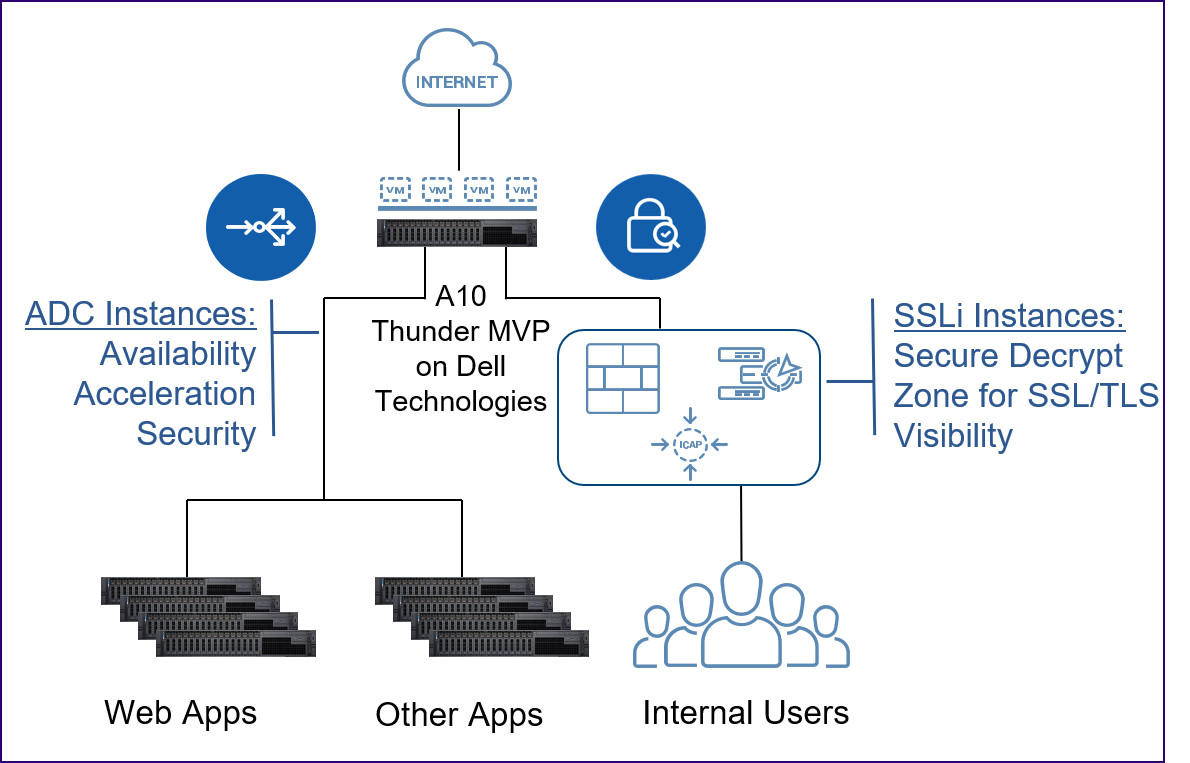
    A10 Networks announced today it has partnered with Dell Technologies to make its application delivery controller (ADC) and A10 Thunder Multi-tenant Virtual Platform (MVP) available on Dell servers.

    Gunter Reiss, vice president of worldwide marketing for A10 Networks, said this alliance reduces the cost of deploying ADCs in on-premises IT environments by taking advantage of industry-standard hardware platforms based on x86 processors beginning in the third quarter. Those servers, however, will only be available in the Americas market.

    Specifically, the A10 Thunder ADCs are designed to run on Dell EMC PowerEdge R640XL and R740XL servers, as well as Dell EMC Virtual Edge Platform 4600. The A10 Thunder MVP is designed to run on Dell EMC PowerEdge R640XL and R740XL servers. IT teams can move A10 ADC licenses across these platforms as they best see fit, said Reiss.

    In the wake of the economic downturn brought on by the COVID-19 pandemic, A10 Networks expects more IT organizations will look to rationalize their server portfolio, he said, noting as a major supplier of those servers, partnering with Dell affords A10 Networks an opportunity to expand the base of potential customers.

    Standardizing on a single server platform also affords some organizations the opportunity to reduce their carbon footprint in the data center, he added.

    It’s too early to say how aggressively IT organizations will be consolidating IT infrastructure. However, the total cost of IT increases whenever an organization adds a new platform or vendor. Many IT organizations have already standardized on a single server vendor as part of an effort to reduce management costs. In fact, Reiss said A10 is betting rival ADC vendors will be shut out of IT environments if they require IT organizations to acquire dedicated hardware.

    In the meantime, the number of ADCs required by IT organizations is increasing as the application environment becomes more complex. The rise of microservices-based applications is requiring IT teams to focus more on application latency issues that occur when more modules of code are sharing access to the same IT infrastructure.

    A10 Networks helps address that issue by embedding analytics into that A10 Harmony Controller that is employed to centrally manage all A10 ADCs deployed in a distributed computing environment. That capability makes it simpler for IT organizations to embrace best DevOps practices, Reiss noted.

    ADCs are also playing a larger role in security by first offloading encrypted SSL/TLS traffic and then providing visibility into that traffic to prevent data leakage.

    In general, Reiss said DevOps teams are exercising more ownership of ADC platforms. Network and security operating teams still play a major role; however, it’s clear IT functions are starting to converge, he said.

    It remains to be seen to what degree those roles will ultimately converge. Each IT organization is likely to pursue a slightly different path toward converging network operations and DevOps. The challenge and the opportunity will be overcoming the inherent cultural challenges associated with bringing together IT teams that historically have not had much cause to interact with one another.

  • Server Security: Minimizing Risk in 3 Steps

    Server Security: Minimizing Risk in 3 Steps

    Servers located directly on the internet run one of the highest risks of being compromised. It’s just too easy for hackers to find an open “door” or “window” into those servers and then tap into confidential data, systems and information. Companies can’t afford to put their private information at risk, but an increasing move to cloud-based business solutions inherently increases the risk associated with data.

    The good news is, if your organization leverages cloud infrastructure, there are ways to mitigate the risk.

    It takes vigilance—and constant upkeep—but cloud-based data on internet-based servers can be just as safe and protected as on-premises servers.

    In this post, we highlight three steps you can take to significantly protect your infrastructure from being compromised and ensure that you are properly securing your servers.

    Step 1: Shut Down Access

    As admins install appropriate software packages and applications onto servers, invariably ports are opened and services are enabled. This makes a security breach for a hacker easier and easier. Essentially, the more ports and services you tamper with, the more surface area there is available for hackers.

    Depending upon your architecture, see if you can keep ports open “behind” the firewall in a VPC environment. This helps ensure that the fewest possible ports are opened to the public-facing internet, but you’re still able to accomplish your job. You can also specify which servers or services communicate with your AWS machines if you happen to use them (or with your IaaS provider of choice).

    Step 2: Patch Your Servers

    If you have ports or services that are open publicly, it is imperative that they are patched to ensure you are securing your servers. Admins should be updating patches on their servers as often as new data or systems allow them to, for the most attainable risk-mitigated servers. To make effective patches, there are four main steps you can take:

    1. Stay informed about the most crucial updates to cloud computing (Microsoft releases updates monthly).
    2. Automate your patch process.
    3. Test your patches thoroughly and frequently to maintain the highest level patch and to anticipate any errors in your system that hackers could get around.
    4. Verify that all your patches are functioning as designed (this last step could include periodic scans with Microsoft Baseline Security Analyzer, or another vulnerability assessment tool, to make sure all servers are patched and up to date and/or spot-checking individual machines for proper patches).

    Step 3: Tightly Control User Access

    Finally, consider tightly controlling user access to all of your servers. Ideally, admins have complete control in administering access privileges, both individual and group, so that employees have the access they need to do their jobs and nothing more. This tight control limits the amount of access a hacker would have if one user’s identity was compromised. Limited access acts as an obstacle a hacker has to work around to get to his goal: your data.

    The more granular an IT admin’s user control, the better the overall security for the organization.

    To do this, apply standards of access permissions, authentication and authorization for your IT admins to implement. Double-check that permissions are accurate by checking individual devices and ensuring their permissions are correct. Additionally, implement IT technologies that automatically sync changes in user accounts. The technology you need should work seamlessly with Windows, Macs, Linux and other devices to prevent any terminated user ad hoc access to accounts due to their aberrational device.

    Please note that this is a quick-hitter list. These should be the minimum things that you should be doing. Are all of your ports shut down? All servers patched? Are you sure you have control over everybody accessing your servers?

    There are any number of additional tools, technologies and processes that you could use to help protect your cloud server infrastructure. IaaS is incredibly powerful. Take the steps that you need to take to protect you and your organization from being the next victim.

    — Greg Keller

  • SSH Key Management and Your Organization

    SSH Key Management and Your Organization

    It always starts out the same way: a few machines, a few users and a few SSH keys to manage. You manually copy their keys (and your own) to the appropriate machines. You might even say, “Screw it,” and share one key for root access. Admit it. It’s OK. Well, no, it’s not OK, but we all do it at some point, even though we know better. Like pouring grease down the drain: We know we shouldn’t do it, but sometimes it’s just so much more expedient.

    Anyway, you’re lucky enough that your company starts to scale and things start to get more complicated. More users, more servers, tons more keys. Like having too many kids at a birthday party: You start spending all your time making sure they have ice cream, they don’t fall off the trampoline, they don’t get into fights. You’re spending way too much time managing your users and their keys, so you realize you need some sort of system to keep everything coordinated. Often this starts off as an Excel spreadsheet tracking who has what key on what machine (another thing we all do but don’t like to admit to our friends). That’s a start, but that’s just one of many things that you need for SSH key management, and the less manual the process, the better.

    Centralized Store of Identities

    First, let’s admit that Excel spreadsheets really aren’t sufficient to track who can access what on your servers. Without centralized key management, you’re likely to have temporary accounts that are forgotten and hang around forever. You’ve also got the problem of rogue users: One of the users you authorized users goes around you to add someone else and you as the administrator have no idea. You want to have one source of identity for these machines—one place to add, one place to delete, one place to audit.

    Provisioning New Users

    If I’m adding a user a month, sure, I can go and add peoples’ keys to each machine manually. Of course, this presupposes that you’ve got the public key from the user and have it to move around. Which presupposes they’re savvy enough to manage making keys themselves. A key management system should make this process simpler for you, reading from your identity store and putting them onto the appropriate machines.

    Deprovision Departing Users

    If you have someone leaving on good terms, it’s just good practice to remove their keys from your servers. It keeps things clean and secure. If they’re leaving on not-so-good terms, though, you better know where the keys are on every machine and be able to remove them quickly. This also reiterates the need for keeping separate keys for all of your users: If they have the private key for root, you’re going to have to not only get that key off the machines but also hand out the new key to everyone that is supposed to have access to the shared account.

    SSH Key Rotation

    Keeping the same key around makes you more vulnerable to attack if an old key is compromised. The PCI DSS standard says that keys must be rotated at least annually. Making this as easy as possible for the user is important, and you must have someplace to record when each key was last rotated. For a lot of organizations, this is probably that Excel spreadsheet somewhere that’s dusted off right before an audit. Doing this right—rotating all your keys across all your machines on a regular schedule—calls out for an automated process.

    SSH Key Robustness

    Let’s say everyone in your organization is using 1024-bit keys and suddenly word comes down that you need 2048-bit keys instead. Having a key management system is going to help coordinate the update. Otherwise, you’re going to be looking at every key on every server (notice a pattern here?) to see which need updating.

    Getting Rid of Defunct SSH Keys

    This isn’t a one-time thing; keys (and users) have a tendency to be provisioned “temporarily” and then forgotten and left on a machine. A good key management system will find and remove these keys—or at least notify you of their existence.

    Allow Users to Self-Service

    Although we don’t want to allow users to willy-nilly add accounts for themselves and each other, we also don’t want to have to create and handle their private/public key pairs and go into every machine and make changes whenever they lose a key or want to update their keys. Ideally, our key management system would allow for (secure) user control of their keys, allowing resets and updates.

    While most of these things are possible to do by hand, it’s just not easy and it will end up taking way too much time. Maybe you can script it—and in fact, many companies do. But many companies used to write their own string libraries, too, and run their own mail servers and manage their own payroll. It’s not the best use of your time.

    — Rajat Bhargava

  • Setting Up Google Authenticator on Multiple Servers

    Setting Up Google Authenticator on Multiple Servers

    Google Authenticator is pretty great. It allows me as an administrator to set up and configure multi-factor authentication into my UNIX boxes without having to spend money on a tool like YubiKey or RSA tokens. It’s easy to set up on any type of phone—no specialized hardware or dongles needed. It’s also pretty cool in that you don’t have to have network access from the server to the outside world. Since Google Authenticator is time-based, it doesn’t need to send an SMS or do a callout to a centralized server to get the current valid token.

    What is a bit painful, though, is needing to have a different Google Authenticator token for every one of my servers. The standard setup would have you run the google-authenticator command on each and have as many tokens as you have servers. Obviously, this quickly becomes unwieldy and untenable.

    Instead, I want to have one token for multiple servers. Here’s how I installed and configured Google Authenticator on each system.

    First Machine

    On my first machine I’m going to install Google Authenticator and create a secret key—the exact flow I’d use normally.

    1: Install Google Authenticator. This is pretty well-documented; examples can be seen at untrusted connection and How-To Geek. I won’t walk through each step since this part varies from OS to OS; the rest of the steps are identical, however.

    2: Restart the ssh service

    $ sudo restart ssh

    3: Run the google-authenticator command to generate a secret key for your account, which you’ll store in your phone. This information will be stored in a configuration file that we’re going to get into later. I don’t need to comment that you actually have to enter the secret key into your phone, do I?

    4: Give it a spin. From another shell go ahead and try it out.

    5: Let’s take a look at the configuration file. We’re going to copy these contents to our other machines that we want to have the same secret key.

    Installing Google Authenticator on Additional Machines

    For all other machines I’m going to install Google Authenticator as normal, but I’m going to use the secret key from the first machine. This will let me log in to each of them using that same secret key that I stored from the first machine.

    1: Install Google Authenticator. Again, other places describe this in detail. We’re going to install the program but not do the creation of any secret keys

    2: Create the configuration file and add the content that we got from the other machine.

    3: Set permissions for the configuration file.

    4: Restart the ssh service.

    5: Test the login.

    Voila! A shared secret key across my servers! Happy day.

    — Rajat Bhargava

  • Dell Technologies Drives Automation Deeper into Platforms

    Dell Technologies Drives Automation Deeper into Platforms

    Dell Technologies this week launched a series of initiatives intended to provide IT organizations with multiple deployment options for Dell EMC appliances and servers, including forthcoming managed service offering through which Dell will manage private cloud platforms based on VMware software on behalf of customers.

    Announced at the Dell Technologies World 2019 conference, Dell EMC also unveiled a new appliance series and revealed an alliance with Microsoft under which its VMware arm will make available cloud software on the Microsoft Azure cloud, in addition to existing support for Amazon Web Services (AWS), IBM Cloud and servers deployed on-premises.

    Jon Siegal, vice president for product marketing for converged platforms and solutions at Dell EMC, said Dell EMC plans to make it easier for IT organizations to consume IT infrastructure in an on-premises IT environment as a service or continue to use their capital budgets to acquire servers and appliances.

    To advance that latter approach, Dell EMC is launching VxFlex, a set of appliances that include an operating system that enable compute, storage and networking separately. In contrast, the existing VxRail series of appliances are optimized for VMware and assume compute, storage and networking will be scaled in tandem, said Siegal. Dell EMC is also now unifying a set of hyperconverged appliances and converged infrastructure servers under a common VxFlex brand, and Siegal said in the future those offerings will be extended to add support for Kubernetes alongside platforms from vendors other than VMware.

    At the same time, Dell EMC is previewing a VxRail Analytical Consulting Engine (ACE) that will be embedded in VxRail HCI system software that Dell EMC provides in its appliances optimized for VMware. That analytics engine employs machine learning algorithms to maximize application performance, while also providing self-optimization recommendations and capacity forecasts.

    The Dell Technologies Data Center-as-a-Service offering, meanwhile, is scheduled to be generally available in the second half. It marks the first time Dell has launched a managed service under its own brand. VMware, however, has been providing managed services for the past year. The Dell Technologies Data Center-as-a-Service offering extends that concept to include Dell EMC VxRail appliances.

    Automation is clearly at the heart of the evolving Dell Technologies strategy. The challenge organizations that have embraced DevOps will face is aligning their processes with the automation frameworks Dell Technologies is embedding in both VMware and the underlying infrastructure on which VMware gets deployed. To address that issue, Dell Technologies over time will bundle frameworks such as the open source distribution of the Pivotal platform-as-a-service (PaaS) environment from Pivotal Software, an arm of Dell Technologies, on its platforms, Siegal said.

    These moves signal Dell Technologies is trying to fulfill a promise to make it as easy to manage IT infrastructure deployed in an on-premises IT environment as it is to manage on a public cloud. There’s obviously still a gap. But as Dell Technologies starts to make IT infrastructure available as a service, it may one day become challenging for DevOps teams to tell where any one cloud happens to be running at any given moment.

    — Mike Vizard

  • The Power of Autoscaling and the Mistake You’ll Never Make Again

    The Power of Autoscaling and the Mistake You’ll Never Make Again

    Many years ago when I was interning as a software engineer, I made a mistake that could have ended my career just as it was getting started …

    It was my birthday, and I was given the task of loading queries to a database. The task was straightforward—even then, when I was only an intern learning my craft. I was using a program to upload the queries automatically. It looked like the program was running well, so I decided to go home and leave the program running overnight.

    The next day at the office I met any intern’s worst nightmare: Everything had stopped. And it was all my fault. The queries were loading with a paralyzing level of inefficiency. In fact, it took up all of the processing power that we had in that company server, making it crash. All operations were brought to screeching halt … just for my measly query project.

    It took several hours for the operations team to have everything running again. Luckily, I didn’t lose my job. In fact, the company ended up handling the situation graciously, and it turned out to be a good learning opportunity for me.

    These days, something like this is entirely avoidable, and it’s all thanks to the magic of autoscaling. As recently as 10 years ago, obtaining more server space was a slow and rigid process owned by a few gatekeepers. Now anyone can acquire more server space with just a few clicks.

    The democratization of processing servers has completely transformed the internet. It has given any organization virtually unlimited processing power at a moment’s notice. When done strategically, autoscaling allows for a more flexible and agile processing infrastructure. If implemented in a way that’s ad hoc or rushed, your organization will end up spending exorbitant sums of money without seeing the full potential of autoscaling.

    Here are three questions you need to answer to develop a winning autoscaling deployment strategy.

    What Should You Autoscale?

    Before the advent of autoscaling, projecting server needs took a lot of guesswork. Imagine, for example, that a timely and effective advertisement suddenly brings a 1000x spike in traffic to a company that sells sunglasses. If the company is not ready for this spike in traffic, everything comes to a screeching halt. Orders are not filled—and some orders can’t even be made because the server space is not ready to handle the unexpected surge in volume.

    With autoscaling, processing power can be offloaded to a new server automatically, based on the conditions set by the system’s administrators. This is valuable not only in the case of spikes in traffic, but also for lag periods. This is a way to avoid paying for processing power that you’re not using.

    In any organization’s computing architecture, there are a number of components that can be autoscaled, whether it’s central processing units (CPU), random-access memory (RAM) or bandwidth. The first step is to collect as much data as possible to understand the current operational loads of each of these items. Any organization using Amazon Web Services (AWS) has access to some data monitoring services, but they tend to be very basic. It’s better than nothing, but there are other options out there.

    One option is black box testing, which allows you to measure various components within your  infrastructure through monitoring. Among many things, it can help you determine where bottlenecks are occurring. Elastisearch is another great resource for word searching and metadata collection within a document or a digital framework.

    Another effective tool to assess autoscaling needs is something called an ‘agent.’ It works by sending pulses to measure processing data throughout an entire system. Collecting data like this will give you crucial insight on the state of your processing infrastructure.

    Once you collect all of this data, a thorough analysis is in order. At present, analyzing this data must be done manually, but before long machine learning will take care of this part of the process. It’s important that you consider all layers of your applications (front end, back end, database) to autoscale effectively. It can be tempting to scale at will, given how easily it can be done. Be vigilant against abusing this capability. Otherwise, it won’t be long before you spend outrageous sums of money on something you don’t need.

    How Should You Autoscale?

    An important concept to understand before you decide on your autoscaling approach is containers. Containers are small pieces of code that are meant to perform a specific function. In this way, a single machine can contain several apps used to perform a variety of functions: CPU, RAM, bandwidth, disk space, etc.

    Containers are a sophisticated way to get creative with the server space you’re working with, and should be considered even before you start building on a vertical or horizontal autoscaling strategy. Better algorithms in existing hardware can help you to avoid making new hardware purchases. In any case, once you do decide to autoscale, containers should most definitely be considered as you strategize and build.

    However, while containers can be great for scaling, it should be taken into account that they have the potential to add a great deal of complexity to your server. For example, if your server can run 20 containers, but suddenly you need three more, buying a new server with more containers is an expensive solution, since the server would be mostly empty.

    In principle, there are two ways to autoscale: vertically or horizontally. Scaling vertically means adding more physical machines with more gigabytes for more processing power. The biggest AWS machine server that’s currently available (at least as far as I’m aware) is 128 CPUs. That’s the most processing growth you can make from just adding one server. The cost of a new machine like this will vary: anywhere from 80 cents to $7 an hour is what you can expect to pay.

    The other approach is to scale horizontally, which would involve a cloud-based solution. For organizations not ready to make the commitment that comes with adding a new physical server, this is the approach worth considering. Plus, with a horizontal approach to autoscaling, it’s possible to adjust processing needs on the fly.

    It’s important to understand that not all parts of an application can scale the same way. Databases, for example, can scale up with ease. But scaling in (horizontally) would take a lot of time. If your data is stored in 30 front-end containers and you want to scale in to 15 containers, you can’t do it in one step. You’d first need to scale from 30 containers to 28, wait for the data to replicate, then scale in from 28 containers to 26, again wait for the data to replicate, then from 26 containers to 24, etc. Otherwise you risk losing all of that data.

    When Should You Autoscale?

    Consider the above example of the sunglasses vendor. While it’s impossible to predict exactly when your business or customer base will reach a tipping point, something such as publishing out an advertisement with a broad reach is certainly an instance where your organization ought to be ready for a sudden spike in traffic. Your business decisions should be made mindfully, so that the potential effects of actions like these—and the strain they create on your organizational architecture—are understood ahead of time.

    Anticipating peaks and troughs in demand is something businesses have been doing for centuries. In Colombia, for example, utility companies have long understood the power of “arepa hour”: This is when Colombians are at home eating breakfast (specifically arepas, a traditional breakfast food in Colombia). Knowing that the majority of the country is likely to be in their homes sometime between 7:30 and 9:30 a.m. consuming power, that is a crucial data point that can allow for utility companies to be ready for this disproportionately high level of demand.

    The dilemma to determine “the arepa hour” of your business’s autoscaling needs often comes down to CPU and memory. Should you be ready to autoscale based on when your site crosses a predetermined CPU load? Or should it be based on the memory running on your servers?

    The answer is really neither. There is no “golden metric” that will point the way for your autoscaling strategy, and you should never decide to scale based on a single data point in isolation. For example, it may make sense for processing data to be offloaded to a new server once the processing capacity is at 90 percent, but it’s also entirely plausible that your application continues to run completely normally with zero issues at this processing load.

    You should be aiming to strike the right balance between efficiency and not compromising the user experience for those who visit your site or use your application. And the only way to do this is to consider all of your data points holistically and how they interact with one another—not in isolation.

    Conclusion

    We are past the time in which a query loading faux pas like the one I made as an intern can completely shut down a company’s processing activities. Given how accessible processing servers have become, some may find it tempting to “brute force” their way through every problem: Make a few clicks and pay for more server space at will. Don’t be goaded into taking the easy way out. Think about autoscaling strategically by answering these deceptively basic questions, and you will in fact make it easier (and more cost efficient) for your organization in the long run.

    — Alejandro Calderon

  • Securing Immutable Servers in a Serverless World

    Securing Immutable Servers in a Serverless World

    Snowflakes are beautiful, unique creations. But, let’s keep them in nature. They don’t belong in our server infrastructure. Snowflake servers, where every configuration is just a little different, can introduce unnecessary security vulnerabilities and complications. While common in IT infrastructure, in the DevOps realm, they are gradually becoming ancient history.

    At the recent All Day DevOps conference, Erlend Oftedal (@webtonull), with Blank and head of the OWASP Norway chapter, discussed the benefits of immutable infrastructure practices within serverless architectures. Erland walked us through the positive effects on security as well as offered insight on potential problems.

    Erlend outlined the progress from physical servers to immutable servers, discussing the benefits of each step and the concerns that lead to the next phase, ending with immutable servers—that is, they can’t be changed. Once set up, they are set. Automated processes coupled with immutability principles can eliminate snowflake servers.

    Immutability isn’t a new concept. Some classic examples include: live Linux CDs, internet cafes, schools, libraries, hotel business centers, etc. To set up immutable servers, Erlend outlines these steps:

    1. Find a suitable base image
    2. Build a specific image for the application (dependencies, application, secrets)
    3. Deploy image to server(s)
    4. Repeat steps 2-3 for new versions.

    Of course, this immediately raises questions.

    What about data? He notes that, because data inherently changes, data has to be stored externally.

    How do you deploy changes? Well, you don’t change the server. You take one out and put a new one in. If that one fails, roll back to the previous one.

    How do you manage secrets? You can build secrets in, leverage cloud key management or use third-party services.

    How do we apply security patches? If truly immutable, you deploy a new server with the patch. However, you can have a semi-immutable server that allows for automatically installing patches but still doesn’t allow for logins or manual changes.

    Speaking of security, what are the security advantages? For starters, if an attacker is in your server, it will be thrown out when you change servers, although it may come back if the vulnerability isn’t patched. It also allows for very specialized images by removing all unneeded packages. With these specialized images, you can more easily audit and monitor the system for unexpected file changes, logins and connections.

    Erlend discussed containers because they are a step closer to a serverless world. Containers isolate processes and all run on the same OS. Of course, you can make them immutable, but, whether they are or not, there are some key security best practices you’ll want to consider:

    • Don’t run as root inside container
    • Implement user namespaces so the root account within the container is separated from the root account outside the container
    • Utilize the least privileges necessary for capabilities and resources
    • Keep them up to date
    • Automate scanning using tools such as Sonatype Nexus, Twistlock, Clair or Aqua.
    • Separate untrusted and trusted containers

    Erlend also dove into serverless architecture. While there is debate over what exactly qualifies as serverless, there are five principles that Erlend highlighted:

    • Use a compute service to execute code on demand
    • Write single-purpose, stateless functions
    • Design push-based, event-driven pipelines
    • Create thicker, more powerful front ends
    • Embrace third-party services

    Migrating to immutable, serverless infrastructure is a topic to be discussed well beyond this blog post and even Erlend’s session. Whatever you do in the future, though, take his parting words to heart: “The cloud can solve many of your problems, but in the end you cannot transfer your responsibility for security.”

    Erlend’s session was packed with information. If this piqued your interest, you should watch his complete session in his full All Day DevOps conference session (just 30 minutes). The other 56 presentations from the All Day DevOps Conference are also available online, free of charge here.

    — Derek E. Weeks

  • Elasticsearch Ransomware Attacks Highlight Need for Better Security

    Elasticsearch Ransomware Attacks Highlight Need for Better Security

    Recently, reports surfaced that a large number of Elasticsearch servers fell victim to potential ransomware attacks. Ransomware is the type of malware a company doesn’t want on its systems or network. It takes systems hostage, most commonly by encrypting or stealing data, and exposes the owners to blackmail attempts. According to a report by the Herjavec Group, the cost of damages from ransomware was projected to reach $1 billion by the end of 2016.

    A new wave of ransom attacks observed over the last several weeks targets unsecured MongoDB databases. Security researchers Victor Gevers and Niall Merrigan call these attacks a “ransack,” and Merrigan estimates that more than 40,000 databases were impacted in the first two weeks alone.

    Now research shows that Elasticsearch servers, which are configured to be insecure so they can be accessed over the public internet, are being subjected to similar ransom attacks. Victor Gevers tweeted that within the first three days, 2,515 Elasticsearch servers were eradicated and ransomed and 34,298 vulnerable Elasticsearch instances are still open. In the following days, the number of affected servers has risen to more than 5,000. John Matherly, founder of Shodan, tweeted that the vast majority of vulnerable Elasticsearch servers are open on Amazon Web Services (AWS).

    If an Elasticsearch server is hacked, users will find data indices gone and a message that reads: “SEND 0.2 BTC TO THIS WALLET: 1DAsGY4Kt1a4LCTPMH5vm5PqX32eZmot4r IF YOU WANT RECOVER YOUR DATABASE! SEND TO THIS EMAIL YOUR SERVER IP AFTER SENDING THE BITCOINS…”

    The FBI stresses that victims should refuse to pay Bitcoin ransoms, so users might or might not get their data back depending on the security processes they had in place in case of an attack. At this point, it is unclear who is behind the attacks.

    Ironically, what makes these attacks possible is not that Elasticsearch in itself is insecure, because it isn’t. Ransom attacks are possible because these instances have been configured in a way that makes them vulnerable. It’s like leaving the front door open.

    Technology journalist Steven Vaughan-Nichols of ZDNet gave an excellent summary, explaining that, when used by amateurs without any security skills, Elasticsearch is simple to crack. The people deploying instances on AWS clouds are under the impression that AWS is protecting them, but that’s not the case. While AWS tells users how to protect their AWS Elasticsearch instances, users still need to do the work themselves.

    He notes: “The worst thing about this? Just like the MongoDB attacks, none of this would have happened if its programmers had protected its instances with basic, well-known security measures.”

    Elasticsearch is often used in log management, typically as part of the Elastic Stack or ELK, which stands for its main open-source ingredients of Elasticsearch, Lucene and Kibana. Since it’s free, open-source software, ELK is an easy first choice for many. It’s a great, powerful piece of software. These open-source projects are highly active, with thousands of code contributions every month and a growing combined code base of about 2.5 million lines of code.

    Users need expertise to deploy and run it efficiently and safely, though, and that means needing people in an organization with the skills and time to maintain ELK clusters. If these people leave, companies need to have a backup. If they aren’t willing or able to invest in these resources, they are likely to get into trouble, like this latest ransom attack situation illustrates.

    ELK is free software, but keep in mind what Richard Stallman, founder of the Free Software Foundation and the GNU Project, has to say about free: “’Free software’ is a matter of liberty, not price. To understand the concept, you should think of ‘free’ as in ‘free speech,’ not as in ‘free beer.’”

    Whether a company pays for a log management service or runs ELK, one approach isn’t necessarily better than the other. For some companies, it makes a lot of sense to run an in-house-built log management solution based on ELK, or even one built from scratch. For others, a delivered solution may be best.

    Regardless, companies and teams need to carefully evaluate if open source makes business sense and if they are realistically able to properly support the deployment without imposing risks. If these factors aren’t weighed or completed correctly, the number of Elasticsearch ransomware attacks will continue to grow and be a profitable endeavor for hackers.

    About the Author / Sven Dummer

    Sven Dummer is the senior director of product marketing at Loggly. Previously, Sven worked with Yahoo, Wind River (acquired by Intel), SUSE, and Microsoft in product development and management. At Intel, Sven also helped launch (and named) the collaborative Yocto Project, an open-source initiative that enables users to create custom Linux-based systems for embedded products regardless of the hardware architecture. Connect with him on LinkedIn and Twitter.