Tag: serverless architecture

  • How to Overcome Challenges With AWS Lambda Logging

    How to Overcome Challenges With AWS Lambda Logging

    Monitoring AWS Lambda can be a complex and potentially costly endeavor. Here’s what you need to know to stay on track and on budget

    Organizations are already experiencing a shift toward serverless cloud computing. According to the O’Reilly “Serverless Survey 2019,” around 40% of respondents said they had implemented serverless architecture. Forrester “Global Business Technographics” Developer 2019 found that 49% of companies are using it or planning to use it in the next 12 months.

    AWS leads the way in this space. According to Serverless.com, 96% of respondents choose AWS Lambda over Azure Functions and Google Cloud Functions. AWS Lambda helps us to design a lightweight and robust application architecture that can be built and deployed without any hassle. However, nothing comes for free. There are several, potentially costly, complexities when monitoring AWS Lambda. Fortunately, there is an array of solutions.

    Logging

    By default, AWS Lambda’s stdout and stderr messages are sent to CloudWatch Logs, where every function has its log group. A log group is a collection of log streams (sequence of log events) that can be stored as long as you want. Storage of logs costs USD 0.03/GB and data ingestion costs around USD 0.50/GB.

    It is common practice to break up your Lambdas into single responsibility functions. This means, for example, if you need one Lambda to read a certain object and another to write it, you’re setting up two separate functions. However, this also means two log groups.

    This creates a challenge when you want to analyze your application’s output log. There is no direct way to log queries across multiple log groups. In response to this, AWS enabled CloudWatch Log Insights to conduct cross-log querying. While this brought many of the improvements users wanted and needed, analyzing multiple log groups together meant a higher cost for queries. This prohibitive cost model encouraged many to look to external services.

    Tracing

    AWS X-Ray enables you to trace the underlying components of your application and helps you to dig out the fundamental reason behind distributed issues. It has quickly become an essential troubleshooting and optimization tool for engineers.

    For example, cold start latency can be problematic for AWS Lambda functions with slow startup times. Although you can counter this by enabling Provisioned Concurrency, you will need to pay extra.

    If you have budget constraints and still want to resolve the issue, X-Ray might help you eliminate or at least optimize your application by removing the bottleneck. It lets you know, among other things, if your application is consuming more time during initialization or invocation. You can find X-Ray SDK on AWS Lambda for Go, Java, Node.js, Python and .NET.

    Debugging

    Traditional architecture and serverless architectures are as different as day and night. Serverless requires changes across the software engineering spectrum, including debugging.

    A serverless application is a combination of various services or resources within infrastructure, which can include tools such as AWS API Gateway, CloudWatch and SNS. Such distribution of web services helps avoid a single point of failure (SPOF), but this design creates a problem. Debugging or replicating an issue on a local machine is not always feasible, and debugging a production application is always a dangerous proposition.

    Moreover, the abstraction of AWS Lambda makes debugging complicated, as you don’t have direct access to the underlying OS. Hunting down dispersed logs adds to this overhead. As your serverless infrastructure scales, it becomes difficult to identify the root cause.

    To combat this, developers can use AWS native tools such as CloudWatch, X-Ray or Serverless Application Model (also known as SAM). Any of these tools on their own can be difficult to use; together, however, they form a powerful debugging suite.

    Outside of the AWS-native toolset, some tools provide further assistance with debugging. For example, the Serverless framework, which is an open source tool to develop and deploy serverless applications over AWS, lets you see your live application’s function log, for example:

    Monitoring

    Robust monitoring ensures the smooth operation of an application and helps to detect issues quickly. In traditional infrastructure, metrics only appear from a handful of sources, so collecting them together is less of a challenge. In a serverless architecture, this problem is much more complex.

    AWS gives you the freedom of converting CloudWatch Logs to metrics. These metrics can be filtered, measured and, when a threshold is crossed, alerted on. You can define a metric filter by choosing a log group created by your serverless function and target the log stream. This enables you to create a visual reference for your log events. Every custom metric you create will cost $0.30/10000 metrics per month.

    Metric filters can be a powerful tool, but it can also be a bit overwhelming to set up everything, and there are certain bottlenecks as well. For instance, you can’t parameterize metric names, which forces you to create a filter for every custom metric you want to track. There is also a hard limit of 100 metric filters per log group, which restricts you as your application evolves.

    Other than this, AWS resources are tightly coupled with each other, which makes AWS-native monitoring tools a fine choice when you need to monitor individual AWS resources or Lambda functions. To get an infrastructure-wide view and to monitor other third-party tools, a centralized logging approach is necessary to take full advantage of the log data.

    Conclusion

    There is no denying that serverless tooling quickly unlocks high availability, scalability and cost optimization. To make the most of this new paradigm, engineers need to build a robust and reliable monitoring system. The ability to manage log data streaming from many components, detect and trace issues on the fly, and deliver accurate insights to keep on improving the application is crucial to remain online and competitive.

    While serverless solutions give access to many of the technical features we need, the dangers of vendor lock-in and the power of third-party providers must be considered if you want to scale your organization and its infrastructure smoothly.

  • Securing Internet-Facing Portals

    Securing Internet-Facing Portals

    Against the backdrop of the current pandemic, barely a day goes by without another portal or web application being launched to help citizens and customers interact with governments and corporations. Bringing these applications to market quickly, and ensuring they can’t compromise the security of the organization, requires DevOps to embrace news techniques and technologies. So, how best can DevOps ensure these applications don’t become a backdoor for the bad guys?

    Additional Defensive Techniques

    In the OWASP Top Ten list of vulnerabilities in Web Applications, ensuring uploaded documents and images are threat-free doesn’t factor. Yet, these can be the Achilles Heel of any internet-facing portal or application. 

    The primary vehicle for smuggling malware into an organization is via documents and images. These are routinely embedded with malware, some basic, some extremely sophisticated, targeting the user or employee who eventually uploads the document. Alternatively, the concealed malware can attack the portal itself, for example, via a malformed document.

    This malware is sufficiently new and well-concealed that it repeatedly evades detection-based cyber defences and even modern AI technologies. Ensuring that what arrives via the portal is threat-free means finding additional defensive techniques that increase the security without slowing down the application. 

    Best Practice

    The UK’s NCSC has published a set of essential guidelines for anyone charged with the security of an application that must accept documents and images from the internet. In the NCSC “Pattern: For Safely Importing Data,” the organization describes a set of best practice guidelines for accepting documents from untrusted sources and recommends an approach called document transformation to ensure imported documents are threat-free. 

    Transformation is a mechanism whereby untrusted documents and images have the essential business information extracted from them. The originals are then discarded–along with any embedded threats. The business information is then verified and brand-new documents are then created and formatted to match the originals.

    Securing internet-facing portals - Figure 1_transformation engine
    Figure 1: Transformation engine.

    Once documents have been through the transformation engine they are completely safe and can be used without any further security measures.

    “Baked-in” Security Controls

    For the AppSec manager, transformation is a great approach to promote across DevOps teams. It can be accessed via cloud APIs and it adds an additional layer of security–conformant with security best practices–that helps ensure web applications and portals don’t become a backdoor for malware infiltration. 

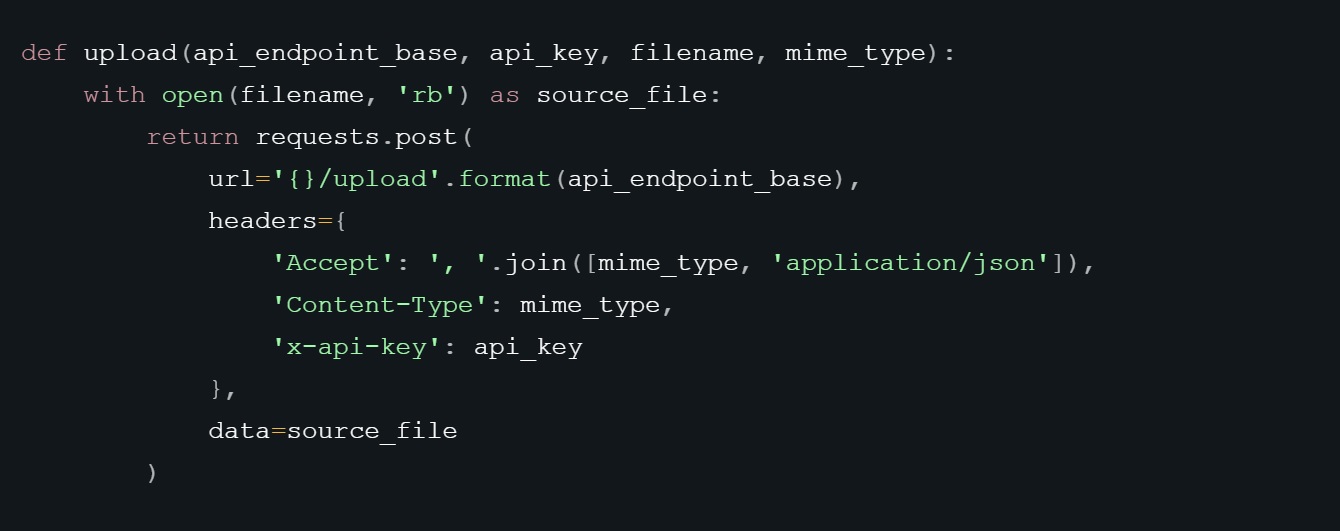
    Securing internet-facing portals - Fig 2 python
    Figure 2: Uploading a Document via an API.

    Developers need a choice of transformation APIs, depending on the nature of the particular application. For example, some applications will require a simple upload/download API to transform a file, while other applications will need APIs capable of handling more complex tasks, such as event-driven workflows or moving files between different storage buckets.

    Securing internet-facing portals - Fig 3 AWS flow
    Figure 3: AWS Flow Using S3 API.

    Head Start

    The demand for web applications to accept uploaded documents into portals is only going to increase, and with it the risk of potential for compromise from concealed malware. The good news is that any DevSecOps professional building a web application or portal that must accept documents and images from the internet, already has a head start when it comes to building securely if they are using a serverless architecture.

    From a security perspective, the alternative to serverless architectures, machine images in the cloud, have the associated risk that if, for example, malware succeeds in compromising the machine, it remains compromised thereafter. With a serverless, cloud native architecture, there is no residual machine and, therefore, little residual risk.

    Another key point in favor of building on a serverless cloud-native computing model is that it devolves the responsibility of patching to the service provider. It is widely understood that unpatched systems are one of the main causes of cybersecurity breaches. Serverless architectures enable the developer to shift operational responsibilities and routine security tasks, such as patching, maintenance and upgrades, to their service provider. 

    The current pandemic has turbo-charged the demand for internet-facing portals and with it the risk of malware infiltration via uploaded documents and images. For developers, that means finding new defensive techniques like transformation that can be quickly and easily baked into the code to ensure uploads are threat-free.

  • Why Organizations Are Adopting or Avoiding Serverless

    Why Organizations Are Adopting or Avoiding Serverless

    For the inaugural O’Reilly survey on serverless architecture adoption, we were pleasantly surprised at the high level of response: More than 1,500 respondents from a wide range of locations, companies and industries participated. The high response rate tells us that serverless is garnering significant mindshare in the community.

    Below we examine three of the most notable findings from the survey.

    Why Organizations Adopt Serverless

    When we asked if respondents’ organizations had adopted serverless—defining “adopted” as entering into a contract with a vendor to provide serverless resources—we expected a low take rate for this relatively new and developing technology. Interestingly, a higher-than-expected 40% of respondents said they had adopted serverless (Figure 1). Of those respondents whose organizations have adopted serverless, more than 50% made the jump one to three years ago and 15% adopted serverless more than three years ago.

    Figure 1: Serverless adoption among survey respondents’ organizations.

    When asked about the benefits of adopting serverless (Figure 2), there were some stand-out issues. Reduction of operational costs was the number one reported benefit. Rather than buying racks and racks of servers that need to handle the maximum potential traffic and be idle most of the time, it seems that serverless’ method of paying by compute is proving to be beneficial to the bottom lines of organizations.

    This likely goes hand-in-hand with the second most popular reason for adoption: scales with demand automatically. Instead of planning for average or maximum usage, you can deploy serverless and it will scale to current usage. You only pay for what is used. This scaling takes away the worry from random and unexpected traffic spikes or big seasonal traffic.

    Figure 2: Serverless benefits among survey respondents.

    Serverless Concerns

    Educating current staff was the number one serverless concern among respondents whose organizations have adopted serverless (Figure 3). That makes sense—with serverless being relatively young, formal training is difficult to find, specific documentation must be generated and case studies to learn from (while growing) are harder to come by. In addition, organizations sometimes discover that success requires custom features. These features evolve quickly as vendors vigorously compete to attract and retain customers—making up-to-date formal training difficult to maintain.

    The second biggest challenge was vendor lock-in. Writing code for one vendor platform does not make it portable or simple to move elsewhere. Because serverless is a nascent space, it seems the market is waiting to see how the issue of portability among vendors plays out.

    Figure 3: Serverless challenges faced by survey respondents’ organizations (respondents whose companies have adopted serverless).

    Turning to the 60% of respondents whose organizations have not adopted serverless (Figure 4), they cited security concerns as the chief reason they have avoided serverless. Because we’re in an environment where security is a paramount concern, the adoption of any new technology carries a lot of weight. Moreover, serverless introduces a different paradigm for data management where sensitive data is much more dynamic. With valuable business data not being managed or controlled by your company, there will always be concerns around who has access, how safe is it, whether or not the vendor looks at the data or metadata, and whether or not the software is patched or vulnerable to attacks.

    Adjacent to security is also the challenge of meeting regulatory requirements such as GDPR. In the cloud on third-party servers, can you guarantee the same levels of security and quality as your own on your own infrastructure?

    Figure 4: Reasons why survey respondents’ organizations have not adopted serverless.

    Serverless Vendors and Tools

    The results in Figure 5 reflect what we know of the cloud market and mirror what we found in our cloud native survey in 2019. Amazon’s early-to-market serverless offering and dominant market position has given them a functional leg up on their primary rivals in the cloud market. However, both Microsoft and Google have ramped up their own serverless offerings and likely retain whatever market differentiation they’ve already developed in the wider cloud market—i.e., customers who already like and use Azure or Google Cloud Platform are likely to find the same advantages hold with Azure Functions and Google Cloud Functions.

    Figure 5: Serverless vendors used by survey respondents’ organizations.

    Custom tooling ranked number one in serverless tools used by respondents’ organizations (Figure 6). This could mean there’s a market for standardizing or improving existing tools, getting companies to either migrate away from their in-house tools or to convince new customers to avoid spending the time to build something custom. It could also mean that current tools are not addressing everything needed to properly manage and deploy to serverless infrastructure.

    Figure 6: Serverless tools used by survey respondents’ organizations.

    Conclusion

    Based on the survey, we expect the demand for serverless to grow in the near term as another worthwhile infrastructure option for many organizations. With no ties to specific technologies or programming languages, serverless can work with a wide range of tasks, and getting started has gotten easier over time.

    You can see additional findings and analysis from the O’Reilly serverless survey here.

    To learn more about containerized infrastructure and cloud native technologies, consider coming to KubeCon + CloudNativeCon EU, in Amsterdam. The CNCF has made the decision to postpone the event (originally set for March 30 to April 2, 2020) to instead be held in July or August 2020.


    This article was co-authored by Chris Guzikowski. Chris is the senior content director at O’Reilly, where he manages the acquisition and development of content in software architecture and software development. He’s also the co-chair of the O’Reilly Software Architecture Conference. Chris has been working on technical content and technology marketing for more than 30 years.

    — Roger Magoulas

  • DevOps 2.0: A New Evolution of Serverless Cloud Architecture

    DevOps 2.0: A New Evolution of Serverless Cloud Architecture

    Science teaches us to formulate hypotheses and test them experimentally to advance systematically. While this sounds logical, DevOps—and software architecture in particular—does not follow this approach because current tools make this too cumbersome. So, architecture choices are frequently made by HiPPO (highest paid person’s opinion).

    However, the rate of development, especially in the serverless or function-as-a-service (FaaS) space, makes it difficult to gather all necessary information for HiPPO to work effectively. For example, according to AWS, it publishes on average two new cloud services per day, with similar development rates at other public cloud providers. With so many very nuanced choices, picking the optimal architecture without experimentally testing them is impossible.

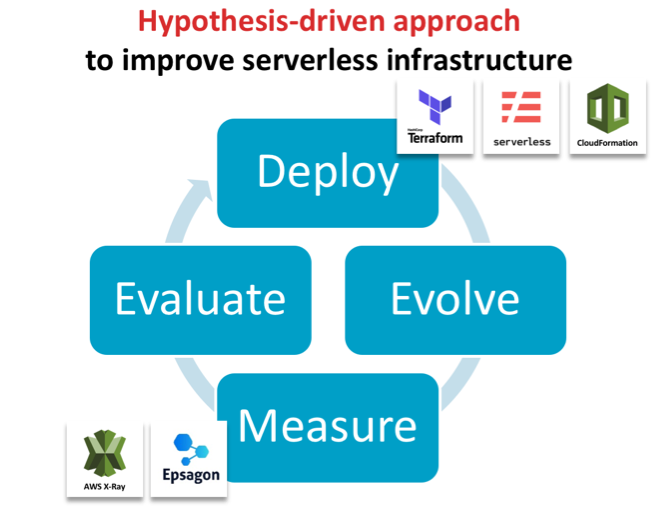
    We propose a fundamentally different approach for developing efficient and robust serverless architectures: hypothesis-driven architecture evolution, which consists of the steps deploy, evolve, measure, evaluate and iterate. In this blog post, we will go through each component and demonstrate how this can be done in an automated fashion to bring out the inner scientists in all of us.

    Deploy with Code as Text

    To deploy easily and consistently, the serverless architecture stack needs to be fully defined through code/text. This is widely known as infrastructure as code (IaC) and comprises the full infrastructure, from the computational core in the serverless functions all the way to permissions, databases and connecting services.  Frameworks such as Serverless Framework and Terraform or vendor-specific tools such as AWS CloudFormation enable this by allowing a single file to define the infrastructure used and to automatically deploy these services. This ensures that multiple versions can be deployed in isolation even though they are hosted to the same availability zone for reducing confounding factors when comparing performance.

    Evolve the IaC for Hypothesis-Driven Advancements

    This infrastructure file can then be modified and re-deployed to systematically test hypotheses, such as whether an algorithm is faster or a particular autoscaling group is more efficient. This idea was proposed first by James Lewis from ThoughtWorks in the context of general software architecture development, but is particularly applicable for the serverless space.

    Measure Performance of the Newly Evolved Architecture

    The second key element to this novel way of evolving architecture is the automatic evaluation of any newly deployed architecture without manually recording runtime or specifying interactions between services. Here, tools such as Epsagon can help in automatically detecting the workflows in architectures and analyzing their performance.

    Evaluate and Iterate

    In this approach, evaluation needs to keep pace with the overall process. To be effective, it is imperative to be able to identify errors and bottlenecks across the entire architecture in a timely fashion. In serverless architectures, most tools focus on the individual function rather than a full transaction from end to end. You may be made aware of a long-running function but you have to scrape logs and go through your code to perform root cause analysis. Tools such as Honycomb or Epsagon help to collide errors across multiple layers or the entire data flow.

    Case Study: Improve Runtime Performance of a Bioinformatics Tool

    We now describe the two key aspects (deploy and evaluate) on a practical example showcasing how it has helped improve the runtime of a serverless application. We chose the bioinformatics software framework GT-Scan, which is used by Australia’s premier research organization to conduct medical research, to improve its runtime by 85 percent.

    GT-Scan was one of the first serverless architectures (Jeff Barr Blog) with a focus on burstable web services that conducts data- and compute-intensive tasks. As such, it relies heavily on all of its components to be as time- and resource-efficient as possible.

    We contrast the automated approach against a previous approach in which the performance was evaluated using AWS X-Ray (AWS Public Sector Blog) and summarize our three learning outcomes:

    Visualizing the Current Architecture Automatically is Important

    Key to rapid architecture evolution visual feedback, especially so if only small changes to the architecture are evaluated. Hence having a visual representation of the architecture helps differentiate deployments and focuses in on differences.

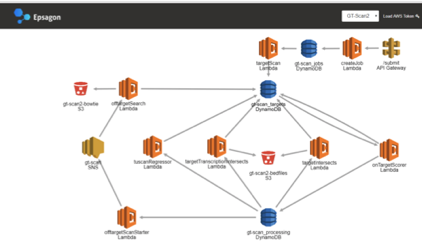
    Figure 1: X-Ray view of the functional architecture vs the view of Epsagon’s automatically detected architecture


    Use Invocation Count and Runtime to Identify Which Function is the Bottleneck

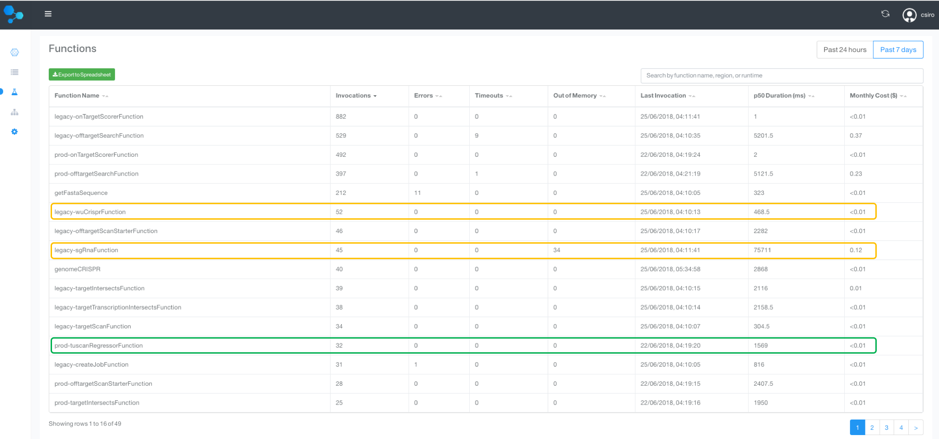
    To identify the bottlenecks in the system, a tabular view over the runtimes of all functions is essential. This also allows us to weed out obsolete or unused functions. A similar analysis can be done for memory use.

    We therefore sort by invocation count, which allows us to focus in on the most frequently used methods to target optimization efforts. We can now compare the old and new deployment side by side, by labeling one as “legacy.”

    Figure 2: A tabular view of all Lambda functions and their invocation count and runtime

    As seen in the functions table, the longest running  function and its precursor is from the legacy deployment with its median (p50) duration :

    • legacy-sgRnaFunction: 75.7 seconds
    • legacy-wuCrisperFunction: 468 ms
    • Total: 76 seconds

    In contrast, the new tuscanRegressorFunction, which replaces the two legacy-functions, runs in just 1.6 seconds! This is a 97.8 percent reduced running time, which is 47x faster!

    Assess Entire Data Flows to Target Top-Down Improvement Efforts

    Complex production applications typically contain many managed services and asynchronous events, whose interplay determines the overall performance. In addition to spotting individually slow functions, it is worthwhile to evaluate entire workflows to prioritize optimization efforts to the main data flows.

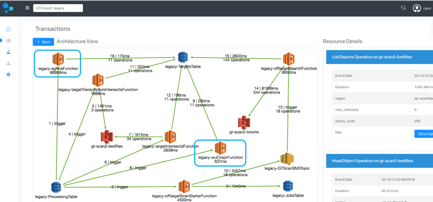
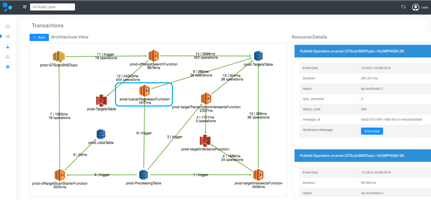
    For each of the GT-scan deployments, the solution identifies two flows: one comprising services watching DynamoDB and the other the API-gateway.

    Comparing the two deployments at this level reveals that the main flow in GT-Scan2_legacy takes on average 97.7 seconds before the optimization, while the average runtime for the corresponding data flow in GT-Scan2_prod is 14.1 seconds—a reduction of 85.5 percent—and an overall runtime improvement of 7x!


    Figure 3: Comparison between the automatically detected data flows between the prod and legacy deployment.

    Visualizing the data flow of the two architectures highlights that our optimization efforts were indeed targeted at the root problem: The legacy deployment uses the two inefficient Lamdba functions, while the production deployment contains only a single more efficient function.

    Figure 4: Architecture comparison of the transaction containing the difference between the prod and legacy deployment.

    Bringing It All Together

    Improving serverless architecture can be done systematically and efficiently by deploying the entire cloud infrastructure stack through code and using an evaluation system to automatically interrogate runtime. Specialized tools such as Epsagon can offer substantial improvements over AWS X-Ray for the evaluation step, by providing a tabular view to easily identify underperforming Lambda functions and offer an interpretable view of the architecture. Detecting data flows in the system helps prioritize optimization efforts to the main transactions of the architecture. Specialized tools help developers save time when documenting performance improvements; using hypothesis-driven evolution principles, we were able to improve the efficiency of GT-scan’s serverless system by 85 percent.

    This article was co-authored by the following:

    Aidan O’Brien is the main developer on the GT-Scan2 project. He is a Doctoral research student with joint appointment at CSIRO and one of the most impactful CRISPR research facilities in Australia.


    Nitzan Shapira is co-founder and the CEO of Epsagon. He is a software engineer, highly experienced in infrastructure technologies and cyber-security.


    Shannon Brown is the Senior Director of Growth of Epsagon. She is a software engineer with over 20 years of experience in software development, management, and sales.

    — Denis Bauer