Tag: security

  • Myth Busting: 5 Misconceptions About FinOps

    Myth Busting: 5 Misconceptions About FinOps

    Over the years, moves to the cloud have happened in several different ways and at various speeds. The reality is that today most enterprises are spending massive amounts on their cloud environments, and many teams are struggling to contend with the governance implications of this reality.

    Fundamentally, teams struggle with an either-or proposition: Either they give development and engineering teams free rein in terms of how they use cloud models, and, in the process, they leave the business exposed to a wide range of risks or they try to enforce central controls and restrictions on cloud usage and, in the process, stifle speed, flexibility and innovation.

    FinOps is a Necessary Discipline

    Teams are struggling with cloud governance in general, and one particularly vexing aspect of governance relates to cloud cost management. Quite simply, the procurement models and approaches that worked in the days of on-premises data centers simply don’t cut it today. At all.

    For these reasons, FinOps is emerging as a necessary discipline. At its root, FinOps is about establishing the people, process, and technology for establishing financial accountability in pay-as-you-go cloud environments.

    Here’s how the FinOps Foundation defines it:

    “FinOps is an evolving cloud financial management discipline and cultural practice that enables organizations to get maximum business value by helping engineering, finance, technology and business teams to collaborate on data-driven spending decisions.”

    Recently, I started preparing for the FinOps certification, and in the process, I have had the chance to talk with quite a few practitioners. Along the way, I’ve heard several misconceptions about the discipline. I’ll list and dispel a few of the most common myths in the following sections.

    Myth: FinOps is a Buzzword, not a Discipline
    While the term may still be new to some, the need for FinOps is clear, real, and not going anywhere. Consider that in a survey of more than 800 professionals, the FinOps Foundation found FinOps team sizes grew 75% in the last 12 months, and respondents are expecting 50% more growth in the next year. Today, the FinOps Foundation has more than 5,300 members. Further, on any given day, a search on career sites for roles specifically referencing FinOps will typically yield hundreds of opportunities.

    Myth: The Sole Goal of FinOps is Saving Money
    More than just tracking and controlling spending, FinOps offers a way to optimize spending, so each dollar invested ultimately yields the most business value. Rather than simply helping save money, FinOps is about making money.
    FinOps teams should advocate and lead with value-based discussions rather than focusing on cost. For example, if additional spending on a certain cloud service increases marginal value, FinOps teams help justify that additional investment.
    FinOps helps teams reduce wasted spending, but it also enables teams to invest more in services that allow the business to innovate, adapt, and scale. Ultimately, it offers teams a way to capitalize more fully on the advantages of cloud pricing models.

    Myth: FinOps Teams are Responsible for FinOps
    To be successful, organizations need to build a central FinOps team. These teams establish guidelines and best practices and facilitate unified reporting and visibility. However, FinOps doesn’t start and end with a single team.

    Those that succeed with FinOps are the ones that effectively break down silos. Individuals from leadership, finance, operations, development, and more all have a role to play. In a FinOps-driven organization, a range of teams collaborate, and in the process, they all benefit. For example, development teams can innovate more quickly and make more intelligent, data-driven decisions around balancing speed, quality, and cost.

    Through FinOps, everyone takes ownership of cloud usage. Cross-functional teams work together to establish more effective management of cloud vendors and rates. Ultimately, rather than creating conflict, friction is reduced. The end goal is to establish alignment around business objectives.

    Myth: FinOps Teams Stifle Innovation

    With traditional procurement models, central teams retained visibility and control over expenditures. While this would add layers of time and effort to purchases, this was accepted as a worthwhile tradeoff.

    Part of the reason for FinOps has come into existence is that it enables teams to break away from the rigid, centrally controlled procurement models that used to be the norm.

    Rather than having a finance team that acts as a central gatekeeper and bottleneck, FinOps enables teams to fully leverage opportunities available for automation in the cloud. Compared to rigid, monthly, or quarterly budget cycles—and being blindsided by cost overruns long after the fact—teams move to continuous optimization.

    Real-time reporting and just-in-time processes are two of the core principles of FinOps. Fundamentally, FinOps is about removing obstacles, and the focus is on enabling development teams to speed up their ability to deliver new features and capabilities.

    In the cloud, the reality is that teams can spin up a cloud resource with the click of a mouse. FinOps is about bringing real-time visibility to teams so, along with this instant access, there can also be informed decision making and ultimately accountability—all while fostering agility.

    Myth: FinOps is Only for the Largest Enterprises With the Biggest Cloud Budgets

    Clearly, the larger the business’ cloud investments, the larger the stakes. In addition, the larger investments, the bigger the problems that silos between technology, finance, and procurement can create.

    The goal for FinOps is to establish the people, processes, and technologies that enable more intelligent decisions about cloud investments. Ultimately, FinOps enables teams to ensure that each dollar spent in the cloud is delivering the most business value. Given that context, it is clear FinOps is invaluable for any organization making investments in cloud services. This is particularly true as organizations become more reliant on more cloud vendors and service types and more internal teams begin to access services.

    Establishing a strong FinOps practice can support growth in cloud investments while equipping teams to ensure better those bigger investments will yield maximum business value.

    In my experience, it seems that most organizations take on the creation of a FinOps practice after encountering significant issues, such as massive cost overruns or major snafus that impede operations. It is far better to make this move proactively before issues and obstacles arise. Further, the sooner the move is made, the sooner the business benefits.

    Conclusion

    As organizations’ investments in cloud services continue to grow, FinOps is becoming an increasingly vital discipline. FinOps offers teams a way to make more informed cloud investments and ultimately ensure those investments yield maximum business value. Consequently, FinOps represents a key aspect of cloud governance, which also requires teams to ensure security, compliance, and operational policies are constantly adhered to.

  • Lock Down Your Toolchain

    Lock Down Your Toolchain

    We have done amazing things with Agile and DevOps, increasing IT responsiveness to levels that most people would not have believed and our business counterparts only dreamed of even a decade ago. Think about it—we can check in a single source file and kick off a chain of events that involves half a dozen or a dozen software tools that collectively shepherd an entire application through the development process to deployment. Through all of that, only deployment might require human interaction, depending upon corporate policy. In many places, even deployment does not require a person. Just development.

    We didn’t get to this point by moving slowly, and sadly, we did not get to this point by acting in a security-first manner. Thanks to the security-toxic mentality that DevOps was born in, we have had to go back and try to bolt on security where it was ignored initially. But we’ve largely managed that process. We have tools that handle privileges, monitor connections, scan source, look for vulnerabilities in support software, even scan entire container definitions before the build.

    Know what most of you still don’t have? A truly secure toolchain. This is bad policy. A knowledgeable attacker is going to go after one of the aggregate locations. Places like container management servers that give them access to a lot of resources. Or the toolchain, which gives them access to every bit of software the organization develops. If an attacker wants to do code injection without detection, the toolchain in charge of builds and deploys is it.

    And yet, for ease of use and keeping up with iterations, many of you have credentials for the toolchain stored in easily accessible places so that whichever tool is running the show has access to credentials for each piece of the toolchain. I wish I could say “No one keeps that data in flat files anymore,” But alas, I cannot.

    One of the reasons it is not sufficiently secured is that build toolchains fall somewhere between Dev security and Ops security. That means our teams that came from a development background are not focused on security for the build chain, and our teams/team members that came from an ops background are not focused on the toolchain selected and often initially deployed by developers.

    Which brings me to my recommendation. Put security professionals on the toolchain to verify it is locked down at every step. There are a lot of places for the toolchain to be insecure, not just poorly stored credentials. And the toolchain touches all of IT’s crown jewels.  So make sure it isn’t wide open. If your organization doesn’t have dedicated security staff, bring in consultants to review the toolchain and make recommendations. There are some great security teams for hire out there that will be happy to lend a hand.

    And keep rocking it. Your teams are building and deploying at a rate never seen before—even if DevOps is “slow” at your org, it is still likely faster than its predecessors—for doing anything. So keep working miracles, and lock down your castle’s the inner keep.

  • Resolving CI/CD Permissions Issues to Address Delivery Needs

    Resolving CI/CD Permissions Issues to Address Delivery Needs

    Security concerns and DevOps process issues can stall CI/CD operations. DevOps teams are familiar with the frustrations plaguing their pipelines, whether regulatory or process-based. Operational hurdles are all too common in DevOps pipelines, leading to miscommunication between team members and the broader organization. One of the leading operational issues DevOps teams encounter is permission issues. Permission issues are a seemingly small yet significant roadblock to smooth CI/CD pipelines. Fail to address them and the result is a lack of cohesion between development and organizational objectives.

    Here’s how to streamline these processes, boost security integration within the broader CI/CD framework, and maintain robust security postures.

    Review Pipeline Tools for Permissions and Access

    The DevOps life cycle often contains multiple tools, all with different access needs and permissions. As such, this situation is a security nightmare. Jeremy Hess, head of DevRel at secrets management platform Akeyless, called this a “secrets sprawl.”

    “The combination of proliferation and decentralization of secrets creates an operational burden, if not a nightmare,” he said. “For organizations that operate in both a cloud-native environment and classic IT infrastructure, a duplication issue is created due to having their own secrets managed with different tools and cloud-native solutions.”

    There is also the risk of these tools exposing user credentials and permissions to malicious actors. For instance, configuration tools like Jenkins use plugins to determine access and artifact deployment. Because these tools communicate with other pipeline tools, credential details can often be present in configuration details.

    Developer passwords are not visible on the frontend but could accessible from the system backend. Any user with ‘configure’ permissions could request any credential and then inject them into agents. The result is that AWS keys, Git credentials and/or passwords are at risk.

    To mitigate this issue, the first step involves deleting hard-coded secrets from CI/CD tool files. Distributing secrets between multiple tool configuration files also reduces the possibility of attack while easing developer and engineer access. Password managers are also a good choice, but validate them for security before implementing a solution.

    Practice Least-Privilege Access 

    Access and permission issues often create a lot of frustration among DevOps teams as they are forced to assign blanket access to the majority of users, regardless of members’ roles or job functions. While this situation encourages rapid development, it also creates massive security issues.

    Balancing security with CI/CD needs is tough to get right. That’s where the principle of least privilege comes in. Team members receive access to secrets on a need-to-know basis. Note that this principle applies to everything from apps to systems and connected devices.

    While most teams put this principle into practice, they make the mistake of leaving their process intact. The lack of access audits creates DevOps frustration, not the level of access. CISOs should regularly involve DevOps teams when reviewing access to mitigate issues quickly.

    For instance, embedding a security role within every delivery team will mitigate access-related risks quickly. The security team member will have insights into risk-based access needs and can quickly approve or reject requests.

    Creating an access management repository will also remove any confusion related to role-based access. In addition, record time-based and task-based access permissions in the repository. The result is every DevOps team member understands their access paths before projects get started. It allows them time to offer feedback and request one-off access to sensitive secrets.

    Review segmentation rules within your systems when assigning role-based access. Often, these rules will have to change depending on delivery timelines. Involving all stakeholders in these discussions is good practice and prevents frustration down the road.

    Implementing OTPs and other authentication factors is also a good idea when validating user access to secrets.

    Review OSS Projects

    Open source software (OSS) projects are essential to industry growth but might pose security risks if access is mismanaged. Zan Markan, developer advocate at CI platform CircleCI, summarizes the problem aptly.

    “Often, the company that initiated and that owns a popular OSS project continues to employ the core contributors,” he said. “They will probably be joined by other regular contributors and maintainers that are not part of that company. And then there is everyone else—anyone who occasionally might contribute a fix or a feature.”

    As user access grows, security concerns grow exponentially. Enforcing rigid user-based access is unrealistic and detrimental to an OSS project. However, CISOs or other security-focused managers must review whether sensitive secrets are being passed during builds for pull requests. Monitoring permissions—and who can place requests and roles that review them—will ensure a good level of security.

    Establishing machine identity is also critical, given the degree of non-human access pipelines face. Authentication can be based on verifying whether client runtime container attributes match the characteristics of the valid container. Once authenticated, role-based access can take over, limiting access to secrets.

    It’s also a good policy to destroy containers and VMs after they’ve been used.

    Streamlining DevOps Operations is a Top Security Priority

    DevOps is critical to every organization’s success. Access and permission-related issues are common occurrences, but are easily avoided. Reviewing access and establishing a balance between delivery and operational needs is essential to maintaining a competitive edge.

  • What the New OWASP Top 10 Changes Mean to Devs

    What the New OWASP Top 10 Changes Mean to Devs

    The open web application security project (OWASP) recently updated its top 10 list of the most critical security risks to web applications after four years. It represents the most radical shake-up since the list was introduced in 2003. The changes will undoubtedly have a big impact on how businesses address application security going forward and how developers and DevOps teams approach their jobs. This article will look at three of the most significant changes that have emerged in the new top 10 list.

    OWASP

    New Methodology for Current and Future Threats

    This time, OWASP took a more data-driven approach to their research to get better insight into current and future threats. Members provided more than 1.5 million data points on the security threats they see. OWASP categorized the data and assigned an impact score before deriving their overall ranking.

    OWASP also included survey data from security professionals about emerging threats. For example, the current incident rate of server-side request forgery (SSRF) vulnerabilities is low, but security professionals consider this attack very serious and expect it to increase significantly in the future. SSRF enables attackers to use vulnerable servers to request and receive data from protected internal sources, which is a very serious risk. So, SSRF became a new category (A10:2021) this year.

    With this new methodology, OWASP is now able to offer comprehensive insight into the most serious current and future threats.

    OWASP 10 Expands Security to the Left

    One key change in the new top 10 list is the inclusion of many categories (e.g, Insecure Design—A04:2021, Software and Data Integrity Failures—A08:2021) that recognize the industry has to start with better application design practices to improve security.

    Many application vulnerabilities creep into software because secure design principles are not followed from the outset. In the race for faster app development, corners are being cut. The CI/CD approach to application development is a major contributor to the use of plugins, libraries or software modules of dubious integrity. This problem is getting worse. Businesses must ensure that all their software components are from reputable sources and should use software supply chain tools to check for known vulnerabilities.

    Major Ranking Changes due to the Evolving Threat Landscape

    Injection attacks, which have been ranked as the number-one risk since 2003, are now ranked number three. While this is welcome news, we cannot claim victory just yet. Your valuable data is still very much at risk from vulnerable apps that allow bad actors to run unauthorized commands and access the sensitive corporate information your business depends on.

    Injection attacks have been replaced by broken access control (A01:2021). OWASP reported that in their data set 94% of applications were tested for these vulnerability types and 3.8% showed one or more weaknesses. A staggering amount!

    Due to the increased adoption of standardized authentication frameworks which are more readily available and easier to implement, identity and authentication failures (A07:2021) have plummeted in the ranking from number two to number seven as a risk.

    This shift demonstrates that as businesses have improved their determination of who can access applications, they have neglected to enforce controls over what an individual user, process or device can do in that application. It is crucial to consider authentication and authorization together for a better security posture.

    Lots of Work Ahead to Bring Left and Right Security Together

    The 2021 OWASP top 10 list is a big step forward. OWASP’s expansion of security to the left with the inclusion of new categories and significant changes to their rankings will require businesses to revaluate their application security posture. Addressing security earlier in the application development life cycle will likely prevent many of the more common attacks, but businesses must complement this with robust, proven and scalable security protections on the ‘right’ like web application firewalls. It is not just about shift left, it is about expand left. You need both left and right security for a better multilayered security posture.

  • At Some Point, We’ve Shifted Too Far Left

    At Some Point, We’ve Shifted Too Far Left

    Those of us involved in DevOps have a tendency to see the world with blinders on. It is rather easy to fall into the “If all you have is a hammer, everything looks like a nail” trap. We have used the phrase “shift left” with the attitude that this is the solution to every problem in IT.

    Just for clarity, it is not. That is as blunt and unambiguous a statement as I can make. DevOps is great and has helped in many areas, but it is not the only solution, and not every problem is a DevOps toolchain problem.

    In the end, much critical work in IT is not DevOps-related, nor can it be impacted by DevOps. I’ll mention two areas that are obvious and talk in-depth about one of them.

    First off, no matter how far down the Agile/DevOps trail you travel, the wagon you are riding in is separate and distinct from the DevOps process. If you have a data center, all that hardware is still, in the end, hardware that must be configured and managed. For the “But we’re 100% in the cloud!” crowd (who say that loudly and forcefully enough that I suspect they’re trying to convince themselves that this is a good thing)—in the end, you are still using a network and computers to connect. The massive work-from-home migration due to lockdowns made it abundantly clear that IT is needed to set up and support both. Some of the horror stories coming across ops and DevOps social media were … ugly. Employees don’t want to be—and should not need to be—IT specialists to get their job done.

    The other easy one is security. Yes, insert security into development and DevOps workflows. Yes, make operations staff more aware of security. Yes, automate security as much as possible because we’re chronically short of security staff. But, in the end, lots of security is external to DevOps. While Kubernetes security is absolutely DevOps, password management, for example, absolutely is not. And that’s just one of many, many examples.

    So I am going to ask (but not answer) the question: Where is the line? How far left is too far? The answer is yours to decide with regard to your organization and the tools/environment that exist in your organization. In a primarily cloud environment, the answer to this question is far different than in a primarily data center environment. It is rare that any organization be purely one or the other at this point in time, so there are similarities, but few exact solutions we can name.

    Security is akin to a cost center. It is actually insurance, but few orgs view it that way. And even if they did, it would not make much difference. Much as my father once declared that he and Mom were “insurance poor” and canceled half their policies, most orgs want to contain the costs of security whether they admit it or not. When ‘security merged into DevOps’ hits the ears of people trying to stretch budgets just as far as they can, bad things tend to happen.

    DevSecOps implements security where it should have been all along—at the development stage—but it does not replace other security, it just makes our apps more protected. There are cases where security testing hours are seriously reduced, but since testing in all forms is the first thing to go when staffing is tight, again, it is not replacing something that was happening—it is making it possible for us to do what we should have been doing all along.

    It doesn’t help that our toolchains have taken on lives of their own—at many organizations, staff are required to maintain them—because they, too, are apps that DevOps struggles to help. Once you’ve invested time and money in building that edifice, you want to use it as much as possible. So, many orgs want to shift left everything in IT, right into the toolchain octopus.

    You know your org better than anyone. You are the ones making it work day in and day out, in all of your environment’s glorious complexity. Start talking about what is too much; when adding a step in an already complex toolchain needs to be justified. Push back against everything needing to shift left (where appropriate, I’ll say again for clarity, DevOps has done amazing things for us, but too much of a good thing is our living nightmare and, historically, is tomorrow’s technical debt). Keep rocking it, and make sure you are rocking the right things in the right places.


  • How to Securely Manage Secrets Within Jenkins

    How to Securely Manage Secrets Within Jenkins

    The continuous integration and continuous delivery (CI/CD) pipeline is a fundamental component of the software delivery process for DevOps teams. The pipeline leverages automation and continuous monitoring to enable seamless delivery of software. With continuous automation, it’s important to ensure security for every step of the CI/CD pipeline. Sensitive information like access credentials is often necessary at various stages of the pipeline. Securing this information is vital to maintaining a strong security posture. This post discusses how to secure secrets within Jenkins CI/CD pipelines.

    Using Secrets in CI/CD Pipelines

    As previously mentioned, CI/CD pipelines often need access to sensitive information like passwords and API keys. Hardcoding them in plaintext represents a critical security risk and violates auditing guidelines in most compliance frameworks. A mechanism to make use of these credentials without exposing them unnecessarily is important for automating software delivery.

    The collection of tools and techniques used to store, manage, and access these credentials securely is known as secrets management. Secrets are broadly used in IT, DevOps, and cloud environments.

    Secrets include:
    ● App-generated passwords
    ● System-to-system passwords
    ● API keys
    ● Private encryption keys
    ● One-time passwords
    ● Certificates
    ● Privileged account credentials

    CI/CD pipelines integrate multiple configuration management platforms, requiring secrets to enable service-to-service communication. These platforms also need secrets to authenticate entities requesting access to SSH servers, databases, HTTP services and other resources.

    The Purpose of Secrets in CI/CD

    Secrets are used to manage access permissions for entities within the CI/CD pipeline. Some use cases include source control management, infrastructure connection, collaboration providers and verification. Let’s discuss each of these use cases in more detail.

    1. Source Control Management
    Version control systems, such as Git, foster collaboration between multi-personnel teams. These systems help maintain cohesive application development by managing and storing code contributions from multiple developers. Since source code can comprise some of an organization’s most valuable assets, it is important to properly authenticate and manage access permissions for Git repositories.

    Secrets management systems are important in securing credentials used to connect contributors’ machines to the repositories. The secrets themselves are not stored within version control, as malicious users can access them and orchestrate security attacks. Instead, they are stored in special, sensitive files that are designed to be excluded from the repository’s storage and logs.

    2. Infrastructure Connection
    CI/CD pipelines are often composed of different services residing on multiple hosts distributed across a disparate infrastructure. These hosts constantly communicate with each other, as well as with services through API calls, to achieve the required application functionality. Secrets such as API keys and system-to-system passwords enable a secure connection between the infrastructure running these services, allowing for multi-tenant and multi-cloud CI/CD pipelines.

    3. Collaboration Providers
    CI/CD pipelines encompass collaborative activity across multiple development, operations and quality assurance environments. These teams rely on multiple tools and frameworks to collaborate and share information. Using secrets for collaboration helps teams ensure secure communications and provides a layer of trust between both parties.

    4. Verification
    Identity verification is a crucial element of CI/CD and application security. Secrets are used to ensure security and privacy for CI/CD pipelines by connecting applications to identity and access management (IAM) solutions. These solutions provide an external database of user roles and permissions, letting users log in to the applications without exposing their credentials within the CI/CD pipeline.

    Examples of Secrets Usage in CI/CD

    To set the stage for improving secrets management, it’s helpful to understand some simple use cases. In this section, we’ll provide some basic examples of CI/CD configuration that requires access to sensitive credentials or other data for functionality.

    1. AWS Credentials
    As one of the leading cloud SaaS platforms, AWS is a common choice for most cloud-based infrastructures. Interacting with the AWS API to provision and query resources typically requires the use of a secret key/access key credential pair. Protecting these credentials is critical to maintaining the security of an AWS account.

    2. Infrastructure-as-Code (IaC)
    Modern application architecture often depends on infrastructure as code (IaC) to deploy the underlying systems that the workloads run on. Codifying this configuration makes it much easier to maintain a repeatable, scalable and secure infrastructure. In the course of provisioning this infrastructure, engineers will often need to deploy sensitive information to the nodes, such as SSH keys and API credentials. Automating infrastructure provisioning via IaC and CI/CD is a common pattern and managing secrets is an important component of that workflow.

    3. Environment Variables
    Environment variables, a common convention for configuring processes on a computer, see consistent usage in most CI/CD pipelines. The ability to dynamically set values and retain them for consumption by other processes and scripts is a powerful abstraction when dealing with CI/CD workflows. In many cases, sensitive values will need to be passed via environment variables, again highlighting the need for effective secrets management.

    Securing Secrets Within Jenkins

    Jenkins requires access to a large number of credentials to interface with all the platforms and applications that make up a complete CI/CD pipeline. Jenkins ships with a default credentials plugin that offers a built-in secrets store. It also comes with the credential binding plugin which enables the binding of credentials to environment variables.

    Storing secrets in the Jenkins controller enables applications in the pipeline to reference secrets multiple times, even when they’ve only been created once. While the Jenkins credentials plugin offers a simple way to store and manage secrets, any Jenkins administrator and pipeline author can access them. Therefore, DevOps teams should ensure proper configuration of access rights to keep the CI/CD pipeline secure.

    This section discusses some of the available options for securing secrets in Jenkins.

    Types of Secrets Jenkins Accepts

    Credentials supported by the Jenkins secrets plugins include: Secret text, username/password pairs, secrets file, SSH username and certificates. For a limited number of secrets, these can be stored individually, whereas a large number is typically best managed with a credentials file.

    Managing Secrets in Jenkins

    If you’re ready to inject secrets safely into your Jenkins pipelines, follow these best practices.

    1. One-Time Passwords (OTPs)
    One-time passwords help prevent user account takeovers by ensuring that a username-password combination can not be used more than once. While the account retains the username throughout, the user is sent an OTP every time they log in. This keeps Jenkins administrators’ and users’ accounts safe, preventing secrets from being exposed to unwanted individuals.

    2. Avoid Hard-Coding Secrets
    Remove any secrets that have been hardcoded into CI/CD configuration and Jenkinsfiles. This keeps sensitive credential information away from the pipeline, making it inaccessible to malicious actors.

    3. Reduce Attack Surface by Storing Secrets in Multiple Jenkins Files
    Storing secrets in multiple files helps enforce the principle of least exposure for credentials. This makes credentials available to the minimum number of applications and users possible.

    4. Use Authorization Controls to Manage Secrets Permissions
    Developer teams should configure security checks to ensure the application requesting resource access has the properties of a valid application. These applications should be able to access various resources based on permissions assigned in RBAC policies.

    5. Follow the Principle of Least Privilege
    Only grant permissions to applications that absolutely need access to secrets within the pipeline. Teams should consistently audit permissions to maintain the principle of least privilege throughout the pipeline’s lifecycle.

    Managing and Storing Secrets

    This section walks through three basic examples of actually using Jenkins with secrets and the Akeyless secrets management platform.

    ● The first example will highlight a completely insecure example: Using plaintext environment variables to store sensitive credentials.
    ● The second example will focus on using native Jenkins features and plugins for secrets management.
    ● The third example will show some of the benefits of using a third-party tool for secrets management.

    Plaintext example
    To get started, we’ll create a basic “freestyle” project in Jenkins, and connect it to a GitHub repository:


    Figure 1: Project creation

    Regardless of how we choose to manage our secrets in code, it makes sense to use the Jenkins built-in mechanism for credentials to access the GitHub repository:

    Figure 2: Configuring GitHub credentials

    Our actual code will be a very basic Python application that makes an API call. The API requires a simple API key in the form of a text string for authentication:

    #!/usr/bin/env python
    import os
    import requests
    api_key = os.environ[‘API_KEY’]
    response = requests.get(“https://thedogapi.com/v1/breeds?api_key={}”.format(api_key))
    print(response)

    Jenkins provides the ability to configure environment variables; however, without additional plugins, they can only be set globally to the Jenkins environment or instance:
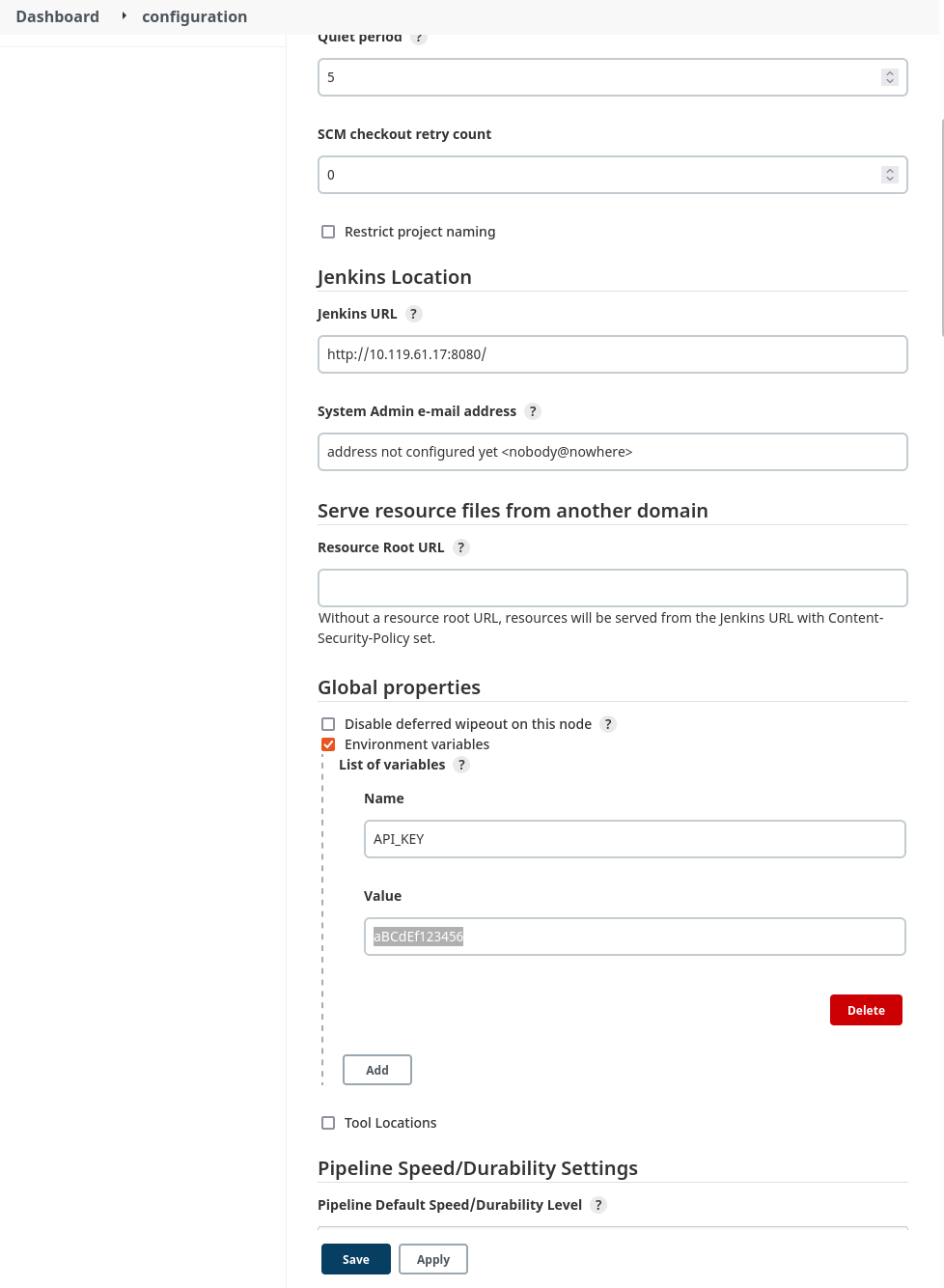
    Figure 3: Configuring a global environment variable

    The code will read the API key from the environment variable that was just configured. Here’s the configuration for the build steps:
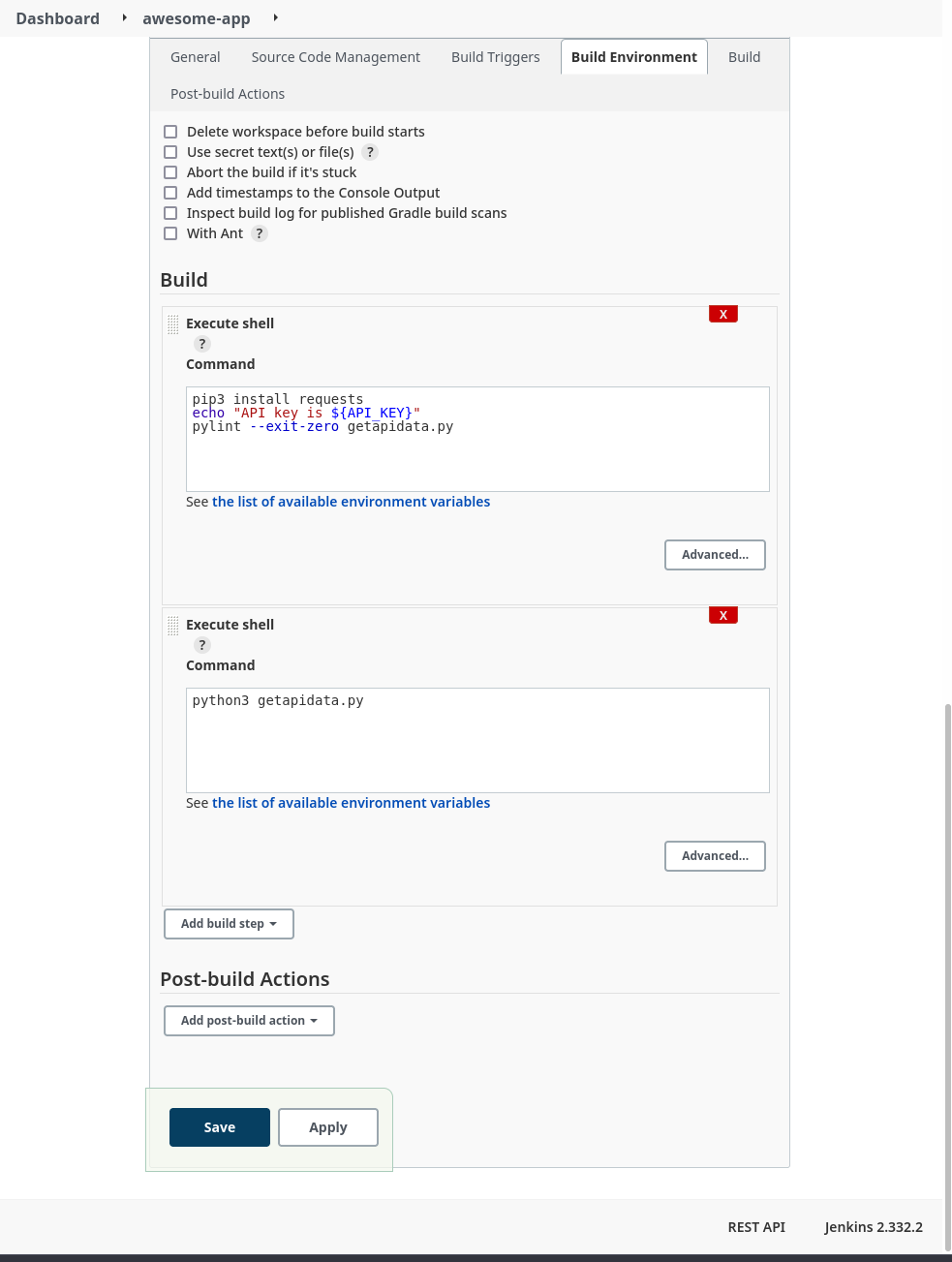
     

    Figure 4: Build configuration

    The build steps run some simple linting and then actually execute the code. Here’s a look at part of the log from a successful build:


    Figure 5: Build log with exposed secret

    The API key has obviously been exposed in a plaintext log with a simple directive in one of the build steps. A minor misconfiguration could potentially cause a breach or compromise.

    Jenkins Secret Text Example

    Now we can try to improve the security of our build environment by using the built-in credentials handler:


    Figure 6: Configure build environment to use secrets

    In this example, we’ll use a simple “Secret text” credential binding to store the API key:


    Figure 7: Adding a secret credential

    Next, we configure our build job to use the new credential variable:


    Figure 8: Updated build configuration

    Now, after running another build job, we check the build logs again:
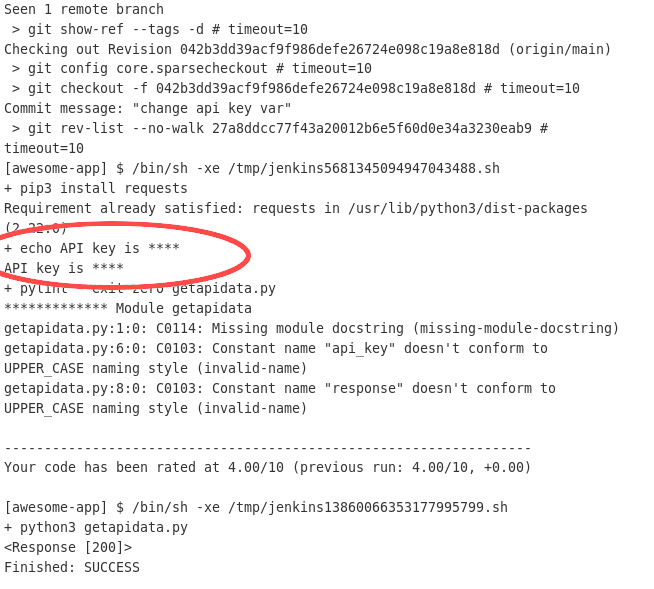
     

    Figure 9: Build job with obfuscated secret

    Even though we configured the build step to print the variable contents to the log, the Jenkins credential handler knows that the value is sensitive and obfuscates the actual value in any log or output.

    Although this measurably improved the security of the build, there are some caveats. While this works well enough for a small Jenkins deployment with a limited number of users, managing access and correct permissions scoping for multiple users and teams across a large, distributed Jenkins architecture quickly becomes complicated and difficult to manage effectively. In addition, the secret value stored in the credential variable is still accessible to every Jenkins instance in the cluster, as well as any user with the appropriate permissions.

    If any node is compromised, secrets across multiple deployments and contexts could be at risk. Users still have to manually secure and configure Jenkins infrastructure that now doubles as secrets storage. What if there were a way to use sensitive credentials without ever having to store them in Jenkins itself?

    Secrets Management Tool Example

    Let’s try using Akeyless to manage our secrets. Since we’re integrating with a Jenkins deployment, we can follow the documentation for working with Jenkins. Akeyless integrates with the publicly available Hashicorp Vault plugin, so it’s simple to get Jenkins set up.

    Next, we’ll create a free account with Akeyless, and configure a secret:

    Figure 10: Creating a secret in Akeyless

    Figure 11: Creating a secret (cont).

    The next step is to create an Access Role that has permission to access the secret that was just created:

    Figure 12: Create a role

    Now we need to give our Access Role the correct permissions to view the secret:

    Figure 13: Giving the role permissions

    The last thing we’ll need to create on the Akeyless side is an authentication method. This is how we can give external entities, like our Jenkins deployment, the ability to make API calls to Akeyless and retrieve secrets:

    Figure 14: Create an auth method

    Once the authentication method has been created, be sure to save the Access ID and key by downloading the CSV file; the values will not be displayed again otherwise. Finally, we need to associate our newly created role with this access method:

    Figure 15: Associating the auth method with the access role

    The next step is to configure the Jenkins build environment according to the Akeyless documentation referenced in a previous step:

    Figure 16: Jenkins build configuration with Akeyless

    Now we’ll run another build, this time configured to utilize the Akeyless vault we’ve configured:

    Figure 17: Build log with Akeyless configuration

    In the logs, there is now a step present where Jenkins retrieves the secret from the Akeyless Vault. The credential value is also still obfuscated in the build log. We’ve now got a working, third-party secrets management platform integrated with our Jenkins instance.

    It may seem like extra steps just to achieve the same outcome, but an external tool focused entirely on secrets management is a powerful abstraction. Jenkins is a CI/CD tool first and foremost, with secrets management provided as an add-on. In that context, it will never be able to provide the first-class features, management capabilities, and security guarantees that a dedicated secrets management platform can:

    ● Managed infrastructure with SLA guarantees
    ● Zero-knowledge encryption
    ● Intuitive, accessible secrets management and organization
    ● Integration with industry-standard DevOps tools and platforms

    A tool like Akeyless also does away with having to manage complex, self-hosted infrastructure. We were able to have a working secrets endpoint in just a few clicks.

    Conclusion

    Since security is a top consideration for CI/CD pipelines, it is important to follow best practices when using secrets in Jenkins. Jenkins pipelines rely on secrets for identity verification, collaboration, and infrastructure management. CI/CD secrets management presents a challenge for most teams because of how complex it is to implement access control at a granular level.
    With a secrets management tool, Jenkins users get a centralized and secure resource to manage the many credentials that are required to operate CI/CD pipelines. They benefit from using a simplified, standardized approach to access all secrets they need, without worrying about security. Simply put, a secrets manager accelerates DevOps workflows.

    Meanwhile, security teams benefit by gaining full visibility into where secrets are, and how they are used. With automated processes and centralized access policies, a secrets management platform helps security teams stay compliant with security regulations as well.


  • Why is Security Still in the Way? A Look at DevSecOps Right Now

    Why is Security Still in the Way? A Look at DevSecOps Right Now

    According to industry trend reports for 2022, DevSecOps is now considered to be one of the most effective approaches to building software quickly and securely. This effort, of course, means development, security and operations teams commit to addressing security as early as possible in the software development life cycle (SDLC). The goal of the shift into DevSecOps revolves around the need for more automation, streamlined CI/CD pipelines, less friction among teams and plenty of time for productive innovation. Incorporating DevSecOps practices into an organization unites security, compliance and development issues into a collaborative concern, one that allows DevOps to move fast without jeopardizing code quality. 

    As we approach the middle of 2022, it’s worth looking back and considering why security is still standing in the way of smooth software development. Security vulnerabilities have always been present in the process, and yet these pesky bugs continue to be the biggest threat to software performance. The question is, why?

    The Truth About Security

    Software has always been deployed and shipped with some existing bugs. But as software and services continue to dominate our everyday lives, the reality of this statement continues to plague both businesses and the end user. On some level, software development has yet to evolve into the next phase of security. Code is still rolled out regularly, only to discover security vulnerabilities in production. Some say the way software is developed today actually lends itself to defects, mostly because the pace of work required supersedes best practices around AppSec. 

    While the larger cybersecurity industry—and every DevSecOps team in the world—is striving to make software more secure, many organizations still prioritize speed and productivity over digital risk. This means the state of security (and, to some extent, the DevSecOps world) has become somewhat lopsided, with some enterprises making great efforts while others embrace a more lackadaisical approach. To make matters worse, many professionals today believe there has been a general under-investment in cybersecurity over the past several decades. 

    The Next Phase of DevSecOps

    The shift to remote and hybrid work models has led to mass adoption of cloud technologies and digital transformation, across all sectors and industries. As a result of this evolution, organizations today need to bear in mind that the more services they use, the more digital threats and overall risk they face. As this exposure to vulnerabilities increases, so does the need for new approaches to security. 

    The majority of modern enterprises do, in fact, have a security process in place, as well as other risk management solutions. But with the cybersecurity reckoning of 2021 and the stakes of cloud computing being higher than ever, businesses right now are feeling the pressure to think long and hard about why security still isn’t a guarantee. The trend of slowing down software development to address security more thoroughly, also known as the secret sauce of DevSecOps, is not free from roadblocks—but it is also far from optional. For many organizations, the implementation of DevSecOps practices feels less like security and more like speed bumps that just slow down the shipping of software. 

    Even so, the effort to improve security is happening now. Organizations do not need several solution platforms or tools to get started. They can begin right away; evolving their security tools and practices as they grow the business. With this growth comes one of security’s biggest challenges—scalability. Because toolchains across the cloud have become more and more complicated, setting policies and/or workflows in one tool is challenging. While these issues can be largely addressed by the adoption of an end-to-end security solution, organizations must continue to focus on strengthening supply chains, improving security oversight, and bolstering their approach to DevSecOps. Some ways to make this happen include:

    • Making sure CI/CD pipelines are integrated with DAST and SAST testing in development
    • Ensuring developers and DevOps teams complete vulnerability scanning before commit or merge, as they write code
    • Minimize manual security as much as possible with automated AI/ML tools to support more effective scanning and monitoring
    • Invest in management solutions that improve security in a multi-cloud environment

    Addressing the Supply Chain

    According to an industry survey, 60% of companies have decided securing the software supply chain should be a top priority for 2022. When we think about software supply chain attacks, we need to think about better controls to validate its integrity through all stages of the SDLC. Obviously, DevOps and automation have provided considerable help in this area; however, they cannot pull all the weight of security without proper governance and guardrails. 

    With a secure supply chain comes better security, as well as compliance, privacy and transparency. When a supply chain is secure, it can automatically enforce policy requirements for things like instrumentation, testing and architecture. As a result, software development and deployment become a repeatable process that is also reliable. Teams across the organization can rest assured that the products and services they are building comply with security expectations, such as validating code before production with static analysis and scanning tools. 

  • When DevOps-as-a-Service (DaaS) Meets Security

    When DevOps-as-a-Service (DaaS) Meets Security

    One of the most recent IT methodologies to be offered as a service is DevOps, a cultural and practical approach that brings development and operations teams together under one umbrella of work. DevOps-as-a-Service (DaaS) ensures that everything related to the selection, management and maintenance of DevOps tools and infrastructure, including all policies and procedures, are addressed through a centralized team who are able to provide this service to development teams across the organization. 

    From a 30,000-foot view, DaaS represents DevOps capabilities made accessible to practitioners through portals and APIs. Because DevOps capabilities vary among organizations, there is no standardization of these services. For the business, DaaS enhances competition. Application users and developers find DaaS improves overall software development, while specialized DaaS teams say it improves the management of DevOps capabilities.

    What Are the Other Benefits of DaaS?

    DaaS offers many benefits, especially to development teams who no longer want to spend all their time configuring and deploying the necessary security tools to run DevOps pipelines. This means it’s no longer necessary to understand all the differences between DevOps tools and the underlying infrastructure, as the appropriate tools and technologies are automatically deployed for development teams. As a result, developers are able to focus their efforts on creating innovative software at the speed of business. 

    Further, Daas delivers clear business and operational benefits in the form of a more streamlined process for facilitating DevOps across the enterprise. Daas supports governance while also enabling centralized oversight and visibility into development workloads and productivity. As we know, this shift leads to increased accountability among teams and an overall optimization of business processes. Add on resource efficiency and cost savings through tool selection, and it’s easy to see why DaaS has found a home in the world of software development. 

    But despite the benefits, Daas also presents new security challenges that can’t be fully addressed by traditional management solutions. These approaches are often sluggish, expensive, and/or incredibly complex to manage.

    What About Security and DevSecOps?

    Because the principles of DevSecOps proactively address the risks and threats associated with DevOps processes, it has seen rapid adoption in recent years. By integrating AppSec tools and strategies within a DevOps pipeline, developers are able to find and fix security vulnerabilities earlier within the software life cycle—not after the fact. This ability is what allows developers to generate secure and high quality software from the beginning, while also preventing any deployment delays stemming from last-minute security checks in production. With DevSecOps processes in place, AppSec testing becomes seamless and transparent for developers, who need a frictionless experience to facilitate steady and reliable software development and deployment. 

    DevSecOps is a  natural fit for the as-a-service delivery model. Similar to DevOps, AppSec involves various tools, policies and processes that demand a certain degree of professional expertise—not to mention the time and resources it takes to to select, maintain, and deploy them to drive DevSecOps practices. Security and development teams looking to  implement and manage DevSecOps can reap major benefits from a centrally defined and managed process, to be administered by a specialist team and delivered “as a service” to those in charge of DaaS.

    Standardizing AppSec through a DevSecOps-as-a-Service offering would guarantee security is applied evenly across all DevOps activity, thereby allowing businesses to produce secure and high-quality software consistently while also supporting AppSec compliance demands. This shift also establishes a foundation where a holistic and homogenous view of AppSec can be found, one that is critical to the assessment and management of application and business risk. 

    Developing DaaS Metrics

    First, don’t try to boil the ocean by measuring all applications at the same time. Instead, choose an application that’s supported by DaaS processes and appoint a specialized team to develop metrics for the application. This team can look many ways—but would likely include stakeholders, developers and other DaaS-supporting roles. Service-level indicators (SLIs) and service-level objectives (SLOs) are also baked into this model, which are chosen to best suit the requirements of an individual application. 

    Once the most valued SLOs of DaaS are determined, the service can be tailored to identify the most critical SLIs. With this knowledge, things like instrumentation, telemetry and analysis requirements can be identified and used to design alerts, dashboards, analyzers and more. Next, setting up policies and procedures around accountability establishes a complete solution. And once the solution for the chosen application is tested, confidence kicks in and creates an easier process for adapting and expanding the process around other applications. 

    This means DaaS can provide many key capabilities to both the organization and the teams who rely on them. A specialized DaaS team can then figure out the best metrics for larger implementation on any application. As a result, SLOs can be evolved for other future applications, to be used as a baseline for future improvements. 


  • DevSecOps: Realities of Policy Management

    DevSecOps: Realities of Policy Management

    Policy management is essential to scale cloud environments and is key to secure DevOps practices. It enables organizations to manage policies put in place that secure the cloud environment, ensure Kubernetes configurations are secure and enable the continuous monitoring of a company’s overall security posture. 

     As businesses migrate workloads across multi-cloud architectures to achieve the agility and scalability needed to keep up with the pace of digital transformation, the growing demands placed upon developers often leave a gap that exposes potential threats and risks in the configuration settings, making security an even greater focus in DevOps. In fact, IDC’s 2020 survey found that 67% of breaches in the cloud are caused by misconfigured applications or infrastructure, including some of the industry’s largest breaches like Marriott’s second breach.

     To add to this, the first State of Policy Management report by Nirmata and the creators of the CNCF project Kyverno revealed that nearly 50% of users in cloud-native environments have now adopted some type of policy management solution. This tipping point of mainstream adoption across production cloud-native environments is making it critically important for DevOps teams to look at their practices and simplify and operationalize policy management across their Kubernetes stack by eliminating vulnerabilities through built-in, curated policies, without the barrier of learning complex policy languages. But this widespread adoption also acknowledges that organizations are finally realizing the need to put attention, investment and innovation into addressing security and compliance gaps as they adopt Kubernetes through proper DevSecOps practices and tools so applications being built can empower businesses.

    To confidently build cloud applications in Kubernetes, DevSecOps teams need to accept these DevSecOps realities and apply policy management effectively. 

     Customization Creates Security Risks

    Kubernetes can be highly customized, but DevSecOps teams need visibility into what’s happening in each cluster as organizations scale to ensure application reliability and security. Exploits on containers—including malware installation, cryptomining, host access and privilege escalation—offer opportunities for more security vulnerabilities. They can exist in images, production-accessible container registries, failed builds and third-party admission controllers in Kubernetes clusters.

    To address these risks in applications running on Kubernetes, it’s important to protect your environment with three A’s: Authentication, authorization and admission. This should be done at the cluster layer which enables secure access to authenticated entities that are authorized to perform certain actions. One way to accomplish this is through policy management. In fact, according to the State of Policy Management report, the top use case for policy management is for Kubernetes admission control (31%). When a request is authorized, having a policy in place ensures the request goes through another set of filters. For example, an authorized request may be rejected by an admission controller due to quotas or due to other higher-priority requests. In addition to validation, admission webhooks can also mutate incoming requests as a way of processing request objects for use before reaching the Kubernetes API server. 

    Configuration Issues

    Container images, namespaces, runtime privileges, persistent storage and control plane, together with network policies that are not compatible with best practices, are a source of misconfiguration and risk exposures. It’s this potential for greater risk exposures that have led configuration management to be a key driver of policy management adoption. In the Nirmata State of Policy Management report, it ranked third in security tools that are adopted today and fourth for the organization’s plans for future adoption.

    There are several ways to define security policies to protect cloud environments. Policies can be used for auditing purposes, to reject pod creation or to mutate the pod and limit what it can do. By default, pods can receive traffic from any source and send traffic to any destination. Network policies allow you to limit the ingress and egress access for your pods. The network policy typically translates to firewall rules.

    Lack of Adequate Authorization 

    Cloud authentication allows authorized users to securely access information stored in the cloud with authentication provided through cloud-based services. In The State of Policy Management report, key findings revealed that more than 24% of respondents today are using tools like policy management to authenticate users accessing applications. With data theft one of the fastest-growing and most expensive cybercrimes, the ability to process information and have strong authorization measures needs to be part of DevSecOps best practices.  

    In Kubernetes environments, as a user request is authenticated, it goes through an authorization workflow that decides if the request should be granted. It evaluates the request attributes against all policies and allows or denies the request. The main authorization mechanism is role-based access control (RBAC). Each authenticated request has an HTTP verb like GET, POST or DELETE, and authenticated entities have a role that allows or denies the request. Other authorization mechanisms include attribute-based access control (ABAC), node authorization and webhook mode.

    As the trend of moving security further to the left in the application life cycle accelerates, developers are being required to take active responsibility for it, which creates a higher desire for automation. The rapid releases can expose applications to many vulnerabilities, raising the risk of a breach.  With DevSecOps, organizations can transform the development pipeline by shifting security and compliance to the left, enabling developers to check the code before every commit. In doing so, security and compliance vulnerabilities can be identified and fixed in development, saving the organization from high costs and negative publicity from potential breaches. 

    There’s no doubt that Kubernetes is complex and challenging to adopt. On top of this, the development landscape is flooded with tools and more demands are being placed on engineers.  These shifts are changing the traditional role of a developer, leaving a gap for organizations to address to get the most out of DevOps. But by taking a secure, continuous, iterative approach that also includes policy management, companies can reduce the risk and exposure of their cloud environments. The more mature an organization’s DevOps practices are, then generally, the stronger the security and compliance practices are—they grow in relation to each other. The most innovative companies accept policy management in DevSecOps as a necessity of development and adopt some level of policy management best practices. With the right implementation tools like policy management and security and compliance best practices, organizations can remain efficient in agile and DevOps while adhering to critical go-live deadlines—which can’t be missed in this fast-paced business environment. 

  • MDR for DevSecOps: How Managed Security Can Help You Shift Left

    MDR for DevSecOps: How Managed Security Can Help You Shift Left

    What is managed detection and response (MDR)? Managed detection and response (MDR) is an outsourced service that helps organizations detect threats on endpoints, respond to them and carry out proactive threat hunting.

    MDR services typically include an endpoint detection and response (EDR) platform, which is deployed on company endpoints, and human security experts. MDR providers give their customers access to security analysts and engineers who can help with endpoint security, network security management, triage of alerts and responding to real security incidents (here’s some further reading and more background on managed detection and response platforms).

    Why is MDR Important?

    Traditional managed security services (MSS) offer basic monitoring and alerting that do not provide the context and guidance needed to identify, respond to and remediate real security incidents. It leaves organizations exposed to many threats that pass through these basic services.

    How MDR Helps Protect Organizations

    MDR provides a proactive, outcome-driven approach that goes beyond the scope of what MSS vendors can offer. Common MDR services include:

    • Continuous network and endpoint monitoring.
    • Security orchestration.
    • Threat hunting.
    • Integrated response actions like remote threat containment.
    • Advanced MDR services also offer extended detection across clouds such as AWS, GCP, Azure and common SaaS suites like Google Workspace and Office 365. Other providers can protect incident command systems (ICS) and supervisory control and data acquisition (SCADA) systems within operational technology (OT) environments.

    What is DevSecOps?

    DevSecOps is a software development methodology that unifies previously disparate development (Dev), security (Sec), and operations (Ops) teams. It aims to integrate security across all development life cycle phases, including design, development, testing, deployment and delivery. It involves using automation to integrate security across all phases.

    In the past, security tasks were performed at the end of the development pipeline by a separate security team. Next, the product was tested by a quality assurance (QA) team. This approach worked when developers released software updates only once or twice per year. However, once software development teams adopted Agile and DevOps pipelines to reduce the development time, security became a bottleneck.

    How DevSecOps Improves Security

    DevSecOps integrates security into Agile and DevOps pipelines. It ensures teams can address security issues during the early phases of the development cycle. As a result, teams can apply fixes when it is easier and faster to remediate before products are released to production.

    DevSecOps makes security a responsibility shared by all teams, including Dev, Sec and Ops. It is no longer the sole responsibility of one team that creates a security silo. Instead, it enables teams to automate secure software delivery, prioritizing security without slowing down the software development cycle.

    How Managed Detection and Response (MDR) Solutions Benefit DevSecOps

    DevOps has revolutionized application development. However, due to the high velocity of modern development methods, they can introduce security gaps and flaws.

    In addition to regular security breaches occurring across the DevOps pipeline, new and sophisticated attacks, most significantly supply chain attacks infect the development systems themselves or third-party software components. This results in mega-attacks that can compromise millions of devices before being detected.

    How can MDR help?

    MDR is a relatively new cybersecurity offering but is beginning to have a major impact on companies seeking better protection with lower operational overhead. There are many overalls between MDR and DevOps. To integrate cybersecurity into production and deployment pipelines, some organizations are turning to a DevSecOps approach and MDR can help.

    DevSecOps makes cybersecurity an integral part of the entire DevOps life cycle. As more organizations implement DevSecOps, they can supplement the knowledge and security best practices of in-house teams with the security expertise provided by MDR services.

    How MDR Keeps DevOps Ahead

    MDR keeps DevOps teams ahead of the latest threats by keeping developers up-to-date on emerging threats and vulnerabilities and providing advanced tools for continuous security monitoring and response in their development and deployment pipelines. A key benefit of MDR is that it provides access to experts who can take action to prevent attacks, not just provide recommendations.

    MDR becomes a supporting element that allows developers to write more secure code as well as better secure their DevOps environment. With the help of MDR technology and experts, it becomes easier to identify advanced threats that can bypass security controls before they impact the DevOps environment or the resulting software product.

    Considerations for Selecting an MDR Solution

    • There are several important considerations when choosing an MDR platform suitable for a DevOps environment:
    • Understanding of attack surfaces common in a DevSecOps environment, and the ability to monitor and control the relevant environments.
    • Measures are taken to eliminate false positives and prioritize alerts. DevOps teams operate at high velocity and do not have time to wade through irrelevant alerts.
    • Automated triage and response at all stages of the development lifecycle. In earlier stages, this should take the form of actionable recommendations for developers, and in later stages, full incident response for production environments.

    All of this is useful as you find the right way to shift your organization to a true DevSecOps process.