Tag: security automation

  • Synopsys Report Sees Steady Application Security Gains

    Synopsys Report Sees Steady Application Security Gains

    An analysis of the security automation practices of 130 organizations published today by Synopsys suggests significant progress has been made toward securing software supply chains in the last year. However, much work still remains to be done.

    The annual Building Security In Maturity Model (BSIMM) report found there has been a 22% increase in the number of organizations creating software bills of materials (SBOMs) this year. Additionally, there has been a 10% increase in the number of organizations tracking open source software risks.

    At the same time, there has been a 25% increase in the number of organizations that are fixing all defects found in software and a 15% increase in the number of organizations that can identify potential attackers and track attack patterns.

    The report also sees significant gains in activities related to software development practices (44%), penetration testing (35%) and compliance and policy controls (21%). Usage of application behavior monitoring and diagnostics grew 64% and monitoring automated asset creation grew 45%, respectively.

    The finding and publishing of secure design patterns, the required use of approved security features and frameworks and the use of application containers to support security goals all grew about 25%, according to the report.

    However, the report also noted that usage of possible attack lists dropped by 31%, while expert-driven tasks such as building and applying adversarial security tests declined 25% and use of centralized defect reporting dropped 18%.

    The most widely used processes are implementing security checkpoints and associated governance (91%), creating or interfacing with incident response (90%), identifying privacy obligations (88%), using external penetration testers to find problems (88%), ensuring host and network security basics are in place (87%) and automated code review tools (86%).

    Jamie Boote, associate principal security consultant for the Synopsys Software Integrity Group, said the report suggests more responsibility for cybersecurity is shifting everywhere as organizations rely more on automation to apply security controls. Application development and IT operations are, as a result, able to address vulnerabilities more proactively either before an application is deployed or as soon as a vulnerability is discovered, he noted.

    The challenge organizations will encounter when it comes to automating security processes is there is a tendency to set and forget. Once a process becomes automated, not enough organizations will reevaluate that process as the cybersecurity threat landscape continues to evolve, noted Boote.

    Of course, the rate at which security processes are being automated varies widely from one organization to the next, but the more automated they become, the less dependent organizations become on application developers who typically don’t have a lot cybersecurity expertise. All too often, application developers are rushing to meet software delivery deadlines at the expense of security best practices. Unfortunately, it’s usually only a matter of time before an issue that was avoided is later discovered in a production environment and is considerably more problematic to update, given all the dependencies between software and infrastructure that exist.

    One way or another, however, a pending wave of regulations will soon force organizations to pay more attention to securing software supply chains. The only thing left to determine in the absence of automation is how painful the reengineering of DevOps workflows to embrace DevSecOps best practices is going to be.

  • The DevOps Sweet Spot: Inserting Security at Pull Requests (Part 1)

    The DevOps Sweet Spot: Inserting Security at Pull Requests (Part 1)

    Today’s organizations are increasingly benefiting from the modernization of the software development lifecycle (SDLC), including the adoption of cloud, DevOps, Agile methodologies, containers and more. Thanks to this modernization, organizations are innovating and releasing updates faster than ever before. But these benefits aren’t without challenges.

    Application security arguably tops the list of challenges. Security has inherently manual bottlenecks, and is unable to keep up with the pace of automated DevOps pipelines. The result is that security is often left behind, overlooked or simply ignored in the development process. Developers aren’t willing to slow innovation down today for the potential of security breaches tomorrow.

    As a result, more and more applications are being shipped into production with vulnerabilities and security flaws. Today, most of the vulnerabilities are found in post-production either via red teams, bug bounty programs or siloed and irregular code analysis scans. At best, these vulnerabilities are fixed in the next version that’s shipped. At worst, your organization is making headlines for millions of personal records being breached.

    However, security in the modern SDLC is becoming more symbiotic thanks to two key advancements—speed and accuracy. Overcoming these two challenges enables security to be inserted into developer workflows earlier than ever before. By automating security with every pull request, development organizations can finally embrace security without slowing down innovation.  

    Automation — Security at the Speed of DevOps

    These days, many vendors claim to insert security into DevOps pipelines, often during the build. While it’s true that security scans may be automatically started, they still finish in siloed processes that don’t keep up with the pace of releases. We call this “automation for automation’s sake.” It does not measurably improve defect density, slow the accrual of technical debt or reduce mean time to repair (MTTR). The only value that automating this way provides is checking a box on a compliance form.  

    So, how can organizations more effectively automate security quality decisions? 

    First, security tests and scans need to be dramatically faster. Legacy code analysis takes such a long time that many vendors recommend sacrificing comprehensiveness by scanning only differentials. Even then, they still aren’t fast enough to keep up with CI/CD. It goes without saying that organizations cannot meaningfully automate security into processes such as builds or pull requests, that take just a fraction of the time.

    Second, the results need to be more reliable. The goal of security automation should be to fail insecure code. However, historically, code analysis tools are plagued by so many false positives that no code would ever pass any test. Only with reliable results can insecure code be confidently failed. 

    Third, security scans must be comprehensive as false negatives lead to vulnerabilities going undetected into production. This is, in part, because developers are not asking the right security questions when scanning their code. Traditional code analysis tools leverage pattern matching techniques—they look for symptoms of a vulnerability that are common across all code bases. For example, lack of input validation from sources is a classic cause of injection vulnerabilities. However, there are many vulnerabilities that are unique to each code base, such as business logic flaws, data leakage, hard-coded literals and insider threats.

    For example, all applications are purpose-built to meet specific business needs, meaning vulnerabilities may go beyond coding errors and present themselves as business logic flaws in the design of an application. Take the First American Financial breach. Thanks to an insecure direct object reference (IDOR), an attacker has the potential to manipulate an internal implementation object. In the case of First American Financial, this was a URL or form parameter. Given the asymmetrical advantage that attackers have, defenders must protect from all possible vulnerabilities, but attackers need to only find one vulnerable route. As such, partial security can be as problematic as no security.

    Only when security is completely comprehensive—reliable enough to fail with confidence and fast enough to keep up—can it be meaningfully automated into developer workflows without slowing them down.

    Yet, comprehensive security scanning is only part of the equation. In the second article of this series, I’ll dig into where these security scans should be taking place in the development cycle to make them most effective.

    — Chetan Conikee

  • Better Apps and Better Security When You Shift Left

    Better Apps and Better Security When You Shift Left

    Tens of thousands of people and hundreds of cybersecurity vendors descended on San Francisco at the end of April. While the RSA Conference was the primary draw, there are a number of peripheral events that go on throughout the week as well, such as the Cloud Security Alliance Summit, the CIO/CISO Interchange, BSides San Francisco and the Qualys Security Conference.

    I was able to attend some of the Qualys Security Conference and I had the opportunity to see Alex Mandernack, security solution architect for product management at Qualys, presenting on the need to shift left when it comes to cybersecurity.

    Mandernack outlined some of the issues organizations face today when it comes to security. Migrating to the cloud and embracing DevOps culture means more ephemeral, elastic environments and compressed development time frames. He pointed out that these trends make security more challenging, but also described the opportunity they present to change our approach to streamline and improve security.

    The Traditional Pipeline is Broken

    The traditional model of application development is much more linear. Each app team builds their own image—often in a silo or vacuum disconnected from other teams. Penetration testing is conducted on a sporadic or infrequent basis, and eventually the app is deployed. Vulnerability scans are run on the app in production, and issues or deficiencies are reported back to the developers to address or incorporate into the next build.

    The process is slow and cumbersome. It also has the potential to introduce redundancies that waste resources and make the organization less efficient. As companies embrace DevOps and move to the cloud, the traditional development pipeline simply doesn’t work—especially not for security.

    DevOps, and Cloud, and Containers — Oh My!

    The cloud and DevOps fundamentally change the development lifecycle. Development time frames are compressed, and the process is a self-feeding, iterative circle rather than a repeating linear approach. The traditional approach of identifying and resolving security issues after an application is deployed won’t work in a DevOps environment because by the time issues are identified and fixed, the app itself may have already moved on to the next version.

    Cybersecurity and the development pipeline have enough challenges with the cloud and DevOps, but there is also a newer technology trend that exacerbates the problem—containers. Containers are designed to get code quickly and to operate fast. They are also built for scalability—spawning and spinning down hundreds or thousands of containers constantly to keep pace with demand.

    There is a diverse array of tools and platforms associated with cloud, DevOps and containers. Organizations often employ a complex collection comprised of some combination of AWS, Azure, Docker, Kubernetes, OpenShift and others. The result can quickly become a black hole when it comes to security—which is why it’s important to push security left into the CI/CD pipeline.

    Shift Left to Help Security Teams Do Better

    In a DevOps culture, developers and security teams need to think about security sooner. It’s important to get the security tools into the process earlier. Thankfully, with the DevOps lifecycle and the tools commonly used within a DevOps environment, it can be done.

    For starters, companies should build a golden image. Developers shouldn’t have to patch and update the base operating system before they even start developing. The golden image takes a baseline operating system such as Ubuntu or CentOS, and completely patches and configures it so everyone has a standard, consistent image to develop on.

    With the golden image in place, the next step in shifting security left is to implement testing and scanning in the CI/CD pipeline. Put vulnerability information at the fingertips of developers as they’re developing and implement vulnerability gates in the pipeline to ensure that applications that don’t comply with policies and meet minimum requirements are not allowed to be deployed.

    New Role of the Security Team

    Part of shifting security left includes providing tools that make security self-service for the DevOps team. Automating actions with scripting, APIs and CI plugins ensures that security is simplified and streamlined to provide value for developers.

    In this shift left scenario, the security team has to redefine its role in the process. The security team is still vital, but rather than being the police or a roadblock in the development process, the role of security focuses on verifying and auditing the process. The security framework should have dashboards and live data that enable the security team to monitor activity and identify trends that may need further attention.

    Better Security, Faster

    There is often conflict between developers and security teams, but there doesn’t need to be. Mandernack stressed that developers don’t want to create insecure apps either.

    Shifting security to the left into the CI/CD pipeline streamlines the whole process. Ultimately, the result is higher quality, more secure applications that are developed faster.

    — Tony Bradley

  • 6 Traits That Define DevSecOps

    6 Traits That Define DevSecOps

    How do we define DevSecOps? A combination of DevOps and security is readily apparent, but the philosophy goes much deeper. In a recent eBook, The State of DevSecOps, we asked industry experts to define what DevSecOps meant to them. Below, we’ve condensed their answers into five core attributes.

    Following these principles, CIOs or CTOs now have a DevSecOps doctrine applicable to nearly any software development and release environment.

    Security Automation

    DevSecOps emphasizes security objectives within the automation processes. Ben Newton, director of product marketing and evangelism at Sumo Logic, defines DevSecOps as first making security requirements and objectives a clear part of the continuous integration (CI) and continuous deployment (CD) cycle.

    Culture of Security

    DevSecOps establishes a team culture that embraces security concerns. As stated by Ben, a security team must provide “clear guardrails for developers as to what is fair game and what is not appropriate from a security perspective.” Building security expertise to integrate security into the entire DevOps lifecycle is critical.

    De-Siloing IT

    DevSecOps is about eroding boundaries. Just as DevOps has eroded the traditional separation between software engineering and IT operations teams, “DevSecOps further erases the walls between the DevOps team and IT Security,” said Tim Jarrett, senior director of product management at Veracode. “DevSecOps is about building a bridge between the security and DevOps teams,” echoed Dan Hubbard, chief product officer at Lacework.

    Security Shifts Left

    DevSecOps places security earlier on in the development process. IT security is traditionally viewed from a risk avoidance and compliance standpoint. Rather than viewing security as a gate, Tim noted that within DevSecOps, “security is better positioned to integrate earlier in the development cycle where they can actually make a difference.”

    Security Enables, Not Stalls

    DevSecOps supports, not stalls, agile development. DevSecOps doesn’t have to be sluggish. As Dan described, DevSecOps must “support the need for DevOps to move fast, but in a way where security is not ignored.” By embracing a security-as-code mindset and involving practices such as automated threat detection, agility is not sacrificed.

    — Bill Doerrfeld

  • Top 5 DevOps Practices to Improve Security in Engineering

    Top 5 DevOps Practices to Improve Security in Engineering

    We’ve all been there … A new application or feature needs to be deployed yesterday and the last thing anyone wants to do is address security requirements. On the flip side, the very last thing anyone wants to address later is a security breach or a cost associated with non-compliance. Not only is it a massive headache but also it’s extremely expensive. According to the IBM X-Force Threat Intelligence Report 2016, the average cost of a data breach in 2015 was $154.20 per record ($363 per healthcare record) with the average total cost of a breach estimated at $3.79 million.

    Not only is a breach expensive in terms of cost that can be easily quantified, but there are also costs that are harder to quantify such as the impact to branch image and customer loyalty. According to a new FireEye research report, 76 percent of respondents would likely take their business elsewhere due to negligent data-handling practices. In an incredibly competitive technology space, none of us can risk turning a blind eye to security if we want to attract customers with cool new features and then keep those customers with trust and reliability.

    Security seems to be one of those topics that you either love or hate. I’m personally interested in it; however, I realize it’s not an interest shared by all. In the land of unicorns, we want all developers (infrastructure and application) to have more ownership in security, but tight schedules combined with the lack of expertise and reliable controls often can make that strategy unreliable. To make matters worse, a secure system and application isn’t something that is always glaringly visible to an end user or product owner. As a result, security may easily get deprioritized as something that “can be fixed later.” The “fix it later” strategy can be a dangerous decision, as many cybercriminals now are actively taking advantage of those that deploy quickly without adequate controls. How do you balance the customer’s desire to have new features delivered quickly with the fact that they need secure systems protecting their data against malicious threats?

    Several common DevOps practices inherently lend themselves to providing a development and delivery pipeline that can improve your overall security posture. DevOps combined with SecOps includes practices that shift operational and management aspects of a system to the left to ensure we are able to reliably delivery and manage secure systems.

    5 Security Practices Worth Considering

    Below is a list of the top five DevOps practices and tooling that can help improve overall security when incorporated directly into your end-to-end continuous integration/continuous delivery (CI/CD) pipeline:

    1. Collaboration
    2. Security test automation
    3. Configuration and patch management
    4. Continuous monitoring
    5. Identity management

    If you iteratively build in security practices as you move infrastructure and application code through the deployment pipeline, it greatly increases your security posture as well as decreases the cost of future rework.

    Collaboration and Understanding your Security Requirements

    Many of us are required to follow a security policy. It may be in the form of a corporate security policy, a customer security policy and/or a set of compliance standards (ex. SOX, HIPAA, etc). Even if you are not mandated to use a specific policy or regulating standard, we all still want to ensure we follow best practices in securing our systems and applications. The key is to identify your sources of information for security expertise, collaborate early and understand your security requirements early so they can be incorporated into the overall solution.

    Security Test Automation

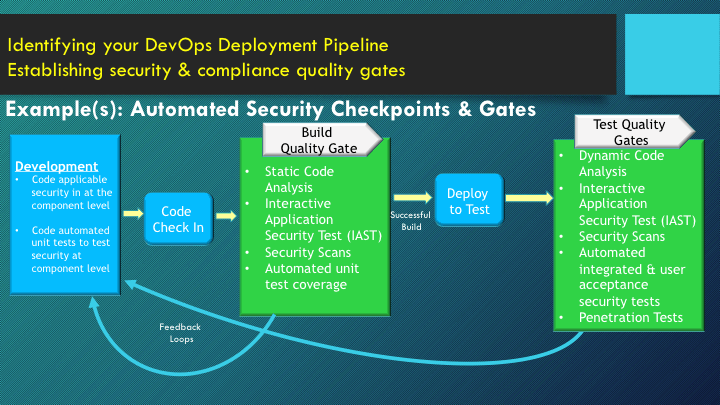
    Whether you’re building a brand new solution or upgrading an existing solution, there likely are several security considerations to incorporate. Due to the nature of quick and iterative agile development, tackling all security at once in a “big bang” approach likely will result in project delays. To ensure the project keeps moving, a layered approach often can be helpful to ensure you are continuously building additional security layers into your pipeline as you progress from development to a live product. An example of building gates in as you progress through your pipeline is shown below. Security test automation can ensure you have quality gates throughout your deployment pipeline giving immediate feedback to stakeholders on security posture and allowing for quick remediation early in the pipeline.

    sec

    Configuration Management

    In traditional development, servers/instances are provisioned and developers are able to work on the systems. Sometimes there is a “golden image” developers use to provision that can ensure that the provisioned servers/instances have a hardened operating system. However, as soon as any additional development and configuration activities happen on those servers, that server is no longer golden. To ensure servers are provisioned and managed using consistent, repeatable and reliable patterns, it’s critical to ensure you have a strategy for configuration management. Your strategy may include Chef for one situation, Salt for another situation, immutable infrastructure, or a combination of practices. The key is ensuring you can reliably ensure and manage consistent settings across your environments.

    Patch Management

    Similar to the concerns with configuration management, you need to ensure you have a method to quickly and reliably patch your systems. Missing patches is a common cause of exploited vulnerabilities including malware attacks. Being able to quickly delivery a patch across a large number of systems can drastically reduce your overall security exposures.

    Continuous Monitoring

    Ensuring you have monitoring in place across all environments with transparent feedback can alert you quickly of potential breaches or security issues. It’s important to identify your monitoring needs across the infrastructure and application, and then take advantage of some of the tooling that exists to quickly identify, isolate, shut down and remediate potential issues before they happen or before they become exploited. Part of your monitoring strategy also should include the ability to automatically collect and analyze logs. The analysis of running logs can help identify exposures quickly. The collection and analysis of security logs can identify issues that require remediation as well as provide automatic collection of compliance evidence. Compliance activities can become extremely expensive if they are not automated early.

    Identity Management

    DevOps practices help allow us to collaborate early with security experts, increase the level of security tests and automation to enforce quality gates for security and provide better mechanisms for ongoing security management and compliance activities. While painful to some, it has to be important to all if we don’t want to make the headlines.

    We are all busy keeping up on everything that is emerging in technology and it’s difficult to keep up on all of the latest issues, so relying on reputable tools and reliable sources of information can be extremely beneficial. Some of my favorite resources in this area are The OWASP and SC Magazine. IBM X-Force is another great reliable resource to check out for the latest threat research and services. There are also a slew of tools out there to help with different areas of security in each of the practices covered in this blog. I’d love to hear about some of your favorites at @Shelbee_SE.

    About the Author / Shelbee Smith-Eigenbrode

    Shelbee

    Shelbee Smith-Eigenbrode is a senior software engineer/IT architect at IBM and has been in IT for 19 years.  She has worked across varying roles spanning the software development life cycle. Her experience across functional roles as well as performing that work deeply inside traditional silos has contributed to her passion for embracing the DevOps culture and transforming the way teams are delivering technologies by adopting DevOps practices. She is a member of the IBM Academy of Technology committed to driving innovation and technical advancement.

  • Combining SecOps and DevOps

    Combining SecOps and DevOps

    Security has to be top of mind for most any company that is moving, or has moved, to the cloud. And, businesses know they need to act swiftly to ensure that any new products or services they’re dreaming up do not expose them to risk.

    How can they do that when the fast-moving nature of the cloud is leaving proper security practices in the dust? The problem today is that today’s security solutions are proprietary, too slow and take too many resources.

    Bottom line, the security model that has served most businesses well was never built for speed, and is simply unsustainable for opportunities in today’s cloud-centric world. Today, security solutions must be agile, lightweight, loosely coupled and extensible.

    On the front lines at various companies you’ll see a new type of cooperation –  where two teams most directly involved in a potential solution, development and security – are breaking down the traditional (and often opposing) silos and collaborating more openly to drive secure innovation from the start.

    We’re seeing a new “marriage” of SecOps and DevOps that creates a whole new mentality for driving innovation inside and outside of organizations. This new mentality allows security and DevOps to find common ground to make it easier for organizations to align their security goals with the delivery of their products at today’s rapid speed of business.

    While businesses are changing internal structures to address cloud security, there are also a number of new solutions that can be deployed against a company’s clouds and deliver security intelligence back to the DevOps teams.

    These kinds of tools are especially important for start-ups and SMBs that face unique challenges securing their businesses from cyber attacks and preventing data breaches.

    By encouraging greater collaboration between security and DevOps, and relying on outside solutions to assess and identify potential threats as new products and services are developed, businesses of all sizes can feel a higher level of confidence that they’re addressing security concerns by enforcing industry-leading security practices every step of the way.

    About the Author:/Tim Prendergast

    tim p Tim Prendergast co-founded Evident.io to help others avoid the pain he endured when helping Adobe adopt the cloud at a massive level. After years of building, operating, and securing services in AWS, he set out to make security approachable and repeatable for companies of all sizes. Tim led technology teams at Adobe, Ingenuity, Ticketmaster, and McAfee.

  • Automation domination (for security automation it’s a path)

    Automation domination (for security automation it’s a path)

    Let’s face it, by nature security professionals are not the trusting type – in the least bit whatsoever – to put it bluntly. The concept of automating security makes them jumpy, testy and downright irritable in some cases.

    Why?

    Well, as we know, security teams are charged with maintaining control over processes. Introducing automation requires trust, a lot of it in fact.   But as automation IS the future of IT, like it or not, how can security pros learn to love automation domination?

    Let’s tackle the elephant in the room first. When it comes to getting security teams on board with automation, the stopgap tends to be around trust. The security culture is one of control (yes, we’re a bunch of control freaks) and by nature security professionals don’t trust people and they don’t trust systems.

    The sound of the word Automation makes some security people jump out of their seat, but it’s not only because of security reasons. The biggest concern is actually, causing an outage, an event that tends to be noticeable much faster than an overly permissive security configuration which may go unnoticed forever.

    For automation to take place, there has to be a hand off around security decisions, a loss of control so to speak, and in order to do that there has to be unfounded trust in the process about to be automated.

    Where to Start: Today, automation in IT is predominant; sys admins use automation for application deployments as well as managing infrastructure on premise and in the cloud. It is increasingly becoming the norm. However when you move from IT into security automation, that is where the norm ends. So if automation of security processes is new to your team or organization, where might be a good place to start?

    First, security teams are open to automating tasks that are not inline. Compliance audits are one good example. While it is a security-related activity, it cannot induce risk (except for the risk of failing the audit). So anything that doesn’t introduce risk and that can be automated, security professionals are open to – especially if it’s a dull, time consuming task.

    Another area where security automation is abundant is with those processes that are just too overwhelming for security teams to deal with manually – where there’s no other feasible alternative but to automate. Patch management and event management (SIEM) systems are two good examples where manual processes are just not viable.

    Creeping into the Network with Automation: It’s when we talk about automating security into change management, that trust issues come into play, big time. Nowhere else is security risk more predominant than when it comes to configuring security devices, because more often than not, misconfigurations lead to outages. When it comes to firewall policy or network security management, automation has to prove itself before security teams can hand it off. Baby steps are called for here.

    How?

    Consider starting with the processes that can be reviewed in detail first with a simulation of the automation before the “RUN” button is pressed – a dry run. This will certainly help determine what the system is going to do or not do. If teams have the opportunity to review what will be configured before it gets automated, you have started on the path to trusting security automation.

    This is more about collaboration and breaking down silos just as much as it is about technology. Bringing security in to review the change processes as they are being automated, is a trust and team building exercise in and of itself, and ensures that security considerations are baked into process automation from the get-go.

    Trust between the people determining which processes should be automated – and how – tends to occur over time, as everyone gets to know each other, and especially as security teams have the visibility and input they need to ensure that security is baked into process automation. As concerns are assuaged, security teams will become increasingly hands-off, but they need to be eased into it.

    Phasing in More Network Automation: For security teams looking to take a gradual approach to full automation, Security Policy Orchestration (SPO) is the perfect vehicle. I like to think of this concept as a version of automation but a more intelligent way of doing automation. Automation in itself is like a robot repeating tasks in a dumb way. Orchestration is more like a conductor coordinating a talented group of musicians (network of complex systems) who are playing a symphony together.

    Core to this approach is simulation. Once the organization has its network topology accurately mapped out, the system can automatically identify relevant policy enforcement points (firewalls, routers, load-balancers) that are associated with the flow of the business connectivity requirement. Based on this, a network simulation can be performed to accurately design the implementation.

    In moving toward automatic network design, DevOps teams can greatly benefit from leveraging tried and true best practices already in place, in the security world. For example, automatic risk analysis against a pre-defined zone-to-zone security policy, across the entire network, allows the security team to review and decide whether certain business needs are aligned with corporate security guidelines or not.

    As trust is gained in the automatic network design and the automatic changes set forth by pre-defined policies, there will be less reliance in reviewing every design change and more trust in automation. As soon as the system automates change provisioning, you have reached a mature automation model.

    Orchestration handles changes as part of a process rather than through hidden API calls, this gives you the necessary transparency including an audit trail, separation of duties and check points that are critical for trusting the machine. The capability of providing an audit trail enables a post-mortem analysis in the event something fails to go as intended. Checks and balances, allow for human intervention where defined conditions occur. Lastly, the system has to be very accurate, reliable and secure.

    The path to security automation may not be a quick one, but by taking a phased approach and automating the right processes, everyone will feel more confident with automation domination. This way, our favorite control freaks, the guys we trust to secure our network, can focus their attention on addressing the next generation of security challenges.

  • DevOps – A wake up call to security vendors

    DevOps – A wake up call to security vendors

    DevOps is changing the way IT works.  Through a collaboration of development and IT teams, organizations can achieve tremendous scale at increased speed to deploy and maintain critical applications and infrastructure.  The key technologies of virtualization and configuration automation have made this possible.  Without these technologies, development may not slow down, but deployment would slow to a crawl and the benefits of DevOps would be minimal.

    It is interesting to note that in almost no definition of DevOps is the security process discussed as a key element.  In some cases you will hear mention of improved security through consistent configuration management enabled through automation, but security teams are not at the DevOps table.  Why is that?  I would suggest that for most people security is considered a barrier to IT.  Not surprisingly, DevOps, a practice focused on streamlining IT, security has been left out of the conversation so as to not prevent achieving the goal.

    But if you accept that security needs to remain a part of the story, then it must be just as manageable as the infrastructure or it will never have a seat at the DevOps table.  Take a look at Puppet or Chef; they automate the configuration of the systems necessary to run the applications.  Through automation scripts, systems are deployed, configured, updated, and managed.  Development boxes are configured consistently with production boxes limiting impacts related to deploying an application into production.  So why can’t security fit into this picture?

    One reason, is a lack of standardization.  Every security vendor wants to be unique.  They promote their solution as so incredibly unique from their competitors that there is no way to standardize.  So, creating scripts to manage security would require not only a unique script for each vendor, but a unique solution.  In comparison, the command to edit a route in Linux may be slightly different than in Windows, but the parameters are the same.  When you are managing security rules on a firewall as an example, you can’t even get agreement on that.  Zones are required for some firewalls, not used in others.  Applications define access in Palo Alto, but don’t exist in Cisco.  Even firewalls that share the idea of Applications use non-standard dictionaries of Applications.  So, creating a script becomes a non-standard solution.  Worse yet, the script that worked today won’t necessarily work tomorrow when the vendor changes their solution.

    To make it all unmanageable, is the fact that they are so proud of their uniqueness that they have obscured even how they do it.  If you take all the firewall vendors on the market, not one of them publishes an API on how to fully manage their firewall policies.  Palo Alto exposes some capabilities for object management in a cool SDN sort of way.  Check Point has a very powerful, but proprietary API that allows full management, but they do not recommend it be used in that way.  Cisco is straight up command line with some newly available API’s and should be commended for making it at least obvious how to do it, if not easy.

    The result: security is not a big part of the DevOps picture today.  And if the vendors don’t do something, they will be replaced by solutions willing to operate in this new DevOps world.  Open source firewalls or integrated firewalls in the virtual stack for example are ready to take their place.

    The solution for security vendors: publish API’s to fully manage their systems.  They must accept that their UI is no longer what differentiates them from their competitors, it is the security engine and enterprise manageability.  Make it possible for others to manage their solution through open API’s with their full support.  All the security vendors will not come together and agree on a single API, but each should at least publish a usable API for their own product.  Vendors like FireMon or open source contributors to solutions like Puppet and Chef will solve the rest.

    Security vendors better wake up or they will get left behind.