Tag: secrets management

  • GitGuardian Survey Surfaces Secrets Management Challenges

    GitGuardian Survey Surfaces Secrets Management Challenges

    A survey of 507 IT decision-makers in the U.S. and the United Kingdom published today found 75% of respondents said a secret leaked from at least one application, with 60% noting that the leak caused issues for either the company, employees or both.

    Conducted by Sapio Research on behalf of GitGuardian, a provider of a platform for securing application secrets, the survey found less than half of respondents (48%) are confident in their ability to protect application secrets to a great extent.

    The top source of risks when it comes to secrets management are source code and repositories (58%), followed by hard-coded secrets (47%). Just under a third (30%) of respondents to the GitGuardian survey admitted they share passwords and secrets when building applications as clear text within a messaging application.

    Just over a quarter (27%) still relied on manual code reviews to prevent secrets leaks, the GitGuardian survey found.

    On the plus side, 94% of the respondents said they were considering improving their secrets management practices in the coming 12-18 months, even though 93% said either “all” or “some” of their repositories were continuously scanned for hard-coded secrets.

    Thomas Segura, a cybersecurity expert for GitGuardian, said as the number of applications developed continues to increase, secrets sprawl has become a bigger challenge for application security. The way secrets are managed during application development has become a bigger issue in the wake of a series of software supply chain breaches that led to malware being injected into applications.

    The concern is cybercriminals that compromise software development environments will be able to retrieve secrets that they can later use to compromise an application after it has been deployed in a production environment. Cybercriminals are also now routinely scanning for secrets that may have been stored in text after an application has been deployed.

    The challenge is that secrets have not been historically managed effectively, so many organizations are now looking to implement more rigorous processes. Another challenge is that, in many cases, it’s not apparent whether those processes will be implemented by a DevOps team familiar with how an application is constructed or an application security team with more cybersecurity expertise, noted Segura.

    Regardless of the approach to remediating these issues, there is always going to be an issue because the humans who build applications are always going to make mistakes. The goal is to minimize the number of secrets that might be leaked by implementing DevSecOps practices that automate the review process, said Segura.

    In theory, at least, advances in artificial intelligence (AI) should make it easier to automate more of the secrets review process. In the meantime, however, organizations need to review their existing processes in advance of pending legislation that looks to hold organizations more accountable for application security if it is determined that the organization did not take reasonable precautions.

    It may be a while before such legislation becomes law, but one way or another, it’s clear that DevOps teams are soon going to be asked tougher questions about how secrets were managed every time an application security breach occurs.

  • ReversingLabs Adds Ability to Detect Secrets in Application Binaries

    ReversingLabs Adds Ability to Detect Secrets in Application Binaries

    ReversingLabs today announced it added an ability to detect secrets exposed in application binaries to its Software Supply Chain Security (SSCS) platform.

    Tomislav Peričin, chief software architect for ReversingLabs, said this addition will make it easier for DevSecOps teams to identify secrets that are inadvertently left in applications as plain text or that can be discovered because of weak cryptography, scripts that have been included in directories that have secrets configuration files, packaging automation mistakes, compromised developer accounts or the activities of malicious insiders.

    The SSCS platform can identify more than 250 secret types out of the box, including private keys, version control, certs, tokens and more. Once they are identified, the platform also surfaces their precise location, which services are affected and if those secrets are exposed or leaked elsewhere. The platform also identifies third-party, open source, testing keys and other commonly shared secrets in addition to which secrets have already been exposed. Armed with those insights, it then becomes possible to better prioritize remediation efforts on actionable issues to reduce overall manual triage fatigue, noted Peričin.

    ReversingLabs also provides guidance for sensitive information policies, including documentation of public exposures and breakdowns of secrets used for web service access credentials, web service access tokens, web service API keys and webhook service access keys.

    Most software composition analysis (SCA) tools used to secure software supply chains are limited to identifying issues in source code. As applications become more modular, however, the odds authentication credentials such as login credentials, application programming interface (API) tokens and encryption keys might be left exposed because of a developer mistake substantially increase. The overall goal is to make it possible for DevSecOps teams to discover these issues in binary code before an application is deployed, noted Peričin. That “just in time” approach to secrets management includes canary token management and custom detection policies to better ensure application security.

    In general, secrets within applications are becoming more challenging to secure as cybercriminals increasingly scan repositories and continuous integration/continuous delivery (CI/CD) platforms to find them. The ultimate goal is to inject malware into a software component that will be used in multiple downstream applications. Once activated, that malware will then create a backdoor through which cybercriminals can exfiltrate data or launch a full-blown ransomware attack. It was the latter type of attack that led to the U.S. government creating a formal National Cybersecurity Strategy to, in part, lock down the software supply chains employed by federal agencies to build applications.

    A recent survey published by ReversingLabs, however, found that while 87% of respondents agreed that software tampering has become a more frequently used cybersecurity attack, only 37% said they have any means to detect it. Only 7% said they could detect software tampering at each phase of the software development life cycle.

    It’s not clear to what degree best DevSecOps practices are currently being implemented within application development teams, but as more attacks are launched against software supply chains, it’s now only a matter of time before most DevOps teams are routinely required to scan code for exposed secrets and known vulnerabilities long before code is allowed anywhere near a production environment.

  • GitGuardian: 10M Exposed Secrets on GitHub

    GitGuardian: 10M Exposed Secrets on GitHub

    GitGuardian published an analysis of more than one billion commits to GitHub repositories that found 10 million occurrences of secrets, with one out of 10 developers exposing a secret.

    Mackenzie Jackson, a developer advocate for GitGuardian, said more than 80% of all the secrets caught by live monitoring GitHub were exposed through personal repositories, with a large share of them being corporate secrets. In fact, three million of the secrets discovered were unique instances, with 5.5 commits out of every 1,000 made exposing a secret.

    On a year-over-year basis, the report also found that the number of hard-coded secrets discovered in these repositories increased 67%. More than half the secrets discovered (56%) contained a generic password.

    There appeared to be no correlation between developer experience and the number of secrets exposed. Junior and senior developers are equally predisposed to making the same mistakes, said Jackson. The most common mistake is secrets left exposed because developers used them to simplify access to components and resources when building their applications and then forgot to remove them when the application was deployed in a production environment.

    Secrets management is, of course, getting more attention as more organizations review their software supply chain processes in the wake of a series of high-profile security breaches. The issue with secrets management is cybersecurity teams are usually a lot more focused on discovering vulnerabilities than looking for instances of poorly secured credentials. Once an application is deployed in a production environment, it may be months before anyone discovers an issue—if it’s discovered at all. In fact, the number of existing applications running in production environments that have issues with how secrets are managed could be staggering.

    In theory, at least, the adoption of DevSecOps best practices should be mitigating this issue, but as the volume of code stored in repositories continues to increase, it would appear more fundamental mistakes are being made. Cybercriminals, meanwhile, have a greater appreciation today for weaknesses in software supply chains, so many of them are scanning repositories for secrets that will enable them to breach an application.

    Of course, there’s a lot more attention being paid to secure software supply chains, especially in the wake of the Biden administration creating a National Cybersecurity Strategy that requires Federal agencies to, among other things, lock down software development life cycles on an end-to-end basis. Most enterprise IT organizations, if they have not done so already, are expected to follow suit.

    As a result, DevOps teams should expect to see more cybersecurity professionals focusing more on secrets management. Developers, naturally, will not want to be called out for mismanaging secrets, so over time, the overall state of application security should steadily improve. The issue, of course, is the volume of attacks against software supply chains is expected to increase. Many previous mistakes are likely to come back and haunt developers and the organizations that rely on their code and wreak havoc downstream.

  • The Secret to Secrets Management: Reduce Source Code Vulnerabilities

    The Secret to Secrets Management: Reduce Source Code Vulnerabilities

    We are in the cyberattack age. From Microsoft to Crypto.com, no company is completely safe from malicious attackers, and it seems as if a new major cyberattack is announced weekly, if not more frequently. As more companies not only go digital but expand their digital offerings and initiatives, there are more opportunities for cyberattackers. Security teams within IT organizations are hard at work to ensure that their company isn’t next in the headlines. However, as the tech world moves to everything-as-a-service (IaaS, PaaS, SaaS, etc.), the move toward everything-as-code is happening in tandem. As a result, many developers are unknowingly keeping sensitive data (secrets, passwords, certs, keys, etc.) stored in Git source code repositories. This information is often pushed to production which puts sensitive information at greater risk of exposure.

    The good news is there is a way to ensure that secrets are locked tight within source code. Let’s explore the complexity and realities of securing source code today and how to take the guesswork out of finding at-risk code that could land your company on the front page of the news tomorrow.

    Secrets Management is Challenging and Costly

    Sophisticated cyberattackers will stop at nothing to breach valuable data assets. Secrets leaked from source code make it easy for threat actors to access applications using the same credentials intended for legitimate purposes.

    At the pace of continuous software development, developers must move quickly to build applications. However, security teams that are expected to prevent breaches are not often well-versed in all facets of the software development life cycle (SDLC). This becomes an issue as the number of lines of code (and the secrets kept within) rise alongside the number of apps developed. According to a recent report from 1Password, “two in three (65%) IT and DevOps employees estimated their company has more than 500 secrets.” And, according to the same report, “the average cost of a secret’s leak is $1.2 million. Poor secrets management can result in organizations losing $8.5 billion annually.” Secrets are vital to building any connected application or process. If hard-coded or left unprotected in source code, the proverbial keys to the kingdom are at risk of exposure—as are your loyal customers.

    It’s clear that source code security should be a priority for security teams and DevSecOps professionals. Let’s examine how they can achieve this without sacrificing developer productivity.

    How to Reduce Threats Through Secrets Management Best Practices

    Manually searching source code repositories for vulnerable secrets can be almost impossible. However, there are some best practices to follow to ensure vulnerabilities are caught early and often:

    ● Identify and remove secrets in code: You can’t protect what you can’t see. It’s important to have visibility into source code to be able to see where vulnerabilities may exist. There are a few ways of potentially going about shining a light on vulnerabilities. One is through manual scanning of source code, but this takes away valuable time developers could be spending on more innovative tasks. There are also some open source solutions that can help with scanning source code repositories, but as with everything open source, this means developers will have to maintain it (keep it up to date, integrate it, etc.). Instead, security teams should consider looking for a unified toolchain platform to help with source code vulnerability identification and remediation.
    ● Alert and remediate in code repositories: Provide a fast feedback loop to a developer or DevOps engineer before releasing code into production. Remediation should happen at the time of commit. The idea here is to block secrets from being committed to your source code repositories in the first place.
    ● Adopt a secrets management tool: Don’t store secrets or binaries within source code—nothing but code should be in your source code repositories. Remove secrets to a secrets manager (i.e. HashiCorp Vault), keys and certificates manager (i.e. Azure Key Vault), etc. Modularize and isolate these managers, but make sure they still communicate with each other so that they don’t expose secrets.

    As cyberattacks continue to increase, it is imperative that security teams take a hard look at their source code to ensure that it is locked up tight. Keeping secrets out of source code entirely is recommended in theory but difficult to ensure in practice. Following the above best practices will help reduce the risk of exposure of sensitive data and reduce the risk of losing loyal customers and revenue dollars.

  • Resolving CI/CD Permissions Issues to Address Delivery Needs

    Resolving CI/CD Permissions Issues to Address Delivery Needs

    Security concerns and DevOps process issues can stall CI/CD operations. DevOps teams are familiar with the frustrations plaguing their pipelines, whether regulatory or process-based. Operational hurdles are all too common in DevOps pipelines, leading to miscommunication between team members and the broader organization. One of the leading operational issues DevOps teams encounter is permission issues. Permission issues are a seemingly small yet significant roadblock to smooth CI/CD pipelines. Fail to address them and the result is a lack of cohesion between development and organizational objectives.

    Here’s how to streamline these processes, boost security integration within the broader CI/CD framework, and maintain robust security postures.

    Review Pipeline Tools for Permissions and Access

    The DevOps life cycle often contains multiple tools, all with different access needs and permissions. As such, this situation is a security nightmare. Jeremy Hess, head of DevRel at secrets management platform Akeyless, called this a “secrets sprawl.”

    “The combination of proliferation and decentralization of secrets creates an operational burden, if not a nightmare,” he said. “For organizations that operate in both a cloud-native environment and classic IT infrastructure, a duplication issue is created due to having their own secrets managed with different tools and cloud-native solutions.”

    There is also the risk of these tools exposing user credentials and permissions to malicious actors. For instance, configuration tools like Jenkins use plugins to determine access and artifact deployment. Because these tools communicate with other pipeline tools, credential details can often be present in configuration details.

    Developer passwords are not visible on the frontend but could accessible from the system backend. Any user with ‘configure’ permissions could request any credential and then inject them into agents. The result is that AWS keys, Git credentials and/or passwords are at risk.

    To mitigate this issue, the first step involves deleting hard-coded secrets from CI/CD tool files. Distributing secrets between multiple tool configuration files also reduces the possibility of attack while easing developer and engineer access. Password managers are also a good choice, but validate them for security before implementing a solution.

    Practice Least-Privilege Access 

    Access and permission issues often create a lot of frustration among DevOps teams as they are forced to assign blanket access to the majority of users, regardless of members’ roles or job functions. While this situation encourages rapid development, it also creates massive security issues.

    Balancing security with CI/CD needs is tough to get right. That’s where the principle of least privilege comes in. Team members receive access to secrets on a need-to-know basis. Note that this principle applies to everything from apps to systems and connected devices.

    While most teams put this principle into practice, they make the mistake of leaving their process intact. The lack of access audits creates DevOps frustration, not the level of access. CISOs should regularly involve DevOps teams when reviewing access to mitigate issues quickly.

    For instance, embedding a security role within every delivery team will mitigate access-related risks quickly. The security team member will have insights into risk-based access needs and can quickly approve or reject requests.

    Creating an access management repository will also remove any confusion related to role-based access. In addition, record time-based and task-based access permissions in the repository. The result is every DevOps team member understands their access paths before projects get started. It allows them time to offer feedback and request one-off access to sensitive secrets.

    Review segmentation rules within your systems when assigning role-based access. Often, these rules will have to change depending on delivery timelines. Involving all stakeholders in these discussions is good practice and prevents frustration down the road.

    Implementing OTPs and other authentication factors is also a good idea when validating user access to secrets.

    Review OSS Projects

    Open source software (OSS) projects are essential to industry growth but might pose security risks if access is mismanaged. Zan Markan, developer advocate at CI platform CircleCI, summarizes the problem aptly.

    “Often, the company that initiated and that owns a popular OSS project continues to employ the core contributors,” he said. “They will probably be joined by other regular contributors and maintainers that are not part of that company. And then there is everyone else—anyone who occasionally might contribute a fix or a feature.”

    As user access grows, security concerns grow exponentially. Enforcing rigid user-based access is unrealistic and detrimental to an OSS project. However, CISOs or other security-focused managers must review whether sensitive secrets are being passed during builds for pull requests. Monitoring permissions—and who can place requests and roles that review them—will ensure a good level of security.

    Establishing machine identity is also critical, given the degree of non-human access pipelines face. Authentication can be based on verifying whether client runtime container attributes match the characteristics of the valid container. Once authenticated, role-based access can take over, limiting access to secrets.

    It’s also a good policy to destroy containers and VMs after they’ve been used.

    Streamlining DevOps Operations is a Top Security Priority

    DevOps is critical to every organization’s success. Access and permission-related issues are common occurrences, but are easily avoided. Reviewing access and establishing a balance between delivery and operational needs is essential to maintaining a competitive edge.

  • The Other Reasons for Password Management

    The Other Reasons for Password Management

    I try not to write about ongoing work—if it is important enough to blog about then it is important enough to write about in the work product, and blog about something else. But every once in a great while, the need overrides my simple rule. After all, zealous adherence to rules is not really a thing we do well in IT.

    I hit a couple of those while doing work on password management for a client. I mentioned a couple of important issues in the work product, but one was mentioned with the caveat that it was not something profound while the other was evident and necessary but with solutions other than password managers that could handle it. I didn’t belabor either point.

    The wider market, though—those who either haven’t yet addressed password management or those that are just now starting to delve into it as a corporate solution—probably don’t realize that these are two issues that an enterprise requires and that DevOps needs.

    The less obvious is the enterprise requirement. There is a lot of buzz out there about changes in the perimeter driving changes in perimeter security (if perimeter security is going to have any meaning, anyway). But the underlying change factor is not so much our perimeter going out to embrace items on the larger internet, but the growth of that internet. Yes, our perimeter extended to cloud or service providers (or multi-clouds or more than one service provider), but the enabling technologies making the internet and the web also extend our perimeter in less visible ways.

    Right now, in your organization, there are hundreds of unacknowledged accounts at your business partners. These accounts should be known, but they’re hiding in plain sight. Accounts exist for places that provide small things—the type of stuff that used to be paid for with petty cash. The store where marketing buys the one-off items, or the emergency backup account for when office supplies run out in accounting—accounts like that. Password management protects these accounts automatically (assuming it’s being used, anyway). There’s not much your organization can do to protect those accounts from being attacked on the server side—those are not your servers, after all—but password management would protect them from the user side by enforcing things like strength policies and change frequency rules.

    The more obvious but underrated one is secrets management. Most password management vendors do secrets management today, sharing in the password protection technology already implemented in the core product. And if you are a DevOps shop that is even a little bit automated, you need secrets management. Secrets management could be done elsewhere (and often is), but most organizations are using things like hardcoded credentials and API keys instead.

    My rare forceful statement: “If you are hardcoding credentials, API keys, SSL certs or other secrets, stop it. Stop it now. You’re DevOps, not ‘Here are the keys to the kingdom’-Ops.” Password management can do this for you without hardcoding. So can other products, but you get two solutions in one if you use your password manager for secrets management, too. A password management product that offers secrets management with both API and command line access is huge for DevOps. To use the product in any given DevOps scenario, one of those two will address the scenario.

    As always, keep kicking it. You are running the face of the company. Whether sales, marketing, PR or whatever, when people go to interact with the company (be they employees, partners or customers), it is almost always the systems you run that they’re working with. Also, remember to protect your baby. Password management is not a product-centric thing, but push for central implementation with secrets management. Drive faster with password management, deploy more with secrets management and worry less with both. I don’t generally plug myself, but I’ll come close because it might be relevant to you—if you’re interested, there is more about password management out there under my name, including my take on who you should consider.

  • GitGuardian Tightens Integration With GitHub to Secure Secrets

    GitGuardian Tightens Integration With GitHub to Secure Secrets

    GitGuardian has expanded its ability to secure code repositories by providing deeper integration with GitHub.

    Ziad Ghalleb, product marketing manager for GitGuardian, said the results of security scans are now provided in the context of pull requests alongside suggestions for remediating issues.

    The company also expanded developer onboarding options by adding an application programming interface (API) key provisioning mechanism integrated with its command line interface (CLI) in addition to making it easier to configure that CLI.

    Finally, GitGuardian extended support for role-based access controls (RBAC) to its platform so that team members can be assigned different permissions levels for incidents based on their role.

    GitGuardian makes it possible to scan source code to detect API keys, passwords, certificates, encryption keys and other sensitive data in a code repository in real-time. Developers building an application often make secrets easily accessible as plain text for the sake of convenience. However, when those applications are deployed in a production environment, developers often forget to delete these secrets. Cybercriminals know to scan for these secrets to make compromising an application environment easier.

    A recent GitGuardian report found a typical company with 400 developers would discover 1,050 unique hardcoded secrets when scanning its entire codebase. Each secret had 13 different occurrences, which meant the effort required to remediate those associated vulnerabilities would be considerable, the report noted.

    Secrets management is, of course, getting more attention as more organizations review their software supply chain processes in the wake of a series of high-profile security breaches. GitGuardian makes it simpler to achieve that goal within the context of a set of DevSecOps best practices by integrating with GitHub with a single click, said Ghalleb.

    It’s still early days as far as adoption of DevSecOps best practices is concerned, but it’s clear more responsibility for application security is being shifted left toward developers. The challenge is many developers still lack the tools required to make sure applications are secure before they are deployed in production environments.

    Naturally, the earlier an application security issue is resolved the less costly it is to fix. The problem with secrets management is cybersecurity teams are usually a lot more focused on discovering vulnerabilities than looking for instances of poorly secured credentials. Once an application is deployed in a production environment, it may be months before anyone discovers there is an issue—if it’s discovered at all. In fact, the number of existing applications running in production environments that have secrets management issues could be staggering.

    One way or another, it’s only a matter of time before more of those issues are surfaced. In the meantime, DevOps teams can reduce the number of applications that might have this issue by making it easier to discover secrets within applications before they are deployed in production environments. After all, the only thing worse than a secret being discovered by a cybersecurity team is having one uncovered by cybercriminals that use it to wreak havoc.

  • How to Securely Manage Secrets Within Jenkins

    How to Securely Manage Secrets Within Jenkins

    The continuous integration and continuous delivery (CI/CD) pipeline is a fundamental component of the software delivery process for DevOps teams. The pipeline leverages automation and continuous monitoring to enable seamless delivery of software. With continuous automation, it’s important to ensure security for every step of the CI/CD pipeline. Sensitive information like access credentials is often necessary at various stages of the pipeline. Securing this information is vital to maintaining a strong security posture. This post discusses how to secure secrets within Jenkins CI/CD pipelines.

    Using Secrets in CI/CD Pipelines

    As previously mentioned, CI/CD pipelines often need access to sensitive information like passwords and API keys. Hardcoding them in plaintext represents a critical security risk and violates auditing guidelines in most compliance frameworks. A mechanism to make use of these credentials without exposing them unnecessarily is important for automating software delivery.

    The collection of tools and techniques used to store, manage, and access these credentials securely is known as secrets management. Secrets are broadly used in IT, DevOps, and cloud environments.

    Secrets include:
    ● App-generated passwords
    ● System-to-system passwords
    ● API keys
    ● Private encryption keys
    ● One-time passwords
    ● Certificates
    ● Privileged account credentials

    CI/CD pipelines integrate multiple configuration management platforms, requiring secrets to enable service-to-service communication. These platforms also need secrets to authenticate entities requesting access to SSH servers, databases, HTTP services and other resources.

    The Purpose of Secrets in CI/CD

    Secrets are used to manage access permissions for entities within the CI/CD pipeline. Some use cases include source control management, infrastructure connection, collaboration providers and verification. Let’s discuss each of these use cases in more detail.

    1. Source Control Management
    Version control systems, such as Git, foster collaboration between multi-personnel teams. These systems help maintain cohesive application development by managing and storing code contributions from multiple developers. Since source code can comprise some of an organization’s most valuable assets, it is important to properly authenticate and manage access permissions for Git repositories.

    Secrets management systems are important in securing credentials used to connect contributors’ machines to the repositories. The secrets themselves are not stored within version control, as malicious users can access them and orchestrate security attacks. Instead, they are stored in special, sensitive files that are designed to be excluded from the repository’s storage and logs.

    2. Infrastructure Connection
    CI/CD pipelines are often composed of different services residing on multiple hosts distributed across a disparate infrastructure. These hosts constantly communicate with each other, as well as with services through API calls, to achieve the required application functionality. Secrets such as API keys and system-to-system passwords enable a secure connection between the infrastructure running these services, allowing for multi-tenant and multi-cloud CI/CD pipelines.

    3. Collaboration Providers
    CI/CD pipelines encompass collaborative activity across multiple development, operations and quality assurance environments. These teams rely on multiple tools and frameworks to collaborate and share information. Using secrets for collaboration helps teams ensure secure communications and provides a layer of trust between both parties.

    4. Verification
    Identity verification is a crucial element of CI/CD and application security. Secrets are used to ensure security and privacy for CI/CD pipelines by connecting applications to identity and access management (IAM) solutions. These solutions provide an external database of user roles and permissions, letting users log in to the applications without exposing their credentials within the CI/CD pipeline.

    Examples of Secrets Usage in CI/CD

    To set the stage for improving secrets management, it’s helpful to understand some simple use cases. In this section, we’ll provide some basic examples of CI/CD configuration that requires access to sensitive credentials or other data for functionality.

    1. AWS Credentials
    As one of the leading cloud SaaS platforms, AWS is a common choice for most cloud-based infrastructures. Interacting with the AWS API to provision and query resources typically requires the use of a secret key/access key credential pair. Protecting these credentials is critical to maintaining the security of an AWS account.

    2. Infrastructure-as-Code (IaC)
    Modern application architecture often depends on infrastructure as code (IaC) to deploy the underlying systems that the workloads run on. Codifying this configuration makes it much easier to maintain a repeatable, scalable and secure infrastructure. In the course of provisioning this infrastructure, engineers will often need to deploy sensitive information to the nodes, such as SSH keys and API credentials. Automating infrastructure provisioning via IaC and CI/CD is a common pattern and managing secrets is an important component of that workflow.

    3. Environment Variables
    Environment variables, a common convention for configuring processes on a computer, see consistent usage in most CI/CD pipelines. The ability to dynamically set values and retain them for consumption by other processes and scripts is a powerful abstraction when dealing with CI/CD workflows. In many cases, sensitive values will need to be passed via environment variables, again highlighting the need for effective secrets management.

    Securing Secrets Within Jenkins

    Jenkins requires access to a large number of credentials to interface with all the platforms and applications that make up a complete CI/CD pipeline. Jenkins ships with a default credentials plugin that offers a built-in secrets store. It also comes with the credential binding plugin which enables the binding of credentials to environment variables.

    Storing secrets in the Jenkins controller enables applications in the pipeline to reference secrets multiple times, even when they’ve only been created once. While the Jenkins credentials plugin offers a simple way to store and manage secrets, any Jenkins administrator and pipeline author can access them. Therefore, DevOps teams should ensure proper configuration of access rights to keep the CI/CD pipeline secure.

    This section discusses some of the available options for securing secrets in Jenkins.

    Types of Secrets Jenkins Accepts

    Credentials supported by the Jenkins secrets plugins include: Secret text, username/password pairs, secrets file, SSH username and certificates. For a limited number of secrets, these can be stored individually, whereas a large number is typically best managed with a credentials file.

    Managing Secrets in Jenkins

    If you’re ready to inject secrets safely into your Jenkins pipelines, follow these best practices.

    1. One-Time Passwords (OTPs)
    One-time passwords help prevent user account takeovers by ensuring that a username-password combination can not be used more than once. While the account retains the username throughout, the user is sent an OTP every time they log in. This keeps Jenkins administrators’ and users’ accounts safe, preventing secrets from being exposed to unwanted individuals.

    2. Avoid Hard-Coding Secrets
    Remove any secrets that have been hardcoded into CI/CD configuration and Jenkinsfiles. This keeps sensitive credential information away from the pipeline, making it inaccessible to malicious actors.

    3. Reduce Attack Surface by Storing Secrets in Multiple Jenkins Files
    Storing secrets in multiple files helps enforce the principle of least exposure for credentials. This makes credentials available to the minimum number of applications and users possible.

    4. Use Authorization Controls to Manage Secrets Permissions
    Developer teams should configure security checks to ensure the application requesting resource access has the properties of a valid application. These applications should be able to access various resources based on permissions assigned in RBAC policies.

    5. Follow the Principle of Least Privilege
    Only grant permissions to applications that absolutely need access to secrets within the pipeline. Teams should consistently audit permissions to maintain the principle of least privilege throughout the pipeline’s lifecycle.

    Managing and Storing Secrets

    This section walks through three basic examples of actually using Jenkins with secrets and the Akeyless secrets management platform.

    ● The first example will highlight a completely insecure example: Using plaintext environment variables to store sensitive credentials.
    ● The second example will focus on using native Jenkins features and plugins for secrets management.
    ● The third example will show some of the benefits of using a third-party tool for secrets management.

    Plaintext example
    To get started, we’ll create a basic “freestyle” project in Jenkins, and connect it to a GitHub repository:


    Figure 1: Project creation

    Regardless of how we choose to manage our secrets in code, it makes sense to use the Jenkins built-in mechanism for credentials to access the GitHub repository:

    Figure 2: Configuring GitHub credentials

    Our actual code will be a very basic Python application that makes an API call. The API requires a simple API key in the form of a text string for authentication:

    #!/usr/bin/env python
    import os
    import requests
    api_key = os.environ[‘API_KEY’]
    response = requests.get(“https://thedogapi.com/v1/breeds?api_key={}”.format(api_key))
    print(response)

    Jenkins provides the ability to configure environment variables; however, without additional plugins, they can only be set globally to the Jenkins environment or instance:
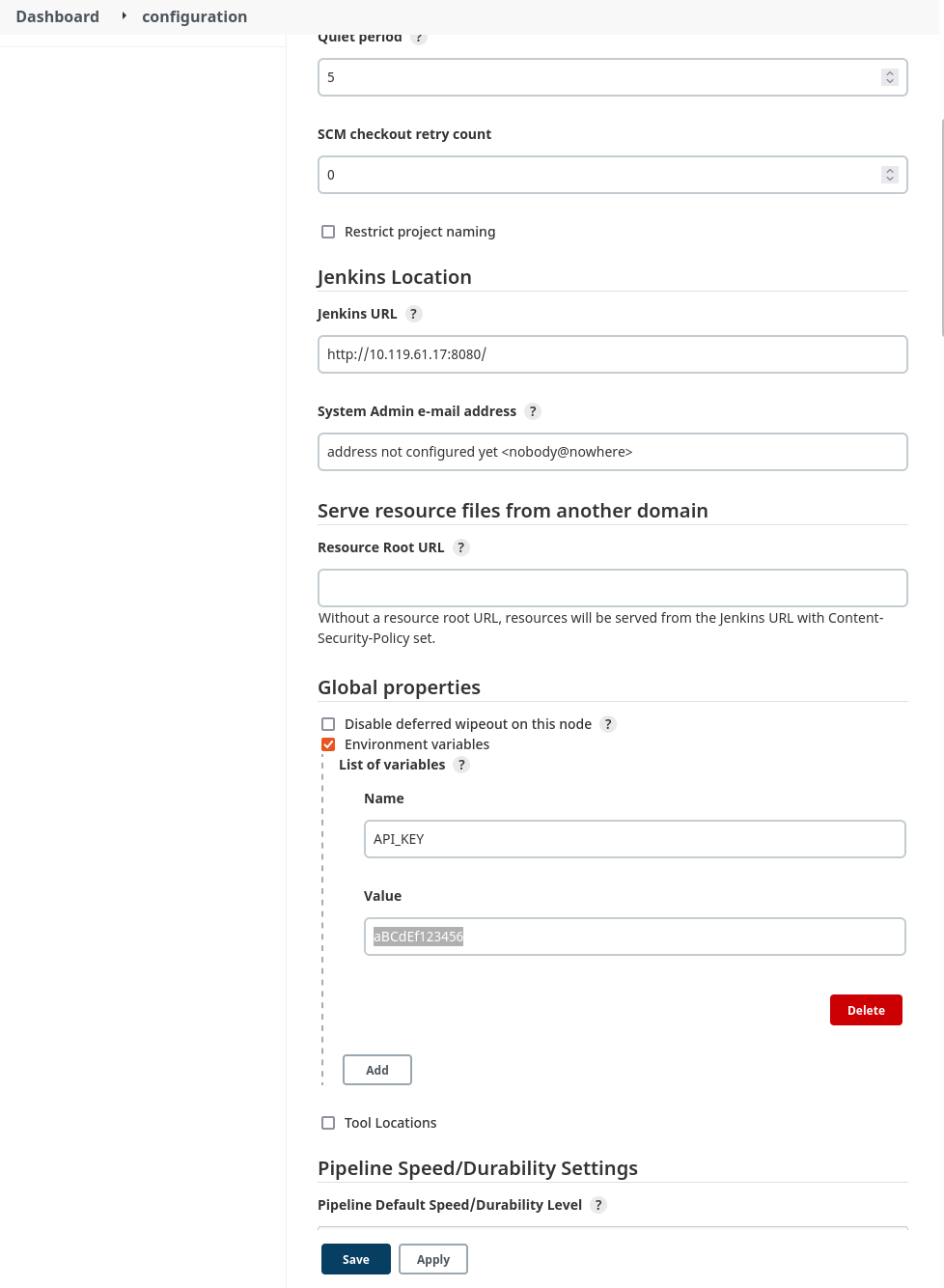
    Figure 3: Configuring a global environment variable

    The code will read the API key from the environment variable that was just configured. Here’s the configuration for the build steps:
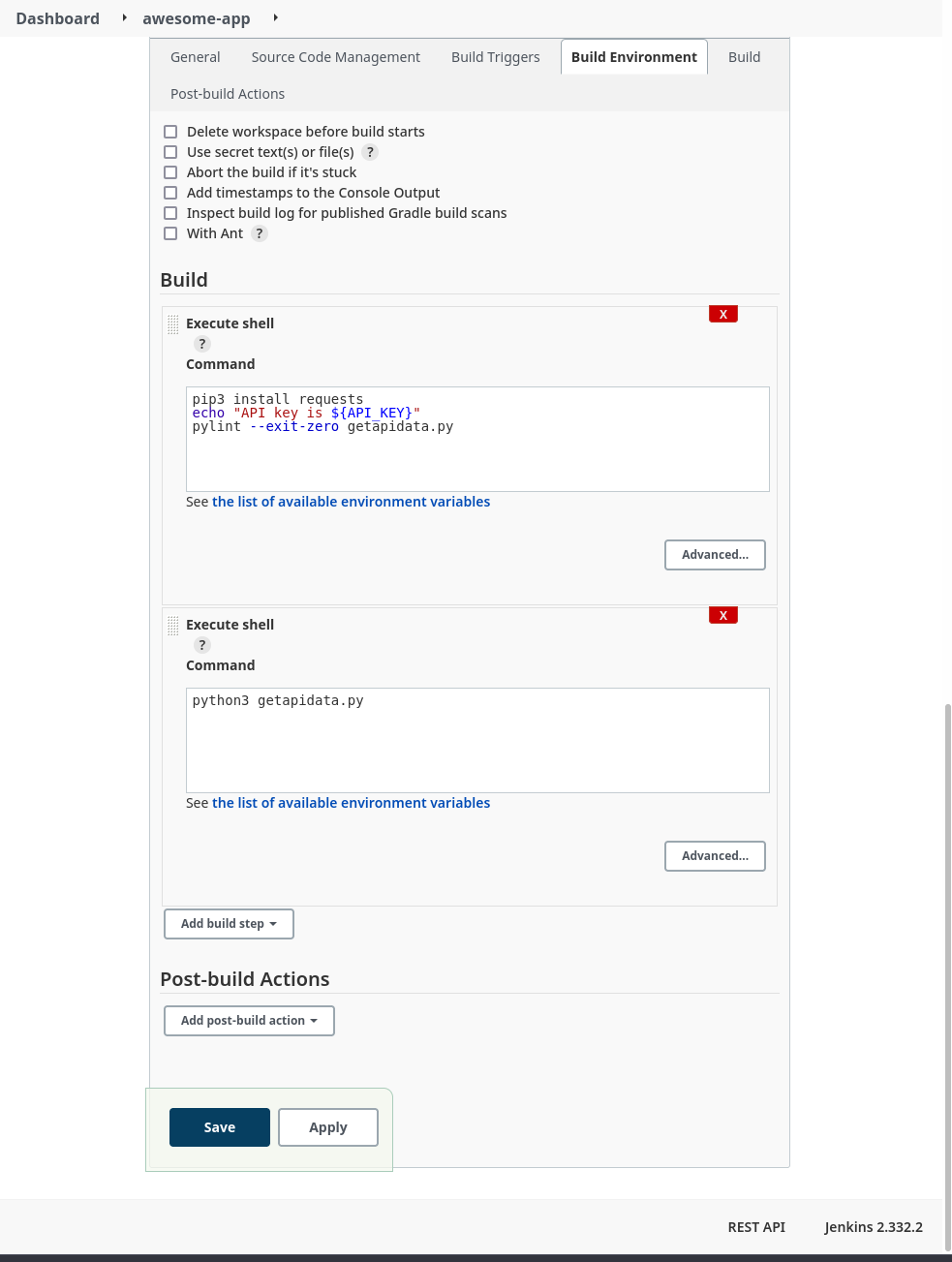
     

    Figure 4: Build configuration

    The build steps run some simple linting and then actually execute the code. Here’s a look at part of the log from a successful build:


    Figure 5: Build log with exposed secret

    The API key has obviously been exposed in a plaintext log with a simple directive in one of the build steps. A minor misconfiguration could potentially cause a breach or compromise.

    Jenkins Secret Text Example

    Now we can try to improve the security of our build environment by using the built-in credentials handler:


    Figure 6: Configure build environment to use secrets

    In this example, we’ll use a simple “Secret text” credential binding to store the API key:


    Figure 7: Adding a secret credential

    Next, we configure our build job to use the new credential variable:


    Figure 8: Updated build configuration

    Now, after running another build job, we check the build logs again:
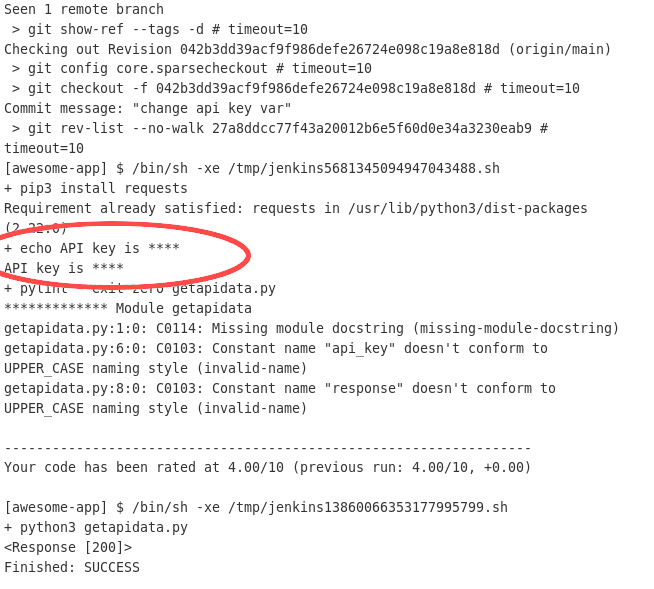
     

    Figure 9: Build job with obfuscated secret

    Even though we configured the build step to print the variable contents to the log, the Jenkins credential handler knows that the value is sensitive and obfuscates the actual value in any log or output.

    Although this measurably improved the security of the build, there are some caveats. While this works well enough for a small Jenkins deployment with a limited number of users, managing access and correct permissions scoping for multiple users and teams across a large, distributed Jenkins architecture quickly becomes complicated and difficult to manage effectively. In addition, the secret value stored in the credential variable is still accessible to every Jenkins instance in the cluster, as well as any user with the appropriate permissions.

    If any node is compromised, secrets across multiple deployments and contexts could be at risk. Users still have to manually secure and configure Jenkins infrastructure that now doubles as secrets storage. What if there were a way to use sensitive credentials without ever having to store them in Jenkins itself?

    Secrets Management Tool Example

    Let’s try using Akeyless to manage our secrets. Since we’re integrating with a Jenkins deployment, we can follow the documentation for working with Jenkins. Akeyless integrates with the publicly available Hashicorp Vault plugin, so it’s simple to get Jenkins set up.

    Next, we’ll create a free account with Akeyless, and configure a secret:

    Figure 10: Creating a secret in Akeyless

    Figure 11: Creating a secret (cont).

    The next step is to create an Access Role that has permission to access the secret that was just created:

    Figure 12: Create a role

    Now we need to give our Access Role the correct permissions to view the secret:

    Figure 13: Giving the role permissions

    The last thing we’ll need to create on the Akeyless side is an authentication method. This is how we can give external entities, like our Jenkins deployment, the ability to make API calls to Akeyless and retrieve secrets:

    Figure 14: Create an auth method

    Once the authentication method has been created, be sure to save the Access ID and key by downloading the CSV file; the values will not be displayed again otherwise. Finally, we need to associate our newly created role with this access method:

    Figure 15: Associating the auth method with the access role

    The next step is to configure the Jenkins build environment according to the Akeyless documentation referenced in a previous step:

    Figure 16: Jenkins build configuration with Akeyless

    Now we’ll run another build, this time configured to utilize the Akeyless vault we’ve configured:

    Figure 17: Build log with Akeyless configuration

    In the logs, there is now a step present where Jenkins retrieves the secret from the Akeyless Vault. The credential value is also still obfuscated in the build log. We’ve now got a working, third-party secrets management platform integrated with our Jenkins instance.

    It may seem like extra steps just to achieve the same outcome, but an external tool focused entirely on secrets management is a powerful abstraction. Jenkins is a CI/CD tool first and foremost, with secrets management provided as an add-on. In that context, it will never be able to provide the first-class features, management capabilities, and security guarantees that a dedicated secrets management platform can:

    ● Managed infrastructure with SLA guarantees
    ● Zero-knowledge encryption
    ● Intuitive, accessible secrets management and organization
    ● Integration with industry-standard DevOps tools and platforms

    A tool like Akeyless also does away with having to manage complex, self-hosted infrastructure. We were able to have a working secrets endpoint in just a few clicks.

    Conclusion

    Since security is a top consideration for CI/CD pipelines, it is important to follow best practices when using secrets in Jenkins. Jenkins pipelines rely on secrets for identity verification, collaboration, and infrastructure management. CI/CD secrets management presents a challenge for most teams because of how complex it is to implement access control at a granular level.
    With a secrets management tool, Jenkins users get a centralized and secure resource to manage the many credentials that are required to operate CI/CD pipelines. They benefit from using a simplified, standardized approach to access all secrets they need, without worrying about security. Simply put, a secrets manager accelerates DevOps workflows.

    Meanwhile, security teams benefit by gaining full visibility into where secrets are, and how they are used. With automated processes and centralized access policies, a secrets management platform helps security teams stay compliant with security regulations as well.

  • The Scanner We Really Need

    The Scanner We Really Need

    IT has scanners for everything. And by everything, I mean everything. We scan source code for vulnerabilities and data leaks. We scan apps for vulnerabilities. We scan the network for holes. We scan our cards for access … Okay, that last one doesn’t fit, but you get the idea.

    Know what we don’t scan for (and what I propose we start scanning for immediately)? Secrets. Oh, there are apps that include finding secrets as part of their feature set—but only a part—and they only scan for secrets within their domain. What we really need is something all-encompassing. Secrets have a way of turning up everywhere—Git, flat files, databases, source code, email … If it can store text, your secrets are probably in there. The larger the organization, the more true this is.

    Way back in the day, I started working at a company that had mainframe admin credentials stored in a flat file on the network. I am not an InfoSec employee, but I can smell insecurity easily enough and I told them to knock it off.

    I am not mentioning the company by name because this is not indicative of their practices today, nor am I mentioning my position or the market, because anyone interested could then use my LinkedIn profile to figure out who it was.

    In my role there, I had the authority to tell them to knock it off, but they handed me a ready response: “Our network is secure, so we don’t have to worry about it. And we monitor the file … some …”

    The same type of mentality seems to permeate IT today. Security by obscurity is alive and well with regard to secrets, and yet we as an industry know (from hard-earned experience) that it is largely a myth.

    So, we need a tool that can access all the places that secrets might be hiding and ferret them out—I’m thinking like a simple UI that takes a secret and searches for it in all of the configured places—would be perfect. Well, almost perfect. Iteration 2.0 would report on what is accessing the secret in that location.

    Get secrets management. Several markets offer secrets management as part of a toolset, you might even own a product that can do it for you. Then, given the search tool and a good secrets management solution, you could search out all instances and replace access to them. Until iteration 2.0 comes out, you could replace them in a test environment and see what breaks—though we also have the hard-earned experience to know that this isn’t foolproof, so you’ll want to heavily document the change for that odd thing that breaks 20 months from now.

    This is not that difficult a product to design and build; finding where each secret is accessed from would be the hardest part. But that’s still doable with our current dev tools. One of you should build it and get rich.

    But meanwhile, as always, keep rocking it. Secrets stored in not-so-secret locations or not, you’re keeping the company running day in and day out. That makes you the stars of business. Keep up the good work.

  • Managing Hardcoded Secrets to Shrink Your Attack Surface 

    Managing Hardcoded Secrets to Shrink Your Attack Surface 

    The practice of hardcoding secrets—such as authentication credentials, passwords, API tokens and SSH Keys—as non-encrypted plain text into source code or scripts has been common in software development for many years. It is an easy way to save time and labor, but it is also highly insecure. The issue is that anyone with access to the code also has access to these hardcoded (or embedded) credentials, meaning your code is supremely vulnerable to attack.  

    Of course, today’s DevOps-oriented software development life cycles are all about velocity and efficiency—the goal is to advance and launch products not in weeks or months, but in days or even hours. Anything that might slow that pipeline is to be avoided, which is why hardcoded secrets are not going anywhere. They are going to be with us for many years to come.  

    At the same time, cybersecurity experts are right to be alarmed about the growing problem of secrets sprawl, which occurs when an organization stores secrets in a variety of locations, including source code, text files and spreadsheets. In today’s multi-cloud DevOps environments, it is simple arithmetic: As the number of users grows, your attack surface grows, too, in many cases expanding exponentially. 

    The Right Tools to Manage Secrets

    According to Gartner, “Hard-coded secrets embedded in source code and scattered throughout the DevOps pipeline pose significant risk. Technical professionals responsible for DevSecOps must introduce tools that securely store and manage secrets and enforce access controls without disrupting automated DevOps workflows.”

    What has come to the fore as many organizations have adopted cloud infrastructure, containerization and microservices architecture—especially regarding the software development life cycle (SDLC)—is that conventional technologies for secrets governance and entitlements management are not at all adequate in the cloud. Vault technology for static secrets is a well-understood set of capabilities that has been a cornerstone of cybersecurity best practices for many years. SecOps and DevOps teams realize that they need to adapt vaulting to cloud environments, but progress toward effective cloud secrets governance has been held back by several challenges.

    Just-In-Time For the Cloud 

    First, as noted above, disrupting continuous integration/continuous delivery (CI/CD) processes is not seen as an acceptable practice. DevSecOps teams very much expect to deploy secrets management capabilities without slowing or otherwise impeding the development process and without having to expend additional resources. Yet many standalone vaulting services are cost-prohibitive for most SMBs. Further, in many cases, conventional approaches to secrets management cannot deliver full governance capabilities, including clear visibility and attestation, across multiple vaults or within cross-cloud environments.  

    The good news is that today’s advanced dynamic permissioning platforms incorporate just-in-time (JIT) secrets provisioning capabilities and zero standing privilege (ZSP) enforcement mechanisms and can overcome these obstacles. The automated granting and revocation or expiring of permissions—JIT privilege grants—is highly effective at minimizing attack surfaces. These solutions—increasingly grouped under the banner of cloud infrastructure entitlement management (CIEM)—work based on the concept of zero-trust, which means no one and nothing is trusted with standing access to your cloud accounts and data.  

    With JIT, elevated privileges can extend either for the duration of a session or task, for a set amount of time or when the user checks the profile back in manually. Once the task is complete, those elevated privileges are automatically revoked—all without sysadmin involvement. Where a user previously had standing access privileges potentially extending around the clock for months or years at a time, converting to JIT granting compresses that attack surface to several hours per month.  

    Even better, as cloud-native entities, these solutions can support highly effective secrets governance initiatives for SMBs and enterprises alike. CIOs, engineering managers, CISOs and other IT security officers looking to better protect their multi-cloud DevOps environments should be looking to adopt an automated secrets governance platform that enables them to deliver on these four priorities: Visibility, enforcement, automation and investigation. 

    Visibility 

    Cross-vault visibility into all your secrets, secrets owners and secrets users is a must-have. You need to be aware, at any given time, of every human and machine user that has access to a secret, and you need to be able to uncover and monitor your highest-risk secrets or accounts across vaults.  

    Enforcement 

    You need to be able to enforce your secrets policies across vaults, which necessarily includes the ability to automatically rotate your static secrets across all vaults based on organizational policy. JIT permissioning is key here because it enables users to generate temporary credentials on the fly, and necessarily incorporates the automated granting and expiring or revocation of permissions—JIT privilege grants—which is highly effective at minimizing attack surfaces. 

    Automation 

    You need to be able to manage the identity life cycle for your secrets—preferably through an automated joiner/mover/leaver process. Consider, for example, if several people have access to a shared secret. Sharing accounts is not a best practice from a security standpoint, but it is common (and becoming more so) with the growing use of cloud resources within DevOps organizations. If one of those individuals in the shared secrets group leaves the organization, that permission/privilege then becomes a potential vulnerability. Automated shared secrets rotation that is invoked by policy directly addresses this issue. 

    Investigation 

    Security incidents are an inevitable eventuality in any organization. When an incident occurs—data breach, lost device, ransomware attack—you need to be able to tie secrets back to identities for proactive monitoring and post-incident investigation. Understanding which identities or individuals were exploited—and how—is essential for addressing vulnerabilities or bad practices. Analysis and reporting are also a critical capability for looking into access changes, addressing policy drift and identifying risky behaviors. 

    There’s no question that secrets governance in cloud environments requires rethinking and retooling established vault technologies and best practices for securing static secrets. JIT permissioning and secrets grants based on ZSP precepts provides an effective path forward. Consider that with JIT and ZSP, elevated privileges are circumscribed, and time-limited to minimize the permissioning and privilege threat surface. Taken together, these capabilities can deliver highly effective secrets governance to secure your entire organizations, without slowing or otherwise impacting your DevOps teams.