Tag: SCM

  • IBM Unveils Simulation Tool for Attacking SCM Platforms

    IBM Unveils Simulation Tool for Attacking SCM Platforms

    At the Black Hat USA 2022 conference, IBM today revealed it is making available a toolkit for launching simulated attacks against source code management (SCM) platforms. The toolkit was launched as a proof-of-concept.

    Brett Hawkins, head of adversary simulation for the X-Force Red arm of IBM Security, said the SCMKit takes advantage of the REST application programming interface (API) functionality in most SCM platforms to launch various types of attack modules using validated SCM platform credentials. IBM also described a series of attack scenarios that the simulation tool can be used to launch.

    The SCMKit can currently launch simulated attacks against GitHub Enterprise, GitLab Enterprise and Bitbucket Server. The kit can support reconnaissance, privilege escalation and persistence attack module capabilities for creating personal access tokens or secure socket shell (SSH) keys. The SCMKit is based on a modular framework that makes it possible to add additional modules in the future, added Hawkins.

    IBM created the SCMKit to focus more attention on an attack vector that can be exploited to compromise a software supply chain, said Hawkins. In the wake of a series of high-profile security breaches, the Biden administration issued an executive order that required federal agencies to review the security of their software supply chains. While there is more awareness of the issue than ever, Hawkins noted there has not been nearly as much focus on identifying specific attack vectors against SCM platforms that cybercriminals are able to exploit.

    It’s not clear to what degree organizations are launching penetration tests against their preferred SCM platform as they work to secure software supply chains. However, it won’t be long before testing the security integrity of those platforms becomes more commonplace. In some instances, organizations will launch those tests themselves. In other cases, third-party IT services firms will be tasked with launching those tests.

    Of course, the challenge is that penetration testing techniques are also often used by cybercriminals to conduct reconnaissance. The SCMKit doesn’t uncover any new techniques, but it does provide cybercriminals with a guide for launching attacks against SCM platforms. As such, IT organizations should assume these types of attacks will increase in frequency in the months ahead.

    Regardless of the tool employed, it’s clear that cybercriminals have come to appreciate the fact that software supply chains are the soft underbelly of IT. Organizations today have typically focused most of their security efforts on production environments. However, malware inserted into, say, a software repository could easily find its way into multiple downstream applications. At some future date, the malware then reaches out to a command-and-control system that then enables cybercriminals to, for example, launch a ransomware attack or simply exfiltrate data. That malware could also move laterally across an application environment to wreak additional havoc.

    It may be a while before the full extent of the threat to application security is fully appreciated, but as more organizations embrace DevSecOps best practices to secure their software supply chain, it’s all but certain that penetration testing will become much more pervasive in DevOps environments.

  • The Competitive Advantages of Modern SCMs

    The Competitive Advantages of Modern SCMs

    Source code management (SCM) is not a new concept. It has been in existence since around 1980, when Revision Control System (RCS), one of the first major SCMs, was released.

    But that doesn’t mean SCM today is the same as it was decades ago. Modern SCM tools do much more than their predecessors. They handle not just application code, but all the configuration scripts and templates used to build and support the infrastructure that applications rely on.

    Here is an explanation of what a modern SCM can do for you, and why it’s important from a business perspective to have a modern SCM.

    What Do SCM Tools Do?

    SCM tools, also known as version control systems (VCSs), at their most basic level, provide a history of all changes to one or more files and directories within a repository. These tools are most effective on text-based files such as source code and configuration files, as they can show line-by-line differences. While some tools can do specific binary file types (such as Microsoft Word documents), typically, binary files are stored intact, and each change results in a whole new copy being saved.

    An example of what metadata is tracked in the history (CLI-based example):

    $ p4 changes

    Change 2 on 2019/04/19 by dev@desktop ‘deletion of library.dll’

    Change 1 on 2019/04/18 by dev@jenkins ‘Initial commit’

    …

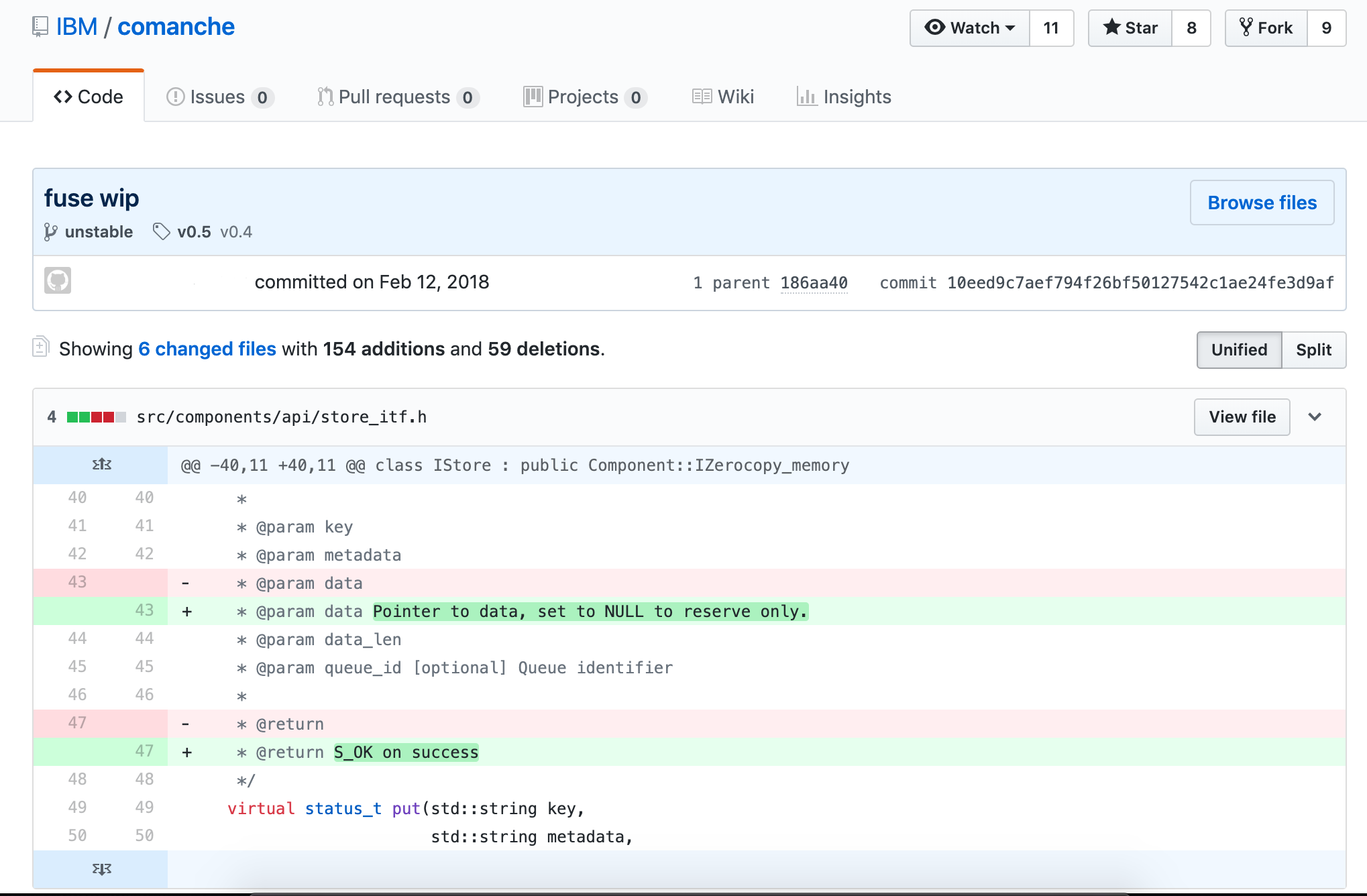
    You can display what has actually changed in each file (GUI-based example):
    Distributed vs. Centralized SCM

    There are actually three models of SCM tools: local-only, centralized and distributed.

    There is currently no modern SCM tool that runs local-only. Modern SCMs have evolved beyond a local-only architecture.

    Centralized SCM tools work by having every change committed directly back to the source server that is the authority for whatever is being worked on. There is code hosted on the local workstation, but any and all changes are tracked on the server. This model was dominant in the late 1980s and is still extremely popular in many large enterprises. The benefit of having everything centralized is all changes are tracked, and it is easy to stay in sync with the authoritative repository that leads to very few conflicting merges. The downside is a constant connection to the network is required to get any work done.

    Distributed SCM tools came out of obscurity in the early 2000s with their biggest proponent: Linux kernel development. Linux kernel development had evolved into a globally dispersed team, and not all members had the bandwidth or always-on connectivity needed to continue to use their centralized SCM toolset. The biggest benefit of the distributed model is each workstation has a complete copy of the entire repository and can locally branch, tag, revert and commit changes. At certain points (often daily, sometimes weekly), each developer syncs their local repository with the remote repository (which can loosely be called the authoritative version). The biggest downside is a much higher likelihood of conflicting changes being applied to files in the repository if there isn’t a lot more coordination around the process. It isn’t enforced with locks like it is in a centralized model.

    Why Use SCM Tools?

    Reproducibility and traceability. Period. It really is that simple.

    With SCM tools embedded in your development and support lifecycles, you can produce the code used for any version at any time, which will let you reproduce the binaries that were running in production. In addition, you can trace back to who actually changed the line of code that either fixed the defect or broke the world.

    Let’s go through a few scenarios where this can make all the difference.

    1. Fixing an ABEND from a Job that Only Runs Quarterly

    It’s 3 a.m., and you receive a phone call from operators saying your job has ABENDed, and their normal remediation steps didn’t fix it.

    Without SCM in place, you can only work with the code you have. You are in the middle of refactoring it, so it is in no shape to go anywhere near production–leading to meetings full of apologies and late nights spent working.

    With SCM, you check the tags in the repository and pull the latest production build, fix it, test it, push it to production and have the job back up and running before others make it into the office. Then, you can create a new tag, and there is a record of what was done.

    2. Discovery in a Lawsuit for an Event that’s Six Years Old

    This is pretty straightforward. We live in a world where companies love to sue each other, and your legal team will appreciate your ability to reproduce things as they were so you can prove what does or doesn’t work as expected, or does or doesn’t include whatever patented code the other side claims. No one likes to lose a default judgement.

    3. Client Finds a Bug in the Older Release They Still Run

    This applies to managed offerings or when the client installs the software on their own; there is always that one client who for some reason can’t upgrade.

    In this case, inside your SCM tool, as a best practice you would create a branch every time you do a release of your product. On that release branch, you can easily make code changes and rebuild and distribute the new, updated binaries of a version that was originally released two presidents ago, without having any impact on other customers or your own production deployments.

    Timeline of Popular SCM Tools

    There are dozens of version control tools and discussing the evolution of each one would fall far beyond the scope of this publication. However, there are a few key SCM tools that have led the way in establishing standards and norms for the industry. Their history is outlined here.

    1. Unix

    Concurrent Version System (CVS) was the first widely used SCM tool in the Unix ecosystem. It was a pioneer in the centralized approach when it was released in 1990. CVS is heavily based on RCS (to the point that most RCS repositories were seamlessly converted).

    Microsoft had a tool called Visual Source Safe (VSS) that it supported and distributed from the mid-1990s through the early 2000s. VSS was good for the typical mid-sized source code repository. Microsoft did not use VSS internally, as their internal needs were too complicated and their code repositories were too large for the tool.

    2. Cross-Platform SCMs: Perforce, ClearCase and SVN

    Perforce was the dominant source management tool used within Microsoft for decades. Perforce supported the level of complexity Microsoft and other large enterprises had around tagging and branching. It was also cross-platform like other popular tools such as PVCS, which helped it support development across all facets of a large enterprise’s infrastructure, from mainframes to Unix to Linux to Windows.

    Rational ClearCase (later bought by IBM) was heavily used by larger enterprises across all platforms, especially when mission-critical systems that leveraged big iron hardware and service-oriented architecture were involved. While ClearCase was a centralized system, it had several features that were unique and valuable to distributed teams, including dynamic views, which could be remotely mounted, and true code-level integration with Rational ClearQuest to track exactly what was changed in each defect and request. These concepts were revolutionary, but required large and reliable network interconnections, which is why distributed systems have become more commonplace today.

    While enterprises were adopting PVCS, Perforce or ClearCase, many open source, web-scale and smaller organizations were adopting Subversion (SVN), released in 2000. It built on CVS’s success and specifically addressed a couple of major annoyances with CVS’s architecture, which included repository-wide versions (which allowed a more consistent approach to versioning applications), as well as atomic commits (meaning the entire change is applied at once—if any of it fails, then the entire change is rolled back).

    Rational Team Concert, which emerged in 2008, represented another important point in the evolution of SCMs. It was cloud compatible and offered features (such as build management) that extended beyond just version control.

    The Git Revolution

    The world of SCM changed significantly with the introduction of Git, which was released in 2005.

    Initially developed by the Linux kernel development team, Git built on the lessons learned from a previous product the team used, called BitKeeper. Git is a truly distributed SCM tool and is now the dominant SCM tool for all new development. Git is multi-platform and has the largest mindshare across organizations of all sizes.

    Git has a much larger ecosystem around it than previous SCM tools enjoyed, and multiple vendors offer solutions that are built on it. Git is the default tool for most modern continuous integration tools, such as Jenkins.

    Using Modern SCMs with z/OS

    On the mainframe, SCMs developed in parallel to other platforms, but remained entirely separate in their implementation. Products such as Endevor, ChangeMan and ISPW were born as Library Managers, but were later used for version control. Still, the core technology that powers them is over 20 years old. They have remained substantially unchanged throughout their lives.

    Recently, however, with the rise in popularity of of hybrid applications and the adoption of lean/agile development processes, the legacy SCMs have come under increasing pressure to modernize. The vendors who produce these products have belatedly tried to bolt on modern capabilities; and where this has been proven impossible or impractical, they have elected to integrate with Git. However, since Git is now fully supported on the z/OS platform, organizations requiring the capabilities of a modern SCM are able to use Git without the hindrance or cost of a legacy SCM.

    You might think developers who work on legacy platforms such as mainframes, have to abandon their entire environments in favor of modern ones in order to take advantage of modern SCMs. Fortunately, that is not the case. Tools such as Dependency Based Build (DBB) bridge the divide between mainframe apps and modern SCMs. DBB lets mainframe developers use Git to manage source code for z/OS COBOL applications. It also supports Groovy for managing builds.

    Git, and the build tools that integrate with it, have become the go-to SCM solution for virtually all developers today, on most platforms. With the rapid uptake of Git already on Z, and tools like DBB available, it is clear Git is also going to become the dominant SCM for the z/OS development.

    As teams modernize their practices to handle the explosion in the sheer number of applications being built and the infrastructure automation scripts that support them, moving to an agile development methodology or trying to take advantage of DevOps practices such as continuous integration (CI) is impossible without a modern SCM tool to push all the changes through.

    Modern SCM tools are the foundational building block every technology team needs to successfully support all aspects of an application’s lifecycle.

    — Vince Power

  • Achieving Open and Integrated Development with IBM Z

    Achieving Open and Integrated Development with IBM Z

    “DevOps” and “mainframe” are not words you often hear in the same sentence. Yet, the reality is that even in our current age of DevOps, mainframes remain the mainstays of many companies’ IT infrastructure.

    That’s why it’s critical for organizations to find ways to bring mainframe software delivery up to speed with modern DevOps practices, which emphasize collaboration, agility and continuous deployment of software to meet quality and time-to-market pressures. It’s also essential to be able to de-silo software delivery teams with a unified pipeline that includes common, modern source code management (SCM) and other tooling.

    This is one area where the IBM Z Open Development environment can deliver real value. Built with the goal of supporting modern source code managers such as Git, IBM Z Open Development helps make a common DevOps pipeline, including mainframe teams, more practical through use of modern, open SCM, plus other essential features for developers.

    Keep reading for details on how Z Open Development works and what it can do to make mainframes DevOps-friendly.

    IBM Z Open Development: Making Developers’ Lives Easier

    There is a looming shortage of mainframe developers as the current experts retire; according to BMC’s 2018 mainframe survey, staffing and skills shortage is the second top concern for the mainframe ecosystem. This is not an ideal situation for organizations that rely heavily on mainframes. To solve it, organizations must allow all developers to work on mainframe software, instead of relying on mainframe specialists.

    With Z Open Development, developers are armed with the capabilities they need to integrate mainframe work with a common DevOps pipeline that employs a modern, shared SCM. They also have the ability to perform program analysis, edit, build and debug in a way that is similar to other development platforms.

    Git is the de facto SCM for the open source community, and enterprises are also embracing Git as the standard SCM for distributed software delivery. Z Open Development makes key Git features such as full Isolation and true parallel development, a reality for mainframe development teams.

    Traditional mainframe library managers don’t offer these features; hence, they don’t overcome the isolation that separates mainframe development from development for other platforms. Z Open Development tackles this problem by offering IBM Dependency Based Build and provides enterprises a standardized implementation of Git.

    Essentially, Z Open Development is purpose-built IDE for developing and maintaining z/OS application components with a modern SCM that supports parallel development. It provides integrated development and build automation, which can be joined with a common DevOps pipeline. This provides a path to migrate traditional mainframe library managers to modern source code management systems such as Git and Rational Team Concert.

    Key Features

    Z Open Development is a neat and lean offering that can help development teams transform their software delivery around a common, automated delivery pipeline. Z developers can join a platform-neutral, continuous integration and deployment pipeline that is inclusive of z/OS. However, Z Open Development offers other attractive features that developers require:

    1. Dependency-Based Build

    IBM’s Dependency Based Build (DBB) allows clients to set up the build for COBOL, PL/I and other traditional z/OS languages just as they would other distributed languages through the use of modern scripting languages. By following the same model as distributed languages, and using standard scripting languages such as Groovy, the z/OS build can be easily added to the same CI/CD pipeline and managed by the same skills building the pipeline today. This ability to use the same CI/CD pipeline coordinator (such as Jenkins) removes the separation and allows for the creation of one coordinated pipeline. This includes being able to standardize on the approval flows, using the same quality gates and supporting the integration of the multiple parts of the application together.

    DBB extends the Groovy language with an additional set of java APIs to allow access to run MVS, TSO and ISPF commands, as well as a facility to run existing JCL. DBB also provides a set of open source samples including a configuration-based build that can be used within your own organization, with minimal modifications.

    With its GroovyZ capability, DBB also supports the ability to do automation in the pipeline for any additional configuration required. Since it’s Groovy, existing automation created for other platforms can easily be reused for z/OS.

    2. Modern Editors

    Developers can use modern editors for COBOL, JCL and PL/I to develop their applications. These editors are familiar and provide syntax highlighting and source code assistance to make coding a breeze.

    3. Visual Program Analysis

    Developers can check out the graphical views of the logical flow of any program they are working on for better program understanding. Developers can also access the graphical view of data flow within their program to identify different data elements and understand how they are populated and modified.

    4. IBM z/OS Debugger

    Z Open Development comes with the powerful Eclipse-based, source-level IBM z/OS debugger, which can be used to debug 24 and 31-bit z/OS applications written in COBOL and PL/I. Developers can modify variables during debugging while also being able to insert breakpoints during or prior to debugging. The visual debug capability provides developers with a graphical view of the execution flow through their program.

    5. Simplified Integration

    DBB integration with the editor enables developers to compile the programs using the same scripts defined for the pipeline build, which includes copying files with any dependencies to a specified host, running a build process and returning errors.

    If the shared, modern SCM for the DevOps pipeline is Rational Team Concert (RTC), Z Open Development also offers RTC integration.

    6. The Foundation for Z Open Unit Test

    In addition to all of the above, Z Open Development lays the foundation for Z Open Unit Test, a unit testing tool for z/OS applications built on the Z Unit capability. Thus, Z Open Development allows developers to streamline and automate not just their SCM process, but also unit testing. Note that the Z Unit capability is also offered in IBM Developer for z Systems.

    Empowering the Endangered

    DevOps is based on the idea of eliminating silos to have a more collaborative approach to application development for more efficient and predictable output.

    Mainframes have long been isolated, which places them in opposition to the fundamentals of DevOps. Z Open Development arms developers with the capabilities they need to build and maintain mission-critical software while still leveraging a shared DevOps pipeline that includes Git and Jenkins. It offers an easy first step to DevOps adoption and equips DevOps teams with the power to develop mainframe applications with familiar, shared skills and tools.

    — Twain Taylor

  • ‘DevOoops’ Moves: SCM Conflicts

    ‘DevOoops’ Moves: SCM Conflicts

    DevOps’ ultimate aim is to create efficiencies in the software delivery process. But it doesn’t always work out that way. Sometimes DevOps initiatives lead to mistakes—something we lovingly call a “DevOoops.” CloudBees recently polled some colleagues and came up with five examples of a DevOoops in action. Following is a discussion submitted by solution architect Will Refvem about siloed departments.

    Scenario:

    One of the biggest challenges in DevOps is SCM. Early in my career, being given access to Git repositories was a bit like handing a belt-fed machine gun to a drunken toddler. My biggest DevOoops moment came when I was trying to master the basics of Git in a project that used Git submodules—don’t, just don’t—and had a series of bash scripts that implemented a primitive CI/CD workflow by running in the environments we were deploying to (seriously). I can’t tell you how many merge conflicts and detached HEADs I encountered, or how I got out of them. Fortunately, we were using the fork-PR model, so I did no real damage.

    Software configuration management (SCM) is key not only for versioning, but also for providing a shared view of code and other assets, from development through to production. Giving proper consideration to your SCM structure, branching and merging model, access controls, etc., will support collaboration, reliability and traceability—all key for DevOps success.

    In the 2019 DevOps and Jenkins Community Report, 66 percent of organizations respondents reported the use of modern solutions SCMs, specifically GIT-based solutions GitHub or BitBucket. But the older SCM solutions aren’t going away completely—45 percent of all organizations still use pre-GIT, pre-DVCS (distributed version control systems) such as Perforce, Subversion and CVS. While it’s possible to apply DevOps practices using these legacy solutions, it is important (and more challenging) to design a branching/merging model and surrounding workflow, which supports the key aspects of DevOps such as peer review, collaboration and short-lived branches.

    Modern SCMs such as GitHub have features that inherently support collaboration, including the game-changing Pull Request, making it much easier to implement processes that best support CD and DevOps.

    Poorly designed CD workflows or inadequate CD systems create friction multiple ways. If the interactions are too cumbersome, users will not commit code to the pipeline frequently enough. If it’s difficult to access the pipeline and create visibility into the process, it can lead to unresolved conflicts.

    You need to pick the right tool. If you don’t have the option to get the modern tool, you need to take the time to design a legacy tool.

    It’s also important to consider two other issues in relation to this DevOoops example: branching and acquiring the appropriate level of DevOps skills.

    • Branching: A proper branching and merging model is required to ensure you are feeding the appropriate inputs into your DevOps pipeline, such that you are able to continuously integrate, test and ultimately deploy changes. A simple guide here is encapsulated in the KISS (keep it simple, stupid) principle. If you need a full-wall whiteboard or a spreadsheet fit for an accountant to list your active branches, you need to rethink things. Get as close to the ideal of mainline trunk development as possible, with short-lived feature branches, minimal application versions, etc.
    • Skills: As organizations seek to implement DevOps, most likely new tools and practices will be implemented simultaneously. It’s important to understand and accommodate the fact that there will be bumps and bruises as you learn to use these new tools and practices. For instance, shifting from centralized version control such as Apache Subversion (SVN) to distributed version control such as Git is a paradigm shift that can be difficult to fully grasp and result in destructive mistakes, such as deletion of nodes from the change history, overwriting changes or misconfiguration access control. Consider hiring for these new skills and/or account for time and training.

    Takeaways

    • A proper branching and merging model are required to ensure that you are feeding the appropriate inputs into your DevOps pipeline to let you continuously integrate, test and ultimately deploy changes.
    • If you are using a pre-Git legacy SCM solution, develop a branching and merging strategy within the legacy solution to achieve appropriate velocity in your DevOps model.
    • Consider that you will need to develop new skills to adopt new SCM tools and practice and account for this in your plan.

    — Brian Dawson

  • Configuration Files and DevOps

    Configuration Files and DevOps

    When DevOps appeared on the scene, configuration file management tools already existed. They weren’t used by everyone, but a fair number of organizations saw the power of configuration file versioning/management, and were using them.

    An interesting thing seems to have happened while DevOps evolved. Those tools are more popular, but while we’ve standardized on things like Puppet and Chef for installs, and Jenkins for continuous integration/continuous delivery (CI/CD), configuration file management seems to have gotten less standardized.

    While it is easy to argue (convincingly, IMO) that most people use Git for configuration file versioning, there are a ton of other solutions out there being utilized also. And plenty of places that have no solution in the works.

    There are even a few new vendors cropping up that are basing their existence on the idea that configuration file management should be similar to using the source code git repository, but not the same as using the source code git repository.

    What Are We After?

    That brings us to the question, What is it that we hope to gain from configuration file management? Which should take us back one step further to ask, “Which configuration files?” There is a vast difference between configuration files for a piece of network gear, the configuration files for infrastructure apps such as Docker and the configuration files for your application.

    There is a valid argument that all of the above are relevant and should be stored somewhere, but that argument does not imply they should all be stored in the same manner, nor with the same frequency.

    What does make sense is standardization on a given platform with version control capabilities. The question then becomes, Which platform?

    And That’s Where We Are

    My company uses Git for this storage, right next to application code. But we use regular storage with a naming scheme for switch and router configuration backups because we want them backed up with our other file-based data. Most companies are similarly split.

    The simple answer is, “Throw it all into Git,” and I think that’s where most DevOps teams are. But I don’t think we have the long-term answer in front of us yet. A toolset that can manage and version, and is aware of the idiosyncrasies of popular hardware/software/cloud solution configuration files is likely where we’ll end up. That will offer easier use, ease of management, a centralized store for configurations and some automated check upon the inevitable manual configuration changes.

    Until Then …

    Until then, it is best not to vary too far from the best fit for your organization. We’re content that we know where to get all of our configuration files back from, even if it is split between two platforms. There is one single piece of hardware in our infrastructure that in an emergency would be lost, and that’s because it is massive and only supports backup to attached USB disk.

    For most organizations, Fit is “good enough,” and allows for spawning new copies of servers/apps with the correct configuration during the deploy process, so is probably where you want to be right now.

    For enterprise grade networking gear, the configuration files are complex, and unlikely to be hand-edited these days (though we all know that person who can). So any system that gives you a backup of the configuration file you can re-import is good enough.

    For now.

    — Don Macvittie

  • Separate but Equal: Not Equal and Not the Right Way

    Separate but Equal: Not Equal and Not the Right Way

    The DevOps Enterprise Summit in London provided another opportunity to speak to many clients about their organizations’ DevOps transformations. The key message is, “It’s all about people and culture,” but how do you make those changes? In session after session it was clear the source code manager (SCM) is central to this transformation. All clients included the SCM as a key part of the solution. SCM’s key value is as a common place to version all the artifacts from the source code to the system configuration. As such, it must provide visibility to all to allow for sharing and collaboration.

    So how can z/OS participate in this transformation if its source code is locked away in some host-based SCM? The answer is, It doesn’t. In my interview with devopsy.kinsta.cloud editor Alan Shimel, we discussed this issue and he related it to the idea of separate but equal, which we all know does not work. What’s worse is separate but equal was really never equal, and the same is true for the host-based SCM to which the z/OS source code is relegated. I have asked many companies if they would move their distributed source to those host-based SCMs, and the answer is always, “Of course not; it does not provide what the distributed teams need.” How can it provide what the host teams need? It doesn’t.

    Separate but equal does not work; it’s never equal and it isolates people. That’s not the way we should be looking at our z/OS source code. It’s critical to the business and should have the best support and capabilities, not the least. Now is the time to move to modern tools and processes and stop isolating the z/OS environment from the rest of the development environment.

    The key is to focus on collaborative management solutions that do not separate, but bring teams together by providing one environment that all teams can use together for cross-platform collaboration. Various solutions include all the capabilities companies need to provide the modern agile development environment including z/OS.  No separation—the z/OS code is in the same repository as all the rest. In these tools, the modern dependency-based build provided for z artifacts is based on Ant technology, so it can be extended just like existing build tools. With this tooling you can use your existing continuous integration pipeline and plug z into it.

    It’s time we move z/OS development into the 21 century.

    Read the thought leadership paper on DevOps for Enterprise System POV to know more on the essential tools and process that can enable disruptive technologies and an innovation at the speed the business requires.

    About the Author / Rosalind Radcliffe

    Rosalind
    Rosalind is a Distinguished Engineer within the IBM Rational organization. She is Chief Architect for CLM and DevOps. She is responsible for driving the DevOps for multi-platform architecture. This includes System z and Power system. In addition, she is responsible for the architecture for the Collaborative Management capability for Enterprise solutions. This includes UrbanCode Deploy and Rational Team Concert’s support for standard Mainframe development activities. She is a member of the IBM Academy of Technology and a Master Inventor. Prior to Rational, she was in Tivoli responsible for the SOA Management Strategy for IBM. Connect with Rosalind on LinkedIn / Twitter.

  • Essential Ingredients for Continuous Deployment

    Essential Ingredients for Continuous Deployment

    To build the system to automate the build and deployment (continuous deployment) process there are few main areas which need to be covered. Following are our prerequisites.

    – Source code
    – Builds System
    – Deployments
    – QA Automation

    To describe above here are the main ingredients
    – Configuration Management
    – continuous integration/ Automated Build
    – Automated Deployment
    –  Automated testing

    Configuration management
    Very fist step to align your development practice is to select the right source control tool. Once you have the tool then you need to think of branching policy to make sure the starting point of the workflow is well defined and accepted by developers during their development phase.
    There could be lot of process around merging, branching code review etc which needs to be address and policy driven. Some key points could be
    – Developments and release branch should be separate.
    – Each change goes qualifies for next stage only if reviewed.
    – Code quality should not go down.

    Following are a few options
     Source control tool
    – SVN (Free)
    – CVS (Free)
    – Git (Free)
    -Perforce (Paid)
    -Clearcase (Paid)

    Build system
    Team needs to have robust and automated build system which can take care of all our needs (build, analysis, deployment etc).
    – Need to have automated build system which can keep building the source code from various branches to make sure we catch the broken piece fast.
    – Build can run the unit test and provide report
    – Build can check the health of the code by running findbugs and checkstyle (if any).

    Above checks can verify the heath and quality of the code (static analysis).
    Nothing should go beyond this point if any of the above is not matching with our criteria.

    Till this point we have reached to qualify the minimum criteria for continuous Integration.
    Here are few tools which comes under Build system
    Build Tools
    – Ant
    – Maven
    – Gradle
    – Make
    CI tool
    – Jenkins
    – Cruise control
    – Luntbuild
    -Bamboo
    Repository management
    – Nexus
    – Artifactory
    (Above are not open source but they are free to use with limited features).
    Code quality check
    – Findbugs
    – jacoco
    – cobertura

    **Deployments **

    Deployments are the next big bottleneck for continuous deployment.
    We need to have a deployment tool to move ahead,
    – configuration management tool like puppet or chef
    – Private cloud management (Openstack)
    – Third party tool like xl deploy, Udeploy, Opsworks etc..

    Deployment strategy can be chosen on the basis of our need and the tool we are using, most of the plugins are available in jenkins (or bamboo) to make tight integration of build and deployment.

    (At this stage I am not considering the dynamic provisioning of hardware in this section).

    Automated testing

    Once deployment phase is over QA regression suite can be triggered via jenkins (or any other tool) and entire reports can be published to central QA metrics board.
    This this point we can even use jacoco/cobertura to provide functional code coverage(for Java code) to demonstrate how much % of code QA regression/automation is covering and what is the level of automation.
    Similar way job can be setup to raise jira/bug ticket to file issues found during any of the above step.

    Finally we can have last step which can perform the final release build and push to staging /production in similar fashion.

     Resource Provisioning

    Developers/QA can just get the hardware either from infra team or if auto provisioning is enabled they can setup the environment and use the jenkins to perform build+deployment+QA
    If we talk about automatic scaling of environment, we can use AWS for same.
    Jenkins has AWS plugin to launch instance, This can be setup to launch instance dynamically and run the application and perform the QA Automation. Once need is over aws instance can be terminated automatically.

    Reference-1

    Reference-2

  • Continuous Delivery and Continuous Deployment

    Continuous Delivery and Continuous Deployment

    A question comes to mind in what exactly do we need to do to move forward with Continuous Delivery and Continuous deployment, How should we start or rather where we should start from. Many times teams may not have achieved the continuous integration properly, maybe due to lack of proper tools, workflow or historical process.

    What we need to do before even thinking of CI/CD, what are our prerequisites:

    • Source code
    • Builds System
    • Deployments
    • QA Automation

    We need to understand release != deployment

    Lets assume with the help of right source control tool, build system and QA, automation team has achieved the continuous integration which means developers integrate code into a shared repository several times a day and each check-in can be verified by an automated build, allowing teams to detect problems early.

    The next step: From CI to Continuous Delivery deployment

    What exactly is Continuous Delivery, Its attitude to make software safe and to go fast
    Lets begin with basics, How much time does it take to deploy one line change or a small bug fix in to the production? Exactly, our goal should be to achieve this as fast as we can.

    Why We Need Continuous Delivery?

    • Yes, its Speed which is needed in current fast paced software industry.
    • Stop waiting around on each other to provide go ahead and open the gate.
    • Quality – It raises the overall quality of your application – No surprises.
    • Capacity and Clarity – Get every team on one tool – Eliminate manual error

    How are we going to do this…..

    Key Areas:-

    • Speed is essential because there is an opportunity and cost associated with not delivering Software
    • Frequent Releases, How frequent is frequent? Why do developers need to wait after writing code?
    • Every build can be potential release candidate.

    Bottom Line

    Remove Manual Work/Steps.
    Move towards complete automation

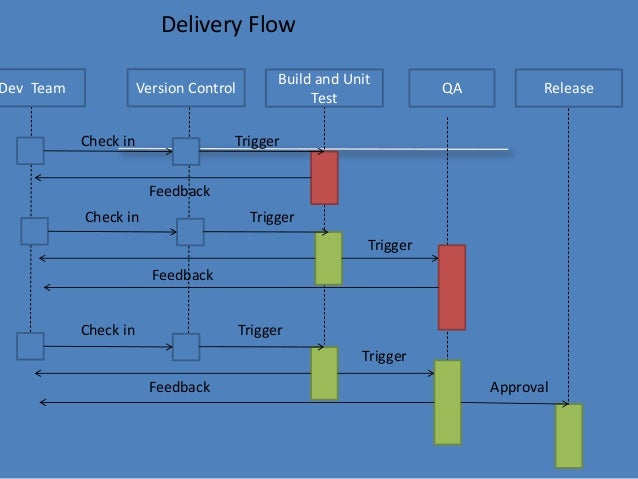
    Delivery Flow

    Here is the Delivery Flow.

    Ingredients:-

    Configuration Management
    continuous integration/ Automated Build
    Automated Deployment
    Automated Testing

    Obviously no single team in a company alone can achieve CD without the help of other teams. It needs collaboration and team work to implement it, Lets take a look at what do we need from various teams

    Dev Team

    • Collaboration – Integration is no longer an event
    • Check in regularly
    • Make small frequent releases because Big Change -> Big risk –> Big effort and Small Change –> Small risk –> Small effort

    QA team

    • Should have complete automation or whatever max is possible. More manual testing leads to more delay.
    • Keep the Build and Test Process Short
    • Break the QA automation into small pieces so that they can run simultaneously and do the QA frequently.
    • Publish the report

    Environment

    • Should have complete Environment to test everything.
    • Flexible and scalable so that multiple env can be spawn any time and can be extended.
    • Managed as prod or at least similar to prod

    This increases Confidence in build’s production readiness reducing release risk.

    Main blocker to achieve CD

    1. manual work
    2. Lengthy Process
    3. ticket system
    4. approval

    Now, How do we deal with blockers

    Do not add gates, add only checks. Adding gates to prevent issues from creeping into prod is not so smart. There are many more issues hiding, you just don’t know them

    Approval!!! Why do we need CAB?

    Dev Sign off
    QA sign off
    Ops and Dependency sign off
    Infra sign off

    Dev Sign off -> Use proper project mgmt tool to track everything that goes in to software with adequate workflow. Get everyone together at the beginning so that these will not be surprises at the last moment. Keep meeting across the team during entire development. This way you don’t need any approval since you have already taken care of all necessary elements during the entire development process.

    QA Sign off -> Publish consolidated QA report with each and every build which should be visible to everyone. You should have proper definition of “Go Ahead” instead of just random checks, Nobody has to ask QA for a thumbs up for the go. • Minimum criteria for Q has to be set.

    Ops, Dependency and Infra Sign off -> Include them at the beginning of the project. Have capacity and change planning during requirement gathering, This gives enough time for ops and infra to get ready for the release.

    Role of SCM/ Release Mgmt

    SCM/ Release Mgmt provide the workflow, tools and necessary filler to enable all teams to interact and automate their part.
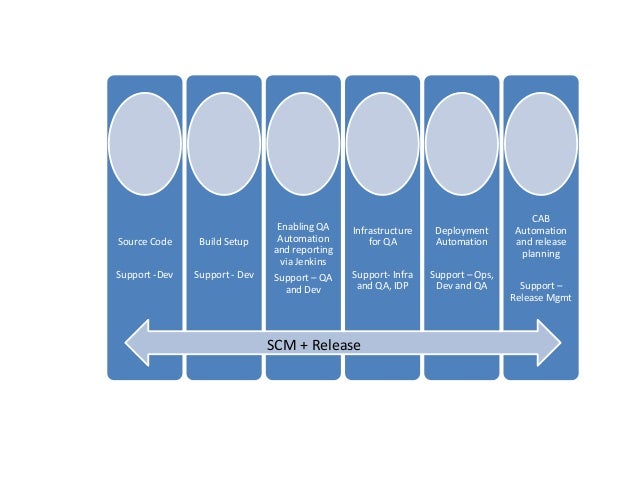
    The picture below shows How SCM and Release Management help each team.

    Source code support for Dev by defining branching policy, Build Setup Support for Dev team to provide continuous build with predefined configuration and in managed environment which includes static code analysis like unit test, code coverage, checkstyle etc..

    Enabling QA Automation and reporting via build tools (Like Jenkins) to support QA and Dev to run their automation and aggregate report on central location. which include QA automation/regression, functional code coverage etc..
    Infrastructure for QA Support like managing integrating environment, Deployment Automation etc.

    Ops, Dev and QA CAB Automation and release planning support.

    It’s clearly visible that CI and CD is not a one man show. Planning, collaboration and teamwork are essential parts of the execution.

    Tools can be chosen by the org/team whichever are suitable for them, but the main part is automation and integration of the tool with each other to make flow smooth and free.