Tag: scaling

  • Go Big: Scalability in the Age of DevOps

    Go Big: Scalability in the Age of DevOps

    Achieving hyperscale is a work of technical art for any business. As companies grow and customers begin to rely more heavily on your service, ensuring reliability during peak business times is mission-critical. An enormous amount of work goes on behind the scenes to ensure scalability, and oftentimes it becomes necessary to redesign or rethink processes and systems to improve them as they face increased pressure.

    When customer demand reaches its apex, it’s the ultimate test for any organization’s systems and processes; therefore, it’s important to prepare a comprehensive strategy that focuses on scalability, reliability and hypergrowth in a targeted, calculated and data driven methodology.

    The first step on your path to hyperscale is forecasting and gathering data analytics around business and growth patterns for a full year to make smarter forecasts. Set aside time each day throughout the year to go over the allocation of your data and analytics, measuring them for accuracy to see how they stack up to your current predictions for that specific day. This may seem taxing and cumbersome when engineers have other priorities to work on, but devoting time to this in the early months of the year will help you be that much more accurate when it comes to predicting the needs of your customers and how you should go about scaling to meet those needs.

    Especially during the holiday season, it’s important to have a minute-by-minute projection of how much traffic you expect and need. That’s where forecasting and an advanced data science model come into play. A common mistake made when it comes to scalability is not getting granular enough about the real pressure points for your systems. Having accurate projections and forecasts in place that feed into your data science model means you can better test your systems and production limits while gaining greater insight into meeting your scaling points. If you find fragilities ahead of time through this, you can assign your engineering team to fix them well in advance.

    Another way to truly bolster your scalability efforts is by introducing an operability development model. This entails constantly deploying some controlled chaos into your systems to see how they really stack up and function under pressure, with the goal of up-leveling the capacity of both your operations and system growth. The operability development model allows you to really test the grit of your systems by squeezing the most out of them, prepares you to respond quickly and methodically should the worst case scenario occur and sets you down the path toward continued performance growth and scale.

    From here, you’ll want to institute a preventative maintenance model. Think of it like getting an oil change for your car. Instead of waiting until the very moment you need your software to perform exceptionally, start taking a look at the little things that could or are causing problems ahead of time and fix them on a monthly or quarterly basis. A preventative maintenance model helps you inspect, adapt and solve these little nuisances before they become serious problems, granting you the cleanest operating environment possible.

    Scalability is king, but availability and reliability are arguably just as critical. Improving availability means reducing latency and getting as close as you can to where your customers utilize your services. This can be achieved by deploying locations around the world to make connections much faster and services more independent. To maintain reliability, you should have processes in place that can quickly respond and offer support to customers 24/7 to maximize consistency and performance.

    Another strategy to consider—if it makes sense for your business or if you’re evaluating cloud providers as a growth option—is to double down on your efforts by re-architecting your platform and systems as cloud native from the ground up to support greater levels of scalability and cost efficiency. By going cloud-native, you can achieve independently scalable services so that you don’t have to scale all of your services together. This means your engineers and developers don’t have to spend way too much time figuring out where issues and fragilities occur.

    A platform architected as cloud-native allows you to leverage microservices and containerization, creating an environment with more reliable, self-healing, high-tenancy and auto-scaling features that take the most advantage of your hardware and services. An added benefit of a cloud native platform is that you can use your data to find the most opportune times to both scale in advance and descale based on performance and customer expectations. The efficiencies that come from re-architecting as cloud native enable engineers to spend more time on automating software and the delivery pipeline, which is a huge boon for scalability.

    At the end of the day, a well-thought-out preparation strategy for mass scalability makes the whole process much more exciting and obtainable. It also greatly reduces lead-up anxiety by getting a head start on planning so that you have more time to sit back and enjoy the fruits of your labor. Lastly, a yearlong scalability strategy enables you to experiment and try new things without the fear of failure. Testing new approaches ahead of time to see what does or doesn’t work will only help you learn and make your scalability efforts that much more effective for the future as your company continues down the path of hypergrowth and hyperscale.

    — Jamie Tischart

  • Core Factors Influencing Java Memory Consumption

    Core Factors Influencing Java Memory Consumption

    Java is known for having an insatiable appetite for resources, requiring strict controls to not exceed budget limits. However, the latest JDK updates and other developments have helped to make Java runtime extremely flexible in terms of memory usage. When configured smartly, Java can be cost-effective for different types of applications—cloud-native or legacy, microservice or monoliths. Today, it’s possible to make Java very slim from the start and scale it up gradually without consuming unnecessary resources.

    Here we’ll take a closer look at the factors influencing resource usage inside JVMs, see what tools can help and how processes can be tuned to gain more elasticity and scalability, ultimately reducing TCO.

    Scaling Possibilities: Virtualization vs. Containerization

    Within JVMs there are several scaling options: vertical, horizontal and a combination of both. To maximize results, it is important to start with a vertical scaling configuration that optimizes RAM and CPU usage inside every instance, based on current load levels. As a next step, these settings will be replicated across all instances while scaling horizontally.

    VMs Scaling

    While starting to run a project inside a VM, it is important to pick the right size machine, as too small an instance can lead to performance issues or even downtimes during load spikes. However, over-allocating will result in wasted unused resources during normal load or idle periods that still must be paid for. This can be a tough choice.

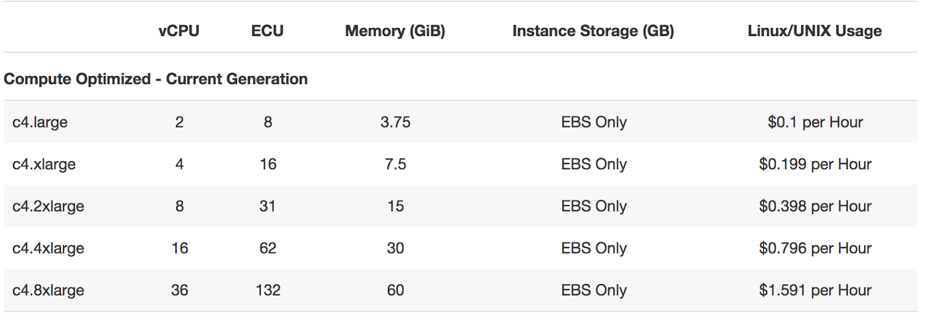
    Start with a smaller VM and scale it as the project grows. When just a bit more resources are required, the cloud vendor can offer you to double the size, as this is the most commonly used scaling step (e.g. see AWS offer below).

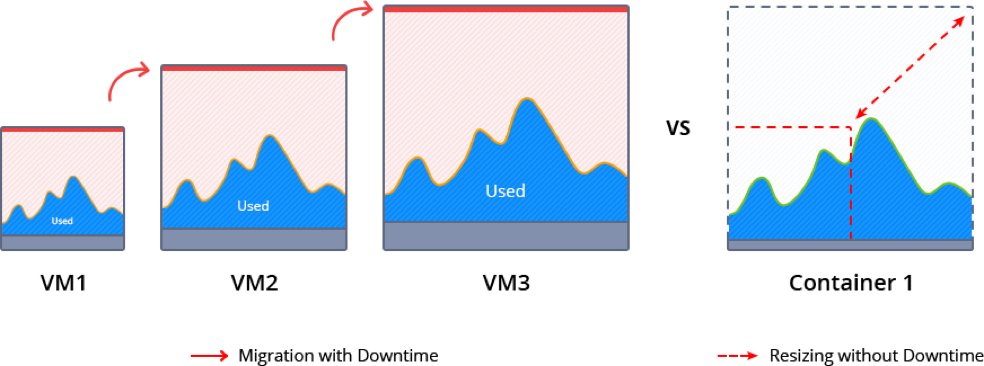
    During such scaling, the current VM normally is paused to migrate and redeploy the application. This inevitably causes some downtime and requires manual intervention.

    Memory ballooning provides a possible way (although rather complicated) to modify the amount of resources inside VMs on the fly without incurring downtime. However, this process is not fully automated and requires special tools to monitor the memory pressure in the host and guest OS and then activate vertical scaling based on the needs. As a result, memory ballooning doesn’t work well in practice, as the memory sharing should be automatic to present the expected advantages.

    Unfortunately, lack of VM elasticity and efficiency in terms of resource usage often leads to overpaying.

    Containers Scaling

    Containerization presents a new way of application packaging that makes resource consumption more granular and flexible, by automatic resource sharing among containers on the same host using cgroups. Unlike VMs, containers’ boundaries can be easily scaled up and down without the need to pause and reboot running instances.

    There are two types of containers: application and system containers. Both use the same scaling approach but they are intended for different purposes. An application container (such as Docker or rkt) typically is more lightweight, runs a single process and is used mainly for creating new projects, as it is easy to build them from pre-existing Docker image templates.

    A system container (LXD, OpenVZ) behaves like a full OS and can run full-featured init systems. This type of container is preferable for monolithic and legacy applications, as it can reuse the originally created design and important “old school” settings.

    Even system containers are much thinner compared to virtual machines, so scaling up and down takes much less time. And the horizontal scaling process is very granular and smooth, as a container can be easily provisioned from scratch or cloned.

    Garbage Collector Choice

    To maximize the efficiency of the above mentioned vertical scaling inside a Java-based container, it is important to select the appropriate garbage collector (GC) and tune it according to the project needs.

    Let’s review five widely used garbage collector solutions:

    • G1: From JDK 9, this modern shrinking garbage collector is enabled by default. One of its main benefits is the ability to compact free memory space without lengthy pause times and uncommit unused heaps. This GC is considered the best production-ready option for vertical scaling.
    • Parallel: A default GC in JDK8, it is a good option for low pauses but not for memory shrinking. This makes it inappropriate for flexible vertical scaling.
    • Serial, ConcMarkSweep (CMS): Both of these are shrinking garbage collectors with the ability to scale memory usage in JVMs vertically. But in comparison to G1, they require four Full GC cycles to release all unused resources. A new JVM option (-XX:-ShrinkHeapInSteps) in JDK 9 can  speed up memory release by bringing down committed RAM right after the first Full GC cycle.
    • Shenandoah: Shenandoah is a rising star among garbage collectors which promises to be the best solution for JVM vertical scaling. Its main benefit over the others is the ability to shrink in live mode without necessity to call Full GC, which helps eliminate significant performance degradation.

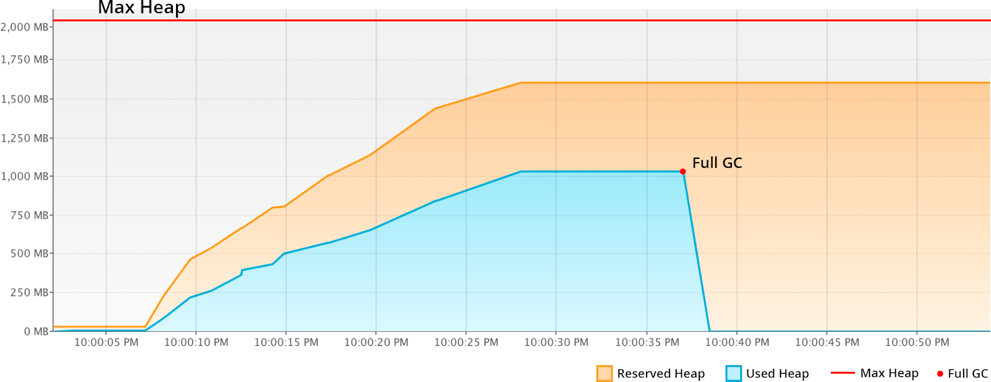
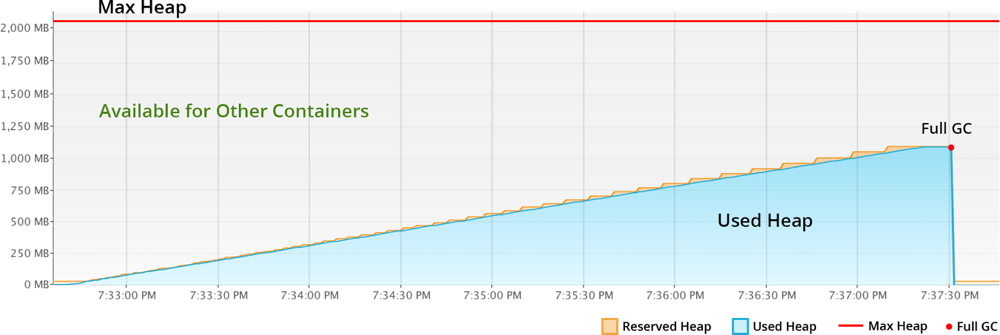
    Let’s compare memory behavior with shrinking G1 and non-shrinking Parallel:

    With Parallel, the unused RAM is not released back to OS. JVM keeps it forever, even disregarding the explicit Full GC calls. So even if your application has low RAM consumption, the unused resources cannot be shared with other processes or other containers as it’s fully allocated to the JVM.

    The modern shrinking G1 garbage collector significantly improves resource utilization compared to the previous example. The reserved RAM increases slowly according to the real usage growth. And all unused resources within the Max Heap limits are not wasted by standing idle, but made available to other containers or processes running in the same host.

    To summarize, Java applications with non-shrinking GC or non-optimal JVM start options hold all allocated RAM. For scaling Java vertically, the garbage collector should provide memory shrinking in runtime. In other words, it has to package all the live objects together, remove garbage objects, uncommit and release unused memory back to the operation system.

    Charging Model of Cloud Providers

    Nowadays, most of the cloud vendors offer a “pay as you go” billing model. This means that it is possible to start with a smaller machine and then add more servers or migrate to a twice-bigger instance as the project grows. But as described above, usually you reserve more than the application actually consumes to avoid the risk of downtime during the load spikes. As a result, many organizations overpay because the account is charged per VM but not based on the consumed resources inside.

    At the same time, there are providers offering  “pay as you use” billing approaches that became possible with the help of containerization, resource granularity and automatic vertical scaling. The payment is based on the resource units inside container. And the required capacity is provided and reclaimed on the fly in accordance with the load at the current moment. As a result, you are charged based on actual consumption and are not required to make complex reconfigurations to scale up or down.

    Taking into consideration all these factors and implementing the right settings can significantly reduce the costs for Java hosting resources, as well as positively influence application performance as a whole. Cloud and container technologies continue eliminating barriers and offering new opportunities for projects with different architectures and budgets.

    About the Author / Ruslan Synytsky

    Ruslan Synytsky is CEO and co-founder of Jelastic. He designed the core technology of the multilingual cloud platform that runs thousands of containers in a wide range of data centers worldwide. Ruslan worked on building highly available clustered solutions, as well as enhancements of automatic vertical scaling and horizontal scaling methods for legacy and microservice applications in the cloud. Ruslan is actively involved in various conferences for developers, hosting providers, integrators and enterprises. Follow him on Twitter.


  • Deep Art of Scaling for Cloud Environments, Part 2

    Deep Art of Scaling for Cloud Environments, Part 2

    In Part One of our two-part series on scaling for cloud environments, we looked at some of important factors for scaling and best practices for code storage. Let’s continue the discussion.

    Auto Scaling for Next-Generation Applications

    There are a few very good-looking cloud hosting service providers that provide the features mentioned in Part One: AWS, Google Cloud Platform (GCP) and Microsoft Azure. If you are going to auto scale, it’s best to use one of these cloud hosting services. There are other cloud hosting service providers in my knowledge that follow similar approaches, but they are not widely used or are platform-as-a-service (PaaS) ecosystems so we will not cover them.

    Also, it’s important to remember that in auto scaling, all app nodes are changing and created dynamically, with a new host, new IP, etc., so your synchronization mechanism needs to determine how to update the code with the new nodes that may change or be deleted later.

    Options to Auto Scale and Not Die Trying

    Lsyncd

    Lsyncd allows you synchronize nodes across the cluster that are spinning up/down new instances, Work using this script, which monitors the auto scaling group for new nodes and updates the Lsyncd master with new auto scaled slaves. Discovering which IPs or instances are within the auto scaling group is the preamble auto scaling faces, but this script will help resolve the discovery.

    GlusterFS

    Another approach is to use GlusterFS, which ensures high availability and syncs between your web nodes. You need a minimum of two instances in case one fails. The other instance can jump in and still be tolerant for failures. Once the failed instance is back online, it’s added again to the cluster. GlusterFS works similarly to master/master or master/slave. I won’t cover how to configure GlusterFS, but I’m sure this approach was a very good option before AWS EFS was released. If you are not using AWS, this is an awesome option.

    On the other hand, if you are using AWS environments with EFS, consider registering your web node to the master node using “AWS User data,” so every time a new EC2 instance is created by the ASG, it will register this new volume to the master and keep data synced with the rest of the nodes.

    Pre-Baked AWS AMIs (Old Approach)

    Given the fact that your code won’t change or barely changes, baking an AWS AMI and updating the auto scaling launch configuration will do the trick—this is an older but still-used approach. When you have a defined code release schedule and a defined development workflow, you could bake an AMI for every new code release and, once ready, recycle the nodes to use the new AMI with the latest code update. There are plenty of tutorials on this method.

    Admin Server (mainly used for WordPress, Drupal, Magento and CMS-based apps)

    Another wild approach is to use an admin or master server out of your auto scaling group. This is used commonly to sync code from the master to the scaling group, but I believe this a waste of server resources that can be used inside the auto scaling group. I would recommend this approach for WordPress or Magento sites; in addition to this, consider proxying the wp-admin or administrator URL to the admin server, or update the CMS directly to the admin server. As with NFS, AWS EFS will facilitate everything with WordPress, Magento, joomla and CMS-based apps. Click here for an example of what I’m talking about.

    Implement AWS EFS

    Finally, the easiest approach is AWS Elastic File System – EFS. Amazon Web Services released EFS a few months ago as a very promising technology—a distributed file system similar to NFS but improved—think of it as a sophisticated NAS solution. During AWS Re:invent, the company said EFS is based on NFSv4.1 but with better network performance, and is a pNFS workaround. I have waited for such a component in the arsenal of AWS for months, though early access was only available for the Virginia region. Today, though, it is supported across all AWS regions – Yay!

    EFS can be mounted as a local mount point within fstab, similar to NFS, and you can share your code across your AWS auto scaling group: Set your EFS volume in/etc/fstab to load automatically in each reboot. Therefore, If you are in AWS, use EFS; it will facilitate everything—really. To accomplish this approach, make sure to update your user data in each EC2 instance with the EFS mount point, so every time a new instance is created it automatically will have the EFS volume.

    Note 1: All EFS mount points should be in the same region; if an EC2 instance tries to mount from another EFS region, it won’t be allowed.

    More Details can be found here.

    Google Cloud Platform

    Well, what do we have for Google Cloud Platform? I suggest GlusterFS, Lsyncd, rsync or Google Cloud Storage—although it shares a lot of features with Amazon S3, it is faster. Google states that its cloud storage is faster than Amazon S3 due to its infinite edge points across the world and, yes, it is correct. The easiest way to share the code across your auto scaling group is to use Google Cloud storage and GSutils. Additionally, you could use GSutils and call the bucket in each Google Instance—just make sure the visitor/user does not change the code or static content in the instances. Also, Gsutils helps sync the bucket data to your instance data to stay in sync. If your code changes dynamically with your traffic, you need to use gluster or Lsyncd, given that it is very complicated to deploy since Google auto scaling is always recycling instances/IPs and needs some workarounds.

    Don’t Forget Scaling Databases!

    Another topic that we didn’t touch was scaling a database, for AWS RDS, DynamoDB, Postgresql, Mysql and Nosql databases. All these modern databases are easy to scale; some of them are PaaS such as DynamoDB or RDS. For Postgresql, MySQL exists only for manual scaling, which is adding new database nodes to the master/slave cluster. In AWS RDS, with some clicks you can get a slave “replica” and you are scaling already. But I won’t go further about it as it’s out of scope for this piece.

    Scaling Microservices and Serverless Apps

    Definitely, these topics need another talk. There will be another time to explore this new architecture approach of splitting your application into pieces. Microservices is changing the IT paradigm, but to survive for this new paradigm, you need to understand first scaling for cloud before evolving to microservices with Docker, Consul, Compose, RancherOS, AWS ECS, Kubernetes and Serverless apps architectures.

    Conclusion

    diagram

    As you can see, scaling an application can be challenging when you are dealing with a custom app or CMS-based application. With this article,  you have the options and their pros and cons in tackling this constant preamble of how to scale with custom apps. Everybody uses their own scaling process and seriously, they never fit with other applications’ needs. Now that AWS EFS is out there, I’d recommend it every time you can, but in case you are not using AWS, implement Lsyncd or GlusterFS, but don’t forget the other methods that also can help accomplish your scaling goals.

    About the Author / Alfonso Valdes

    alfonsovaldesAlfonso Valdes is the CEO and Founder of ClickIT Smart Technologies, a IT agency focused in the architecture and implementation of Modern Cloud Applications highly resilient in Linux and Open Source technologies. He combines more than 8 years of IT experience in the field of scalable architectures, distributed systems and developing cloud-native applications, and has worked for different U.S companies such as: Sprint Nextel, Texas Instruments and Nike USA. Nowadays he is encouraging enterprises to join the cloud. Connect with him on LinkedIn.

  • Deep Art of Scaling for Cloud Environments, Part 1

    Deep Art of Scaling for Cloud Environments, Part 1

    The number of resources to scale an application are abundant, but every application has its own challenges to scale successfully, and the solution to this problem doesn’t come handy. This two-part article focuses on the best approaches to build a scalable application, software-as-a-service (SaaS) application, mobile app, or WordPress-, Drupal- or Magento-based website. The scope of the approach extends to both auto scaling and manual scaling.

    In my experience, there are two types of applications: ones that use an admin and Admin panel to modify the code, layout and functionality (WordPress, Joomla, Drupal, etc.) and modern, next-generation applications that are stateless and follow the 12-factor app approach.

    But first, we have to decide whether to use auto scaling or manual scaling. It is an important decision to make in the very beginning, as it changes the whole approach and complexity of developing your app. We will be discussing both, but in essence of auto scaling, you will need to consider how to maintain the code synchronized across the web nodes and how to maintain new web nodes that constantly are being created/deleted in the auto scaling group. (With stateless apps this is not an issue, as the images or static content can go to Amazon S3, CDN or isolated services. Later on will explain a bit about these technologies.) Working with manual scaling will facilitate your work—you just need your code synced across all the web nodes. All of the approaches mentioned below apply to manual scaling.

    But on the other hand, auto scaling with an admin application is a headache for some common reasons: Every time a front-end developer  changes something in the admin, code will be inconsistent across multiple web nodes along with the Git versioning.  Because of this issue, I don’t  recommend using Git for such applications—there are always discrepancies between the last commit/version in Git and the last update in the admin CMS, which makes auto scaling with admin even more complicated.

    Let’s cover some approaches to solve this problem. Using an NFS distributed file system will resolve everything for a CMS app, but as everybody knows, this approach pulls down the performance.

    What’s Important for Scaling:

    • Designing a deployment workflow that is easy for your team, your manager and developers—that’s why you are here, to improve development productivity by defining a good mechanism to deploy code to your cluster or auto scaling group. Here, you can think of Webhooks, rsync cronjob, bash scripts, Jenkins, CircleCI, DeployBot, manual pulls or AWS CodeDeploy.
    • Isolating and centralizing all services. Databases, caching session, integrate s3 for static content, implement CDN, worker servers, cronjobs, Load Balancer, app server, web server, etc., to name a few.
    • Dynamically synchronizing code in a live application with many web nodes behind a load balancer or AWS auto scaling Group.
    • Ability to use the 12 factor approach for next generation applications, or stateless apps. You may be using this approach already but you don’t know it!
    • Bootstrapping your application with a stateless approach—this will facilitate all your work when you implement a scalable infrastructure. There are many ways to bootstrap your base application using bash scripts, docker files, vagrant file, AWS code deploy, git, user data file from AWS and baked AWS AMI, among others.
    • Using immutable servers in your environment. Make sure your applications and servers are in a pre-configured image state. Every moment a new server/instance is created in an auto scaling mechanism, the instance should be identically cloned of any other instance in production without any further configuration. As you know, AWS, Docker, Google Cloud, and cloud-based providers are much more easier for immutability. This really helps to deliver software faster and decrease time to market.
    • For CMS based apps, stay out of git for now, unless you have a very good code change control with your CMS admin and a very good discipline to push your changes with every dashboard/back-end change in the CMS.
    • A load balancer for auto scaling, such as AWS ELB, Google Cloud LB, Nginx or HAProxy.

    Advised Practices for Code Storage

    Understanding how your application works in terms of how visitors dynamically change your application data is very important. It’s imperative to understand how the session is saved, either locally or in Redis/Memcached. If it’s saved locally, you need to add this data to your synchronization mechanism. Another storage change is the user image uploads for WordPress or Magento-like CMS-based websites; use of plug-ins such as Wp super cache or w3 total cache makes image upload configuration easy. Plus, the option to integrate with a CDN, Amazon s3 or a cloud storage pushes the boundaries even further.

    But if you have a modern application, you need to understand and guide your development team how to change local image uploads path to a cloud storage or CDN. Make sure all your dynamic data is saved in a SQL or NoSQL database, and all cached database data (db queries, objects, sessions, keys, etc.) is saved to redis/memcached, Taking care of these factors will facilitate your scaling journey.

    Why not use NFS?

    Well, we hear a lot around the internet that the easiest way to achieve scalability is integrating NFS. Though it is the simplest way to look for and implement a fix, reducing the work for a service provider/developer  by almost 50 percent, it’s a real sacrifice in terms of application performance. Autoscaling an environment with a slow response speaks against the whole cause of the setup! It is very irritating to a client whose application speed is 1 second to 2 seconds when switching to a scalable environment with NFS slows the application by at least 50 percent.

    It’s also very disappointing when your small EC2 instance is much faster than your auto scalable environment with NFS. Additionally, using NFS has a point of failure, unless you have a failover in the cloud that is rarely used. It is just not worthwhile to have a complete standby environment waiting for a failure, and it’s better to use this environment within your cluster and have more resources to consume your traffic, or even better use this redundant environment to balance between different regions or data centers.

    Why not use Amazon S3 to Share Code?

    What about using Amazon S3, Google Cloud Files or any cloud storage to share code?

    Implementing Amazon S3 to share code between nodes will slow down your site similar to NFS. There’s not much of a difference accessing the S3 URL to mounting the S3 to a Linux directory, so don’t use Amazon S3 as the document root or code base folder. Keep the use of S3 limited to static content that needs to be fetched over time. Yes, there are websites that can survive and work decently using Amazon S3 for static web pages, but from my experience, I don’t recommend it for websites that support an application responsible for driving revenue to the company.

    Stay tuned for Part Two of our conversation on scaling for cloud environments.

    About the Author / Alfonso Valdes

    alfonsovaldesAlfonso Valdes is the CEO and Founder of ClickIT Smart Technologies, a IT agency focused in the architecture and implementation of Modern Cloud Applications highly resilient in Linux and Open Source technologies. He combines more than 8 years of IT experience in the field of scalable architectures, distributed systems and developing cloud-native applications, and has worked for different U.S companies such as: Sprint Nextel, Texas Instruments and Nike USA. Nowadays he is encouraging enterprises to join the cloud. Connect with him on LinkedIn.