Tag: Release Orchestration

  • CircleCI Adds Release Orchestration Capability to CI/CD Platform

    CircleCI Adds Release Orchestration Capability to CI/CD Platform

    CircleCI today added a release orchestration capability to its namesake continuous integration/ continuous delivery (CI/CD) platform to give developers more control over application deployments.

    CircleCI CTO Rob Zuber said a CircleCI releases capability provides development teams with the ability to release a controlled subset of their code in a live production environment in a way that provides immediate feedback on how that code is performing. That level of visibility can then be used to determine whether that code might need to be rolled back using automation tools embedded in the CircleCI CI/CD platform, he added.

    In the absence of that capability, noted Zuber, it takes DevOps teams, on average, 45 minutes to an hour to manually roll back an application.

    Initial platforms supported by CircleCI releases are Kubernetes and Amazon SageMaker. CircleCI releases is also compatible with the open source Argo CD platform that CircleCI integrated its platform with last year.

    CircleCI also plans to add support for blue-green deployments later this year, enabling DevOps teams to deploy one application version more gradually to replace another.

    The way CD is managed often varies widely from one organization to another. In highly regulated industries, CD is typically managed by a central team to ensure compliance requirements are met. In other instances, developers are directly responsible for building and deploying their code. Regardless of approach, CircleCI enables organizations to define a set of guardrails to ensure best practices are observed, noted Zuber. In effect, each organization can implement a set of checks and balances that are aligned to their specific needs, he added.

    As DevOps continues to evolve, more organizations want the ability to control deployments at a more granular level by, for example, only making a new application or an update available to a select number of users. Once deployed, developers need a more holistic view into not just how that application is performing but also how it impacted the business, said Zuber. If, for example, the number of logins declines after an update, a developer needs the information to determine whether that update should be rolled back as quickly as possible, he added.

    It’s not clear how many organizations are managing the entire CI/CD workflow on an end-to-end basis. While most DevOps teams make extensive use of CI to build an application, the deployment of applications is still often managed manually. However, as CD capabilities become simpler to employ across platforms with standard interfaces, the number of organizations automating CD should steadily increase. In fact, that capability will soon prove essential as, thanks to the rise of generative artificial intelligence (AI), the pace at which applications are being built only continues to accelerate.

    In the meantime, each organization will need to determine how closely it wishes to integrate CI and CD workflows. However, the more tightly integrated these processes become, the simpler it becomes for developers to assume full responsibility for building and maintaining the software they create.

  • ReleaseIQ Adds Orchestration Tool for Multiple Instances of Jenkins

    ReleaseIQ Adds Orchestration Tool for Multiple Instances of Jenkins

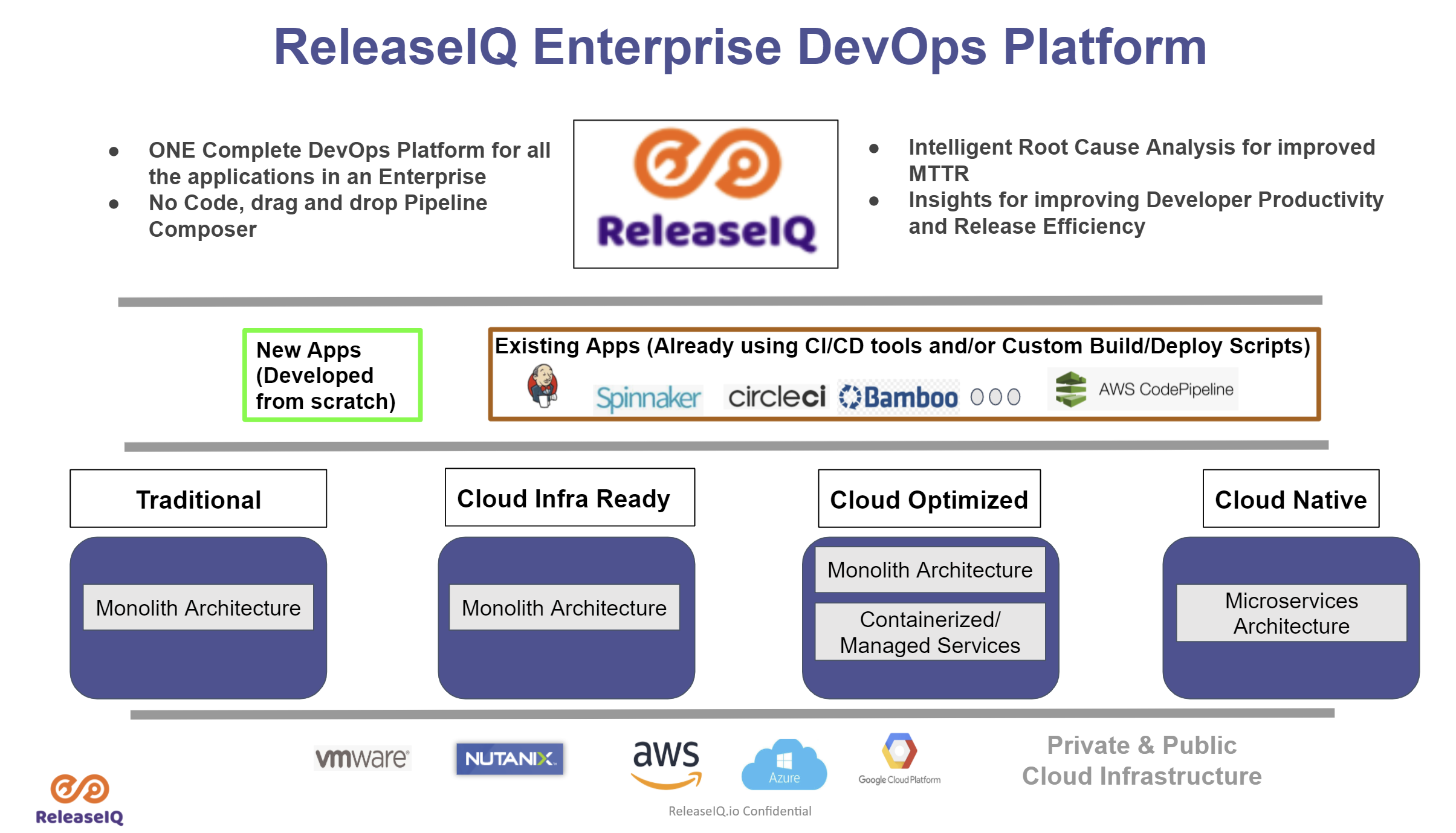
    ReleaseIQ has launched an orchestration framework for the open source continuous integration/continuous delivery (CI/CD) environment that makes it possible for DevOps teams to orchestrate pipelines across multiple instances of Jenkins.

    Seetharam Param, ReleaseIQ CEO, said ReleaseIQ Essentials for Jenkins is an implementation of an existing orchestration platform that enables DevOps teams to orchestrate pipelines across heterogeneous CI/CD platforms.

    The challenge is that organizations that have standardized on Jenkins typically have multiple instances being used by not only different IT operations teams but also owners of, for example, ancillary quality assurance processes. ReleaseIQ Essentials for Jenkins provides an alternative approach to the orchestration tools that CloudBees, the original developer for Jenkins, provides, said Param.

    Jenkins today is being advanced independently of CloudBees as an open source project managed by the Continuous Delivery (CD) Foundation, which is an arm of the Linux Foundation. Founding members of the CD Foundation include CloudBees along with Alauda, Alibaba, Anchore, Armory, Autodesk, Capital One, CircleCI, DeployHub, GitLab, Google, Huawei, JFrog, Netflix, Puppet, Red Hat, SAP and Snyk.

    ReleaseIQ Essentials for Jenkins optimizes execution of jobs and pipelines and also provides DevOps teams with a no-code graphical interface to build pipelines.

    DevOps teams can also import and execute Jenkins pipelines and jobs in addition to being able to pre-merge pipelines.
    Finally, DevOps teams are provided insights based on key metrics the platform automatically tracks on their behalf. Those metrics make it possible to quickly discover and fix pipeline issues across multiple Jenkins instances via console log aggregation, noted Param.

    It’s not clear to what degree DevOps teams that have standardized on Jenkins might swap out one orchestration tool for another. However, Param said more organizations are either wary of becoming locked into a specific CI/CD platform or now find themselves in a position where they need to continue employing multiple CI/CD platforms from different vendors. The ReleaseIQ platform provides a means for orchestrating pipelines regardless of how many different CI/CD platforms are employed, noted Param.

    It’s clear the need to embrace orchestration tools is becoming more pronounced. DevOps teams are spending too much time manually maintaining DevOps pipelines. The need for tools to automate the management of DevOps workflows is becoming critical as the number of application development projects that are simultaneously being launched continues to grow. Arguably one of the reasons that DevOps processes are not as widely embraced as they might be is the level of expertise required today to manage all the pipelines that make up a workflow.

    Of course, the level of DevOps maturity varies greatly by organization. It’s not uncommon for even different teams within the same organizations to have significantly different levels of proficiency. The challenge and the opportunity now is to provide those DevOps teams with tools that operate at a high enough level of abstraction to make DevOps accessible to every IT professional regardless of the level of programming expertise they may or may not have.

  • Integrating ARA into traditional RM

    Integrating ARA into traditional RM

    Application Release Automation (ARA) is terminology that includes several DevOps constructs from a singular, application-centric point of view. In essence, ARA implies the automation of a single app from build through deployment (even if that deployment is to production). Of course, embedded or implied in that automation terminology is build automation or construction; deployment automation, which may include provisioning; and governance automation, which includes testing and approvals.

    If your company’s portfolio of applications is small, or if the applications are fully independent from each other, using ARA to describe your DevOps continuum is more or less a complete vernacular. However, if your application portfolio contains interdependencies; you need a coordinated/scheduled release event of multiple applications into production in a particular sequence or timing;or you are required to meet blanket compliance governance requirements that exceed the scope of a single app; you will need to learn how to integrate an ARA-based DevOps strategy with the more traditional discipline of Release Management (RM).

    Clarifying ARA

    One of the nicer implications of ARA thinking is that it places the value—or, accentuates the value—where it should be; that is, on the application. Automating infrastructure is great, but if no application rides on top of it, the infrastructure is essentially nothing more than unexplored capacity. Most CIOs are not fond of having excess computing capacity sitting idle. So the idea of ARA sets the focus of the automation where it should be: moving an “application” from construction to production release.

    ARA is also development methodology-neutral, which means the build, deployment, and releasing automation will look the same regardless of whether the code was prepared using Agile or Waterfall. Mind you, Agile tends to drive the need for speedier delivery systems, but even legacy development teams can find value in consistent delivery system automation once a build is ready to begin. It is, after all, consistency that reduces support costs by reducing errors and creating predictability, thereby improving quality. It also is consistency within the automation that permits scale, whereas variability in the automation deters scale.

    ARA also allows for depth within the stack. If code reigns at the top of the stack, then the operating system of the server reigns at the bottom (perhaps networking in the wine cellar and facilities management in the root cellar). ARA incorporates the notion of automating dependent layers of technology under the code such as database services, middleware or messaging services, perhaps the provisioning of a virtual machine, even down as far as configuring the OS, if needed.

    The practicality of moving down the stack however, is that the scope of change will continue to have a broader impact than a single app. I usually do not install a single instance of Oracle for each application I create; more often, I have several applications relying upon a single instance of my Oracle setup. So the actual changes I automate as I move down the stack tend to be more of a configuration adjustment. It is more likely my particular app needs a config change to accommodate it rather than a completely new install of a supporting technology component underneath my app. It is also worth noting that the frequency of change as you move down the stack slows down considerably compared with app code riding on it, and the cost or impact of change increases greatly, as you begin to impact a wider number of things riding on it.

    Deconstructing ARA

    ARA automation, then, includes all the traditional DevOps disciplines, but limiting them to the viewpoint of a single application as follows:

    Build Automation: This includes version-controlling each particular build. It also includes packaging all the component technologies to create a deployable package used for deployments throughout the software development life cycle (SDLC). The golden rule here is create a “build once, deploy many” philosophy in your build automation. Changes to code, included configuration files or dependent technology components down the stack must occur in the DEV class environment. Once the deployable package is completed to satisfaction in DEV, it will move unaltered through any other layers of testing environments before it gets to production for ultimate release.

    Deployment Automation: Since each deployable package is tightly version-controlled during its construction in build, there is now an ability to roll forward (normal deployment) or roll backward (revert to a prior version) in the event of failed testing in a given SDLC environment. Some of the common environment classes include integration testing, performance testing, user acceptance testing and pre-production quality assurance (QA) testing. Smart DevOps deployment tools utilize the ability to deploy (or overwrite) only the components that are out of sync with the versions listed within the deployable package. This smart deployment capability reduces time and ensures consistency with what “should” be there.

    Provisioning Automation: This is an offshoot of deployment automation. For those using virtual machine or cloud technologies, the deployment automation can include the ability to provision or set up an environment of any class on the fly. When testing is completed, the same environment can be decommissioned to not waste capacity or budgets. Provisioning bare-metal servers is precluded by human interactions, although what should go on them also can be fully automated once engineering is done with the physical work.

    Governance Automation: Even though substantial testing can and should occur in development, a significant amount of it must occur in other testing-class environments later in the SDLC progression. It is, therefore, a good idea to have the ability to isolate testing automation outside of both build and deployment templates or scripts, still making it callable or executable from an overall workflow manager (often included in the release orchestration or release automation tooling within DevOps). This gives the flexibility to run a series of tests without having to rebuild the application or redeploy the application just to kick it off. In addition to testing evaluation, there may be other process regulations driven by a governance team or compliance entity within the organization. All of these flags must be met and passed before final promotion to production.

    Integrating ARA with RM

    Dependency is the hobgoblin of simplicity. Applications that are fully independent of each other can utilize an ARA strategy and deploy into production as often as they want. No one else is impacted by this. But if a given application has dependencies upstream—I get my data from, or transact with, someone else—or downstream—my data is provided to someone else—then my path to production must include testing an application different from my own. Determining where the responsibility for failure lies now requires policy instead of just common sense. Synchronizing in-state changes where two dependent applications are now undergoing change at the same time requires policy to govern as well as more sophisticated SDLC testing environments to manage.

    When a wider view than just a single application is required, the traditional DevOps discipline of RM or its synonym release orchestration (RO) becomes the solution. RM allows for the sequencing of applications going into production to occur as needed. It allows for testing to occur when a dependency spiderweb is kicked off. RM allows for corporate governance to be applied universally to all applications attempting to enter production, instead of having to build it over and over again in each deployment script or template. RM can produce sophisticated logs designed to satisfy outside regulators for compliance history automation. These kinds of tools become invaluable when there must be a wider view of deployments to production beyond a single app at a time or in a small portfolio.

    Given this reality, the key to integrating ARA with RM is to ensure automation is constructed independently by discipline, and can be executed by discipline as needed. ARA encompasses or groups four disciplines together: build, deploy, provision and governance. RM uses the ARA package and extends it with other applications to create a needed sequence, or kicks off selective smaller units such as a testing package when needed to meet certain outside app change conditions based on dependencies. RM can selectively execute the automation ARA creates as it needs to to accommodate larger goals, while ARA continues to focus on keeping its own app as efficient as possible.

    Impacts to the Bottom Line

    There is no one right answer. There is only the perspective you hold within the DevOps continuum. Knowing that both ARA and RM are ultimately dependent on traditional DevOps disciplines offers flexibility on “how” you think about delivering innovation. In my opinion, ARA is simply the next evolution of automating build and deploy. It is a logical next step.

    There are other disciplines within DevOps, however, that might benefit from a wider view of the workflow required to move innovation to production. Take, for example, the integration of monitoring automation in the process, capacity on demand provisioning, security oversight and configuration management database (CMDB) integration—a wider view of how and where these services are integrated with DevOps might reduce the labor required to create them for each app, reinventing the wheel—or worrying the wheel has not been updated properly in a while. At its heart, DevOps attempts to create singular automations to perform tasks, increasing speed, reducing risks and improving quality.

    There is no immediate financial impact of this other than to pursue a strategy of single-app focus in an environment where a wider view would have been more ideal. Calculating the cost of that error is akin to picking six lotto numbers from the sky: It is always hard to know what might have been; at that point all one can do is wish.

    To continue the conversation, feel free to contact me.

  • The Automation of Compliance

    The Automation of Compliance

    Consider how much money your enterprise spends on audits. Smaller firms not subject to external regulation should consider how much money is spent on quality assurance—or the lack of it. A business that suffers from a customer-facing quality incident will, at minimum tarnish the brand of its services or at the high end, lose market share altogether. Larger firms that fail audits can suffer from brand tarnishing as well as high fees, not to mention further scrutiny by regulatory agencies.

    Failure to perform or failure to follow proscribed processes inevitably leads to a black eye in front of customers. The entire discipline of governance is premised on avoiding both. Whether your governance practices are efficient or not—and whether your “process” as it sits today leads to quality or not—is not the subject of this review; it is how DevOps and automation can shine a spotlight on both and radically reduce the costs you spend today to achieve them.

    The Spotlight of DevOps

    The spotlight of DevOps begins with consistency that leads to predictability. Automating any given kind of process or technology the same way every time begins to give insight on any “holes” from things that do not work (or work well). If all that changes in your deployment process, for example, are pointers inside a configuration file and the kind of testing executed against this version of the code, you have achieved a build-once, deploy-many state of deployment automation. Operations staff who support the deployment of change or maintain the environments in the software development life cycle (SDLC) begin to  isolate any issues faster because they become familiar with “how” a given kind of technology is automated to deploy. This reduces the total number of deployment errors and, in tandem, reduces the length of time it takes to fix them. Any “process” problems or weaknesses in your governance model become apparent quickly and can be fixed quickly. Limiting variation is the medicine to keep them away in future.

    The spotlight of DevOps next turns to transparency. Offering your entire enterprise visibility or “read only” access to your entire DevOps tooling suite has a profound impact on the transparency of change. As an example, consider that I am a humble accountant in your firm who has submitted an agile story to improve our billing system. I may or may not, given the nature of my job, be co-located near the programming team who will fulfill this request. If our firm specializes in accounting software then perhaps I will co-locate, but if I am only requesting a change to an ancillary or support system, likely not. Without direct access to the programmers through traditional agile co-location, my visibility into the progress of change is limited to the tracking system I submitted the request within (assuming you have one, and don’t use email to do this).

    If I know a programmer in MIS, perhaps I ask him at lunch how my change is coming along. But if I have read-only access to the testing systems, or to the release orchestration (RO) tooling, I may get a much better up-to-the-minute view of exactly where my change is, how it is doing from a quality assurance (QA) perspective, and when it is scheduled for release into production. Based on this news, I may make decisions about how we bill our customers in what time frame to increase overall revenue to the company. I would notify my boss of same (who also has access, but pays less attention), and of any changes that impact the new timeline I create. The marketing team (who also has access) begins to work with public relations (PR) and the advertising guys on customer announcements, etc. etc.

    The net impact of having universal transparency is that audiences who are not traditionally notified or interested in the inner workings of change movement now make decisions based on it. Consider that prior to this systemic access, and the reliability of DevOps to ensure delivery, the only news you got before was from “the IT guy,” who was often wrong. It does not take long before IT loses credibility from being wrong about delivery timelines, and these other audiences begin to pay less attention (if at all). At that point, an “I’ll believe it when I see it,” attitude emerges. And this same attitude infects internal auditors because of what they hear and see from disaffected internal customers who have been misled repeatedly by the failed manual methods of the past (pre-DevOps).

    Processes that are disinfected over time by the consistency of DevOps begin to change the internal company thinking about the delivery of innovation—namely that it can be counted on as accurate. Transparency offered to all audiences of a company increases the visibility into all aspects of innovation delivery and better ideas emerge, both about what to do with completed efforts and how to improve the innovation process itself. And before you know it, your governance and QA processes become efficient, reliable and predictable. Variation is eliminated or greatly reduced, and the costs of operation and innovation begin to decline.

    The Forgotten Stepchild of Automation

    What is rarely a matter of focus in most companies is the secondary ability to automate the compliance history of a given application. Most firms are content (translate, only able to) work with their testing tools to produce logs about a given version of an application now residing in production. A test log does show an auditor the majority of the quality related information about a given version of an application. But the log is a highly limited view of what has taken place. What is needed is the full context of innovation. Enter compliance automation.

    Consider for a moment, that requirements drive the train. Why are we doing the innovation we are doing? Is this a bug-fix, a new feature, a client request, a regulatory requirement? Being able to trace the code itself back to the requirements system that drove the need adds significantly more context than is possible from mere test logs. Next, think about the number of attempts that finally resulted in this version of the application. An automated build tool (part of our DevOps suite) has this information. At this point you could evaluate how many builds and deployments took place in development before a worthwhile candidate emerged to traverse the remainder of the SDLC. An automated deployment tool (part of our DevOps suite) can trace the number of environments this version of the app was deployed into for testing and how long the overall process took to get something moved from development to production.

    And finally, testing is often done from a variety of tools, with results compiled in a variety of result repositories. This information may be available from a solid RO tool that tracks the gated progress of this version of the application, but if it’s not, it still should be sitting in each of the testing tools used throughout the process. Depending on the level of inherent DevOps tool integration (i.e., using a vendor suite) much of this information may “flow” from one tool to the next. But if not, the information does still exist in the logs produced by each of the DevOps tools.

    It may be well worth the application of internal programming resources to put together a tool that gathers all this information (automates the collection and presentation of) for audit purposes. Imagine the reduction in cost of supporting an audit that can gather a simple push-button report (or dashboard) of the entire life cycle of a given version of change. At that point, you have the entire context for a piece of innovation. You know what drove it (requirements). You know what it took to create it (build and deploy). You know the entire history of testing it (testing tools). And, finally, you have the entire governance process used in its deployment to production (RO tooling). But instead of examining multiple tools to collect and present it, you have created a push-button system to do so.

    Impacts to the Bottom Line

    The investment in adding automation to the compliance history of innovation pays off in more than one way. It is not just the ease with which history can be recited. It follows the same principles as DevOps itself. Automation introduces consistency in how audit information is gathered and presented (reducing variability from one audit to the next). Automation introduces transparency if the entire company is given “read only” access to this new system. Automation shows auditors we are not afraid to learn from our mistakes and proud of our accomplishments. And in effect, it reduces the need for audit altogether.

    Typically, regulatory bodies investigate and audit firms where they are uncertain of how the results were obtained. An automated system like this one fully eliminates that need. Transparency as could be offered here, may convince auditors that attention is not warranted here. Keeping in mind the spotlight of DevOps has already improved quality and streamlined process, add to that full transparency of audit materials and the confidence of auditors regarding your company may increase significantly. Routine becomes the only reason to audit, rather than suspicion.

    Invariably the “new” will sometimes result in an error that your current systems and processes (automated or not) will not catch. But this truism is recognized, and accounted for, in how DevOps enables innovation. And if you have this kind of automation in place, it can be demonstrated in how we fixed what we fixed (whether governance or QA). Your strategies in DevOps should help you achieve this level of confidence. (If you need help, feel free to contact me, I am currently looking.)

    To continue the conversation, feel free to contact me.

  • Dying for Intelligent Calendar Awareness

    Dying for Intelligent Calendar Awareness

    What would we die for in an integrated DevOps tooling solution—something that would make our operations partners stand up and cheer? Intelligent calendar awareness.

    The most fundamental construct of any release orchestrations (RO) tooling software is the calendar. RO software, no matter who the vendor is, uses a form of the calendar, to outline what tasks will get performed in what order from beginning to end. Better RO software allows for parallel tasking, but all RO software uses a calendar. So the most fundamental use of a calendar construct is focused on “when” tasks are performed and completed. Adding intelligence to a calendar construct adds three more dimensions or characteristics to this baseline feature.

    The Intelligence of Ownership

    First is the concept of ownership. Instead of just marking a calendar with the dates of specific tasks, or clusters of tasks, the addition of ownership marks the calendar with “events” that are “owned” by specific teams of people intended to perform groups of actions or tasks. As an example, instead of just marking the calendar that on April 27 this year, with the specific tasks we need to run a mini-release to upgrade our Oracle database from version “x” to version “y.” With the addition of ownership, we could mark this date as running an “event” of an Oracle database platform upgrade. This new event would be “owned” by the database update team.

    The block of time the team outlines for the Oracle upgrade “event” would then take on two additional characteristics for teams in general: inclusionary and exclusionary implications. As an example, the time set aside for the tasks to upgrade the Oracle platform becomes inclusionary for the owning team. Members of this team would be allowed to schedule tasks during this block of time, ideally intended to facilitate this goal of upgrading the platform.

    Other teams are (by default) excluded from performing actions during this block of time so they don’t impact what the database team is attempting to accomplish. When other teams pull up their respective calendars to schedule some new task or event, the April 27 block of time is greyed out or presented as unavailable because the database team owns an event listed in that block of time. For the database team the time is inclusionary, for all the other teams the block of time is considered exclusionary.

    The benefits to you the customer are immediately visible. By adding ownership to the calendar construct, events could be scheduled in such a way that teams do not inadvertently “step on” each other (i.e., attempt to schedule tasks during the same window of time that would adversely affect the other). It also allows you the customer, to view a dashboard that shows the “kinds” of events that are scheduled throughout the week, month or quarter, and who is doing what.

    To avoid being too strict with this idea, the RO tooling vendor need only add concept of granting exceptions to requesting teams by the owning team for events that would not impact their efforts. So as an example, if a different team wanted to work on tooling the SQL Server platform during the same block of time that Oracle platform was being updated, and the servers were different anyway, there is no reason why that team could not schedule a similar event of its own at the same time. If ownership is the only concept added in the RO tool, an exception would have to be granted by the Oracle team, but this would be costly in terms of administration. It is for this reason we introduce the second main construct in the intelligence of calendar management.

    The Intelligence of Component Awareness

    The second main concept of intelligent calendar management is component level awareness. This dimension of awareness is based on identifying specific “technologies” as resources or components that are part of the environment you operate at your company. It doesn’t have to be a ground-up exercise, and if you prefer one of those, you could use a standard discovery tool to keep it up to date. But the more basic idea is to simply identify the fundamental technology components you use in your world.

    So as an example, I could identify that this company uses Oracle databases (perhaps also tracking the version if there are multiples of it), SQL Server databases, the type of servers it uses, the operating systems, the middleware, perhaps a mainframe platform and the network fundamental technologies, etc. It is highly likely that there are groups of people who are uniquely identified in this company that manage these specific types of technologies. This makes the associations easy for event ownership. The Oracle guys become associated with the Oracle technology components but not with the SQL databases, etc.

    Having teams associated with the components they manage allows for better parallel event scheduling. But this is only the first level of intelligence. The next level is to track, by application, the underlying technology components they utilize. This process is done during the build and deploy automation anyway, so the effort is nothing more than what is done today. The beauty of having this spider web map, or this map of technology component dependencies, is that it adds a new level of capability to scheduling in our calendar.

    At this point, scheduling an Oracle event does not preclude the SQL team from scheduling another one during the same time window, since those two technology types don’t conflict with each other. Both teams would see open calendars on the same day due to this intelligent calendar awareness of component interdependency, or lack thereof. This dimension of intelligence precludes having to grant needless exceptions to owned events. The only requests for exceptions would come from users or teams that actually would impact the upgrade event, and they could be evaluated for legitimate need and potential real impact.

    Let’s return to our Oracle platform upgrade event our mythical company scheduled for April 27. With the addition of component-level awareness, when this event is scheduled by the Oracle database team, every application that uses Oracle is “automatically” notified that this time window is now off-limits for its development or usage activities. This limitation could include automatic notification to application development teams that they could not deploy new code during this window. Or the notification could be expanded to notify users of the impacted application(s) that this list would be down during this window of time. Applications that do not use Oracle would remain unaffected and not notified.

    Imagine what this kind of automatic notification could do for both development and the user base of the technologies you operate, all coordinated automatically through the RO tooling you use today in DevOps. Then think about the possibilities from here. The Oracle team could look at a block of time again and examine whether scheduling on April 27 would have a high impact on other teams, or not, before it finalizes it. If the impact to others is high, perhaps the team picks a different date. The possibilities become endless.

    The Intelligence of Scope

    The third and final architectural dimension to add to calendar intelligence is the concept of scope. Scope is a simple hierarchy that you could define about your company by logical business subdefinition. As an example, you could outline the scope you define as: global (entire company), business unit (listed by name), product unit (listed by name) or departments (listed by name). Just using these kinds of simple scope definitions begins to insert an impact assessment into the event scheduling that takes place.

    As an example, events could be scheduled with a global scope, owned by the change management governance body, that excludes a 10-day window because of a corporate audit by outside regulators. Now, when any development team attempts to schedule deployments or releases, for example, their calendars are automatically greyed out during this 10-day window because of the corporate governance event. Exceptions would only be granted by that governance body. In this case, this prevents accidental changes occurring during the middle of an audit.

    If the example cited above is too broad, and the mythical company only needs to limit an event to a particular product line or further down to a particular department, the “scope” characteristic allows them to do so. This final dimension to intelligent calendar management does require a higher level of sophistication from the RO tooling vendor and a higher upfront investment in the administrative costs of providing DevOps services. But for an enterprise-class installation, this is an investment that can take the chaos of corporate communication where it comes to the impact of change to a systemic nirvana of communication on demand.

    The Impact to Your Bottom Line

    So why outline an architecture that most RO vendors have yet to implement? If it is candy I created that you can’t have yet, why discuss it? Two reasons: First, when you begin to examine the cost of running your DevOps set of services, you will find that, like many other enterprise-class efforts, it is the administration costs that are heavy at the outset and increase over time. The effort it takes to manage “communication” and avoid having interdependent technologies “step on” each other is no easy task, particularly when we have moved from weekly deployment windows to potentially daily deploys to production across large app portfolios or complex legacy hardware architectures.

    Second, for those of you who still maintain data centers, consider how much time you “waste” if your Ops teams continue to require a 12-hour to 48-hour window over the weekends to make updates to their own platforms. Going to an external cloud provider is a way out of this, but for organizations that are unable to fully do so, the weekend downtime remains a significant issue. DevOps will create desire in the Dev teams to want to use this traditionally Ops window for their own purposes as well. Once DevOps has been fully embraced, there is as much a need to automate communications and intelligently ensure we do not step on each other as there ever was. DevOps accelerates this need, as it accelerates the speed of innovation itself.

    The proper tooling, or rather the tooling that is thinking about intelligent architectures that will greatly reduce your costs and your overhead and ensure consistency in your world—these are the features (and the thinking) you need your tooling vendor to embrace. The alternative is having to pay your labor base to manage it another way. If your leadership and your vendor partners are not considering these issues, they should be. If you need help, feel free to contact me (I am still looking at the moment). The goal of DevOps to automate process should not just be about moving code; it should extend to how we administer, communicate and inject governance as well. Intelligent architectures accomplish these goals, and any vendor could be there first, if they wanted to.

    To continue the conversation, feel free to contact me.

  • Humans in the Machine of Release Orchestration

    Humans in the Machine of Release Orchestration

    Let’s face it: Most organizations are still struggling to achieve the Nirvana of full gated automation. At first, we automate the core of our DevOps services, the build and the deployment disciplines. Over time, we realize that a templated or framework (or pick your similar terminology) approach toward automation allows for scale as well as predictability, lowering costs. It is here where the lion’s share of variability can be reduced and scalability achieved.

    The next culprit to hit the radar is usually test automation, but this tends to be where the rubber meets the road for the level of work it takes to automate process. So generally minimal work gets done, ascribing to the 80:20 rule that 80 percent is quickly attainable and should be sufficient, the remaining 20 percent is just too hard. But having gotten this deep in the DevOps maturity scale, release orchestration (RO) is usually next up in our continuum of services.

    The automation of release orchestration is a different animal than the core of build, deployment or even test automation. Release orchestration is more about automating our process of change management. Invariably the spreadsheets or SharePoints of yesteryear are intended to give way to our preferred vendor’s methodology of reinventing the release wheel in their proprietary toolset (albeit with better results expected). But usually this is the wrong approach as well.

    Changing Human Thinking About RO Construction

    As I continually repeat, DevOps is about thinking differently about “how we innovate.” (If you need more strategic leadership help in this regard let me know, I am looking.) Consider that our spreadsheets and SharePoints, while impressive, constricted us to thinking about release and change management within the architectural constructs or limitations of the spreadsheet and SharePoint tools. They were task-oriented, less interactive, top-to-bottom lists of what we thought we needed to do in any given release. If we were to truly go back to the drawing board and thought about creating a release without those constraints, or just with the idea of parallel tracking, what might we accomplish?

    Digesting the release process with a lean mentality breaks down large sections into more manageable subsections. This reduces risk, and increases speed, particularly if it is coupled with parallel execution. If there truly is a sequential dependency in our tasks, let’s call it out, but when we do, we must ask ourselves whether that dependency is a go/no-go for all activities, or for only some of them. If it is the former, so be it; if it is the latter, then perhaps we can adjust our sections to account for this and run more of them in parallel. Just implementing a parallel mindset can radically reduce the time it takes to run a release from end to end. But we must also ask ourselves, What other key features of any preferred release orchestration toolset can alter how we think?

    Changing Human Thinking About RO Execution

    The other axis upon which to digest release orchestration is in its real-time interactivity. Consider for a moment that some tasks either cannot or will not ever be fully automated. Some tasks will remain in the province of a human to fulfill. For example, (and I cannot imagine why, but humor me), if we needed to install additional hard drives in bare metal servers during a release, the physical installation would always require a human to do so. With old release orchestration technology we must wait for shared spreadsheet files to be updated by the engineer when he/she completes this task (or any other manual task example you can think of).

    With new mobile release orchestration technologies, the engineer could mark them complete (or percentage complete) in real time on his/her mobile device while still in the data center, standing in front of the hard drives/server. How much time does this save, in pure walking to his terminal, logging in and updating a file, emailing it to the change manager, merging it with the current one, etc.. A simple swipe and done. The engineer is now able to provide a great deal more information to the team in real time, and with minimal effort. This gives real-time visibility to the release manager such as has never existed before.

    It can also grant them a level of direct interactivity. Imagine the hard drives’ physical installation has been completed, but manual testing is failing. If the engineer has no good way to share the information with the team, risk for overall on-time completion cannot be properly assessed. Proper tooling avoids the scenario where change and release managers are waiting on a task, and drill-down activity is unavailable (picture a spinning icon, rather than a percentage complete on specific task item). Add the dimension of red-yellow-green to track the completion of tasks, whether parallel or not, and we have a dashboard that calls our attention to the problems impacting a release in real time. This is far less possible with older RO technologies until somebody checked their watch and started making phone calls.

    Changing Human Thinking About RO Valuation

    Now every organization dreams of a release containing nothing but virtualized full-stack deployment for every app (even the legacy ones), where everything from bottom to top is automated during the deployment process. However, some of us living in the real world, still have a few database scripts that must be run manually during a production deploy (don’t ask me why). Or pick your poison in the real world you are contending with, often infrastructure and platform tasks are the last to be fully automated.

    So during a release, engineers need to be on hand and ready to go when called upon. If however, we now all subscribe to a tooling solution that acts as a common backbone for our release orchestration … the engineers know exactly when to do something, if they can do it early, and when they can go home afterwards. There is the value proposition for the engineer, less time spent doing tedious work during a weekend, when they would otherwise prefer to be at home.

    The value proposition to the release manager is real-time insights into all this activity during a release. The automated tasks flow through just as you would expect them to, with up-to-the-minute status of their progress until completion is reached. The remaining manual tasks provide as-good-as-it-gets status updates, also in real time, and serve as the next target of opportunity for automation prior to future release(s).

    Changing Human Thinking About RO Perspective

    One thing that always seems to be missing from a number of vendor’s offerings I have reviewed in the release orchestration marketplace, is a view from human centricity. Most release orchestration tooling is obsessed with task management, integrating it with calendar scheduling and designing it for maximum efficiency in getting the next step done. If however, our vendor community would embrace the idea of intelligent calendaring a bit more (a future article will discuss this characteristic more in detail), the offerings could form a more human-centric view of the release orchestration process.

    Imagine what it would be like for either an engineer or a change manager to log in to the release orchestration toolset and have a personalized dashboard outlining the tasks that need to be approved, worked on or completed to support the all pending releases for that user (based on integrated workflow and intelligent scheduling). An automated red-yellow-green attention draw, for work that may be behind, on schedule or completed early, would greatly improve the human experience of release orchestration. And an integrated departmental or team-focused view of the work effort from manager or employee-centric views would add to job performance critiques—proof of superior, or inferior performances over time.

    This represents only a simple recognition that humans should not be stuck in the machine of release orchestration tooling, slave-to-a-machine-centric view of actions to be completed. Instead, a vendor could recalibrate a more human perspective—a subtle alteration in perspective adds an exponential lift to the value of this release orchestration toolset, and it seems to me, any vendor could be there first … if they wanted to.

    To continue the conversation, feel free to contact me …

  • The Nirvana of Gated Progression

    The Nirvana of Gated Progression

    A highly functioning enterprise-class DevOps set of services has a fundamental goal of full automation. To be honest, having the right DevOps strategist (or visionary) leading this effort is as important to achieving this goal as the combination of all the challenges and topics that must be addressed. So for the sake of argument, will we assume you have one (if not, feel free to contact me—I am looking at the moment 🙂 ).

    With key leadership in place, the first target is always the automation of the build and deploy process. This could easily be considered the core of DevOps or its heart. But once this automation has been achieved, the trickier topic of release orchestration begins to emerge. Strategy is to release orchestration what taste is to food: Having the right one does make all the difference.

    To progress our code to production, the inherent assumption is that all testing has been completed successfully. Sounds like common sense. But then, how much of that testing occurs with human hands on it? The user acceptance testing (UAT) discipline inherently requires a human at the wheel. But the reality is, for every time a human must interact with the progression of code from the development-class environment through all the testing environments (integration, performance, user acceptance and QA) on its way to production, the momentum of innovation is slowed down—all the way down to human levels.

    The Complexity of Testing Types

    The first automated testing begins to occur in development or (DEV) class environments, where the programmer is under strict instructions to implement test-driven development. This requires new feature/functional testing as part of the build or deployment automation into DEV. Either the build or the deployment cannot be said to be successful “if” the accompanying tests are not “passed.” This also represents our first “gate.” Sophisticated release orchestration (RO) software can examine “flags” set during the build or deployment process to see if the testing has been completed successfully. If so, the code can progress to the next testing level environment within the software development life cycle (SDLC).

    Another useful type of testing completed early in the SDLC (most often in DEV) is the examination of code coverage. Development organizations can begin to examine how much of their code is put to the test, and set arbitrary percentages as a minimum standard before the target application is able to progress. The addition of alternate types of testing occurring in DEV class environments does add to the quality of the innovation effort. However, it brings with it an increased labor effort to automate both progression—and audit—of the version under test.

    For instance, feature/function testing may use a single repository to store the results for a given version of the code. I go to my testing repository and I can look up the results from version 1.4 of my application, or version 1.5 of my app, as many as I desire. Should a regulatory official or internal auditor ever ask me to prove the quality of version 1.5 of my app, I need only consult my testing repository and show them how many tests were executed, and how many passed or failed before this version of my app was ever deployed into production.

    When you add code coverage testing to the process, I now need to consult two different testing repositories, producing two separate reports to assess the quality of this same version of my app. There is nothing wrong with this, but it does create more work or effort to produce than it would if a single testing repository was used. The problem only increases as we keep increasing the types of tools we use to prove quality. Security testing, for example, (ensuring code does not have inherent security holes) tends to use different tools, or, worse, processes that require human peer observation, which again can add effort to create the automation and the traceability for audit. These are critical types of testing (and/or processes) so they must be done, but they also come with an inherent cost in automation effort.

    Small shops may not worry about these kinds of concerns, but large organizations will, particularly if they are still in the process of transitioning from legacy waterfall methods (where controls were high) to new agile methods (where it feels to auditors like the wild, wild west). Compiling a test log that matches the version of code under scrutiny such that it can be reproduced automatically will restore the faith of both internal auditors and regulatory officials who come asking. But the addition of each new type of testing tool will require more effort to maintain the ability to compile those test logs.

    The Complexity of Testing Responses

    Next, consider the impact of non-binary responses to automation efforts for gated code progression. Does my feature work (yes/no)? This is a binary evaluation, a true/false or yes/no that is easy to set my progression flag for testing response. It is another matter to evaluate the results of my code coverage and ensure this app is above 70 percent or between 70 percent and 90 percent. These kinds of questions are not binary (in other words, there is a real result to compare to, not just a pass/fail), and require further effort to set a binary flag for the gated pass/fail. When the evaluation question does not intend a binary answer at all, such as a grading of 1 to 5 where 1 equals horrible and 5 equals outstanding, I am now most often forcing a human to make an intelligent decision as to whether this code should progress.

    Multiple testing repositories require additional automation effort. Multiple kinds of responses require additional automation effort, and the standards by which the gates pass or fail also may change over time, requiring tracking of the goals at the time the tests were taken. Creating independent test automation that can be called from the build process or the deployment process is wise. Associating this test automation (whether scripts or simulations, etc.) with the version of the application code is wise. And working to reduce the number of repositories to examine is wise. Having de-coupled test automation strictly from a build allows it to be re-executed in more advanced testing environments when the need arises.

    Charting the Course to Nirvana

    RO benefits from as full a level of automation as possible. I will discuss the RO topic more fully in another article, but the foundation of automated change progression relies on a gated history of proving quality. As long as the code under review continues to pass testing, setting progression flags to green or yes or pass, the RO software can continue to progress it along its way to production. Failing code must be sent back to the DEV environments where development teams can address the issues before making its way back through the automated process once again from beginning to end.

    If the organization has made the intentional decision to keep humans substantially involved in the testing and evaluation cycle, it must realize a few impacts of that decision. Daily movement to production becomes less likely—most often it takes a week or two for changes to undergo significant human scrutiny (depending on the level of testing automation). The results of human intelligent decisions also must be chronicled in the testing repository to preserve the history for audit. This can lead to a “blame game” kind of thinking when something goes wrong, as it is immediately attached to “who” approved it, instead of to “why” they did so. And obviously the cost of labor is always the highest cost element in any innovation cycle, so buyer beware in this scenario.

    On the other hand, “Nirvana” is the state when all testing (except UAT) is fully automated and gated, and provides the foundation for RO software to move code into production as often as it can prove quality. This could mean fully automated releases instead of release weekends. This could mean multiple releases per day into production. This could mean that releases themselves are no longer considered “events,” but by default are now “non-events.” Nirvana does not endanger the lives of change and release managers—it actually gives them one. For a “change” (pardon the pun), they get to discover something they vaguely remember … a life outside of work.

    To continue the conversation, feel free to contact me.