Tag: Release Automation

  • The DevOps Journey

    The DevOps Journey

    Maintaining a constant thirst for learning is essential for anyone dedicating their career to the IT, computer and networking industries. It’s more than just learning about the latest technologies, rather, it’s imperative we embrace new methodologies and paradigms for doing work, thinking about problems and creating solutions. Enter DevOps, which is a healthy mix of all the above.

    You might find things a bit confusing if you’re new to DevOps. There are many perspectives on what it means. For myself, there were two significant milestones on my journey to understand and embrace DevOps;  1) rethinking how we design large, dynamic applications and manage the underlying infrastructure in cloud environments such as Amazon AWS, and 2) reading the book The Phoenix Project by Gene Kim, Kevin Behr, and George Spafford.

    At first blush, I thought DevOps suffered the “definition bloat” of so many other industry buzzwords (for example, “cloud” comes to mind.) Depending on who you talked to or what you read, DevOps definitions frequently encompassed one or more of the following:

    1. embedding development resources within business units for better alignment and reduced cycle time,
    2. high frequency software releases into production (multiple per day, hour, etc.)
    3. automating infrastructure and system administration tasks vs manual provisioning and sysadmin
    4. embedding operations functions within development organizations
    5. operations performed by developer, even doing away with traditional operations in some cases

    If these seem like a somewhat confusing, loosely assembled list is ideas, don’t fret — they struck me the same way at first too. These ideas actually fit very well together around a few core ideas essential to DevOps.

    Quicker Time To Value – Being Fast and Agile

    DevOps is about changing traditional paradigms, enabling us to more rapidly deliver production updates, new capabilities and improved operations. Outcomes include reducing software releases from months to multiple, micro releases per day, and even hours. To do this requires much more than can be achieved through traditional operational efficiencies. It requires tight alignment, coordination and execution by product, development and operations functions. Embedding multiple disciplines together helps gain this alignment, shorten communication paths, setting priorities quicker, enabling lightning fast coordination. DevOps promotes new practices like embedding development and operations functions within other parts of the business, breaking down long standing barriers between IT / Ops and development / business groups.

    Automated Provisioning, Operations and SysAdmin

    From app development to infrastructure operations, DevOps is about automation. DevOps is about faster software testing and integration, quality improvement, and working in much more dynamic and rapidly changing operating environments. For example, rather than building system images by hand (stick built), automation is used to rapidly generate and spin up new virtual environments on a small or large scale. Systems wake up, check in to learn their personality, install, configure or update code (OS, database, web server, application code revs, etc) and join the network dynamically. This can occur with a single instance or with hundreds simultaneously. Initial upgrades and feature updates can occur on smaller or isolated sections of the network, then are rapidly rolled out across the network, and rolled back quickly if necessary. Sysadmins, be they developers or ops people, use scripts, code and automation tools to manage much larger environments than would ever be possible using manual methods. Automation is an essential differentiator in any DevOps environment.

    Culture of Open Collaboration, Communication and Failing Fast

    DevOps breaks down silos and places a premium on collaboration and communications amongst all players involved. It’s no longer us vs. them or this department vs. that other department. The blame game is gone and the focus is on making work happen, and fast. Communication lines are drastically shortened and conflicts in chains of command are collapsed. It’s about how “we” get things done, no longer about what “they” didn’t do. Failures are viewed much differently. Failures happen and from them we learn and develop newer, better, more innovative solutions to solving problems and prevention problems in the future. Because of the speed DevOps can bring, recovery from failure is much quicker. If a new release into production is causing issues, we quickly flip back to a previous known-good version running on other virtual instances. Updates can also be rolled out much more quickly.

    I hope these and coming views on DevOps are valuable to you as a reader. I know our conversation will help me and the teams I work with, as we learn and grow our expertise in DevOps. Please share your ideas, disagreements and learnings as we move along this journey together into the fast moving and quickly changing world of DevOps.

  • Approaches to Application Release Automation

    Approaches to Application Release Automation

    This is a guest post by Phil Cherry from Nolio

    A discussion of process-based, package-based, declarative, imperative and generic approaches to application release automation.

    Application Release Automation is a relatively new, but rapidly maturing area of IT. As with all new areas there is plenty of confusion around what Application Release Automation really is and the best way to go about it. There are those who come at it with a very developer-centric mind-set, there are those who embrace the modern DevOps concept and even those who attempt to apply server based automation tools to the application space.

    Having worked with many companies of various sizes, technologies, cultures and mind-sets; both as they select an ARA (Application Release Automation) tool and as they move on to implement their chosen tool, I have had many opportunities to assess the various approaches. In this short blog I will discuss the pro’s and con’s of each approach.

    Package-Based

    Package-based automation is a technique that was originally designed for automating the server layer. Due to its success at this, some have attempted to adapt it to automate the application layer as well. Packages encapsulate all the changes that need to be performed on a single server, and can include the pre-requisite checks that need to take place, as well as the post-deployment verifications. When patching a server this makes complete sense, there are no dependencies between the patched server and all the others in the same data centre, and so applying all the required changes for that patch (or patches) in a bundle in one go is possible. The package can then be applied to all appropriate servers without modification. At this layer there is little difference between one Windows Server 2008 and the next, even though the applications on top may be completely different.
    The benefit of this packaging approach is the easy rollback capability. If required the package can be easily rolled back to the original server state, but on the other hand it treats each server as an island with no dependency to another server. It assumes that all changes on that server can be done in one go. This type of automation is offered by companies like BMC Bladelogic and IBM Tivoli Provisioning Manager (TPM).

    Declarative-Based

    Declarative-based automation comes from a similar mindset to package-based but takes a different route to the solution. It also originally came out of the need to automate the server layer and a subsequent attempt to apply it to the application layer. With declarative-based automation, the desired state of the server is defined down to every individual configuration item (registry key, dll, config file entry) etc. Most declarative-based tools require you to describe the desired state by writing what is effectively a piece of ‘code’. Some solutions, for example Puppet, offer a simplified proprietary DSL (Domain Specific Language) but this does not allow you to do everything, and so keeps Ruby as a backup. The downside of this is that the user has to learn at least one programming language (or you have to employ people with that knowledge already) and so does not readily open the automation to non-developers. This approach also has the same downside as package-based automation in that it assumes each server can be configured independently and all in one go. But it also has the same benefits, in that automatic rollback is conceptually a lot easier.

    Imperative-Based

    Imperative-based automation is more familiar as the structure of the language is closer to traditional programming languages (such as Java, C++, Perl etc). In this approach a programming language is used to describe what needs to be done to the target servers in a series of steps executed in a specific sequence. Chef is an example of an imperative automation tool (the programming language which is based on Ruby). As with declarative-based, the code created (or recipe as it is called in Chef) is still very much focused on making changes to a single isolated server, and the assumption is that those same changes will be applied to multiple servers of the same type. There is limited understanding of making dependant changes across multiple servers, because that was not required at the server layer. It is only important when you move up to the application layer. And of course, the current offerings available still require you to be familiar with, or learn, a programming language to use them.

    Generic and Custom-Built Approaches

    Often, people try to apply generic approaches (such as Powershell, DOS batch scripts, Perl etc) to the task of automation, or even to write their own automation tool using a compiled language such as Java, C++ etc. As any developer will tell you, they can go and write something that will deploy your application. They can use their preferred language rather than having to use the language supported by the automation platform being employed. And they are right, a development team can indeed write a fully capable deployment tool but the question is: does it really benefit the company to take up development time building and maintaining a deployment tool rather than focusing on the development of their own applications? Even then they will have many issues to face in enabling parallel execution, reporting and auditing, access and permissions control, and importantly synchronising activity across multiple servers. The original intention of these approaches was once again focused on a specific server and not on the cross-server nature of application deployment.

    Process-Based

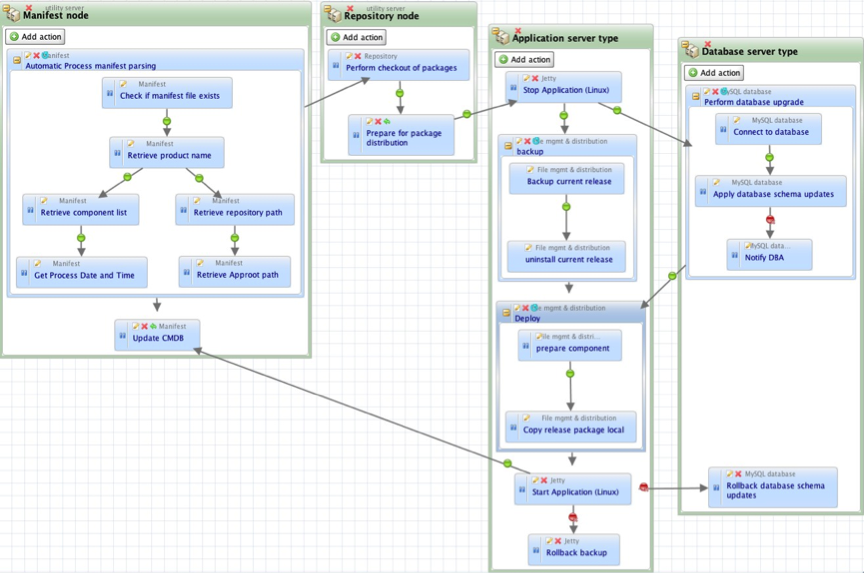
    Process-based automation is a different approach, which was created more recently, to address the needs of application release automation. ARA platforms such as DeployIt and UrbanDeploy and, of course, our own tool Nolio all take this approach. These tools seek to support currently existing application deployment processes, the ones that operators could/would normally step through manually. The focus is on processes, and the tools allow an operator to define them in a visual way, with an understanding of the cross-server nature of application deployments. Let’s say that you need to do something on an application’s web server, then the application server, then update tables in the database, then a second change to the application server and finally another change to the web server. With a server-centric approach (such as those discussed above) it is very hard to orchestrate activities across multiple different servers, to synchronise the changes so they happen at the right time in relation to each other, and even to pass information between those servers. With a process-based system this is straightforward – you define the different server types, drop the relevant steps onto each one and draw links to define the synchronisation points (i.e. only do the db steps once the application server steps have been completed).

    process-based-automation

    Diagram 1 – Screenshot of a Nolio deployment process, including activity on 4 different server types.

    The issues mentioned above such as parallel execution, cross-server synchronisation etc. should already have been dealt with by the ARA platform, rather than having to be created on top of a more generic platform. As you see from the diagram above, with an ARA platform cross-server synchronisation is simply a case of drawing a dependency link between an action on one server type to an action on another server type. Now “Stop Application” action on the “Application Server Type” will not run until “Prepare for package distribution” on “Repository node” has been completed.

    In addition to this, process-based automation brings the following benefits: there is no need to modify the deployment process to fit the automation tools’ inability to synchronise activity across multiple servers, thus ensuring the consistency between manual and automated approaches is maintained; the defined process can be used as documentation for how the deployment should be done as it is inherently very readable; there is a detailed and relevant audit trail because the process is inline with how the deployment would be done manually, and it is much easier to diagnose issues because the process follows the expected steps.

    You can read more articles on Application Release Automation on Nolio’s Blog Site.