Tag: Python

  • Microsoft kills Python 3.7 ¦ … and VBScript ¦ Exascaling ARM on Jupiter

    Microsoft kills Python 3.7 ¦ … and VBScript ¦ Exascaling ARM on Jupiter

    Welcome to The Long View—where we peruse the news of the week and strip it to the essentials. Let’s work out what really matters.

    This week: VS Code drops support for Python 3.7, Windows drops VBScript, and Europe plans the fastest ARM supercomputer. (more…)

  • Threads: Twitter Killer or Ad-Infested Hellscape?

    Threads: Twitter Killer or Ad-Infested Hellscape?

    Welcome to The Long View—where we peruse the news of the week and strip it to the essentials. Let’s work out what really matters.

    This week: Meta launches its much-leaked Threads microblogging app. A spinoff from Instagram, it’s already reached 30 million signups at the time of writing—even before it’s available in the EU. But how is Meta’s DevOps team making it scale? (more…)

  • US DoJ Makes PyPI Give Up User Data ¦ Tape Storage: Not Dead

    US DoJ Makes PyPI Give Up User Data ¦ Tape Storage: Not Dead

    Welcome to The Long View—where we peruse the news of the week and strip it to the essentials. Let’s work out what really matters.

    This week: PyPI complies with a “string of subpoenas,” and LTO continues to grow, despite predictions of its demise. (more…)

  • OpenAI to go Open Source — Elon Musk was a ‘Huge Idiot’ ¦ Mojo Risin’

    OpenAI to go Open Source — Elon Musk was a ‘Huge Idiot’ ¦ Mojo Risin’

    Welcome to The Long View—where we peruse the news of the week and strip it to the essentials. Let’s work out what really matters.

    This week: Sources say it’s an open source future for OpenAI, and improving AI perf with Mojo. (more…)

  • Wipro Fires 2-Job Staff | Python Bug from 2007 | Lite Layoffs

    Wipro Fires 2-Job Staff | Python Bug from 2007 | Lite Layoffs

    Welcome to The Long View—where we peruse the news of the week and strip it to the essentials. Let’s work out what really matters.

    This week: Wipro fires 300 for moonlighting at competitors, Python has a nasty 15-year-old bug, and companies are finding new ways to lay people off without calling it a “layoff.” (more…)

  • Checkmarx Report Highlights Need for AppSec Collaboration

    Checkmarx Report Highlights Need for AppSec Collaboration

    A research report published by Checkmarx finds the same basic malicious software developed using multiple programming languages as cyberattackers industrialize their malware development processes.

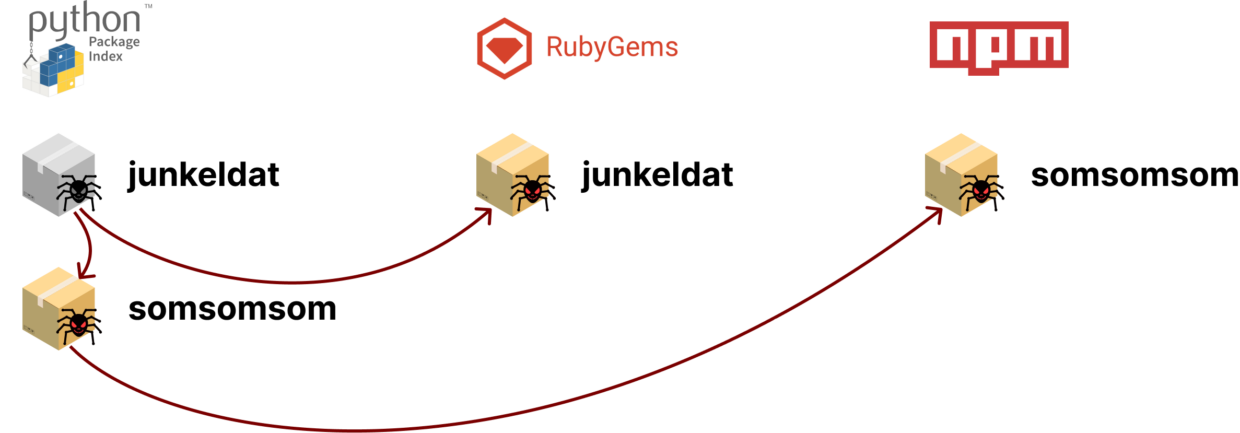
    Checkmarx, a provider of code scanning tools, shared examples of malicious packages written in multiple programming languages. These example packages share the same indicators of compromise that have gone undetected for years. A “junkeldat” PyPI package for Python applications, for example, that has been compromised also shows up in a Ruby version of the package.

    Tzachi Zornstain, head of supply chain security for Checkmarx, said much like any other development team that uses multiple programming languages, it appears cybercriminals are also sharing techniques. These examples highlight the need for development teams to share security intelligence even if they build applications using different programming languages, he added. There is a tendency for development teams using one programming language to ignore application security issues that appear to only impact applications written in another programming language, noted Zornstain.

    The fact that the packages remained undetected for such a long period of time is due—at least in part—to the lack of information sharing in the ecosystem, said Zornstain.

    Cyberattackers are, of course, trying to take advantage of the implicit trust many development teams have in open source projects. However, now that more cybercriminals are making a concerted effort to compromise downstream software components, it’s imperative that every component be vetted, said Zornstain. In fact, organizations should not use any code provided by strangers, he advises.

    The core issue is that many open source projects are maintained by a small number of programmers contributing their time and effort to building components that others are free to use. Many of them argue that the onus for making sure software is secure is on the organizations that decide to deploy that software. Nor is it their responsibility to keep track of cybercrimimals distributing malicious versions of their software.

    Unfortunately, many IT vendors and large enterprise IT organizations that rely on that code are, unfortunately, not contributing anything meaningful back to the project, either in terms of financing or helping open source maintainers find and remediate vulnerabilities. Many of those same organizations, however, are assessing whether the open source software they employ is, from a security perspective, actually sustainable in the absence of those contributions. As a result, it may be only a matter of time before these long-simmering open source software security concerns boil over into a larger crisis.

    One way or another, DevSecOps best practices will need to be applied to application development at a deeper level. Organizations can’t assume that the software components they are relying on have been scanned for vulnerabilities by someone else. It’s simply too easy for a development team to make a mistake. The need for higher levels of security may lengthen the development process, but the alternative—malware infestations wreaking havoc—is far less desirable.

  • Game Developers Shouldn’t Overlook Python’s Potential 

    Game Developers Shouldn’t Overlook Python’s Potential 

    Python is an object-oriented, general-purpose and high-level programming language developed in 1991 by Guido van Rossum. Since its development, Python has become one of the most popular programming languages in the world. It often ranks high in popularity surveys—for instance, it claimed the top spot in the Popularity of Programming Language index and came in second in the TIOBE index.

    Python earned its acclaim as a widely used tool because of its suitability for multiple purposes and for various projects—from data analytics and visualization to artificial intelligence, language development, design and web development.

    That said, Python isn’t exactly renowned for its use in video game development. But should this mean game developers should just disregard Python completely? Not at all.

    Familiarity Breeds Productivity

    Thanks to the language’s simplicity and coding speed, Python is an excellent choice for prototyping. The work product is visible immediately and it’s possible to quickly deliver a playable project to potential investors.

    Therefore, Python is also an ideal language to begin a developer’s adventure with creating games, regardless of whether the user is already fluent in it or just starting out.

    Due to the newcomer-friendly syntax of Python, developers can focus on the basics of game programming, not the complexity of the language itself.

    The effects, which are quickly visible, allow beginners to get actively involved in the process of creating a project. Advanced developers, on the other hand, will appreciate the fact that they can create something playable using their familiar, everyday work tool and that the process of coding will be, as always, very enjoyable and satisfying.

    Preexisting Python Tools and Libraries

    Python programmers can also take advantage of tools that were written specifically for them.

    The most popular library that supports Python game development is PyGame. This engine, available under the LGPL, allows users to build fully commercial projects. Additionally, the library is designed in a way that lets users easily use multiple processor cores. The main functions were written in C and Assembler, thanks to which the user’s project will be 10 to 20 times faster than if it were written in Python alone. This tool is incredibly easy to learn. Its creators also have prepared extensive documentation to help guide users through the process. 

    There are also available tools for 3D rendering, such as Ursina or Panda3D. Of course, these aren’t the only technologies designed for Python users. In fact, there’s a really large selection of available tools and engines such as PyOgre, PyKyra and Ren’Py that are worth checking out.

    Lastly, the Kiva library should also be mentioned. It may not have been created with gaming in mind, but it’s perfectly suited for it. Kiva is a multi-platform tool for creating window applications quickly.

    Python for Game Development 

    If you Google, “Which language should I use for game development?” the first results you see will likely be recommendations to avoid Python. However, that shouldn’t be a deterrent; it can be done! 

    Python has received criticism in the past regarding its use in game development, mostly centering around the fact that Python is not designed for computational performance but, rather, coding performance. This is justified. 

    But if a user, programmer or game developer is already familiar with the programming tools and takes advantage of the preexisting tools and libraries at their disposal, then Python for game development has clear promise, both now and also in the future. 

    If you want proof that a game written in Python can be an international success, I recommend EVE Online—a title that attracts over 20,000 players each day!

  • Everything You Need to Know About Cookiecutter

    Everything You Need to Know About Cookiecutter

    Cookiecutter is a templating library for creating project boilerplates in any programming language. When individuals, teams and organizations create projects, they must follow consistent standards so that those projects are easily readable and searchable. Templates accelerate the code writing process, too, since developers are able to spend less time on setup and can get straight to the actual implementation. 

    Cookiecutter is a Python package, easily installable with pip or other package managers. It enables you to create and use templates for microservices and other software projects. It is a command line tool that doesn’t require knowledge of Python to use. Cookiecutter is widely used among software engineers, researchers, data scientists and other technical roles.

    Creating a template is simple and requires updating a cookiecutter.json file. Using a template requires running the cookiecutter command with the appropriate directory to create a new project.

    Here’s an example template for a Python package that the Cookiecutter team maintains. To use the template, install Cookiecutter first and then run the following command in your terminal:

    Cookiecutter https://github.com/audreyfeldroy/cookiecutter-pypackage.git 

    Go through the series of prompts and voila! In just a few moments, you have the skeleton of a completely functional Python package. Swap out the template for something else and you could just as easily spin up a mobile app, a data science notebook, or any other project on your favorite cloud service. There’s an entire community with thousands of templates to choose from.

    Creating custom templates to fit your and your organization’s needs is also simple and powerful. We’ll cover how to do that below.

    Who is Cookiecutter For?

    Cookiecutter is for individuals, teams and companies to standardize their project development process and accelerate new project creation.

    Example use cases include:

    • Learning a new framework: Cookiecutter lowers the barriers to entry for developers unfamiliar with a particular framework. You can find an expert’s template for a framework you’re learning and quickly get started with a configuration that is known to work.
    • Onboarding: Standardization makes collaboration much more manageable. New team members can immediately follow best practices without the risks of copying, pasting and trying to edit just the correct variables.
    • Enforcing standards in an organization: Consistent foldering, file-naming conventions and other patterns enable large teams to maintain an organized codebase.

    Cookiecutter Features

    Templates

    The heart of a template is the cookiecutter.json file, which might look something like this:

    {

      “full_name”: “Alice Cookie”,

      “email”: “foobar@example.com”,

      “project_name”: “Django Boilerplate”,

      “version”: “0.1.0”

    }

    These key-value pairs determine the prompts a developer needs to answer when using a template. The command line interface iterates over the keys, prompting a developer to set the various parameters. If a developer does not specify something, Cookiecutter uses default values.

    A template needs to have files and directories worth copying and reusing, such as the skeleton code for a particular framework. Cookiecutter uses these inputs to modify the template. To connect this boilerplate to the inputs, Cookiecutter uses the Jinja2 templating language. With Jinja2, Cookiecutter identifies all instances of the text {{cookiecutter.variable_name}} and replaces that boilerplate with the actual value of the variable. This works both within files as well as for file and directory names.

    Loops and Conditional Logic

    Jinja2 is very powerful and can do much more than just text substitution. It comes with control structures including for loops and if statements. It even has macros that are analogous to functions in programming languages. Since all of Cookiecutter’s templating uses Jinja2, it can leverage the same control flow features. This opens up enormous possibilities. For example, you could prompt a developer to specify which device types for which they are building an app and have unique behaviors depending on the response.

    Hooks

    Pre/post-generate hooks let you run Python or shell scripts before and/or after generating a project. Inputs from the template prompts are fair game within hooks and work similarly to the way they would elsewhere in the project with Jinja2 syntax. This means you can run a script to validate a developer’s responses to the prompts. Other applications of hooks include cleaning up unwanted files or otherwise using logic that would be complicated by just using Jinja2.

    What Are the Limitations?

    By design, templates are prescriptive with regard to a project’s setup, presenting all kinds of advantages as discussed above. On the other hand, a template might be opinionated in a way that does not align with either an individual developer’s or an organization’s preferences. In that case, it may be worth choosing another template or revising an existing one. Forcing a template in a situation that doesn’t make sense is less-than-ideal.

    What Are Some Alternatives or Extensions?

    Boilerplate for Specific Frameworks

    While Cookiecutter is compatible with almost any framework, some frameworks do have custom boilerplate that is readily available. If you were to start a React app, for example, there is a great boilerplate available to use as a starting point, and other communities often maintain similar ways to get started. Boilerplate is not incompatible with Cookiecutter, and you’ll find templates from popular boilerplate that you can use, too.

    Cruft Keeps Templates Organized

    As with any new process, there is some overhead involved to stay organized with Cookiecutter. When a team starts to manage dozens of templates or more, it’s especially important to keep templates up-to-date. Cruft works alongside Cookiecutter to not only make projects but to update existing ones as a template evolves. Cruft also has template validation capabilities to ensure projects match the latest version of a template.

    Learn More About Cookiecutter

    The Cookiecutter community has lots of resources to help you dig deeper.