Tag: Provisioning

  • HashiCorp Adds Business Tier to Managed Terraform Service

    HashiCorp Adds Business Tier to Managed Terraform Service

    HashiCorp today announced it has added a Business tier to the HashiCorp Terraform Cloud that expands the managed service in a way that provides advanced security, compliance and governance capabilities along with the ability to execute multiple runs concurrently and take advantage of more flexible service level agreement (SLA) options.

    Meghan Liese, director of product marketing for HashiCorp, said this new tier addresses the requirements for enterprise IT organizations that are looking for a way to enable teams of developers to more securely provision IT infrastructure using open source Terraform tools.

    For example, the Business tier of the service provides integration with single sign-on tools provided by Okta, while auditing of logs is provided via integration with tools from Splunk. This tier also provides access to private networks with fixed IP addresses as well as self-hosted agents to interact with other management planes if required.

    HashiCorp reported that since launching a managed service last year for IT organizations that don’t want to provision the servers, it is now adding more than 5,000 new users per month, with 500,000 runs to provisioning infrastructure executed monthly.

    The other two existing levels of services provided by HashiCorp are free instances aimed at individual developers and a Team and Governance services that can be employed to create teams that manage and govern reusable instances of configurations.

    Liese said HashiCorp launched the Business tier in part to respond to the needs of enterprise IT organizations looking to automate the provisioning of IT infrastructure at scale. While there is a lot of free-rein usage of open source Terraform tools, Liese said enterprise IT organizations need to ensure security and meet compliance requirements.

    Those same enterprise IT teams also tend to provision IT infrastructure concurrently, which, Liese noted, means waiting for one configuration to be completed before another is launched isn’t practical.

    Terraform has gained a lot of traction among individual developers who have shown a tendency to prefer open source tools to provision IT infrastructure. That momentum has enabled HashiCorp to provide IT organizations with both commercial support for instances of Terraform they deploy and manage as well as via a service through which instances of Terraform are managed and updated by HashiCorp.

    Regardless of the path chosen, the number of IT teams provisioning IT infrastructure as code has increased substantially. Less clear is to what degree that provisioning is being done by developers versus IT operations staff who have mastered Terraform. At a time when many organizations are unable to add more IT personnel, the need to automate the provisioning of IT infrastructure has never been more acute.

    Of course, there are still more than a few IT teams who prefer to rely on IT administrators to provision IT infrastructure using legacy tools. However, as the pressure to become more agile continues to steadily increase, it’s now only a matter of time before the manual workflows constructed using those tools are rendered obsolete.

  • Kemp Adds Predictive Analytics to ADC to Advance DevOps

    Kemp Adds Predictive Analytics to ADC to Advance DevOps

    Kemp this week enhanced the automation and predictive analytics capabilities it makes available within its application developer controller (ADC) as part of an effort to ease deployment of applications across multi-cloud computing environments.

    Company CEO Ray Downes said the goal is to make it easier for DevOps teams to avoid overprovisioning IT infrastructure, at a time when applications are more distributed than ever.

    The Kemp ADC offerings are comprised of a mix of physical and virtual appliances that have now been deployed more than 60,000 times. The volume of data generated by those deployments now makes it possible for Kemp to apply predictive analytics via a 360 Central monitoring tool that, for example, can now make suggestions concerning where to deploy a workload based on current utilization rates, Downes said.

    Kemp also now can provide comparative analytics, he noted. For example, the company revealed that its analytics show 61 percent of application experience issues are related to events caused by capacity issues such as failing or degrading application servers. Kemp also revealed that 48 percent of organizations see as many as nine application incidents per week.

    Now that Kemp has begun to apply predictive analytics to its ADC platforms, Downes said the next logical step will be to apply machine learning algorithms to help further automate application deployments.

    While ADCs provide critical load balancing capabilities, they are often overlooked as a source of actionable intelligence for DevOps teams. That data is more critical than ever because as IT organizations modernize their application portfolios by embracing more complex microservices, many of them are discovering every application will soon require its own load balancing capability. Previously, the primary role of an ADC had been to enable as many applications as possible to share the same IT infrastructure efficiently. Now the goal is becoming to orchestrate and optimize the allocation of IT infrastructure resources across a range of loosely coupled microservices. The Kemp ADC is designed to enable DevOps teams to define a desired state of all the load balancers in the distributed IT environment, including F5 Big-IP, AWS Elastic Load Balancer, Nginx, and HAproxy load balancers. That capability then makes it easier to roll out distributed application services.

    Over time, Downes said Kemp will extend that capability to open source load balancers such as Envoy, which are starting to be deployed on top of Kubernetes clusters. Both Kubernetes and Envoy are being developed under the auspices of the Cloud Native Computing Foundation (CNCF). As critical as load balancing will be within a Kubernetes cluster, however, Downes noted distributed applications will span cloud-native and legacy IT infrastructure environments as well as multiple Kubernetes clusters.

    It may take a while for DevOps teams to fully sort out what form of ADC platform and load balancing capability to employ when and where. But as IT becomes more distributed, there’s rising interest in making sure IT infrastructure utilization rates for those applications remain as high as possible regardless of how they have been developed.

    — Mike Vizard

  • 6 Big, Bad Mistakes in Configuration Management, Part 2

    6 Big, Bad Mistakes in Configuration Management, Part 2

    In Part One of my article on big, bad mistakes in configuration management, I reviewed the dangers of using the wrong tools for the configuration management job. Provisioning management tools, application release automation tools and continuous integration tools each have their place in your DevOps toolchain. But they should not be used as a substitute for ongoing configuration management. In this article I am focused less on misusing tools and more on bad practices, limited thinking and short-sightedness that should be avoided.

    Mistake No. 4: Direct Server Access to Production

    This one may not bite you … until it does. I’ve worked with many companies where developers have direct access to Production. This is not good. And, in many cases, it is a violation of compliance policies. Please don’t take offense, my developer friends. You shouldn’t want direct access to Production. I find that 9 times out of 10, your code is not the problem—the configuration is the problem. However, you’re being asked to log directly into the server to do comparisons between your environment (where it worked just fine) and Production. This leads to the, “How did he fix it?” problem, and it leads to the dreaded typos and other manual errors. I’ve witnessed companies lose millions of dollars in a matter of minutes because someone logged directly into a server and made an incorrect configuration change.

    The question is, How do you cut off direct access to Production? How do you quickly find configuration differences between environments without logging into the server? The answer is a good configuration management solution that quickly shows differences between the environments for all your tiers. This is easy when you’re doing file-to-file comparisons, but what about registry key comparisons, or WebSphere comparisons? Find a configuration management tool that gives you visibility fast, exactly when you need it, for the important parts of the stack that keep your applications running. And insist on a configuration management solution with robust RBAC (role-based access control) over what changes can be made, where and when they can be made, who can make them and even who can approve them.

    Mistake No. 5: Leaving Your DBAs Out of the Picture

    The majority of companies I work with have completely disconnected database and middleware teams—the DBAs don’t really know what the middleware team is doing and the middleware team has no visibility into what the DBAs are doing. I believe there are a couple reasons for this: people and technology. We won’t worry about the people aspect today, other than to say that each team thinks the other team is “quirky” J. From the technology aspect, traditional tools simply do not provide configuration visibility into both the middleware and the database tier. So the DBAs end up having one toolset, and the middleware team a completely different toolset. This prevents collaboration, orchestrated releases, and the complete configuration picture that’s needed to make sure your application is fully configured, performing, and running correctly.

    This is a big problem. In fact 37 percent of survey respondents admitted that they relied on scripting and manual processes to determine which databases were used by which applications in their ecosystems. And another 38 percent admitted they don’t even have a way to determine this information. Talk about blindfolds! My advice is to find a solution that both middleware and database teams can use. That doesn’t necessarily mean the DBAs will replace their favorite tools, but they’re now involved in the process, allowing that collaboration and orchestration that was missing.

    Also, if you use a single, integrated configuration management solution your management, middleware, OS and DBA teams will all have visibility into every aspect that makes the application run. The middleware team can see if there are schema changes that may be causing an application issue as opposed to spending hours looking for a middleware configuration issue they’ll never find, or vice versa. Having one unified tool cuts down on the mean time to diagnose because you can see all the tiers in one place.

    Mistake No. 6: Focusing Only a Single Part of the Stack

    The previous “big, bad mistake” segues nicely into this one: focusing on just a single part of the stack. There are many tiers supporting your application, and we’ve touched on several in this series—namely middleware, database and OS. Within each tier you may be supporting different technologies. Some applications may be running on IIS with a SQL Server back end while others run on WebSphere with an Oracle back end. Then you have the operating system settings to worry about: making sure registry keys are set, system services have the right accounts, filesystem permissions are accurate, all the correct versions of Linux packages are installed, etc.

    Based on a lack of comprehensive coverage up and down the application stack, many companies have chosen to explore configuration management tools for just a single part of it. These point tools tend to focus on the most business-critical applications, the one where they hit the most configuration issues or simply the one that’s most difficult to manage. This is not necessarily a bad thing to do, but take care not to be too single-minded. Try not to choose a configuration management solution that works well for one part of the stack but not others, or that works very well in one environment (Linux/Unix), but not very well in another (Windows). Managing these disparate point solutions, with maddening gaps and overlaps in coverage, can be exhausting.

    Choose a tool that’s extensible to other parts of the stack, business or other teams. My suggestion is to make a list of all present and future technologies you use that need configuration management support. Divide them into different parts of the stack and then rank them from “most onerous to manage and/or most business critical” to “nice to have.” Refer to this list when evaluating configuration management tools so you don’t lose sight of the forest from the trees. Make sure the tool can support all your top items and ask about their road map for your “nice to haves.”

    Tune into our upcoming webinar, which will touch on these topics as well.

    About the Author / Kristy McDougal

    Kristy McDougal leads Product and Sales Engineering for Orca, an application release and configuration automation solution for DevOps teams. Prior to launching Orca, Kristy was a Senior Pre-Sales Consultant within BMC Software’s worldwide DevOps specialist team. Before BMC, Kristy held technical positions at VaraLogix, Virtual Bridges, Global Foundries and Advanced Micro Devices. Her experience includes Unix systems administration, systems engineering, pre-sales consulting and post-sales services. Kristy is ITIL Foundation-certified and is an electrical engineering graduate of the University of Texas at Austin.
  • 6 Big, Bad Mistakes in Configuration Management, Part 1

    6 Big, Bad Mistakes in Configuration Management, Part 1

    Configuration problems come in many flavors. Some are mere nuisances. Often though, configuration errors can lead to more serious mishaps like application performance problems, policy compliance violations or even security vulnerabilities. They can often go undetected, quietly doing their damage in the background while everyone’s attention is focused elsewhere.

    Unfortunately, I find that configuration management is an area where many companies either 1) put it as a “last to solve” on their priority list (when arguably it’s quite important), or 2) try to solve it with a do-it-yourself fix, but in a way that’s not always extensible or that doesn’t end up working with their DevOps toolchain.

    Usually, I find configuration issues stemming from the age old problem: using the wrong tool for the job. In this blog I’ll address six big, bad mistakes of configuration management. (For the sake of brevity, three will be addressed here and three in an upcoming blog.)

    Before I get into it, though, there are so many definitions of configuration management that it warrants a brief summary so we’re all on the same page. I’m talking about the ongoing configuration management of the infrastructure tiers supporting your applications—the middleware, database and OS-level configurations that keep your applications’ lights on and everyone happy.

    Mistake No. 1: Only Considering Provisioning

    Notice I just mentioned the word “ongoing” in my definition of configuration management. I find that so often people forget to take the ever-important “ongoing” into consideration. I have many conversations with folks wanting to implement a “provisioning tool.” On the surface, they think they need just that: a tool that provisions infrastructure including all the tiers of the application. But when I probe further, what they’re really wanting is something that provisions and then continues to monitor, manage and fix. There’s a big difference there.

    Some tools do great at provisioning but lack the visibility and “ongoing” configuration management needs. Think of a provisioning tool as waving a bat at a piñata. Yes, you can “blow away your environment” and start over, but that blindfold prevents true visibility and ongoing interaction.

    When looking for configuration management, be sure to focus on your current and future needs. Do you just need a provisioning tool? Or do you need an ongoing configuration management tool? Or both? Most tools that tout doing both do one much better than the other, so be sure to do your research.

    Mistake No. 2: Using an ARA Tool to Manage Configurations

    In a previous position I spent quite a bit of time onsite with clients helping them automate their application deployment processes. What I found is that around 80 percent of “application deployment” tasks are actually configuration tasks. The application deployment is the easy part; it’s the configuration management aspect that causes all of the headaches. I would spend the majority of my time onsite hurriedly writing little scripts that would be hurriedly inserted into the deployment process that would set the application pool, restart the service, change a heap size, etc. I had to write the scripts because application deployment products are workflow automation engines with process wrapped around them. They are not meant to be infrastructure configuration management products.

    It bears repeating: Traditional application deployment solutions are not meant to be infrastructure configuration management products. They can get you part of the way there, but 1) you’ll need to script it all, which is not extensible and defeats the true purpose of a tool, and 2) they simply catapult your application (one way only!) into the next environment (i.e. Test to Staging, Staging to Prod), so you can forget about the “ongoing” piece we discussed above. Compare that one-way catapult launch to the complexity of routinely engineering one safe launch (and landing!!!) after another on an aircraft carrier on the open seas. A mission-critical task like this requires advanced technologies, visibility, communication and coordination to account for constantly changing environmental factors.

    Mistake No. 3: Using a CI or Build Automation Tool When You Need Configuration Management

    As bad as misusing an application release tool when you really needed a configuration management solution, it’s even worse using a continuous integration tool for this. Like many DevOps solutions, CI tools are particularly helpful for developers. CI tools like Jenkins and Bamboo require Dev teams to share or check in their updated code into a repository. The CI tool then detects potential problems early by automatically verifying builds for the developer. From the Dev team’s perspective, there is no more wondering if their code is going to work, and they spend less time debugging and redoing. The financial benefits of CI and the early warning system they provide should be obvious and considered a must-have for developers.

    But while detecting coding errors early saves a lot of hassle for the Dev and Test teams, Ops teams do not directly benefit from CI. Here’s why: Operations teams are concerned with the application release into Production environments and then the ongoing configuration management of the entire application stack including the application, middleware, database and operating system. Once the (application) baton is passed to them, they require visibility into and intelligence about the application’s operating environments—well after Dev and UAT. As good as they are for Dev teams, CI tools are simply not equipped to provide ongoing operations support, visibility and coordination in Production that modern Configuration Management solutions provide.

    These are just a few big, bad mistakes in configuration management and they focus largely on misusing tools beyond their intended scope. I will follow up with a Part II companion article that addresses configuration management practices to be avoided.

    Tune into our upcoming webinar, which will touch on these topics as well.

    About the Author / Kristy McDougal

    Kristy McDougal leads Product and Sales Engineering for Orca, an application release and configuration automation solution for DevOps teams. Prior to launching Orca, Kristy was a Senior Pre-Sales Consultant within BMC Software’s worldwide DevOps specialist team. Before BMC, Kristy held technical positions at VaraLogix, Virtual Bridges, Global Foundries and Advanced Micro Devices. Her experience includes Unix systems administration, systems engineering, pre-sales consulting and post-sales services. Kristy is ITIL Foundation-certified and is an electrical engineering graduate of the University of Texas at Austin.

  • The One Simple Reason to Consider Clustering

    The One Simple Reason to Consider Clustering

    As you may know, I’m pretty interested in the newest round of clustered computing these days. I’m digging in pretty deep to see how well-suited it is to the enterprise, and how it is best used/architected/implemented.

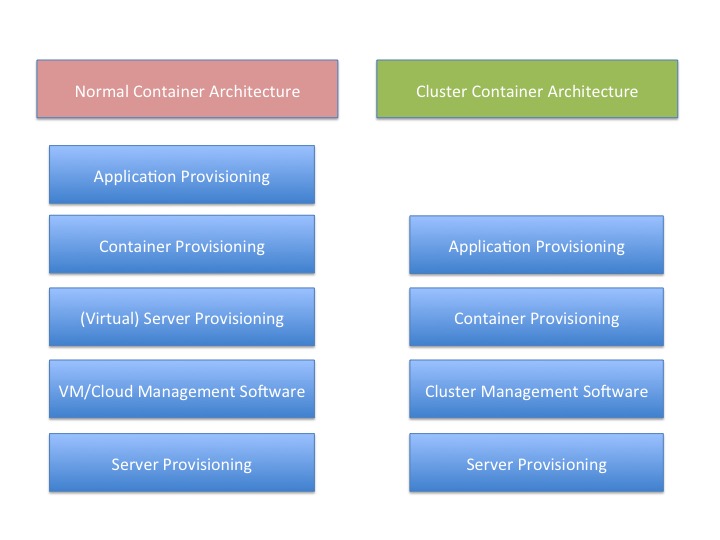
    There is a reason for that, and I think this graphic probably gives it away:

    You’ll note that “container provisioning” is in there. It doesn’t need to be. If your environment is running without containers at this time, then simply remove that block from both sides of the diagram and remove container from the titles.

    The fact is that there is one less step in any provisioning environment short of one app, one server.

    And remember that this abstraction doesn’t touch on storage provisioning, AAA or OS upgrades at two different levels (or in some scenarios three).

    And that’s a big deal. Not just because you have one less layer for deployment, you also have one less layer for maintenance, one less layer for security, one less layer for logging … It’s a big deal. As I’ve mentioned before, we have increased the complexity of the operations environment to the point that some form of DevOps is nearly required to keep a modern or cutting-edge data center running smoothly. The newest round of clustering solutions removes one layer from the architecture stack, reducing that complexity a little bit. Of course, it is just a slowing in the growth of complexity, but it’s better than a “Damn the torpedoes, full speed ahead!” approach to complexity.

    The thing is that clustering software has been around for a very long time—I was briefed back when VMware was just making a name for itself about a clustering solution that was aimed at gaming sites. I never wrote about it because VMware stole the thunder, and the company couldn’t reference any customers except gambling websites—not exactly an easy comparison to make with enterprise environments. This briefing was my first, but clustering existed long before that, even.

    But this round is different than most recent clustering solutions. It focuses on resources and scheduling, not on making a special-purpose large-sized computer. This round of clustering software makes a large computer that looks to apps like Linux. That’s a far more useful abstraction, if it works without a ton of overhead.

    And the overhead is what I’ll be digging into over the next few weeks.

    But yes, I think it’s a great idea. Give me a big old expandable Linux box, make it look exactly like Linux to my apps and let’s see what it means for app growth.

    — Don Macvittie

  • FLAP, Part 3: Full Data Center Provisioning

    FLAP, Part 3: Full Data Center Provisioning

    In the first two parts of this series (Part 1, Part 2), we covered server provisioning and application provisioning. Knowing a bit about each of these tools is useful (although one blog is hardly a thorough evaluation of strengths and weaknesses—I strongly suggest you do more research), knowing how they work together is the point of full layer automated provisioning (FLAP). Automating one or the other helps, but automating both—and integrating that automation—brings us to the level of “Oh, engineering needs a new test environment, and it has to be internal …” and, with a push of a button, it is delivered. That should be the long-term end goal for your organization, so staff time is free to attend to some of the many other issues that plague any given IT organization.

    The thing is, these tools combine in both better and worse ways. Some are designed to work together as if one product; some take some work to get going but the combination adds value once connected; and some combinations are painful to put together and almost never are worth the effort.

    One thing you’ll note is a repeated discussion of OS support for combined solutions. The reason we address it here, even though we have limited words and it’s already been mentioned in product write-ups, is simple: The limitations of these combinations are compounded. That is, if the server provisioning tool doesn’t support Windows, then the complete solution does not, no matter what the application provisioning tool does. This applies both ways, and is an important consideration for most shops, so we mention it here.

    Tools Built to be Together

    First off, we’ll take the easy ones. These are the combinations that were designed to work together, and do so pretty well. They vary in maturity level, but otherwise, they’re good options if they fit into your environment.

    Razor and Puppet

    This is the easy one. Razor was built to be the server provisioning part of Puppet. While the solution set is relatively new, and it shows in the installation phase (which has several manual configuration steps both before and after Razor install), it is maturing rapidly, and the two dev teams work pretty closely together. This is one of only two solution sets that uses a single UI for all provisioning—in this case the Puppet UI. Support for operating systems is broad, including all versions of Linux and Windows to boot. (get it? To boot?) If your data center is highly heterogeneous, or you are already a Puppet shop, it is worth looking closely at this combination. You just have to keep in mind that it is improving at a rapid rate, so those things you don’t like likely will change soon.

    Satellite + Puppet + Foreman

    As of version 6.0, Satellite is a collection of tools knitted together that include Puppet with Foreman. This means that Red Hat has a vested interest in making certain the two tools work well together. And they certainly seem to. While the operating systems support is limited to Red Hat OSes, the solution is pretty rock solid, and like Razor and Puppet, it is improving at a rapid rate since the switch to this new platform. The UI is independent of the tools underneath, and this is the other solution that offers a “single pane of glass” for all installation activities. The one catch with Red Hat, as mentioned before, is that the functionality of underlying systems is only supported when used with Satellite. How that fits into your organization’s plans is up to you.

    Close Enough to be Second Cousins

    There are some combinations that, while not officially interdependent, have a long history of mutual support, and thus make them strong combinations. These tools tend to come with straightforward directions to make them work together, and those instructions generally work well. Once paired, they can manage complete automation in a relatively integrated fashion.

    Note that these combinations are not even a little exclusive. They are pairings the project teams saw made good sense, and have grown out of closeness. Both sides of these solution sets interoperate with other tools (see the next section).

    Ansible + Cobbler

    Ansible and Cobbler both trace their genesis to Red Hat, and they share some employees/team members—and have for a long time. That makes it natural that the two are closely integrated. Before Ansible started discussing all of the other server provisioning tools out there, it already had Cobbler integration.

    As one would expect, there is Ansible setup, Cobbler setup, and then integration. But once combined, Cobbler can do for bare metal, Ansible can do for cloud, and together they provide a full-stack solution. Since both support most operating systems, the final solution does, too.

    Juju + MaaS

    Juju and MaaS have interoperated for a long time. Both are projects of Canonical, so it is no surprise that their interoperability continues. Years ago this author used them together and it was … difficult. But that was years ago, and just in the last year both projects have made strides in documentation and ease of use. Like most solutions in this category, there are separate installations and then integration configuration. Since both support a large number of operating systems, this solution can manage the full data center also.

    Their traditional home, and the one you’re most likely to be comfortable with them in for the short term, is Ubuntu-heavy shops. But they do support most platforms out there, so it’s worth the time to look into them even for non-Ubuntu shops.

    The Extended and Mixed Families

    Then there are the ones that have not forged solid one-on-one relationships, some because they are forging a separate path and some because they want to interoperate with everyone. Note that some of the above systems meet this category—Puppet is integrated with most of the server provisioning tools out there—but due to space considerations, we’re not going to go over those products again here. This list contains both application provisioning and server provisioning tools not mentioned above.

    Chef

    Chef has put the bulk of its focus on cloud and virtualization, with the notable exception to this trend being in AIX, where it does support server provisioning. “The bulk of its focus” is not absolute, though, and that’s on purpose. Chef has had presenters at the annual conference talk about using it with server provisioning tools, so it isn’t unaware of the integrated solution space, just that’s not where their focus has been.

    SaltStack

    The Salt crew is happy to support everyone. While they don’t talk loudly about whom they are integrated with, the product is in use with most major server provisioning tools out there. As mentioned in the SaltStack write-up in part two of this series, cloud integration is pretty broad also, making Salt perhaps the most versatile of the application provisioning tools with regard to full data center automation.

    Stacki

    Originally built to interoperate with SaltStack, Stacki (disclaimer: this author’s employer) has moved on to support most of the availableapplication provisioning tools. The catch with Stacki is that some are supported with sample integrations and video tutorials at the open source layer, while others require a license and engagement of Stacki core engineers to obtain support. So there is a video showing Ansible and open-source Stacki working together and talking about the integration, but it would require a paid license and negotiation to get SaltStack or Chef with Stacki. Because of the way Stacki is designed, it is perhaps the easiest of all these products to integrate—simply add the appropriate “Pallet” and tell Stacki to include it in installations. It is getting the correct pallet that requires licensing for some platforms.

    Conclusion

    Since any server provisioning tool that allows users to customize the install can have the agents for a given application provisioning tool be the last step of a given install, these overviews are at least a little bit arbitrary. To be precise, they are easier to use in the given configurations, but all application provisioning tools can be forced to interoperate with any of the server provisioning tools listed.

    The point of this series was really to help those looking into full data center automation quickly get up to speed on what’s available in the marketplace, and as much information as a few 1,200-word blogs will allow to help shorten the list to ones relevant to your organization. It is by no means complete, and there are issues and concerns with each of the products that only further research will bring to light, so don’t stop here.

  • FLAP, Part 1: Server Provisioning

    FLAP, Part 1: Server Provisioning

    We have reached the state where end-to-end data center provisioning is a reality. It’s early yet, so there is a certain amount of work involved, but today a DevOps team essentially can turn on the automation and move on to other DevOps priorities. It takes some effort, depending upon the solution chosen, but the end result is an infrastructure that provides for installation of operating system (OS), hardware (if needed) and apps, along with configuration of the whole, at the push of a button.

    There are a number of solutions ready for your data center today, and this three-part series will explore them. In the first part, we’ll talk about server provisioning—the part that takes you from uninstalled server or virtual to a functioning OS configured for your environment. The following two articles will cover application provisioning and merging the two to achieve FLAP. (Yes, I made up FLAP. Use it or not, as you see fit.)

    Disclaimer: I work for a vendor in this space. While I do not believe that impacts my objectivity, I will note where my employer is mentioned, and leave it to the reader to decide if I’m blinded to some items/issues based upon my association.

    Server Provisioning: What and Who

    A server provisioning system takes a physical or virtual server from nothing to fully installed OS. This layer of FLAP is fundamental to automating the entire process. If the system has to be installed manually, using tools and scripts to install applications just doesn’t offer the overall benefit as when the entire process is automated.

    For this discussion, we will be sticking with the major provisioning tools out there. To be sure there are more, and I have information about them, but for this short blog post, we’ll stick with the ones that hold something special—market share, history, integrations, associations—that make them a good long-term bet. Our list is alphabetical, and does not show preference by ordering.

    Cobbler

    Cobbler is one of the original server automation tool sets, and definitely has the history and stability to warrant your attention. For shops that use a lot of Fedora and CentOS, Cobbler in combination with Spacewalk is particularly appealing, as we’ll talk about later. Support includes most Linux distributions. Users have created ways to include Windows in the list of installable OSes, but there is not yet an official solution for Windows.

    Cobbler is integrated with Ansible, Spacewalk, Saltstack, Puppet(user created), and older versions of Satellite. There is some amount of concern about Cobbler’s future growth, simply because Red Hat moved Satellite off of Cobbler with release 6.0, though Red Hat still supports Cobbler. It is too soon after the split to predict how this will fall out, but currently it seems to have motivated the Cobbler core team to do more. Users concerned should check GitHub analytics to see what the trends are for committers and commits at the time they are evaluating (good advice for all of these products, but more pertinent for one where there is a question of its future).

    Cobbler’s hardware support is better than most, and in terms of application support it is a pure-play server automation tool; there is no support for applications at all—application provisioning is expected to deal with that aspect.

    Foreman

    Foreman is an open source project that is currently enjoying the sponsorship of Red Hat, but support is not limited to Red Hat OSes. In fact, Foreman will install just about any flavor of Linux, and can target most physical/virtual/cloud platforms. Using WDS, Foreman can also install Windows.

    One of the big strengths of Foreman is its interoperability—it doesn’t much care which application provisioning tool you are using. It is integrated into Satellite (with Puppet), and has support for all of the other major application provisioning tools. This means that no matter what you’re using to get your apps installed, Foreman is worth looking at for getting your servers installed.

    Like most products out there, Foreman provides CLI, API and GUI. They’re relatively stable in relation to the market, simply because Foreman implemented them earlier than most competitors, and is constantly improving them.

    In short, if you are in an environment that has a wide selection of OS, architecture and application requirements, Foreman should be at the top of your short list. For more focused solutions (in terms of OS, whether or not cloud, or application provisioning tools), it makes more sense to compare specific features/functionality with some of the more focused tools in this list.

    MaaS

    MaaS was the sleeping giant of the automation world, but it does indeed look as though it is awakening. MaaS is part of Canonical’s Ubuntu project, so there is plenty of backing, but historically its goals have been modest and its documentation more so. That changed some time over the summer/fall, and MaaS is showing increased support for OSes, better documentation and a more focused attempt to get the word out. If you are primarily an Ubuntu shop, it is well worth considering.

    Like most of the products in this offering, MaaS uses PXE to get the machines into its system, and then uses predefined images that have been imported (Ubuntu images don’t need importing) to install a machine from bare metal/virtual to working OS. MaaS proclaims support for CentOS, RedHat, SuSE, Ubuntu and Windows. For those unfamiliar with the space, that’s an impressive list. But the last time this author used MaaS, it was still only Ubuntu, so I cannot comment on the level/quality of support for each of the OSes. Due diligence should involve testing with those OSes your organization needs.

    The weakest part of some installers is non-standard hardware, such as RAID controllers, specialized network cards and the like. MaaS supports these components and includes UCS support in its packaging. Directly mentioning UCS support is only to be found with MaaS and Stacki, so if you’re a UCS shop, it is worth considering.

    In addition to CLI, MaaS touts an API and a GUI. These are important tools in the DevOps sense, because the API lets you tie MaaS into your automation architecture, and the GUI helps find issues specific to MaaS and its domain. Particularly interesting is the collection of logs that show install results and operations results clearly for each server.

    The one major drawback to MaaS is its limited application provisioning support—it is well-integrated with Juju, but none of the other big names in the space.

    In short, for Ubuntu shops using Juju, this is the tool to put at the top of your short list. For everyone else, the tool is viable, but should be considered against the features/functionality of other tools.

    Razor

    Razor is Puppet’s newer bare metal installer. It is young yet, and there are still issues to be worked out, but the large cadre of developers that are dedicated to Puppet say that Razor will continue to improve as time moves on. At current it directly supports most flavors of Linux and Windows installations. The catch to Razor is on the other end: It is designed to work with Puppet, and support for other application provisioning tools is low—indeed, is limited to user-designed solutions. Needless to say, because it is sponsored by Puppet, it is expected that official work in this area will remain slow, as it is not a priority.

    Razor does not have a dedicated GUI; instead, it uses Puppet’s GUI to report results. As with integration, this is okay for Puppet shops but pretty much eliminates Razor from consideration for other shops. (More on this in a future blog in this series.)

    Because Razor is new, there are a couple of serious caveats with the product. First, install is one of the worst in the market, with a lot of pre-install steps, a lot of install steps, and configuration of an array of underlying systems by hand. Second, each currently installed server that you do not want Razor to re-install must be entered into Razor manually on the command line. This is so limiting in a generalized data center environment (where Puppet shines) that you can expect this limitation to be resolved quickly.

    In short, for Puppet shops that do not see their application provisioning tool changing, this is the tool to put at the top of your short list. For other shops, it’s worth looking at competitors first, simply because Razor requires Puppet.

    Stacki

    Stacki is an open source project sponsored by StackIQ (as promised, this is my employer). Having roots that stretch back more than a decade, Stacki specializes in RedHat/CentOS installations with additional support for clustered software. As of this writing, CoreOS and Ubuntu have been added to Stacki’s list of supported OSes, and expect that list to grow over time.

    The biggest appeal of Stacki is the variety of ways to get systems under management. All of these apps will auto-detect a new server on the network, grab it and install it. Stacki adds the ability to list just the servers that should be clean-installed in a spreadsheet, the next time each of those machines boots they will be installed, but no other machine will. While there are ways in all of these systems to simulate this functionality—you can add exceptions to the “install all machines that boot on this subnet” rule via the command line in Razor, for example—using a spreadsheet to affirmatively manage what machines are to be installed and how gives an offline bulk way of managing installations and re-installations.

    As of this writing, Stacki does not have an API, and only with commercial add-ons can a GUI be had, but expect one or both of these things to change as the community begins guiding development efforts. Stacki is optimized to spin out hundreds of servers in minutes or hours instead of weeks or months, utilizing a peer-to-peer parallel installer to service installations faster as more servers come online. While it works as well as others in smaller environments, it really comes to its own when there are a large number of servers under management. On the initial installation front, while the other systems in this list require hand-installing and/or configuring prerequisites and sub-systems, Stacki comes as an ISO with a UI that asks a few questions and configures everything.

    Stacki has been used with most (Ansible, Puppet, Saltstack) of the major application provisioning tools this series of blogs will consider, making it versatile on the application side of the equation.

    Overall, if you’re a Red Hat shop that uses CentOS a lot—particularly a larger shop—Stacki should be the first stop on your short list. For everyone else, the tool is viable, but should be considered against the features/functionality of other tools.

    Stay tuned for part two of this series, which will cover application provisioning.