
One way of saving time when writing code is with stored procedures; prepared SQL code that you can save so the code can be reused over and over again. Stored procedures are a powerful vehicle for speeding up your code and giving you gains in performance.
Stored procedures have many benefits—they can be easily modified, are reusable and they possess the ability to automate a task that requires multiple SQL statements. Another advantage of stored procedures is the ability to access or modify data in a database.
Before incorporating stored procedures, it’s important to know exactly what a stored procedure is, how it differentiates itself, how to create a stored procedure and how to use them in embedded analytics.
Performing Tasks With Stored Procedures
A stored procedure is defined as a set of SQL statements and other PL/SQL constructs that are stored in a relational database management system as a group that you can save and reuse. A stored procedure can be comprised of multiple SQL statements like SELECT, INSERT, UPDATE or DELETE. These statements run as a unit and are used to solve a specific problem or perform a set of related tasks.
Stored procedures are among the most frequently used and most popular database subjects. Using stored procedures can help simplify and speed up the execution of SQL queries.
Stored procedures can reduce network traffic between servers and clients, for example. This is a result of the commands being executed as a single batch of code rather than multiple. Rather than every single line of code being sent for execution individually, only the call to execute the stored procedure is sent to the server.
The other benefits of using stored procedures include maintainability, performance and efficiency and complex business logic. And maintaining one stored procedure is easier on the server than maintaining copies on multiple machines. Procedure scripts are stored in one location and they can be freely used in other applications, too. In the event of a definition change, only the stored procedure will be affected—not the application that calls it.
Advantages of Stored Procedures
Once you compile a stored procedure, it can then be used many times. This can save a lot of time writing, especially if you are doing ad-hoc queries. This also gives you a slight performance edge on the first execution of a stored procedure over the first execution of an ad-hoc query.
A stored procedure is ultimately a function call on a database. You may include IF statements, LOOPS, security checks and more to ensure the correct data is being sent back to the call of the stored procedure.
Another advantage of stored procedures is that they are easily modified. Simply change one or more statements in a stored procedure with the ALTER PROCEDURE command and it quickly updates the results sent back to the calling app. Unlike a middle-tier component which includes business logic that would need a potentially costly re-deployment, a quick change to a stored procedure takes seconds.
Another benefit of using stored procedures is the security it provides to its data source. The security of an application can be enhanced when using stored procedures by restricting unauthorized access. You may grant someone access to a procedure that updates the database table without allowing access to the table itself. You may also use stored procedures to “hide” the underlying table names from the end user of the stored procedure. Since the caller of the stored procedure has the name of the stored procedure and not the name of the tables used in the stored procedure, they cannot directly access the tables with your data.
Best Practices For Creating a Stored Procedure
Creating a new stored procedure is fairly straightforward. Here are the three basic steps:
1. Within the SQL Server Object Explorer, right-click on the Stored Procedures node under Programmability.
2. Within the New Stored Procedure Template, modify the CREATE PROCEDURE statement to include the tables, parameters and query options to return the desired data from the stored procedure.
3. Within the Toolbar, click the Execute button to compile and save your stored procedure.
There are multiple tools you can use to create stored procedures. Using the interactive SQL Server Management Studio is the easiest, as it gives you an easy way to start connecting to many different types of database servers, including Azure and SQL Server Analysis Services.
Behind the Scenes in Embedded Analytics
More organizations are using data to predict future outcomes and stay competitive, offering their customers what they want when and where they want.
Embedded analytics business intelligence software holds the key to unlocking the power of data. Stored procedures can be incorporated into embedded predictive models and continuous computational language code for data streaming scenarios.
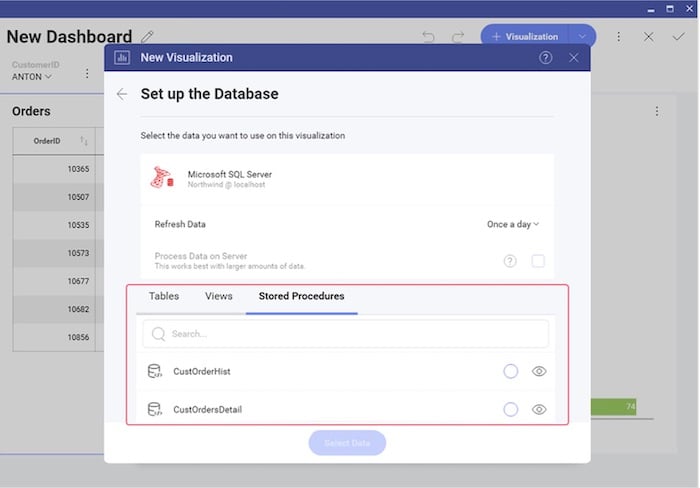
To create a new visualization on a database that supports stored procedures, first review the list of stored procedures that are available. You will treat the stored procedure you select just like any other data source. The only difference is a parameterized stored procedure, which you can use in a Filter by passing variables to the stored procedure.
Some embedded analytics platforms, for example, offer complete programmatic control over stored procedures and parameters via code. To pass a stored procedure name, as well as any required parameters, use the ChangeVisualizationDataSourceItemAsync function. This is an example of passing a stored procedure named CustOrderHist and passing the CustomerID parameter in the Reveal platform.
The Power of Stored Procedures
Stored procedures are a powerful tool to query a database and return results to a calling app. They are secure, offer performance advantages and are easy to maintain and modify. Stored procedures can be a good avenue for simplifying the way you present data and deal with parameters in your application code versus using error-prone and lengthy ad-hoc queries. As you develop applications, you may want to consider incorporating useful stored procedures in your next project or visualization database.