Tag: pipeline security

  • Shift Left With DAST: Dynamic Testing in the CI/CD Pipeline

    Shift Left With DAST: Dynamic Testing in the CI/CD Pipeline

    Dynamic application security testing, or DAST, is a process used to evaluate an application’s security while it’s running rather than while it’s in a static state. This method involves simulating attacks on an application, identifying vulnerabilities and analyzing the responses. DAST focuses on the exposed HTTP and HTML interfaces of web-enabled applications, making it an excellent tool for spotting security vulnerabilities that may occur during an application’s active runtime.

    DAST is a ‘black-box’ testing method, meaning it tests the application from the outside in—much like a potential attacker might. It doesn’t have access to the source code and instead focuses on the application as a whole rather than its individual components. This external perspective enables DAST to discover potential security threats that static testing methods might miss.

    While DAST is an effective security testing tool, it becomes even more potent when paired with a shift left approach.

    Understanding the Concept of ‘Shift Left’ in Software Testing

    Shift left is a practice in software development where testing is conducted earlier in the life cycle—that is, it’s ‘shifted left’ on the project timeline. Traditionally, testing was seen as the last phase before the release of a software product. However, with the shift left approach, testing becomes an integral part of every stage of the development process from planning to deployment.

    This approach has several advantages. It allows for the identification and resolution of issues earlier in the development process, reducing the cost and effort required to fix them later. It also encourages collaboration between developers and testers, fostering a more cohesive, efficient development environment.

    Shift left is not just a testing strategy but a philosophy that promotes preventive measures over reactive solutions. It’s about building quality and security into software from the get-go, rather than tacking it on at the end.

    DAST in the Context of Shift Left

    Importance of DAST in Early Stages of Development

    The integration of DAST in the early stages of development is crucial for several reasons. First, by conducting dynamic security testing from the onset, teams can identify vulnerabilities earlier, making them easier and less costly to fix. This proactive approach helps to prevent security issues from becoming ingrained in the code, which can lead to significant problems down the line.

    Second, early integration of DAST encourages a security-focused mindset from the beginning of the project, promoting a culture of security within the team. This cultural shift is crucial in today’s cybersecurity climate, where threats are increasingly sophisticated, and the stakes are higher than ever.

    How DAST Complements Other Testing Methods

    DAST doesn’t replace other testing methods; rather, it complements them. While DAST focuses on external vulnerabilities, other testing methods like static application security testing (SAST) can target internal issues. By combining these methods, teams can achieve a more comprehensive view of their application’s security.

    In a shift left approach, this combination of testing methods can be very powerful. By conducting these tests early and often, teams can ensure that both the external and internal aspects of their application are secure. This layered approach to security testing can help to catch any vulnerabilities that might otherwise slip through the cracks.

    Incorporating DAST Into the CI/CD Pipeline

    1. Understanding the Application Structure

    Before we can integrate DAST into the CI/CD pipeline, it’s crucial to understand the structure of the application we’re working with. This involves understanding the layers of the application, the technologies used and the data flows. By analyzing the application’s architecture, you can identify the critical components that need more attention during the security testing phase.

    Understanding the application structure is not just about knowing the technology stack. It’s also crucial to understand the business logic and the functionality of the application. This will allow you to create better test cases during the DAST process. Additionally, understanding the application structure will enable you to make better decisions when configuring the DAST tool, leading to more efficient and effective security testing.

    Finally, understanding the application structure will help you prioritize the vulnerabilities found during the DAST process. Not all vulnerabilities are created equal; some might be more critical due to the data they expose or the potential damage they could cause to the application. 

    2. Configure the DAST Tool

    The next step is to configure the DAST tool. This involves setting up the scanning parameters, defining the test cases, and tuning the tool to reduce false positives.

    When configuring the DAST tool, it’s important to strike a balance between thoroughness and speed. You want the tool to be able to identify all potential vulnerabilities, but you also want the scanning process to be fast enough not to slow down the development process. This balance can be achieved by carefully selecting the scanning parameters and continuously tuning the tool based on the results of the scans.

    Additionally, when configuring the DAST tool, you should consider the unique characteristics of your application. For example, if your application uses a specific technology or framework that is known to have certain vulnerabilities, you should ensure that the DAST tool is configured to test for these vulnerabilities. Similarly, if your application handles sensitive data, you should prioritize testing the components that process and store this data.

    3. Integrating DAST Into the CI Pipeline

    The next step is to integrate DAST into the CI pipeline. The CI pipeline is a sequence of steps that developers follow to merge their changes into the main codebase. By integrating DAST into this pipeline, we can ensure that every code change is automatically tested for security vulnerabilities.

    Integrating DAST into the CI pipeline can be achieved using various tools and plugins. Most DAST tools provide APIs that allow you to automate the testing process. By using these APIs, you can trigger a DAST scan every time a new code change is pushed to the repository. This allows you to catch vulnerabilities early in the development process, reducing the cost and time needed to fix them.

    However, integrating DAST into the CI pipeline is not a one-time task. It requires continuous monitoring and tuning to ensure that the testing process remains effective. You will need to update your DAST configurations as the application evolves, add new test cases as new features are developed, and fine-tune the testing process to reduce false positives. 

    4. Scan for Vulnerabilities

    After integrating the DAST tool, you can start scanning for vulnerabilities. The scanning process involves executing the test cases defined during the configuration phase and identifying potential security issues in the application. Depending on the size and complexity of your application, this process can take from a few minutes to several hours.

    During the scanning process, the DAST tool will interact with the application just like a real user would. It will send inputs to the application, observe the responses and analyze them for signs of security vulnerabilities. This dynamic approach allows the tool to identify vulnerabilities that static analysis tools might miss, such as runtime vulnerabilities and issues related to the application’s business logic.

    5. Analyze and Prioritize Findings

    Once the scanning process is complete, the next step is to analyze and prioritize the findings. The DAST tool will provide a report of the identified vulnerabilities, including their type, location and potential impact. This information should be used to prioritize the vulnerabilities based on their risk to the application and the business.

    Analyzing and prioritizing the findings is not an easy task. It requires a deep understanding of the application, the business, and the threat landscape. You need to consider various factors, such as the potential impact of the vulnerability, the likelihood of exploitation, the sensitivity of the affected data, and the complexity of the remediation process. By considering these factors, you can prioritize the vulnerabilities and focus your efforts on those that pose the highest risk.

    In addition, analyzing and prioritizing the findings should involve all relevant stakeholders. Developers, security teams, and business leaders should all participate in this process, as they each bring unique perspectives and insights that can help make better prioritization decisions.

    6. Remediate and Retest

    After analyzing and prioritizing the findings, the next step is to remediate the vulnerabilities and retest the application. Remediation involves modifying the application’s code or configuration to eliminate the identified vulnerabilities. Depending on the complexity of the vulnerabilities, this process can involve simple code changes or significant architectural modifications.

    After remediation, it’s crucial to retest the application to ensure that the vulnerabilities have been effectively addressed. This involves running the DAST tool again and verifying that the previously identified vulnerabilities are no longer present. Additionally, retesting allows you to check for new vulnerabilities that might have been introduced during the remediation process.

    Remediation and retesting is a continuous process. As new vulnerabilities are discovered and new features are developed, you will need to repeat this process to ensure the ongoing security of your application. This continuous effort is a critical component of the shift left with DAST strategy.

    7. Continuous Monitoring and Updates

    The final step in incorporating DAST into the CI/CD pipeline is continuous monitoring and updates. This involves regularly checking the effectiveness of the DAST tool, updating its configurations as the application evolves, and tuning it to reduce false positives.

    Continuous monitoring and updates are crucial to maintaining the effectiveness of your shift left with DAST strategy. As the application evolves and the threat landscape changes, the DAST tool needs to be updated to remain effective.

    Conclusion

    In conclusion, incorporating DAST into the CI/CD pipeline is a powerful strategy to enhance the security of your software. By understanding the application structure, integrating DAST into the CI pipeline, configuring the DAST tool, scanning for vulnerabilities, analyzing and prioritizing findings, remediating and re-testing, and continuously monitoring and updating, you can unleash the power of shift left with DAST. This comprehensive approach will allow you to identify and address security vulnerabilities early in the development process, leading to more secure and reliable software.

  • 3 Must-Haves When Implementing DevSecOps

    3 Must-Haves When Implementing DevSecOps

    The term DevSecOps is already more than a dozen years old. DevOps—the practice of combining software development with IT operations to deploy applications faster—was first coined in 2008 and refined in a historic conference presentation in 2009. DevSecOps—the concept of baking in security at every stage of Agile development, rather than tackling it at the end—followed soon after. 

    Despite a huge amount of industry conversation and activity around DevSecOps, it has been hard to tell just how much traction the movement has been gaining.

    In a 2020 survey of 1,500 IT professionals around the world by the Synopsys Cybersecurity Research Center, 63% reported that they are incorporating at least some DevSecOps activities into their development pipelines. “At least some” indicates, however, that a portion of the adopters have yet to fully embrace DevSecOps. And what about the other 37% who haven’t incorporated it at all?

    Nevertheless, two factors suggest that DevSecOps is starting to pass a tipping point on the way to mainstream adoption.

    One, the prodigious number of cyberattacks that have been hitting companies and government agencies demand aggressive and proactive approaches to address security, which is exactly what DevSecOps does.

    Two, the pandemic has been a powerful accelerant for digital initiatives. For example, global spending on public cloud services was predicted to grow slightly more than 23% in 2021, to $332.3 billion from $270 billion in 2020, according to a forecast from Gartner. In addition to the greater reliance on technology driven by COVID-19, increasing use of emerging technologies such as containerization and edge computing are fueling higher cloud spending. All of this points to the need for organizations to take security risk into account throughout the modern software development life cycle.

    The logic behind DevSecOps is undeniable. Viewing security as a shared, collaborative responsibility among development, operations and security functions starting at the earlier possible stage—the methodology known as shifting left—rather than in silos enables the deployment of secure software at the speed and responsiveness that today’s business conditions require.

    Companies that have successfully meshed the three functions under the broader DevOps paradigm enjoy radically reduced friction in software development and production. These organizations can deploy software faster and more safely with fewer design flaws, misconfigurations and other missteps that can lead to security issues.

    Companies not as far along in their DevSecOps journeys tend to have espoused some of its practices but not consistently. Clunky, linear waterfall approaches persist here and there. Vulnerability management remains a reactive box-checking effort later in the life cycle, forcing developers to backtrack and fix the code rather than a proactive, preventative process seamlessly integrated from design to production.

    The more advanced organizations typically focus on three key ingredients to assure success.

    1. Education. DevSecOps is a cultural shift as much as a technological one. It requires a new mindset that empowers developers to take ownership for creating secure code at the beginning of the software development life cycle. Thus, IT leaders can’t simply snap their fingers and expect DevSecOps to take hold without educating team members on why it is so critical and how it drives rather than disrupts great work.

    “Organizational learning and change are key to allowing DevOps to flourish,” senior Gartner analyst George Spafford wrote. “In other words, people-related factors tend to be the greatest challenges, not technology.”

    This means that before introducing DevSecOps into an organization, it is important to connect the endeavor with the value it will bring and explain why it will allow the business to deliver more value to customers and improve its competitiveness.

    2. Process. The right DevSecOps policies and processes can spell the difference between a nimble software development machine and one still bogged down by inefficiency.

    For instance, many organizations that rely heavily on scanning tools to detect vulnerabilities assign nonsensical policies to their use. Let’s say that vulnerabilities of a particular score or type need to be eliminated before code is deployed to production. But what if the flaw resides in an unimportant section of the code and is unexploitable?

    The best DevSecOps initiatives include policies and processes that seek to understand the entire context of a project, from design to production and handle everything in a way that reflects the context of true risk to security and compliance requirements rather than merely running all code through the same pipeline.

    3. Tooling. Fact: Without the right automated tools that provide deep visibility into code, a DevSecOps implementation doesn’t stand a chance.

    To carry out the qualities of collaboration and agility that DevSecOps promises, organizations should gravitate toward tools that give developers all the relevant information they need to make more informed decisions.

    These tools must truly simplify the addition of security into DevOps methodologies by automating various manual processes that traditionally have slowed everything down—threat models, security and compliance reviews, pentests and risk assessments and the like. The tools can’t just aggregate data from silos — which fails to provide enough contextual information and generates too many false positives —they need to provide holistic relief to overburdened teams in securing applications at the feature request, commit, pull request and CI/CD stage.

    By keeping these three elements in mind, organizations can fulfill DevSecOps’ potential as a true game-changer. As DevSecOps continues to cross the chasm to more universal adoption, organizations can look to earlier adopters for guidance on how to do DevSecOps right.

  • What to Expect When Transitioning to DevSecOps

    What to Expect When Transitioning to DevSecOps

    How do you ensure your DevOps pipeline is secure? Does DevSecOps protect you against serious breaches or is it just a way to allay the concerns of stakeholders about security in DevOps?

    A data breach can cost an average of $3.92 million USD, as per IBM’s study Cost of a Data Breach. In this report, health care was found to be the most expensive industry, with breach fines averaging $6.45 million USD.

    While DevOps delivers on the promise to increase the rate of delivery, the traditional CI/CD framework does not emphasize security. For the sake of speed, misconfigurations and known vulnerabilities may be allowed to pass through the development pipeline to production. 

    Security and testing are generally a low-priority activity, which means these vulnerabilities are fixed retroactively. This takes more time, effort and money. With rampant, unverified integration of open source tools, you open up the software to attackersthat could compromise the security of your apps, systems and users’ data.

    DevSecOps is an upgrade to DevOps, allowing you to deliver security and compliance testing continuously. These checks get integrated within the CI/CD pipeline to enable the delivery of more secure code faster.

    From DevOps to DecSecOps: What to Expect

    The automated nature of DevOps delivers several benefits that enable teams to realize the true power of DevOps as silos break and delivery rates skyrocket.

    As DevOps practices span the entire delivery pipeline, it provides the necessary mechanism to deliver audit, compliance and security requirements along with speed and efficiency. 

    There are many benefits of upgrading from DevOps to a dedicated DevSecOps practice, and they are important to understand before you embark on that journey.

    1. No Restrictive Access Control Policies for Developers

    Access to infrastructure assets must be strictly controlled and monitored to enforce requisite security measures. This means approval gates, secure configuration parameters and other security measures.

    With DevSecOps built into the pipeline, these access controls can be automatically applied. This enables on demand access to infrastructure resources for the team and reduces their dependence on factors outside the team. 

    For example, many organizations have started deploying internal DevOps teams that enable automated access to a shared pool of deployment processes, tools, repositories, workflows, etc. 

    This team is usually separate from the IT team but enforces security mechanisms with the same rigor. It ensures that access to all the infrastructure instances required by development, QA or production is automatically tracked, monitored and controlled as per the guidelines. Additionally, inconsistent processes or misconfigurations are also controlled.

    Often called the shadow IT team, the idea of this team is not to circumvent the IT department but to create an additional team that matches the agility of the DevOps team. 

    2. Seamless Security and Compliance Testing

    Traditionally, security and compliance testing happened all at once at the end of the release cycle close to the release date. This typically meant that a large spreadsheet of issues is sent to the development team to be fixed immediately, since maintaining a consistent release velocity is the key to DevOps success. 

    This requires the development team have at least one dedicated resource to work on those issues. When metrics are tracked, to no one’s surprise, this method resulted in negative impacts on the velocity of the next release cycle.

    DevSecOps applies all the security and compliance checks in batches. So, testing for security and compliance is shifted left and spread out across the pipeline.

    This makes the security feedback loops shorter and more frequent, thus aligning security and compliance testing with the DevOps philosophy. As more secure code is committed every time, the possibility of security and compliance errors reported by the QA team is minimized.

    A second, more personalized approach is using the integrated development environment (IDE) itself to take security and compliance checks to the developers. With regular and automated security and compliance baked right into the development process, this process is sped up considerably and the development team becomes self-reliant.

    3. Overcoming the Risks Associated With Open Source Software

    The 2019 State of The Software Supply Chain report from Sonatype showed that, on average, 85% of the codebase among modern applications uses open source components. While open source components enable innovation, they also come with considerable security risks. As more of these open source tools are added to the software supply chain, it increases the risks on the cybersecurity front.

    The same report showed evidence to back up the need for greater open source software security checks and processes. Companies that managed their open source components released 55% less vulnerable components than those who had no verifiable open source management process.

    While many of these open source components released frequent patches, it is also important for the DevSecOps team to step in and regulate the open source components. Some of the ways DevSecOps teams can do this are:

    • Create a formal component management plan which makes sure that when employees leave, the practice doesn’t go away with them. Having a documented plan lets you look at the bigger picture of your pipeline and find vulnerable components that may be skipped without a formalized process. Incremental improvements to this plan are also possible if it’s well-documented.
    • Use scanning tools like Gemnasium and Snyk that help regularly check for vulnerabilities.
    • If vulnerabilities are detected or reported in a component, look at either updating or replacing the component.
    • Enable quick approval for new open source software. Alternatively, prepare developers to test new components using security and compliance checklists.

    4. Overall Cost Reduction and Acceleration of the Delivery Rate

    An integrated security and compliance framework in DevOps prevents breaches and guarantees faster recovery when breaches do happen. As developers don’t have to set aside a large chunk of time to work on security and compliance violations, this shortens release cycles and ensures more secure code at the same time. 

    The fewer breaches you identify and fix, the more money you save on overcoming security disasters. 

    5. Automated Compliance Reporting

    DevSecOps automates your security and compliance tests and it also logs and documents all the tests. DevOps automation platforms collect large amounts of information for the build, test, integration and deployment phases. This data can be used to create an end-to-end audit trail without any manual intervention or extra time spent scouring through various tools to prepare compliance reports. 

    A fantastic advantage of DevSecOps is the complete traceability from day one and automated compliance reporting. DevSecOps also focuses on the automation of testing, allowing you to deliver a secure development framework on a continuous basis.  

    DevSecOps is the Future of DevOps

    The rapid release velocity DevOps enables is not without its disadvantages. In particular, the unchecked use of open source tools in the pipeline can expose your applications and systems to many known vulnerabilities, increasing the probability of a breach. Combined with a general lack of focus on security, this is a recipe for an expensive security incident. 

    To counter this, DevSecOps radically transforms the pipeline by shifting security and compliance testing left. Developers check the code before every commit. With fast feedback loops, they fix any reported vulnerabilities along with other errors in the app. 

    With DevSecOps, compliance and security checks are not done all at once; instead, developers chip away at vulnerabilities and security flaws with every release.

  • A Blueprint for Securing Software Development

    A Blueprint for Securing Software Development

    Software development has changed dramatically in recent years, as technologies like DevOps, application containers, and cloud-native transform how software is built and distributed. Unfortunately, attackers have been paying close attention to these changes, and have retooled their attack strategies to take advantage of relatively weak security controls in software development and build environments. Attackers recognize that security teams are more focused on protecting infrastructure and less focused on software development and supply chains. This is how damaging attacks like SolarWinds happen – and it’s likely that attackers will strike again to yield even more successful outcomes.

    A new approach is needed to secure the software development pipeline. What’s more, this approach needs to be put in place by the engineers developing the software—and not by information security teams. Engineering teams need to be responsible for design and implementation while giving security teams visibility and assurance that controls are operational and that policies are being enforced.

    A new blueprint for securing the pipeline centers on a flexible set of controls that secure the software build pipeline by ensuring that authentication and authorization are properly managed, that the integrity of software artifacts are tested at appropriate stages and that controls are placed on third-party and open source solutions incorporated into the software. The result: Software innovation and delivery at lower risk of supply chain tampering, and reduction of attacks during development.

    A Pragmatic Design Philosophy

    This modern software security blueprint is based on the following design philosophy:

    • Least-privilege: Only grant the access and permissions required to accomplish a job, and no more.
    • Immutability: Artifacts and infrastructure are not modified after deployment to an environment. If a change is required, it’s done in the image or script in the development environment and then promoted through the higher environments.
    • Everything-as-code: Infrastructure, security policies and other parts of the pipeline are also implemented as code and subject to the same controls as the software artifacts.
    • Traceability: All changes, whether to infrastructure or business code, are version-controlled. 

    Controls Blueprint for Software Development Pipelines

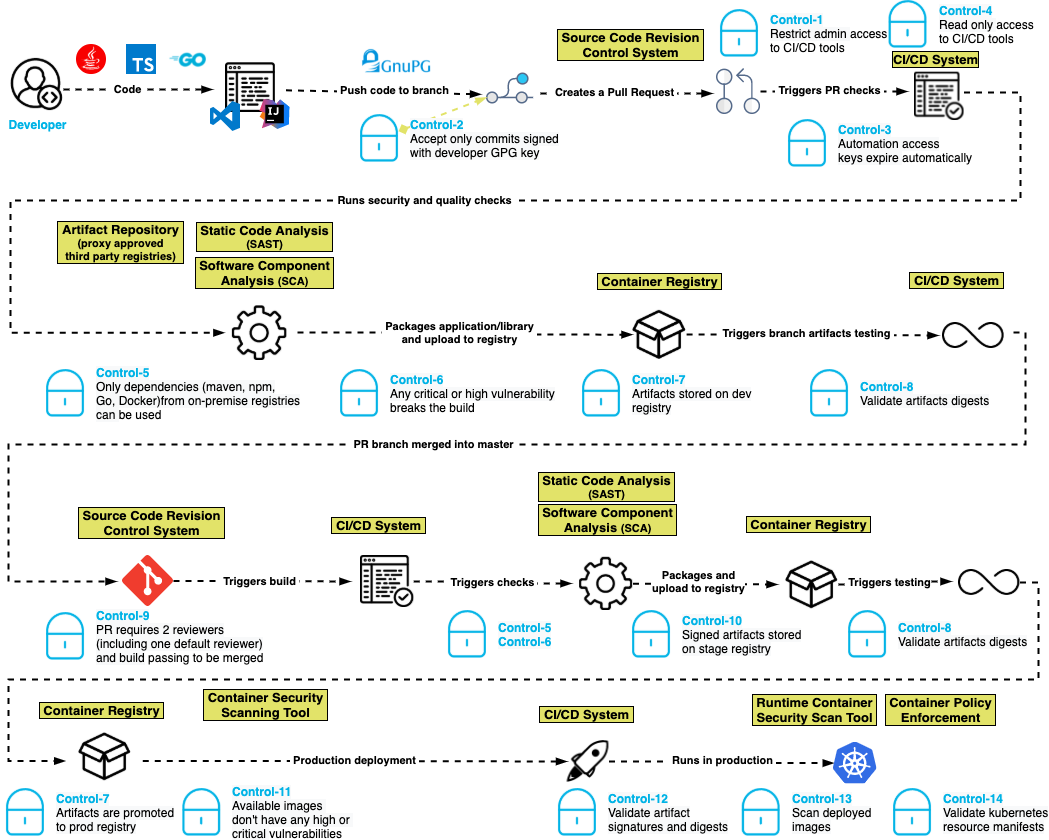
    The basis for this software security blueprint centers around a set of 15 controls that are built for modern development pipelines where developers, pipelines and execution can happen anywhere in the world.

    Control one: Restrict administrative access to CI/CD tools. Ensure that only authorized people can make administrative changes to the CI/CD system, which prevents unauthorized changes to pipeline definitions.

    Control two: Only accept commits signed with a developer GPG key. Unsigned code commits are challenging, if not impossible, to trace and pose a risk to the integrity of the codebase. 

    Control three: Automation access keys expire automatically. By ensuring that access keys used by automation expire periodically, developers create a shorter window of attack when keys are compromised.

    Control four: Reduce automation access to read-only. CI systems should have read-only access to source code repositories following the principle of least-privilege access.

    Control five: Only dependencies from trusted registries can be used. By configuring the dependency manager to only allow connections to an authorized list of registries, attacks can be blunted by keeping malicious packages in public registries from entering the pipeline.

    Control six: Any critical or high-severity vulnerability breaks the build. Supply chain attacks may introduce code with vulnerabilities into the software pipeline. Static application security testing (SAST) helps to identify serious security issues, including poor cryptographic practices, hard-coded credentials and injection vulnerabilities. 

    Control seven: Artifacts are stored in a repository in development, staging and production. This control helps to enforce the immutability of the artifacts so they can be compared in the development, staging and production repositories.

    Control eight: Validate artifact digest. Before an artifact is deployed in any environment, its digest should be validated against the artifact in the repository to ensure that it has not been compromised.

    Control nine: Pull requests require two reviewers (including one default reviewer) and a passing build to be merged. In addition to supporting good coding practices, this control also helps ensure that no commits are made without competent human oversight. 

    Control 10: Artifacts in higher repositories are signed. Requiring artifacts to be signed in a repository throughout the process ensures visibility and traceability for whatever is deployed to production. 

    Control 11: Available container images don’t have any high or critical vulnerabilities. Just as applications need to be tested for vulnerabilities before being placed in production, so do the container images into which they are packaged for deployment. Container images could have open source vulnerabilities if they contain open source software. 

    Control 12: Validate artifact signatures and digests. Validating the signature of the artifact against the digest ensures that the artifact was not tampered with in the repository and that the artifact being deployed is the same one that was tested.

    Control 13: Scan deployed images in production. This helps to ensure that the prior controls were followed for all software in production.

    Control 14: Validate Kubernetes resource manifests. If the resource manifests are tampered with, they could be tricked into deploying a container of the attacker’s choice. 

    Control 15: Ensure build environments are ephemeral and immutable. Build environments should be defined in code with automated creation and teardown and a fresh environment created for every build. Build hosts should not be accessible using interactive logins.

    We believe this blueprint provides engineering teams with an actionable architecture that security teams can rally behind and support. By adopting these standards, engineering teams are promised the delivery of assured software at lower risk of supply chain tampering, reduction of attacks during development and manipulation in staging and production.

    Here’s what it looks like:

    blueprint

    To learn more about the suggested blueprint, read our GitHub post about the project. Our goal is to prioritize speed and agility for software development while incorporating a security-always mindset.