The AlmaLinux OS Foundation has announced the formation of the AlmaLinux Engineering Steering Committee (ALESCo) to bolster community engagement and technical governance. This new body aims to guide the technical direction of the AlmaLinux CentOS-clone Linux distribution, ensuring its robustness and long-term stability.
Why this move? Cody Robertson, CTO at Hawk Host, a web hosting reseller, said, “This committee provides a structured platform to streamline the engineering capabilities of everyone involved in the AlmaLinux project. By fostering an environment where transparency is paramount, we’re not only engaging engineers but also welcoming non-engineers on equal footing to be a core part of AlmaLinux’s explosive growth.”
Dubbed the “air traffic control” for engineering matters, ALESCo will oversee and guide technical decisions in collaboration with various Special Interest Groups (SIGs). The committee was proposed by infrastructure team members Jonathan Wright, AlmaLiunx’s infrastructure lead, and Robertson. It will be responsible for:
Technical oversight of the operating system
Transparency in engineering decisions
Keeping a focus on long-term stability
Release management
Supporting SIGs
What that means for DevOps is that AlmaLinux should—should—be both better and a bit more flexible to its user community than Red Hat has been. AlmaLinux has already shown that it’s willing to step away from RHEL to improve security and provide support for older hardware. Hopefully, this move will help them to add other improvements.
The AlmaLinux OS Foundation board appointed the initial members of ALESCo. It will subsequently internally appoint a chair and new members every six months. This approach aims to foster diverse leadership. In this context, diverse means AlmaLinux wants to listen to its customers and other contributors, such as tech writers and developers. AlmaLinux also wants to keep its Linux community cred by preventing any single point of prolonged control. To ensure decision-making transparency. All ALESCo meetings will be public, with member affiliations disclosed.
Benny Vasquez, the AlmaLinux OS Foundation chair, underlined the commitment to transparency and community involvement, stating, “The creation of ALESCo reinforces our dedication to transparency while opening the door for broader technical input from our community. We are excited about the increased engagement this will bring and appreciate the contributions from Wright, Robertson, and other key proposal contributors like Farrell, Alex Iribarren of CERN, and Daniel Pearson of KnownHost.”
With ALESCo in place, AlmaLinux is poised to enhance its collaborative efforts, ensuring a robust and reliable operating system that meets the needs of its growing community.
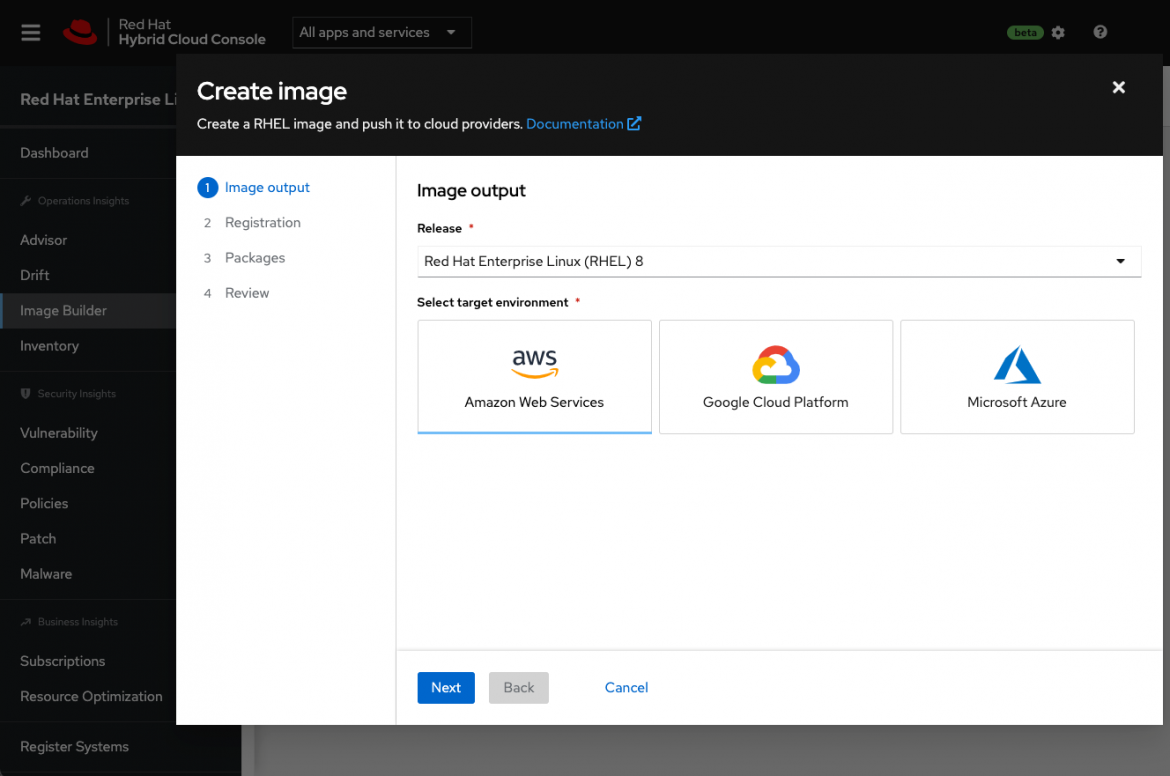
Red Hat this week announced a public beta of an Image Builder service that streamlines the process of building customized instances of the Red Hat Enterprise Linux (RHEL) operating system.
Scott Herold, director of product management for RHEL at Red Hat, said the Image Builder service enables an IT team to define a “gold” template for each target deployment environment that only contains the RHEL code required. Initially, Image Builder is configured to default to build a minimal, recommended RHEL server image for Amazon EC2, Microsoft Azure and Google Cloud Platform (GCP) cloud services.
Future updates to the service will add support for VMware vSphere platforms as well as downloadable images and installation media for physical servers, customized filesystem layouts and versions 9.0, 8.5, 8.4 and 7.9 of RHEL. The service itself is accessed via the Red Hat Hybrid Cloud Console that is currently being made available in beta.
Herold said building or installing operating systems is often a slow, tedious and error-prone process that needs to be manually performed in a slightly different way for each platform. Each physical server or edge computing platform requires different configurations and workflows. As a result, the chances mistakes will be made is high; Image Builder can greatly reduce the possibility of mistakes because there is no guesswork required, noted Herold.
IT teams can also opt to include additional content from Red Hat in those builds to further streamline deployment processes, noted Herold. Those images can then be automatically registered with Red Hat to ensure future updates are received.
The ability to customize those images also serves to reduce the overall size of the codebase that needs to be secured, added Herold. At a time when there is increased focus on software supply chains in the wake of a series of high-profile security breaches, many IT teams are revisiting their software deployment processes, he noted.
Ultimately, Herold said Red Hat is moving toward providing IT teams with a more cloud-like experience regardless of where they deploy Red Hat’s curated open source software. The goal is to reduce as much friction as possible so that IT teams can more easily manage infrastructure at scale, he added.
One way or another, the entiree software deployment process is becoming more automated. Much of the drudgery that has historically made it challenging to deploy and manage IT platforms at scale can be traced back to manual processes created when organizations ran a much smaller number of applications in on-premises IT environments. As IT teams increasingly deploy more applications in the cloud and at the network edge, it’s become more apparent that manual legacy processes won’t scale—especially when it’s already challenging to hire and retain IT personnel.
It’s not clear how quickly IT teams will modernize software deployment processes using automated DevOps processes. Simple inertia is often a powerful force to overcome; however, most IT professionals can easily find something more compelling to do with their time that doesn’t involve using manually customizing operating system images.
Which operating system (OS) is best for DevOps engineers to use on their workstations?
That’s a weighty question. Talk about which OS is “best” for any purpose is always controversial.
I’m not going to stick my neck out by saying that one OS is definitively better than others when it comes to doing DevOps work. But I would like to consider the strengths and weaknesses of each of the major desktop operating systems—Windows, Linux and macOS—for performing DevOps work.
Windows
Statistically speaking, Windows is the OS that most people use. By extension, it’s the OS that most DevOps engineers probably use. (I can’t confirm that fact, because I’ve yet to see a study of which OS DevOps engineers actually use.)
As I see it, Windows has two main advantages from a DevOps perspective, including:
Popularity. This is a strength because DevOps is all about having freedom to pick and choose which tools to use. Given that Windows is so popular, almost everything is compatible with it. OS compatibility problems, therefore, don’t get in your way of doing DevOps as you see fit.
The Windows subsystem for Linux, which lets you run some Linux CLI tools on Windows. This feature is handy if you need to do DevOps work for both Linux and Windows server environments.
The main drawback of relying on Windows is that, well, it’s Windows. Compared to Linux, Windows offers very little opportunity to customize, and that restraint can be a drawback from a DevOps perspective. When it comes to core tasks, such as working from the command line, you’re stuck with the tools Microsoft offers you. And you can’t do very much to harden your Windows system for security purposes.
Linux
For my money, Linux is the best OS for DevOps. But I say that only because I’m a die-hard Linux lover and I tend to think Linux is the best for everything.
But even if you are not a Linux fanboi, you have to admit that it has certain advantages for doing DevOps work:
Linux is ultra-customizable. You can choose to set up your system in whichever way works best for your workflow. You can use a wide array of tools. You can make lots of changes to add extra security. Given that DevOps values choice, this is a big benefit.
In many cases, DevOps engineers are supporting software delivery pipelines that deploy to Linux server environments. Being able to work from a native Linux environment can make it easier to do things such as test and stage those applications on your local device when it becomes necessary to do so. You could, for example, spin up a Linux container on your local machine, which you couldn’t do with a Windows or macOS workstation.
On most mainstream Linux distributions, installing all of the DevOps tools you need is extremely fast and simple using repositories and package managers. It’s not exactly difficult to install most DevOps tools on other systems, either, but I don’t think any OS can beat the package management systems used by Linux distributions.
Linux’s major limitation is that learning it takes some time, particularly for DevOps engineers weaned on Windows. You also run the risk of needing a tool that doesn’t support Linux, although I’m having a difficult time thinking of any DevOps tools that doesn’t work on Linux systems.
MacOS
Last but not least is macOS. Overall, I don’t think macOS is ideal for doing DevOps work. The only strength I can think of is:
It gives you a native Unix-like environment. You can’t run your Linux containers directly on a Mac, but you can at least use some native Unix tools.
Drawbacks for macOS are many. It’s not very customizable. It lacks compatibility with some applications and tools. It comes with its own learning curve if you have never used a Mac before.
Does OS Choice Even Matter?
Now that I’ve weighed the pros and cons of Windows, Linux and macOS as operating systems for DevOps engineers, let me state the obvious: It’s 2019, and in many respects it no longer really matters which OS you run on your local machine. Lots of applications—including key DevOps tools, such as IDEs—now run in the cloud as often as not. Plus, there are a plethora of hardware virtualization tools out there that will let you run virtually any OS in a virtual machine within another type of OS. You can run Linux and Windows side-by-side as virtual machines on your Mac, if you want.
Still, not everything runs in the cloud, and having to switch between virtual machines is not always practical. It’s therefore worth thinking hard about which desktop OS will best serve your DevOps needs and making that the one that controls your bare metal.
Emerged out of Agile methods in 2001, DevOps basically represents a fundamental departure from the traditional waterfall software development approach.
DevOps is a modern software development method that focuses mainly on the effective collaboration between software developers, project managers and operations staff, while also aligning with business goals at the same time.
DevOps came into being when developers and operations staff came together to more effectively overcome the challenges associated with continuous software delivery.
DevOps in Mobile Applications
Peerbits takes a holistic view of mobile DevOps, defining it as a capability for continuous mobile app delivery that enables our clients to reduce time-to-market new features and seize new market opportunities simultaneously.
The key principle in DevOps is continuous delivery, which means deploying the software (in this case a mobile app) and the environment on which it runs, automatically and on-demand, during any stage of the mobile app development cycle.
DevOps basically applies the same principles whether you want to build an app for either mobile or web. However, the challenges in mobile DevOps are bit different and specific.
Mobile DevOps Challenges
The challenges in mobile DevOps mainly include:
Different OS Versions: Most mobile apps have multiple target environments and multiple devices, which require dealing with different specs, different OS versions and different form factors.
Furthermore, not only is there a wide range of operating systems running in the market, but there are also different installed versions.
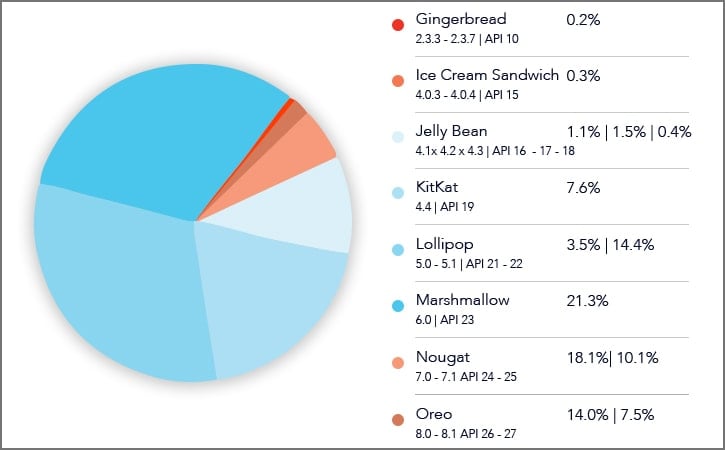
Take Android, for instance: The Android market accounts for almost 85 percent of the smartphone market. The below mentioned chart shows the breakdown of installed Android Versions as of Oct. 26.
Image source: www.developer.android.com
As you can see from the chart, the Android version 6.0, which according to Wikipedia is now unsupported, is still being used by 21.3 percent of Android users.
This clearly indicates that only a few users update as soon as the new version comes along, while others don’t, either because they don’t want to or because their smartphone manufacturers are not providing newer OS updates.
In addition to this, most Android smartphone manufacturers also tweak newer Android OS slightly, resulting into an increase in the OS fragmentation and making the launch times slower.
Hardware: Smartphone hardware presents two primary challenges. First, smartphone manufacturers offer a good range of chipset, memory, storage options and, most importantly, different screen sizes. This makes it difficult to support each of them.
Second, the mobile device war no longer is being fought only between Apple and Samsung. There are new smartphone manufacturers entering market more often than before. Out of these new rivals, there are also many manufacturers that offer low-cost models.
Though Apple and Samsung might be dominating the Western markets right now, in China both of these brands account for only 13.7 percent and 20.7 percent respectively.
In 2015, at least 18 new smartphone manufacturers entered in the market in Asia.
This localization and fragmentation of available devices and their different OS versions adds a considerable complexity to the mobile application development as a challenge.
Balancing Mobile App Quality with Always Changing Consumer Demand: As the app economy grew in last recent years, the need for businesses to get their mobile apps released in the market quickly also grew along with it.
However, since the consumer expectations are also increasing, the quality of a mobile app is the most essential factor in retaining existing customers as well as attracting the new ones.
In 2018 especially, this is more and more difficult, due to the ease in which customers can delete apps and give poor ratings and review to low-quality mobile apps.
As a result, businesses need to be extra careful in terms of their app quality, while consistently adding value to keep their existing customers happy.
All of these factors are putting strain on mobile app development teams, as the waterfall model approach is not a sustainable practice for today’s consumers.
3 Rules for Successfully Adopting Mobile DevOps
Adopting DevOps in your business mobile app needs only three considerations, which are explained below.
Continuous Planning and Integration
Continuous planning refers to bringing your entire mobile app project team—developers, project managers, operations staff, and other stakeholders—on the same platform to finalize the scope of the mobile app in the preparation of a launch plan.
Continuous integration, on the other hand, ensures that the code submitted by one developer works with the code submitted by the other developer(s). Simply put, continuous integration in mobile DevOps demands frequent builds, which must be integrated with the last developed code.
Continuous Testing and Monitoring
Most mobile application testing is executed on simulators instead of actual devices. Plus, the testing is also manual. And given the number of OS versions alone, it is impossible to do manual testing for all versions.
A mobile app can perform well in test environment, but it is very common that it will fail in the live environment.
The reasons of these failures can be many, such as memory, network conditions, power, etc. It is necessary, therefore, for developers as well as businesses to make sure that the continuous monitoring is done via third-party SDKs for log, crash report and so on to find the root of the problem.
Continuous Delivery and Deployment
Continuous delivery refers to the practice that makes sure the code is deployed to the production environment by submitting each change to the production-like environment.
Continuous deployment is the next step of continuous delivery. In continuous deployment, each change that has been approved by continuous testing gets deployed to the production environment automatically.
Takeaway
In our perception, there is no such thing as a separate DevOps for mobile application development. DevOps is a general approach that works for all components as well different kinds of application development.
While there are certain challenges involved in adopting DevOps for mobile apps, but there also measurable benefits that makes the entire journey worthwhile.
All in all, despite the cost to build an app and its initial pains, the benefits of DevOps make the investment worthwhile.
Microsoft this week at its Ignite 2018 conference made it clear DevOps teams will have their hands full upgrading both databases and operating systems this Fall.
Erin Chapple, corporate vice president for Windows Server, announced Windows Server 2019 will become generally available next month. As is the case with Windows Server 2016, there are three editions: Standard, Data Center and Essentials. The latter offering is for small businesses.
However, the suite of management tools the company provides for its operating systems will not be available until early next year.
Microsoft is putting the finishing touches on Windows Server Software Defined (WSSD) 2019, which provides another approach to combining compute, storage and networking on top of a hyperconverged infrastructure platform. That offering is expected to come bundled on a wide variety of hardware platforms early next year. Organizations looking to shift from a legacy rack-based approach of managing their data centers to a more modern HCI approach will have to wait for WSSD 2019 to become available.
The company is simultaneously pushing forward with a public preview of Microsoft SQL Server 2019. In addition to adding support for faster queries and persistent storage in memory, Microsoft SQL Server 2019 packages the Hadoop Distributed File System and Apache Spark in-memory computing framework with a relational database. Microsoft is also making it possible to run SQL Server 2019 on Kubernetes clusters running on either Linux or Windows deployed on-premises or in the cloud. While the company has broadly embraced Kubernetes, its support for Kubernetes on Windows Server is not expected to be generally available until 2019.
Microsoft touts the ability to run Windows Server on-premises and in the cloud as a core element of its hybrid cloud computing strategy. Right now, however, the most widely employed platform running on the Azure cloud is Linux. The company is also pushing another approach to hybrid cloud computing based on Microsoft Azure Stack, an on-premises edition of the cloud framework the company employs to drive its public cloud. An edition of Kubernetes is available in beta on Microsoft Azure Stack as well.
Microsoft earlier this month revamped its AzureOps tools to make it easier to manage all those variations on its public cloud. But those tools have yet to be extended to on-premises environments.
Of course, there’s no requirement that says any approach to a hybrid cloud using Microsoft technologies requires Azure. Windows Server and SQL Server both are already widely deployed across multiple public clouds. The challenge DevOps teams will face is managing all the different versions of Microsoft operating systems and databases that potentially will be strewn across an extended enterprise. It’s unlikely any organizations will be able to upgrade operating systems and databases in one wholesale effort.