At its MongoDB Europe conference this week, MongoDB updated its open-source document database with the addition of MongoDB Ops Manager to simplify management of distributed instances of version 3.6 of its database.
In addition, the company has added a capability that enables all updates to the database to be automatically reflected in the application in real time without having to take the database offline.
Additional new capabilities include a MongoDB Compass tool to analyze schemas and a governance capability that makes it easier to apply and tune data governance polices before and after an application is deployed.
The company has added an aggregation pipeline that allows users to perform real-time analytics directly in the database to improve performance. Developers and analysts now can write queries combining data from multiple collections for complex analytics. Its Connector for BI, which can now be deployed and managed by its Ops Manager, has been updated to support this new query capability.
Finally, in the event of a system failure or network outage, MongoDB says it now automatically will replay any writes to the database when those services come back online.
Brooks Circhlow, vice president of product for MongoDB, says developers have embraced document databases as an alternative to other database platforms because of their flexibility. Unlike, for example, relational databases, a document database doesn’t impose a schema that must be crafted by a database administrator. But as more instances of document databases proliferate across the enterprise, DevOps challenges start to manifest.
In fact, Circhlow notes that IT organizations are also making extensive use of cross-replication capabilities across multiple database clusters that they manage or are managed on their behalf via the MongoDB Atlas managed service. In many of those instances, DevOps teams are responsible for both the applications and the document databases they run on.
MongoDB is also moving to address a DevSecOps issue stemming from a wave of attacks aimed at misconfigured instances of its database. Circhlow says the most widely used installer for MongoDB limits network access by binding to localhost by default. With version 3.6, binding to the localhost is now extended to all MongoDB packages across all platforms. In addition, with new IP whitelisting support, administrators can configure MongoDB to only accept external connections on approved IP addresses.
Document databases such as MongoDB arguably have been a primary catalyst for DevOps. Once developers began to bypass database administrators by downloading instances of document databases, it became clear that traditional approaches to IT operations were starting to erode. Most organizations would prefer their developers to write code than manage databases, so some new means for managing databases that doesn’t compromise the dexterity that document databases provide developers was required. Once those processes get established, the next question then becomes how to make traditional database administration involving other classes of databases part of that process. Most IT organizations are still working through those processes. But it’s clear database administration will never be the same.
AT&T and India IT outsourcing company Tech Mahindra announced that code the companies jointly developed to drive artificial intelligence (AI) applications is being contributed to the Linux Foundation.
Mazin Gilbert, vice president of advanced technology for AT&T Labs, says the goal of Acumos is to not only democratize access to AI software, but also consume it as a microservice with a standard set of DevOps processes.
Gilbert says AT&T decided to contribute Acumos to the Linux Foundation because it’s become clear the proprietary implementations of AI platforms will prove to be too difficult and costly to support. AT&T is addressing this issue because it currently has 10 proprietary AI platforms attached to its network and was looking at having hundreds attached within a matter of months.
Making Acumos available as an open-source project should go a long way to reducing that complexity by providing a standard interface to integrating various AI platforms, says Gilbert. Acumos includes a standard mechanism for downloading AI code from an app store, bringing AI functionality to where data resides instead of requiring developers to load data into a proprietary cloud service to access AI functions. In the case of AT&T, that integration is accomplished via the company’s Indigo software-defined network (SDN).
Gilbert notes that much of what passes for advanced AI today has been around for decades. Many of the algorithms being used to drive AI applications are now over 50 years old. The only real differentiation is how these algorithms are being combined to drive applications to access enough data to make the algorithms useful. Because of that simple fact, AT&T doesn’t believe giving Acumos to the Linux Foundation represents any major loss of intellectual property.
As AI becomes more democratized, DevOps teams will manage massive amounts of distributed data pipelines. AI applications require access to massive amounts of data that must be consumed via a consistently applied information architecture. Sometimes referred to as DataOps, the pipelines created by operations teams enable the algorithms embedded in a developer’s application to continually learn about changes that impact the recommendations being surfaced by the AI engine.
At this point it’s now only a matter of time before every application is infused with some form of AI. In many cases, the front end to those AI capabilities will be a voice-enabled digital assistant trained to optimize a specific processor or answer a broad range of capabilities. Applications that don’t provide these capabilities soon will be deemed archaic. The result from a DevOps perspective should be a massive series of rolling upgrades to infuse AI capabilities into existing applications or replace them with one that provide those capabilities. Regardless of how that is accomplished, without some form of integrated DevOps processes in place there can be no data for AI applications to consume.
As IT organizations are being asked to provision and support an ever-growing number of platforms, they increasingly require an approach that abstracts away as much of that complexity as possible. With that goal in mind, IBM created IBM Cloud Private, an on-premises platform that automates the deployment of a private cloud based on Kubernetes container orchestration software. This week, IBM announced it is extending the reach of IBM Cloud Private to include support for the open-source Cloud Foundry platform-as-a-service (PaaS) environment.
IBM Cloud Private is designed to be deployed on top of virtual or physical servers, including instances of hyperconverged infrastructure based on software from Nutanix. Michael Elder, an IBM distinguished engineer for IBM Cloud Private, says IBM has developed tools for automating the provisioning of not only underlying infrastructure, but also containerized and legacy versions of IBM middleware such as IBM DB2 databases, the Open Liberty Edition of WebSphere application server and IBM Microservice Builder. In addition, Elder says IBM Cloud Private can be employed to deploy a variety of open-source databases, including MongoDB and PostgreSQL.
Also available for an additional fee with IBM Cloud Private are a plethora of DevOps tools including APM, Netcool, UrbanCode, Cloud Brokerage, Jenkins, Prometheus, Grafana and ElasticSearch. Regardless of the platform employed, IT organizations should be able to apply a consistent set of DevOps processes to manage either Kubernetes or Cloud Foundry, Elder says.
IBM is also addressing security issues by including Security Vulnerability Advisor to scan containers and an ability to encrypt all data in flight.
Elder says many IT organizations will deploy 12-factor applications on a PaaS environment alongside containerized applications running on Kubernetes. IBM Cloud Private is designed to provide a common management framework for managing both environments. However, IBM is not extending that management framework to the IBM public cloud. Elder says the company determined that attempting to create a common management framework for both would result in too much complexity, especially for administrators of public cloud services that require a much more streamlined user interface experience.
Most IT organizations could, of course, craft their own private cloud. IBM Cloud Private simplifies that process by providing all the pieces required under a common management framework. Rather than spending months putting those elements together, IBM is making a case for an integrated platform that enables IT organizations to concentrate more of their efforts on deploying applications instead of managing infrastructure.
The debate occurring across the IT industry now is to what degree will container-as-a-service (CaaS) environments based on Kubernetes supplant traditional PaaS environments. IBM, as a major supporter of both Kubernetes and Cloud Foundry, is clearly betting there will be room for both. The Cloud Foundry Foundation recently furthered that goal by adding support for a Kubernetes runtime.
Thus far, however, the complexity of standing up a PaaS environment has limited the adoption of Cloud Foundry to Fortune 1000-class IT organizations or cloud service providers. Meanwhile, CaaS environments based on Kubernetes increasingly are being stood up by developers and then handed over to IT operations to manage. Given that disparity in deployment models, it may not be too long before the number of CaaS environments simply overwhelm the number of instances of traditional PaaS environments.
At its PuppetConf 2017 conference, Puppet made it clear its ambitions now extend well beyond its namesake IT automation framework for IT infrastructure. On the heels of acquiring Distelli in September, the company announced it is adding several products to its portfolio based on technologies developed by Distelli.
The new offerings include Puppet Pipelines for Apps, to automate commits; Puppet Pipelines for Containers, to automate the building of Build Docker Images from a source repository and then deploying them on a Kubernetes cluster; and Puppet Container Registry, to host Docker images and unify views of them regardless of whether the repositories are local or remote.
At the same time, the Blueshift platform developed to automate deployments of container platforms such as Kubernetes, Docker Swam and Mesos is also being enhanced. The Kubernetes module now installs the container cluster in a more secure way that is also highly available. The Docker module adds support for Puppet Code Manager, Docker Swarm mode and Docker Secrets. A Kream tool makes it easier to deploy Kubernetes and Helm, a package manager for Kubernetes, at the same time. Helm also now can manage applications deployed on Kubernetes.
In addition, the company announced Puppet Discovery, a tool that makes it simpler to identify infrastructure distributed across a hybrid computing environment, and Puppet Tasks, which employs new open-source agentless software dubbed Puppet Bolt to automate entry-level IT tasks. Bolt is capable of running existing scripts written in any framework and executing them on any platform that Puppet supports.
The company is also adding a Task Manager to Puppet Enterprise that makes it easier to manage ad hoc tasks and executing them across hundreds of Puppet nodes. The latest release of Puppet Enterprise includes tools for inspecting packages deployed on and a tool to simplify configurations of those nodes.
Puppet has also expanded its alliance with Splunk to tighten integration between the two IT operations’ platforms, and formed new alliances with Baracuda Networks, CloudPassage, Conjur/CyberArk, Cumulus Networks, Electric Cloud, F5, Intelliment Security, Onyx Point, Praecipio Consulting and Sensu. In addition, the Puppet module for the Microsoft Azure cloud has been updated to provide access to more disk storage, expanded networking support and support for Azure tags.
Tim Zonca, vice president of marketing and business development, says with these products Puppet should no longer be considered a one-product company. It is now committed to developing a full range of DevOps management capabilities. That’s significant, notes Zonca, because today there is too much tension between IT operations teams and developers caused by silos of automation across various DevOps processes. As part of that effort, the company is also committing to start to synchronize the release cycles of the various elements of its portfolio.
As DevOps continues to mature, the line between how infrastructure, applications and security are managed continues to blur. Many IT organizations prefer to acquire a set of DevOps tools from one vendor because it simplifies purchasing and support. Over time, those vendors combine those tools into an integrated suite that aims to unify the management of infrastructures, applications and security. Most vendors today are a long way from unifying those functions, but a wave of consolidation across the DevOps sector suggests the race is on to provide a unified DevOp stack capable of being employed across multiple platforms.
The percentage of IT organizations that make extensive use of IT automation frameworks such as Puppet is relatively small. Much of the resistance to IT automation frameworks can be attributed now to simple inertia. But as the size and scope of IT environments exceed the capabilities of an internal IT team to manage manually, it’s now only a matter of time before reliance on IT automation increases.
Puppet and other vendors also have infused their platforms with machine learning algorithms to expand the scope of what can be automated within an IT environment. In general, Zonca says reliance on those capabilities tends to increase in time once the DevOps teams gains confidence in the algorithms’ abilities to make the right decision. Until such time, Zonca says most IT professionals employ those algorithms to either present them with a series of suggested options based on the most recent events that have occurred. Given the nearly infinite number of possibilities that can be inferred from those events, most DevOps teams already are going to need all the machine learning algorithm help they can get.
Thanks mainly to the rise of DevOps, the number of open-source database deployments in the enterprise has risen sharply in the last two years. The driving force behind those deployments has been developers that have shown a marked preference for downloading an open-source database instead of requesting access to a commercial database from a database administrator (DBA) working in an IT department. As more of those applications get deployed, however, either the developer or a DBA still needs to find a way to manage those open-source databases.
In a lot of instances Davoll says the same DBA that is being tasked with managing IBM DB2 or Oracle databases is being tasked to manage MySQL databases. Most of them are already familiar with Toad database tools that are already widely used by internal IT organizations. Davoll says Quest Software is well aware there are a variety of open-source tools available for managing open-source databases. But Davoli says most of those offerings are not nearly as rich in terms of features as Toad database management tools that have been continually enhanced now for the better part of a decade.
For example, Toad Edge can be used to identify and manage schema differences and initiate changes in real time. Toad Edge can also be used to explore and edit JSON data as well as keeping all the scripts being employed to manage databases up to date.
Davoll notes that Toad Edge has also been integrated with Jenkins Continuous Integration server to allow databases to better facilitate continuous integration/continuous deployment (CI/CD) processes.
Most DBAs have come to terms with the fact they are being required to support multiple databases. They don’t always appreciate the extra work that involves. But as the number of applications deployed across the enterprise dramatically increases, the cost of employing commercial databases to support them all would be prohibitively expensive. Developers often download an open-source database on their own because they don’t want to spend time participating in an extended procurement process involving salespeople and purchasing managers.
Developers don’t always appreciate what’s required to keep the databases their applications up and running. Many of them initially believed they would be able to eliminate the need for a DBA altogether. But developers soon discover how much time is required to do routine database maintenance. DBAs may not always get the respect they deserve. But as most developers have come to appreciate, it’s difficult to have a truly integrated DevOps process that doesn’t include at the very least someone willing to manage those tasks.
MySQL is a free-to-use, open-source database that facilitates effective management of databases by connecting them to the software. It is a stable, reliable and powerful solution with advanced features including:
Data Security
MySQL is globally renowned for being the most secure and reliable database management system used in popular web applications including WordPress, Drupal, Joomla, Facebook and Twitter. The data security and support for transactional processing that accompany the recent version of MySQL can greatly benefit any business, especially if it is an eCommerce business that involves frequent money transfers.
On-Demand Scalability
MySQL offers unmatched scalability to facilitate the management of deeply embedded apps using a smaller footprint, even in massive warehouses that stack terabytes of data. On-demand flexibility is the star feature of MySQL. This open-source solution allows complete customization to eCommerce businesses with unique database server requirements.
High Performance
MySQL features a distinct storage-engine framework that facilitates system administrators to configure the MySQL database server for a flawless performance. Whether it is an eCommerce website that receives a million queries every single day or a high-speed transactional processing system, MySQL is designed to meet even the most demanding applications while ensuring optimum speed, full-text indexes and unique memory caches for enhanced performance.
Round-the-Clock Uptime
MySQL comes with the assurance of 24×7 uptime and offers a wide range of high-availability solutions, including specialized cluster servers and master/slave replication configurations.
Comprehensive Transactional Support
MySQL tops the list of robust transactional database engines available on the market. With features such as complete atomic, consistent, isolated, durable transaction support; multi-version transaction support; and unrestricted row-level locking, it is the go-to solution for full data integrity. It guarantees instant deadlock identification through server-enforced referential integrity.
Complete Workflow Control
With an average download and installation time of less than 30 minutes, MySQL means usability from day one. Whether your platform is Linux, Microsoft, Macintosh or UNIX, MySQL is a comprehensive solution with self-management features that automate everything from space expansion and configuration to data design and database administration.
Reduced Total Cost of Ownership
By migrating current database apps to MySQL, enterprises enjoy significant cost savings on new projects. The dependability and ease of management can save troubleshooting time that is otherwise wasted in fixing downtime issues and performance problems.
The Flexibility of Open Source
All the fears and worries that arise in an open-source solution can be brought to an end with MySQL’s round-the-clock support and enterprise indemnification. The secure processing and trusted software of MySQL combine to provide effective transactions for large-volume projects. It makes maintenance, debugging and upgrades fast and easy while enhancing the end-user experience.
About the Author / Michelle McLean
Michelle McLean is VP of Marketing at ScaleArc, responsible for overseeing all of the company’s marketing strategy and initiatives. She has more than 20 years of networking and market positioning experience. Prior to ScaleArc, she held director of product marketing positions at Silver Spring Networks, ConSentry Networks, Peribit Networks and Trapeze Networks, and prior to that, she was director of strategic marketing at Pluris. She previously served as program director at the research firm META Group, providing technology and strategy direction to global 2000 enterprise clients. Before that, she tracked technical developments, networking trends and vendor strategies as a journalist for two leading networking publications, LAN Times and LAN Magazine. Michelle earned her BA in English from the University of California at Berkeley. Connect with her on Twitter.
This article’s purpose is to compare the “big two” in the log analytics world—Splunk and the ELK Stack. But before we go into details, a short introduction to the competitors is required.
Splunk is the “Google for log files” heavyset enterprise tool that was the first log analysis software and has been the market leader ever since. The open-source ELK Stack of Elasticsearch, Logstash and Kibana is an up-and-coming rival that is a consolidated data analytics platform. The two compete in terms of features, usability and cost.
Overview
Splunk and the ELK Stack use two different approaches to solve the same problem. People typically choose one or the other based on how their organizations are structured and how much time they want to devote to log analytics. Splunk takes a pile of data and allows people to search through the information to extract what they need. ELK requires more work and planning in the beginning, but the value extraction is easier at the end.
The three key components of Splunk are its forwarder, which pushes data to remote indexers; indexer, which has roles for storing and indexing data and responding to search requests; and search head, which is the front end of the web interface where these three components can be combined or distributed over servers. Splunk also supports the integration of its functionalities in applications via SDKs. Common use cases include operational monitoring, security and user behavior analytics. Splunk is a paid service wherein billing is generated by indexing volume.
The ELK Stack is a set of three open-source products—Elasticsearch, Logstash and Kibana—all developed and maintained by Elastic. Elasticsearch is NoSQL database that uses the Lucene search engine. Logstash is a data processing and transportation pipeline used to populate Elasticsearch with the data (though also it supports other destinations including Graphite, Kafka, Nagios and RabbitMQ). Kibana is a dashboard that works on top of Elasticsearch and facilitates data analysis using visualizations and dashboards.
Both Splunk and the ELK Stack can be used to monitor and analyze infrastructure in IT operations as well as for application monitoring, security and business intelligence.
ELK vs. Splunk
Loading Data
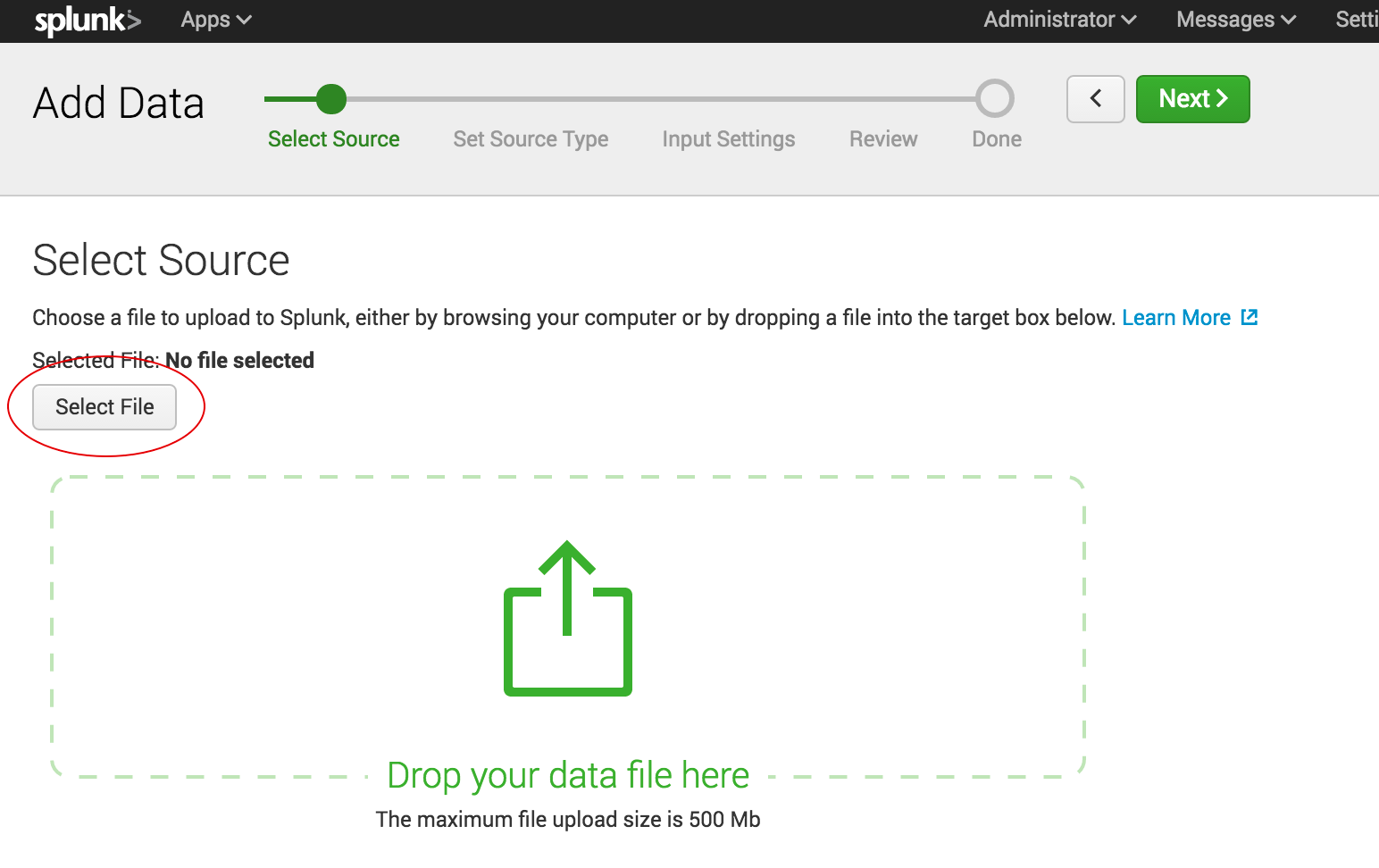
Shipping data to Splunk is fairly easy. After installation, the forwarders come pre-configured for a wide selection of data sources such as files and directories, network events, windows sources and application logs, and they are used to import data into Splunk as shown:
In the ELK Stack, Logstash is used to ship data from the source to the destination. However, Logstash needs to be configured so that each field is identified before the data is shipped to Elasticsearch. This kind of configuration can be tricky for those who do not work with scripting languages (such as Bash, Python or Ruby), but there is good support online that can be found quite easily.
Visualizations
The Splunk web UI includes flexible controls that allow you to edit and add new components to your dashboard. Management and user controls can be configured differently for multiple users, with each having a customized dashboard. Splunk also supports visualizations on mobile devices with application and visualization components that are easy to customize using XML.
Kibana is the visualization tool in the ELK Stack, and like Splunk, the platform supports the creation of visualizations such as line charts, area arts and tables and the presentation of them in a dashboard. The search filter is always shown above the different views: If a query is used, it is automatically applied on elements of the dashboard. Splunk also has a similar option, but it involves configuration in XML. Still, Kibana does not support user management, but hosted ELK solutions provide it out of the box.
Search Capabilities
The search function is a key capability of any log management platform. Both the Splunk and ELK Stack’s web UIs support searching using a dedicated search field. The query syntax on Kibana is based on the Lucene query syntax while Splunk uses its own Splunk Search Processing Language (SPL). Those familiar with scripting languages may already be familiar with Lucene while SPL is proprietary and must be learned.
One other difference is that Splunk offers dynamic data exploration to help users to find and extract everything as a searchable field when formatted in a manner that allows searching for non-configured fields. Elasticsearch fields, on the other hand, need to be defined in advance to use aggregation over the log properties.
Here is one example of a query for each platform.
Kibana:
(beat.hostname: ES1 AND metricset.name: process) AND (system.process.username: root OR system.process.username: admin)
Splunk:
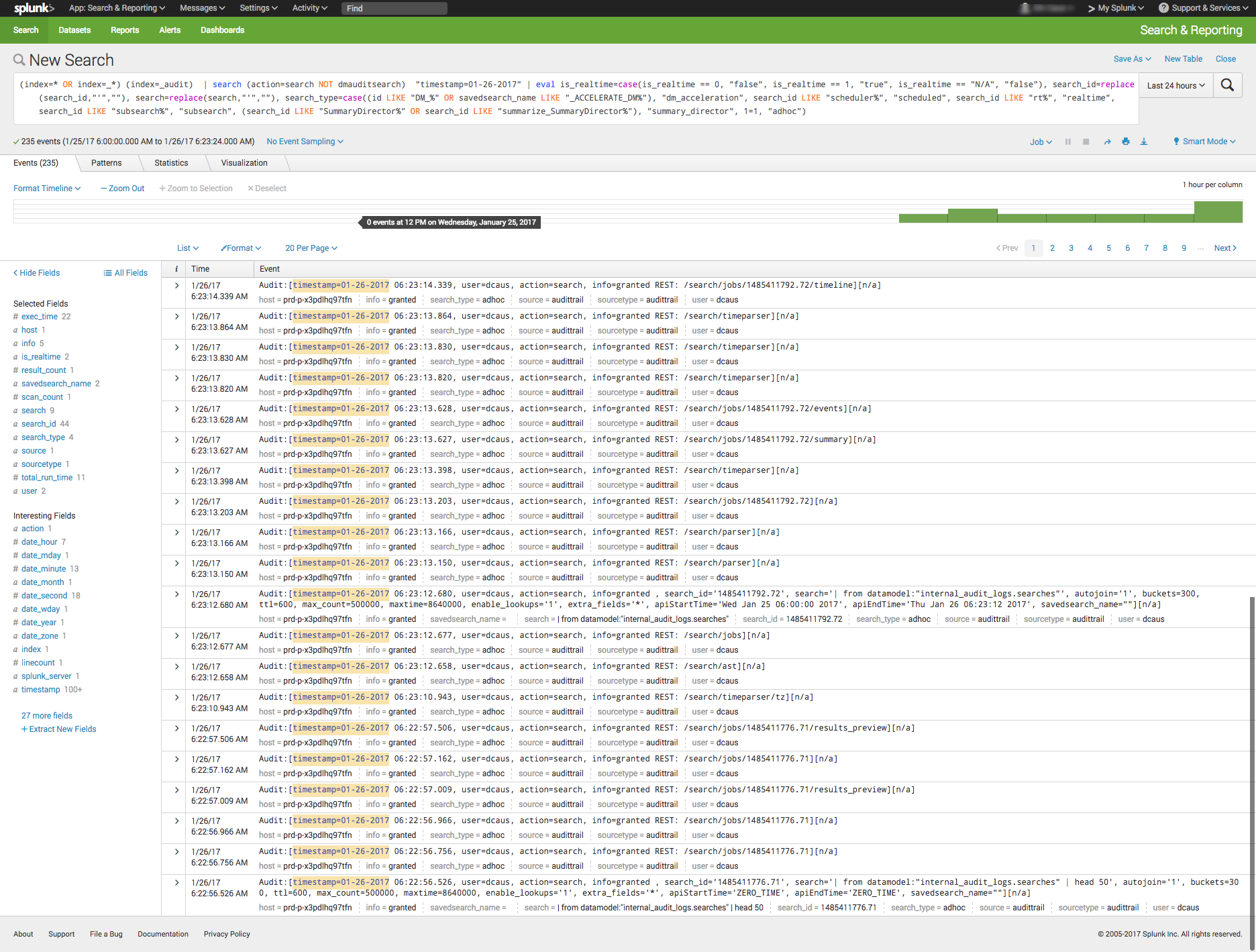
(index=* OR index=_*) (index=_audit) | search ( action=search NOT dmauditsearch ) "06:54"
The difference between SPL syntax and Lucene queries is that SPL supports the search pipeline (as in the example above) in which consecutive commands are chained together using a pipe character that allows the output of one command to be used as the input of the next one. Lucene query syntax is more straightforward and can work to generate the output from the query without additional transforming.
Traction and Community Support
Both Splunk and ELK Stack have large communities of users and supporters. ELK also has its own clear and extensive documentation for each separate tool, making it easy to get started. In addition, Elastic itself offers educational sessions worldwide.
In addition to having good documentation and a forum, Splunk, too, has customer and support platforms that offer various professional services. Splunk’s education program and instructors are available virtually or on site.
The Learning Curve
The ELK Stack’s learning curve is flat for what it’s meant to do. Elastic offers paid courses, but there is a lot of free material online due to the popularity of the open-source platform.
For Splunk, the learning curve is moderate in size, especially when carrying out more specialized analyzes. The company offers a trial period with extensive documentation, but the advanced Splunk educational courses are fairly expensive.
User Management
The ELK Stack provides role-based security as a separate paid tool. Splunk and managed-ELK services offer user management out of the box with user auditing included.
Pricing Levels
As already mentioned, Splunk is proprietary software with a price tag. After one integrates several data sources with the platform, the cost will increase greatly as data is continuously generated.
The open-source ELK Stack is free, but the true picture is not so black and white. The cost of the platform’s hardware and maintenance also adds up. To lower the cost of using ELK, features, plugins and tools must be developed.
Vendor Lock-In
Splunk’s high price tag comes with the benefit of offering an overall, well-rounded product. Users might be locked into a vendor, but that one vendor is all that is needed to do nearly anything. The open-source ELK Stack is seemingly free, but it does not provide many functionalities such as alerting out of the box—and it costs money to develop and maintain them.
One way to look at the Splunk-versus-ELK discussion is to frame it as the old Microsoft-versus-Linux debate. If you like Microsoft, you will probably prefer Splunk. If you like Linux, you will likely want to use the ELK Stack.
Final Thoughts
When one decides between these solutions, the ultimate choice should reflect not only on the platform but also on the customer’s specific needs.
Both Splunk and the ELK Stack are currently popular. But what might the future hold?
Splunk (Blue) vs. Elasticsearch (Red) on Google Trends
According to Google Trends, the ELK Stack has now overtaken Splunk in terms of the proportion of Google searches. But ELK’s traction does not stop there. As mentioned earlier, Splunk self-reports 12,000 total users. Elasticsearch is reportedly downloaded 500,000 times every single month. In IT departments, then, it is far more likely to meet people who are familiar with ELK than with Splunk, meaning that the adoption rate of the ELK Stack could “snowball” and increase even more in the future whenever ELK users join new companies or teams. People tend to use whatever software they already know or is already being used.
It’s clear that many functionalities are being added to the open-source ELK Stack. This, in turn, is shrinking the gap between it and Splunk. hose features currently found only in Splunk are likely to be added to ELK at some point in time.
So, if a more mature product is what you need, go with Splunk. But if you like a product that is more flexible, ELK is the way. Either way, it’ll be interesting to see how these two continue to compete.
It’s time to start implementing the practices of Continuous Testing
Earlier this year, Computing Magazine conducted a fascinating study around the adoption and benefits of DevOps in its DevOps Review 2017 publication. The findings that stood out most fascinating to me where around quality assurance and testing.
In this survey, the question was asked, “Where are the main holdups in the software production process?” Of all the self-proclaimed DevOps practitioners, a whopping 63 percent said the biggest delays occurring in the QA/Test phase. In fact, this cited bottleneck was more than 2 times greater than the next proclaimed bottleneck, which they felt was in planning (29 percent). In this same survey, another question asked, “What tends to lose out more in DevOps environments?” While 43 percent said, “Nothing,” nearly 30 percent of these DevOps practitioners said that quality was being sacrificed. When asked which area they wanted to focus on improving in the next year, over 40 percent opted for quality.
Why is it that quality has taken such a hit? The study cited two issues: 1) Testing and QA is often siloed from the other parts of the organization, and 2) Testing tools haven’t matured much in the past five years.
Testing must become a cross-functional operation across the software development lifecycle (SDLC) spectrum, one that involves all teams. Agile developers and testing teams don’t have weeks to test, but hours. Testing hasn’t kept up because it hasn’t applied the methods and concepts of agile development have not been applied to testing and QA processes. By removing the constraints that force testing to the end of a development cycle, developers and QA teams can achieve accurate, automated testing from day one. They can create an integrated pipeline, capable of taking an idea from design to deployment, at speed, without compromising quality.
Open-source, cloud-based solutions can be the catalyst that brings the speed of agile to testing. Here are a few examples.
Better In-Sprint API Testing: Since APIs have become the major component of applications, organizations are shifting their approach from starting testing when the user interface is complete to shifting the focus of testing at the API level. But the hard thing is finding enough time in a development sprint to test them sufficiently.
Today’s applications are a collection of microservices and API calls. UI testing alone just won’t cut it. UI testing is very brittle, and whenever it changes, testing breaks. Testing needs to shift left into the development cycle—into sprints. But if you shift testing left to be a focus of the sprints, what kind of API testing can you really do? How comprehensive can they really be? Creating those API tests has to be quick, and simple.
Dev and Test teams must utilize automated tools that not only generate API tests, but create an exhaustive set of test cases from the API, then execute those tests. These tools also need to support the most popular open-source testing frameworks allowing developers to run functional API tests as performance tests without any proprietary conversion issues. And, vice versa, developers must be able to take open-source performance tests and be able to run them as functional API tests.
Orchestrating Testing: A Continuous Delivery Pipeline Manager: “Faster” is becoming table stakes with automation. The facts show that companies who have widespread agile adoption and are deploying more frequently with significantly reduced lead times. But, this too often leads to release failures, quality issues and disorder with multiple—if not hundreds—of applications rolling through the SDLC. Plus, things slow down significantly with time-consuming handoffs and rework in the release process. DevOps teams, who release features and fixes frequently while significantly reducing errors and manual processes, need toolchain-agnostic pipeline planning, orchestration and optimization solutions that enable them to eliminate spreadsheets, automate test processes and feedback, and continually improve the delivery of revenue-generating features to end-customers. New CD SaaS tools help make this orchestration process easy.
Performance and Functional Testing Using Open Source Frameworks: More and more organizations are trying to move from legacy testing tools. It’s not so much that these don’t adequately test, but they were never designed to meet the needs of agile development approaches. Rather, they were designed for releases that occurred two to three times per year. But that won’t cut it anymore.
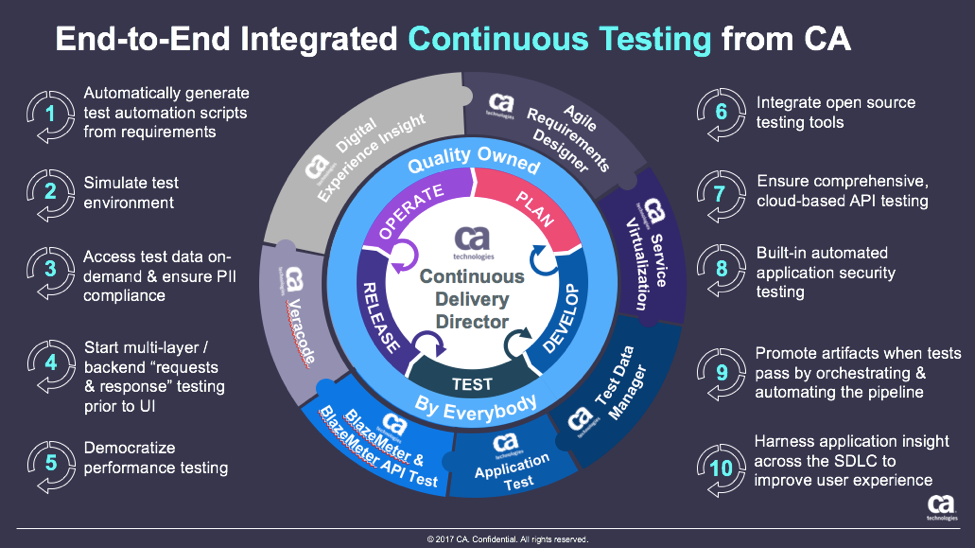
These are just a few examples of how continuous testing eliminates the testing hurdle. With continuous testing, organizations can:
Automatically convert user stories from requirements management tools like CA Agile Central or Atlassian JIRA into the minimum number of test cases required for complete code coverage, and being able to adapt automatically to changing business requirements.
Reduce test cycle prep time by requesting test data from within requirements.
Request, reserve, and create test data at any time, even from requirements phase.
Virtualize APIs for better testing, while managing API access to developers.
Institute easy API testing that can generate comprehensive test cases (positive, negative, edge case, and SQL injection) and execute those tests automatically.
Democratize testing with SaaS-based testing tools so that developers can test early and test often.
Speed testing by feeding test data directly and securely to virtual services.
Use open-source testing tools such as JMeter, Selenium, Jenkins, Jenkins, Appium, Taurus, Gatling, Locust and more.
Orchestrate the application delivery pipeline to promote releases from one environment to the next as soon as all the tests pass and enable faster feedback loops.
This is testing unleashed, going hand in hand with agile development to accelerate quality into production.
By adopting next-generation testing practices, DevOps teams have the ability to test early, often, automatically and continuously. To learn more about continuous testing and why it is critical to DevOps and Continuous Delivery initiatives, visit this Continuous Testing informational page.
Beyond influencing the future direction of the Cloud Foundry PaaS, Microsoft also revealed this week it will tighten the integration between the Cloud Foundry PaaS running on Microsoft Azure and backend database services. There also now command line tools for Cloud Foundry available within Azure Cloud Shell, a browser-based tool for managing Azure resources.
Corey Sanders, partner director for Microsoft Azure, told conference attendees that Microsoft is fully committed to Cloud Foundry as any member of the foundation. In fact, there have been instances of Cloud Foundry running on Azure for years, including the version of Cloud Foundry that SAP makes available as part of a multi-cloud computing strategy it has crafted. Microsoft claims usage of Cloud Foundry on Azure has increased 300 percent over the last year.
CFF CTO Chip Childers says that endorsement of Microsoft is significant because, along with Google, it means two of the three largest public cloud providers are now investing in Cloud Foundry. There are instances of Cloud Foundry running on Amazon Web Services (AWS), but the largest public cloud service provider has not seen fit to join the CFF.
The mission of CFF is to promote the adoption of multi-cloud computing via technologies that can be deployed across both public clouds and an on-premises IT environment, Childers says. He expects Cloud Foundry and the Kubernetes container orchestration engine to play similar roles in that regard. The actual operating system deployed in those environments, he says, is now much less relevant. The choice regarding when to deploy one or another will come down to the nature of the application workload and the relative cloud-native maturity of the organization deploying those workloads.
Microsoft has already made it clear it it is committed to offering multiple classes of services with Azure. In addition to Cloud Foundry, Microsoft already offers a PaaS environment built on its own proprietary stack of Windows software. There’s also both a container-as-a-service offering based on Kubernetes and implementations of the container stack developed by Docker Inc., in the wake of a strategic alliance between those two companies.
Obviously, the range of deployment options now being made available on platform such as Microsoft Azure creates some significant DevOps challenges. Rather than trying to limit the number of services developers might invoke, IT operations teams will need to focus more on making sure the right type of application workload invokes the class of cloud service that is best optimized for that workload. Naturally, that approach will require IT organizations to address both technology and cultural issues within their organizations. But given the limited effectiveness most IT operations teams historically have had in terms limiting deployment options, there’s no better time than the present to get started.
Do you remember building with LEGOs? You could follow the directions that come in the box down to the letter, or you could go off-script to create something totally your own and evolve and refine it over time. Regardless of your level of creativity, if you had one of those classic green base plates to build from, then LEGO cities were in your grasp.
In many ways, a DevOps methodology aligns with the block-building process. While the tools and processes can change, a solid foundation is the backbone for fast and repeatable success. Developers and IT operations are beginning to reap the benefits: According to RightScale’s “2016 State of the Cloud report,” DevOps adoption increased to 74 percent in 2016 from 66 percent in 2015.
But even though adoption is on the rise, some DevOps teams still struggle to extract the full range of benefits from a DevOps model. Why? Because they’re more concerned about the LEGOs without first having considered the base plate. DevOps requires a flexible and modular foundation, a software-defined infrastructure (SDI) built with open-source technologies to be successful. Here’s why.
Infrastructure: The Path to Agile Business
The goal of a DevOps approach is to speed the entire application delivery life cycle (initial development, testing, delivery to market), enabling the business to quickly respond to consumer demands (deliver new services, fix bugs, add new features, etc). However, for the DevOps teams to successfully execute this, they need a flexible and modular cloud infrastructure that easily adapts and extends to meet their needs.
SDI provides easier access to resources via a self-service interface so developers can quickly get the resources they need. It also gives the DevOps team the capability to standardize services so that applications built in the development environment will easily deploy and run in the test and production environments, speeding their delivery to market. SDI also offers a flexible and modular approach that provides timely and easy access to the latest technologies, such as containers, where innovation is occurring at a rapid pace and easy integration is available via standard open protocols.
SDI provides the best LEGO base plate to support your DevOps processes that improve application lifecycle management.
Automation to Support Strategic Collaboration
Routine deployment and management tasks are the Achilles heel of every IT organization. The best way to improve efficiency, reduce costs and quickly respond to infrastructure demands is with automation.
As a key component of an SDI, automation and orchestration of the application life cycle including deployment of hardened VM or container templates ensures faster, consistent and repeatable provisioning and configuration. Additionally, the SDI automation and monitoring tools can intelligently sense and respond to infrastructure demands, automatically optimizing and adapting the infrastructure in real time. This frees time for the team to focus on strategic initiatives versus backend tasks.
The DevOps movement is all about collaboration and constant innovation, which is made possible by having your infrastructure automate the mundane tasks and automatically respond to infrastructure demands.
Visibility Down to the Base Level
One challenge facing successful DevOps adoption today is lack of visibility into application delivery. As developers rely on constant innovation through a loosely coupled chain of events, understanding how each link operates is crucial to keeping the chain moving in the right direction.
In the case of open source, there is no infrastructure more transparent or collaborative. The infrastructure itself is built on openness and exchange of code, leading to a natural transition to its use in a developer environment. As DevOps uses CI/CD to stay refined, so do the open-source projects that contribute to its infrastructure. Constant innovation is what keeps the infrastructure and development tools up to date, supporting the entire DevOps team.
The Solution to Cultural Challenges
Successful DevOps adoption doesn’t solely involve changes to existing technology. It also requires a cultural shift within an organization. A software-defined infrastructure that utilizes open-source technologies is built on the same concept: growth through collaboration. Businesses aren’t committed to using a single vendor or propriety solution, giving them an expanded network of resources and tools to optimize their IT needs and business operations. DevOps is a marriage of technology and people, and an SDI environment allows that union to succeed.
The world has seen many great LEGO projects over the years, both the small-scale private home projects and large-scale public exhibitions. But the common thread for their success is the base plate, allowing innovators everywhere to build LEGO masterpieces more rapidly and effectively. For DevOps professionals, a software-defined infrastructure built using open-source solutions is the base plate for success. SDI environments improve efficiency with automation, refine visibility into application performance, enable innovative and agile business models, and create stronger cultural alignment.
About the Author / Terri Schlosser
Terri Schlosser, head of SUSE product and solution marketing, has 20 years of experience in the IT software industry. She has held roles in marketing, software development, product management and strategy in many different IT software areas including cloud, networking, storage, management and operating systems. Most recently her focus has been on open-source software defined infrastructure solutions. Follow her on Twitter.











 This is testing unleashed, going hand in hand with agile development to accelerate quality into production.

 Terri Schlosser, head of SUSE product and solution marketing, has 20 years of experience in the IT software industry. She has held roles in marketing, software development, product management and strategy in many different IT software areas including cloud, networking, storage, management and operating systems. Most recently her focus has been on open-source software defined infrastructure solutions. Follow her on