Tag: No Code

  • Don’t Make Big Tech’s Mistakes: Build Leaner IT Teams Instead

    Don’t Make Big Tech’s Mistakes: Build Leaner IT Teams Instead

    One of the biggest narratives in the U.S. concerning the current wave of tech layoffs is the fact that ‘traditional’ sectors have a prime opportunity to snap up new tech teams and IT talent. This has always been a significant challenge for sectors such as banks, insurance and manufacturing that compete with big tech for talent. In 2022, a majority of CEOs (71%) identified skills and labor shortages to be that year’s biggest business disrupter.

    And they were right to be worried. According to Salesforce, three in four workers do not have the digital skills needed by businesses to prepare for the future of work. The temptation in this environment for many traditional organizations is to enter the labor market to build larger tech teams to help drive their modernization programs. However, this may be a mistake.

    Building large, expensive, bloated tech and IT teams is not always the answer. It’s critical that traditional companies learn this lesson from big tech.

    Instead, traditional organizations should consider other avenues to drive their digital transformation ambitions with their lean resources. What does this look like?

    What is the Real Challenge you are Trying to Solve?

    Since COVID-19 hit, U.S. companies have been forced to reevaluate how they work, with remote working becoming commonplace–even for companies who couldn’t imagine themselves working remotely.

    And the challenges have grown as U.S. businesses seek growth to recover lost gains from the last few years. Evanta’s 2022 CIO Leadership Perspectives study found that CIOs rate data and analytics as their second top priority within the IT function. It is clear that business leaders see advancing organizational use of data, analytics and automation as key to reaching enterprise objectives.

    For many organizations, the biggest challenge they face is the unprecedented amount of data generated. Critically, more than 80% of all new data is unstructured and messy. This makes it difficult for data-driven companies to accurately review, gather, analyze and rely on what is mission-critical information.

    Traditional industries such as health care, banking, insurance or the public sector, have even larger concerns because data is increasingly critical to how they build value and deliver services for customers. So, it is important for their IT teams to create a single source of truth and data governance framework across their organizations to ensure the right people and senior leaders have the most accurate information to make smarter decisions.

    For instance, in the manufacturing industry, no-code database platforms can be leveraged to structure daily operational data and visualize insights through digital dashboards for quality assurance, continuous improvement and health safety.

    Additionally, at Baserow, we work with treasury customers at some of the biggest international banks that use no-code platforms to keep track of local legislation around the world by centralizing information in real-time databases available to relevant teams, including compliance.

    Modern organizations depend on their IT teams to accomplish a lot of their goals. So, it is important to provide them with the tools to focus on more complex development projects. No-code tools free your non-technical teams to address their pressing needs themselves without having to wait for budget or resource availability in the IT department.

    Have you Also Considered Upskilling Your Current Team?

    We know from the Salesforce survey that the vast majority of U.S. workers lack the digital skills to support their organizations’ ambitions and needs. This suggests that there is a wider issue within most companies at large. Do businesses need to prioritize upskilling their current team instead?

    A U.S. Gallup report found that 72% of workers are overwhelmingly interested in pursuing additional digital training to prepare them for an increasingly digitilized workplace. Is there room for no-code technologies to supplement the digital capabilities within companies?

    Enterprises are already expanding the responsibilities of application development outside their IT teams as well as increasing the productivity of their existing IT resources by automating and abstracting repetitive developer tasks. Gartner predicted that by 2025, 70% of apps will employ low-code/no-code technology. This trend aligns neatly with the business needs, such as the development of organization-specific applications and tools, because every business’s requirements are different.

    Furthermore, no-code/low-code technology enables companies to drive innovation and shorten the idea-to-market cycle times. The technology’s pre-built components make it easier for end-users and workers to intuitively assemble the templates that solve their complex needs.

    In Conclusion

    U.S. companies that need to fill the IT skills gap should consider how technology can be leveraged to boost productivity and accelerate the speed of innovation while accepting that new technical resources will continue to be expensive and scarce.

    These organizations are better off taking the lead in the democratization of IT within their teams. Only then can they keep up with the speed and agility required in today´s competitive environment.


  • Low-Code Should be Worried About ChatGPT

    Low-Code Should be Worried About ChatGPT

    Is ChatGPT the technology revolution that will save the world, or the Pandora’s Box that will eventually destroy it? How about neither? Putting these two extremes aside, a more rational concern is whether ChatGPT will steal your job, especially if you work in software development.

    Is this a fair concern? Conversations like this are nothing new. New technologies always go through this cycle; starting with intrigue then moving onto fear and resentment until eventually being accepted and embraced as the new normal.
    ChatGPT and other natural language AIs are undoubtedly exciting new trends with huge potential. One area of ChatGPT’s potential that has largely been overlooked is how it can democratize software development. Should low-code/no-code providers be worried about this?

    Delivering the Low-Code Promise

    Low code has long promised to democratize software development by providing a way for non-coders to develop applications themselves. This “democratization of IT” promises a new wave of innovation by enabling organizations to create new processes without the new to engage with IT. While low-code has already achieved some great things when and where it has been implemented, the amount of change it can deliver is fundamentally limited by the developer’s choices. The developer still chooses which aspects of the application can be configured by the user, so the user still has no fundamental access to the code. While this has been low-code’s strength (since users cannot damage the underlying code if they can’t access it), users are still beholden to developers to do anything significant. ChatGPT could allow users to make more significant changes to applications, potentially enabling organizations to achieve far more than with low-code and in half the time.

    Software Development is Just the Start

    ChatGPT can achieve more than helping non-developers build the applications they need. If you think about the most common reason for an IT project failure, it is rarely down to poor delivery or mismanagement alone. Most IT projects fail because they do not deliver the outcomes that users want. This happens because of a communication breakdown between IT and end users. On one hand, users fail to convey exactly what they want and IT fails to ask the right questions to find out. The requirements (i.e., the intended outcomes) get lost in translation because technical and non-technical people simply speak different languages.

    In a scenario where the message is too often lost in translation, ChatGPT can serve as the interpreter between those who build and maintain IT and the wider staff who use it day-to-day. ChatGPT can bridge the gap because users won’t need technical skills to realize the changes they want.

    Always Start with the Business Case

    Delivering change in an organization is fraught with challenges and uncertainty. Like any project, it is important to start with the fundamentals of what you’re trying to achieve, not the technology you want to use. No matter how much you want to use ChatGPT, you must start by defining the outcomes you want to achieve and working backward from there. How you achieve these outcomes is a technical decision that comes much later. If one of your questions is to enable change to happen faster and to be more adaptive to the company’s needs, then ChatGPT may well form part of the answer. Just remember to define the problem first, build the business case and then evaluate the various solutions to achieve those objectives. Don’t get carried away by the hype.

    ChatGPT Needs Room to Flourish Outside of IT

    ChatGPT has the potential to be the bridge between technical and non-technical users in every organization. It can reduce the gulf between these radically different types of people to speed up change in the organization and deliver better outcomes for all. But it is crucial for technologies like ChatGPT to sit within the domains where they will have the best chance to flourish. In what might sound like a controversial statement from someone in the IT sector, I believe that, like low-code, ChatGPT must sit outside of the technical domain. ChatGPT needs to move out of the IT sector where it was born to reach its full potential. The question is, is IT ready to let it go?

    Image via Unsplash

  • The Time for Automated Testing is Now

    The Time for Automated Testing is Now

    Skilled software testers continue to be in high demand, and it appears that trend won’t change any time soon. The current labor shortage and a looming recession is giving software development leaders good cause to think about how to attract and keep qualified personnel and, more importantly, enable them to work as efficiently as possible. Added to this scenario is a trend in the software development cycle toward shift left testing, which has put increased pressure on developers to take on testing responsibilities that often require taking on new perspectives and using new tools. Automated testing solves these problems by making it easier to learn how to build a consistent, reliable testing program in less time, requiring less maintenance.

    Add to this the future promise of artificial intelligence or AI-augmented testing platforms and current machine learning (ML) capabilities, such as self-repairing of test scripts, and you have a platform that both levels the learning curve and accelerates efficiency. The sooner organizations can transition from manual to automated testing, the better they can withstand internal and external market fluctuations.

    A Developer and a Tester Walk Into a Bar …

    Traditional software testing is a manual process in which testers are employed to replicate users and are expected to bring that perspective to their work. As such, software testers have a very different mindset than software developers. Where developers are protective of their creative output, software testers are driven by a curiosity to probe the limitations of a system. It stands to reason that the qualities that make someone excel at either of these roles is, likewise, not the same. And yet, with the trend toward shift left testing and continuous integration/continuous development (CI/CD), the industry has blurred the distinction between coder and tester to the dismay of both sides.

    Automated testing removes much of the monotonous work associated with repetitious test plans. It allows testers to focus on writing better scripts, extending the scope of their testing plans and scheduling more powerful load tests. From the organization’s perspective, once you have established a library of reusable test scripts, your testing program will be protected from future turbulence in the employment market, including recession and attrition.

    Low-Code/No-Code

    Regardless of the tool you use, code will be created if you are creating software — even test scripts. Ideally, however, a low-code/no-code tool can hide some of the complexity and promote best practices. Using a low-code/no-code tool can relieve a tester from creating test scripts from scratch by recording manual interactions and offering suggestions. In the case of shift left testing, a low-code tool can eliminate the need to learn entire testing frameworks while still enabling a developer to access code when desired. Automating testing also eliminates the human error inherent in repetitive manual tests. In short, test automation does not diminish the value of skilled software testers and developers; it increases it.

    Placed in the hands of skilled testers, automated testing will only become more powerful, more effective and more critical to your development cycle. It elevates the skills of testers and makes them more productive, accurate and thorough. Test automation also makes for a smoother transition to shift left testing, allowing developers to spend less time testing their software and more time doing the creative work that makes them thrive. In a market where attracting and keeping top talent is only going to get more difficult, anything you can do to lighten the burden on your employees and make them more productive will be a big win for your business. So, the question is not whether you should transition from manual to automated testing but when.

  • This is Not Just a Test: DevOps and the Need to Automate

    This is Not Just a Test: DevOps and the Need to Automate

    Creating software is as much about the process as it is about the product. In recent years, we’ve seen the speed of innovation reach new heights due to more efficient development and quality control. DevOps has further accelerated development by combining software and operations in unified, self-improving teams. With automation taking care of rote tasks, developers can now tackle more difficult issues, resulting in even greater software quality and faster development. The need for speed to market is vital; a month or two can make or break a product launch. Then again, if a product isn’t tested thoroughly in the rush to get to market, flaws can slip through and an organization’s revenue and reputation can take a serious hit. In the U.S., software failures in businesses’ operations systems cost a total of almost $1.6 trillion in 2019. The problem is that it can be a bottleneck and create major delays in the release cycle. In fact, A recent survey of 4,300 developers revealed that it is the top reason that releases are delayed.

    In the past, the waterfall approach was common. Tests usually took place after code was written; carried out by testers who had no interaction with the original developers. As a result, bugs that could have taken moments to correct during development required days or even weeks to fix afterward. Even worse, the complexity of the finished software and its many dependencies meant that fixing a localized bug could introduce additional problems that needed to be fixed after another round of testing, further delaying the release.

    But even in a modern DevOps environment, testers and developers are still speaking entirely different languages. By and large, testers do not code and software developers are not expert testers. The two teams typically converse through multiple logs, event viewers and other operating system tools. It creates a great deal of friction and slows down the process.

    Shift Left 

    DevOps represented a big improvement over waterfall methods but, even so, it’s far from a set-in-stone process. It, too, has evolved and right now, shift left testing has moved into the spotlight.

    In this approach, the guiding philosophy is to test early and often, beginning very early in the development cycle and continuously throughout every stage whenever there’s an opportunity. As a result, bugs are caught early when the relevant code is still fresh in the developers’ minds, so it’s easier to fix. In the end, businesses are able to release higher quality software much faster and more frequently.

    Environmental Tests

    When it comes to the DevOps process, it’s not always clear where and how to automate the process. The following looks at how that can be incorporated into DevOps based on four different environments in a continuous delivery (CD) pipeline.

    These environments include local development (usually a coder’s personal device), a continuous integration (CI) or development server, test servers for user interface (UI) testing and the production environment itself. Each has stages with requirements that must be met for code to advance.

    Whenever any new software features or capabilities are entertained, though, developers and the QA team should begin by answering the question, “How can this be tested?”

    Moving Through the Stages

    Once code is created, it must be able to be built without error, passing all unit tests and local verification.

    This stage is particularly important because the development environment echoes the requirements of production; if it works here it’ll likely also work for the customer.

    At this stage, running early regression and developer verification tests ensures the build is ready while providing feedback about the reliability of the environment. It’s useful to have individual test cases as part of more than one schedule. This enables developers to test minor parts of the software without undergoing regression tests of all product features. These tests should be automated and triggered as part of the same process.

    Developers should have the ability to perform basic tests on their own code. After all, the sooner a flaw is identified, the easier it is to eradicate. Just as testers are not experts in coding, neither are developers expert testers. To shift left and effectively integrate tests at all stages of the development life cycle, it must be automated. This will allow developers to test larger quantities of code earlier and more frequently.

    Once through this stage, the software can advance to the test environment.

    This is where a variety of product tests take place, including those for function, load and performance. Passing this stage entails completing all automated functional UI tests, verification of visual appearance, an inspection of server logs and performance evaluation.

    This is where most regression tests are conducted and automation is crucial for scheduled tests to be triggered.

    Next, the product moves into the production stage.

    Tests still occur in this stage to pinpoint any remaining bugs. Automated tests are then run against the production environment to closely mirror interactions with real end users. At this point, it’s highly unlikely there will be major issues but, if there are, running tests at earlier stages could very well be the culprit.

    Throughout the process, ideally, testers will use a visual, no-code tool to create these automated tests. In this way, testers are able to more rapidly and intuitively implement test automation without having to tap into programming resources. Additionally, the integrated documentation of the actions taken during automation will be interactively connected to visual documentation of the test results. The upshot is that testers and developers gain a shared language for both building test automation and troubleshooting the issues it identifies.

    This is Not Just a Test

    Effective, scalable tests are crucial to delivering the reliable, high-quality software that today’s businesses rely on for day-to-day operations. This is why DevOps and development teams need to integrate tests at all stages of software development. Shift left speeds up the creation of better quality software, which provides a significant market advantage. After all, it’s not just about software quality; it can show which companies are best prepared to meet market demands.

  • Front-End Frameworks Enable Better Dev Collaboration

    Front-End Frameworks Enable Better Dev Collaboration

    The general public often thinks about software development in terms of a lone software developer hacking away tirelessly at their keyboard. Of course, that is an anachronism, at best. What is true is that collaboration among software engineers, especially with their colleagues in IT operations which evolved into DevOps, has become the norm for rolling out better code faster.

    We are on the cusp of the next big evolution as software development becomes more of a ‘team sport’ than ever before. Now, collaboration is extending beyond IT (developers and operations) to cross-functional areas across various business teams. Product development, marketing and others also are providing input and feedback into the software development process and, most significantly, becoming part of the process.

    Front-End Frameworks are Driving Collaboration

    Historically, software programming, including front-end programming, happened in local IDEs. However, the rise of modern front-end web frameworks has led to an entire class of developer tools that speed up the build process and allow applications to be deployed more quickly.

    There are a number of front-end frameworks that do this: Netlify, Vercel and Appsmith, an open source internal app builder, are three examples. These tools are getting widespread adoption, because, in a world where front ends are becoming more complex, they make things like hosting, deployment, authentication and serverless functions much simpler. The other reason for adoption is also because many of these tools are built on top of popular open source frameworks such as React, which already has a vast user base.

    This is enabling a new kind of collaboration that is unlocking a lot of value for all the stakeholders involved. Inspired by how Figma reshaped the design process by allowing real-time commenting back in 2016 or how Google’s suite allowed real-time editing, there is a similar phenomenon taking place over the last year in software engineering.

    Visual, Real-Time and On the App

    The most obviously striking feature is that collaboration is happening on the app (or the app prototype) and is becoming increasingly visual. Writing or editing code in the command line is great, but it doesn’t necessarily help the developer to visualize what is happening. Vercel’s Next.js Live, for example, allows teams to chat, draw and edit.

    collaboration

    This also means that collaboration is happening on the app instead of through tools like email, Slack and Jira, leading to targeted feedback without having to toggle between multiple tools.

    Collaboration and Feedback Loops Become More Inclusive

    While developers often collaborate at the code level, non-developers’ feedback is often given at the design level. This is more often the case for internal tools (or apps), which typically account for anywhere from 20% to 40% of engineering bandwidth in organizations.

    For example, Appsmith today has thousands of developers self-hosting and deploying internal applications for users who are often business or operational teams like support, sales and/or finance, for example. Often, these business users don’t even know who has built the application. Real-time commenting via front-end frameworks facilitates collaboration between software engineering teams and their business counterparts who can now communicate directly, provide feedback and collaborate with their engineering peers. This close collaboration empowers all parties, increases efficiency and saves significant time while improving the overall quality of the software and ensuring that it meets expectations.

    AppSmith

    In addition, non-engineers don’t need to familiarize themselves with a new tool like GitHub or go through a painful replication issue on Jira involving a variety of screenshots or screen recordings. Sharing feedback can be done much more easily.

    Better Version Control and Feedback

    For developers, having the ability to visualize a particular branch of an application and give detailed feedback on it and then track it on GitHub or GitLab speeds up the development cycle. Netlify, for example, pioneered this when it launched Deploy Previews earlier this year. Netlify takes this feedback and integrates it into project management tools like Jira, Trello and many others in addition to GitHub and GitLab.

    collaboration version control

    We are seeing other companies, like Sturdy, building on this much-needed trend of real-time collaboration in app development.

    Collaboration is the Trend

    Great software is the story of teams expanding collaboration beyond developers and there is a lot of good tooling available to help achieve that. This trend should continue to gain traction in the years to come because it taps into a number of other underlying trends in the software development space.

    First, the explosion of alternatives in the backend-as-a-service space, in which Heroku and Firebase were early pioneers, means BaaS is embraced by many more organizations for a variety of use cases. This trend speeds up development because they present a much more tightly integrated ecosystem of services and organizations don’t have to worry about deployment, hosting, content delivery network (CDN) and/or authentication themselves, for instance.

    Second, the proliferation of APIs is driving the emergence of more complex applications built on a variety of data sources. Everything is connected to everything. Of course, this also means that a lot more data is available to support decision-making, and this leads to many different kinds of applications being created both for external as well as internal purposes.

    And finally, the larger low-code/no-code movement is creating millions of new citizen developers and blurring the boundaries between who is and isn’t a developer.

    Summary

    DevOps marked the start of the evolution of software development into a team sport, and collaboration is now accelerating beyond the boundaries of IT. Like DevOps, the result of this collaboration in the software development process will be better software that propels businesses forward created faster than ever before.

  • Low-Code and the Rise of the Citizen Developer

    Low-Code and the Rise of the Citizen Developer

    Low-code technologies have become increasingly popular for helping businesses adapt to ever-changing environments quickly by allowing them to build, customize and deploy apps with little to no coding. At Low-Code/No-Code Virtual Summit, taking place on Nov. 18 at 9 a.m. ET, luminaries of leading organizations in the low-code community will share valuable insights on their digital transformation journeys and the role of low-code/no-code in their digital strategies.

    Attendees will get an intimate look at how organizations are embracing low-code technologies to advance their business while improving user experience. The virtual event explores the vast and growing ecosystem of technologies that are changing the face of application development, featuring sessions on:

    • The rise of the citizen developer
    • Security and compliance in low-code applications
    • How low-code is transforming software development
    • Low-code versus no-code
    • Low-code trends

    Low-Code/No-Code Virtual Summit features an exceptional lineup of low-code and industry experts, including:

    • Derya Sousa, co-founder and COO at Kianda Technologies
    • Venkat Thiruvengadam, CEO at DuploCloud, Inc.
    • Andrew Manby, head of product management at HCL Software
    • Asna Javed, hybrid cloud build team and developer advocacy leader at IBM
    • Eren Akbaba, cloud architect at IBM
    • Charles Kolodgy, cybersecurity strategist, advisor and educator at Techstrong Research
    • Daniel Topham, CEM for digital, strategic solution architect at Everbridge
    • Bala Madhusoodhanan, principal architect at TJX
    • Paul Porter, VP of sales engineering at Everbridge
    • Gunndarr Dotter, regional sales director at HCL Software
    • Amy Hart-Koullapis, communications systems specialist, global marketing and communications at World Vision International

    The virtual environment features an auditorium where attendees can watch the sessions by the experts and an exhibit hall lined with booths showcasing the latest solutions from leading low-code companies. In the exhibit hall, attendees can download resources and interact with partner sponsors.

    To start off the event on a high note, we have scheduled a yoga class at 9 a.m. with a certified instructor.

    Registered attendees will receive a link to access the virtual environment on-demand for up to 30 days after the live event.

    To check out the full agenda and to register for free, visit the Low-Code/No-Code Virtual Summit website.

  • Citizen Development Program: Establishing Guardrails

    Citizen Development Program: Establishing Guardrails

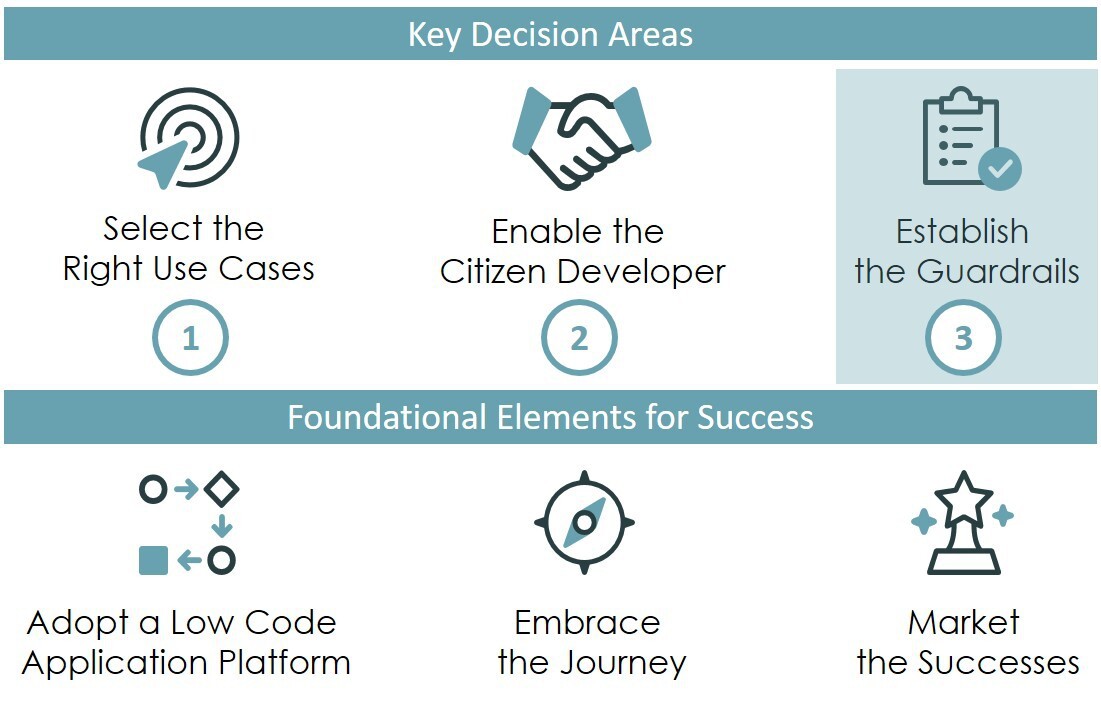
    Citizen development is as easy as one, two, three.

    1. Select the right use cases
    2. Enable the citizen developer(s)
    3. And establish the guardrails, which I will cover here.

    Of course, there is a little more to it than this. Success requires focus, planning and patience. We previously discussed, in parts one and two of the series, the discipline required around use cases and citizen developers (CDs). This third and final post covers how to establish the appropriate technical and process guardrails to ensure the wider enterprise, platform and developers are protected.

    Establishing the Guardrails

    Guardrails exist for two primary purposes: alignment and independence. Clear and concise guardrails ensure alignment across organizational objectives, company policies and disparate teams. Those same guardrails provide CDs with a degree of independence – a safe operating space where they will not be micromanaged or unnecessarily burdened by processes.
    Effective guardrails define and enforce a range of acceptable behaviors, as well as reduce risk and speed application delivery.

    While low-code application platforms (LCAPs) each have their unique capabilities and technical implementations, relevant features can be viewed in three broad categories: platform foundation security, app dev access control and development tools & processes.

    Within the context of your specific LCAP and development methodology, you need to consider and answer the following questions:

    Platform Foundation Security

    • How will you provide your CDs a “safe” environment to build and test their applications? Does your platform support separate and secure development, test and production environments? Will you put your citizen developers in their own discrete development environment?
    • Will your developers be working with data that requires encryption and/or localization? If so, does your platform support data encryption and compliance with relevant data residency laws?
    • Does your LCAP support anti-virus scanning and/or HTML sanitization, and if not, how will you prevent a CD from inadvertently putting your organization at risk?
    • What logging and auditing is required for your CD activities? Who reviews logs? How long is the information kept?
    • Does your platform support enhanced security mechanisms like two-factor authentication (2FA) or virtual private networks (VPNs)? Will citizen developers be working in areas or with applications that require enhanced security?
    • Are there other risk, compliance and security standards that your organization mandates? If so, how will you incorporate them?

    App Dev Access Control

    • How will you provision or deprovision developer and tester accounts? How will you handle developer login and authentication into the development environment?
    • Will CDs have development access to downstream environments across testing, staging and production?
    • Will you use groups to control access to applications in development, and if so, who will manage these groups?
    • Will you use roles to grant access to distinct development capabilities like tables, workflows, UIs, mobile, reporting, analytics, etc.? What determines which role(s) a citizen developer is granted?
    • Will you provide a library of pre-built application components (e.g., workflows, dashboards, virtual agents, etc.)? How will you control access to and usage of the pre-built components?
    • Will you allow citizen developers to access pre-built integrations? How will you control access to and monitor usage of those pre-built integrations?
    • Does the developer identity and access management process need to be driven by an enterprise identity provider, such as Azure Active Directory?
    • Will citizen developed applications be able to access other citizen developed applications? How will app-to-app access be controlled?

    Development Tools and Processes

    • How will you manage your demand intake process? How will you ensure that new applications do not duplicate existing application functionality? What criteria will you use to determine if an application is a good fit for a citizen developer?
    • Will you require your CDs to adhere to all, some or none of your existing development methodology? Can you explain the methodology in terms the citizen developer will understand and accept?
    • Will you require CDs to create requirements or agile stories before building an application?
    • Will you require tests be developed for CDs’ applications, and if so, can these be automated? Who will develop those tests?
    • Will you require code or application reviews of citizen developed applications? What best practices and standards will be used during those reviews? Can those reviews be automated?
    • What level of documentation, if any, will you require developers to produce?
    • How will you promote applications through the development pipeline (i.e., dev to test to prod)? Can the app promotion process be automated?
    • How will you track and manage CDs’ applications through the development pipeline and their life cycle?

    Reflections on Citizen Development Programs

    The exercise of writing this series and your feedback has encouraged me to reflect on parts one (selecting the right use cases) and two (enabling citizen developers). Here are a few final thoughts to consider:

    • Do you care that a CD builds just one app or do you want them to build more?
      Ideally, a CD continues to deliver app after app. But attrition can be high in a CD program. Therefore, if your CD built a single application that delivers business value and then returned to their “day job,” you should still celebrate that success.
    • Is citizen development better suited for creating new apps or maintaining existing apps?
      In my view, the answer is both. LCAPs provide great opportunity for CDs to prototype or even produce an MVP of an application. At the same time, LCAPs allow professional developers to build more complex applications and turn the maintenance of those applications over to CDs.
    • How many LCAPs can you reasonably expect a citizen developer to understand?
      Realistically, perhaps one, or maybe two. Keep in mind that app development is important, but having CDs focus their technology choices on a single LCAP vastly improves their chances of success.
    • Do citizen developers make good professional developers?
      Consider this – some of the best developers I have worked with do not have computer science or software engineering degrees. It’s more important that a developer has a passion for technology and, more importantly, for understanding how technology solves business problems.
    • Finally, explore and embrace citizen development before your competitors do, as the value proposition is real in this new world of work we have found ourselves in. After 30 years in enterprise IT, I can confidently say we’ve reached an inflection point in technology and business, truly democratizing application development.

    This post is the third of a three-part series from Mark Tognetti that provides real-world insights on delivering business value from citizen development initiatives.

  • SAP Makes Available Free Cloud Tier to Build Applications

    SAP Makes Available Free Cloud Tier to Build Applications

    SAP announced that next year it will make available a free tier on SAP Cloud Platform for developers that are building applications.

    Announced at the SAP Tech-Ed conference, the free tier comes at a time when SAP is encouraging developers to use its applications as a foundation for digital business process transformation initiatives.

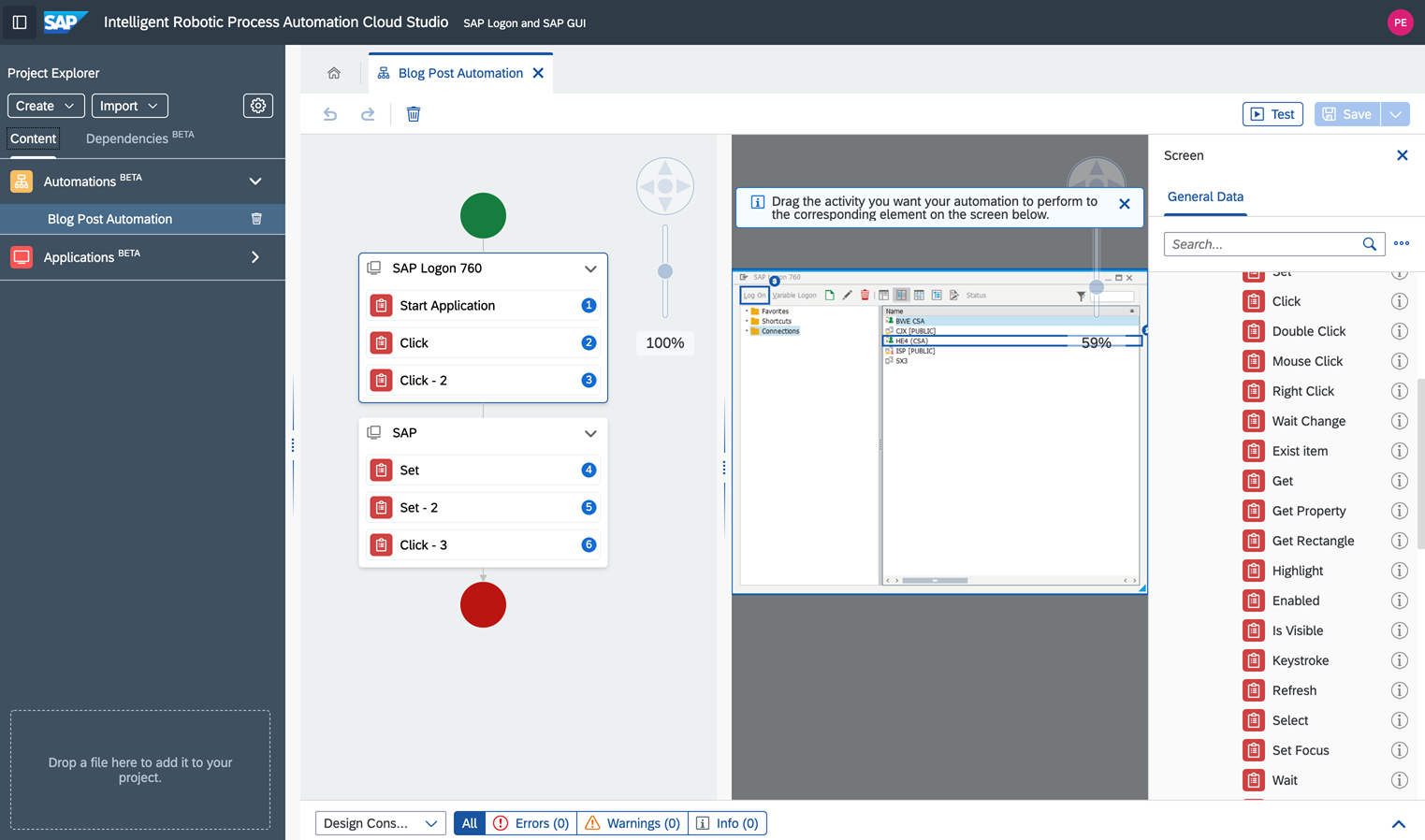
    As part of that effort, SAP is also extending the capabilities of the low-code tools it makes available to customize SAP Cloud Platform Workflow Management and SAP Intelligent Robotic Process Automation (RPA) 2.0 to make it easier to integrate these offerings with other applications. SAP beginning in January is also promised to include a limited edition of SAP Intelligent RPA in every SAP S/4HANA Cloud subscription.

    Finally, SAP is beta testing SAP Ruum, a set of no-code tools it plans to make available alongside the low-code tools it already includes in its portfolio of tools for building custom applications that extend the packaged applications it provides on-premises and in the cloud.

    At the heart of the SAP digital business transformation strategy is SAP Business Technology Platform, which makes it possible to share data across SAP applications via a common data and object model. SAP makes available SAP Cloud Platform to provide a distinct platform-as-a-service (PaaS) environment through which developers can build extensions to its applications.

    Most recently, SAP has made SAP Graph tools in beta offering as a complement to a revamped SAP API Business Hub that will be available in beta this month.

    Thomas Grassl, vice president and global head of developer relations and community for SAP, said the company is also embracing continuous integration/continuous delivery (CI/CD) platforms as it continues to encourage developers to move away from waterfall-based approaches to building and deploying applications.

    The free tier of resources SAP is providing developers will encourage organizations to experiment more at a time when many organizations are now quite certain what digital process may ultimately gain traction with their end customers and suppliers. SAP is also focusing on no-code and low-code tools to enable organizations to accelerate the development of those applications. SAP already has an existing partnership in place with Mendix, a unit of Siemens, to make available low-code tools.

    SAP’s biggest concern, of course, is that digital business transformation initiatives will revolve more around application platforms from Oracle, Salesforce, ServiceNow and Workday. Every major provider of enterprise applications offers low-code and no-code tools to customize their applications. Many enterprise IT organizations are employing these tools more widely to accelerate digital business initiatives as an alternative to building entire applications from the ground up.

    The challenge these organizations will soon encounter is that as the backlog of applications that need to be deployed starts to build, they will have to modernize their approaches to deploying applications to keep pace.

    As a dominant provider of enterprise applications, SAP is in a position to drive digital business transformation in a way that extends the reach and scope of its enterprise resource planning (ERP) portfolio. The issue is finding a way to accomplish that goal when organizations thanks to the COVID-19 pandemic have a pressing need to transform much sooner than later.

  • Low-Code To Become Commonplace in 2021

    Low-Code To Become Commonplace in 2021

    A new study finds 85% of engineer leads predict low-code and no-code will soon become common

    New findings from an Internal-endorsed study suggest 2020’s software development challenges will undoubtedly carry into 2021. Many businesses are making immediate transitions to a digital-only economy, forcing a ton of new app development requirements. Yet, hiring top engineering talent is especially difficult, amid a developer drought and pandemic uncertainties.

    One in three organizations has implemented a hiring freeze. Respondents also cited rising development challenges and insecure internal software, putting a strain on normal operations. To help address these challenges going forward, a whopping 85.1% believe implementing low-code and no-code will become more and more omnipresent within their company.

    Below, we dive into the report’s major findings, which surveyed 500 IT and engineering workers at medium-to-large enterprises. Using this data, we’ll forecast hurdles software development teams may face in 2021, and gauge if low-code tooling adoption is the ultimate panacea or no more than a Band-Aid for a much larger ongoing problem.

    Development Challenges Will Increase

    In the thick of the pandemic, software is often the only touchpoint many traditional companies have with a user. Naturally, the number of digital experiences required to meet this new reality is skyrocketing. Experts and data show this trend has no signs of stopping.

    In fact, 60.1% of surveyed saw app development increasing due to work-from-home policies. Only 9.7% reported a decrease in app development. One could easily attribute rising app development with growing software requirements brought on by the current digital-first climate.

    In this new economy, finding bold ways to increase productivity is critical. Improving the efficiency of engineering teams was a priority for most respondents and a high priority for 40% of respondents. For small groups with lean margins, improving automation for software delivery could help compete with larger players.

    Talent Will Become More Competitive

    The biggest challenge employers face is finding talent—30.6% of respondents cited increased competition for talent as a top challenge in 2020 and 22.2% also recognized developer drought as a significant obstacle. If you had trouble finding skilled software engineers in 2020, good luck next year …

    Looking to 2021, 45% see competition for talent remains a top challenge. Trailing problems include developer drought, immigration issues and a poor reaction to new work-from-home policies.

    Hiring Practices Will Continue to Shift

    With COVID–19 in full force and a developer scarcity, you’d think hiring would come to a freeze. Yet, the results of this study were mixed—hiring practices are pretty varied across teams.

    According to the report, 34.5% of organizations surveyed had paused hiring new engineers. Conversely, 37.3% have hired more engineers, and 18.5% of organizations reported no change to hiring practices at all. About 10% had layoffs.

    Whereas some tech companies are thriving in the new normal, others may pause hiring due to uncertainness around COVID-19. These companies could be turning to low-code technologies as a replacement. “If you pause hiring, you still need to build, and low-code is a great option for that,” said Arisa Amano, CEO of Internal.

    Low-Code Will Become Commonplace

    To address the above issues, companies are turning to low-code solutions. These platforms help relieve the development burden for internal business tools and open up citizen developer use. And, it’s more than a fad—the report was able to squarely demonstrate an uptick in low-code use.

    Most companies (75.2%) have already implemented a combination of low-code and traditional engineering methods. It appears that low-code is complementing existing software engineering practices at a number of institutions.

    In addition, 28.8% of respondents predict low-code and no-code will become a high priority in the coming months, and for 21.6%, it will become an essential focus. Impressively, 85.1% of developers foresee low-code and no-code as becoming more commonly implemented within their company.

    Low-Code Will Open Doors for Non-Tech

    The citizen developer concept has been gathering marketing steam, but it might not be just hype. Now, data suggests low-code tools are actually opening doors for such non-developers. Seventy percent of companies said non-developers in their company already build tools for internal business use, and nearly 80% predict to see more of this trend in 2021.

    It should be noted that low-code and no-code do not seek to replace all engineering talent; instead, to free them up to engage in more complex tasks. “With low-code, you free up your engineers to work on harder problems, instead of having them work on basic things,” said Arisa Amano, CEO of Internal. She believes this could translate into more innovation companywide.

    Surprisingly, bringing non-traditional engineers into the development fold is not being met with ambivalence—69.2% of respondents foresee that citizen developers positively affect engineering teams, with the rest primarily exhibiting a neutral reaction.

    Improved Access Control Will Boost Internal Security

    The costs of internal security threats are high. Breaches could decrease customer trust, harm brand reputation and lead to escalating legal fees. With cyberattacks a prevalent concern, cybersecurity must come back in style.

    Not only are threats external, but internal too—46.8% of respondents were extremely concerned about employees having access to customer data. The cause for concern is duly noted, as the majority, 58.1%, have experienced internal data security breaches in the past.

    The reasons for internal breaches vary across the board. Respondents attributed the top cause simply to a rise in the number of employees and contractors with access to sensitive information—a surge in employees means a greater chance of human error or leaked credentials. It also means an increase in the number of devices with access to sensitive data—this is particularly tricky, as CISOs face a dilemma on how to govern privileged access for housebound laptops and mobile devices.

    Respondents also noted the increasing complexity of technology and the overabundance of new cloud applications. It’s hard to expect DevOps to secure modern infrastructure when they’re still trying to figure out how it works! As a knowledge gap could quickly introduce vulnerabilities, 62.7% of respondents are actively investing in increased employee security training.

    Other security problems, such as a lack of granular access control or lack of logging and audit trails, seem like they could be mitigated with the right configurations and DevSecOps approach. In fact, 55.4% of respondents are in the process of baking in fine-grained access controls. “Having that at the forefront of internal tools is key,” said Bob Remeika, co-founder, Internal.

    Shifting security left could correct an age-old trend of adding security after the fact, which only prolongs the problem. On the whole, companies require a combination of better access enforcement, multi-factor auth and increased monitoring to mitigate mounting threats.

    Low-Code Becomes Mainstream in 2021

    Software development teams face many challenges in the coming year. Demands for new software will increase and processes to increase efficiency will fall under the microscope. Rising engineer competitiveness and developer drought will also continue to shift hiring practices.

    Companies that weren’t 100% digital will be forced to embrace the new norm and develop internal software and automation. Yet, building internal tools isn’t straightforward and will be especially difficult for companies less technical than their software-as-a-service counterparts. All this, paired with ongoing security threats, means internal app development in 2021 has its challenges.

    Although conditions look dicey, the underlying issues are not unusual, Remeika said. They have just been amplified. “There’s always been a developer drought, companies have always been trying to find ways to do more with less, and competition for talent is never getting less fierce,” he said.

    Though we’ve seen a spike since COVID-19, the desire to offload work has been everpresent. Remeika believes sophisticated low-code platforms will empower technical non-engineers and assist with things people typically tend to disregard when building internal applications, such as security, deployment, testing and review capabilities.

    Nevertheless, development team output appears to be resilient throughout work-from-home policies. And as I recently covered, a low-code movement could also enable a democratization effect, helping SMEs who can’t afford the top talent to still compete at the same table as large tech companies. We expect low-code and no-code adoption to spill well into 2021, seemingly, as a panacea to these mounting concerns.

  • Demystifying the Low-Code Category

    Demystifying the Low-Code Category

    The low-code category is estimated to grow substantially in the coming years. By 2024, Gartner projects 75% of large enterprises will have adopted four low-code or no-code tools for both IT application and citizen development needs. But what exactly is low-code, and what are the scenarios in which it is needed?

    Low-code, like so much other software jargon, is somewhat ambiguous. Under this umbrella term exists a well of various tool types—website generators, form builders, API connectors, database builders, workflow automators and more, each requiring varying levels of technical proficiency. Some are 100% codeless and UI-based with drag-and-drop templates. Others need programming acumen to set up to complement a developer’s pre-existing workflow. When we talk about low-code, we’re typically referring to platforms that help create internal business utilities.

    I recently connected with Divyesh Kharade, co-founder and CEO at DronaHQ, to demystify the low-code category. Below, we define citizen developers, break apart low-code versus no-code and dig into specific types of low-code scenarios. Given this knowledge, technology leaders can better identify what tools they need to increase rapid development for their business needs.

    Hard Code Is to No-Code as Manual Is to Driverless

    So what’s the difference between traditional coding, low-code and no-code? To demonstrate the nuances between emerging code paradigms, Kharade compares them to automobile types.

    Manual Coding

    Traditional coding is like a manual car with a gearbox

    With a manual car, you must know how to switch between gears. Not to mention, you must understand driving itself and how to navigate busy streets, all while following traffic laws. We can compare manual driving to traditional coding. Manual coding is for trained developers.

    For example, consider we need to develop an application to interact with a database. To create this from scratch, this could mean coding a PHP application, connecting it to a back-end database management system such as PostgreSQL and hard-coding commands for ingesting data and manipulating entries.

    Manual coding requires an adept understanding of programming languages and development frameworks and libraries and collaborative development processes such as git. Naturally, traditional coding is in the professional developers’ realm and often necessary for software teams developing proprietary software-as-a-service offerings. It affords ultimate customizability.

    Low-Code

    Low-code is like an automatic car

    With an automatic car, you must still know how to drive, but gear-switching is automated. Cruise control is a nice perk, too. Similarly, low-code seeks to make development easier. It even enables some non-tech folks to construct applications. Low-code is used by professional developers and citizen developers.

    If we consider our database example, a low-code solution would likely involve a one-time registration of a database. This would require a little technical expertise to initiate, Kharade said. However, after which, it would be smooth riding—a user interface would be utilized to develop applications that interact with the database.

    Low-code platforms often incorporate various drag-and-drop building blocks to help develop applications. These pre-generated components may include tables, textboxes, dropdowns, charts, maps, forms, user directories and other elements. Low-code solutions typically make code under-the-hood accessible and portable, too. Degrees here vary. Some, such as some-code, are more geared toward alleviating operational tasks for skilled engineers.

    Low-code solutions also may assist with the surrounding operations necessary to create a fully functional app, such as hosting, deployment and monitoring. Example providers in the low-code spectrum include Appian, Claris Filemaker, Mendix, Outsystems, Quick Base and Salesforce Lightning.

    No-Code

    No-code is like a driverless car

    In an automated car, AI handles all. Driving through traffic and re-routing is automated. You don’t need your hands on the wheel—but you do need a destination. Similarly, no-code is the most usable, non-tech option for application development. No-code is geared toward citizen developers and non-tech users.

    No-code takes low-code usability to a new level—100% UI-driven, with pre-built templates and the ability to string together utilities. No-code is popular in connectivity and triggers, taking the burden out of integration. Of course, the more you automate, the more granular control you sacrifice. Many no-code options simply require logins and permissions for business applications you already use. Examples include Zapier, IFTTT, Kissflow, Airtable and Retool.

    The trend toward low-code and no-code is industry-agnostic, too, having seen adoption by banking, manufacturing, consumer goods, eCommerce, and other areas, Kharade said.

    5 Common Low-Code Scenarios

    Now that we understand the variants, what are enterprises building using low-code? Kharade sees four common scenarios:

    1. Building internal forms: Collecting data in a form, such as for an inspection or audit. May require PDF generation. Non-tech folks with an understanding of their industry could create forms.
    2. Extending with publicly available forms: Making the form public for registration or lead generation. Requires little added functionality and a no-code user could likely implement.
    3. Working with databases: Junior engineers will readily understand database mechanics, but it’s not entirely non-tech, said Kharade. For example, skills may be required to synchronize databases with other cloud operations.
    4. Business process management (BPM): Digitizing the traditional corporate project approval processes. What was once paper-based or email-based is streamlined. It could involve picking up an order, pushing to a manager and a manager approves. Digitizing this process requires a deep understanding of the data structure.
    5. Purely open applications: Perhaps used for onboarding or internal job postings. Requires a fuller amount of user interaction design, workflows, file hosting and API connectivity. May require skilled developers.

    “Building your data structure at the start is extremely critical,” Kharade said. To him, more complex projects will still likely require skilled engineers at some point. But, as you can see above, there are many areas where low-code and no-code could streamline the creation of simple apps and tools.

    Low-Code, Demystified

    In other pieces, I’ve attributed the rise of low-code to an ongoing developer drought and the emergence of a digital-first economy during COVID. Throughout the pandemic, “there has been a frenzy to digitize any manual process,” noted Kharade. “People are scared even to use a pen someone has used.”

    Low-code has in part become a critical option to stand up replacement business applications rather effortlessly, providing citizen developers or non-tech users new digital capabilities. With its surge in popularity, the marketing language around this area is a bit befuddling, and many applications claim to be low-code or codeless.

    Of course, you could call any tool with a UI “no-code.” Technically, your iPhone apps are codeless from a user’s point of view. However, what sets these low-code development styles apart is their use in forging internal business applications and automating repetitive software development tasks. By utilizing low-code, traditionally non-tech companies could wrap operational capabilities around basic applications and scale them like tech companies.

    Another key to low-code, which I will expand on in a follow-up piece, is solving the integration hurdle with third-party APIs. “It’s difficult for a non-tech user to register an API,” Kharade said. One must understand authentication, OAuth, payloads, HTTP methods, responses and headers just to make a single call.

    API-driven services have needed better usability for quite some time. Low-code layers could make consuming a vast array of SaaS more inclusive—a fascinating prospect to problem-solvers of all skillsets.