Tag: mongodb

  • PyMongo Pointers: How to Make Robust and Highly Available Mongo Queries

    PyMongo Pointers: How to Make Robust and Highly Available Mongo Queries

    In today’s clusters made of commodity servers, failures are the norm. Having your code fail because one data node happened to be down when you were querying it is frustrating and no fun. Based on my experience hardening our product, I wanted to share a few quick and easy pointers that can help make your MongoDB queries more robust to node failures. Let’s get started.

    Background for Beginners

    Note: If you are completely new to MongoDB, I would recommend reading the following links. They should give you a high-level understanding of the components that make up a MongoDB cluster.

    Let’s first start by understanding PyMongo and its advantages. As you already know, Python is a high-level programming language that provides code readability with object-oriented programming. Its ease of syntax and code written are more readable and smaller than code written in other languages. And MongoDB is a document-oriented scalable database designed for handling big data applications (such as content management systems). Since MongoDB supports dynamic schemas, it also provides the flexibility of storing any kind of data into your database without any rigidity.

    So, in case you have never used PyMongo before, the PyMongo distribution contains tools for interacting with MongoDB databases with Python. It is the most efficient tool for working with MongoDB using the utilities of Python. PyMongo was created to incorporate the advantages of Python as a programming language and MongoDB as a database. Since Python provides an easy-to-implement way of programming and MongoDB can handle large document repositories, the PyMongo tool can be of great use, since it provides the best of these two technologies.

    At the very core of PyMongo is the MongoClient object, which is used to make connections and queries to a MongoDB database cluster. It can be used to connect to a standalone mongod instance, a replica set or mongos instances. To specify which mongo endpoints to contact, you simply pass in the endpoints into the host argument of the object. For example, if we had a standalone mongod node on 10.0.0.3 listening on port 27017, you can contact that node as follows:

    import pymongo
    client = pymongo.MongoClient(host=“10.0.0.3:27017”)

    The node passed into the host is called a seed node. Once you initialize the MongoClient, it will connect to the specified seed node in the background. With some basics, let’s talk about how to make your queries more robust!

    Tip 1: Increase Your Host Seed List

    The first tip is very simple, but quite useful. Instead of passing in a single seed node, pass in a list of seed nodes. Passing in a list of seed nodes gives the MongoClient object more endpoints to contact in case the connection to one of the input nodes is down. This not only makes initializing a mongo connection more robust, but also makes the client robust to later connection failures occurring after initialization. Code-wise, it would look like the following:

    client = pymongo.MongoClient(host=“10.0.0.3:27017”) # Fragile; single point of failure 
    client = pymongo.MongoClient(host=[”10.0.0.3:27017”, “10.0.0.3:27018”, “10.0.0.3:27019”]) # More robust; can contact two other nodes in case one goes down

    Note that all nodes in your seed list must be part of the same logical group. For example, the seed list must contain mongod nodes belonging to the same replica set, or mongos query routers connected to the same config servers, or config servers in the same sharded cluster. Mixing these up will result in unpredictable behavior.

    Tip 2: If at First You Don’t Succeed, Try, Try Again

    After initializing a connection to a mongo node, the connection may fail at any time. This can be caused by a large variety of factors, ranging from network connectivity issues to actual mongo node failures. If one of these failures occurs, the next time a query is issued, the MongoClient will try to contact the unavailable node, determine it is unreachable, and then throw an exception. Afterward, the MongoClient object will automatically try to connect in the background to another live node in the seed list you provided, meaning your subsequent queries are likely to succeed. However, your code is still left with an exception to handle.

    A clean and easy way to handle these situations is to wrap all your queries in a retry decorator that will catch the exception and then retry your query. Here is some sample code:

    def retry(num_tries, exceptions):
        def decorator(func):
            def f_retry(*args, **kwargs):
                for i in xrange(num_tries):
                    try:
                        return func(*args, **kwargs)
                    except exceptions as e:
                        continue
            return f_retry
        return decorator
    # Retry on AutoReconnect exception, maximum 3 times
    retry_auto_reconnect = retry(3, (pymongo.errors.AutoReconnect,))
    @retry_auto_reconnect
    def get_count(client, db, collection):
        return client[db][collection].count()

    By wrapping your queries in a retry decorator, you can make them more robust to node failures and other temporary failures such as primary re-elections. Granted, this method isn’t a guarantee your queries will succeed in all cases as it assumes that there are other healthy nodes in the cluster to fail over to. However, assuming a relatively stable cluster, this method handles a large number of failures.

    Tip 3: Catch the Right Exceptions

    In the above example, we retried on AutoReconnect exceptions, which is raised when a connection to a database is lost. While this is one of the exceptions to catch, it is by no means complete. Other exceptions can be found in the pymongo documentation (see link below). A couple ones you may want to also catch include:

    • pymongo.errors.ConnectionFailure: thrown whenever a connection to a database cannot be made (actually the super-class of AutoReconnect above)
    • pymongo.errors.ServerSelectionTimeoutError: thrown whenever the query you issue cannot find a node to serve the request (e.g. issuing a read on primary, when no primary exists)

    These two exceptions are useful in both unsharded and sharded MongoDB clusters. However, there is some additional complexity in handling node failures for sharded clusters. In sharded clusters, most of your queries should be sent through the mongos because it can route your queries to the appropriate shard. If the mongos instance fails, then aConnectionFailure will be raised. However, what happens if your connection to the mongos is healthy, but the mongos fails to make a connection to a replica set? In these cases, the mongos will aggregate all the errors and send back an error which is then raised as an OperationFailure.

    While it may seem simple to just also retry OperationFailures, it’s not quite that clean because OperationFailures can represent a large variety of errors, ranging from retryable errors such as primary re-elections to non-retryable errors such as authentication errors. You can distinguish between different types of errors by examining the code field of the error. Although at some point in time there was a list of error codes and their meanings, they have since become outdated and removed (see SERVER-24047), which means you’ll have to do some trial and error to discover which codes you should retry on.

    Conclusion

    Hopefully, these tips were helpful for all you MongoDB lovers! If you have any questions, comments, or have your own tips to share, feel free to comment below and get the discussion flowing.

    — Brian Yin

  • MongoDB Atlas: One Giant Leap, But More Steps Needed

    MongoDB Atlas: One Giant Leap, But More Steps Needed

    Atlas, holding up your databases in the cloud. I’m not sure if that’s what MongoDB was going for, but I personally like the analogy.

    At MongoDB World’16, MongoDB announced Atlas, a database-as-a-service offering (in the cloud) of the company’s popular open-source NoSQL database. Rather than dealing with the complexities of setting up, provisioning and configuring a MongoDB cluster yourself, Atlas allows companies to leave all those details for the masters of MongoDB to manage, freeing up application developers to focus on more important things (such as application development). Atlas currently is available on Amazon AWS, but there are plans to expand it to other public cloud platforms such as Microsoft Azure and Google Cloud Platform.

    Depending on the needs of your application, Atlas allows you to scale your cluster up or down, both vertically (with more powerful servers) and horizontally (with more shards in your cluster). You can also provision more disk space as your data grows. Simply tell Atlas and it will automatically update your cluster in the cloud to match your specifications. The documentation is unclear whether Atlas leverages AWS’ autoscaling features, but it appears that scaling must be done manually.

    Bringing Up a MongoDB Cluster

    When you first log in to Atlas, you’re met with a pretty simple user interface (UI). The very first thing you can do is to start up a new cluster in the cloud.

    2Before deploying a cluster, you need to know the AWS region to place the cluster, AWS instance size, amount of disk space needed, whether to use encrypted storage, whether to enable backups, the speed of the underlying storage (i.e. number of IOPS) and the number of shards and replica set members.

    You first specify the type of AWS instance you want to run your cluster on (ranging from M10 to M100) and how much disk space you want to provision, anywhere from 10GB to 16TB. All instances can be configured with encrypted storage with no additional cost. I first started by selecting the default settings from the M10 instance, which also happens to be the cheapest.

    3Instance sizes, specs, and configurable options. Details including cost are consolidated on the right.

    After specifying your instance, you can then configure the number of nodes in your cluster. For replica sets, you can have either three, five or seven members. Additionally, you can specify whether the cluster should be sharded and the number of shards in the cluster. Note that sharded clusters requires an AWS instance of M50 or higher, which is one of the more expensive instances, so the jump from a basic unsharded cluster to sharded cluster will be fairly expensive!

    4

    5The cheapest sharded cluster is 56 times more expensive than the cheapest unsharded cluster. You probably don’t want to be using Atlas for any sharded testing clusters if you can help it.

    After you’re satisfied with your cluster configuration, you can just click “Confirm & Deploy.” My cluster was spun up within a couple minutes, but your mileage may vary. After adding the IP addresses from which you’ll access the Atlas instances to a security whitelist, you can begin using your new mongo cluster. Something small that I really appreciated about Atlas is that it gives you the exact command and hostnames you should use to connect to your cluster (both through the mongo shell as well as through MongoDB’s many drivers). It makes connecting to your cluster incredibly simple. Just copy and paste.

    6Atlas gives you high-level stats of your cluster, including IOPS, read and write performance, disk usage, etc. You can also get more detailed metrics for each node.

    7Connecting to your cluster made easy! Just download an updated mongos binary and then copy and paste.

    After creating your cluster, it is fairly simple to scale your clusters horizontally by adding more shards. For me, the whole process of upgrading my 1×3 to a 2×3 cluster took around 10 minutes (again, your mileage may vary). Pretty slick! In this process, Atlas will automatically provision more servers and configure your cluster with new config servers, mongos and shards. Notably, once you decide to shard a cluster, you are unable to go back down to an unsharded instance, so make sure that you’re absolutely sure when you decide to scale up to a sharded cluster—you won’t be able to go back!

    Overall, outside of a few unsupported cases, the process of setting up a cluster and manually scaling it was quite smooth. While what has been achieved thus far in reducing cluster configuration to a few tunable options is definitely a step in the right direction in simplifying cluster setup for the user, Atlas can do much more. Compare with other existing cloud database services, such as Amazon’s DynamoDB or Microsoft’s DocumentDB, where all you need to specify is the IOPS requirement of your application (application IOPS, not storage IOPS as it is in Atlas). In these competing cloud databases, issues such as replication, number of shards, and high availability are hidden away from the user. Granted, DocumentDB has been out for a year already and DynamoDB many years before that, so it may just be a matter of time before Atlas catches up. Regardless, there is a lot more Atlas can do to be truly serverless and even simpler to use—a solid first step, but lot more needs to be developed to compete with cloud databases and to win enterprise customers.

    Under the Covers: Backup and Recovery

    Now since I work on something similar here at Datos IO, I was quite interested in Atlas’ backup and recovery options. At a first glance, it looks similar to the backup and recovery services provided by MongoDB’s earlier products such as CloudManager and OpsManager. After playing around with the feature, I’m more convinced that the backup technology Atlas uses is essentially the same as previous offerings, only that it’s applied to Atlas instances.

    Backups are free for the first 1GB and $2.50 per GB per month for every GB after that. Backups can be scheduled at set intervals but with a minimum interval of six hours. While I was initially put off by the minimum snapshot interval (after all, a LOT can happen in six hours!), after some investigation, Atlas also allows you to schedule “checkpoints” in between snapshots. Checkpoints can be used as restore points, but they take longer to restore because it requires applying all deltas since the last snapshot. It’s important to note that this feature is only available for sharded clusters. If you want to protect data on an unsharded cluster, you’ll be stuck with a minimum snapshot interval of six hours.

    Backup can be set when by toggling a flag during cluster initialization. During restore time, you can select a specific snapshot to restore. If you need a finer granularity of restore, Atlas also provides point-in-time recovery, which is pretty neat. You can specify a time between two snapshots to restore at a minute-level granularity. If you need an even finer granularity, you can specify the specific oplog timestamp and interval you want to restore.

    8Existing cluster snapshots and the types of restores you can do.
    As I performed a couple of backups and restores, I had a couple reservations about the feature. Most of my qualms arose from the fact that Atlas treats the entire cluster as its ‘unit’ of backup. What I mean by this is that backups created by Atlas are snapshots of the entire cluster. So there is no granularity at all, and this is problematic in a few ways.

    First, since Atlas takes snapshots of the entire cluster, you can’t control what data you want to back up. Say, for example, only a small portion of your database contains critical sensitive information that needs to be backed up. With Atlas, to back up your critical data, you’ll have to back up all your noncritical data as well! Considering that the cost of backup increases with the size of your data, you’ll end up unnecessarily paying a lot for backups of data you don’t really care about.

    Moreover, your options when recovering your backups becomes constrained by the fact that backups are at the cluster-level. By nature of being cluster-level snapshots, backups must restore back the entire cluster; you can’t restore back a specific database or collection. This can be problematic when, say, only one of your collections in your production cluster becomes corrupted. In that case, Atlas takes a very heavy-handed approach of bringing down the entire cluster and resetting every collection back to the point of the snapshot, as opposed to only restoring the problematic collection.

    Lastly, Atlas only allows you to restore snapshots to clusters with the same number of shards as the snapshot. For example, if you have a cluster with three shards, you can only restore to other clusters with three shards. One potential reason you may want to restore data to a cluster with a different topology is for testing purposes: Perhaps you want to measure application performance as you increase the number of shards in your cluster, or perhaps you just need a small, cheap cluster for basic tests. If you want to restore production data to a test cluster in Atlas, you’ll either have to spin up a cluster with the same topology as the production cluster (which is good for MongoDB, but sad for your wallet), or you’ll have to manually download from Atlas and then manually restore that data back to Atlas into a cluster of different topology. Both cases work, but are far from being ideal.

    Concluding Thoughts

    Atlas is a pretty good move by MongoDB to make it even easier to build up applications on top of its database by abstracting out a lot of the more mundane details of cluster configuration to the people who know MongoDB best. For me, Atlas was a simple and fast way to create and scale up MongoDB clusters. While a good step in the right direction, Atlas can do more to make it a truly serverless approach like other cloud databases in the market right now.

  • Backup and Recovery of MongoDB, Part 2

    Backup and Recovery of MongoDB, Part 2

    This blog is the second in a two-part series on backup and recovery for MongoDB. In one of my previous blogs, I covered why companies require both replication and backup for enterprise grade data protection. And in the first part of this blog series, I discussed the existing solutions for backup and recovery of MongoDB and their drawbacks. Now in this blog, I will discuss the key requirements for protecting data that resides on MongoDB (deployed either on-premises, on private cloud with an as-a-service model or in public cloud with Amazon AWS or Google Cloud Platform).

    Requirement 1: Online Cluster-Consistent Backups

    Next-generation applications deployed on MongoDB must be always-on. This means pausing the database to make backups is not feasible and the backup operation should not impact the performance of the application. As the application scales, the underlying MongoDB also needs to scale-out to multiple shards. In this case, a backup solution must provide a consistent backup copy across shards without disrupting database and application performance during the backup.

    Advanced Data Management ServicesRequirement 2: Flexible Backup Options

    Depending on the application, data may have different change rate and patterns. For example, in a product catalog, certain items may be refreshed every day (fast-selling goods, for example), while the others may have longer shelf life, such as premium items. Based on the application requirements, some collections may need to be backed up every hour versus others that may be backed up daily. Providing this flexibility to schedule backups at any interval and at collection level granularity is another requirement we have heard from customers using MongoDB. More importantly, these backups always should be stored on the secondary storage in native formats to avoid vendor lock-in.

    Requirement 3: Scalable Recovery

    During its life cycle, data resides in multiple stages such as development, test, preproduction and production, and also may reside in multiple clouds (private cloud and public cloud). The topology of MongoDB clusters at each stage is different. For production, the application could be deployed on a sharded MongoDB cluster on-premises, but the test team might have access only to unsharded MongoDB clusters in the Amazon AWS (public cloud). Hence, the backup solution should allow multiple restore operations such as sharded to sharded (such as from 5×3 cluster to 2×3 sharded cluster) or sharded to unsharded (such as 5×3 cluster to 1×3 unsharded) across such cloud configuration.

    chart

    Requirement 4: Handling Failure

    Failures are a norm in the distributed database world. However, the backup solution should be resilient to database process failures, node failures, network failure and even logical corruption of data during backup and recovery operations. Finally, the backup solution should be able to handle failures of MongoDB config servers that store metadata for sharded clusters.

    Customers are deploying MongoDB in physical servers, private clouds and microservices such as frameworks, and in public cloud.  Backup and recovery should be seamless across these deployment example and the ease of backup and recovery deployment is a big one for MongoDB customers and I will cover this in the next blog. Stay tuned!

  • Using MongoDB for a Product Catalog Application

    Using MongoDB for a Product Catalog Application

    In today’s era of data-driven business, enterprises are continuously adopting new technologies to gain a competitive advantage. Distributed and cloud databases is one such technology. These databases are fundamentally different from relational databases, offering scalability, availability and flexible data models that are beyond the capabilities of traditional relational databases.

    MongoDB is one of the leading next-generation scale-out databases. It is a document-oriented database that provides dynamic schemas, making the integration of data in certain types of applications easier and faster. MongoDB also provides easy scaling through auto-sharding, tunable consistency for reads and built-in replication.

    In this blog, I will describe an application, product catalog management, that distinctly benefits from features MongoDB offers.

    Most e-commerce enterprises need a product catalog with the ability to store varied types of objects with different sets of attributes. These kinds of data collections are quite compatible with MongoDB, which can offer dynamic queries on a constantly changing dataset.  However, it is important to understand the major requirements of industry verticals such as retail, media and entertainment, insurance, health care and e-commerce that are addressed by MongoDB before designing an optimal data model and for your own product catalog.

    For example, Ebay offers several use cases in which MongoDB has been implemented successfully and has delivered much value for its product catalog:

    • Product Availability – Being a JSON document store, not only can MongoDB help in complex querying of a product catalog in real time but it also can keep track of placed orders to accurately calculate the available quantity for popular products. The data is important from customer service point of view, as it keeps them aware of available choices at the time of order placement and prevents order cancellations later due to non fulfillment.
    • Dynamic Pricing – Product prices change quite frequently in the online world. E-commerce enterprises need to keep pace with these fluctuations and dynamically adjust product prices to retain their existing customer base. MongoDB helps tremendously through its ability to update data on live sites without shutting down/restarting any systems. On top of that, ability to run geospatial queries using geospatial index allows the sites to show converted pricing and taxes based on the location of their customers. The example below shows how to find all theatres within 10 miles of a location using a geospatial query.

    db.theatres.find({ location:
    { $geoWithin:
    { $centerSphere: [ [ <longitude> , <latitude> ], 10 / 3963.2 ] } } })

    • Shipping Estimation – Today’s customers enjoy the convenience of shopping online at home but also demand the flexibility to control the delivery of their products. Some customers will pay extra money for expedited delivery while others are content with waiting longer to pay no shipping costs. The ability to provide correct shipping costs and time estimates is a critical functionality for e-commerce applications. Again, MongoDB comes to rescue with its geospatial queries to calculate correct shipping estimates based on the locations of the user and the inventory.
    • Personalized experience – E-commerce enterprises want their customers to enjoy the online shopping experience by understanding their needs as well as their social profile. This allows them to provide every single user with a personalized version of the site, which can be based on their past order history and their interaction with the company via stores, customer service and social media. Not only that, e-commerce enterprises run applications that recommend new products based on customers’ indicated preferences. MongoDB is being used by online retailers such as Otto to consume data from multiple sources and build customized catalog experiences for individual e-commerce customers.
    • Sales/Discounts – To engage their customers at the next level, e-commerce enterprises have built capabilities to develop customized discount offerings. This can be done via “flash sales” that allow customers to buy their coveted products at lower prices within the constraints of quantity, time and minimum spend. MongoDB has been the with technology of choice here as well (for example GILT Groupe) because it can keep track of time-bound and volume-bound parameters in real time to make such deals successful.

    ecommerceIt can be argued that e-commerce industry and dynamic product catalogs have been in existence for a long time. So, how is MongoDB changing the landscape? The answer lies in the rapidly evolving landscape of customer buying patterns. Today, a wait of an extra minute often means losing customers and revenue to the next best online competitor. Always-on applications are a norm and scalable infrastructure is a must-have requirement. Hence, MongoDB is helping enterprises to meet their changing business needs.

    However, product catalog applications generally require consolidating data from disparate sources and present a uniform view to customers. This also makes the underlying database, MongoDB, prone to logical and human errors. Hence, a highly available data protection infrastructure that can guarantee minimal data loss (low recovery point objective and recovery time objective) is required to keep online retail engines running. Further, certain catalog portions could be updated more frequently such as perishable goods; hence, those databases need to be backed up every hour versus the slow-moving goods.

    The data protection system should provide enough flexibility to set backup policies per the business requirements (granularity, etc.).

  • What is JSON? How Do I Use It? Does It Beat BSON?

    What is JSON? How Do I Use It? Does It Beat BSON?

    TL;DR: If you’ve ever wondered about JSON—what it is, how to use it or what it has to do with BSON—then you’ve come to the right place. In this article I’ll explore what these acronyms stand for and what these formats do in the world of programming and databases.

    What is JSON?

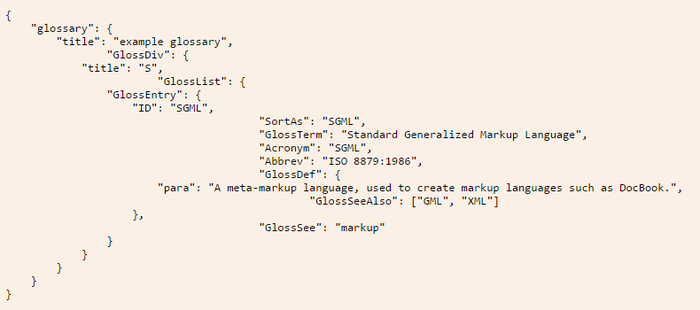
    JSON stands for JavaScript Object Notation. Basically, it uses syntax derived from JavaScript to represent data in a way that is readable to both humans and machines. For instance, an example used on the JSON website describes a glossary in JavaScript Object Notation, as shown in the figure below.

    JSON Example

    How to Use JSON

    As you can see, a hierarchy is created that encloses each level within a set of curly braces ({}). At each level, you have name/value pairs, such as “title”: “example glossary”. In the same way that JavaScript objects work, the value part of the pair can open yet another level by starting a new set of curly braces. This creates a well-structured layout of the data that can be scanned easily for information by machines, as well as be looked at by humans to find what is needed.

    This notation allows a number of data types to be represented—numbers, strings and Booleans, hashes (enclosed by {}) and arrays (enclosed by []) all can be used in this format.

    Once data is represented in this notation, a JSON parser can be used in most any programming language to turn this notation into the native data types for that language, thus allowing programmers to access the data using that language’s natural syntax. Since this notation is so prevalent, most programmers have a great deal of experience in storing and retrieving this type of data.

    Does It Get Used in Databases?

    Document databases typically store data in JSON format or something based upon that format. Rather than the tables and rows used by a relational database, a document database will store and query information through the use of the JSON format.

    These databases refer to each set of JSON data as a document. Since the structure is hierarchical, each document can have subdocuments on any of its keys. This setup makes it very easy for a programmer familiar with the language to both store and query the data within the database.

    What is BSON?

    BSON stands for Binary JSON. This format is specifically used by MongoDB for its document database. The idea behind it is to provide the utility of the JSON format, but also be able to use that format with the speed that comes with a binary format.

    JSON vs. BSON

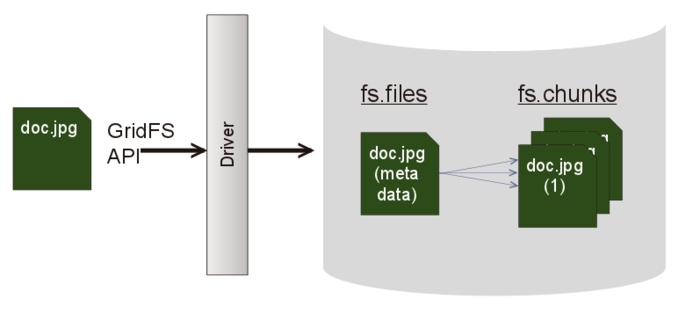
    While JSON simply represents a data structure, MongoDB can use BSON to build database indexes on keys at any level, thus helping improve speed in that area. MongoDB also provides a specification called GridFS that can be used in conjunction with BSON to store data over BSON’s 16MB document size limit. This can be useful to store large files, as it divides them into “chunks” to allow the storage to work properly in the database.
    BSON vs JSON
    For the  most part, JSON and BSON are very similar, but BSON is can provide an extra punch of speed as well. Both are certainly very handy ways of storing and retrieving data for applications.

  • Backup and Recovery of Next Gen Apps in MongoDB

    Backup and Recovery of Next Gen Apps in MongoDB

    This blog is the first in a two-part series about MongoDB backup and recovery. In this first part, I will discuss the motivations for protecting data that resides on MongoDB and the existing backup and recovery solutions. In the second part, I will discuss how to solve this problem.

    In the era of big data, enterprise applications create a large volume of data that may be structured, semi-structured or unstructured in nature. In addition, application development cycles are much shorter and application availability is a critical requirement. Given these application requirements, enterprises are forced to look beyond traditional relational databases to onboard the next-generation, cloud-native Platform 3 applications—infrastructure-as-a-service (IaaS) or platform-as-a-service (PaaS) applications. NoSQL databases such as MongoDB are now being adopted and evaluated by enterprises for these next-generation applications, which include ecommerce and content management. The benefits of MongoDB are many, including dynamic schema, easy scaling through auto-sharding, tunable consistency for reads and built-in replication.

    MongoDB database also has native replication capabilities that satisfy availability requirements. However, data protection requirements for scalable point-in-time backup and recovery must be addressed. For robust data protection, enterprises need both backup and replication; Without point-in-time backups, organizations are at substantial risk of losing data due to human error, logical corruption and other operational failures. Traditional backup solutions were built to address the requirements of structured Platform 2 applications on relational databases that used shared storage and had the ACID (atomicity, consistency, isolation and durability) transaction model. Unfortunately, they fall short of addressing point-in-time backup requirements of Platform 3 applications and distributed databases (local storage, eventual consistency and the elastic nature of infrastructure). There are a few alternate script-based solutions such as Strata that enterprises are using to fill the data protection gap, but these solutions are sub-optimal at best.

    Manual Scripted Solutions

    Manual scripted solutions (MSS) leverage native MongoDB snapshot utility and scripts to transfer data to secondary storage. The scripts (via mongodump) are customized for each MongoDB cluster and require significant operational effort to scale or adapt to any topology changes (such as addition or removal of nodes to your MongoDB database). Further, these scripts are not resilient to failure scenarios such as failure of a node (primary or secondary) or intermittent network issues. Finally, recovery (the paramount value of “backup”) is a manual process, hence, time-consuming (resulting in very high application downtime) and contains data loss risk due to any bugs in the scripts. Overall, these solutions work when the MongoDB environment is small and some data loss may be permitted in the application. Some of the key issues that these solutions face are:

    • Lack of enterprise backup solution for sharded configurations
    • Database needs to be offline when the snapshots are taken
    • Both backup and recovery fail under node failure and other infrastructure failures
    • Recovery process is manual and requires verifications, which increases the recovery time
    • Recovery at collection-level requires manual recovery that is time consuming
    • Recovery to unlike topologies (sharded → unsharded) for test/dev refresh is not available

    Most enterprises use these scripted methods as a temporary quick-fix solution. It is like driving your car with flat tires: You can keep going; however, you can’t go at the speed you want to go, nor are you risk-free from disasters.

    MongoDB Paid Backup and Recovery

    MongoDB (the company) provides a couple of ways to back up MongoDB databases. Enterprises may choose from either a managed backup offering (MMS) that runs in public cloud or, if they are paid MongoDB customers, they may deploy the backup service on-premise. In addition to being exorbitantly costly, the managed backup service stores customers’ data in public cloud. Backup data transfer over WAN may not work for customers who deploy MongoDB on-premise and for the customers who need to keep their sensitive data in-house. Further, there are significant data limitations per shard to use this service.

    Using the MongoDB on-premise backup service is possible but is overly complex to deploy and operationalize (this deployment diagram speaks for itself!). Enterprises need to deploy eight servers, additional databases (with additional licensing) and about 6 to 9 times storage capacity (of the database that is backed up) for enabling on-premise backups.

    Overall, on-premise backup service is a theoretical solution that brings with it significant CAPEX and OPEX investments:

    1. Complexity of deploying multiple databases
    2. Cost of additional infrastructure (servers and storage)
    3. Cost of licensing additional MongoDB nodes
    4. Risk of failed backups when nodes fail (secondary from which backup is taken)
    5. Siloed backup infrastructure for only MongoDB database

    Look for Part two of this discussion to come shortly.

  • Enterprise Cassandra Deployments

    Enterprise Cassandra Deployments

    Successful Cassandra deployment in the cloud takes a certain amount of skill and knowledge. In this blog I will share best practices for a successful Cassandra deployment in the cloud such as Amazon Web Services (AWS) and Google Cloud Platform (GCP). I will also discuss how you can protect and recover the data in your Cassandra cluster when deployed in the public cloud.

    Cassandra Deployments in the Public Cloud

    There are two main ways to have successful enterprise Cassandra deployments in AWS:

    • Use a ‘managed’ Cassandra deployment. This is a reasonable approach; the only downside is the inability to customize data placement beyond what is typically provided by the vendor.
    • Manage the cluster yourself, if you want to have full control over your Cassandra deployment and customize it to scale and perform according your business needs.

    Please refer documentation from Datastax or Apache Cassandra for detailed best practices for Cassandra deployments. The following best practices are reiterated here to simplify deployment of a scalable Cassandra cluster in AWS.

    Storage

    Both AWS and GCP offer two types of local storage options for their compute instances. For AWS, the options are Elastic Block Storage (EBS) and Ephemeral Storage. In GCP, the options are Persistent Disks and Local SSD. Both options have their own trade-offs. Pick the one that best suits your deployment.

    Persistent Storage

    EBS volumes have performance characteristics similar to network storage such as a NAS or SAN. Because storage from EBS volumes is multitenant in nature, it is not suitable for distributed, log structured databases such as Cassandra. If you want to ensure reliable performance through EBS volumes, use “EBS optimized instances” with “provisioned IOPS.” Since the IO traffic to EBS volumes goes over the instance network, EBS optimized will provide reliable performance, but does not guarantee any increased performance. To get the most performance out of EBS volumes, use instances with multiple disks and separate the volumes used for “Data” and “Commitlog.”

    If you have to use EBS Volumes, go with “EBS Optimized Instances,” with “Provisioned IOPS” and split data and Commit Log on different volumes.

    Ephemeral Storage

    Ephemeral storage is a great option to use for downstream Cassandra environments such as test/dev and staging. Since ephemeral volumes are typically SSDs, there is no need to separate the data and commitlog into separate drives. To optimize performance, choose EC2 instances with multiple ephemeral storage drives and stripe them together into one logical volume. Send data and commitlog to the logical volume. Remember that when you stop the EC2 instance, the data in Ephemeral storage will be deleted.

    Stripe all Ephemeral drives into a single volume to get maximum performance.

    Data Distribution

    Cassandra uses Snitch to determine the topology of the cluster. The Snitch is also used to determine the data center and rack for each node in the cluster. Replication strategy is used to determine the placement of data across the different nodes in the cluster.

    AWS

    1. EC2Snitch works well for single region deployments.
    1. Ec2MultiRegionSnitch works well for cluster distributed across multiple AWS regions. Please note, Multi-DC, Active-Active configuration makes your cluster resilient to region failures and for multi-dc cluster, use “local quorum” to improve performance.

    Google Cloud Platform (GCP)

    1. Use GoogleCloudSnitch for Cassandra deployments in GCP.
    1. GoogleCloudSnitch treats regions as Cassandra data centers and availability zones as racks.

    Other Features

    Both AWS and GCP offer a series of operational capabilities that seem to make it easier to maintain high uptime on Apache Cassandra cluster. These capabilities have to be chosen carefully depending your deployment needs.

    1. Load Balancing: Network-level load balancing service is offered by both AWS (Elastic Load Balancer) and GCP. It is not recommended to put a load balancer in front of Cassandra. It is better to use a client connector that can handle this, consider open source utilities such Presto and Astyanax
    1. Autoscaling: Both AWS and GCP offer Autoscaling facility for compute instances. However, although this functionality looks very enticing, putting all C* nodes in an autoscaling group will not produce the desired result. Instead, create a separate autoscaling group of ‘1 node’ for every node in your cluster. This will ensure that anytime a node goes down, it is automatically brought back up. This will ensure the cluster data placement is not disturbed when nodes go down and nodes coming up do not cause excessive data movement.

    Scalable Backups and Reliable Point-in-Time Recovery

    Backing up your data is a must-have for enterprise organizations. The impact of data loss is so high that no enterprise wants to risk relying alone on replication. Protecting data in a public cloud environment may seem daunting, but there are several options available that can make this easier compared to an on-premise deployment. A simple option may look like one of the native snapshots:

    Storage Snapshots

    I have seen few customers use snapshots of EBS volumes as a way to protect the data in their cluster against logical and/or operational errors. This solution will work but with some severe limitations. On top of the overhead of maintaining the scripts to take snapshots, there is a large overhead in storage costs. Taking a snapshot of volumes does not allow for incremental backups of your data. This causes an exponential bloat in the amount of data stored in snapshots, leading to high cost of the backup solution.

    Amazon S3 or Google Cloud Storage

    Using an S3 bucket as the secondary storage enables enterprises to use low-cost, highthroughput storage, while reducing overall operating costs for storing backup data. Here are a few recommendations when using S3:

    1. S3 Region: Amazon S3 buckets are region-specific. A bucket created in one region will provide better performance characteristics to other infrastructure in the same region. Subsequently, it is important to ensure the S3 bucket used as the secondary storage is in the same region as the production database being protected and the Datos IO cluster.
    1. Storage Class and Lifecycle Policy: Amazon S3 allows users to create lifecycle policies on buckets. These policies dictate the performance and response time characteristics of objects in the bucket. STANDARD_1A is more suitable for longer lived and less frequently access data, and is not suitable as secondary storage. Additionally, do not turn on any lifecycle policies on the buckets used for the secondary storage. All buckets should be in the standard storage class.

    Conclusion

    As enterprises leverage the agility provided by public cloud environments, it’s important to understand the various facets of Cassandra deployments to ensure the efficient use of your money and time.

  • New CEO wants to take MongoDB where NoSQL has gone before

    New CEO wants to take MongoDB where NoSQL has gone before

    MongoDB, the leading NoSQL database company that has raised about $220m in venture funding so far, announced a change at the helm today. Max Schireson who has been with the company for 4 years, first as President and then about two years ago taking over as CEO from founder and chairman Dwight Merriman, is stepping up to be Vice Chairman of the Board.  Taking his place as CEO is industry veteran, Dev Ittycheria (pronounced Dave).

    Ittycheria was the founder and CEO of BladeLogic which had a successful IPO and then was acquired by BMC.  Ittycheria then served in an executive role there before moving over into the VC side of things. He was involved with Greylock Partners and OpenView Venture Partners.  Many industry insiders thought that he would not want to come back to an operations position, but the opportunity with MongoDB was too hard to pass up.  The next step for the company is probably an IPO which would say investors start cashing out on the hundreds of millions of dollars they have invested.  

    Schireson posted on his own personal blog that he was “stepping out and up” for several reasons, not least of which is the fact that he has 3 young children and being away from home so much was painful.  Max’s family is based in Silicon Valley where is wife is a physician and Stanford professor. MongoDB is headquartered in NYC. So the bi-coastal routine plus regular CEO duties had Max logging airlines miles at a 300k annual clip. That is a tough number to live with for an extended period of time.

    I spoke with Max today about the news. I have been spoken with Max several times over the years about MongoDB and knew how instrumental he was in the companies success.  But Max realizes that MongoDB is about to move into another phase. While the growth has been phenomenal, a different skill set is now required for this next jump to warp speed.

    This same  lesson was taught to me many years ago by a man named Len Fassler. You may never have heard of Len, but Len was one of the smartest men I ever met in business. He had done multiple roll ups in several industries. My friend Brad Feld counts Len as a mentor. Len actually bought Brad’s first company, Feld Technologies.  Anyway, Len used to tell me that anyone can get lucky and catch lightning in a bottle, starting a company and building it up to a $4 to $6 million dollar run rate.  But it takes a whole different skill set to build and manage a team that can take a company to 25 to 35 million dollars in revenue.  To make the next leap to lets say $100m in revenue takes a whole different set of skills.  To go beyond that yet another set of skills involved.  It is rare that one person has the spectrum of skills to take a company from near start up all the way to billions of dollars.

    I told Max today when I spoke to him, bravo to him for recognizing this fact without making MongoDB and its investors pay the price. He has done a tremendous job making MongoDB a near household name in the tech world. Now it is up to Dev Ittycheria to take the captains chair and steer this star ship to its next destination.

    Opportunities to lead a company with the trajectory of MongoDB are rare indeed. Schireson believes that the future is even rosier though. He thinks MongoDB may be just hitting a place where revenue starts to hockey stick up. The foundation is laid for good things to continue.

    It will not be easy, it never is. MongoDB still has to overcome some growing and scalability issues. There are other NoSQL and other databases gunning for them.  But I would rather be playing their hand of cards then any of their competitors frankly.

    In the meantime congratulations to Max for a job well done at MongoDB. Another thing I learned from Len Fassler was that building any company into a success is not easy and anyone who does so should be congratulated. So Max be proud of all you have accomplished here.

    Now lets see where Captain Dev can take MongoDB on the next phase of its 5 year mission to boldly go where NoSQL has gone before!

  • Deploying a MongoDB Cluster with ElasticBox

    Deploying a MongoDB Cluster with ElasticBox

    Our founders, back in the day,  were part of the .NET framework team at Microsoft. So it’s no surprise that their first version of ElasticBox was written on C#, .NET framework and SQL Server.

    Fast forward to 2012. As the ElasticBox vision crystallized, we wanted a robust, scalable architecture to match our vision. So we reevaluated all the existing technologies.

    Among other things, we decided to move from a relational database model to a document based approach. The main reason was because we wanted to store hierarchical data and be able to version it.

    Today, to accommodate our data needs, ElasticBox relies on MongoDB clusters, which we run on three separate providers–two public, one private. Thanks to ElasticBox, we can now deploy our MongoDB cluster in a matter of minutes.

    The Basics

    What is MongoDB? MongoDB is an open-source document store database.

    Why would you want to cluster MongoDB? To provide redundancy and high-availability for production deployments.

    How We Use MongoDB

    In our case, MongoDB is using a replica set model. A replica set is a group of MongoDB instances that host the same data set. One MongoDB, the primary, receives all write operations. All other instances, secondaries, apply operations from the primary so that they have the same data set.

    The primary accepts all write operations from clients. Replica sets can have only one primary. Because only one member can accept write operations, replica sets provide strict consistency.

    Screenshot 2014-06-18 16.47.20

    Deploying MongoDB through ElasticBox

    ElasticBox provides a default MongoDB box that’s available to the public. It deploys a standalone instance of the MongoDB server. Our MongoDB production box very closely resembles the default box, minus a few configuration settings required for our production scenario.

    While the default MongoDB box configuration is suited for development purposes, it needs to be configured further to use in production. To configure the MongoDB default box for production use, follow the steps below:

    Step 1. Create a new box called MongoDB Replica. Add a box variable for the MongoDB Server (this is to use the default box settings).Screenshot 2014-06-18 16.11.18

    Screenshot 2014-06-18 16.12.08

    Step 2. Add a text variable REPLICA_SET to hold the replica set name. This value must be shared between all the members of the cluster.

    Screenshot 2014-06-18 16.12.42

    Step 3. Expand the MongoDB Server box. Edit its file variable COMMON_YAML and paste the following:

    Screenshot 2014-06-18 15.35.45

    mongodb::replica_set: {{ REPLICA_SET }}

    mongodb::key_file: /etc/mongod.key

    Screenshot 2014-06-18 16.15.36

    This file will be used by hiera to pass arguments to puppet automatically without modifying the existing puppet default.pp file.

    Step 4. Add a binding named primary of type MongoDB Replica (the box you just created).

    Screenshot 2014-06-18 16.14.05

    Step 5. Add an install script. Get the script here.

    Screenshot 2014-06-18 16.16.10

    Screenshot 2014-06-18 22.34.28

    Step 6. Add a start script. Get the script here.

    Screenshot 2014-06-20 11.40.08Screenshot 2014-06-20 11.40.35

    When you deploy the box without a binding, it creates a cluster for you with an initial configuration. On the other hand, if you bind to an existing instance, it adds the instance to the existing cluster!

    There, you have it, a MongoDB cluster in a few easy steps!

  • What’s new @DevOps.com

    What’s new @DevOps.com

    All of us here at devopsy.kinsta.cloud have been very busy. In addition to adding some new writers and great new content, we have been working “outside the 4 walls of the website”.  Here is an update on what’s new:

    CampDevOps-logo-align_left1. Camp DevOps – We held our first Camp DevOps event last week in beautiful Boulder, Colorado at the University of Colorado, Boulder Campus.  It was a great event featuring a lot of great sessions.  Sanjeev Sharma of IBM, author of DevOps for Dummies (and a devopsy.kinsta.cloud contributor) kicked things off with a great keynote. Andi Mann of CA had a great talk on implanting DevOps from the top down. Rajat Bhargava and Topher Marie of JumpCloud also had some great insights in their sessions. Rich Mogull’s “KickaaS Security” session was a great look at the top things you need in terms of security.  Another very popular track was Craftsy VP of engineering, Matthew Boeckman’s using S3 and Glacier for backup. There were some other great sessions but I can mention them all here. You can check out the Camp DevOps website for the full agenda.

    We will be conducting more Camp DevOps in the near future in cities throughout the US.  Some will be in conjunction with larger events or conferences within conferences, others will stand alone events. Stay tuned for more details.

    I was asked the question of whether Camp DevOps competes with DevOps Days. Short answer, no. We support DevOps Days and the culture they represent. Camp DevOps shares with DevOps Days the desire to advance DevOps, but takes a slightly different tack.  We will have both highly technical, as well as business orientated tracks. Camp DevOps will feature both learning on DevOps culture, as well as tools. We will also be adding more exclusive Camp DevOps activities to the events in the future.

    gluelogo

    2. Gluecon 2014 – Camp DevOps Boulder was held in conjunction with Gluecon in nearby Broomfield.  Gluecon was fantastic this year and also featured a full DevOps lineup. I was the moderator of the DevOps tracks on day one. Again some real quality presentations on Ansible, Saltstack and more. We will be posting video here soon.

    Look for more announcements regarding Gluecon and Camp DevOps soon.

     Webinars:

    Compuware APM – I was invited as a guest on a webinar by CompuwareAPM in an intro to DevOps. The webinar was hosted by Steve Wilson. It was a good conversation about several interesting areas of DevOps.  The recorded version of the webinar will be available shortly and we will post a link on our events page.

    cloudpassageSecDevOps – I am joining Andrew Storms of CloudPassage to discuss SecDevOps, the new black. You can register for this here. Andrew is a really bright fellow that is very well known in the security space and this promises to be a great webinar!

    devopsy.kinsta.cloud Media Sponsored events

    devopsy.kinsta.cloud is working with several organizations to promote events for DevOps learning. If you would like to have devopsy.kinsta.cloud media sponsor your event contact sponsor@devops.com

    devops summit

    velocity


    mongodbworld