Tag: mobile apps

  • SauceCon Speaker Profile: Shivani Sharma, Slack

    SauceCon Speaker Profile: Shivani Sharma, Slack

    Just Say No to Flaky Tests: Releasing Code with Confidence

    Shivani Sharma doesn’t like anything flaky—unless it’s baked goods.

    Shivani is senior engineering manager at Slack, working on test automation for Slack’s iOS, Android and web applications. An avid baker, Shivani thinks flakiness should stay in the kitchen.

    Although “flaky” is a common adjective describing automated tests, the Slack test automation team wanted to be better and create value by delivering deterministic results. The team’s mission is “to make our software development process simpler, more productive and our product more pleasant to use.”

    Worthy goals, to be sure. To that end, Shivani will present on, “Releasing Code with Confidence,” at the upcoming SauceCon conference in San Francisco June 6-8. Her presentation will discuss how Slack’s automation team approached the common problem of flaky tests to build a reliable feedback system into their continuous integration pipeline for code hundreds of developers write and release every day. This talk will provide actionable takeaways that can be used in other organizations, too.

    In addition to baking and “crème brûlée-ing,” as she describes it, Shivani is an avid runner and has run eight half-marathons. To give her knees a break, she’s excited to participate in her first Olympic distance triathlon this summer. She has spent 10 years working in Silicon Valley, holding positions at Google, BigFix and IBM, as well as Slack. Shivani holds a BS in Electrical Engineering from UCLA.

    SauceCon, the first-ever Sauce Labs user conference, is a three-day event filled with training, workshops, best practices and visionary content from the leading minds in automated testing. For more on upcoming SauceCon presentations or to register, visit the SauceCon website.

    About the Author / Rebecca Cramer

    Rebecca Cramer is a writer and communications strategist specializing in technology. With more than 20 years of experience across disciplines including marketing, internal and executive communications at companies such as Dell and Quest Software, Rebecca is passionate about creating and sharing good content of all kinds. In her spare time, she enjoys spending time at the beach and hiking in her native Southern California.

  • How Are You Getting Your Cloud On?

    How Are You Getting Your Cloud On?

    With 71 percent of CIOs report having a cloud-first strategy, it’s clear enterprises are doing something. But it’s also clear that no two organizations are in the same place. While some organizations have gone “all in” by moving their production workloads to the cloud, most organizations are adopting a hybrid approach in which they are:

    • Building net-new next-generation applications that are built on cloud-native, non-relational database platforms, and
    • Selectively moving application workloads to one or multiple clouds and back to their on-premises data center.

    We at Datos IO thought we would share some of the ways in which we’ve seen organizations embrace a multicloud infrastructure strategy.

    Disaster Recovery

    One of the easiest ways to test the cloud and its promise of flexibility and agility is to set up your disaster recovery (DR) environment to act as a fail-safe mirror for the data in your on-premises environment. Cloud allows you to be more flexible in technology choices and offers elastic expansion of capacity. A cloud-based DR environment can be a conservative strategy to test the waters and prepare your organization. For more adventurous folks, you can think about building your DR strategy to focus on multiclouds.

    Test/Dev Environments

    In their journey to the cloud, many customers are trying to minimize their risk by moving test and development environments first. One way to do this is to move test/dev instant workloads for your batch analytical, integration and processing workloads. Some organizations have moved their production workloads off-premises, and could repurpose their on-premises infrastructure for test and development environments.

    Cloud Bursting

    As enterprises transition to the cloud, they are leveraging on-demand capabilities to transition analytical processing for peak processing hours, such as quarter-end financial reporting. In such cases, companies want to stand up an environment to offload processing and probably merge changes back to on-premises when operations are completed.

    Here are a few examples of how organizations are deploying new applications in the cloud.

    Data Lakes

    Some organizations use the cloud as a data lake, where data of all varieties—from different databases to different applications—go to a single environment. Big data file system technologies such as Hadoop are custom-built for data lake environments and offer a cost-effective way to store and process all the data. These new applications reside in the cloud and must be protected.

     Next-Generation Mobile and Web Applications

    Companies such as Netflix frequently use non-relational databases such as Cassandra and MongoDB to build new web 2.0 applications. A lot of new websites use MongoDB because of its support for objects, which works well in building a web catalog. Similarly, Cassandra is popular for applications such as web user profiles because of its ability to support distributed replication and fast write throughput.

    If one wishes to build a new application for the cloud, using a non-relational database is highly recommended.

    — Michael Colby

  • Understanding the App Development Life Cycle

    Understanding the App Development Life Cycle

    More and more businesses nowadays are shifting to mobile. And that’s absolutely reasonable choice:

    • More than 50 percent of digital media consumption accounts for mobile apps;
    • Ninety percent of the time smartphone users spend on their mobiles goes to mobile apps;
    • A typical user has about 30 apps installed on his mobile and spends more than 35 hours a month using them;
    • Forty-two percent of the mobile purchases were completed from mobile apps;
    • Eighty-five percent of consumers prefer native mobile apps over a mobile website.

    When deciding on developing a mobile app, it’s important to picture the entire range of stages and procedures to go through.

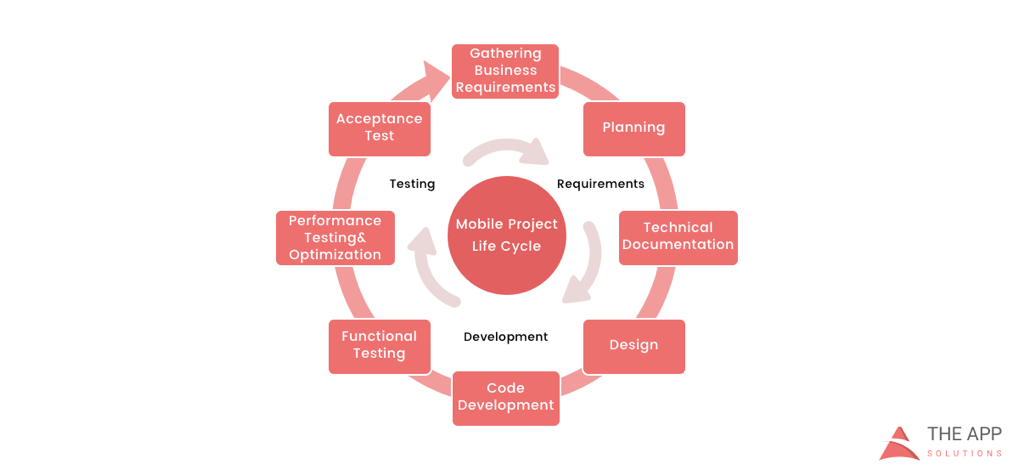
    According to the mobile app projects approach by The App Solutions, here is the life cycle of a typical development project, no matter the complexity:

    1. Planning stage (project manager, marketer, and business analyst are involved) – carrying out the business analysis and crafting mobile strategy.
    2. Technical documentation (covered by the technical writer) – describing all tech requirements and details.
    3. Prototyping (usually made by a UX/UI designer) – creating the sketch, wireframes, prototype and final app skins upon approval.
    4. Development (performed by the developers) – front-end and back-end segments of coding.
    5. Quality Assurance (usually performed continuously after each agile sprint is completed; followed by bug fixing) – testing tech requirements, device compatibility, interface, security aspects, etc.
    6. Publishing & Maintenance (covered by DevOps) – publishing to the app store, updates releases, infrastructure, and entire app maintenance.

    Planning stage

    When creating a mobile app, it is crucial to take time to go through the necessary research and planning steps.

    Business analysis:

    • Idea evaluation – a preliminary stage, when experts investigate the idea, correct it, give their advice and create a rough logics for it.
    • Competition analysis – study of activities of other players in the market.
    • SWOT-analysis – evaluation of strengths and weaknesses of the product, insights into opportunities and other aspects.
    • ROI calculation – assessment of the future app market performance help realize the real value and adjust budget accordingly.
    • Requirements scope – summing up requirements for the future product at all levels.

    Mobile strategy:

    • Market research – this study shows the overall situation on the market to help adjust the concept of the product to current demand.
    • Defining user personas – understanding who is your target audience is crucial in crafting advertising approach.
    • Technologies & tools assessment – study of specific tools required for the industry and select a set of technologies to meet the objectives of the project.
    • Complex promotion strategy – a step-by-step action plan for acquisition and retaining users.

    Technical documentation:

    Also known as a technical specification or a software documentation, this paper is a complex manual of your product, outlining requirements, business logic and leading your specialists through all stages of the project:

    • Makes your software universally understandable.
    • Provides flexibility for future changes.
    • Adds value to your app by providing a clear manual.
    • Helps to keep control of your own product.
    • Allows reusing existing parts of the developed application.

    Prototyping:

    Prototyping is a process of defining a concept in visual terms and evaluating how the app might develop to correct a misconception.

    • Creating a sketch – the draft version of your app on paper that sets up the main logic, number of screens and the way they interact with each other.
    • Creating wireframes – provides the visualization of the draft structure.
    • Creating a clickable prototype – helps to find out and analyze all possible use cases, discover logical breaks and technical inconsistencies in the original idea.
    • Designing app skins – collecting all wireframes and put them together to get the final design.

    Code Development:

    This segment usually consists of two main parts:

    • Front-end development – client-side development, creating a presentation layer of the software for a direct user interaction with it.
    • Back-end development – a server/database part of development, connecting a front-end part of the mobile app with the data access layer.

    Quality Assurance:

    In the agile development, it’s usually a continuous process following every sprint of development:

    • Compatibility testing – running the app on different devices and screen sizes.
    • Interface testing – checking the navigation, menu and buttons performance.
    • Device compatibility testing – checking how the app looks and performs on various screen sizes.
    • Low-level resources testing – examination of the app in conditions of low battery, slow internet connection, etc.
    • Security testing – provides quality assurance of users data safety.
    • Beta testing – giving users access to the app to get feedback.

    Publishing & Maintenance:

    • Publishing of the app and following updated versions to a chosen app store.
    • Infrastructure support – either you have admin panel to post on or cloud service attached, you’ll need to make sure it functions fully.
    • App store optimization – helping your app move onto the tops of search lists and this way gain more users.

    Making the Most of Your App Development Project

    Here are a few tips for getting the most out of your own app development project:

    • Mind what’s trendy + study the market and your target audience. It is a crucial preliminary stage that will impact literally every side of the project and every decision to make.
    • Specify as particularly as possible the product you expect to see at the end of the project. Defining the smallest features and functions of the software at the planning and prototyping points of the project will help find areas to save money on the actual development.
    • Negotiate your idea with various development teams (study the profile of the app development company and find evidence for their credibility, debate the best price). Make sure they hear you and understand what you mean—simply put, that you’re on the same page.

    About the Author / Charlie Shabe

    Charlie Shabe is a professional Digital Marketing Strategist. He has over 20 years Digital Marketing experience in helping global organizations use the Internet to drive their online visibility and generate leads. In addition to his PR and online marketing experience, Charlie is an expert in writing. Connect with him on Facebook and Twitter.

  • 7 Reasons to Move to Parallel Testing

    7 Reasons to Move to Parallel Testing

    While development operations are more scalable now than ever, there is one area that continues to constrain the ability of organizations to scale: functional testing.

    Most organizations still rely on sequential tests to deliver quality assurance. No matter how rapidly a business can produce great products, its ability to bring them to consumers quickly is limited by its dependency on a slow, tedious testing process that does not adapt well to changing development needs or ever-faster business processes.

    That, at least, is the way things traditionally have been. But today there’s a replacement for sequential testing: parallel testing, which lets you leverage the cloud and virtualization to perform more tests at faster speeds than your physical infrastructure or homegrown testing grid could support on its own.

    What is Parallel Testing?

    First, a definition: Parallel testing is the process of running multiple test cases on multiple combinations of operating systems and browsers at the same time. The process is automated, and it often runs on virtual machines. For the QA professional, no additional effort is required once the appropriate test scripts have been developed. All the testing solution needs is the test suite and a pool of resources.

    Granted, new does not always equal better. But it is hard to make an argument against parallel testing, especially if you leverage a robust testing cloud. Here are seven key advantages of parallel testing to consider over sequential testing:

    You Can Test for Wider Compatibility

    Because parallel testing is faster, it allows you to test for wider compatibility in the same amount of time. If you’re releasing a new app and want to test the user interface (UI) functionality, you don’t have to limit yourself to testing against only the most popular OS and browser combinations or mobile devices—you can test all the combinations that are important to your users.

    You Can Radically Reduce Testing Time

    Good software testing must be thorough and comprehensive. In a sequential testing environment, it can be (and usually is) a very time-consuming process. Parallel testing can divide invested time (roughly) by the number of test machines being used in parallel, so that overall testing time is a fraction of that required for sequential testing.

    For example, if you are running 10 concurrent tests, you can reduce your testing time by a factor of about 10. This can cut days or even weeks from delivery time. This reduction in testing time also allows you to make more efficient use of your engineering team. They are freed from a set of necessary but time-eating and repetitive tasks, allowing them to concentrate on more forward-looking and innovative projects.

    Parallel Testing Optimizes Continuous Integration and Delivery

    Modern development best practices such as continuous integration and delivery require frequent and rapid functional tests. The execution of pre-scripted tests on a web or mobile app saves considerable time, plus having test data accessible in detailed reports is valuable to development teams who can use this information to quickly identify issues. Parallel testing in the cloud allows you to execute test suites continually as developers submit and integrate code changes throughout the day.

    The Cost per Each of Your Tests is Less

    Because parallel testing is automated and and can run at high concurrency in the cloud, the cost per test is considerably less. Leasing test time on a cloud testing service generally will be much less expensive than building and maintaining your own test infrastructure.

    Even the common practice of using development hand-me-down computers as test machines has its costs and practical limits. For example, as used systems age, they require more maintenance and they become less capable of duplicating real-world deployment conditions. Cloud-based testing grids mean environments have high availability, and they are up-to-date, making parallel tests the better option.

    It Supports Testing Science

    Parallel testing enables teams to focus on making tests repeatable, measurable and accurate. By simply testing faster, you can test more, and testing more produces more actionable data to find bugs and also improve test cases. Automated parallel testing delivers strong data on test results with key indicators of where tests can be improved. The net result is a test process that is more scientific.

    You Can Still Perform Sequential Tests, If and When Needed

    Parallel testing simply offers a different framework for testing, which can easily accommodate most or all of your existing test regime. This means that transitioning from sequential to parallel testing does not force you to sacrifice test targets, strategic testing goals or test quality.

    If anything, moving to parallel testing increases the range and depth of your test program, allowing you to better meet your test goals and it improves the quality of your testing. When you make the move to parallel testing, you are not abandoning traditional software testing. You are simply applying modern development practices and technology to it.

    You Do Not Need to Make the Switch to Parallel Testing All at Once

    The great thing about parallel testing is that you can transition to it in steps, starting with the tests that are most easily converted to parallel, then adapting some or all of the remaining tests after your team has had time to adjust to the parallel testing environment. Once you have started to use parallel testing and have integrated it into your development process, it is easy to expand the quantity and scope of parallel tests as the need arises.

    Conclusion: A Faster Test Run is a Penny Earned

    The faster you run a test, and the more tests you run, the more frequent the releases and the more defects you can find. The math is simple. Parallel testing in the cloud decreases the cost of maintaining test infrastructure, the cost of lengthy testing cycles, the cost of delayed releases and, finally, the branding cost of unhappy customers due to poor application quality.
    Even without changing the way you test, a shift to a parallel testing environment will provide an immediate speed enhancement—which means every test that still runs serially is a cost that can be avoided. And every test run in parallel is an opportunity to test your application better and faster at the same time.

    About the Author / Lubos Parobek

    Lubos ParobekAt Sauce Labs, Lubos Parobek leads strategy and development of Sauce Labs’ web and mobile application testing platform as VP of product. His previous experience includes leadership positions at organizations including Dell KACE, Sybase iAnywhere, AvantGo and 3Com. Parobek holds a Masters in Business Administration from the University of California, Berkeley.


  • Mobile Testing Delivers Big for Pizza

    Mobile Testing Delivers Big for Pizza

    Mobile applications have been disrupting industries worldwide. For some industries, the disruption focuses on business internals, as enterprise apps enable manufacturing processes to be restructured and streamlined. In other industries, the disruption focuses on the customer and how mobility can make life more convenient.

    When it comes to pizza, however, mobile development changes everything.

    I remember how, as a kid, we would hope the teacher wasn’t looking when we used the public payphone to place an order for a pizza to be delivered a few minutes after we raced back home for lunch.

    Now you can do it with the click of a button. Using a mobile application, you can order exactly the type of pizza you like, and it will be delivered to your location whenever you want.

    There are few businesses better-suited for a perfectly working mobile app.

    When we were asked by a multibillion-dollar pizza giant to deliver on its mobile testing, we knew the pressure would be on. The company needed a new quality assurance strategy to handle a mobile app that would direct traffic to its more than 3,500 pizza parlors located within the United States alone.

    The Big Step: From Manual to Test Automation

    At the onset of mobile testing, manual testing was the primary method. As the mobile universe expanded to thousands of devices, a more efficient way had to be developed to support business-critical apps being used by people with different devices and mobile operating systems running over different local networks.

    Enter the dedicated mobile testing lab.

    DevOpsPizza2

    Utilizing our cloud testing solution, a lab of 60 devices was connected to the two mobile testing teams located in the United States and India. Mobile testers had access to the devices as they needed them. With a test automation solution in place, more than 200 scripts were written and deployed to handle the regression testing.

    Every device that wasn’t actively being used by a tester would be busy conducting regression tests. The 60 devices running at the same time enabled parallel execution, wherein an app could be tested over a matrix of devices and mobile operating systems. With our performance testing solution, different network conditions were simulated, expanding the overall mobile test coverage exponentially.

    A dedicated mobile device lab meant that the devices were made available exclusively to the business. This prevented any unnecessary breaches in security. At the same time, all remote mobile testing was conducted within the customer’s virtual private network (VPN), bolstering security even more.

    One of the biggest time-savers was the ease in which test cases could be re-created. As a DevOps solution, both the developers and the testers had access to the same devices. So when a specific bug was reported on a function that wasn’t executing properly over this device running that operating system, the developer didn’t have to worry about finding that device with the right operating system. He simply read the report, clicked the link and accessed the same device in the dedicated lab. The test cases did not have to be re-created because they were available in real time to the developer.

    Mobile testing became a 24/7 operation. Right as the American team was checking out for the day, the Indian team was running the reports on their mobile testing activities, and continuing their work. At the end of the day in India, the Americans came back to work to read the Indian team’s testing results.

    Mobile Testing Produces Sizzling ROI

    DevOpsPizza1

    By upgrading their regression testing from a manual process to an automated one with parallel execution through the mobile lab, the regression testing cycle went from 10 days to 17 hours. The testing coverage also increased to 90 percent for the native mobile app.

    As a result, the company was able to get the latest version of its mobile application to market sooner. The impact was felt beyond the DevOps team as the entire IT department began to plan their strategy based on the dramatically shorter release cycle.

    “What makes mobile testing a DevOps success is test re-creation and CI integration.” says Tal Barmeir, Experitest CEO.

    The customer uses Jenkins for its CI platform, uniting developers and testers toward automating as much of the DevOps process as possible. Granting the developers and testers access to the same devices established a powerful tool for test re-creation.

    Their entire DevOps process was retooled to generate returns that truly deliver!

  • SimplyHealth Uses DevOps to Manage Mobile Testing

    SimplyHealth Uses DevOps to Manage Mobile Testing

    SimplyHealth, a private company health insurance plan provider in the United Kingdom, saw its mobile web traffic trending upward with no end in sight. “While this was good news, there was concern whether the customer experience and the company’s ability to provide continuous application delivery on mobile devices might erode as a result,” said Chris Dale, information technology test and release manager at SimplyHealth,

    A good half-dozen challenges in mobile testing and development stood at the crossroads between mobile customer demand and SimplyHealth’s mobile development speed and ability to respond to needs for improvement.

    With some help from Mobile Labs, a provider of internal cloud mobile device testing for software, SimplyHealth allayed its fears of customer dissatisfaction.

    Mobile Web Test, Dev Challenges

    Dale noted SimplyHealth’s challenges to mobile web test and development were many. Among them:

    • Testing came late in development, causing the testing team to find issues at later in the development process and leading to costly rework for developers.
    • The vast array of mobile handsets that needed to be tested against, which affected productivity and increased expenses because of the time spent searching for, ordering and waiting for devices to be shipped to SimplyHealth for testing.
    • The development team’s use of mobile device simulators for testing mobile software on different device platforms—a process that did not represent accurately the behavior of actual devices.
    • The differing behaviors of Apple and Android devices in some functional areas, which made it impossible to do cross-platform testing with a single script.
    • Testing eventually  became a bottleneck, jeopardizing SimplyHealth’s award-winning customer service levels for its mobile customers.
    • The digital marketing team had difficulties in verifying customer experience on mobile devices.

    An all-encompassing solution for the SimplyHealth mobile web testing team would enable early testing and cross compatibility with the needs of all affected departments, including marketing.

    Dale said the tool would have to meet 34 requirements, including:

    • Allow for the highest levels of security and compliance with the Data Protection Act (similar to HIPAA regulations in the United States)
    • Provide the ability to use the existing automation framework and toolset and hook into SimplyHealth’s continuous integration solution for automatic test execution
    • Offer a way to swap devices in and out quickly and easily
    • Provide easy accessibility from any location
    • Have a simple user interface
    • Maintain high levels of performance
    • Offer scalability for future growth
    • Come with backing by dependable, knowledgeable support and a solid development road map

    The Solution

    After looking at four possible testing solutions based on products listed in Gartner’s Magic Quadrant, SimplyHealth decided on Mobile Labs deviceConnect to manage mobile devices for testing software. This on-premises cloud solution provides the accessibility and flexibility of the cloud and the security of on-premises technology, protected by the security measures available to the enterprise for its other assets, such as firewalls.

    The physical installation largely amounts to a mobile cart and rack for plugging in many different mobile devices for testing. “DeviceConnect enabled SimplyHealth to have a product-agnostic virtual lab so we could all easily test software on the devices using our own in-house testing scripts,” Dale said.

    Mobile Labs was willing to configure and demonstrate a proof of concept mobile device web application test setup using deviceConnect to show the SimplyHealth team how it worked to manage apps and devices for testing. “After we thoroughly evaluated this configuration, we concluded that Mobile Labs deviceConnect was the best choice,” Dale said.

    Implementation

    Mobile Labs implemented the entire solution for SimplyHealth, from setup to installation to ensuring it integrated well with SimplyHealth’s existing Hewlett Packard Enterprise testing tools, Dale noted. “We were immediately writing automation scripts to use with it. We had it working in production the next day.”

    All affected teams and departments have fully adopted and use the Mobile Labs tool, including testing, development, branding, user experience and support teams, he said.

  • Mobility and Quantum Adaptation

    Mobility and Quantum Adaptation

    As you look at the preponderance of DevOps tooling solutions available today, you notice similarities in deployment automation and how they work. DevOps is purported to be the most significant catalyst for change in how we innovate in the last two decades. Yet, as you examine the tooling and the strengths and weaknesses of each, so many products are strikingly the same. It seems to me that if DevOps is to ingrain itself in IT culture, it must use its own principles to remain current, or remain fresh in the coming years. The doctors of IT must learn to use the tool of change to change it once again, and then again, and so on.

    Case in point: The deployment discipline of DevOps is premised largely on a “controlled” rollout. Deploying versions of code and versions of applications into production is a fully controlled event. Our entire release orchestration (RO) discipline is merely an extension of our basic deployment tooling. RO tools add governance and quality assurance (QA), segregating it directly from a specific deployment and handling it more broadly in a release event. But whether we are examining a deployment tool or release orchestration software, both rely upon a premise of controlled distribution of applications to their respective destination.

    The Mobility Disruption

    Mobility, or mobile apps, disrupt this thinking. The platform our Apple partners have given us (in its current form, though I understand that is evolving as we speak), is based on an “at will” acceptance of a new version of a given application. When I look at my phone, I see a red balloon informing me of how many application “updates” are available for me to accept. I can decline an upgrade just by not taking any action. This is true, even of the newest version of the Apple OS (the foundational building block of application capabilities). Or, when I am home on my Wi-Fi network, I can at my leisure begin downloading and updating the various software application versions to the latest offerings. All are my actions, determined completely by my choice.

    It’s a little different on my PC—I have more flexibility of what version I have running on this platform, at least in terms of rollback. If I do not like the next version of my web browser, I can pull up the site and choose an older version to use on my PC, until the errors that bothered me are resolved in the latest offering. Mobile apps, in the mobile catalog so many of us use on our phones, offer no such options. Once I have updated the application to the latest offering, I am stuck with it, errors and all. If it becomes too intrusive to my work efforts, I would have to pick something else to take its place, or just stop using it and wait until a new version is available again.

    DevOps deployment tooling is foreign to this model. The servers in production do not get a choice about whether they intend to accept our deployments, and when they might get around to it. They do what we tell them to do, and when we tell them to do it. But it seems updating our servers, upon which future versions of applications will rely, does not cover the last mile of our application delivery. Mobility is accomplished ad hoc, by consent, and without controls on my part.

    This has an immediate impact to my thinking about application distribution (and how DevOps will play in this new world). If I make a catastrophic change to the servers my mobile apps rely upon (that is, a change where only the new version of the app works), it will require my users to upgrade, or stop using the product as it sits today. This is dangerous if my application is utilitarian (not critical to daily life), and could be replaced by a competitor. It might mean that my applications must seek out version-specific back ends if I want to have multiple versions still working until people get around to upgrading. That costs time, money and support. Either case forces me to think differently about distribution.

    You can imagine how angry you might be if your online banking software just stopped working. Mobility in its current form also makes rolling back to a previous version a near impossibility. So if the new version of the app has a bug in it that prevents key functionality, I am going to get a huge black eye with my customers, and must race to produce a new version minus the old bug, even assuming universal adoption. Alternatively, my customers may be using the buggy version for a while before they choose to upgrade to the bug-free version.

    There is tooling for corporations to more tightly control a provided device or even govern what happens to personal devices for corporate software. But the ability for DevOps deployment solutions to integrate with a mobility platform requires a new way of thinking. The limitations and the new capabilities must be taken into account specifically before any vendor can legitimately offer a holistic solution for DevOps for mobile.

    The Quantum Obliteration

    Quantum computing is likely to prove once again to be another disruption to our DevOps model. Evolution will help us bridge the gaps and minimize the impacts. But consider that quantum systems are not based on a foundational binary model. This is not like English speakers having to learn the Cyrillic version of the alphabet to read and write in Russian. No, it is more like communication will be telepathic from now on. The entire constructs of binary will eventually fade into the history books, and a new construct will emerge in its place.

    Today we use binary-based computing systems to attempt to converse and control the quantum systems built so far. When you don’t know how to communicate telepathically, you use what you do know: reading and writing. But it will take a long time before the power of quantum computing is truly unlocked; until then, we have to constrict its capabilities with binary-based computing methods. When native quantum languages, and perhaps hardware, are let loose, the true power of the platform will be better understood and impacts experienced.

    How will DevOps play in a quantum computing environment? Will the fundamentals about deployment and distribution once again evolve to incorporate the impacts of new quantum platform capabilities such as entanglement? Or will we experience what we have in the mobile platforms of today: a series of catchup steps to deal with what is different? If we use our catalyst of change in DevOps to begin to think differently about our own future and the capabilities our tools should provide, perhaps DevOps will still be unlocking possibilities none of us dream of today. If not, I foresee DevOps becoming only another fad, replaced by the term we give to the next wave of innovation thought needed to unlock our future.

    To continue the conversation, feel free to contact me.

  • Mobile Testing’s Role in Staying Alive

    Mobile Testing’s Role in Staying Alive

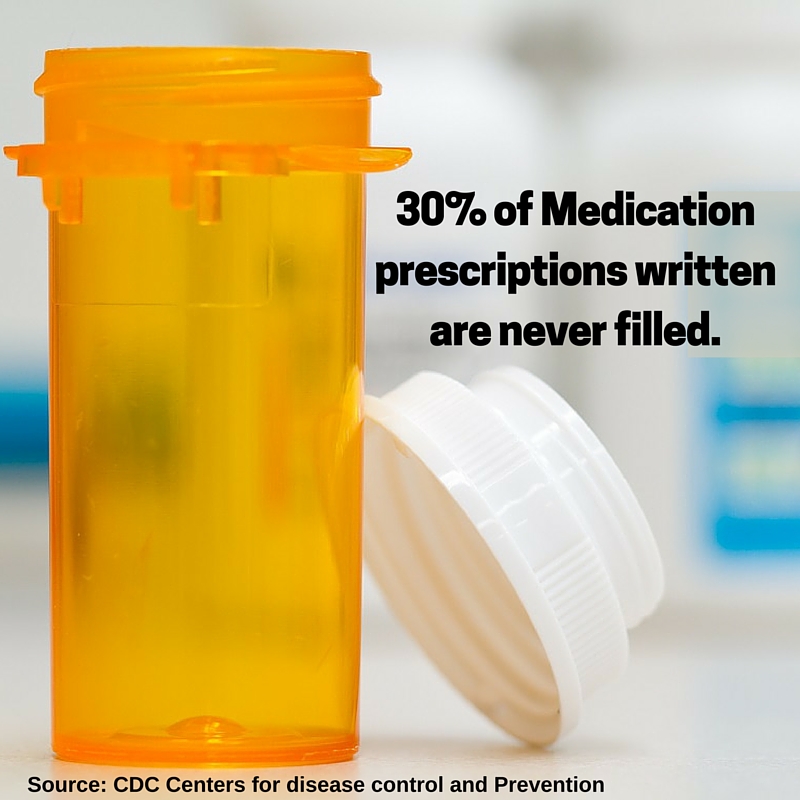
    Have you ever forgotten to take your pills? You’re not the only one. According to the Centers for Disease Control and Prevention, half of the people prescribed medication eventually stop following their doctors orders.

    It’s a dangerous game of Russian roulette. Most of us simply forget. For the elderly, who take more medications with different sets of instructions, it becomes easy to get confused. In cases where their cognitive abilities are diminished due to illness, they can forget on a regular basis. The consequences can be critical.

    adherence3

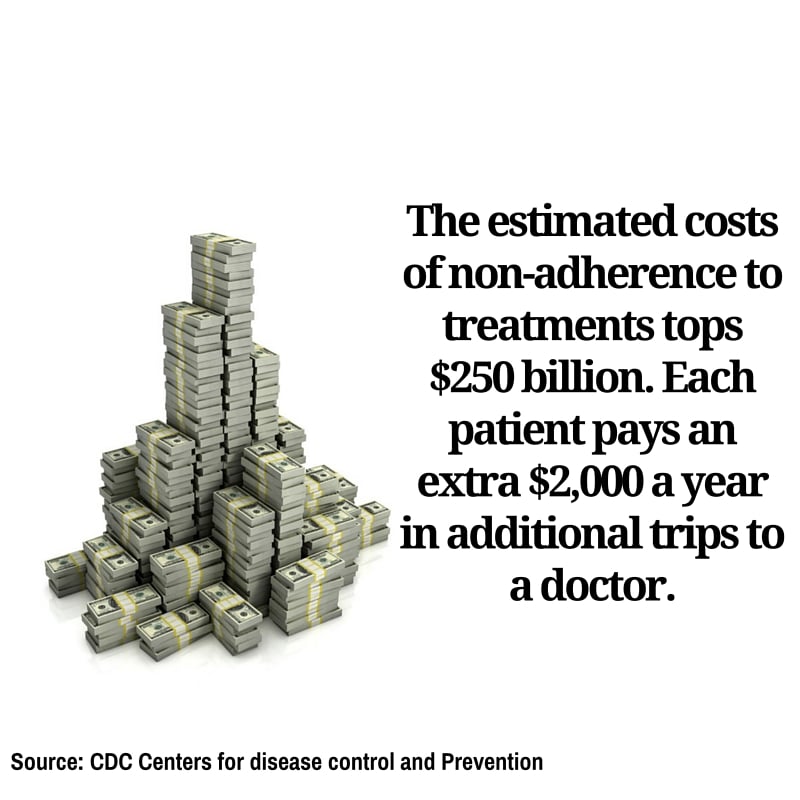
    Almost half of all failed treatments for any illness were a result of failing to adhere to the treatment prescribed. It is estimated that 125,000 Americans die each year simply because they did not take their recommended dose on time.

    Mobile technology is changing that.

    The newest “thing” to be connected to the web are pillboxes. Smart pillboxes can track if you take your pills, when you took them and the pills you need to take, and even alert you when the box is empty and it’s time to refill your prescription.

    If you fail to take your meds, the box itself will send an alert to a caregiver, physician or family member who can call you. For anyone prone to forgetting, this is a life-saver.

    adherence2

    The advantages of such a technology are clear. So are the risks. Handing over a life sustaining chore to computers demands that we guaranteeing the technology is working perfectly, all of the time. If the mobile apps fail on us, the consequences are devastating.

    Enter mobile testing.

    “Mobile application testing makes sure that every function of a mobile app is working all the time, and in any location. It underwrites all the benefits of mobility,” says Tal Barmeir, CEO of Experitest.

    Making Mobile Testing Work

    A successful mobile application testing strategy can double the chances your treatment will work. To accomplish this, the following areas must be covered:

    Functional Testing: From setting the times, to alerting the user, to notifying the doctor or caretaker if a dosage wasn’t taken, every operation of the application must be working correctly. Not only must it work, it has to work on every different type of mobile operating system, over each type of device and in all versions of both.

    adherence4

    Automated testing: As the technology advances, new features will be made available quite often. For every new feature added to the mobile application, the entire app must be retested to make sure nothing has been affected—even areas of the app never touched by the upgrade. That takes time. The only way to perform this amount of mobile testing in a reasonable amount of time is automating the process.

    Network Virtualization: A doctor can be vacationing on another continent when he or she is alerted a patient has forgotten to take his or her meds. Or, family members can live on the other side of a country and using mobile service from another carrier. Whatever the situation, it is vital that a mobile application will work as effectively in one local network as it will in any of the world’s other 400 to ensure that messages are communicated in a timely manner.

    Mobile technology is poised to extend the life expectancy of everybody using top-of-the-line smart tools communicating with mobile health apps. We will all enjoy healthier and longer lives while paying less in the process. The role of mobile testing makes sure this is a safe progression by giving your apps a clean bill of health.

  • Case Study: Sauce Labs Covers Animoto’s Testing Needs

    Case Study: Sauce Labs Covers Animoto’s Testing Needs

    Animoto’s web and mobile platforms enable businesses and consumers to drag and drop stock and user-defined visual and audio elements to create videos via a tiered monthly subscription service. Animoto updates service features with increasing frequency—some of them several times a day.

    “We have a broad range of applications and features including an online video maker application, where we enable users to import videos and video elements from all the known, established sources such as Facebook and through Dropbox,” says Siddharth (“Sid”) Jain, VP of Engineering at Animoto. “They can then export videos out to a variety of venues such as YouTube.”

    Animoto must iterate new innovations continuously into its application/platform for high-quality yet simple video creation to compete with similar solutions in the marketplace such as WeVideo and Stupeflix. This fast-paced development process is challenging, since Animoto must update separate versions of its software for the web, Android OS and Apple iOS (both iPhone and iPad). “The mobile apps are largely consumer-focused for very easy, on-the-go, frictionless video creation and sharing, while our web apps feature server audiences of professional photographers, educators and small businesses,” says Jain.

    In addition to testing service capabilities of different versions of the video maker application, Animoto must test the on-boarding/registration flow and the free product experience, where users get their first taste of Animoto. “We do lots of interesting things such as testing support for multiple currencies around the globe and running continuous multiple AB tests to ensure that the free product experience is working,” Jain notes.

    Notable Animoto testing includes user funnel testing in a simulated user flow environment starting at sign-up and continuing through video creation, feature exploration and the upgrade experience. “We test this several times a day on the different platforms,” Jain says, noting Animoto tests for the seamless success of import and export of videos and video elements to and from Facebook, Dropbox and YouTube. “The emphasis is on ensuring the quality and consistency of the user experience, i.e., making sure that nothing goes out that breaks revenue in terms of service.”

    Porting to Sauce Labs Promotes Progress

    Sauce Labs‘ cloud service helps Animoto scale up and out instantly to test Apple/iOS versions of its application so it can meet the high standards set by Apple and ensure fast inclusion of new app versions in the Apple App Store. This helps Animoto to compete by getting new innovations and features to market more quickly. “The biggest advantage to using Sauce Labs is that we don’t have to create or maintain a test lab internally,” says Jain.

    This accelerated testing speed is especially important since the app must adapt to every new iOS version while maintaining backward compatibility. “It would be a very nightmarish thing to do this all manually,” he says.

    In addition to faster testing, Sauce Labs is helping Animoto ensure that testing was delivering on its promises of software improvement through accurate feedback. “We used to be religious about doing extensive unit tests. Now we emphasize integration tests over unit tests because we got bit by unit tests that were all green even though the software functionality was broken,” says Jain. “Now we have a balance between unit and integration tests while frontloading the latter with tests of customer-facing functionality and collecting fine-grain feature use data.”

    The comprehensive testing helps to ensure that users aren’t shying away from certain features and that features are not broken. Frontloading uncovers regressions very early so the Animoto developers dedicated to fixing them can catch them before they lead to breakage.

    Sauce Labs helps Animoto shrink technical debt. “Debt rears its head in awkward ways. We do get surprised, but having good test coverage allows us to know where the app hot spots are and to have feedback to fix these and verify changes swiftly,” says Jain.

    Results: More Stability, More Capacity

    “We have been able to reduce testing time from three hours to under 30 minutes for some tests,” says Jain. “Thanks to Sauce Labs’ cloud, we added VM capacity, moving from 20 VMs to 45 VMs for the testing environment.”

  • Testing Mobile Apps? Consider a Mobile Device Cloud

    Testing Mobile Apps? Consider a Mobile Device Cloud

    Market demand for mobile app development services is expected to grow at least five times faster than internal IT organizations’ capacity to deliver by 2017, according to Gartner. As a result, enterprises must use the most efficient, effective and secure methods possible for their mobile app development processes, including mobile app testing.

    Today’s users expect the highest quality user experience from their mobile applications, so testing should be a top priority for enterprise IT departments that want to keep up with these expectations. Mobile testing is more complex than legacy application testing, however, because of the myriad platforms, networks, OSes and devices on which the applications run. To ensure their mobile apps perform reliably for every user, businesses must test on key variations of this growing universe of mobile devices.

    Sharing a single large pool of mobile devices across large or geographically distributed testing teams creates a number of challenges that risk bleeding IT and QA testing budgets dry. Mobile device access management has been plagued with inefficiency and risk, requiring IT teams to purchase an unreasonable number of devices to cover their enterprise’s growing needs. Inevitably, many of these devices remain unused or become lost, which can stall testing and result in idle mobile engineers.

    In addition to the cost and inefficiencies of having multiple mobile devices, security has become a top concern for today’s enterprises, thanks to the rise in data breaches. To avoid complications, enterprises must hold mobile testing practices to the highest security standards. A data breach during app testing can create significant cost for an enterprise and harm its reputation. Plus, for industries that must adhere to Sarbanes-Oxley, HIPAA or other federal privacy regulations, a data breach or unauthorized user access can create a regulatory compliance issue.

    The Mobile Device Cloud Option

    A mobile device cloud may be the answer to the cost, security and compliance issues enterprises face in their mobile app testing environment. It can serve developers looking to test and debug applications and QA teams performing manual or automated testing, and facilitates collaboration among these groups and other stakeholders such as marketing and customer support.

    A mobile device cloud offers organizations four significant benefits: security, accessibility, speed and cost. Let’s explore each in a bit more detail:

    Security

    On-premises, private mobile device clouds access a centrally managed pool of devices and mobile apps and enable testing within an enterprise’s corporate infrastructure and behind the firewall.  This creates a highly secure environment for proprietary apps and sensitive data throughout the testing process, which is managed in-house. In addition, private, cloud-based mobile testing can improve compliance with regulatory standards by reducing the chances of a data breach or unauthorized user access.

    Accessibility

    Private mobile device clouds can still meet the enterprise need for global access—developers, testers and mobile engineers can securely access centrally managed mobile devices from locations anywhere across the globe without compromising corporate data security.

    Speed

    Technology advancements in mobile application testing platforms now allow automated, continuous testing simultaneously on multiple devices. This allows private mobile device clouds to be even more effective in increasing an enterprise’s app testing speed and quality without compromising security.

    Cost

    With IT budgets for QA and testing increasing 9 percent over just the last year, reaching 35 percent of enterprise IT team’s total budget in 2015 according to Capgemini’s “World Quality Report 2015,” IT teams need affordable options that still maintain efficiency, effectiveness and security. Private mobile device clouds often are much more cost-effective than off-premises, public device clouds, while also providing an agile, efficient and effective solution.

    BI Intelligence predicts that mobile phone sales will surpass 2 billion in 2016, which means demand for enterprise applications will continue to increase rapidly. More enterprises already have begun using on-premises, private mobile device clouds and are seeing the benefits of this secure, agile, affordable option for their mobile application QA needs.

    For those enterprises that haven’t yet considered private mobile device clouds, 2016 is a great opportunity to upgrade your mobile testing with an improved solution and to meet both employees’ and customers’ high expectations for enterprise mobile user experience.