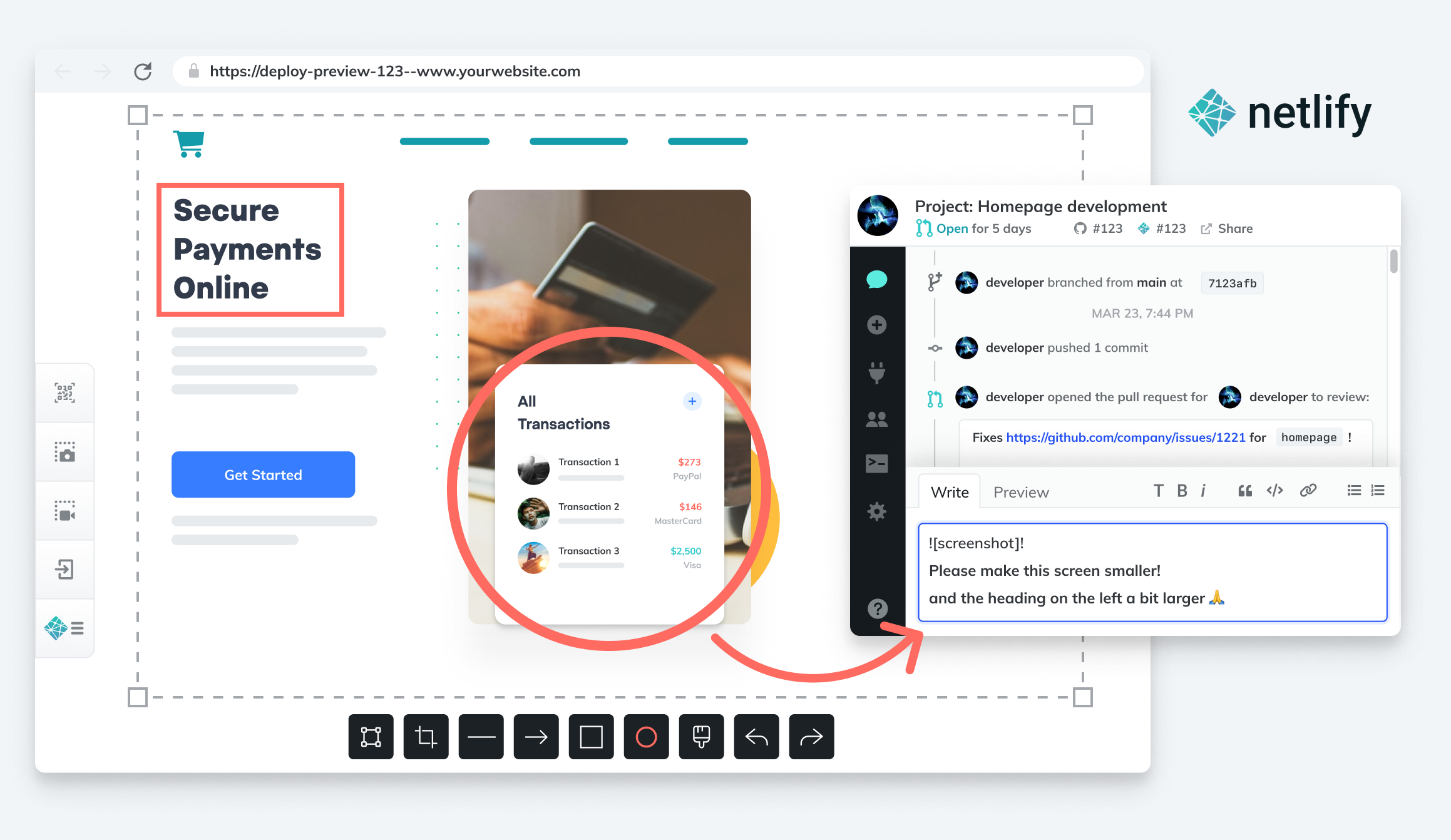
Netlify announced today it has acquired FeaturePeek as part of an effort to make it simpler for DevOps teams to create a portal through which application stakeholders can both inspect a web application developed using JavaScript and leave comments for developers.
Matt Biilmann, CEO of Netlify, said Netlify will embed that collaboration capability in the next iteration of its Netlify Deploy Previews. That tool makes it currently possible for a front end pull request from a Git repository to automatically generate a live preview of the site with a unique shareable URL.
The current version simply shares URLs with application stakeholders, versus enabling DevOps teams to create a portal through which the review process can be centrally managed to make feedback more consistent, said Biilmann. Each piece of feedback from an application owner or stakeholder made via the portal will become a comment on the Git pull request, or can be shared via any collaboration tool a development team employs alongside a Netlify workflow, noted Biilmann.
In the meantime, Netlify is also making available a free user role license for reviewers that want to make use of Netlify Deploy Previews to view recent updates to applications.
Netlify has been driving adoption of a serverless computing framework based on a JAMstack architecture for building JavaScript applications faster. An application based on a JAMstack architecture isolates the front end and back end end of an application to make it possible to prebuild front ends that are highly optimized around static pages to make web applications faster. The name JAMstack is a mashup of JavaScript, application programming interface (API) and markup language.
The need for more collaboration between developers and stakeholders has become more pronounced, in part, because organizations have significantly accelerated the rate at which they are investing in digital business transformation initiatives, noted Biilmann. With organization more dependent on software than ever, it’s critical for them to streamline the feedback cycle as the number of application stakeholders within organizations steadily increases, added Biilmann.
As the relationship between DevOps teams and the rest of organization continues to evolve, the amount of feedback any team is likely to receive will continue to increase. Everyone from sales teams to the board of directors now realizes how dependent the business is on software. DevOps teams will need to way to organize and prioritize that feedback. They should also expect application owners and stakeholders to follow the progress of software development projects more closely than ever because, in many cases, financial projections are now based on assumptions being made about software delivery timetables.
Many DevOps teams have been making the case to have a more central role in business planning for years. Now that many of them are getting a seat at the proverbial business planning table, however, they may soon realize they don’t really have the processes in place to absorb the overabundance of enthusiasm and anxiety that application stakeholders are likely to generate in equal measure.
Web development has changed a lot since DevOps first hit the scene. The languages used have shifted, where languages are used has shifted, the likely back-end hosting environment has changed – but DevOps has folded these issues in and just kept plugging along.
We’re going to approach this from two angles – what languages you’re likely to use, and what DevOps offers. This is not a “Best Billion Web Development Languages for 2021!” article; there are plenty of those out there, and you are more than welcome to read them. This is more about using these languages in a DevOps environment, which has become standard for web apps more than any other type of development.
We’ll start by observing that your web app is, more than likely, going to have at least three parts – HTML, CSS and JavaScript. This is not news to those of you doing it daily, but we’re just setting the bar, here. Other languages may be used to generate or populate any/all of the above, but, in the end, these three languages get sent to the browser, so will be part of the equation.
Backends add an incredible amount of complexity to this equation. I’ve done Ruby backends that did most of their work in C++ and Java; I’ve done pure Java backends that spit out the required three components; I’ve done Node backends that had very little actual HTML/JavaScript source code, but generated a ton of both – it’s all there. And the hosting environments for backends have changed. When DevOps started, most hosts were virtual machines (VMs) or hardware, whereas now we’re mostly running cloud instances or containers. Those backends have to be configured and managed, too, along with all of the dependencies that your application requires. When you think about it, we really have created quite a messy environment.
But DevOps has risen to this challenge.
I’ve long been an Atlassian fan, and find them to be a great tool for managing the agile side of DevOps. Add in Ansible, for the operations side, and you have a good thing going. I recently looked into GitLab, and GitOps – through GitLab – offers a compelling alternative to Atlassian’s offerings; more so since Atlassian made some rather unpopular changes right about the time I was wrapping up my look at GitLab.
The key is that Git holds all the code. By adding in the scripts to spin up those increasingly complex backends and secure the entire infrastructure, you get an “App in a (virtual) box.” No matter what DevOps toolchain you use, tying this in is simple, because it already works well with Git and associated tools.
Developers tend to care more about the development side of the equation (imagine that!), so let’s talk a bit about what’s going on out there.
PHP is hanging on solidly, with a bulk of applications and (perhaps more importantly) libraries to keep it in the running. PHP is one of the original “generate an HTML page” languages, and is slowly being displaced. It isn’t a bad choice for your web projects, but it isn’t the only – or at this point, the most popular – choice.
Java is still somewhat popular, and while it offers good support for web development, it is … heavy? Is that the word? It’s something for this type of development, and has ceded ground to other languages when it comes to pure-play web development. The skills are transferrable to other targets, so it is a good broad-use language. Like the other serious players in this space, there are web-centric libraries and frameworks that make Java hum. I’m a fan of Spring, but the options are pretty broad.
JavaScript wins this race today. It is used on both client and server, there are a ton of developers and DevOps people available who can be productive in JavaScript from day one, and it is increasingly used in other contexts – meaning skills could transfer to other projects. Like any language, there are trade-offs, but the portability aspect makes the trade-offs things that many are willing to work to overcome. Libraries and frameworks abound to make JS development faster and more dynamic. Personally, I like Node for server-side development, and Angular for clients that need more than straight HTML/CSS offers (probably because it’s the one I’ve used the most).
Python is definitely a contender in this space, as it is in most others today. With Django (or whatever your framework of choice), it functions well for web development, and its popularity has given it a host of support libraries to get things done. Developers are easy to find, and skills are broadly applicable, as Python is used in most areas of Dev and Ops at this point.
Windows aficionados are still using C#, and it does have good hooks into Microsoft DevOps tools, so any Microsoft shop should include it in evaluations. I’ve done C# on Azure for web apps, and for me it was … different, but not broken. In a Microsoft shop, C# will be familiar, and at this point, most developers are familiar with web clients, so merging the two is only a tiny bit of a learning curve, but not a major one.
Ruby does seem to have ceded its spot to Python. It is unlikely you’ll find a steady flow of ruby developers to fill those positions, but it is a highly intuitive language that you can train Java, and even Python developers in, if necessary. Ruby is well-supported for web development; indeed, it feels more natural using Ruby for web work than command line tools (at least to me, YMMV). There are web frameworks to make Ruby more intuitive in web development, and jRuby offers deep integration with Java to make use of already existing Java classes.
All in all, JavaScript should be the strong contender for a new project today, but any of these tools will serve the need. They are all well-supported, and DevOps tools start with integration to most of these languages. Do what’s best for your environment, and keep rocking it.
Accelerating the pace of development has become one of the biggest goals in DevOps. After all, having teams speed the creation and modification of applications is supposed to be one of the primary advantages of DevOps pipelines. Yet, far too many DevOps teams run into speed bumps that can derail the process. For some, turning to alternative methods to generate and modify code can slay the beast of project deceleration, and that is where low-code platforms come into play.
However, the waters are muddied by misconceptions about what low-code is and what it isn’t. Here, three industry experts share their own observations about these common misconceptions.
Low-Code is Only for Citizen Developers
“People often confuse low-code with no-code platforms,” said Richard Rabins, CEO, Alpha Software Corporation. “No-code platforms, which are driven by visual modeling and user interface builders, are aimed at citizen developers with little or no coding experience to quickly build applications.” Rabins makes some good points; no-code environments are designed to put the power of application development into the hands of a citizen developer, meaning those no-code platforms are optimized for simple workflows and not for teams. On the other hand, low-code platforms can integrate with deployment platforms, which helps expedite delivery while also enforcing consistency.
Low-Code Makes Collaboration and Reusability Difficult
“Over time, many developers have come to believe that low-code platforms were built for a single programmer working on a waterfall project,” said Deepak Anupalli, co-founder and VP of Engineering at WaveMaker, Inc. “Today, low-code platforms, like WaveMaker, offer development environments that integrate with code management tools, as well as APIs, to support the sharing of code and fostering team collaboration.” Anupalli’s point is that the majority of low-code platforms incorporate workflows that support team activities. What’s more, those platforms support scale-up, reuse of code and the ability to work within pipelines.
Low-Code Prevents Custom Development
“From the beginning, low-code was all about building applications with little or no code needed, creating the perception that low-code platforms did not lend themselves well to customization,” said Rabins. “However, nothing could be further from the truth. Developers are able to expand the functionality of low-code projects as the need arises. They can insert custom code, call APIs, integrate with other platforms, and so on.” Rabins points out that low-code doesn’t mean no-code, simply that low-code can generate code that can be modified and adapted as needed, supporting pipelines that deliver fully customizable applications.
Low-Code Platforms are Only a Trend
Many seem to think that low-code platforms are just a trend that will ultimately fade away as other technologies come to light. However, according to Business Wire, the low-code market will grow 44.4% by 2022 to reach $27.23 billion. Anupalli added that WaveMaker has experienced year-over-year growth since the company was founded.
One of the leading assumptions about low code platforms is that they all use some type of proprietary programming language. That may be true for a few platforms, but many embrace open source ideologies and use common languages, such as Java, PHP, and C#. Take, for example, the RISE Editor, which enables users to output code based on models in a number of different languages. RISE is not alone in the industry; several other platforms embrace either open source or can create easily accessible code. VisionX and WaveMaker create in Java, allowing generated code to be edited with other Java IDEs.
Low-code development platforms (LCDPs) have come a long way since the term was first coined by Forrester Research back in 2014. And yet, these numerous misconceptions remain, which may have slowed the adoption of LCDP in enterprises using DevOps pipelines. Dispelling these assumptions goes a long way towards helping application developers realize the benefits that LCDP can offer.
Sentry today announced it has updated its JavaScript SDK tool for monitoring applications to provide a more comprehensive view of application health.
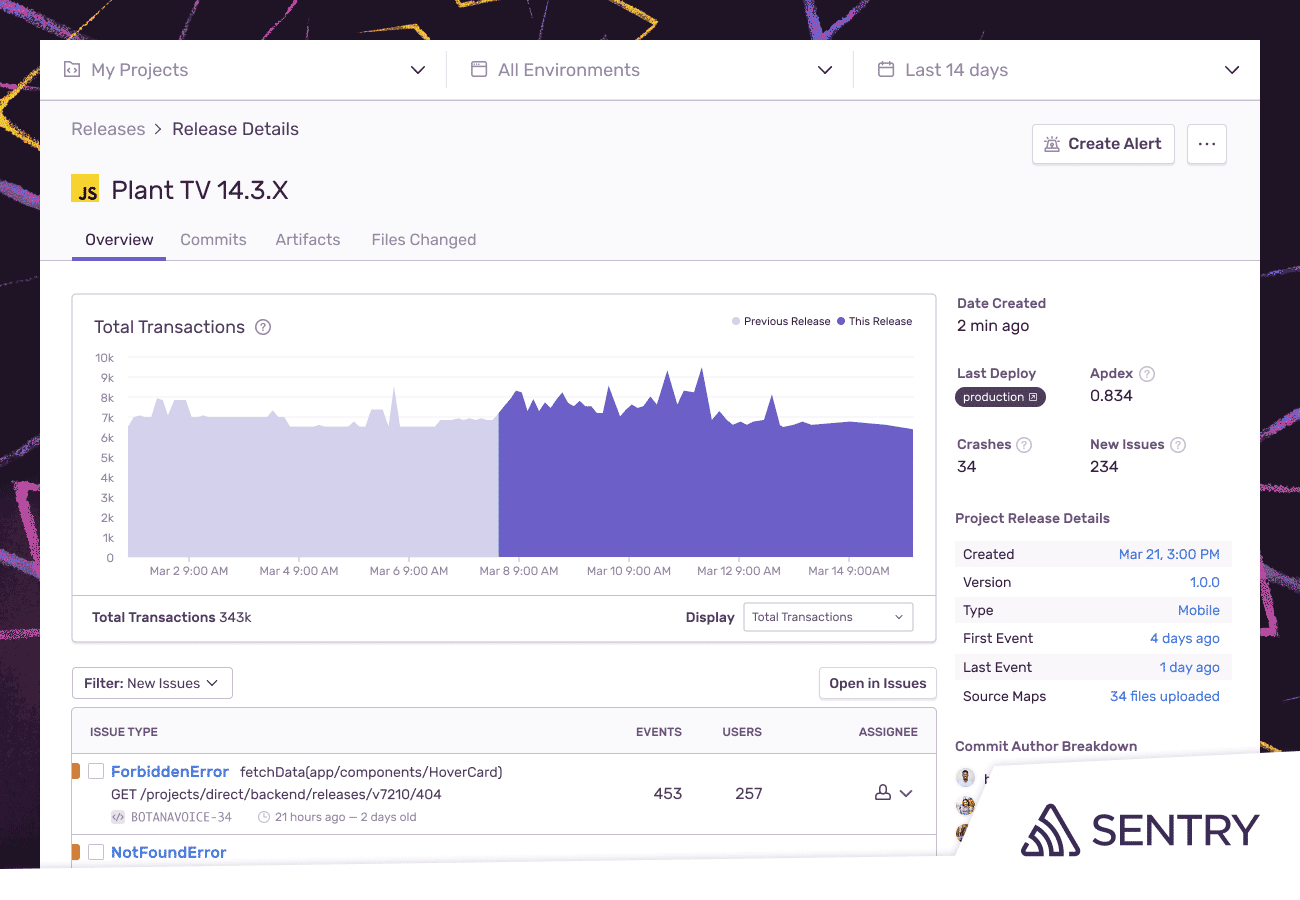
Previously, Sentry’s JavaScript SDK enabled JavaScript developers to insert lines of code that would tell them, for example, how many times an application failed. A new release health capability now also identifies what percentage those fail instances represent of the total number of times that application was successfully launched.
Developers can, in effect, better gauge adoption of a JavaScript application by tracking the percentage of crash-free sessions and crash-free users over the application’s life cycle.
Ben Vinegar, vice president of engineering for Sentry, said the JavaScript SDK is designed to provide developers with a monitoring capability that doesn’t require an IT operations teams to stand up and manage an entire application performance management (APM) platform. That approach also eliminates the need to instrument JavaScript applications with agent software, Vinegar said.
The JavaScript SDK consumes tens of kilobytes of memory after it is embedded directly within a JavaScript application, said Vinegar.
In general, JavaScript is increasingly being used to build complex applications, using frameworks such as React, as an alternative to Java. Over the years, IT organizations have developed a certain amount of bias around how Java applications should be monitored and managed using APM platforms. However, as JavaScript developers assume more responsibility for their applications after deployment, they need real-time monitoring tools that can consume JavaScript application metrics and are built in to existing APM platforms, .
Of course, APM platforms are managing more than just JavaScript applications, so they’ll remain useful for the forseeable future. However, ease of observation and monitoring is a significant factor when application developers choose a language in which to build an application, and it’s up to individuals to remediate issues that might arise in production. Developers, therefore, have a vested interest in discovering potential issues before that application is deployed.
Historically, developers have not had access to JavaScript application monitoring tools that they could easily implement on their own. Sentry’s tools makes it possible for developers to identify performance issues, including calls to application programming interfaces (APIs) and other common errors, and address those before an application crashes.
It’s possible, as performance and security issues shift left and developers become more accountable for user experience, that developers might one day instrument and monitor applications on their own – if for no other reason than self-preservation. Every minute a developer spends remediating a production issue in an existing application is one less minute they will have to write new code.
As we close out 2020, we at devopsy.kinsta.cloud wanted to highlight the five most popular articles of the year. Following is the second in our series of the Best of 2020.
As a novice developer, you may be thinking about learning a programming language and starting a fantastic career.
In fact, this question on Reddit inspired the whole article:
The thing is, programming languages represent certain philosophies of its authors and tailored to certain types of problems, i.e., there is no such thing as “the best programming language.”
In this article, I describe major programming languages according to its popularity, usage, demand and ease of learning.
There is market demand and a potential salary range for each language. These are linked to specific personal goals and prior programming experience.
What Questions Should You Ask Yourself Before Diving in?
What kind of projects do you want to work on? If career flexibility is a priority, then learning Python or C++ will allow you to work with different types of programming. If your passion is web development, learning JavaScript or PHP is a smart choice.
How much experience do you have? You won’t want to switch to an advanced programming language, such as Rust, if you don’t have previous programming experience. If you’re new to a language, you’ll want to start at a higher level and be intuitive.
What are your career goals? Do you want to become a freelancer, working for an existing company or work with a startup? Are you trying to be better in your current role?
If you plan to get a job in a large technology company, learn the programming languages they use, e.g., NASA, Google and Facebook use Python.
Many programming languages have similar syntax and qualities—so if you learn one of them, it will be easier for others. The more languages you know, the more flexibility you have in your career and development projects.
In the list below, we will look at the best and most popular programming languages for many of the most common uses, including web development, mobile development, game development and more.
Top Five Programming Languages to Start Your Career
Java
It is probably the best programming language if you are looking for a common language that will be useful in various situations. As for choosing a programming language to learn, there are many resources for people who are thinking about learning Java. Java was released in 1995, which makes it one of the oldest programming languages. It is used on a wide range of platforms and operating systems, including Microsoft Windows, macOS, Linux and Solaris.
That means there will always be jobs for Java developers, making it (perhaps) the best programming language to learn.
Research shows that Java developers can expect to earn between $80,000 and $130,000 per year. If you are thinking about learning your first programming language, think about taking an online course, for example, CodeGym. This course, which contains 40 levels of game-play classes, will teach you all the basics you need to know to start programming in Java. It’s easy to follow—even if you don’t have programming experience—and it is worth checking out.
It is also best used for back-end web development, mobile development and desktop applications.
JavaScript
This programming language works on several platforms. Therefore, it is ideal for websites that will be accessed through various devices and browsers. It is suitable for anyone who designs websites with effects, interactive features, animations and pop-ups—standard features on virtually any brand website these days. If you want to work in a creative environment and add more experience to the user, this is a coding language to learn.
JavaScript is the number one language on the web. The growth of frameworks such as jQuery, Angular and React JS has made JavaScript even more popular.
If you just can’t stay away from the internet, it’s better to learn JavaScript sooner than later. I consider this JavaScript Masterclass an excellent place to start. For cheaper alternatives see this list of free JavaScript courses.
It is also best used for front-end and back-end web development
Learning PHP
PHP—another old language, first appeared on the stage of programming around the same time as Java in 1995. It is a general-purpose language widely used for web development from the early days of the web.
Unlike other languages, which can be quite tricky to use with HTML, PHP can be built directly into the HTML code block. Start and finish instructions are used to enter and exit PHP, making it very easy to use. Although PHP is not as popular as Python or Java, it can be a suitable language to learn because of its simplicity. It is convenient for beginners and you can write your first scripts just a few hours after you start your PHP course.
Again, the popularity and wide use of PHP means that work opportunities are relatively easy to find. An average PHP developer can expect to earn around $80,000 per year. However, there is potential to make much more as a freelancer.
Take an advanced PHP course, which will teach you everything you need to know to find your first job as a programmer. It doesn’t matter if you’re studying your first language, or if you’re an experienced developer looking for the best programming language to add to your resume—PHP is a great choice!
Python is a useful step toward more advanced forms of programming languages. Python provides a high degree of website readability and is used by companies such as Reddit, Google and even NASA.
It is seen as entry-level programming that does not require too much prior knowledge. It may be ideal for relatively new professionals to help small businesses that want to expand their presence on the internet without having to resort to advanced professionals. Python is a relatively simple programming language that is very easy to pick up if you already have programming experience. That makes it one of the best to learn if you are already working as a developer and want to increase your resume quickly.
The code on Python is designed to be readable. It uses a lot of white spaces, which makes it a pretty easy language to learn while you’re studying it.
One of the most useful Python’s features is its compatibility with data analysis systems and scientific applications. It is a popular language in scientific communities and is often used by researchers to write their programs.
An average Python developer can expect to earn about $100,000 per year. However, there is little room for wage growth.
If you think Python is the best programming language to further your career, consider enrolling in a BitDegree course. The Python Basics Course includes everything you need to know to start writing programs on Python and contains less than four hours of lecture material.
It is best used for back-end web development, desktop applications, and data analysis.
C#
C# is another object-oriented, general-purpose language based on C. It is considered a suitable programming language for building applications native to Microsoft platforms. Microsoft initially developed it as part of its .NET framework for building Windows applications. C# uses a syntax similar to other languages such as C++. Therefore, it is easy to pick it up if you come from a different C family language.
C# is not only a suitable language for developing Microsoft applications, but also a language used by mobile device developers to build cross-platform applications on the Xamarin platform. Besides, anyone interested in VR development should think about learning C# as it is the recommended language for building 3D and 2D video games using the popular Unity game engine, which produces one-third of the best games on the market.
If mobile application development or virtual reality is your business, consider learning C#. Many mobile device developers use C# to create cross-platform applications on the Xamarin platform. Although it is not the most convenient programming language for beginners.
As was mentioned at the beginning, there is no best programming language to learn. The best language for you will depend on your experience, your current knowledge and reasons to learn a new language.
While there are many options, you should be able to narrow down your language choice by what you want to learn from it.
Remember to consider the following:
Programming experience, because some languages, such as Python and Java, are more suitable for beginners who have never programmed before.
What you want to do with the language. Different languages are used for different things.
How much time do you have? Some languages are much more demanding than others.
Make your choice based on your interests and the type of software development you want to get into. Here is a brief summary:
External web development: JavaScript.
Internal web development: JavaScript, Java, Python, PHP.
Mobile development: Java, C#.
Game development: C#.
Desktop applications: Java and Python.
To Sum Up
Programming and developer communities are evolving faster than ever.
Various new programming languages are emerging that are suitable for different categories of developers (beginners and experts) as well as for other applications (web applications, mobile applications, game development, distributed systems, etc.).
This list simply scratches the surface of existing programming languages. Still, the simple fact is that with the right coding skills, you will be perfectly prepared to offer valuable technical support and become an asset to any organization.
There’s no denying that low-code is a rising trend in application development that’s likely to stay for the long run. Its impressive benefits in terms of agility and development time are convincing the enterprise, so it’s no wonder that the industry is on its course to achieve fivefold growth between 2017 and 2022.
In low-code platforms, building custom cloud applications can be achieved by reusing components through a simple drag-and-drop interface, which means reduced engineering efforts. Then, APIs can be used to hook components together and maximize compatibility.
Although many steps of the way can be achieved without actively writing a single line of code, many low-code apps include advanced logic written in JavaScript. So, when it comes to understanding the threat model of low-code platforms, we must consider security considerations that arise from using JavaScript code.
Low-Code and JavaScript
Because JavaScript needs to be interpreted by a browser to work, it is exposed and anyone can access, read and modify it. This becomes problematic because companies store important business logic on the client-side, which is often unavoidable due to the inexistence of a back end or the need to avoid performance losses. So, companies’ proprietary algorithms and logic end up running on an adversarial environment, which opens the door to a series of attacks—namely, automated abuse, piracy, intellectual property theft and data exfiltration.
When it comes to protecting code, typically we’re led to the concept of encryption. However, JavaScript encryption is not a feasible strategy; the browser always needs to interpret JavaScript so that it works. If we have a decryption key, we need to supply it to the browser; if that key becomes compromised, all the code will be easily accessed.
A suitable approach to protect JavaScript is transforming it into a new version that is extremely difficult to understand while also preventing attackers from debugging or tampering with the code.
When it comes to enterprise or commercial applications, JavaScript must be protected with maximum resilience—that the protected code will prevent attackers from using automated tools against it. On top of this, the code should contain runtime defenses that break the application whenever attackers try to debug or tamper with the app’s source code.
Conclusion
Low-code still means a lot of code. Even though most of it will not appear on the front stage, development teams must not forget that it should always be protected. Attackers love low-hanging fruit and unprotected source code of enterprise apps is certainly a low-effort, high-gain venture.
Automated Visual Testing at the Speed of Unit Testing
SAN MATEO, Calif., October 16, 2018 — Applitools (applitools.com), the leader in Application Visual Management (AVM), today announced expansion of their AI powered visual testing platform to Cypress and Storybook; two popular tools with software developers seeking to build high quality applications faster.
These new Applitools Automated Visual Testing SDKs are engineered to run visual tests instantly as developers write code, enabling them to identify visual bugs as soon as they are introduced. The result is more productive engineering teams, delivering higher-quality apps faster than ever before.
“I love how Applitools Eyes has the smarts to ignore minor visual differences in your components, especially when testing on different browser types where it’s easy for layout to be off by a pixel,” saidKent C. Dodds, JavaScript engineer at PayPal and the creator of TestingJavaScript.com. “I also think is awesome how quickly I can get confidence that my application works across these browsers without actually having to run all my tests in every one of them.”
“Finding and fixing bugs at the application development stage is significantly cheaper and easier than finding and fixing those bugs during QA, or worse, in production,” said Gil Sever, CEO of Applitools. “This dynamic is what’s driving the industry trend of ‘Shift Left’ and embedding testing earlier in the development lifecycle. Increasing release velocity, while maintaining software quality is a huge challenge for R&D teams. By expanding our AI powered visual testing platform to Cypress and Storybook, we provide frontend developers and test automation engineers the tools to do visual testing at the development stage, at the ultra-fast speeds needed to maintain agile and CI-CD development.”
“Our software engineers love the simple configuration, fast performance, and both full page and component-level visual regression testing that Applitools now provides,” said David Corbett, engineering lead at PushPay. “Visual testing is now a vital part of our development routine helping drive faster release cycles with higher quality.”
Applitools Cypress Ultra-Fast SDK empowers developers with an almost instant interactive experience allowing them to see a code’s impact on the UI by headlessly running screenshots in parallel. Also, for the first time, you can use Cypress for visual testing on Firefox, mobile browsers, and Google Chrome.
“Applitools Eyes integrates seamlessly with Cypress and has everything I need for cross-browser visual testing coverage by circumventing the Google Chrome-only restriction built into Cypress,” said Omri Aharon, frontend team leader at Autodesk.
Applitools Storybook SDK visually tests UI web components in parallel, without writing any test code on React, Angular or Vue, enabling ultra-fast codeless validation of massive component libraries in seconds.
“Storybook allows you to visualize your components and all their states, and Applitools allows you to do smart visual-regression testing. Using these tools together provides change detection, which will certainly be of immense value to organizations and individual developers,” said Norbert de Langen, senior front-end consultant at Xebia and maintainer of Storybook.
Join us for a live webinar with frontend developer Gil Tayar entitled “Visual Validation at the Speed of Unit Testing with Cypress and Storybook” at https://goo.gl/vvZdTG
Applitools’ AI powered Application Visual Testing (AVT) technology gives frontend developers, QA analysts, test automation engineers and digital transformation executives the ability to automate the visual testing of web and mobile apps on multiple browsers, devices and screen sizes. By accelerating the testing cycle, companies can improve test coverage and increase the detection of visual bugs dramatically.
Applitools’ Visual AI engine mimics the human eye and brain to avoid undetected bugs and simultaneously minimize false positive bug alerts. The technology can instantly validate entire app pages and their components, and detect layout issues on the most complex and dynamic pages. When development teams are confident that web and mobile applications are rendering properly across all browsers, devices and screen sizes, they are unleashed to push more code more quickly, and with much better quality than ever before.
About Applitools
Applitools is the creator of Application Visual Management (AVM) to help companies release, test and monitor flawless mobile, web, and native apps in a fully automated way. Founded in 2013, Applitools uses sophisticated AI powered image processing technology to ensure that an application appears correctly and functions properly on all mobile devices, browsers, operating systems, and screen sizes. Applitools has customers from a range of verticals, including Fortune 100 companies in software, banking, online retail, insurance, and pharmaceuticals. Applitools is headquartered in San Mateo, California, with an R&D center in Tel Aviv, Israel. For more information, please visit applitools.com.
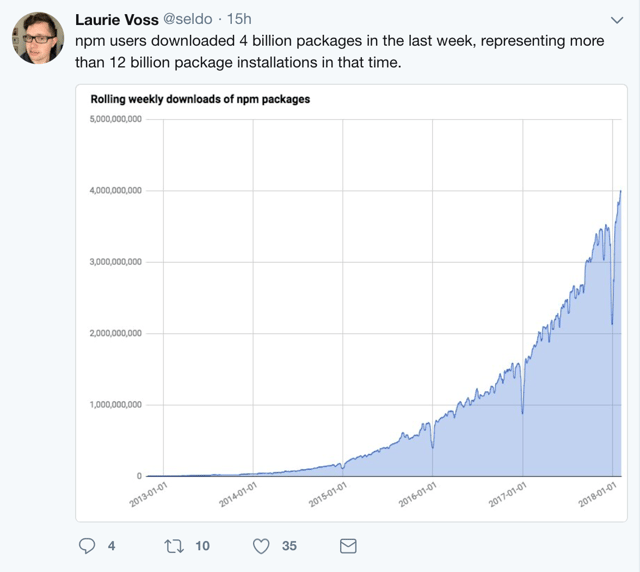
Laurie Voss, COO and co-founder at npm (@seldo), tweeted recently that JavaScript packages downloaded from their repository has topped 4 billion. On an annual basis, that would be more than 200 billion downloads. Wow.
Just as open source software turns 20 years old this year, these numbers are a testament to the incredible magic that happens when communities of developers openly share innovations.
Laurie estimated that 12 million developers were responsible for the downloads. That means, on an annual basis, each JavaScript developer will download nearly 17,000 components. Imagine the time saved by not needing to code each of those functions from scratch simply by downloading a package in a millisecond from the internet.
Software Supply Chains at Work
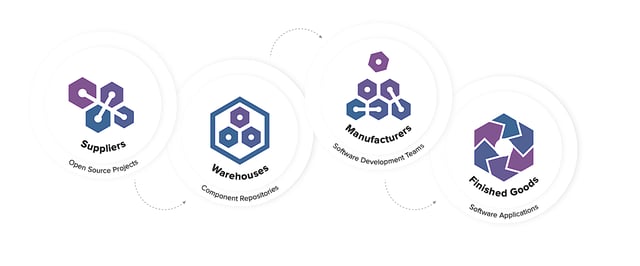
What we’re witnessing here is a software supply chain in full effect. Open source projects contribute packaged code to the community, place it in public warehouses, and it’s then consumed by development teams around the globe to create new front-end, back-end or mobile applications for all of us. Every development team on the planet now utilizes a software supply chain that operates at insane speeds with massive throughput.
In a second tweet, Laurie wrote, “Since we have ~12 million users, that means the average user installed the neatly round number of 1000 packages in 7 days. In reality, most individuals installed very few packages, and a bunch of CI build boxes installed 10s or 100s of thousands of packages each.”
Essentially, there is an army of robots (automated CI tools) downloading billions of components from the web. While this type of automation is efficient, by itself it does not serve teams well.
Repositories to the Rescue
At Sonatype, we saw similar behavior by developers in the early days of Maven. Individual developers would download Java components directly from Maven Central. Maven users sitting right next to one another in the same room and on the same team would download the same versions of the same components needed for their builds, repeatedly. It was for this reason, among others, that our founders invented the Nexus repository manager.
While repository managers have been used for quite some time in the Java community, Laurie’s post tells us that adoption of the technology still lags in younger, less mature, packaged code ecosystems.
Companies looking for repository managers can look toward solutions like e-npm, an on-premises technology exclusively for JavaScript packages. For companies with polyglot development teams, universal repository managers provide full-function, (sometimes) free support for npm and 12 other component types, including Docker containers.
Not All Components Are Created Equal
I have often said that if you have 100 developers, you have 100 front doors open into your organization. If you have 1,000 developers? Then there are 1,000 front doors.
If you dissect Laurie’s comment further, you will also realize that any developer can bring any package into your organization at any time. While this does make them more efficient, it also points to security and governance concerns. Every component was developed by someone else, donated out to the internet and consumed in the millions. But you have no true idea of the source or origin of many of the components.
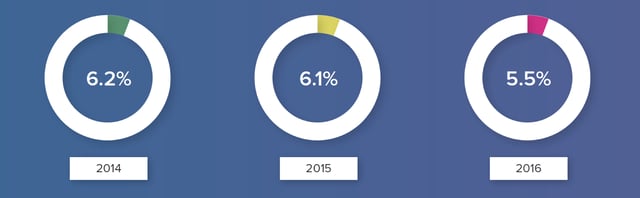
Research I have done in previous years at Sonatype demonstrated that 5.5 percent (1 in 18) of components downloaded by repository managers had known security vulnerabilities. While the percentage is not very large, keep in mind that a repository manager will only download a component once. Once cached, future downloads of that component are unnecessary and the components can be reused infinitely by that team.
Sonatype analysis of more than 40,000 Nexus repositories reveals that the average repository holds more than 1,600 components. Deeper analysis of the 1,600 components housed in the average repository manager found 192 security vulnerabilities were present among the components (some components having more than one security vulnerability).
Within software supply chains, repository managers and private container registries represent procurement gates into the development organization. The gates can be left wide open where component flows are not governed or they can represent opportunities for quality and security checkpoints that ensure defects are not passed downstream.
What’s in Your Repository Manager is in Production
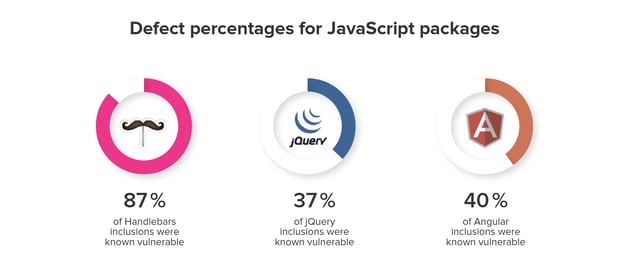
Using data from more than 133,000 websites, researchers from Northeastern University showed that “37% include at least one JavaScript library with a known vulnerability. From a per-library perspective, at least 36.7% of jQuery, 40.1% of Angular, 86.6% of Handlebars, and 87.3% of YUI inclusions use a vulnerable version.
“Alarmingly, many sites continue to rely on npm packages like YUI and SWFObject that are no longer maintained,” the researchers continued. “In fact, the median website in [NU’s] dataset is using a library version 1,177 days older than the newest release, which explains why so many vulnerable libraries tend to linger on the Web.”
What is Wrong With 200 Billion Downloads?
Nothing from an innovation standpoint. It’s awesome and we can all celebrate this achievement with Laurie.
At the same time, it gives us pause to reflect upon other concerns of our day, including cybersecurity threats, technical debt and wasteful context switching.
Javascript (JS) is one of the most widely used and beloved programming languages in history. This can be attributed to its fairly light learning curve and impressive functionality. Designed by Brendan Eich in 1995, the language has seen steady gains in use for more than 20 years.
JS itself is a high-level and weakly typed language, which means it is powerful and less prone to errors than other coding languages. It achieved early success and is now integrated on both the client side and server side.
Most applications and OSs come pre-built with JS development capability. It has become ubiquitous in the web development market and continues to be the strongest and most popular web language out there.
With that in mind, here are five resources for JavaScript developers:
Codecademy
Codeacademy is one of the most invaluable resources a programmer can have. It offers tutorials and lessons on hundreds of topics and provides copious amounts of examples to bolster your programming skills. JS has its own page at Codecademy filled with lessons and coding tests to hone your skills and promote better learning.
Codewars
If there is anything that can hone your programming know-how in real-life situations, it’s Codewars. This handy website has weekly challenges to conquer in JS submitted by real people. It puts JS developers in the hot seat and allows them to deal with situations that they may find in real-life work environments.
It also challenges the knowledge of experienced programmers and enhances their practical skills. Troubleshooting assistance is another big help for programmers just starting out, as it helps identify the small mistakes that can prevent compiling code.
MDN
The Mozilla Developer Network (MDN) is a remarkable resource for all JS programmers as it continually updates with the best practices for coding. It has a gargantuan community and is constantly evolving to fit the needs of newer applications.
For developers, MDN provides unique and incredibly detailed documentation on everything from developing for traditional web to mobile web development. The MDN Web Docs has no equal when programming JavaScript, as it guides you from beginner to expert effortlessly, it seems.
Libraries
This is where JavaScript really comes into its own as a powerful platform and highly functional language. JS has a library for everything from GUI to to form applications.
The most popular library is JQuery, which is a DOM (Document Object Model) manipulation framework designed to make all parts of a webpage customizable. JQuery, like the other libraries, seeks to simplify syntax and provide greater readability across the platform. This makes JS an incredibly customizable language that makes coding easier without losing the functionality of the language.
Code-Alongs
One of the most underutilized tools in the programming field, code-alongs make coding much easier than trying to teach yourself from a book or learn from a lecture. During code-alongs, programmers will code live and share their thought processes as they do certain things.
This especially helps new developers who stare at a screen and can’t figure why that goes there. For experienced developers, it can offer an insight to different strategies that they might not know otherwise. Regardless, code-alongs are incredible tools made by individuals for the sole purpose of fostering a love for programming.
Conclusion
Programming jobs today usually require a knowledge of various languages, but almost always JavaScript is a requirement. Its usefulness make it one of the must-learn languages for all coders hoping to make a living. To make life a little easier, and JS a little stronger, there are many resources that can be utilized.
JavaScript is an incredible programming language entirely deserving of its recognition. It is also a necessary tool for programmers of all styles and philosophies. To that end, resources abound for JS and should be used to their fullest. The true usefulness of JavaScript is its amazing community and incredibly involved developers that make JS the programmers dream. If there is any language you should learn now, it’s JavaScript.