ServiceNow today unveiled an Agent Client Collector (ACC) that makes it possible for IT teams to capture data from software, hardware and cloud infrastructure.
Jeff Hausman, vice president and general manager for IT operations management at ServiceNow, said this unified agent will enable IT teams to reduce the number of agents they would otherwise have to deploy to collect the data required to monitor IT environments.
IT teams will also be able to employ incident management tools that can view that data in a way that eliminates the need to install any remote desktop software, Hausman noted. At a time when many employees will be splitting their time between working from home and the office, that approach reduces the level of IT service management (ITSM) friction that many IT teams today regularly encounter, added Hausman.
ACC surfaces both configuration and performance data in real-time to provide IT teams with greater visibility. That data can then be used to drive a variety of workflows and playbooks that trigger automated incident responses.
ServiceNow will employ ACC both within its ITSM platforms and IT operations management (ITOM), hardware asset management (HAM), software asset management (SAM), and security operations (SecOps) tools.
Hausman said ServiceNow will employ ACC alongside agentless tools for managing IT environments as part of an effort to strike a balance between the amount of software that needs to be deployed and the capabilities that agent software enables. Ultimately, ServiceNow will also open up ACC to third-party tools that offer complementary capabilities, he added.
More than a few IT organizations are suffering today from a phenomenon known as agent fatigue. Each new tool added to the IT arsenal often requires agent software to be installed within a device, application, server or cloud service. The need to reduce the amount of agent software has given rise to agentless approaches to managing IT resources, but the tradeoff is that, in the absence of an agent, the types of data and capabilities that can be enabled tend to be more limited.
The market research firm International Data Corp. (IDC) is predicting that 75% of Global 2000 IT organizations will adopt automated operations practices by 2023. A major driver of that increased reliance on automation has been, of course, the COVID-19 pandemic. Not only are organizations making greater use of cloud infrastructure, but application users are not often conveniently located behind a firewall in a corporate office. For the last year, IT teams have been tasked with supporting a largely remote workforce. As more of those employees are vaccinated in the weeks ahead, a lot more of them will be returning to the office. However, it’s unlikely most employees will be working in an office full-time even after the COVID-19 pandemic subsides.
Regardless of how IT is managed, the overall IT environment will continue to become more complex. As such, it’s now more a question of when rather than if organizations will need to revisit how IT gets managed across what has become a highly distributed environment.
ServiceNow today made available an update, dubbed Quebec, to its Now platform that adds a set of low-code application development tools.
Marcus Torres, general manager for IntegrationHub and vice president of platform product management at ServiceNow, said the Creator Workflows tool leverages existing App Engine and IntegrationHub capabilities in the platform to make it possible for both end users and professional developers to build custom applications faster using a visual development tool dubbed App Engine Studio. A set of templates that provide a set of pre-built workflows is also included.
The goal is to make it easier to develop applications that would otherwise not be built because professional developers, using existing tools, would simply not have the time, Torres said.
The Quebec release of the software-as-a-service (SaaS) platform is also used for IT operations management (ITOM), adding artificial intelligence (AI) capabilities in the form of ITOM Predictive AIOps that surfaces potential issues before they become a major issue. It is now also easier to set up the virtual agents that ServiceNow makes available to enable conversational AI, and there is now an AI search capability built into the ServiceNow portal. ServiceNow gained these capabilities via its recent acquisitions of Loom Systems and Attivio.
Finally, ServiceNow has added process optimization and workforce optimization modules, along with an engagement messenger module that extends the self-service capabilities it provides to third-party portals, and a universal request tool that enables agents to collaborate and transfer tickets across departments while keeping employees informed of the status of their ticket.
Thanks to the general enthusiasm for digital business transformation initiatives being accelerated in the wake of the COVID-19 pandemic, reliance on low-code tools to build applications has significantly increased. The challenge organizations encounter, however, is that a low-code tool can build a relatively simple application. However, development means may need to drop down to a lower level of abstraction to address more complex issues as an application continues to evolve. The Creator Workflows tool from ServiceNow is designed to provide development teams with that option.
In general, ServiceNow is making a case for building applications on the same platform that many IT organizations already employ to manage IT. Many organizations already take advantage of workflows that ServiceNow has built to extend its core platform to address a wide range of uses cases involving, for example, human resources applications. The addition of the low-code tool will make it easier for IT teams to create applications that address use cases unique to their organization.
Of course, there is no shortage of options when it comes to low-code and no-code tools these days. IT teams will need to decide to what degree platform-specific low-code tools make sense versus adopting low-code tools that enable them to build applications that can be deployed anywhere. Regardless of the path forward, however, it’s clear the number of applications that need to be deployed is dramatically increasing with each passing day.
In today’s complex, dynamic IT environments, the proliferation of disparate IT Ops, NOC, DevOps and SRE teams and tools is a given – and usually considered a necessity. This leads to the inevitable truth that when an incident happens, often the biggest challenge is collaborating between these teams to understand what happened and resolve the issue. Inefficiencies suffered during this critical stage can have huge impacts on how much each incident costs the business.
I recently sat down (virtually) with Sid Roy, VP of client services at Scicom, to get a deeper understanding of how IT leaders can more effectively size up these inefficiencies and eliminate them.
The Costs of IT Incidents
When asked what a minute of downtime costs, analysts and vendors may provide different answers – but they are more or less aligned around the same order of magnitude – several thousands of dollars per minute. And with an average of five major incidents a month and an average time of six hours for resolution, this easily amounts to millions of dollars a year.
The three key drivers of these costs are:
Staffing and team member costs: This includes full-time employees (FTEs), consultants, and overhead when other teams are pulled in to deal with the incident. For many organizations, this can include offshore incident response teams.
The direct and indirect costs of an IT incident: This includes your infrastructure or capital expenditures like software licenses for monitoring, log and event management, notification, ticketing, collaboration, etc.
The business impact of an IT incident: This is one of the most challenging and unpredictable variable costs to calculate or manage, and is often the highest of all three drivers. It includes revenue loss/delay or reduction due to a major incident, and the profit or loss due to brand or goodwill impact. It also includes inefficiencies suffered by other parts of the business when critical services they depend on are degraded or unavailable.
Fragmented Teams Magnify the Challenge
The incident volume, complexity and throughput obviously affect the number of people and amount of time needed to deal with them and often drive more indirect costs as needed resources pile up. To save on these millions of dollars of costs, you need to be able to collaborate and lower MTTR. As mentioned above, this becomes a challenge in agile IT environments. To help streamline operations, teams need to start asking and answering several key questions:
Do you have an up-to-date map of your critical services?
Are they prioritized by business criticality (revenue, number of customers, other supported services in the supply chain)?
What are the upstream and downstream dependencies of these applications?
Have you identified the major infrastructure and application elements in your environment?
Are you aligned with the owners of these systems?
Do you have real-time knowledge of changes being done to the infrastructure and applications?
Do you have monitoring gaps?
Which monitoring tools provide you with the best value?
Answering these questions involves overcoming fragmentation across teams of people, processes and tools – essentially integrating ITSM and ITOM to enjoy the benefits of contextual full-stack visibility and streamlined processes within the organization.
The Right Combination for Incident Response
What is the right combination of people, processes and tools we just discussed? Here are the two main guidelines:
Set up a major incident management team – ideally, from your existing staff. This team includes three vital roles:
The incident manager/incident response commander. This is a designated role in charge of declaring a major incident and taking ownership of it. Their job is to, essentially, stop the bleeding of revenue and costs.
The NOC/monitoring team. This is your front line defense. When things go bump in the night or boom in the day, they’re the ones picking it up with their “eyes on the glass” – 24/7. And, they’re in charge of reporting and creating full situational awareness for the incident command through bidirectional communications.
The production support team. This team actually effects the required changes and executes the remediating action.
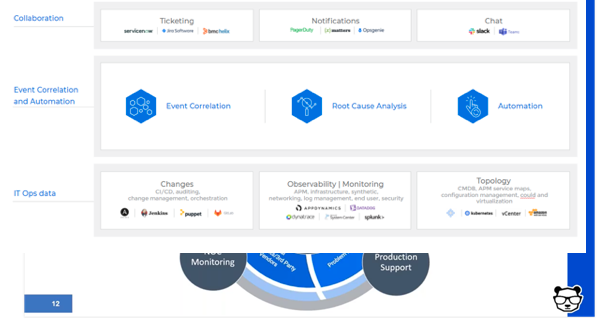
Deploy event correlation and automation tools to enable the incident management team. These tools are key, allowing your team to perform the required actions.
First, correlate the alerts created by your monitoring and observability tools into a drastically reduced number of high-level, insight-rich incidents by using machine learning and artificial intelligence (ML/AI). Add context to these incidents by ingesting and understanding topology sources, as well. This creates the necessary full-stack visibility and situational awareness.
Then, use ML and AI to determine the root cause of these incidents, including correlating them with data streams from your change tools: CI/CD, orchestration, change management and auditing to identify whether any changes in your environment caused these incidents.
Finally, automate as many processes as you can to free your IT Ops team from manual, time-consuming tasks. By integrating with collaboration tools, you can also enable the above-mentioned bidirectional communications.
Artificial intelligence for IT operations (AIOps) has several use cases that IT operations managers can’t deny: reduce alert noise with statistically significant outcomes (up to 80%), correlate alerts and events to uncover the critical business issues immediately, analyze data across environments to find root causes and resolve routine issues (like patching) automatically. Gartner predicts that large enterprise use of AIOps tools to monitor applications and infrastructure will rise from 5% in 2018 to 30% in 2023.
I’ve been working in the AIOps field for a few years now, and I’ve learned that many organizations, even with relatively modern IT operations management (ITOM) software, are behind the curve. Vendors keep releasing new algorithms, yet the original ones are barely being used or worse, still sitting on the shelf in the customer’s environment. This is because it can be difficult to understand when and how to use artificial intelligence (AI) tools in the daily workflow, and because IT professionals may not inherently trust (or even want) machine-driven recommendations and actions.
AI and machine learning technologies are upending traditional assumptions and conventions in many industries – and IT is no exception. In the land grab to bring to market the latest sensational AIOps capabilities, vendors have unwittingly deprioritized customer adoption. This has resulted in a chasm: The technology is getting ahead of the customer’s willingness and ability to implement these solutions in their production environment.
The feature-first perspective in the software industry is nothing new, yet for AIOps to reach its full potential, it’s time to take a customer-first perspective.
Let’s walk through a few ideas to minimize barriers to adoption and speed up time to value for AIOps:
Start on Adoption During Build
Machine learning developers and product managers need to understand potential customer barriers during the design and test phase and put themselves in the user’s shoes. How will an individual interact with the system and what level of transparency is appropriate to ensure a frictionless experience? This is a best practice for any software development team, but given the mystique of AI software, it’s even more important. Document expectations for the user experience by giving users early access to the software, such as a beta program, where they can freely deliver feedback on UI, workflows and outcomes of AIOps features.
Connect the Dots with Visualizations
A significant barrier for any machine learning application is that users may not fully understand the use cases nor trust what the algorithms are doing. Ensure that software-driven actions and recommendations are transparent at the moment and location they occur in the application. It should be easy for users to see the cause and effect of machine-driven actions as well as how the AI reached a conclusion.
The concept of “explainable AI” has become popular in the last year and vendors can help by introducing visualizations into their tools. For instance, you could have graphs showing the progression of a model being trained or the learned sequences in alert correlations. In-app simulation tools can help a customer see the impact of an AI-delivered recommendation without actually making the change.
Amp Up Training
Create internal-facing white papers or videos to demonstrate the workings behind algorithms to your technical staff and tools especially designed for users. The best way to learn is by doing, so designing visual cues and tutorials within the application will be most effective. Ensure that you have dedicated AIOps subject matter experts who can guide customers through implementations and be on call for advice as needed. Common questions include, when should the AI be allowed to automate an action or decision and how can you override an automated decision? It’s not a bad idea to involve machine learning developers in creating training sessions and guides. Finally, the age-old concept of nurturing power users within the customer organization can go a long way.
Diffuse Concerns Over Jobs
Nobody wants to use a new technology which might eventually replace them. For the most part, AIOps is not going to jettison IT operations staff. Instead, AIOps will empower operations and support teams to handle increasing alert volume and complexity with existing staff, while ensuring that expensive engineers such as SREs can focus on higher-level data performance analysis and optimization initiatives.
Design Algorithms for Flexibility
Machine learning algorithms break if they cannot respond to the dynamic nature of modern workloads. For instance, if you design the algorithm based on rules dictating actions between specific applications and infrastructure components, what happens when those technologies disappear or are replaced, as they often do in the cloud? Now you’ve got gaps that could result in a catastrophic system failure and an AIOps tool that requires heavy maintenance. Algorithms should be responsive to environmental changes – such as incorporating neural net technology that can adapt to the shifting sands of the IT landscape.
A survey conducted in April by OpsRamp found that nearly 70% of IT operations leaders plan to invest in AIOps to improve incident diagnosis, troubleshooting and resolution. By all accounts, the year 2020 has raised the bar for IT expectations around resiliency and user experience. AIOps promises to be a pivotal strategy for IT operations success, but it all depends upon user satisfaction and adoption of the technology. Vendors that incorporate customer adoption and value tactics into their development processes will be instrumental in pushing this market forward in a positive way.
Edge computing is growing quickly, but IT operations need to evolve as well to effectively monitor and manage new devices, sensors, applications and data. Growing enterprise edge ecosystems should integrate and become part of centrally managed ITOM systems.
Edge computing is hard to define and is running high on the hype scale. But, research and surveys continue to indicate that this trend of processing data where it’s collected for better latency, cost savings and real-time analysis is an innovation with legs.
There will be 75 billion IoT devices by 2025, according to Statista. According to Spiceworks’ 2019 State of IT report, 32% of large enterprises with more than 5,000 employees are using edge computing, and an additional 33% plan to adopt it by 2020. Tied to the growth of edge computing is the advent of 5G wireless: 51 operators globally will start 5G services by 2020, according to Deloitte Global research from 2019.
The major cloud companies are also investing in the edge. The AWS Local Zones service allows single-digit latency connecting to computing resources in a metro environment, while Microsoft offers the Azure Stack Edge appliance and Google Cloud IoT is a “complete set of tools to connect, process, store and analyze data both at the edge and in the cloud.”
It’s safe to say that edge computing is becoming mainstream, and CIOs and their ITOps leaders should plan appropriately for it in 2020 and beyond.
Benefits of the Edge for ITOps
We’ve read plenty about the business benefits from edge computing: oil rig operators need to see critical sensor data immediately to prevent a disaster, marketers want to push instant coupons to shoppers while in the store, video security monitoring can catch a thief in the act and medical device alerts that ensure patient safety. Edge computing may save IT money on cloud and network bandwidth costs as data volumes keep exploding and the need to store every data point becomes harder to justify.
There are also implications for IT management and operations.Local processing of high volume data could provide faster insights to manage local devices and maintain high-quality business services when seconds make a difference—such as in the event of a critical server performance issue threatening the e-commerce site.
Today, ITOps teams are inundated with data from thousands of on-premise and cloud infrastructure components and an increasingly distributed device footprint. The truth is, only an estimated 1% of monitoring data is useful, meaning that it provides indications of behavior anomaly or predictions about forthcoming change events. With edge monitoring, we can potentially program edge-based systems to process and send only that small sliver of actionable data to the central IT operations management system (ITOM), rather than transmitting terabytes of irrelevant data daily to the cloud or an on-premise server where it consumes storage and compute power.
The job of filtering out the highly-contextual data on the edge, where business occurs, can support real-time decisions for successfully running ITOps at speed and scale—regardless of what combination of on-premise, public cloud or private cloud infrastructure is in place. At the same time, ITOps will need to be a leader when it comes to minimizing the risk of edge technology from a performance, security and privacy perspective. However, as detailed below, we are in the early stages of determining how to make this work in practice.
ITOps Realities for Edge Computing
Edge-Specific Security Needs Are Still Unknown: Edge devices are often small and infrequently designed with security in mind. More than 70% of edge devices don’t mandate authentication for third-party APIs, and more than 60% don’t encrypt data natively. So the attack surface in IoT and edge environments is now larger, and less secure. This is particularly worrisome when considering edge devices that collect personally identifiable information such as email, phone numbers, health data or financial formation such as credit card data. ITOps will need to work closely with security and legal teams to map out the company-specific risk, governance and compliance requirements around managing edge data.
Edge Monitoring Tools Are Immature: Companies need platforms that can instantly monitor and analyze edge-generated data. In the connectivity of tomorrow, billions of connected devices will be communicating machine-to-machine, and the addition or subtraction of connected devices will be possible at an unprecedented scale. In this environment, the ability to manage large volumes of connected devices and the information being exchanged between them will be critical. 5G acts as the unifying technology, bringing flow of information and the density of scale. We will see an influx of innovation in edge monitoring in the coming years.
New Environments Call for New Rules: As organizations move more data and application assets to edge computing environments, IT will need to devise new policies and thresholds for central processing and alerting of all this data. Applying AI-based automation is essential here, as manual efforts will have zero chance of keeping up with the volume of data filtering, analysis and response. We are entering the age of nano satellites, vis-à-vis SpaceX and OneWeb. These edge devices will transform the future of agriculture, energy, mining, transportation and finance due to their capabilities for sending insightful data in real-time to customers, wherever they are at any moment. ITOps will have its work cut out to understand and properly manage this evolving edge infrastructure.
DevOps Processes Will Become Even More Paramount: If you haven’t already realized that DevOps is taking over software development and IT management, just wait for when edge goes mainstream. There will be no other way to manage change and deployments of edge technology without the agile, continuous integration and continuous delivery methodology of DevOps. It will be imperative for ITOps to adopt DevOps practices and tools to manage, monitor and deploy edge resources.
ITOps is at a crossroads, determining how much of the past is still relative and how much they will need to change to adapt to a distributed, hybrid cloud world that will soon include edge as a fundamental pillar of their digital strategy. Security, machine intelligence and DevOps will be crucial areas of expertise for ITOps teams looking to help drive better business value and customer experiences from the edge.
CE tends to be used primarily in DevOps during bug testing: setting up experiments to run software under different conditions, such as peak traffic, and monitoring how it functions and performs. This becomes increasingly necessary in cloud-based systems where failure to understand extreme load responses could result in runaway cascade failures or, worse yet, spinning up thousands of extra nodes handling error conditions while not doing any actual work. These same principles, applied to IT operations management (ITOM), help define a functional baseline plus tolerances for infrastructure, policies and processes by clarifying both steady-state and chaotic outputs when extremes are reached.
Applications in IT
The theory of CE in DevOps gained early traction at Netflix as they moved from physical to virtual infrastructure, with the team that implemented it on AWS breaking off to form Gremlin. However, CE is not typically used in ITOps, because ITOM has historically been separated from development (generally, IT monitors system dynamics, and when a problem occurs, engineering change management or ITSM is brought in to remediate the issue).
With the growth of containerization in cloud applications today, IT infrastructure looks more like development environments than classical multi-tier architectures. But the limitless scale of the cloud means failures can also be limitless: Microservices are well-served by testing elasticity and scalability, data flows and resiliency through stressing the system to the edge of its tolerances and fixing their shortcomings before a public crash.
One, Two, Three…Chaos
Implementing chaos engineering for ITOM provides a systematic approach to identifying weaknesses in a microservices-world. In a monolithic environment, you have visibility into performance and event metrics that may be lost with microservices designs. As a result, the need for operational insights becomes even more critical when scaling to unknown workloads.
Netflix’s Chaos Monkey grew out of CE principles from their own cloud-native community, meant to address the gaps in common dev tools’ abilities to manage extreme complexities. This methodology is extendable to infrastructure and helps to set guardrails on platform behavior as a whole.
Here are five fundamental steps to follow in order to bring this thinking into your team’s ITOM.
Define the Current Steady State
Performing baseline analysis is a standard concept in capacity planning, upgrade strategies and other high-impact functions. Start with something relatively simple (and small) so you don’t get overwhelmed by the data, or risk interfering with the business if something goes wrong (such as security Red Teaming). For example, monitoring CPU and network utilization, which are common bottlenecks in any IT shop.
Define Optimal Conditions
There’s how your system generally operates, and then there’s how it should operate; these typically aren’t the same thing. CPU utilization and network latency are always affected by application efficiencies, hardware conditions and a host of other factors. Create a standard that outlines what engineers should expect on a normal day, on an easy day and on a very hard day. These are the control groups, and the extreme day will be the stress test.
Form a Hypothesis
Where will the system break? If you’re running an application scenario such as doubling the peak traffic that even your worst day so far has seen, will your CPU maintain optimum utilization (or will the container provisioning engine smoothly deploy additional nodes) as in the variable control groups, or will it spike so severely that processes grind to a halt because there isn’t enough memory or network bandwidth left to manage the load?
Execute a Real-World Event (But Contain the Blast Radius)
Do something extreme, such as taking down a firewall that severs connectivity to one internet service provider. This will confuse the application as it tries to respond to requests with repeated failures, ramping up CPU processes as errors return from a dead network endpoint. Log events will mount, filling the database and saturating the backbone.
Validate the Hypothesis
What happened? Monitor utilization and network throughput during the test and see where the system fell over. Is it what you expected, or did something never previously considered take place? Did new chaos erupt from the fissures in your infrastructure? Stabilize, document and remediate.
Never Stop Not Being Afraid
Stressing a system to its absolute max—and a little bit further—to see where things go wrong allows you to understand steady-state behavior and error-handling, so you can fix it before something breaks in new and unexpected ways. What do traffic spikes look like? What are real-world events and their impacts on your organization?
CE is not just for DevOps. It should be a systemic practice for load-testing (out of your comfort zone) to the point of failure. It’s a responsibility for more than microservices deployments and applies to all sorts of disciplines within the IT organization.
The downfall of the all-in-one IT management suite and the rise of the customized IT Ops toolchain
Here is how enterprise IT Ops used to work: you would make your choice among the Big Four vendors and buy in (quite literally!) to their strategy. This meant a suite of products that came preintegrated (more or less) out of the box, and—at least on the sales proposal—covered all of an IT organization’s needs across a huge spectrum of activities.
Photo by Barn Images on Unsplash
Broadly speaking, each of the Big Four’s suites included some flavor of the following: monitoring, ticketing, configuration management and asset tracking and automation and orchestration. Some vendors were stronger in one area than in another, but unless you had pretty specific needs, each vendor could be your one-stop shop.
Development and improvement inside these suites was mainly incremental and occurred at a fairly leisurely pace. Meanwhile, startups with bright ideas would come along occasionally and challenge the incumbents in specific areas, only to be bought by one of the mega-vendors if they showed enough promise.
There was a symbiotic relationship between vendor and IT buyer, as IT professionals built decades-long careers as experts in this or that vendor’s technology stack, with the wall of framed certifications to prove it. CIOs were reassured by the fact that there was a readily available pool of experts to hire, and continued reinvesting in the next iteration of their chosen vendor’s stack.
The Old Model No Longer Fits Modern IT
In the last decade or so, this comfortable status quo has broken down. The cracks were already showing before then, but only the most agile and forward-thinking organizations were moving fast enough to trip over them. As more and more businesses began to expect greater and greater responsiveness and speed from their IT departments, the huge sprawling suites of the mega-vendors were no longer able to keep up with the required rate of change. Leisurely 18-month release cycles no longer cut it in an agile world, where that time span may encompass several entire strategies.
In the old world, to call something “best of breed” was a sniffy dismissal of a one-trick pony, as opposed to the more supposedly versatile offerings of the Big Four. In the new world, it became obvious that aside from a handful of tentpole products that were genuinely good and fit for purpose, most of the individual components of the big suites was distinctly unexciting. Worse, the main value proposition of the suites—that they came preintegrated out of the box—started to break down as well. Many IT professionals were still fiercely loyal to individual products, but they became more willing to pick and choose, rather than buying into the whole vision.
In parallel, the rise of simple integrations—primarily REST APIs—made it easier than ever before to connect disparate solutions together into a single IT Ops toolchain. Worse (from the point of view of the incumbent vendors), sometimes it was easier to connect modern point solutions than their own component pieces, weighted down by the baggage of decades on the market.
How to Deliver the Flexibility and Agility the Business Expects?
These days, it is becoming commonly accepted even among the most staid and risk-averse organizations that the way to go is no longer to align to a single IT vendor and trust them to deliver on their vision, but rather to design custom-fit, multisolution toolchains, including home-grown, open source and commercial tools.
Photo by Max Bender on Unsplash
But what to do if you find yourself dealing with the consequences of this sort of IT monoculture?
Look Back At How You Got Here
The first step is to re-evaluate past buying decisions and strategic alignment. It is very important to do this without assigning blame; it was a different time, and those choices may well have been the right ones for the prevailing environment at the time, when integration between tools from different vendors was legitimately difficult.
Don’t Just Throw Everything Out
In many environments, too, the correct solution may well not be a clean sweep. One or more of those tentpole products that kept the overall suite looking good past its sell-by date may well still be perfectly fit for purpose and not worth the hassle of swapping out. However, other components are probably legitimately lagging behind the state of the art, in which case it is worth replacing them with something more fit for purpose.
Count Costs – All Costs
Include cost in these calculations, but remember to include all costs. Maybe you or a predecessor signed a big enterprise license agreement (ELA), so Product X is “free” in that context. But what does it cost to keep Product X running, in terms of ancillary licenses, hardware requirements and, last but not least, skill and effort on the part of the IT administrators? I don’t want to name specific products or vendors as examples, to avoid the discussion devolving into particulars, but it’s worth bearing in mind that many legacy products have shallow talent pools—not that many people are available on the market, and many of those people are coming to the ends of their careers, which makes them both expensive and reluctant to change employers. Instead, up-and-coming technologies often have much deeper and wider talent pools, with many more experienced specialists available at all salary and skill levels. If you don’t believe me, try hiring half a dozen COBOL programmers and half a dozen Node.js coders, and then we’ll talk …
Photo by Giu Vicente on Unsplash
Your IT Ops Toolchain, For Your IT Ops Needs
Moving from one of the big all-in-one suites to an assemblage of different tools, all flying in loose formation, is not easily done. Any technology transition of this sort is a Project with a capital P, and needs to be planned and managed with due care and attention. However, there is a large payoff at the end in terms of increased agility and flexibility within IT Ops. In turn, this affords IT the ability to offer their business counterparts the sort of responsive and even proactive IT support that moves IT from being a cost center, on a par with Facilities, to a strategic differentiator that enables new business initiatives.
Business as usual doesn’t cut it any more, and assumptions that used to be valid have fallen apart. Decisions based on those assumptions need to be re-evaluated. New, more flexible approaches will set up IT Ops for success in the newly flexible world we are already living in.