Tag: IT administration

  • The Future of IT: Smart Tools, Intelligent Technology

    The Future of IT: Smart Tools, Intelligent Technology

    In the last few years, the lines between information technology and development have been blurred. Developers need to know about infrastructure, and administrators need to know how to code. Advances like containerization, orchestration, continuous integration and infrastructure-as-code (IaC) happened in tandem with DevOps’ rise. The advantage of DevOps is that you can quickly build and deploy products. That comes at a cost, though, and that cost is infrastructure complexity. The answer to managing that complexity lies in technologies such as artificial intelligence (AI) and machine learning (ML).

    How can AI Help IT?

    Intelligent technology has come a long way in recent years. Machine learning and artificial intelligence are finding their way into more and more technology. New tools are beginning to emerge that can monitor and manage complex systems with relative ease. There are several clear upsides to using these systems in IT:

    • Instant notifications when there is a problem.
    • The automation of tedious IT tasks.
    • Dynamic infrastructure adjustments to help with traffic spikes and other changes.

    Training an AI to keep systems running optimally, apply updates and alert IT staff to problems in real-time is entirely possible today. By automating away a lot of tedious, manual work like digging through logs, IT is free to focus on mission-critical objectives instead of babysitting servers and monitoring dashboards.

    What Does That Mean for IT Jobs?

    Some people worry that advances in AI will lead to a world where robots take human jobs. While there will undoubtedly be some domains in which AI and ML make more sense than a person, those same technologies will also create new jobs. As IT teams are unburdened from tedious tasks, they can expand into working with ML and AI technology. IT teams are ideal for guiding business decisions about what tasks benefit the most from intelligence technology. So while IT jobs may be transformed by AI, there is no reason to believe that they will disappear. It is more helpful to think of AI as a new tool for IT instead.

    Where can IT Implement AI Tools?

    AI is best used for tasks where there is a lot of data. Having a human comb through log files, databases and dashboards is a slow process. An AI could continuously monitor everything, all the time, freeing up the IT staff to focus on the solution instead of tracking down which piece of the infrastructure is experiencing a problem.

    One area in particular that could benefit from AI/ML is fraud detection. Machine learning can analyze data to find fraudulent transactions much faster than a person ever could. And over time, it will get faster and more accurate at detection.

    Another area with potential for AI is the customer-facing helpdesk. Intelligent systems that have access to ticket resolution histories and device data may be able to handle a majority of requests without needing to use the time of an actual technician. If the AI fails to solve the problem, it can escalate the issue to a technician. As these tools mature, they’re impacting customer service processes, too; let the AI go as far as it can and then escalate less common and/or more complicated issues to a technician. This is an excellent example of how AI and IT can work together to provide the best possible outcome.

    AI and ML tools are the future for IT teams. These tools will be able to handle a lot of the tedious work that is currently done by people such as parsing logs, monitoring traffic and providing some measure of technical support. That leaves IT to focus on mission-critical issues and problems that AI and ML  cannot easily solve.

  • Oracle Extends Capabilities of Enterprise Manager Platform

    Oracle Extends Capabilities of Enterprise Manager Platform

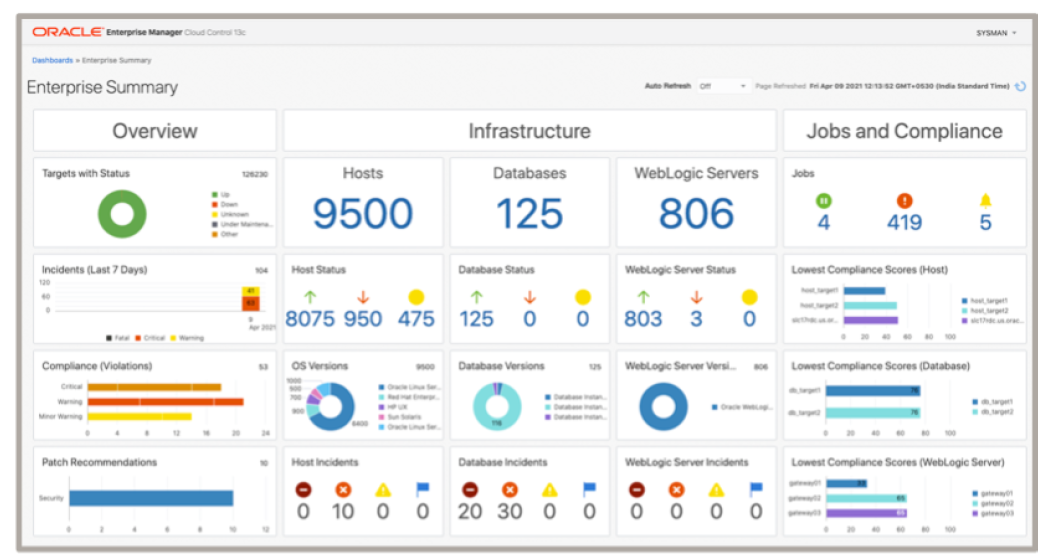
    Oracle today announced it has updated its core management platform to provide capabilities that make it easier to manage a hybrid cloud computing environment spanning millions of endpoints.

    The latest release of Oracle Enterprise Manager (EM) 13c, in addition to greater scalability, also provides support for dynamic groups, dynamic runbooks, automated workload analysis, monitoring templates, event compression and other capabilities that make it easier to manage IT operations at scale.

    Oracle Enterprise Manager (EM) 13c Release 5 also extends the reach of the management platform further into the realm of packaged Oracle applications and integrated hardware and software platforms such as Oracle Exadata, Oracle Database Appliance (ODA), Zero Data Loss Recovery Appliance (ZDLRA) and Private Cloud Appliance (PCA).

    Oracle has also updated the compliance framework it includes with Oracle Enterprise EM to support additional regulatory requirements and refreshed the user interface for the fleet management tool provided.

    Finally, the company is adding a tool that makes it easier to copy data stored within Oracle EM 13c to the Oracle Cloud Infrastructure (OCI) service. Dubbed OCI bridge, this tool copies data to an OCI object store where it is accessed by OCI services such as logging analytics and operations insights.

    Mughees Minhas, vice president of product management for enterprise and cloud manageability at Oracle, said as hybrid cloud computing continues to evolve, the need for a single management platform that spans infrastructure, databases and applications is becoming more apparent.

    Minhas said Oracle EM 13c is part of larger observability initiative that Oracle has embraced to provide more context across disparate services in a way that reduces the total number of tools an IT team needs to deploy and master. That effort complements a series of autonomous computing initiatives Oracle has previously launched that eliminates the need for database administrators (DBAs) to manage lower level systems administration tasks such as performance tuning. In general, Oracle is making a case for an IT world where platforms are co-managed by Oracle and internal IT teams that are focused on higher-level tasks.

    As IT environments become more distributed it’s clear IT is becoming more complex to manage. The issue that IT teams need to come to terms with is to what degree can they automate management tasks that today conspire to limit the size of the IT environment any given IT team can effectively manage. DevOps teams, of course, have been ruthlessly automating application development and deployment tasks for years. That philosophy is now being extended to include a broader range of IT operations tasks being automated by vendors themselves.

    Each IT team will ultimately need to decide just how many automation platforms it requires. In many cases, IT teams are now struggling to unite various islands of automation that have now emerged within their organization. Regardless of approach, however, rote tasks that once consumed hours, sometimes days to complete, are now no longer required which, theoretically at least, should leave more time to focus on more complex challenges that are getting thornier by the day.

  • CloudBolt Software Aims to Bridge DevOps and IT Divide

    CloudBolt Software Aims to Bridge DevOps and IT Divide

    CloudBolt Software today released a Winter update to its cloud management platform that aims to bridge the divide between DevOps teams and traditional IT administrators.

    IT administrators can now employ the CloudBolt platform to invoke the open source Ansible framework for automating IT processes and workflows using a graphical user interface (GUI) surfaced via a OneFuse Ansible Tower module.

    Additionally, the OneFuse Scripting module will now make it possible to automate script creation for anyone who creates a script using, for example, Terraform, and package that script in a way that IT administrators can invoke via a graphical tool.

    Jeff Kukowski, CEO of CloudBolt Software, said the goal is to make it easier for IT teams across the organization to reuse code created by a DevOps team. OneFuse provides IT with a codeless integration tool. In addition to the core cloud management platform, CloudBolt Software also provides access to a Kumolus service that enables IT teams to optimize cloud costs and provides additional governance capabilities such a generating an audit trail.

    Other capabilities added in the Winter release include deeper cost optimization analysis for VMware vCenter and Microsoft Azure environments, support for the latest release of VMware vRealize and additional C-level dashboards and reports.

    As the number of workloads deployed in production environments increases, there is going to be a greater need for some form of détente between DevOps teams and traditional IT administrators. Site reliability engineers (SREs) can typically manage a much wider range of workloads than an IT administrator. However, SREs are both expensive and hard to find and retain. IT organizations will need to find a way for IT administrators that, at best, have limited programming skills, to pick up some of the slack.

    Those IT administrators can play a critical role in minimizing the number of misconfigurations arising from provisioning IT infrastructure as code. Misconfigurations as a result of developer mistakes are rife across the cloud, and IT administrators are more inclined to check for these than are developers who are racing to deliver their next application.

    The truth is, there are a wide range of tasks that DevOps teams would just as soon see managed by IT administrators, especially if a script or runbook that addresses common issues has already been created. The trick is making that script or runbook easily accessible.

    In the meantime, IT organizations are racing to keep up with complexity in IT environments, often by applying automation at scale in a way that is both repeatable and well-documented. Whether IT professionals like it or not, the days of writing automation scripts and failing to document them are coming to an end. The real issue is ensuring that what does get automated actually works as expected, each and every time a script is applied.

  • Tips for Modern IT Admins’ Career to the Cloud

    Tips for Modern IT Admins’ Career to the Cloud

    Fifteen years ago IT professionals experienced a drastically different day-to-day on the job. While the main mission has always remained constant—to take charge of all internal infrastructure—the infrastructure itself has moved off-premises over time.

    The complexity rested in networking for IT professionals. Routers, switches, firewalls and other gear needed to be managed so the network would function. Employee devices also required attention from IT admins, but these devices were typically all Microsoft Windows machines. This allowed IT to standardize its tools and platform.

    What Has Changed for IT Admins?

    Time has drastically altered the lives of IT admins and, after 15 years of evolution, organizations have moved away from large, ungainly on-premises networks and data centers. However, the list of endpoints for infrastructure has grown rather complex, specifically as a result of the implementation of different platforms and operating systems.

    The challenges faced daily and the knowledge needed to be successful has exponentially grown. Below we will take a deeper look at three of the larger changes that IT professionals must ponder as they elevate their careers in the burgeoning cloud environment.

    Rethinking Networking

    The time when it was important to know how to configure a router or switch is slipping away. In the modern IT world, this task has been adopted by cloud infrastructure providers such as AWS and GCP, as well as the telecom companies that deliver your internet.

    The job for IT admins has leveled up, as now it is vital to know how to manage and configure the higher levels of infrastructure. The ability to route traffic through security groups and automate the configuration of systems is a necessity. Writing code to automate these tools is now the norm for an IT admin.

    Regulating Employee Wants

    In the past, IT could dictate the tools that employees had to use, but that ship has sailed. Employees have begun to adopt their own tools to further maximize their efficiency, which forces IT to adapt and get ahead of the game.

    It is crucial to show employees both flexibility and confidence when leveraging new technologies. As a result, employees will work with you and not go out and create shadow IT projects.

    Seeking out and securing cross-platform tools that allow you to manage the various endpoints and services your team is leveraging is of the utmost importance. These tools do exist; however, they typically are not offered by traditional vendors such as Microsoft, HP and Oracle.

    Security is the No. 1 Concern

    Not long ago, security for IT admins was simply firewalls and anti-virus solutions. Fifteen years later the world of IT security is far more intricate.

    To be successful in the IT world, an admin needs to be an expert at infosec so they can understand and defend against the massive world of cybercriminals. Identity theft is rampant and hackers are always trying to locate vulnerable systems that have not been patched. It is because of this that IT admins need to be constantly on their toes and protecting their organization.

    IT is the Core of an Organization

    Without IT, business simply wouldn’t get done. Sales would not be able to email contracts, products would go undelivered, customers would go unbilled and other core activities would fail.

    The IT admin is a vital part of every organization, which is why they are in high demand today. Mastering new technologies and understanding the constantly evolving approaches to IT can be the difference between an organization falling flat on its face or leading an industry.

    — Rajat Bhargava

  • HashiCorp Tools Bridge DevOps, Legacy IT Environments

    HashiCorp Tools Bridge DevOps, Legacy IT Environments

    At its HashiConf EU 2019 conference this week, HashiCorp extended the reach of its Terraform Enterprise tools for automating the management of IT infrastructure beyond the realm of DevOps into legacy IT environments.

    Via integration with the Service Catalog from ServiceNow, IT administrators working with a traditional ITIL-based framework now can invoke Terraform Enterprise to provision IT services. HashiCorp CTO Armon Dadgar said rather than requiring organizations to hire an infrastructure engineer to automate the provisioning of IT infrastructure, IT administrators now can do the job.

    At the same time this week, HashiCorp announced that policy sets may now be configured using the source policies available in multiple version control systems (VCSs), including GitHub, GitLab and Bitbucket. The goal is to make it simpler to enforce policies that would limit, for example, the number of virtual machines a developer might be allowed to spin up within the context of a set of GitOps processes, said Dadgar.

    Finally, HashiCorp also announced that HashiCorp Consul service mesh networking software has been enhanced to include Layer 7 application traffic management capabilities alongside integration with the HashiCorp Nomad application and cluster scheduler software.

    In general, Dadgar said HashiCorp is moving toward enabling its portfolio of offerings to span multiple types and classes of IT environments. HashiCorp Consul, for example, can be run across both legacy IT environments as well as Kubernetes. Most organizations will need to support both legacy monolithic and microservices applications using a combination of DevOps and legacy ITIL processes, noted Dagar. Rather than having to master new tools for each environment, HashiCorp is making a case for a common set of tooling that can be applied across multiple IT classes of processes.

    While some organizations have fully transitioned to DevOps, many more organizations are still struggling to make the transition. Reasons for not making that transition faster range from simple inertia to a lack of skills. Rather than having to take an all-or-nothing approach to modernizing IT processes, Dadgar said HashiCorp is enabling each IT department to embrace IT automation wherever they happen to be on that journey, including being able to embrace new platforms as they become available.

    Dadgar noted that level of extensibility is critical because most tools are still being brought into organizations from the bottom up by individual members of the IT staff, rather than being championed from the top down. In the absence of an executive mandate, Dagar said the path of least resistance is to make IT automation tools as accessible as possible to members of the IT team regardless of skill level.

    There will, of course, come a day when IT leaders will try to rationalize processes around a common standard set of practices. The degree to which any IT organization has been able to achieve that goal, however, has been mixed at best. In the meantime, IT organizations will always need to keep their options as open and flexible as possible.

    — Mike Vizard