Tag: Integrated Development Environments

  • Best of 2022: Environments-as-a-Service: Free Your Devs

    Best of 2022: Environments-as-a-Service: Free Your Devs

    As we close out 2022, we at devopsy.kinsta.cloud wanted to highlight the most popular articles of the year. Following is the latest in our series of the Best of 2022.

    Environments are the bane of a DevOps engineer’s existence and have been since the invention of the server. They can create giant bottlenecks that hamper productivity and suck the life and motivation out of developers. But they’re also completely necessary.

    DevOps teams spend a ton of time building and maintaining their development environments. They are critical to testing new websites, apps, products and updates; making sure everything works the way it is supposed to. And not having enough environments can slow down workflows as developers wait their turn to use an environment.

    There is a new push in the software industry to provide environments-as-a-service (EaaS), removing the annoying yet necessary work of building and maintaining environments and giving DevOps engineers more freedom to tackle more challenging, revenue-generating projects.

    EaaS enables companies to use a third-party service to create a new development environment on-demand, including data, infrastructure and code—all the things necessary to build and run an app. Environments-as-a-service bring major improvements to businesses, saving money and time while increasing the velocity, delivery and deployment speed.

    EaaS offers automation and codification of all the things that would otherwise waste DevOps and infrastructure folks’ time. They should be focused on higher-value tasks, like creating and refining what makes the company or product unique.

    Removing Bottlenecks

    When prepping for a new product or service, teams have to test all associated code to make sure it is functional, secure and that there are no hiccups. Multiple environments are crucial to this process. However, in many cases, teams work within a single, shared staging environment.

    This setup means developers have to wait in line to test their part of the product. These bottlenecks are among the biggest causes of delayed releases.

    Time is money, and in this case, lost time costs money. We estimated the total cost of managing environments exceeded $45 billion annually, and release delays cost organizations millions of dollars every year.

    Organizations can layer EaaS on top of their infrastructure-as-code (IaC) frameworks, agile workflows and other important software. By doing this, developers can create a new environment with a single click.

    That means developers can make a new environment for every feature branch pull request. EaaS also unlocks customization capabilities, as well. For example, testing requires larger and faster environments that integrate with other key services, while more scaled-down environments work well for processes like demos.

    Now, developers are free to test and develop software, without waiting or stepping on anyone else’s toes. Plus, on-demand environments can also be destroyed when they are no longer needed. That’s capacity planning in real-time.

    Save Time and Money

    Capacity knowledge and better capacity planning mean money saved. Knowing how many environments are needed, and what types, helps organizations avoid over- or under-spending on cloud infrastructure.

    Building out environments can take more than a year for even sizable DevOps teams and cost hundreds of thousands of dollars, not to mention the challenges of ongoing management, integration of new tech and management of cloud resources and costs. A third-party EaaS provider takes care of all of that, freeing DevOps engineers to work on hard problems, rather than maintenance and repeating work that has already been done as technology advances.

    Is Your Organization EaaS Ready?

    Any time a company automates something as important as staging and testing environments, though, it’s important to have all their ducks in a row. Luckily, the best ways to do that match up pretty well with best practices for building out any infrastructure platform:

    ● Using infrastructure-as-code automates the provisioning of infrastructure instead of doing it manually.

    ● Containerizing custom code makes it easier to quickly reproduce it for new environments.

    ● Finally, carefully think about how your environments will behave when they are created dynamically. Simple things like creating environment variables for hostnames and trying not to hardcode variables that are environment-specific are a must.

    Organizations that have followed these steps are EaaS-ready. By automating these painstaking tasks, companies can unleash their DevOps teams to be superheroes for the organization, solving the biggest problems and letting tech take care of the rest.

  • Introduction to SPIFFE/SPIRE

    Introduction to SPIFFE/SPIRE

    For a long time, people have been logging into the apps they use via passwords or password managers. And many open standards and identity providers on the market continue to evolve how users authenticate and authorize with websites and applications. The issue is that the same problem exists for software services—when applications talk to applications, how do we prove the credibility of service-to-service connections?

    Enter SPIFFE and SPIRE. SPIFFE is a specification for implementing identity for workloads, and SPIRE is the code that implements this specification in practice. Together, the projects create a standardized, secure way to identify software services and authenticate them. SPIFFE and SPIRE recently reached graduation status with the Cloud Native Computing Foundation (CNCF), solidifying the projects’ maturity as a top open-source standard mechanism to deliver cryptographic runtime identity for both cloud-native and legacy workloads.

    SPIFFE and SPIRE are already used across many major public deployments. Yet not all developers are familiar with their intricacies. Below, I’ll take a gander at both projects and how they operate to provide a bit more context. I also spoke with Evan Gilman, SPIFFE/SPIRE maintainer, to gather more insights on the history of the projects and their future goalposts.

    What is SPIFFE?

    The Secure Production Identity Framework For Everyone (SPIFFE) is a specification for workload identity. According to Gilman, the easiest way to think about SPIFFE is as a passport. Similar to how people are issued passports in a common shape with a barcode and standard information, SPIFFE dictates the standard methods to prove and validate the identity of a service. It’s like bringing the “Sign in with Google” experience to the software services themselves, he adds.

    There are three key components in SPIFFE. First, SPIFFE specifies that services shall identify themselves with what’s called a SPIFFE ID, which is defined as a URI in the format of spiffe://trust-domain-name/path. These IDs are then encoded into a SPIFFE Verifiable Identity Document or SVID. SVIDs aren’t so much a document type themselves — instead, they support either X.509 or JWT document types. Last but not least, SPIFFE specifies a workload API that issues and rotates these SVIDs, along with the keys needed to validate them.

    What is SPIRE?

    SPIRE is the code that implements the SPIFFE specification—you can think of it as a production-ready SPIFFE runtime environment. SPIRE, the “flagship SPIFFE implementation,” is a true end-to-end instantiation of SPIFFE that securely issues SVIDs, renews SVIDS and performs attestation, among other functions. If SPIFFE defines what a passport is, then SPIRE is the agency that issues the passports, said Gilman.

    The SPIRE agent runs on a node and exposes the workload API, which hooks into each workload. A workload, as defined by the SPIFFE documentation can be a web server, an instance of a MySQL database, a worker program or a web application composed of independently deployed systems. By communicating in this manner, SPIFFE/SPIRE can solve the issue of “secret zero,” which refers to the conundrum of proving the first credential to newfound systems.

    More Background on SPIFFE/SPIRE

    Joe Beda, a co-founder of Kubernetes, first proposed SPIFFE at GlueCon in 2016. At the time, Google was considering what internal technology it had that might prove helpful to the broader industry. It’s said that the technology that inspired SPIFFE/SPIRE can trace its roots to security and identity subsystems brought to Google from AT&T and Bell Labs.

    Nowadays, SPIFFE/SPIRE is actively maintained by many organizations, and we continue to see impressive production use cases. “SPIRE is deployed in some staggeringly large cases,” explained Gilman. SPIFFE/SPIRE adoption can be seen within GitHub, Netflix, Pinterest, Square, Transferwise, Uber and many other large technology companies. In terms of ownership, Gilman said that SPIRE is most used by platform engineers, infrastructure engineers or security engineers, depending on the organization’s roles.

    Future Outlook for SPIFFE and SPIRE

    SPIFFE/SPIRE appear to have the resources and backing to maintain a stable implementation, so the future looks bright for both projects. In terms of new features, in mid-2022, a first-class integration with SPIRE was merged into the Istio service mesh as a more flexible alternative to Istio’s built-in SPIFFE implementation. Another recent update is experimental support for SPIRE on Windows. Regarding future plans, SPIFFE/SPIRE maintainers will likely continue to iteratively improve the specification and implementation with frequent updates.

  • Bringing Development Environments Into the Modern Age

    Bringing Development Environments Into the Modern Age

    It’s time to rethink how we deliver distributed access to software development environments.

    We know how to write code. And there are plenty of well-established tools, techniques and processes for doing so.

    We know what kind of code to write: Functional, scalable and efficient code that’s inherently secure and that we can readily modify whenever and however we need to modify it.

    We know why we write code. We write it to enhance the value we offer customers, to expand our market reach, outperform the competition, cut costs, minimize risks and otherwise engage in what we call “digital transformation.”

    We know who writes code—or, more accurately, the various “whos” who write it. We need developers with a diverse range of skills. And as our needs keep changing, we keep adjusting the mix of in-house and contract developers accordingly.

    We also know when to write code—which is now and for the foreseeable future.

    The one thing we still struggle with is where to write code. Not ‘where’ in the physical sense; we’re way past that. We know that for development teams to be optimally productive, we have to enable everyone to work from any physical location at any time. COVID-19 has dramatically reinforced this principle.

    The ‘where’ we struggle with is the virtual ‘where’ of the developer workspace. Yes, we already provide developers with remote access to development resources. Sort of. But there are a lot—a lot—of problems with the way we do that. These problems adversely impact development every day by, among other things,

    • Bogging developers down in annoying technical problems that hamper their ability to set up their environments.
    • Forcing developers to wrestle with the maddening complexity of configuring and managing the multiple dependencies associated with each project.
    • Trapping developers in an endless cycle of building, terminating and recreating environments as projects begin, end and are resurrected for updates and enhancements.

    Unfortunately, we’ve become so accustomed to these problems that we tend to accept them as normal. But we cannot afford to accept them any longer. Here’s why.

    Development Environments: Insecurity, Lost Productivity and Technical Debt

    One big problem for both developers and the enterprise is that developer workspaces aren’t fully portable. The methods we use to give developers remote access to their environments invariably come with unacceptable insecurity. There’s also the issue of onboarding. When a developer joins a team—whether as a new hire, temporary contractor or current employee switching to another project—it can take days for them to get them fully up to speed with access to all the project-specific resources they need. That ramp-up time invariably frustrates developers.

    On the other hand, offboarding developers can be a security and compliance issue. Piecemeal provisioning of the multiple resources developers need inherently results in the piecemeal deactivation of those same resources. So when a developer quits or is fired—or when a contractor’s contract is up—we can’t be 100% certain that all their permissions have been revoked.

    Moreover, what happens when a developer needs to go back into a project that no one has touched in months or even years? How does a developer recreate the full workspace associated with that project and have high confidence that they’re doing it right?

    The answer is that we can’t. Instead, some unfortunate developer inevitably has to spin their wheels trying to piece together a long-dormant project. All your aging code is thus guaranteed to become “legacy” (which is just another name for ‘code no one is quite sure how to work on’), thereby guaranteeing that your organization will forever be burdened with an ever-growing mountain of resource-draining technical debt.

    The Shoemaker’s Children

    So how can we re-engineer the delivery of remote workspaces so we make life easier for developers while also fulfilling the security and compliance requirements of the enterprise?

    Here are a few ideas to consider:

    • Host developer workspaces in the cloud. Developers provide everybody else with a wealth of cloud resources, yet rarely take full advantage of the cloud themselves. Some resources they need may reside in the cloud, but the complete workspaces they require to be fully productive do not.
    • But why not? Everything a developer needs for every project should exist as a complete, unified, project-specific workspace that’s available to them anywhere—just like all the other SaaS solutions developers build for end-users every day.
    • And given the sophistication of today’s browsers, cloud-based workspaces can be made available to developers without requiring them to install a desktop client. The cloud also enables workspaces to be hosted anywhere to avoid latency delays.
    • Nothing should leave your secure workspace repository. Ever. To ensure the security of all developer work-product, no actual code or data should ever leave the hosting environment.
    • Only screen pixels and keystrokes should move across the network. This remote-access model makes developers’ workspaces fully secure and fully portable. It also provides the best protection against data exfiltration.
    • Simplify the definition and administration of project-specific workspaces. You don’t want developers looking around for tasks in progress, relevant datasets or process workflows. Instead, administrators should be able to configure workspaces that give developers access to all the resources they need for each project via a single sign-on (SSO).
    • Leverage containerization into your workspace hosting. Better, safer enterprise development isn’t just about re-engineering remote workspace access. It’s also about making those workspaces easier to manage on the back end. The best way to do this is containerization, which allows you to flexibly mix-and-match workspace elements. That way, you don’t have to build every workspace from scratch.

    And those workspaces don’t exist as monolithic, “all or nothing” environments that you pray you’ve gotten right. Instead, with containerization, you can build project-specific workspaces more quickly, at less cost and with less risk.

    Effective hosting of fully portable developer workspaces requires other important functionality as well: Inactivity time-outs, cloud cost/utilization controls, etc. Before addressing these details, however, development leaders must first come to terms with the fact that developers need a much better way to work remotely—and that every remote workspace must be a secure one.

  • How to Secure Online Coding Platforms

    How to Secure Online Coding Platforms

    Threat Modeling for Online Coding Platforms

    The evolution of DevOps teams and a greater reliance on cloud-based computing has completely changed the coding process. Now, with Integrated Development Environments (IDEs), coding can be done entirely online. This is convenient, but are online IDEs secure? To answer this, we will focus on two popular cloud-based IDEs: AWS Cloud9 and Visual Studio Online.

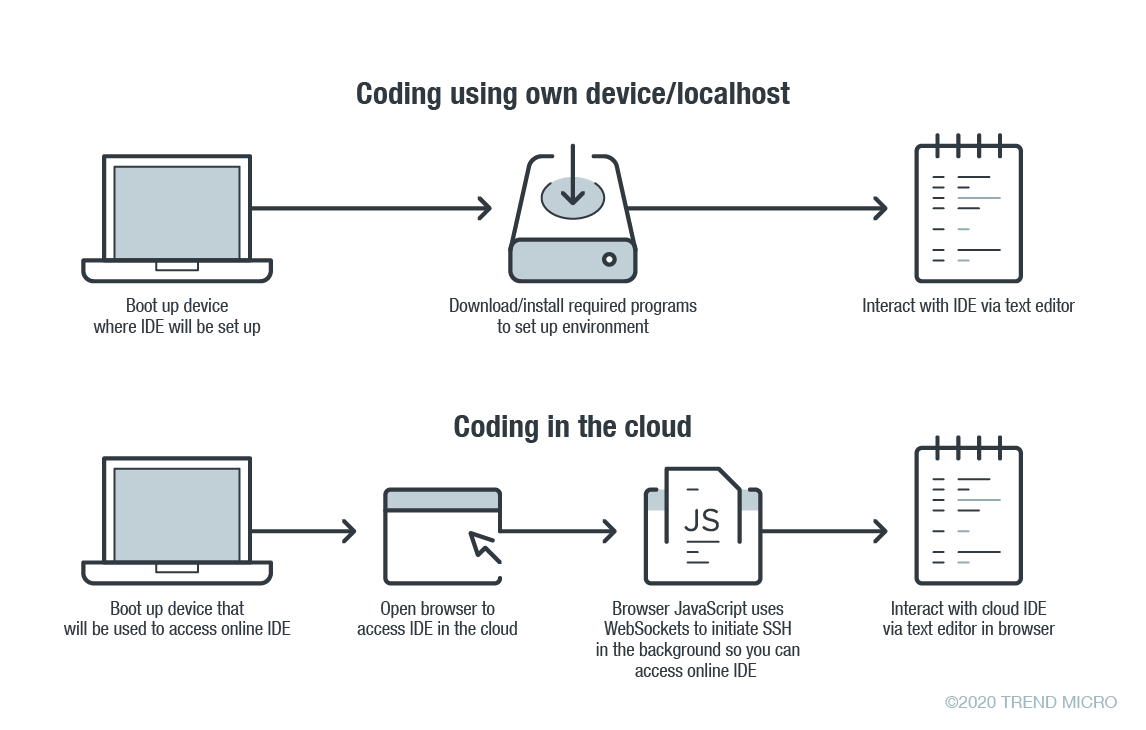
    In online coding, the IDE is rendered inside your browser, the browser JavaScript engine uses WebSockets to initiate an Secure Shell (SSH) connection to your linked device in the background—e.g. virtual private server (VPS)—providing you with the familiar terminal interface to execute commands. The environment—meaning the linked cloud VM/VPS or SSH-accessible device—includes tool configurations (like which tokens are included, or cloud configuration files), a copy of the source code, compilers and other tools that you want to use.

    Figure 1. Local versus cloud-based IDE. Source: Trend Micro.

    The main difference between local and cloud-based coding platforms is where the bulk of the environment resides. In cloud IDEs, the environment is a virtual machine instance inside your cloud provider. In terms of security, this means you are delegating trust to the cloud provider, but you are responsible for preventing any backdoors from opening or introducing misconfiguration issues to the VM. In the case of using your own device with AWS Cloud9, you are responsible for configuring the device securely.

    Linked Devices/VMs Are Not Always Secure

    What is running on the backend often dictates whether linked devices and VMs are secure. As previously described, an SSH-linked device is necessary to use these online coding platforms. In the case of Visual Studio Online (still in preview mode as of this writing), we can find a Visual Studio (VS) Code server running on the machine.

    The code server itself is a Node.js application to which your browser will connect. You can also download the whole ~/.vscode-remote folder and run the server inside your local environment.

    As the owner of the linked device, you have permission to promote yourself to root and install or configure whatever you think you will need. You also have, by default, both Docker and Git pre-installed.

    In the case of AWS-hosted Cloud9, the situation is a little more complicated. The backend necessary for platform communication is located inside the linked device while the frontend remains hosted on a different location. But, like in VS, you can also promote yourself to root.

    This brings us to our first security concern: How secure or private are linked devices/VMs?

    The linked device contains confidential information—access tokens, application configurations, source code, etc., which should be protected against unauthorized access.

    By default, the platform is secured by the provider. However, you should keep in mind that, together with your root access availability, you are also responsible for preventing misconfiguration issues, especially when using third-party plugins. AWS does not provide plugin support for plugins not developed by them.

    There are possible misconfigurations you might make that can lead to security issues. For example, if you set your IDE to be accessible from outside, either intentionally for ease of sharing, or unintentionally, that change can have major consequences.

    In addition, it is not common for access tokens to be stored in encrypted token vaults. A lot of them can be viewed via plaintext configuration files. Without additional security measures, your access tokens can end up exposed to outsiders.

    Once unauthorized access is acquired by cybercriminals, they can compromise your code for their own gain. An example would be the supply chain attack against a software company that modified software updates with malware.

    Browsers Can Introduce Malicious Extensions or Vulnerabilities

    The next security concern is the browser itself. As online coding platforms are accessed from web browsers, you should be very careful when accessing these sites from public, non-domain, shared or unprotected computers.

    Malicious browser extensions are a well-known phenomenon. While an untrusted computer possibly infected with malware presents an obvious risk, it is also possible for an attacker to steal code using a malicious web browser extension.

    Code Extensions and Plugins Can Also Contain Malware

    The main advantage of Visual Studio Online and, generally, the VS Code platform, is the number of extensions available. This in and of itself is yet another possible attack surface.

    Let’s imagine a malicious VS Code extension—a useful-looking extension with an embedded backdoor. The lack of permission checking (such as disk access, network access, process access, etc.) for extensions during installation or use, becomes a security problem. The extent of security checks during extension publishing is limited to having a valid publisher ID and a few image-related restrictions. This means you have to trust the extension developer entirely.

    No Software Application Is Error-Free

    The ever-present possibility of vulnerabilities in any kind of software must be considered as well. In the case of online coding platforms, they can be affected by web-class vulnerabilities since IDEs are web applications. For example, a vulnerability that allows an attacker to execute their own JavaScript code can have control of the IDE or remote linked devices.

    A recent vulnerability affecting the Visual Studio Live Share extension, which is also available for VS Code, shows that we can expect to see another vulnerability affecting online coding platforms in the near future.

    Securing Cloud IDEs Is a Must for DevOps

    Threat modeling allows us to understand the different factors at play that can affect the overall security of a computing environment. Cloud IDEs should be no different from other software, if not more critical to secure.

    Here are some recommendations for each of the security issues we raised:

    • For linked device security — Install trustworthy software. Keep that software updated. Don’t indiscriminately open ports to the internet.
    • For browsers — Work inside trusted and secured environments. Try to avoid using shared computers. Install browser extensions from trusted vendors only.
    • For VS Code extensions — Avoid installing extensions from unknown sources or authors.
    • For vulnerabilities in general — Make sure your environment is updated to the most recent version.

    — David Fiser