Tag: incident response

  • Verica Launches Database for Sharing IT Incident Reports

    Verica Launches Database for Sharing IT Incident Reports

    Verica, a provider of an incident management platform, announced this week it is making available a database to make incident reports publicly available via a single repository.

    Courtney Nash, senior research analyst at Verica, said the Verica Open Incident Database (VOID) initiative is part of an effort to enable organizations to learn from outages and failures caused by software. Today, reports about such incidents tend to be difficult to find because they are scattered all across the internet, she added.

    That lack of transparency makes it difficult to compare and contrast incidents in a way that surfaces meaningful insights, noted Nash.

    Launch partners for the VOID include Indeed, NS1, Adaptive Capacity Labs, Security Scorecard and Auxon. Each will provide support to help fund the development, research and dissemination of knowledge generated by the project.

    The VOID contains more than just standard company postmortems or status updates, added Nash. Verica is committed to applying metadata to better understand how individuals, companies, media and others reacted during an incident.

    One early finding already derived from this initiative is that mean-time-to-resolve (MTTR) is proving to be an inaccurate metric due to the varied distribution of incident data. Other findings include the fact that only one-quarter of incident reports took the time to identify the root cause of an issue, while less than 1% took the time to study incident reports of near-misses.

    In general, there’s now more riding on the performance and availability of IT environments than ever. Digital business transformation became all the rage in the wake of the economic downturn brought on by the COVD-19 pandemic. As the economy continues to recover, businesses now expect IT to respond and pivot to changing conditions no matter how sudden.

    DevOps teams have, of course, learned to expect the unexpected by embracing modern incident management based on DevOps best practices that enable IT teams to adroitly respond to any outage or sudden degradation in application performance. The most important thing to remember about incident management is that practice makes perfect. While practice runs may never precisely mirror an actual crisis, organizations that have processes that are well-known by their IT incident teams and that practice ‘fire drills’ tend to respond both faster and better. After all, the more muscle memory there is to call on the more resilient the organization will be.

    It’s not clear to what degree IT organizations will be willing to share incident reports. However, there is an opportunity for IT professionals to come together that is similar to how engineers from different airlines collaborated to make flying safer for the general public, said Nash. In fact, with so many processes now dependent on software, it’s amazing there have not been more catastrophic events due to software issues. It’s even arguable that it’s only a matter of time before such levels of collaboration are mandated.

    In the meantime, the first step toward achieving that goal may simply be sharing a report with colleagues so they can learn from previous mistakes.

  • SRE’s Guide to Pragmatic Incident Response

    SRE’s Guide to Pragmatic Incident Response

    In my past experience as an SRE, I learned some valuable lessons about how to respond to and learn from incidents. If you want the TL;DR, I’ll summarize them here:

    • Declare and run retros for the small incidents. It’s less stressful, and action items become much more actionable.
    • Decrease the time it takes to analyze an incident. You’ll remember more, and will learn more from the incident.
    • Alert on pain felt by people – not machines. The only reason we declare incidents at all is because of the people on the other side of those machines.

    Now, let’s dive into each of these lessons a little deeper, and explore how they can help you build a better system for pragmatic incident response.

    1. Focus on the Small Incidents First

    The bad habit of ignoring small issues often leads to bigger issues. You should run retrospectives for small incidents (slowdowns, minor bugs, etc.) because these often have the most actionable takeaways—instead of shooting the moon and creating “rearchitect async pipeline” as a Jira ticket that never happens. Focusing on low-stakes incidents and retrospectives are a great introduction to behavior change across your organization.

    Let’s look at an obvious example of how a focus on small incidents can have an outsized impact. Case in point—my apartment. I live in an old candy factory retrofitted into apartment units. We have an elevator (thank God), but some of the buttons don’t light up when you press them. The LED display doesn’t match up with the numbers on the floor buttons. Yes, the elevator goes up and down, but overall, you can tell that things are wrong with it.

    One day, I came home and noticed an “Out of Order” notice on the elevator door. Was I surprised? Not at all. Of course an elevator with mislabeled buttons and broken LEDs would stop working!

    This isn’t dissimilar from an important software lesson—ignoring small issues often leads to much bigger issues. What starts as an inconvenience can lead to a complete breakdown. This is why you should focus on the small incidents first. I hear a lot of companies say, “We need to fix incident response! Every time we have an incident, it’s just chaos!”

    They are talking about unexpected downtime during a high severity level incident and they want to improve it.

    I say that’s the wrong type of incident to use to fix your incident response system and process. Focus on the small incidents first. Running retros for small incidents can help you build strong incident response models, because they have the most actionable takeaways and they are the best way to change behavior through repetition and practice.

    If you have a high-stakes, 12-hour incident and you run a one-hour retrospective you’re not going to get the results you want. You need to start small. Run retros for bugs that were introduced; maybe a bad data migration that didn’t really impact anything but took up a couple of hours of your day.

    Heidi Waterhouse captured this idea really well in this piece on reliability. Every airplane you’ve ever flown on has many tiny problems, Waterhouse said, “… like a sticky luggage latch or a broken seat or a frayed seatbelt. None of these problems alone are cause to ground the plane. However, if enough small problems compound, the plane may no longer meet the requirements for passenger airworthiness and the airline will ground it. A plane with many malfunctioning call buttons may also be poorly maintained in other ways, like faulty checking for turbine blade microfractures or landing gear behavior.”

    I couldn’t agree more. Extrapolating to software: The small things are typically indicators of bigger issues and could cause catastrophes down the road.

    2. Track Mean Time to Retro (MTTR)

    It’s important to think about what you measure in your organization. You should be measuring how you’re improving, and the most important metric here is mean time to retro (MTTR). Everyone should be tracking MTTR. It’s a great statistic to improve incident response in your team because it helps you understand the delay between incidents and retrospectives.

    The easiest way to have a bad incident retro is to wait two weeks. It’s better to get into a room quickly and hash out what happened than wait a long time until you’ve got everything perfectly prepared.

    Tracking MTTR can help you hold prompt and consistent retrospectives after incidents. Set a timer and make an SLO or SLA for yourself that says, “This is how long we take for retros.”

    Retro time will vary depending on the severity of the incident itself. If it’s a SEV1, clear everyone’s schedules, because you need to have retro within 24 hours of the incident. For SEV3 incidents, you have much more leniency.

    I also like tracking the ratio of retros to declared incidents. This is a metric that should go up; you should see your ratio of retrospectives to incidents increasing. You can break down that number by severity, as well. If you have a low retro ratio for a SEV1 versus a SEV3 incident, that might be okay at first (remember, start small) but you want those metrics to eventually become equal.

    3. Alert on Degraded Experience with the Service, and Not Much Else

    The severity of incidents is directly linked to customer pain. We would not declare SEV1s if there weren’t a lot of people feeling a lot of pain.

    Alerting on computer vitals is an easy way to create alert fatigue and burnout. As your company starts to scale, you are going to use more CPU; you’re going to use more memory. Tying alerts to computer vitals is not a good sign.

    If I run, my heart will beat faster—it’s just doing its job. Paging people at 2:00 a.m. because disc capacity is at 80% even though you won’t run out of space until next month is a good way to lose great teammates. I have worked with people who left their previous companies strictly because they got paged too many times for stuff that didn’t matter.

    This is why you need to alert on a degraded experience with the service and not much else. A CPU burning hot at 90% is not necessarily a bad thing, but you need context to decide. Create SLOs that are tied to customer experience and alert on those. People experiencing problems with the service is the only thing you should alert on—for the most part.

    One of the best ways I’ve seen to think about this came from Soundcloud developers, who explained that you should alert on symptoms, not causes. My fast heartbeat is not necessarily a problem. But if my elevated heart rate leads to lightheadedness and I fall—that’s a problem. So, I need to be able to alert on something like that. Paging people at 2:00 a.m. because disc capacity is at 80% and you won’t run out until next month is not good. But paging people because you know that disc capacity problems cascade into other, systemic problems is. You can apply the same thought to other potential causes of an outage. Paging alerts that wake you up in the night should only be based on symptoms.

  • Choosing an Incident Management Platform

    Choosing an Incident Management Platform

    When you’re feeling the stress and pain of manually managing incidents and incident response, making the decision to find an incident management tool is a no-brainer. But how do you choose the one that will work best for you, your team and your business?

    You might be asking yourself, “Where do I start? What do I need to know? What questions do I ask? What are the options? How can I be sure we’re choosing the right tool?”

    To help identify the most appropriate solution for your organization, here are the top four things to consider.

    1. Do you have the culture and processes you need to support an incident management solution?

    Different business models require different approaches to incident management. You should be looking for a platform to fit the unique needs of your organization. More importantly, even if you find a solution that seems like a fit, do you have the people, culture and processes necessary to support a new tool? And if not, do you have a plan to put them in place?

    Implementing solutions successfully takes planning, so you’ll want to make sure that you and your team can handle the workload.

    2. What are your pain points and goals?

    You’re looking for an incident management solution for a reason, but do you know exactly which pain points you hope to solve? Your top goal may be to “make it easier,” but every solution is likely to tout that they make things easier. Determine what you’re hoping to accomplish. Do you want to automate processes? Bring your team together more quickly? Track every action from declaration to retro? All of the above? If you prioritize the problems you want to solve, it’ll be easier to check off boxes when you investigate your top choices.

    3. Who should be involved in this search?

    You may be the one taking the lead on searching for a better way to manage incidents, but knowing who else should be part of the decision-making process will make the search more efficient. You’ll need to know if you have support from your team and from leadership; who’ll authorize the budget for your new tool and who has to sign off on your decision.

    And don’t forget other stakeholders outside of your team! Incidents impact all parts of an organization, so consider who needs to be a part of the selection process—from your client success team to your sales team.

    4. How will you make a decision?

    Finding and implementing an incident management solution requires time and resources. It’s especially important to account for the time it will take to onboard your team and configure your solution, including assigning individual roles, setting up integrations with your existing tools and test-driving your incident management process.

    The worst-case scenario is that you purchase a platform but don’t have time to implement and use it. You won’t be happy, nor will your team or executive stakeholders.

    So have a clear idea of what you need to make a final decision—whether it’s considering who’s involved, how much budget you need to secure, what your timeline is or how you’ll address any legal or security issues.

  • Why You Should Embrace Incidents and Ditch MTTR

    Why You Should Embrace Incidents and Ditch MTTR

    The cliché is that everyone in IT hates incidents, and the natural reaction when assembling incident response metrics is to look for numbers that you can lower over time. Fewer incidents and shorter incident response times must be better, we think. You might already be familiar with the common metrics associated with these goals, including mean time-to-resolution (MTTR) and total incident count.

    As it turns out, however, these metrics actually work against your company’s resilience goals. To understand why, let’s look at the industry that birthed most of our modern incident management practices and has learned the most about how to properly apply them: the airline industry.

    What the Airlines Can Teach Us

    From the 1950s to the 1990s, the airline industry built and refined best practices for incident management that we have since simplified and that have been widely adopted across the tech industry. What’s often termed “modern incident management” simply means the predictable and repeatable approach to handling unexpected disasters and the learnings-driven remediation steps that are prized when building a DevOps or SRE practice.

    One of the most important findings to come out of this research is the somewhat surprising fact that incidents weren’t being declared often enough. Instead, incident reports were created and the carefully assembled response and cataloging process was only followed after catastrophic events, which meant earlier opportunities to catch the underlying problem during a less severe incident were being missed.

    So why did an industry with such incredibly high stakes take so long to realize that more incidents were actually a good thing? You guessed it: a misguided desire to decrease the incident count. In chasing this goal of “lowering the number,” pilots and mechanics were often reluctant to file incident reports for anything less than the most critical situations, which meant the powerful, learnings-focused response and remediation process was only triggered in response to relatively rare and critical situations.

    This is a textbook example of Goodhart’s Law in action. To paraphrase, Charles Goodhart posited that any metric created will ultimately become the goal. In other words, if the incentives are aligned to reduce incidents, no matter how good your response and learning process is, it will only be executed in the most dire and unavoidable circumstances. After discovering this, the industry rapidly moved their focus towards expanding the use of the incident process by working to expand the spectrum of situations that could be classified as incidents with the goal of triggering the formal incident response process more often, distributing learnings for more incidents of lower relative severity and, yes, ultimately resetting the goal to increase the number of incidents.

    This approach effectively turned Goodhart’s Law to the airlines’ advantage—any effort to game the metric(s) meant more learning, not less. Filing incidents became directly and heavily incentivized and these metrics were never used as a justification for punitive action. This resulted in the safest decade of commercial aviation on record, with over 12 billion passengers traveling and no fatal accidents.

    What IT Can Learn About Successful Incident Response

    As technology companies, there is much for us to learn from this exercise in achieving resilience versus chasing “lower numbers.” The primary learning is this: increasing your incident count by incentivizing the use of your incident management process for more non-critical incidents—likely your SEV2s and below—and focusing your metrics and incentives on that goal, is likely the best way to reduce your overall count of catastrophic failures.

    For most companies, this means putting MTTR on the back burner and instead focusing on making the incident process itself more accessible throughout your company and across your organizations. It means leaders should talk about impactful and recent postmortems publicly and that postmortem distribution should be a priority; it should also be something that’s measured. Most importantly, it means opening up the incident management process more widely. Ideally, everyone at your company should have access to systems that allow them to file incidents, read incidents in progress and review postmortems from previous incidents.

    I like to reference the “big red button” philosophy of factory floors, where the decision-making power to declare an incident is in the hands of every employee. An unsafe situation shouldn’t be up for discussion, debate or approval before being acted on, even if the situation is later determined to be less severe than originally thought. The context of why that incident was filed—why that big red button was pressed—may prevent larger, more catastrophic failures in the future.

    So if you’re just getting started building out an incident management practice at your company, or you’ve been chasing MTTR metrics and focusing on pushing your incident count down as a primary goal, consider taking these learnings to heart and creating a positive incident culture with positive metrics meant to encourage and reward incident responders and reporters. Your company’s future depends on it.

  • Best Practices for Cloud Incident Response

    Best Practices for Cloud Incident Response

    Cloud computing is now mainstream, with almost all organizations running at least some resources in the public cloud—whether software-as-a-service (SaaS), platform-as-a-service (PaaS) or infrastructure-as-a-service (IaaS). Security teams have been scrambling to adapt to cloud environments, and with the growing adoption of DevSecOps, they are working together with DevOps teams to secure cloud systems from the ground up.

    As your organization discovers the best way to secure its cloud investments, you also need to develop an incident response strategy for the cloud. Even if your cloud security controls are perfect (and they aren’t), attacks will happen. Knowing what to do during an attack and preparing teams for incident response can be the difference between an incident quickly contained and resolved, and a multimillion dollar disaster.

    What Is Incident Response?

    Incident response enables organizations to make sure they are aware of security incidents and can respond in time to limit the damage to their systems. The objective is to block attacks and prevent similar attacks in the future.

    The SANS Institute’s six-step incident response process provides a structured framework for security incidents. These steps are:

    Prepare—establish security policies, carry out risk assessments, determine which assets are sensitive and establish an incident response team.
    Identify—monitor your systems to detect anomalous activity, identify real security incidents and investigate the severity and type of threats.
    Contain—conduct short-term containment procedures to stop the spread of the threat, followed by long-term containment, such as applying temporary fixes and rerunning a clean system.
    Eradicate—identify the root cause of the incident, remove malware and implement measures to prevent future attacks.
    Recover—restore your production systems and apply measures for preventing further attacks. Test and monitor recovered systems.
    Learn—perform retrospective analysis within two weeks of the incident with complete documentation evaluating containment efforts and determine how you can improve the incident response process.

    How to Prepare Your Cloud for Incident Response

    There are several ways you can prepare your incident response team and your cloud environment for more effective incident response:

    Establish response goals—determine incident response objectives in consultation with stakeholders, legal advisors and organizational leaders. Common goals include problem control and mitigation, restoration of affected resources, and storage of data for evidence and attribution.
    Use the cloud to respond—ensure your cloud resources include the tools and resources you need to respond to an incident. For example, ensure you have robust cloud-based logging and monitoring systems, and set up cloud-based backup and disaster recovery so you can rapidly restore affected systems.
    Determine your requirements—keep copies of logs, snapshots and other evidence in a centralized cloud account. Apply mechanisms to enforce retention policies. Use tags and metadata to maintain visibility and connect logs and cloud resources to organizational units, projects or corporate systems.
    Use a redeployment mechanism—if a security anomaly is caused by a misconfiguration, you should be able to remediate it easily by redeploying the resource with the appropriate configuration. Ensure the response mechanisms can be executed multiple times if necessary.
    Leverage automation—after identifying recurring problems and incidents, automate as much as possible and break them down programmatically to build response mechanisms for common situations. For example, use the mature auto scaling service on AWS or Microsoft Azure’s infrastructure-as-code (IaC) capabilities. This is much easier on the cloud than it was in an on-premises data center. Ensure you use human response only for unique, new or critical incidents.

    Effective Incident Response in the Cloud

    Use the following tips to improve your ability to respond to security incidents in a public cloud environment.

    Shift Your Focus

    Cloud environments require you to monitor different elements than you would in traditional on-premises environments. In the cloud, you should focus on applications, APIs and user roles. Consider how incident responders can operate successfully in a cloud environment, and what tasks they may need to perform. The incident response team must have proper access and visibility into your systems so they can detect, remediate and prevent attacks.

    Integrate Alerting and Incident Management Tools

    The security team must have direct access to supporting data to triage alerts and classify incidents. To this end, security alerting tools should be integrated with any incident management tools you use, like PagerDuty and Slack, for example. This enables security alerts to directly reach the existing tools and workflows used by your teams. Responders won’t have to alternate between tools to see what is happening.

    Build an audit trail to capture the response to each alert, which will provide visibility and accountability and help you refine your response processes. All actions taken in security tools must be visible in the relevant collaboration tool, so you can see who dismissed a specific alert and when, and what annotations they made.

    Work with Your Cloud Provider

    Cloud providers usually have an incident response team, but you cannot assume the vendor will handle everything during an event. Be aware of the shared responsibility model, where cloud providers are responsible for securing the infrastructure, while the customer is responsible for data and workloads.

    Make sure you understand the service agreement for your cloud provider and who is responsible for exactly which element of the response. Find out exactly what alerts you can expect from the vendor’s team and how it can support your own team. Having a clear relationship and establishing points of contact can save critical time during an incident.

    Protect Your Logs

    The major cloud vendors provide logging capabilities for their environments, including log files or operational metrics to provide insight into service operations. Logging services may be free or paid, ranging from basic access logs to complete audit and configuration logs. Most cloud logging service will allow you to store logs outside the cloud or on-premises—and it is critical to do so.

    Logs are a useful resource for incident response investigation, and you must ensure they remain inaccessible to attackers. An attacker might be able to compromise your cloud system or services, but they won’t be able to modify or delete your logs. Logs are a protected source of information that can help you identify the attack timeline, targeted systems and the attacker’s IP address. This provides a reliable starting point for investigations.

    Conduct Cyber Range Training

    Organizations often rely on exercises to train or test their security and incident response capabilities. Today, cloud environments provide an opportunity to simulate your production network in a protected environment, allowing your security team to practice their response to real attacks on your network within a safe setting.

    Tools such as AWS CloudFormation allow you to quickly design and deploy training networks that are identical to your actual network. You can keep costs down by limiting the duration of exercises. These exercises may be the best way to prepare your team to respond to attacks in the real world.

    These are the basics of security incident response, preparing a cloud environment for incident response and how teams can effectively react when the inevitable attack occurs. In short, it’s important to:

    Focus on what matters – In the cloud, this is APIs, applications, and identity and access management (IAM) systems.
    Integrate alerting and incident management tools – The cloud provides ample automation capabilities. Use them to respond automatically to common anomalies.
    Work with your cloud provider – You are not alone in the cloud, and teams need to understand exactly which part cloud providers will take in responding to an incident.
    Protect your logs – If logs are exposed to tampering, you will have no way to detect, investigate and respond to attacks. Protect them at all costs.
    Conduct cyber range training – You’ll never really know what it’s like to respond to an incident until one actually happens. Instead of waiting for a real attack, conduct a “cyber range training” or security drill and see how everyone works together in an attack scenario.

    Now, you’ll be better prepared as you move towards a cohesive cloud security strategy for developers, operations, and security teams.

  • Why AIOps Is Critical for Pandemic Business Recovery

    Why AIOps Is Critical for Pandemic Business Recovery

    As businesses worked to stay afloat over the last year, innovation in many areas fell behind. Business leaders struggled to understand the short-term and long-term impact the COVID-19 pandemic would have on their business, while employees worried about losing their jobs and customers scrambled to rearrange budgets. As we near the end and can finally see light at the end of the tunnel, business leaders are looking for ways to get back on track.

    Artificial intelligence for IT operations (AIOps) is the solution many businesses need to free up resources and return their focus to innovation. The data speaks for itself—the AIOps market was valued at $13.51 billion in 2020 and is expected to grow by more than 200% to $40.51 billion over the next five years. AIOps presents several benefits to enterprises, like automating mundane tasks, providing actionable reporting and improving risk management.

    But before IT leaders jump headfirst into adopting AIOps, there’s still one common misconception they must address: AIOps isn’t a solution, it’s a long-term strategy. AIOps simply cannot be viewed as a band-aid on the road to recovery. To truly maximize the benefits and bring innovation back to the center of business focus post-pandemic, teams must view AIOps as a long-term strategic investment.

    For IT teams looking to adopt an AIOps strategy, consider these three takeaways to jumpstart the journey and maintain it in the long term.

    Find a Partner to Offer Market Insight

    On the road to recovery, IT leaders may not have the time or bandwidth to truly invest what it takes to implement a robust AIOps investment strategy—let alone where to start. But working with a trusted, experienced partner who does have the time and resources to map out a plan and who keeps a close eye on market trends can help ease any struggles that IT leaders may face.

    A strategic partner can also help teams identify what tools IT teams already have in place that will support an AIOps strategy and which will stand in the way of it. Through a comprehensive tools rationalization process, IT teams have a better grasp of what tools they have in place, which are performing overlapping capabilities (in other words, increasing unnecessary costs) and what tools they still need to support their AIOps journey.

    The right partner can plot a path forward for IT leaders and give them peace of mind knowing they have an expert in their back pocket at all times.

    Identify Use Cases

    Use cases for AIOps may have changed over the course of the last year depending on a company’s place in the market, product focus and future growth plans. But as companies bring innovation back to the forefront, they must reevaluate their use cases for AIOps. If you’re an IT leader looking to invest in AIOps, ask yourself ‘Why?’ and determine precisely how AIOps can support that end goal. Your trusted partner can help by giving a different perspective that IT leaders may not have, simply because they are in the weeds day in and day out.

    Build a Plan and Execute

    With the right tools in place and a partner by your side, it’s time to lay out your complete AIOps investment plan with actionable steps in place. Consider the use cases you determined and your short- and long-term goals for AIOps as a starting point. Remember—this isn’t a plan with a definitive endpoint, but rather a strategy with definitive milestones that can help keep the business up and running and customers happy while maximizing internal processes.

    As IT leaders look ahead, they can regain confidence and feel empowered to bring innovation back to the business. No longer should they feel like they’re drowning in incidents and constantly putting out fires. With a long-term AIOps plan in place, IT teams are equipped to thrive post-pandemic and come out on the other side stronger than ever.

  • The Single-Sentence Postmortem

    The Single-Sentence Postmortem

    Do you have four seconds?  In the time it takes you to read this sentence you could be done with your incident’s postmortem.

    “But my postmortem has 8 sections!  I have to construct a critical timeline, restate my followup tasks, show the major milestones, evaluate root cause…”

    Stop right there.

    First of all, your incident management system should be automatically capturing your timeline, follow-up tasks and major milestones as they happen — so you shouldn’t be worrying about reproducing that content at all.

    Second of all, the most critical thing a responder can bring to a postmortem, in the moments right after the incident concludes, is the one-sentence personal context of what actually happened. It’s the same sentence they’d say to a co-worker in the lunch room when asked what went wrong. But to achieve organizational resilience, the knowledge in that sentence has to be captured and distributed. I can’t emphasize this enough – a single sentence can unlock 80% of the value. Writing something, anything, is so much better than writing nothing, and yet, too often, we see companies skip this part of the incident management process.

    Modern incident management, as a practice, was born on factory floors.  Instead of firing the person who was considered accountable for a major incident, having that person write up their view of what happened was more impactful at preventing future incidents. That’s because only the responder has the complete context to shed light on the contextual, systemic failures that actually caused incidents, as compared to the outside view of management and other employees who will often see problems as human-centered or due to obvious oversights (using 20/20 hindsight).

    When asked if he would fire an employee who made a $600,000 mistake at IBM, Thomas J. Watson famously replied, “No! I just spent $600,000 training him – why would I want somebody to hire his experience?”

    The reality is that any amount of your unique perspective as a responder is invaluable when compared to nothing, and without it, the chances of your company learning from these mistakes is slim. That’s why we encourage a unique approach: we tell our customers to spend four seconds on their postmortem.

    Especially for those new to incident response and management practices, it’s important to develop a practice of doing postmortems right away, as soon as the incident closes. As quickly as possible, open up your postmortem, jump to the ‘What Happened?’ section, and write one useful sentence. That’s it.

    Once you do that, we know that one of two things will happen:

    1) You’ll have other things to do, so you’ll publish the postmortem, and that one critical piece of knowledge will be shared throughout the company. That is infinitely better than nothing. 

    2) Or, you’ll realize you have more to say and get it done, right then and there.

    Like putting your running shoes on even if you don’t want to go for a run — at the very least, you’re up and active; at most, you’ll get out there and rack up some miles.

    Working with companies across industries and seeing thousands of incidents filed; hearing the stories of hundreds of companies’ incident management implementations has taught us that the alternative to a quick postmortem often isn’t often a more in-depth one, it’s no postmortem at all.

    So if you’ve just finished an incident– and if you’re about to pick up your coffee and move on to the next task at hand – instead, spend four seconds writing one sentence. It could make all the difference.

  • Report: The State of DevOps Automation

    Report: The State of DevOps Automation

    In the race to accelerate digital transformation initiatives, organizations are encountering more incidents, more downtime, and longer resolution times. In fact, 90.4% of organizations saw an increase in incidents since the pandemic began, according to a recent Transposit report.

    In a completely digital economy, service downtime takes a higher toll. For ITOps teams, working remotely also requires new strategies to organize a team’s response to issues. Amid rising incidents, 94.1% of organizations have increased their focus on service reliability engineering (SRE) practices.

    Transposit just released their 2021 State of DevOps Automation report, which surveyed over 500 IT, DevOps, and SRE professionals across the U.S. The report sheds light on the state of remote work as it relates to incident response processes, reveals increased demand for SREs and highlights the automation they’re using to narrow the resolution time gap. Below, we’ll explore the report’s key takeaways and discover what sort of DevOps automation is trending.

    Remote Work Slows Incident Response

    Try as they might, videoconferencing and group chat solutions like Zoom and Slack just can’t compete with in-person collaboration. According to the survey, 93.6% of ITOps and software teams reported it takes longer to resolve incidents while working remotely.

    Since the pandemic began, 97% of teams have adopted remote work, and 90.4% have experienced increased service incidents. It doesn’t bode well that incidents are increasing as incident response time lags.

    The report findings frame remote work as a top hurdle to resolving issues — 46.1% reported that not being physically in the same room to collaborate on fixing issues was a top concern. But remote work is only one element; others cite changing processes and a lack of visibility into who’s responsible for maintaining code as another challenge.

    Incident Response Hangups

    To make up for these concerns, organizations are investing in incident response strategies. The report found that 56.4% of companies are adopting communication and collaboration tools, with automation tools at 52.3% and integration tools at 43.9%.

    Though the report showed greater investment in those tools, it also identified a persistent communication gap. When conducting postmortems, it can be challenging to correlate human action to incident responses. More than half (57.4%) of respondents felt it’s hard to piece together human actions and team communication during incidents. This context is essential to make sense of mean-time-to-response (MTTR) metrics.

    Interestingly, the report found 96.4% of respondents believe mining insights from human data, like Slack channels or group emails, could help improve incident responses. It appears that having a clearer way to harvest and query incident-related data throughout the entire response process is a universal concern.

    SRE Goes Mainstream

    As I previously reported, the SRE role continues to evolve and gain favor. The report similarly hypothesizes that, based on the survey results, the SRE title is going mainstream. Out of 295 respondents surveyed, 98% said they increased SRE practices in the last 12 months, and 62.4% said they would be expanding SRE efforts in 2021.

    In 2021, SREs will likely remain a hot commodity in hiring. However, these individuals will face mounting complexity in addressing real-time incidents for complex distributed systems. They will also likely be tasked with automating manual processes, as 51.7% of respondents reported that a lack of automation is the top cause of slow incident resolution.

    Automation Goals and Barriers

    40% of companies surveyed now have at least one dedicated full-time staff member working to create in-house tools or bots to automate incident responses. So, what sort of automation is common in the SRE field? The report shows SREs constructing custom scripts to automate things like:

    • Customer communication
    • Recording MTTR metrics
    • Automating infrastructure
    • Corporate communication
    • Auto-generating runbooks
    • Creating or updating tickets

    But, automating these processes is not all that easy. As a top barrier to automation, DevOps professionals collectively cite a lack of documentation. It seems by replacing tribal knowledge with up-to-date, shared documentation, teams could quickly unlock some gains. So, make documentation accessible, and provide copy-and-paste abilities for sample scripts.

    SRE and Automation to the Rescue

    The study demonstrates how the remote economy has increased both the number of incidents and the mean response times to address them. To fill this gap, organizations increasingly turn to site reliability engineering practices to automate incident responses. By leveling up DevOps with SRE, teams could reduce errors and improve overall availability as development teams progressively deliver new features.

  • How to Eliminate Incident Inefficiencies

    How to Eliminate Incident Inefficiencies

    In today’s complex, dynamic IT environments, the proliferation of disparate IT Ops, NOC, DevOps and SRE teams and tools is a given – and usually considered a necessity. This leads to the inevitable truth that when an incident happens, often the biggest challenge is collaborating between these teams to understand what happened and resolve the issue. Inefficiencies suffered during this critical stage can have huge impacts on how much each incident costs the business.

    I recently sat down (virtually) with Sid Roy, VP of client services at Scicom, to get a deeper understanding of how IT leaders can more effectively size up these inefficiencies and eliminate them.

    The Costs of IT Incidents

    When asked what a minute of downtime costs, analysts and vendors may provide different answers – but they are more or less aligned around the same order of magnitude – several thousands of dollars per minute. And with an average of five major incidents a month and an average time of six hours for resolution, this easily amounts to millions of dollars a year.

    The three key drivers of these costs are:

    Staffing and team member costs: This includes full-time employees (FTEs), consultants, and overhead when other teams are pulled in to deal with the incident. For many organizations, this can include offshore incident response teams.

    The direct and indirect costs of an IT incident: This includes your infrastructure or capital expenditures like software licenses for monitoring, log and event management, notification, ticketing, collaboration, etc.

    The business impact of an IT incident: This is one of the most challenging and unpredictable variable costs to calculate or manage, and is often the highest of all three drivers. It includes revenue loss/delay or reduction due to a major incident, and the profit or loss due to brand or goodwill impact. It also includes inefficiencies suffered by other parts of the business when critical services they depend on are degraded or unavailable.

    Fragmented Teams Magnify the Challenge

    The incident volume, complexity and throughput obviously affect the number of people and amount of time needed to deal with them and often drive more indirect costs as needed resources pile up. To save on these millions of dollars of costs, you need to be able to collaborate and lower MTTR. As mentioned above, this becomes a challenge in agile IT environments. To help streamline operations, teams need to start asking and answering several key questions:

    • Do you have an up-to-date map of your critical services?
    • Are they prioritized by business criticality (revenue, number of customers, other supported services in the supply chain)?
    • What are the upstream and downstream dependencies of these applications?
    • Have you identified the major infrastructure and application elements in your environment?
    • Are you aligned with the owners of these systems?
    • Do you have real-time knowledge of changes being done to the infrastructure and applications?
    • Do you have monitoring gaps?
    • Which monitoring tools provide you with the best value?

    Answering these questions involves overcoming fragmentation across teams of people, processes and tools – essentially integrating ITSM and ITOM to enjoy the benefits of contextual full-stack visibility and streamlined processes within the organization.

    The Right Combination for Incident Response

    What is the right combination of people, processes and tools we just discussed? Here are the two main guidelines:

    • Set up a major incident management team – ideally, from your existing staff. This team includes three vital roles:
      • The incident manager/incident response commander. This is a designated role in charge of declaring a major incident and taking ownership of it. Their job is to, essentially, stop the bleeding of revenue and costs.
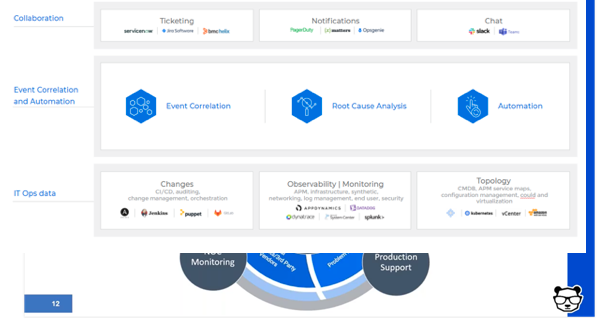
      • The NOC/monitoring team. This is your front line defense. When things go bump in the night or boom in the day, they’re the ones picking it up with their “eyes on the glass” – 24/7. And, they’re in charge of reporting and creating full situational awareness for the incident command through bidirectional communications.
      • The production support team. This team actually effects the required changes and executes the remediating action.
    • Deploy event correlation and automation tools to enable the incident management team. These tools are key, allowing your team to perform the required actions.
      • First, correlate the alerts created by your monitoring and observability tools into a drastically reduced number of high-level, insight-rich incidents by using machine learning and artificial intelligence (ML/AI). Add context to these incidents by ingesting and understanding topology sources, as well. This creates the necessary full-stack visibility and situational awareness.
      • Then, use ML and AI to determine the root cause of these incidents, including correlating them with data streams from your change tools: CI/CD, orchestration, change management and auditing to identify whether any changes in your environment caused these incidents.
      • Finally, automate as many processes as you can to free your IT Ops team from manual, time-consuming tasks. By integrating with collaboration tools, you can also enable the above-mentioned bidirectional communications.


  • XDR: The DevOps Transformation of Security Infrastructure

    XDR: The DevOps Transformation of Security Infrastructure

    eXtended detection and response (XDR) is a security technology that unites multiple security systems into one. Organizations are transitioning from traditional systems such as endpoint detection and response (EDR) and security and information event management (SIEM) to XDR, in a move that is analogous to the transition from agile to DevOps work processes.

    XDR can detect threats quickly by automatically collecting and combining information from across the IT environment—endpoints, servers, email and social media messages, cloud and application workloads—giving security analysts the context they need for fast investigation and response.

    In many cases, attacks occur in the borders between security silos. Each silo may be adequately protected by a security solution, but in between those silos, attacks remain evasive because security analysts have a limited view on the environment, determined by their security tooling. XDR connects silos with a unified threat identification and response strategy.

    Just like in the past development and operations teams were responsible for separate silos, with independent tooling and split responsibilities, security teams are split into silos, with limited communication between them. Security threats that cut across silos are difficult to mitigate. XDR enables new organizational structures in which security teams work together, with shared responsibility for mitigating threats, no matter where they occur in the IT environment.

    Benefits of XDR

    The purpose of XDR is to promote the visibility of threats and security incidents throughout an organization’s ecosystem. Its key benefits include:

    • Centralized monitoring and management – XDR solutions provide a single pane of glass for security incidents happening across the corporate network, endpoints and workloads. Consistent security rules can be implemented across diverse IT infrastructure, both in the cloud and on-premises.
    • Unified visibility – XDR integrates security visibility  across endpoints, cloud infrastructure, network traffic, etc. This allows security analysts to understand potential security incidents without having to learn and use other platforms.
    • Fast ramp up – XDR offers built-in integration with an organization’s IT infrastructure, and uses multiple threat discovery mechanisms from a variety of security technologies. Because analysts only need to learn one platform, time to value dramatically increases.
    • Increased productivity – XDR eliminates the need to manually switch between multiple dashboards or tools to collect security data. This allows analysts to more effectively detect and respond to security threats.
    • Low Total Cost of Ownership (TCO) – XDR provides a fully integrated network security platform. This can reduce the costs associated with purchasing, configuring and integrating multiple solutions.
    • Analyst empowerment – XDR provides a shared workflow for all tiers in the security organization. This reduces the need for training and allows Level 1 analysts to perform more in-depth analysis, reducing their need to escalate to higher analyst tiers.

    XDR is designed to give security teams full visibility into an organization’s endpoints and network infrastructure. Increased visibility has many security benefits:

    • Unified detection and remediation – XDR provides centralized and integrated incident response capabilities across all corporate environments. This allows security personnel to quickly identify threats, mitigate them and recover, all using the same platform, reducing the impact on the organization and overhead costs.
    • Better understanding of threats and attacks – Attack indicators are rare and far between, and each one on its own may not be enough for analysts to identify the threat. XDR collects these signals from multiple sources, across environments and over time, helping analysts identify threats that would otherwise remain invisible.
    • Threat hunting – With unified visibility and data analysis accessible to everyone in the security environment, all analysts can carry out proactive analysis to identify threats that have already compromised the corporate environment.

    How Does XDR Work?

    What is the real difference between an XDR system and the traditional toolchain of endpoint detection and response (EDR), security orchestration, network protection and data analysis tools?

    The answer is the language it uses. An effective XDR system should provide a unified, abstracted language to describe security signals, data and security controls. This language clearly specifies the potential security associations of each data point, by adding the concept of an “attack history.”

    The XDR security language removes certain non-essential information, but suppresses noise, revealing high-risk attacks. It does not require expert manipulation, so security analysts do not need to be interpreters anymore—they can spend their time actually mitigating attacks. It is easy to understand, rich with context and content, based on advanced technology, but generating straightforward outputs that make an analyst’s job easier.

    This unified security language is new, because the technology needed to enable it was not available until recently. Here are some of the advanced technologies that have recently matured and power the XDR information experience:

    • Threat intelligence feeds – Now delivered in real-time and with more data and context.
    • Next-generation machine learning – Multidimensional traffic algorithms that take into account signals from many independent data sources, unlike traditional systems such as user and event behavioral analytics (UEBA), which had a narrow set of inputs.
    • Natural language processing (NLP) – Algorithms that can be trained to draw conclusions from security rules, revealing information about threats, security alerts and how they interact with security controls.
    • Reasoning mechanisms – Algorithms that identify causal relationships, allowing the system to aggregate data points and automatically generate an attack story. This is a dynamic analysis, not based on predefined rules as with old-school security information and event management (SIEM) systems.

    Mistakes to Avoid With XDR Platforms

    While XDR is widely believed to be the future of EDR and network security, it is a new technology and there are several pitfalls you should try to avoid in your implementation:

    • High integration complexity – Check the cost and effort involved in integrating the XDR solution with your environment. Maintaining this integration is also costly. For example, if your organization already has a SIEM, integrating it with the XDR system is non-trivial.
    • Time to implement – The adoption time required for an XDR solution is crucial. Organizations are transitioning to remote work, and attackers are using remote workers, unsecured remote devices and networks, to gain access to sensitive data. A detection and response solution that takes weeks or months to successfully integrate into the stack is risky.
    • Limited automated analysis – Some XDR solutions do not leverage the full power of AI-driven analysis, limiting themselves to initial data processing and correlation, which may be better than existing systems, but still require manual work from analysts.
    • Operational complexity – The promise of XDR is to simplify workflows and improve productivity. If the XDR solution itself is too complex or requires analysts to learn new skills, adoption may be difficult and the total cost of the solution increases accordingly.

    An Enabler for DevSecOps

    XDR is not just a technology platform, it is a new organizational model that will help security teams work more closely together, focusing on threats rather than on specific tools or IT systems.

    This ties into a broader movement in security organizations to transition to DevSecOps models, in which developers, security and operations work together to shift security left and integrate security into all parts of the development life cycle.

    XDR technology will make it easier for security teams to act as a whole, and apply security tooling and practices consistently to a variety of environments, from a developer’s workstation to a full production environment. Thus, XDR may become a key enabler for the easier adoption of DevSecOps methodologies in highly secure environments.