Tag: help desk

  • Atlassian Acquires Halp to Gain Help Desk Based on Slack

    Atlassian Acquires Halp to Gain Help Desk Based on Slack

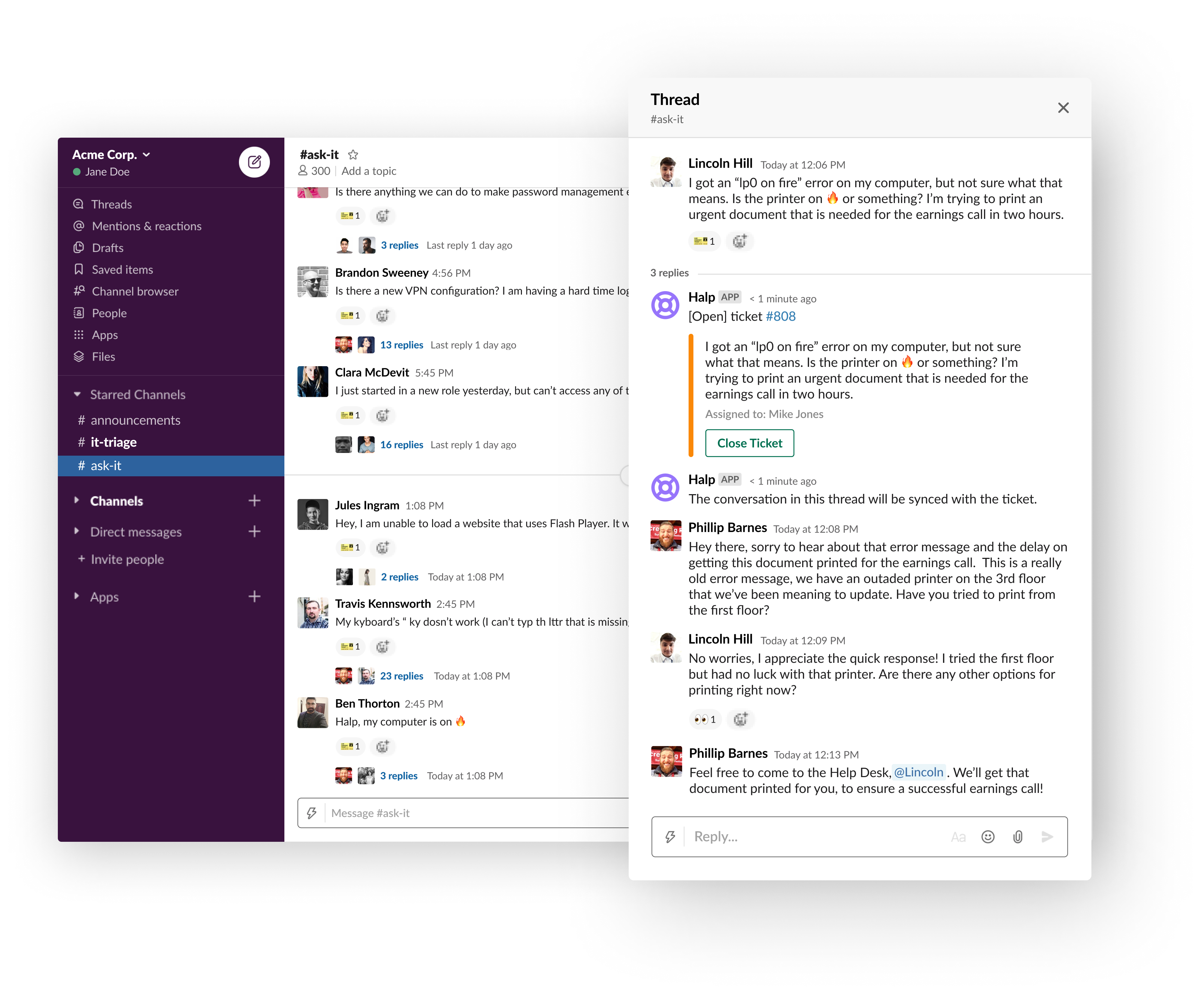
    Atlassian this week announced it has acquired Halp, a provider of a help desk platform that employs Slack as its user interface.

    Steve Goldsmith, head of product integrations at Atlassian, said Halp will provide organizations with a way to manage lightweight processes via an interface that is already commonly used within many organizations. The goal is to provide a level of integration between Halp and the JIRA Service Desk platform from Atlassian to handle more complex requests, he said.

    The Halp platform has already been integrated with Confluence, a knowledge base platform from Atlassian that enables help desk staff to share best practices for resolving known issues. Deeper integrations with JIRA and Confluence will be forthcoming, added Goldsmith.

    At the same time, Atlassian is working on tighter integration between its service desk platform and Microsoft Teams, which has emerged as a popular alternative to Slack, he noted.

    Halp CEO Fletcher Richman said that approach has gained traction because the biggest challenge when it comes to help desks is making it as easy as possible for an employee to generate a help ticket. Halp addresses that issue by enabling end users to simply drag and drop on an emoji to generate a help desk ticket.

    The help desk staff is then provided a web interface through which they can remotely manage tickets and respond to requests via Slack. That approach eliminates the need for the help desk staff to be physically located in an office or employ a virtual private network (VPN) to access a help desk platform running on a local area network, he said.

    Richman noted too often employees wind up supporting each other because the process of generating a ticket is too complex. At a time when many employees are working from home to help combat the COVID-19 pandemic, it’s not really possible for employees to currently provide that mutual support.

    It’s not really clear to how many employees might ever be heading back into an office at this point, so Halp also provides a way for remote employees to more easily remain productive, he added.

    Slack and JIRA, of course, are already de facto standards among many DevOps teams. Halp should provide developers with a means to instantly resolve a wide range of low-level issues in near real-time by generating a help desk ticket via Slack.

    Richman noted that for any IT service management (ITSM) platform to be successful, it needs to meet users where they are. If the platform is too complex or intimidating, users will look to their fellow employees for help first. Before long, however, all the mutual support saps productivity. By making help just a simple Slack message away, many more issues will be resolved by help desk personnel who already know the right answer, he said.

    It’s too early to say how many more help desk tickets might be generated because of Slack. However, in the wake of the rush to remotely enable the entire enterprise, the need for an easier way to provide support is now more apparent than ever.

  • COVID-19 Response: Espressive Makes AI Help Desk Free for 90 Days

    COVID-19 Response: Espressive Makes AI Help Desk Free for 90 Days

    Espressive, a provider of a help desk software that makes extensive use of artificial intelligence (AI), announced this week it will provide free access to its software-as-a-service (SaaS) platform for the next 90 days.

    Company CEO Pat Calhoun said the COVID-19 Rapid Assistance Program is intended to provide a way to augment existing help desks that are now being overwhelmed by requests from end users working from home.

    With a massive spike in IT incidents being seen since the onslaught of the COVID-19 pandemic, many help desks are now simply overwhelmed. In some cases, Calhoun said some end users are finding themselves on hold for 2.5 hours or more.

    Espressive, via its Barista virtual agents, provides a means to automatically address most routine requests using chatbots and a natural language processing (NLP) engine that the company developed specifically to address help desk use cases.
    The Espressive platform has already been trained to recognize 750 million phrases, Calhoun said, noting each time a new phrase is added to the NLP engine, the entire customer base benefits from the addition.

    Organizations that are finding it difficult to handle the volume of support calls being made by often geographically distributed remote workers can employ chatbots via a SaaS platform in a few hours, Calhoun said. In many cases, IT staff are trying to respond to help desk requests using on-premises applications that they need to access remotely, often using cumbersome virtual private network (VPN) software. A SaaS platform provides an alternative approach that is designed from the ground up to be accessed remotely, he said.

    Chatbots are already being widely employed online by customer service organizations with mixed success. Most end users, however, are at the very least familiar with interacting with them. In the case of IT support calls, the volume of requests is within a narrow range of tasks that could be handled via a chatbot, such as requesting a new password.

    Many organizations have already been gradually infusing AI into their help desk operations. The COVID-19 pandemic is likely to accelerate that transition. AI isn’t likely to completely eliminate the need for help desk staff anytime soon. However, it does provide a way to scale help desk services at a time when IT staff are trying to manage a massive transition in how and when applications are accessed by the entire organization.

    Naturally, it remains to be seen how much organizations will rely on AI to resolve support issues once the current pandemic crisis has passed. Short of being replaced altogether, there are many rote tasks that many IT professionals would just as soon not have to manually perform multiple times a day. The challenge now is defining the line between where an interface between man and machine makes the most sense for the benefit of all. In the meantime, to one form or another, chatbots are now here to stay.

    — Mike Vizard

  • Bridging the Gap Between ITSM and Software Engineering

    Bridging the Gap Between ITSM and Software Engineering


    Considering the individual roles of IT service management (ITSM) and software engineers, it seems obvious they should work closely together. ITSM tracks internal and external customer issues, and engineering fixes code-related issues (such as defects) that IT cannot fix on its own.

    However, more often than not, coordination between these two departments is poor, which—critically—undermines customer response times and damages application satisfaction. It’s important to remember that the quality of customer response isn’t just about speed, it’s about giving customers insight into the state of the issue.

    The disconnect between ITSM and engineers—caused by individual priorities and semantic differences—makes this real-time insight difficult. Both teams have individual and shared concerns, and separating these while simultaneously improving collaboration is a big challenge.

    Addressing this relationship is an important step in optimizing ITSM and DevOps integration, alongside focusing on IT help desk enhancement requests to product management, and tracking code from build to release and back.

    The Flow of Information on Things that Matter

    Most of the tickets generated by the IT help desk can be handled internally with no help from engineering, but it’s the tickets that do need help that require consideration. For these issues, there needs to be an open flow of information on the things that matter between these two teams.

    IT help desk must give engineering enough information to understand the defect and its impact on the customer. Meanwhile, engineering needs to be able to give the help desk a sense of when to expect the fix, when the fix is done and be able to request more information when required.

    Information that should be shared from the help desk to engineering includes the following:

    • Severity – Engineering needs a sense of the importance of the defect. If everything comes in as “High Priority,” nothing is high priority. The help desk must understand that engineering already has its own internally generated set of defects, as well as defects found by QA and other sources. For these customer defects to be prioritized and fixed in a timely manner, engineering needs to know how impactful they are to the customer.
    • Description – This is perhaps the most important piece of information the help desk can pass along. The more contextual information that can be shared, the better. It’s immensely important to provide engineering with the necessary steps to reproduce the specific defect, which version of your tool the customer is using, the general environment, etc. Sometimes this is best in structured fields, whereas other times it’s important to simply write out everything.
    • Screenshots and other visual information – Along with the written description of the problem, engineering often requires logs and/or screenshots. As the saying goes, “A picture is worth a thousand words.”

    Now that engineering has the vital information it needs to fix the defect, it has a responsibility to provide useful information back to the help desk:

    • Planned release – This should not be a firm commitment, but rather an estimate to give the help desk general timing. While the actual date of the fix may vary, it’s still useful to be able to tell a customer,”This is coming soon” vs. “We realize this is a problem and it’s on our backlog to fix.”
    • Engineering status – While this is a single defect to your customer and to them only has one status, there are really two statuses your organization will care about:
      • Status of the ticket in your ITSM tool
      • Status of the defect in your defect tracking/agile planning tool

    It’s very important that the ITSM tool contains both statuses to provide more information and context to the help desk. Imagine the benefit of knowing that the defect is “In Triage,” “In Progress,” or “In Verification” and being able to provide that information to a customer.

    • Actual release/released – As opposed to the planned release information, this lets the help desk know that the customer’s issue has been resolved. Imagine running a report from your ITSM tool indicating the defects fixed in your most recent release. Your IT help desk can proactively reach out to customers to let them know to upgrade, enabling you to offer more proactive customer communications.

    Finally, and perhaps most important, you allow your teams to talk about the “same thing” even when it exists in different tools and they speak a different language. There are four core ways to do this:

    • Cross tool tracking – Each artifact in each system should have the ID (and ideally URL) of its twin artifact in the other system. If a help desk representative needs to talk to an engineer about a defect, the rep needs to let engineering know which defect it is in the engineering tool, not just in the ITSM tool.
    • Routing – IT help desks often support multiple products, each of which have multiple components that may belong to a different engineering team. The help desk needs some indication which component and/or team should work on the defect. This information will help the IT help desk know which team to reach out to for help.
    • Filtering – Not every ticket in the ITSM tool needs engineering help (that’s a good thing). However, there should be some indication on the IT ticket if it has been sent to engineering. You do not want to send the same defect to engineering twice (confusing) or to assume it’s been sent when it hasn’t (poor time to resolution or issue overlooked).
    • Communication – IT and engineering need a shared way to talk about a specific defect that they both care about. The closer this communication can be to the native commenting that already occurs, the better. Ideally this is not via email as that communication vehicle does not stay attached to the artifacts in question, meaning information can be hard to find or get lost.

    The Benefits

    Customers will love it – Improved communication means happier customers. Customers can plan their upgrades with more certainty, and their trust grows since your organization is able to deliver on its promises. No longer will they feel like their issues are being thrown into a black hole.

    Better engineering focus – Engineering gets pulled in a variety of directions, contending with feature work as well as internally generated defects. The more information it has, the easier it is to prioritize and deliver more value to customer. Without the ability to share the severity of a defect, you risk two undesirable outcomes:

    • The defect is fixed instead of more important work, which hurts all your other customers.
    • Other less important work is prioritized, which can threaten your relationship with this customer.

    Better trust across your organization – Open communication fosters trust and understanding. Providing insight into prioritization and status let’s your help desk feel part of the development process. No longer will staff feel like they’re sending problems into a black hole with no idea when they will be fixed. Enhanced cross-team communication also helps engineering to avoid feeling like work is simply being thrown over the fence. Obtaining more context around a defect is invaluable.

    Next Steps for Total DevOps Integration

    To fully integrate your ITSM and engineering teams, there are still (at least) two other processes to implement:

    • A method for the IT help desk to provide enhancement requests to your product team: These enhancement requests are similar, but distinctly different from the defects described above. Consequently, they need to be prioritized and triaged by a different team.
    • The other process to implement is the traceability from task to code to build and back again. In order to properly inform customers that their problem is fixed in this version of your product, it’s important to correlate features, stories and bug fixes with the actual version of your product that includes them for the first time.

    Bridging the gap between ITSM and engineering teams brings your company closer to customers. While making your organization work as a unified whole is an incredibly complex problem, addressing this relatively small—but vital—piece of the puzzle helps you on your journey to integrating your whole software value stream. This change of mindset—combined with connecting all teams, tools, disciplines and processes in an enterprises’ software value stream— optimizes collaboration, productivity, efficiency and, most importantly, value delivered to the customer.

    About the Author / Trevor Bruner

    Trevor Bruner is a Product Manager for Tasktop Technologies. His background includes experience in financial services, oil and gas and as a Navy submarine officer. Connect with him on LinkedIn and Twitter.

  • Bridging the Gap Between ITSM and Software Engineering

    Bridging the Gap Between ITSM and Software Engineering

    Considering the individual roles of IT service management (ITSM) and software engineers, it seems obvious they should work closely together. ITSM tracks internal and external customer issues and engineering fixes code-related issues (such as defects) that IT cannot fix on its own.

    However, more often than not, coordination between these two departments is poor, which—critically—undermines customer response times and damages application satisfaction. It’s important to remember that the quality of customer response isn’t just about speed, it’s about giving customers insight into the state of the issue.

    The disconnect between ITSM and engineers, often caused by individual priorities and semantic differences, makes this real-time insight difficult. Both teams have individual and shared concerns, and separating these while simultaneously improving collaboration is a big challenge.

    Addressing this relationship is an important step in optimizing ITSM and DevOps integrations, alongside focusing on IT help desk enhancement requests to product management, and tracking code from build to release and back.

    The Flow of Information on Things that Matter

    Most of the tickets generated by the IT help desk can be handled internally with no help from engineering, but it’s the tickets that do need help which require consideration. For these issues, there needs to be an open flow of information on the things that matter between these two teams.

    IT help desk must give engineering enough information to understand the defect and its impact on the customer. Meanwhile, engineering needs to be able to give the help desk a sense of when to expect the fix, when the fix is done and be able to request more information when required.

    Information that should be shared from the help desk to engineering includes the following:

    • Severity – Engineering needs a sense of the importance of the defect. If everything comes in as “High Priority,” nothing is high priority. The help desk must understand that engineering already has its own internally generated set of defects, as well as defects found by QA and other sources. For these customer defects to be prioritized and fixed in a timely manner, engineering needs to know how impactful they are to the customer.
    • Description – This is perhaps the most important piece of information the help desk can pass along. The more contextual information that can be shared, the better. It’s immensely important to provide engineering with the necessary steps to reproduce the specific defect, which version of your tool the customer is using, the general environment, etc. Sometimes this is best in structured fields, while other times it’s important to simply write out everything.
    • Screenshots and other visual information – Along with the written description of the problem, engineering often requires logs and/or screenshots. As the saying goes, “A picture is worth a thousand words.”

    Now that engineering has the vital information it needs to fix the defect, it has a responsibility to provide useful information back to the help desk:

    • Planned release – This should not be a firm commitment, but rather an estimate to give the help desk general timing. While the actual date of the fix may vary, it’s still useful to be able to tell a customer,”This is coming soon,” rather than, “We realize this is a problem and it’s on our backlog to fix.”
    • Engineering status – While this is a single defect to your customer and to them only has one status, there are really two statuses your organization will care about:
      • Status of the ticket in your ITSM tool
      • Status of the defect in your defect tracking/agile planning tool

    It’s very important that the ITSM tool contains both statuses to provide more information and context to the help desk. Imagine the benefit of knowing that the defect is “In Triage,” “In Progress,” or “In Verification” and being able to provide that information to a customer.

    • Actual release/released – As opposed to the planned release information, this lets the help desk know that the customer’s issue has been resolved. Imagine running a report from your ITSM tool indicating the defects fixed in your most recent release. Your IT help desk can proactively reach out to customers to let them know to upgrade, enabling you to offer more proactive customer communications.

    Finally, and perhaps most important, you allow your teams to talk about the “same thing” even when it exists in different tools and they speak a different language. There are four core ways to do this: 

    • Cross-tool tracking – Each artifact in each system should have the ID (and ideally URL) of its twin artifact in the other system. If a help desk representative needs to talk to an engineer about a defect, the rep needs to let engineering know which defect it is in the engineering tool, not just in the ITSM tool.
    • Routing – IT help desks often support multiple products, each of which have multiple components that may belong to a different engineering team. The help desk needs some indication which component and/or team should work on the defect. This information will help the IT help desk know which team to reach out to for help.
    • Filtering – Not every ticket in the ITSM tool needs engineering help (that’s a good thing). However, there should be some indication on the IT ticket if it has been sent to engineering. You do not want to send the same defect to engineering twice (confusing) or to assume it’s been sent when it hasn’t (poor time to resolution or issue overlooked).
    • Communication – IT and engineering need a shared way to talk about a specific defect that they both care about. The closer this communication can be to the native commenting that already occurs, the better. Ideally this is not via email as that communication vehicle does not stay attached to the artifacts in question, meaning information can be hard to find or get lost.

    The Benefits

    Customers will love it – Improved communication means happier customers. Customers can plan their upgrades with more certainty, and their trust grows since your organization is able to deliver on its promises. No longer will they feel like their issues are being thrown into a black hole.

    Better engineering focus – Engineering gets pulled in a variety of directions, contending with feature work as well as internally generated defects. The more information it has, the easier it is to prioritize and deliver more value to customer. Without the ability to share the severity of a defect, you risk two undesirable outcomes:

    • The defect is fixed instead of more important work, which hurts all your other customers.
    • Other, less-important work is prioritized, which can threaten your relationship with this customer.

    Better trust across your organization – Open communication fosters trust and understanding. Providing insight into prioritization and status let’s your help desk feel part of the development process. No longer will staff feel like their requests are being ignored with no idea when they will be fixed. Enhanced cross-team communication also helps engineering to avoid feeling like work is simply being thrown over the fence. Obtaining more context around a defect is invaluable.

    Next Steps for Total DevOps Integration

    To fully integrate your ITSM and engineering teams, there are still (at least) two other processes to implement:

    • A method for the IT help desk to provide enhancement requests to your product team: These enhancement requests are similar, but distinctly different from the defects described above. Consequently, they need to be prioritized and triaged by a different team.
    • The other process to implement is the traceability from task to code to build and back again. To properly inform customers that their problem is fixed in this version of your product, it’s important to correlate features, stories and bug fixes with the actual version of your product that includes them for the first time.

    Bridging the gap between ITSM and engineering teams brings your company closer to customers. While making your organization work as a unified whole is an incredibly complex problem, addressing this relatively small, but vital, piece of the puzzle helps you on your journey to integrating your whole software value stream. This change of mindset, combined with connecting all teams, tools, disciplines and processes in an enterprise’s software value stream, optimizes collaboration, productivity, efficiency and most importantly, value delivered to the customer.

    About the Author / Trevor Bruner, Product Manager, Tasktop

    Trevor Bruner is Product Manager at Tasktop Technologies. His background includes experience in financial services, oil and gas and as a Navy submarine officer. Connect with him on LinkedIn and Twitter.


  • Machine Learning and ITSM: Helping Help Desks

    Machine Learning and ITSM: Helping Help Desks

    The field of machine learning is a hot topic. We know that this type of artificial intelligence (AI) provides computers with the ability to learn without being explicitly programmed. For people like me who need it in simpler terms, machine learning deals with systems that can learn from past data and experience to improve performance of a particular task.

    Machine learning already touches our lives, both personally and professionally, more than anyone could have imagined. For example, a lawn sprinkler system can be trained to tell the difference between squirrels and cats and to turn on when cats walk on the grass to shoo them away. Processing online search requests, filtering spam automatically out of our email inboxes and understanding and replying to our speech commands on smartphones are all machine-learning tasks being done on a daily basis.

    Sooner or later, machine learning will also be applied to IT service management (ITSM) to change the way help desks work. The benefits might include predicting issues and problems proactively, improving search capabilities and knowledge management, and classifying and routing issues with greater ease. To be more specific, you can expect the following scenarios in the near future:

    Service Requests Will Have Auto-Approvals and Custom Workflows

    With the implementation of machine learning, help desks can be trained to auto-approve service requests based on the employee’s role, department, work site and other parameters. For example, when a designer requests additional design tools or software, the help desk will be able to automatically approve the request and initiate a workflow without waiting for the manager’s approval. The help desk also can be trained to automatically check the workstation assigned to that designer for minimum system requirements to install the requested tools or software and create a request to upgrade the system, if necessary—all by itself.

    Help-desk systems will also be able to learn from past onboarding experiences and make suggestions such as the type of software and hardware the user needs, the access permissions they need based on their role or department, or even a printer configuration setup. These are all options for improving the speed of service delivered to end users.

    Level 1 Incidents Will Be Resolved Without Technicians

    End users will be able to search for solutions and resolve incidents without the involvement of any technicians. Through machine learning, help desks can be trained to scan incoming tickets and provide end users with solutions automatically, based on the system’s previous experience. Google Assistant-style chat boxes will also help end users resolve incidents or get information without even logging a ticket into the help desk.

    For example, a user would just have to ping the help desk that “the printer is not working,” and the help desk would be able to check the printer’s print threshold level and create a request for a toner replacement, if needed. The system also would be able to immediately and automatically send any relevant knowledge-base articles that might help the end user check network connectivity issues or reset the printer configurations in their machines.

    Help desks also could learn from past experience and data to route tickets or tasks to the appropriate technicians or support groups, thereby automating the ticket assignment process without having to create any rules or workflows. Machine learning would help reduce resolution times and improve the efficiency of the help desk team.

    Problems Will Be Anticipated and Prevented

    With machine learning, help desks will be able to analyze incident patterns and anticipate problems. In addition, trained help desks could automatically trigger notifications or create problem tickets for anticipated issues so that the help-desk technicians can investigate at the earliest. Say the performance of an application server starts deteriorating; help desks would be able to anticipate any application failures from the past performance data of that particular server, warn end users who might be affected, create a problem ticket and associate any relevant incident tickets with the problem ticket.

    Highly Dynamic Change Workflows Will Be Created

    Change implementations are always associated with a certain level of risk. Without a proper plan and workflow in place, change implementations can be costly. Help desks can learn from previous change implementation data and experience to help create highly dynamic workflows.

    For example, with the implementation of machine learning, help-desk systems might recognize potential signs of change implementation failure and prompt administrators to stop the implementation and execute the backout plan even before the failure occurs. Change management modules guided by machine learning will also be able to make recommendations during the planning phase based on previous experiences.

    Intelligence Will Impact Asset Life Cycle Management

    A sizeable number of incidents occur due to old IT assets whose performance has degraded. Machine learning can help automatically identify which assets might repetitively break down based on factors such as their performance levels and incidents associated with them. Once those assets are detected, the help desk can use machine learning to send notifications to technicians and facilitate ordering replacements. The simplest case could be the help desk automatically creating requests for printer toner replacements after a specific number of pages have been printed.

    ITSM is full of opportunities for machine learning. The scenarios above are some of the simplest use cases showing how machine learning can make life easier for both the help-desk team and end users. Though these might not be readily available as out-of-the-box solutions, they are not too far away into the future.

    About the Author / Ashwin Ram R

    Ashwin Ram R is an ITSM evangelist at ManageEngine, a division of Zoho Corp. He writes blogs, customer stories, and easy tips and tricks for the users of ServiceDesk Plus, the company’s IT help desk software. He has also authored the white paper, “The Handbook of Essential IT Service Desk Metrics.” He is interested in photography and is an avid collector of watches. Connect with him on Twitter and LinkedIn.