Tag: hardware

  • HPE Leverages AI for Remote Server Management

    HPE Leverages AI for Remote Server Management

    The latest ProLiant MicroServer is designed to use AI to provide the next generation remote server management

    Hewlett-Packard Enterprise (HPE) announced an HPE ProLiant MicroServer Gen10 Plus platform designed to be managed remotely using advanced algorithms the company makes available via the cloud.

    Tim Peters, vice president and general manager for global small-to-medium businesses and the midmarket at HPE, said the goal is to make it possible for organizations of all sizes to take advantage of artificial intelligence and advanced analytics to automate the management of servers in remote offices.

    Based on Intel Pentium and Intel Xeon processors and weighing less than 10 pounds, the HPE ProLiant MicroServer Gen10 Plus comes with HPE Integrated Lights Out 5 (iLO5) server management tool that enables IT teams to configure, monitor and update servers remotely. Those servers can then also be connected back HPE InfoSight for Servers, a cloud-based AI tool that HPE is making available for the first time on this class of servers, said Peters.

    HPE is making this class of servers available as part of a subscription service option that makes the HPE ProLiant MicroServer Gen10 Plus available starting at just less than $20 per month for organizations that prefer to treat IT as an operational expense. This latest generation of HPE servers also only generates 36dB of sound so most employees in a remote office may not even be aware of its existence.

    In addition, Peters noted the HPE ProLiant MicroServer Gen10 Plus server also supports HPE’s silicon-based root of trust technology, which prevents servers in remote offices from being tampered with when there is no IT staff available at that location.

    The days when most organizations could afford to have IT staff at each remote office are all but over. IT organizations increasingly need to rely on frameworks that allow them to centrally manage IT infrastructure wherever it’s deployed. IT teams can either build and deploy those IT automation frameworks themselves or they can rely on the frameworks that IT vendors are embedding in their latest generation of systems. Naturally, that latter approach requires IT to replace their existing IT infrastructure. However, given the rate at which applications are being deployed and upgraded, many organizations are now finding they are replacing server infrastructure more frequently.

    Regardless of the approach, overworked IT staffs don’t want to have to send someone to a remote office location unless it’s absolutely required. Beyond the cost of the travel, there’s the time that could be better spent on more pressing IT management tasks to consider.

    Of course, anything involving AI is likely to make IT administrators nervous. However, as IT becomes more complex, it’s not likely IT teams will be replaced. Rather, the focus of IT teams will shift toward other areas that add more value to the business as more rote tasks increasingly are automated.

    Naturally, it may be a while before all the legacy infrastructure installed is replaced, so IT teams may still need to travel to remote offices for some additional period of time. However, the days when IT teams racked up frequent flyer miles because of the need to visit remote office locations will soon be a distant memory.

    — Mike Vizard

  • Dell Pushes Computing to the Edge

    Dell Technologies today set its sights on becoming a major edge computing player with the launch of a Dell EMC PowerEdge XE2420 server optimized for space-constrained environments and a smaller version of a pre-integrated Dell EMC Modular Data Center Micro 415 (MDC Micro) ruggedized platform.

    In addition, Dell launched the Dell EMC Streaming Data Platform, a streaming analytics platform based on open source Kafka software. Dell is using Kafka also to provide an embedded management capability known as the Dell Remote Access Controller (iDRAC 9 Datacenter) for its edge computing platforms.

    Matt Baker, senior vice president for Dell EMC strategy and planning, said edge computing applications require a different approach to IT infrastructure because data is being processed and analyzed in real-time. Dell expects that eventually 75% of all data will be created and processed outside of a data center, he said.

    A primary driver of that transition will be the rise of wireless 5G networks, which will make it feasible to build and deploy real-time applications on edge computing platforms.

    Dell, of course, is making a case for distributed IT environment made up of its platform, contending will be easier for IT organizations to deploy and manage.

    The iDRAC 9 Datacenter platform, for example, provides a remote deployment capability that Dell claims can reduce administrator-attended time by up to 99.1% per server after initial setup. The streaming analytics capability, meanwhile, makes it possible to discover trends, fine-tune operations and create predictive analytics to help ensure peak performance and reduce downtime. Dell has also made available an automated certificate enablement tool to enable zero-touch security at the edge and in central locations.

    All told, Dell claims to be collecting nearly 2.9 million data points per server that can be surfaced in as many as 20 different types of reports.

    Baker said Dell has no plans to extend its data streaming analytics capabilities to other platforms, so IT teams will have to decide to what degree they want to standardize on Dell infrastructure versus setting up a streaming analytics platform of their own that is capable of supporting edge computing platforms from multiple vendors.

    Whatever the approach, the one thing that is certain is the way applications historically have been built and deployed is fundamentally changing. Rather than relying primarily on batch-oriented applications that often require large amounts of data to be transferred across networks to either a data center or public cloud, a lot more data is going to be processed at the edge because of application latency requirements. Edge computing applications, for example, will need to process analytics in near real-time to optimize a process or end user experience in milliseconds.

    Naturally, that shift will have profound implications for the management of IT going forward as IT environments become even more distributed than they are today. In fact, the real issue isn’t so much how computing platforms will be deployed at the edge so much as it is how they will be managed, at a time when most IT organizations are already short-staffed.

    — Mike Vizard

  • Setting Up Google Authenticator on Multiple Servers

    Setting Up Google Authenticator on Multiple Servers

    Google Authenticator is pretty great. It allows me as an administrator to set up and configure multi-factor authentication into my UNIX boxes without having to spend money on a tool like YubiKey or RSA tokens. It’s easy to set up on any type of phone—no specialized hardware or dongles needed. It’s also pretty cool in that you don’t have to have network access from the server to the outside world. Since Google Authenticator is time-based, it doesn’t need to send an SMS or do a callout to a centralized server to get the current valid token.

    What is a bit painful, though, is needing to have a different Google Authenticator token for every one of my servers. The standard setup would have you run the google-authenticator command on each and have as many tokens as you have servers. Obviously, this quickly becomes unwieldy and untenable.

    Instead, I want to have one token for multiple servers. Here’s how I installed and configured Google Authenticator on each system.

    First Machine

    On my first machine I’m going to install Google Authenticator and create a secret key—the exact flow I’d use normally.

    1: Install Google Authenticator. This is pretty well-documented; examples can be seen at untrusted connection and How-To Geek. I won’t walk through each step since this part varies from OS to OS; the rest of the steps are identical, however.

    2: Restart the ssh service

    $ sudo restart ssh

    3: Run the google-authenticator command to generate a secret key for your account, which you’ll store in your phone. This information will be stored in a configuration file that we’re going to get into later. I don’t need to comment that you actually have to enter the secret key into your phone, do I?

    4: Give it a spin. From another shell go ahead and try it out.

    5: Let’s take a look at the configuration file. We’re going to copy these contents to our other machines that we want to have the same secret key.

    Installing Google Authenticator on Additional Machines

    For all other machines I’m going to install Google Authenticator as normal, but I’m going to use the secret key from the first machine. This will let me log in to each of them using that same secret key that I stored from the first machine.

    1: Install Google Authenticator. Again, other places describe this in detail. We’re going to install the program but not do the creation of any secret keys

    2: Create the configuration file and add the content that we got from the other machine.

    3: Set permissions for the configuration file.

    4: Restart the ssh service.

    5: Test the login.

    Voila! A shared secret key across my servers! Happy day.

    — Rajat Bhargava

  • Linus Torvalds Sees Lots of Hardware Headaches Ahead

    Linus Torvalds Sees Lots of Hardware Headaches Ahead

    Linux founder Linus Torvalds, today at the KubeCon + CloudNative + Open Source Summit China conference, warned attendees that managing software is about to become a lot more challenging, largely because of two hardware issues that are beyond the control of DevOps teams.

    The first, he said, is the steady stream of patches being generated as new cybersecurity issues related to the speculative execution model that Intel and other processor vendors rely on to accelerate performance. That model is the root cause of malware such as Spectre and Meltdown that have roiled the IT industry. Additional bugs in speculative execution with colorful names such as Fallout and ZombieLoad are showing up more frequently. Each of those bugs requires another patch to the Linux kernel that, depending on when they arrive, can require painful updates to the kernel, Torvalds told conference attendees.

    Short of disabling hyperthreading altogether to eliminate reliance on speculative execution, each patch requires organizations to update both the Linux kernel and the BIOS to ensure security. Turning off hyperthreading eliminates the patch management issue, but also reduces application performance by about 15 percent.

    The second major issue hardware issue looms a little further over the horizon, Torvalds said. Moore’s Law has guaranteed a doubling of hardware performance every 18 months for decades. But as processor vendors approach the limits of Moore’s Law, many developers will need to reoptimize their code to continue achieving increased performance. In many cases, that requirement will be a shock to many development teams that have counted on those performance improvements to make up for inefficient coding processes, he said.

    In the meantime, Torvalds noted updates to the Linux kernel are still coming at a rate of every three months, and the Linux team is basically working on a six-month planning cycle—there is no master five-year plan the Linux team is working from. Roughly 1,500 developers work on contributions to the Linux kernel, with 100 maintainers overseeing the implementation of those contributions.

    Naturally, cybersecurity patches at the kernel level have significant implications for all of DevOps. Changes to the kernel need to be absorbed by all the various distributions of Linux, which in turn impacts all the stacks of software that depend on Linux. Jim Zemlin, executive director for The Linux Foundation, said that in the wake of the rise of these hardware issues and previous cybersecurity issues involving open source software such as the Heartbleed vulnerability, cybersecurity is the top priority for The Linux Foundation. As part of that effort, The Linux Foundation is researching various DevSecOps approaches to better securing the global open source supply chain, he said.

    In the meantime, organizations large and small alike will need to up their DevSecOps game significantly if they want to continue to push application performance limits.

    — Mike Vizard

  • 5 Ways Wireless Technology Will Evolve in 2019

    5 Ways Wireless Technology Will Evolve in 2019

    2019 will be a transformative year for the wireless world, with landmark developments in 5G, cloud computing and hardware. From stadiums and retail buildings to airports and even street corners, there’s no place that won’t be affected by the rapid evolution of wireless technology. And if you’re not up on the edge, you’re sleeping on the biggest story of the year.

    As CEO of Packet, I’ve experienced firsthand the latest advances in edge computing, 5G and hardware, all of which will integrate technology into our lives more than ever before.

    Below are my five predictions detailing how wireless technology will evolve in 2019—and how these breakthroughs will impact our everyday lives:

    Software Will Eat the Wireless World

    It’s understood that in our internet-enabled world, technology equals software, even though the reality is more nuanced. And even the cloud, the grand enabler of the latest software wave is itself being eaten alive by the software movement it spawned; cloud-native ecosystems such as Docker and Kubernetes are devouring the value of verticalized cloud providers and offering a portable software experience across any infrastructure substrate, spanning architectures, providers and form factors. This multi-billion dollar industry hasn’t been disrupted, and it is growing increasingly important by the day. In short, it’s a good time to be in software!

    Hardware Technology Isn’t a Commodity

    The influence of hardware is growing steadily, and it will really hit its stride in 2019. We believe that powerful, customizable hardware in collaboration with state-of-the-art software is the next big thing in cloud computing. This trend will help drive investment in everything from accelerators to offloads to alternative processor architectures, especially as the worth of custom-built hardware grows.

    Real Estate is Becoming Digitized

    The leading enterprises of the world are looking to deploy their technology opinion quickly and at global scale. From 5G to mobility to mobile gaming, this ambition requires a go-anywhere model that enables cloud-style infrastructure in hundreds or thousands of locations. In 2019, large real estate owners will move beyond traditional data centers to digitize assets such as co-working, stadiums and retail buildings with cloud and infrastructure.

    5G Technology Is Really All About Private Networks

    Two-thirds of organizations plan to deploy 5G by 2020, according to Gartner. However, as security and control are becoming increasingly important in the wireless world, large industrial companies are being led to explore the implementation of private 5G wireless networks. By deploying private LTE networks using technologies such as Citizens Broadband Radio Service (CBRS), enterprises will be able to efficiently deliver connected experiences from the sports stadium and airports to the urban street corner.

    Edge Computing: The Buzzword of 2019

    In case you haven’t heard of the already buzzy tech phrase, edge computing is computing that takes place at or near the source of the data, rather than relying on faraway cloud data centers to do the work. Edge computing is a flexible model that can be dropped in literally anywhere, allowing developers to think–and develop–on a much larger scale than they already are. In 2019, the edge will become the most exciting frontier in the cloud.

    — Zachary Smith

  • Dell Technologies Drives Automation Deeper into Platforms

    Dell Technologies Drives Automation Deeper into Platforms

    Dell Technologies this week launched a series of initiatives intended to provide IT organizations with multiple deployment options for Dell EMC appliances and servers, including forthcoming managed service offering through which Dell will manage private cloud platforms based on VMware software on behalf of customers.

    Announced at the Dell Technologies World 2019 conference, Dell EMC also unveiled a new appliance series and revealed an alliance with Microsoft under which its VMware arm will make available cloud software on the Microsoft Azure cloud, in addition to existing support for Amazon Web Services (AWS), IBM Cloud and servers deployed on-premises.

    Jon Siegal, vice president for product marketing for converged platforms and solutions at Dell EMC, said Dell EMC plans to make it easier for IT organizations to consume IT infrastructure in an on-premises IT environment as a service or continue to use their capital budgets to acquire servers and appliances.

    To advance that latter approach, Dell EMC is launching VxFlex, a set of appliances that include an operating system that enable compute, storage and networking separately. In contrast, the existing VxRail series of appliances are optimized for VMware and assume compute, storage and networking will be scaled in tandem, said Siegal. Dell EMC is also now unifying a set of hyperconverged appliances and converged infrastructure servers under a common VxFlex brand, and Siegal said in the future those offerings will be extended to add support for Kubernetes alongside platforms from vendors other than VMware.

    At the same time, Dell EMC is previewing a VxRail Analytical Consulting Engine (ACE) that will be embedded in VxRail HCI system software that Dell EMC provides in its appliances optimized for VMware. That analytics engine employs machine learning algorithms to maximize application performance, while also providing self-optimization recommendations and capacity forecasts.

    The Dell Technologies Data Center-as-a-Service offering, meanwhile, is scheduled to be generally available in the second half. It marks the first time Dell has launched a managed service under its own brand. VMware, however, has been providing managed services for the past year. The Dell Technologies Data Center-as-a-Service offering extends that concept to include Dell EMC VxRail appliances.

    Automation is clearly at the heart of the evolving Dell Technologies strategy. The challenge organizations that have embraced DevOps will face is aligning their processes with the automation frameworks Dell Technologies is embedding in both VMware and the underlying infrastructure on which VMware gets deployed. To address that issue, Dell Technologies over time will bundle frameworks such as the open source distribution of the Pivotal platform-as-a-service (PaaS) environment from Pivotal Software, an arm of Dell Technologies, on its platforms, Siegal said.

    These moves signal Dell Technologies is trying to fulfill a promise to make it as easy to manage IT infrastructure deployed in an on-premises IT environment as it is to manage on a public cloud. There’s obviously still a gap. But as Dell Technologies starts to make IT infrastructure available as a service, it may one day become challenging for DevOps teams to tell where any one cloud happens to be running at any given moment.

    — Mike Vizard

  • Hardware in the Age of Automation

    Hardware in the Age of Automation

    There’s a joke making its way around the internet that goes like this:

    Q: How do DevOps engineers change a lightbulb?
    A: They don’t. It’s a hardware problem.

    The trend to abstract hardware away from the day-to-day work of most IT personnel continues. We in DevOps have given it a name: infrastructure as code. Hardware has been pushed so far back into the recesses of IT that I’ll wager good money to say that today most folks working in information technology have never seen the inside of a data center, and fewer have done something as labor-intensive as run cable wire over a rack of servers. For many, hardware is but a concept that’s made real every month by a bill from Amazon, Azure or Google Cloud.

    But hardware is real and it does matter, a lot. If you don’t think so, look at your cellphone. That little piece of hardware had changed just about everything about how the world works today. The cellphone has made possible not only Tinder, Twitter, Instagram, Uber, Lyft and a multitude of startups that will never see an IPO or private equity buyout, but it also has brought earth-shaking events such as the Arab Spring, Brexit and SpaceX landings into the palms of viewers worldwide.

    Hardware counts and it’s going to count more in the coming years. Those working on the forefront of innovation understand that special hardware is, and will continue to be, a critical factor in the development of increasingly complex software. We’re already seeing the ability to choose specific hardware configurations available on cloud providers such as AWS. For example, the g3.16xlarge EC2 instance type is backed by both CPU and GPU chips. This is only the tip of the iceberg.

    According to Jacob Smith, senior vice president at Packet:

    “People ask what’s next. Well, this stuff [GPUs] is an example of what’s next. It’s not just really expensive stuff, but really specialized stuff. Whenever you start to do something that’s really big and really important, which are a lot of the things we’re doing on the internet and in the world, whether it’s bioinformatics or cars driving themselves, those require really big workloads. There’s a lot of data, a lot of processing and you just can’t do it with generic hardware. The reason that hardware is the next innovation layer is because of all the software you guys have been writing to make software portable and deployable around the world in minutes, now the software wants to touch on the new kinds of hardware. And I think that embracing this is the next wave.”

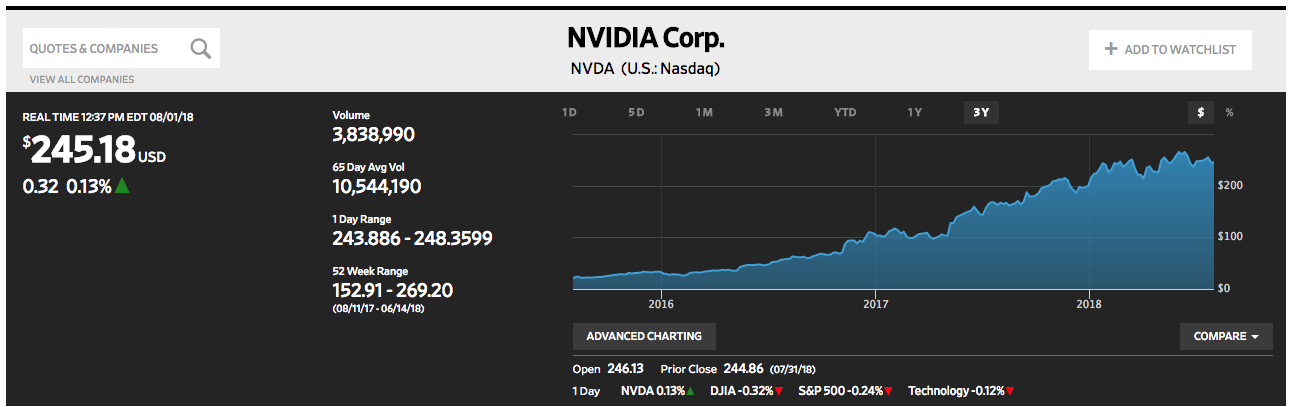
    Packet, and companies like it, are looking forward to a time when computing platforms will move beyond the generic to the specialized. We’re already seeing the trend play out: The value of the stock of Nvidia, a major GPU manufacturer, has gone up 10x in the last three years. (See Figure 1.)

    Nvidia stock has grown 10x in value in over the last three years. (The Wall Street Journal)

    Also, the projected demand for specialized chips is attracting a lot of venture capital (VC) money that’s funding startups such as Cerebras, Wave Computing and Graphcore. Even Google is getting into the specialized hardware business with Tensor Processing Units (TPU). Hardware is indeed becoming very cool again.

    So, what does all of this have to do with automation?

    Automation is a processor-intensive undertaking. And, as AI weaves itself more into the fabric of day-to-day data processing and machine learning, we’re going to see more demand for specialized hardware to handle the activity. In a way, that’s not new; we’ve had specialized hardware for a while now. TV remote controls have been around well before Bluetooth came on the scene. What is new is the degree of intelligence at play in these new devices. All my old-style TV remote control had to do was change the channel when I clicked the button. Today, my remote control recognizes my voice and helps me find a show of interest. It’s a big leap from an operation that responds to a button-click to one that uses voice recognition and inferential lookups.

    As Packet’s Smith pointed out above, as the complexity of software grows, so, too, will the need for special hardware to drive it. The new trend will be to wrap hardware around software. Thus, I have no trouble imagining a new type of hardware that is designed to handle a very particular process—gene editing, for example. Imagine ingesting a pill that is really a nanodevice that contains the intelligence to travel your body and physically alter your genetic makeup. It’s not that far-fetched an idea. Making the idea a reality isn’t so much about the software, it’s the hardware. We don’t have the nanotechnology—yet. Hence, the opportunity.

    Right now, most automation activity is run on generic chips housed in remote data centers around the world. A lot of the work we’re doing is still commodity: Spinning up Kubernetes clusters, facial recognition under Tensorflow, discovering security vulnerabilities using Macie, for example. Yet, as artificial intelligence (AI) becomes more commonplace, the use cases for which AI is appropriate will grow. This growth will require new types of specialized hardware. Engineers will imagine the software and then design the hardware to make it run. We’ll come to a point, which is not that far away, where innovation will be as Smith describes. It will indeed be about wrapping hardware around software. As a result, we’ll go from the “Internet of Things” to the “Internet of Really, Really Smart Things, from the Microscopic to the Gargantuan.” The implications will be profound.

    — Bob Reselman

  • Automation: Critical Missing Pieces in the CD Puzzle

    Automation: Critical Missing Pieces in the CD Puzzle

    As enterprises accelerate the frequency with which they develop and release new code into production to meet the ever-mounting demands of their consumers, there’s growing pressure on networking and security operations teams to keep pace with their DevOps counterparts. And it’s not hard to see why. According to Forrester, nearly four out of five business leaders believe it is IT’s responsibility to ensure the network can support the company’s digital transformation plans.

    And yet, 67 percent of businesses believe the network is the bottleneck—and with good reason. The current networks that NetOps and SecOps teams manage are highly complex, distributed entities that have historically been configured and provisioned manually—and often, in silos. Yet, as DevOps accelerates ahead at lightning pace, underpinned by the continuous integration, delivery and deployment (CI-CD) approach, NetOps and SecOps teams are scrambling for new ways to gain speed to more quickly launch, scale and secure applications and code updates in production.

    The Need for Speed 

    Enterprises are increasingly leveraging DevOps principles to execute daily deployments into their multicloud test and production environments. For example, Etsy deploys 80 times per day, while Netflix and Amazon deploy up to thousands of times a day. In this new world order, collaboration, communication and synchronization across development, operations, network and security teams is essential.

    This also means that testing of the network and application services infrastructure must happen concurrently with the application development and testing processes—not afterward, which can dramatically slow down the agile CI-CD process. Similarly, security cannot be retrofitted after the development and test phases are complete. A recent study by Puppet Labs found that high-performing teams spend 50 percent less time remediating security issues when security is addressed at every stage of the software development and delivery cycle.

    New CI-CD Tools Deliver on the Promise of DevOps  

    New innovations in virtualization and programmability of network and application service infrastructure are making it possible to test policies and configurations prior to production—even in highly complex environments. Powered by validated templates and APIs, these network orchestration and application services tools help automate task execution for scale, preserve provisioning and configuration policies for consistency and bolster security, while dramatically reducing management time cycles and the risk of human error. They empower NetOps and SecOps teams to leverage DevOps principles and apply them to network and security during the development, deployment and delivery of multi-cloud apps and code updates.

    Similarly to how software-defined components such as servers and storage are provisioned, network orchestration tools leverage a software-defined infrastructure (SDI) approach to rapidly provision network services across multiple network devices. These tools support flexible application provisioning across physical and virtual environments, help identify and address issues quickly and improve overall network performance. In the CI-CD model, network orchestration helps NetOps and SecOps teams ensure that all production-critical application and network elements—such as availability, core network services, security services and performance—are accounted for and are rolled out in proper sequence and at scale.

    Application services automation focuses on application availability, performance, and security. While automation used to focus solely on simple load balancing, it now also includes a range of solutions that help network teams configure and automate application services during the test phase. These include web app and network firewalling, DDOS protection, application acceleration, WAN optimization, DNS services and TCP optimization, among others. In the dev and test phases of the CI-CD process, automation allows for faster configuration and deployment of network settings and policies. Similarly, in the production phase, automation significantly speeds up and simplifies areas such as policy adjustment and other time-intensive processes by eliminating the need to reconfigure underlying infrastructure. This means that ticket resolution and necessary changes can be completed in a matter of minutes versus weeks. At the time of rollout, application services automation toolsets also help to ensure the infrastructure is ready to perform at peak levels.

    Network and application services automation innovations—the critical missing pieces in the continuous deployment puzzle—work together to ensure the entire DevOps team—including network and security—can deliver and deploy applications with the speed, reliability and security necessary to meet today’s business challenges.

    About the Co-Author / Ranga Rao

    Ranga Rao is Director of Product Management & Solutions Engineering at Cisco Systems, where he leads a team of product managers, architects/TMEs and software engineers to collaborate with partners to define use cases and build software integrations for leading Cisco solutions including Cisco ACI, Nexus 9000 and Tetration Analytics. Ranga earned an M.S. in Computer Science at Stanford after receiving his B.E. from the National Institute of Technology Karnataka. Ranga is also an author of a popular book, Programmability and Automation with Cisco Open NX-OS, published by Cisco.

    — Lori MacVittie

  • Cisco Looks to Bridge Gap Between Networking and DevOps

    Cisco Looks to Bridge Gap Between Networking and DevOps

    Networking in the enterprise has always stood apart. It might take two minutes or less to spin up a virtual machine, but it can take two weeks to set up the network connections. To help bridge some of the gaps between networking and the rest of the DevOps team, Cisco Systems this week unveiled a series of intelligent switches that promise to do just that.

    Via a Cisco intent-driven networking initiative, it soon will be possible to describe a business outcome that will be automatically enabled at the networking level, says Kiran Ghodgaonkar, senior marketing manager for Cisco. To achieve that goal, Cisco is moving to unify networking on an end-to-end basis, which Ghodgaonkar says primarily will require building a common controller that can be implemented at both the edge of the network and in the data center.

    The first concrete step in achieving that goal is a set of Catalyst 9000 switches running an IOS XE operating system, which Cisco has imbued with machine learning algorithms. Over time, those algorithms will be deployed across both legacy networking infrastructures when appropriate, as well as any new networking and security equipment Cisco brings to market in the future. Once in place, IOS XE will make it easier to implement policies in software that spans everything from prioritizing traffic to implementing security polices.

    This latest Cisco initiative follows the rollout a Tetration analytics platform based on an instance of Apache Spark and Cisco’s acquisition of AppDynamics, provider of an application performance management service delivered via the cloud. Ghodgaonkar says Cisco is aiming to combine analytics and machine learning algorithms to simplify network management in a way that furthers DevOps integration. Right now, however, the biggest impedance to achieving that goal, says Ghodgaonkar, is the fact that 80 percent to 90 percent of networking tasks still require manual intervention. Because of that issue alone, many organizations have experienced limited success in terms of integrating server, storage and networking management, despite the rise of software-defined networking (SDN) in the data center. In fact, to get past that issue, many organizations make investments in pre-integrated systems such as the Cisco Unified Computing System (UCS) platform. But the number of organizations willing to make that kind in forklift investment in IT infrastructure is not all that high when compared to the size of the overall IT market.

    The biggest DevOps issue IT organizations now face, says Ghodgaonkar, is that as various elements of the IT organization invest in automation, silos of automation are created. Cisco says it has developed open application programming interfaces (API) will provide interoperability between its technologies and the rest of the IT environment to help break down those silos.

    It’s still a little unclear these days just how much networking and IT operations can get automated. The good news is that, given the state of network management inside most organizations, things can only improve. The real issue (as any existing DevOps team already knows) may not be so much the technology as it is the culture differences spanning the compute, storage and networking teams.

    — Mike Vizard

  • Is Your Company’s IT a Disaster Waiting to Happen?

    Is Your Company’s IT a Disaster Waiting to Happen?

    Recent IT disasters suggest gaps in hardware testing, backup system testing and inadequate disaster recovery plans.

    Although the summer often is the most profitable season for most airlines, this past summer wasn’t great for several of the largest carriers. In July, Southwest Airlines suffered a 12-hour IT outage, triggered by a router malfunction that quickly took down many of its core operating systems like a house of cards. Worse, backup systems failed to deploy. Flight delays and cancellations continued for a few days.

    A similar disaster unfolded at Delta in August, when a power control module at the airline’s central data center malfunctioned, creating a surge to the transformer and loss of power. Delta’s systems didn’t switch over to backups as planned, causing scheduling mayhem as agents couldn’t access key systems. For both companies, the outages resulted in tens of millions of dollars in lost revenues.

    Sure, both of these outages affected businesses running more traditional IT infrastructure, but even if your company is running in the cloud, your business isn’t immune from a damaging outage. In September, Microsoft Azure experienced two outages lasting several hours each, one in Europe and the other affecting U.S. customers across several key services, including SQL Database, Virtual Machines, Service Bus and Visual Studio team services.

    As software developers and testers, we often focus narrowly on the application and the server it is running on—but there’s a lot more to consider. Hardware and components, backup systems and third-party providers all come into play when testing applications for stability and reliability. Of course, there’s no way to prevent all bad things from happening but there are some steps you can take to cover the bases more thoroughly.

    Look Beyond the Software

    If there were three main lessons learned from these recent IT disasters, they would be:

    1. Assess risk of the whole environment. The quality of your software is only as good as the components it runs on—the hardware, network, power, storage, and other third-party applications are often required. Understand the full picture and all of the dependencies. Categorize applications based upon business criticality and failure rate to focus attention on the pieces that really matter.
    1. Backup systems and processes are not “set and forget.” Spend more time documenting them, testing them and training staff. Make sure that the processes are up to date as IT adds new components and vendors to the system or if the company goes through a merger or acquisition.
    1. Invest according to your risk profile. If your company can’t operate for more than a few minutes without access to certain systems, plan on budgeting for warm or hot failover systems which enable near 100 percent uptime with always-on, parallel systems continually synchronized and ready to go. It’s too expensive to enable this failover capability for your entire environment—you will need to be picky. Some IT assets, such as an airline’s scheduling and reservation systems, deserve top priority and resources, while other assets such as the HR system, can do with less. IT directors also need to frequently investigate the need for upgrading old, unstable infrastructure technologies. Most companies also don’t spend enough time monitoring and testing backup and recovery systems.

    To minimize the risk of a major IT outage bringing down your business and alienating customers, the recipe is as follows: Analyze the points of failure, determine what is reparable and what is not easily fixed (for example, installing software usually can be done much more quickly than building a new server environment) and, finally, install and test failover systems and processes that can maintain basic operations with minimal customer disruption.

    Delta & Southwest: A Quick Analysis

    In both cases, Delta and Southwest had backup systems that did not deploy properly—or, at least, in a timely fashion. The first point of action would include conducting thorough, regular testing of those backup systems and locations and upgrading capabilities if necessary. Second, since no disaster recovery system is foolproof, create manual workarounds for critical system outages. That would have helped tremendously so that customers weren’t completely stranded. Third, create a fully redundant second data center that switches over automatically when the primary data center goes down. Naturally, this is the most expensive option, but depending upon the outcome of the risk analysis, it may be worth the money.

    With Southwest, a router failure caused a cascading effect that brought down the network altogether. It’s not clear if a secondary network was available for failover, although it appears the answer is no. Again, better, more frequent monitoring could have isolated the router problem and alerted IT to fix or replace the hardware before disaster struck.

    Any company with technology from many different vendors should work closely with vendors and partners whenever possible to mitigate possible risks. Vendors often are able to provide insight into how they test their own systems and can even share test cases to assist in validating the end-to-end system. Keep in mind that aging technology is not the only problem—sometimes new technology brings untenable risks. A recent example is the Samsung Galaxy Note 7 and its overheating battery problem and recall. As well, it’s smart to understand how the local utility handles its outages and what if any help it provides to customers in the event of service disruption.

    Planning Ahead

    Large companies with complex IT infrastructures should take a holistic view of critical system availability, considering all of the possible ripple effects from a single point of failure. Today’s systems and networks are increasingly interconnected and interdependent. For both airlines, the effect on customers and employees lasted far beyond the actual outage, as managers struggled to get agents and planes reorganized and rescheduled. Take that risk into any spending calculations for the disaster recovery plan. Companies that have gone through mergers and acquisitions have additional complexities from IT integrations—or lack thereof. Failover strategies should ideally be incorporated upfront as part of any acquisition plans.

    Comprehensive testing strategies are paramount, although sometimes overlooked, in preventing outages. Request information from core vendors, such as the networking equipment provider, on testing processes and ask to see their test cases. Though the vendor should be responsible for ensuring thorough testing of their own products, the customer is always the one to suffer the costs of a downed system. Development and testing teams should get clear on how external systems and providers handle down time and equipment failure. Strive to align the company’s disaster recovery processes with those of partners.

    Finally, for companies running mission-critical systems in the cloud, there are ways to mitigate the effects of an outage. Multi-cloud management tools such as CliQr (now owned by Cisco) allow IT to quickly redeploy workloads from one cloud service to another whenever needed. Containers are also helping in this regard due to the inherent portability benefits of the technology. Companies are using containers to move applications and workloads from region to region within one cloud provider; from cloud to cloud, such as from AWS to Azure; and even from the cloud to an on-premise data center.

    There are many causes of IT outages today, and as IT environments become more multifaceted, supporting more technologies, data and applications all the time, those risks grow. We don’t have an answer to the problem, but there is one strategy: leave no stone unturned. Involving testers and developers in outage prevention and disaster recovery planning is a wise move, indeed.

    About the Author / Kevin Dunne

    Kevin Dunne picKevin Dunne is vice president of strategy and business development at QASymphony. Prior to joining QASymphony, Dunne was a business technology analyst at Deloitte. He can be found online at Twitter and LinkedIn.