If you have ever tried to keep more than a handful of Jenkins instances healthy at the same time, you already know the problem: every master drifts a little differently. Plugins fall out of sync, storage quietly fills up, one team’s “quick fix” becomes another team’s outage, and nobody has a single view of what is actually running across the organization. Multiply that by 150+ instances spread across on-premise data centers and multiple clouds, and manual administration stops being an option. That was the starting point for a project we shipped in three phases over about 20 months: a centralized UI and automation layer that gives platform teams one place to upgrade, back up, roll back, monitor and manage access for every Jenkins instance in the company — without each team having to become Jenkins administrators themselves.
Why Centralization Was Overdue
Jenkins is famously easy to stand up and famously easy to let sprawl. As the instance count grew past the point where any one person could reason about the whole fleet, a handful of recurring pain points kept surfacing: inconsistent plugin versions that broke pipelines after ad-hoc upgrades, backups that existed on some masters and not others, no unified alerting when an instance ran low on disk or memory, and job configurations — especially non-lightweight checkouts — quietly burning far more compute than they needed to. None of these problems are exotic. What made them expensive was scale: a fix that takes ten minutes on one instance takes days when it has to be repeated, inconsistently, across 150 of them.
Architecture: A Control Plane, Not a Bigger Script
Rather than writing a longer shell script, we designed the system as a proper control plane. The frontend is a React and Redux dashboard with Material-UI components, talking to a Python backend split across Flask and FastAPI for synchronous admin actions and real-time data syncing. Underneath that sits the part that does the actual work: idempotent Ansible playbooks for upgrades and backups, Kubernetes and Helm for dynamic Jenkins agent provisioning, and ArgoCD driving GitOps-style rollouts across AWS and Azure. Observability runs through Prometheus and Grafana for metrics and the ELK stack for log aggregation and alerting, so the dashboard is showing live fleet health rather than a static inventory.
Figure 1 — The centralized control plane layered above the Jenkins fleet.
Idempotency turned out to matter more than almost anything else in the design. Because playbooks can be re-run safely, rollbacks stopped being a stressful, manual scramble and became a predictable, repeatable action — which is what let us expose a “self-service” layer to teams instead of routing every request through a platform engineer.
What the Dashboard Actually Does
● One-click upgrades and rollbacks, executed as idempotent Ansible plays across any subset of instances
● Differential backups to S3-compatible storage via rsync, scheduled centrally instead of per-instance
● Dynamic slave/agent provisioning through Kubernetes Helm charts, scaling capacity to actual job demand
● Centralized alerting for downtime, storage, CPU and memory thresholds via Prometheus and ELK
● Advanced job reporting: failed jobs, unused jobs, non-lightweight checkouts and high-resource jobs, surfaced so teams can fix their own inefficiencies
● Org-wide access management and audit logging, supporting SOC 2 and GDPR requirements
● A self-service portal so application teams can perform routine tasks without filing a platform ticket
Process and the Hard Parts
We ran this as a standard Agile delivery: bi-weekly sprints, daily stand-ups, and the usual Scrum ceremonies, starting with stakeholder interviews and Figma wireframes before any backend code was written. Integration testing simulated the full 150+ instance fleet in Docker and Kubernetes before anything touched production, and the test suite combined Jest for unit tests, Cypress for end-to-end UI coverage and Locust for load testing under concurrent fleet-wide operations. The genuinely hard problems were not the individual integrations — they were the seams between them. Keeping the dashboard’s view of fleet state synchronized in real time without introducing lag took several iterations of the polling and event model. Rollbacks needed to guarantee data consistency even mid-failure, which is what pushed us toward strictly idempotent playbooks. And because the fleet spanned on-premises hardware alongside AWS and Azure, we ended up writing custom adapters just to give every environment a consistent interface to the control plane.
Results
The clearest way to describe the payoff is in the numbers teams saw after rollout: significantly lower administrative overhead, a meaningful cut in infrastructure spend from better resource allocation and less downtime, and a large drop in time engineers spent on manual Jenkins upkeep — time that went back into actual product work.
Figure 2 — Reported reductions in overhead, infrastructure spend and manual task time following full rollout.
What’s Next
This kind of fleet-wide control plane is not a novel idea on its own — there is a long history of tools for orchestrating multiple Jenkins instances. What made the difference here was combining self-service automation with genuinely actionable job reporting, so that the platform team’s job shifted from firefighting individual instances to setting guardrails the rest of the organization could operate within safely. The next phase looks at predictive resource scaling and extending the same self-service model to non-Jenkins CI/CD tooling as the organization’s pipeline mix diversifies.
At 2 a.m., a payment service starts throwing errors. Within minutes, your observability stack fires off 40 alerts: Elevated latency on three services, a spike in 5xx errors, a memory warning on a downstream cache and a handful of dependency timeouts. Somewhere in that noise is the one signal that actually explains what broke. Finding it manually, alert by alert, is how a 5-minute fix turns into a 45-minute outage.
This is the core problem AIOps was built to solve — not more dashboards, not more alerts but correlation. By automatically grouping related signals across metrics, logs and traces, AI-driven correlation collapses an alert storm into a single, prioritized incident with a probable root cause attached.
In this guide, you’ll learn how incident correlation actually works, how to set it up on top of your existing observability stack and how to measure whether it’s actually reducing your mean time to resolution (MTTR). By the end, you’ll have a practical framework for moving your team from manual alert triage to AI-assisted incident response.
Why MTTR Breaks Down Without Correlation
MTTR is typically broken down into four phases: Detection, triage, diagnosis and remediation. Most teams invest heavily in detection — that’s what observability tooling is good at. The bottleneck almost always sits in triage and diagnosis, for a simple reason: One root cause typically produces many alerts, and someone has to manually figure out which alerts belong together before the diagnosis of the actual problem can even begin.
A few patterns show up repeatedly:
Alert storms mask root cause. A single upstream failure can cascade into dozens of downstream alerts, each looking like an independent incident.
Signals live in silos. Metrics, logs and traces often sit in different tools or dashboards, so the engineer on call has to manually stitch together a timeline.
Tribal knowledge bottlenecks diagnosis. The person who ‘just knows’ that a cache-eviction warning usually precedes a checkout failure isn’t always the person on call.
AI-driven correlation directly targets this middle stretch of the incident life cycle — the time between ‘something is wrong’ and ‘here’s what’s actually wrong’ — which is usually where the most time is lost.
Prerequisites
Before you begin, make sure you have:
An existing observability stack producing metrics, logs and traces (StackGen’s ObserveNow or a Prometheus/Grafana/Loki/Jaeger-style setup)
Alerting already configured on key services, even if it’s currently noisy
Admin access to configure integrations and correlation rules
At least one recent incident with alert history you can use to validate correlation output
Estimated time: 30–45 minutes for initial setup, plus 1–2 weeks of tuning based on real incidents.
Step 1: Connect Your Observability Stack
AI-driven correlation is only as good as the data it can see. If your metrics live in one tool, logs in another and traces in a third with no shared identifiers, correlation has nothing to work with.
Start by making sure your telemetry shares common context — service name, environment and ideally a trace ID or request ID that threads through logs and traces.
# Example: Shared labeling convention across metrics, logs and traces
service: checkout-api
environment: production
trace_id: “{{request.trace_id}}”
If you’re using ObserveNow, connecting metrics, logs and traces into a single pane is largely a matter of pointing your existing Prometheus, Loki and Jaeger (or equivalent) instances at it — StackGen integrates with these directly rather than requiring a rip-and-replace.
Expected Result: A unified view where a single service’s metrics, logs and traces are queryable together, ideally with a shared identifier connecting them.
Troubleshooting: If correlation later feels inaccurate, this is almost always the first place to look — inconsistent service-naming or missing trace propagation breaks the AI’s ability to link signals correctly.
Step 2: Configure AI-Driven Correlation Rules
With unified telemetry in place, the next step is telling the correlation engine what ‘related’ should mean for your environment. Most AIOps platforms, including Aiden AI Copilot, combine two approaches:
Topology-Aware Correlation: Using service dependency maps to group alerts from services that call each other
Pattern-Based Correlation: Using historical incident data to learn which alert combinations tend to co-occur
# Example: Correlation policy
correlation_policy:
time_window: 5m
group_by:
– service_dependency
– shared_trace_id
confidence_threshold: 0.75
The time_window matters more than it looks. Set it too short and you’ll miss slower-cascading failures; set it too long and unrelated incidents start getting merged. Five minutes is a reasonable starting point for most microservice architectures — narrow it down if your services are tightly coupled with fast failure propagation, widen it for slower, more decoupled systems.
Expected Result: Incoming alerts are grouped into incidents rather than arriving as isolated tickets.
Troubleshooting: If everything gets grouped into one mega-incident, either your confidence threshold is too low or your time window is too wide. Tighten both and re-test against a known incident.
Step 3: Test Against a Real Incident
Don’t wait for a live outage to find out if your correlation setup works. Pull the alert history from a recent real incident and replay it against your new configuration.
Ask three questions about the output:
Did the correlation engine group the alerts that actually belonged together?
Did it surface a root-cause candidate that matches what you now know actually happened?
Did it leave out anything that should have been included or wrongly include something unrelated?
This is also where Aiden/AIOps automated root cause analysis is worth validating directly. It should be able to point to the earliest anomaly in the correlated group and rank likely causes, not just group alerts together and leave the analysis to you.
Expected Result: The correlated incident matches (or comes close to) the retrospective understanding of the incident, with the root-cause candidate ranked at or near the top.
Step 4: Monitor, Tune and Automate Remediation
Correlation isn’t a one-time setup. It improves while identifying more of your real incident patterns. Over the first few weeks:
Review every correlated incident and confirm or correct the grouping.
Watch for recurring false groupings (two unrelated services that keep getting merged) and adjust topology mappings.
Track false-negative correlations — alerts that should have been grouped but weren’t.
Once correlation accuracy is consistently high, you can layer-in automated remediation for well-understood incident patterns — for example, automatically restarting a service instance when a specific correlated pattern (memory leak signature + latency spike + no recent deploy) is detected with high confidence. This is where Aiden for SRE typically comes in: Using the correlated, root-caused incident as the trigger for a pre-approved remediation action, rather than waiting for a human to read the alert and act.
Expected Result: A shrinking gap between detection and remediation, with routine incident patterns increasingly self-resolving.
Testing Your Setup
Before trusting correlation in production, run it through a structured validation pass:
Replay 3–5 historical incidents of varying severity and complexity.
Compare AI-correlated groupings against what your team determined manually during the actual incident.
Check root-cause ranking accuracy — was the true cause in the top 1–2 candidates?
Confirm the time to first correlated alert is meaningfully faster than your team’s manual triage time.
If correlation accuracy is inconsistent across incident types, it’s usually a sign that your topology mapping is incomplete for certain services, which is why it is worth revisiting Step 1 before adding more correlation rules on top of gaps in the data.
Real-World Results
Teams that move from manual alert triage to AI-driven correlation typically see improvement concentrated in the triage and diagnosis phases specifically, since that’s the part of MTTR correlation is designed to compress:
Alert Volume per Incident: Often reduced from dozens of individual alerts down to a single correlated incident
Time to Root-Cause Identification: Meaningfully faster when root-cause ranking is accurate, since engineers stop manually cross-referencing dashboards
On-Call Burden: Fewer distinct pages per incident, since related alerts are grouped rather than firing independently
Your specific numbers will depend heavily on how mature your topology mapping is and how much historical incident data the correlation engine has to learn from — treat the first few weeks as a tuning period, not the final benchmark.
Next Steps
Now that you have AI-driven correlation running, you can:
In modern cloud operations, we’re not just facing a data tsunami; we’re caught in a signal storm. An application’s throughput metric looks flat, but its underlying pod central processing unit (CPU) usage is spiking. A new deployment manifest is applied successfully via kubectl, but user latency is slowly creeping up. These signals are a mix of complementary and conflicting information, creating a confusing picture that paralyzes decision-making.
The problem isn’t the signals themselves, but our approach to them. We consider all metrics equally important, which leads to confusion. Without a framework, a spike in a pod’s CPU usage is given the same weight as a drop in user sign-ups. This lack of structure is the root cause of the analysis paralysis many engineering teams feel today.
This confusion has specific negative impacts. It leads to slow incident response (MTTR) as engineers waste time toggling between Grafana dashboards, Datadog traces and kubectl logs, manually trying to correlate conflicting signals. It also drives costly ‘best guesses’. When a pod begins restarting, the loudest symptom is a resource issue. Therefore, the reflexive action is to scale up behavior that contributes directly to the industry-wide 32% cloud waste statistic. Most importantly, you cannot build reliable automation on a foundation of chaotic, unclassified signals.
To escape the storm, we need a deliberate multi-signal optimization strategy. This strategy’s success hinges on a critical first step: Analyzing and classifying all signals into a logical framework. Only then can we build a solution that is not just fast, but also precise and cost-effective.
Creating Order with Metric Classification
The practical first step in this strategy is to organize the chaos. It’s how you make sense of the noise before you can act on it. We do this by implementing a framework called the signal hierarchy.
Outcome metrics are the ‘what matters’ or ‘north star’ metrics. These define business and user success and are what you are solving for. They are always application-level indicators such as p99 latency, application error rates, cost per transaction or user conversion rates.
Primary metrics are the ‘external drivers’ or ‘causal signals’. These are independent events that act upon your system causing it to react. In the Kubernetes world, these include changes in user traffic from an ingress controller, application programming interface (API) requests per second, a code release or a configuration change or the trigger of a CronJob.
Secondary metrics are the ‘internal symptoms’ or ‘diagnostic signals’. They show how the system’s infrastructure is responding to the primary drivers. These are the classic infrastructure metrics we’re all familiar with: Pod CPU and memory usage, network I/O and disk saturation.
The goal of this classification is to understand the role of each signal. This simple act of categorization allows a fix or a resolution to be found systematically and logically: It prioritizes negative changes in outcomes, looks for causes in primary signals, and uses secondary signals for evidence and diagnosis.
The Strategy in Action: From Classification to Correlation
Let’s walk through how this multi-step strategy works in a real-world Kubernetes environment. Imagine a sudden, sharp increase in the p99 latency for an e-commerce checkout service running as a deployment.
The first step is real-time classification. As signals stream in from Prometheus, the Kubernetes API and CI/CD tools, it should go through a classification system to get classified appropriately. The p99_latency_spike would be tagged as an outcome. A pod_cpu_high metric would be tagged as a secondary. The other two signals are identified: A recent increase in api_requests_per_sec and a deployment_event from ArgoCD are tagged as primary. This classification system, which could be a static classifier or an ML-based classifier, provides an essential context for what comes next.
With signals now classified, we need an approach to correlate them. This process prioritizes the negative outcome (high latency) and immediately looks for a causal primary signal to explain it. Here, it finds the ‘bad deployment’ narrative: The p99_latency_spike (outcome) began shortly after the deployment_event (primary), which was followed by the pod_cpu_high metric (secondary). These three signals complement each other perfectly.
However, what if the signals were conflicting? Imagine the latency is high (outcome), but pod CPU and memory are normal (secondary) and ingress traffic is flat (primary). The lack of complementary infrastructure symptoms is just as important. It tells the engine to correctly rule out a resource bottleneck in the service itself and widen its search for other primary causes such as the failure of a downstream API dependency.
The diagnosis is now based on a coherent, correlated story; not a single, noisy alert. In our first scenario, the system generates a precise operation — kubectl rollout undo — instead of the simplistic and costly kubectl scale deployment. This generated operation is then dispatched through a safety pipeline for verification before execution.
The result is that a precise and effective action was taken. The right action was taken because the system first classified the signals to understand their roles, then correlated them to find the true narrative.
Proactive Classification: Focusing on the Metrics That Matter
The signal hierarchy isn’t just a reactive tool for incident response. Its most profound impact comes from applying it proactively. For any given application, we can perform this analysis ahead of time, creating a focused model of what truly drives its behavior and performance.
Instead of waiting for an issue, we can analyze a service’s telemetry landscape in a steady state. Out of the hundreds of metrics an application performance monitoring (APM) tool may expose for a single service, we can pre-identify the critical few. For our checkout service, this means defining that p99_latency and payment_error_rate are its core outcome metrics, and ingress_traffic and inventory_api_calls are its key primary drivers.
The immediate benefit is a dramatic improvement in efficiency. When an alert on an outcome metric fires, the system’s initial hypothesis formation is no longer a search across hundreds of potential signals. It begins with a much shorter, pre-validated subset of high-impact metrics, making the correlation step exponentially faster. But the true power of this pre-identified model is that it allows us to move beyond rapid reaction into the realm of prediction. By continuously monitoring anomalous patterns in the key primary and secondary drivers, the system can predict imminent issues and take corrective action before the user-facing outcome metric is impacted. This is the shift from firefighting to fire prevention.
This proactive approach also yields a powerful secondary benefit: Optimizing the observability stack itself. By identifying which metrics are truly causal and which are simply redundant or highly correlated symptoms, teams can make informed decisions to reduce their monitoring overhead. This allows you to potentially stop measuring, storing and paying for unnecessary telemetry without losing any meaningful visibility, thereby reducing the cost of your observability platform.
From Strategic Insight to Business Impact
A disciplined multi-signal strategy is more than a technical improvement; it’s a direct driver of business value, moving organizations from costly reaction to profitable proaction. The impact of this strategic approach is clear, measurable and significant.
Crushing Cloud Waste: By strategically correlating traffic patterns (primary) with resource usage (secondary), we’ve found that over 60% of production workloads can be tuned for cost improvements of 20% or more.
Unlocking ‘Long Tail’ Savings: For the bottom 50% of an organization’s resources (such as staging and development environments), this strategy consistently yields average cost reductions of 30–40% by understanding usage schedules and dependencies.
Boosting Performance and Reliability: By automatically correlating negative outcomes to their primary triggers, root cause analysis becomes an instantaneous process. This is why our model leads up to 78% less application downtime.
The key to conquering modern cloud complexity isn’t another dashboard or another tool. It’s adopting a holistic strategy. This strategy must begin with the foundational step of classifying signals to create order from chaos. From this foundation of clarity, you can build powerful, intelligent automation that saves money, protects revenue and — most importantly — allows your engineers to focus on innovation.
Stop chasing individual signals in a storm of data. It’s time to adopt a multi-signal optimization strategy and let an autonomous engine turn that chaos into clear, actionable and profitable intelligence.
KubeCon + CloudNativeCon North America 2025 is taking place in Atlanta, Georgia, from November 10 to 13. Register now.
In today’s digital scenario, user experience can create or break a business. For organizations managing complex apps and cloud-native platforms, observability has emerged as an essential practice, not only a technical requirement, but a strategic driver of customers’ satisfaction, retention and business development. Let us see how the modern industry improves the insight, metrics and real-world examples, user experience and digital performance directly to take action.
What Does Observability Mean for Users?
The Observability enables engineering teams to examine marks for deep viewing, matrix, logs, and infrastructure, as well as every aspect of application behavior, to monitor all aspects of behavior. This allows comprehensive visibility for organizations:
Detect performance issues before they affect customers
Continue to optimize continuous digital experiences
Utilize tools such as middleware, Clepher and Grafana to enhance digital performance.
Core Ways Observability Elevates User Experience
Faster Incident Detection and Resolution
The observability allows teams to indicate the root cause of events with correlated telemetry, dramatically reducing mean time to detect (MTTD) and mean time to resolution(MTTR). A recent report found that organizations that leverage observability can reduce the time to respond by up to 85% during an event, leading to fewer user-support disruptions and improved trust.
Proactive Performance Optimization
Systems can optimize the speed and reliability of the application before notifying any issue to the team users, with real-time insights into health, hurdles, and delays. For example, monitoring core web vitals, such as largest contentful paint, first input delay, and cumulative layout shift, reveals that SEO directly impacts ranking and user satisfaction. Companies using observability solutions receive 20% higher conversion rate due to rapid, more stable digital experiences.
Seamless Releases and Safer Innovation
Observancy enables “shift left” practices, where developers monitor the impact of their code in the environment, such as production in a live environment. It accelerates the release cycle, reduces deployment errors, and allows teams to instill confidence in everyone without compromising credibility.
Personalized and Contextual Debugging
Modern observation equipment allows analysis of data by user segments. Teams can identify issues affecting specific user cohorts (by geography, device, or journey) and even solve micro bugs that can only affect their audiences, leading to substantial improvement and high customer satisfaction.
Reduced Friction and Improved Retention
Ends help users solve issues before they experience them, and observability helps to promote customer retention rates and reduce abandonment due to poor performance. Recent studies suggest that organizations that prefer observationalism receive up to 98% for key services, often leading to improvement in double digits in retention and brand loyalty.
Real-World Impact: Case Studies
Airbnb: Uses observability to monitor guest and host activities in real time, allowing proactive fixing of booking issues and fast response to platform performance dips—resulting in higher customer satisfaction and trust.
Spotify: Relies on observability tools to ensure seamless streaming for millions of listeners globally, quickly detecting and resolving audio delivery problems to keep users engaged without interruptions.
Slack: Utilizes real-time observability for both infrastructure and applications to minimize downtime in its collaboration platform, safeguarding productivity and user trust.
Riot Games: Improved visibility and workflow debugging across microservice architectures, allowing gamers to have smoother and more reliable experiences.
Quantifiable Benefits of Observability for Digital Performance
Here are key stats from recent industry research:
Benefit
Impact Metric
Faster MTTR
Up to 85% reduction in incident resolution time
Higher Conversion Rates
20% increase due to optimized digital experiences
Customer Retention
Double-digit improvement, up to 98% service uptime
Strategic Business Value
88% of organizations gain more time for innovation
Uptime/Resilience
Verified reliability for millions of users (e.g., Airbnb, Spotify)
Conclusion
Observability is a game-changer for digital businesses is not only about technical troubleshooting solutions, but also about providing an excellent user experience. By enabling the recovery of rapid phenomena in the user journey, active performance adaptation, and relevant insights, observability directly drives happy users, better retention, high conversion and permanent development.
For organizations wishing to excel in the rapidly changing digital world, investing in observability is one of the most obvious routes to increase user experience and achieve excellent business performance.
At a GrafanaCon event today, Grafana Labs unveiled an update to its core Grafana visualization platform. The company is offering an Explore Metric module which it says can identify an issue’s root cause — and to do so without anyone having to launch a query against the open source Prometheus platform that is at the core of the Grafana Cloud observability platform.
That’s not the only enhancement. Version 11 of Grafana also makes it easier to edit and share dashboards, in addition to streamlining the number of alerts that a single incident might generate. In addition, Grafana Labs is now making available a curated edition of the OpenTelemetry software dubbed Grafana Alloy that it will extend and support alongside the rest of its open source software portfolio.
Finally, the company is updating Loki log management to make it simpler to streamline the storage of log data.
Grafana Labs CTO Thomas Wilkie said that collectively these updates will make it easier for a wider range of IT professionals, including application developers, to invoke the capabilities of a Grafana Cloud platform based on open source software.
As IT environments become more complex, the need for observability platforms becomes more pronounced. IT teams typically have access to a raft of monitoring tools for tracking pre-defined metrics but their ability to launch queries to surface the root cause of an issue has been limited. As observability platforms continue to evolve, the line between observability and monitoring continues to blur, said Wilkie.
Less clear is to what degree observability platforms might enable IT teams to rationalize existing monitoring tools. In the meantime, the pace at which IT teams are embracing observability varies widely from one organization to another. IT teams need enough expertise to launch relevant queries to get the full return on their investment in an observability platform. In the absence of that expertise, acquiring an observability platform becomes less compelling, in the short term.
In theory, there soon should come a day when machine learning algorithms and other forms of artificial intelligence (AI) make it easier for organizations to identify issues without having to craft queries. But it’s not likely AI will eliminate the need for site reliability engineers (SREs), said Wilkie. Instead, AI will make it simpler to onboard new members to a DevOps team while deploying more applications than ever, he added.
It’s still early days so far as adoption of AI and observability is concerned but there will be an inevitable convergence. The overall goal should be to make it easier to troubleshoot highly distributed application environments that today span cloud, on-premises and edge computing applications. That’s critical because as application environments become more distributed the overall size of most of the IT teams tasked with managing them is not increasing. As such, that pace at which DevOps workflows can be automated will prove crucial.
In the meantime, IT teams should expect it will become more difficult to triage complex IT environments before it hopefully becomes simpler thanks to the rise of observability, automation and AI.
At its ObservabilityCON event, Grafana Labs today announced it has acquired Asserts.ai to automate configurations and customization of dashboards.
In addition, the company is previewing an ability to apply artificial intelligence (AI) to incident management to make it simpler to surface the root cause of an issue. Sift is a diagnostic assistant in Grafana Cloud that automatically analyzes metrics, logs and tracing data, while Grafana Incident is a generative AI tool that summarizes incident timelines with a single click, creates metadata for dashboards and simplifies the writing of PromQL queries.
Grafana Labs is also making generally available an Application Observability module for Grafana Cloud to provide a more holistic view of IT environments.
Finally, Grafana Beyla, an open source auto-instrumentation project that makes use of extended Berkeley Packet Filtering (eBPF), is now also generally available. That tool enables DevOps teams to collect telemetry data for an IT environment from a sandbox environment running in the microkernel of an operating system. That approach makes it simpler to automatically instrument an IT environment, but there are instances where DevOps teams will be managing complex applications that will still require them to collect telemetry data via the user space of an application.
Richi Hartmann, director of community for Grafana Labs, said collectively, these additional capabilities will make it simpler to apply observability across increasingly complex IT environments. For example, the AI technologies developed by Assert.ai will make it possible for DevOps teams to start sending data to Grafana Labs that will enable the cloud service to identify the applications and infrastructure being used. AI models will then be able to automatically generate a custom dashboard for that environment that DevOps teams can extend as they see fit, said Hartmann.
In general, machine learning algorithms and generative AI are starting to be more widely applied to observability. The ultimate goal is to automatically identify issues in ways that reduce the cognitive load required to manage complex IT environments while also making it easier to launch queries that identify bottlenecks that could adversely impact application performance and availability.
It’s not clear to what degree observability tools might eliminate the need for monitoring tools that track pre-defined metrics, but most DevOps teams will likely be using a mix of both for the foreseeable future.
In the meantime, IT environments are only becoming more complex as various types of cloud-native applications are deployed alongside existing monolithic applications that are continuously being updated. The challenge is the overall size of DevOps teams is not expanding, so there is a greater need for tools to streamline the management of DevOps workflows.
AI will naturally play a larger role in enabling organizations to achieve that goal, but it’s not likely to replace the need for DevOps engineers, said Hartmann.
Conversely, many DevOps teams will also naturally gravitate toward organizations that make the tools they need to succeed available. Today, far too many manual tasks are increasing turnover as DevOps teams burn out. Organizations that want to hire and retain the best DevOps engineers will need to invest in AI.
Of course, DevOps, at its core, has always been about ruthlessly automating as many manual tasks as possible. AI is only the latest in a series of advances that, over time, continue to make DevOps more accessible to IT professionals of all skill levels.
Grafana Labs this week released version 1.0 of an open source tool that collects data about an application’s code to aid debugging, troubleshooting and optimization efforts. The tool makes it simpler to identify the specific lines of code driving a process or task within an application.
Ryan Perry, engineering director for Pyroscope at Grafana Labs, said Grafana Pyroscope 1.0 combines a tool acquired last year from a company he led with Grafana Phlare, a code profiling tool that Grafana Labs previously developed. The combination of the two tools provides a more precise code-tracking capability with an underlying database that is designed to scale horizontally, he added.
For example, Grafana Pyroscope 1.0, which supports extended Berkeley Packet Filtering (eBPF) running on Linux systems, can now ingest, store and query workloads from any project of any size. Grafana Pyroscope 1.0 has already been used to profile more than 50,000 application instances at a rate of more than 6,000 unique profiles per second.
The code profiling tool was added to Grafana Cloud Profiles, the hosted continuous profiling tool that Grafana makes available as a service, earlier this month.
While the primary use case for Grafana Pyroscope is to troubleshoot applications, organizations are also using it to identify and then remove dead code within an application as part of a larger application modernization initiative, noted Perry. As updates to applications are made over several years, organizations frequently find that subsets of the application code are no longer needed, said Perry.
The goal going forward is to add support for features such as flame graphs in GitHub pull requests, canary deployments, profile-guided optimization (PGO), integrating profiling with load testing tools such as Grafana k6 and integration with visual editors such as VS Code.
In addition, Grafana Labs is committed to working with the OpenTelemetry project led by the Cloud Native Computing Foundation (CNCF) to ensure Grafana Pyroscope remains aligned with the OpenTelemtry effort to develop an OTel-native profiling tool. Grafana Pyroscope 1.0 will provide the ability to ingest data from that tool and contribute client-side instrumentation capabilities the company has developed.
Grafana Labs is also working toward improving client-side software development kits (SDKs) to add more real-time agent management features, such as sampling controls, ad hoc profiling capabilities and alternative instrumentation options.
Finally, Grafana Labs plans to improve eBPF integration for languages such as Python, Java and .NET.
DevOps teams naturally spend a lot of time trying to optimize application performance and troubleshooting issues that arise long after an application is initially deployed. Code profiling tools are emerging as a tool that makes it much simpler to aggregate metrics, logs and traces and surface actionable insights that make debugging and troubleshooting applications much less tedious. The challenge is finding the time to identify and proactively address potential issues before they become another incident to manage.
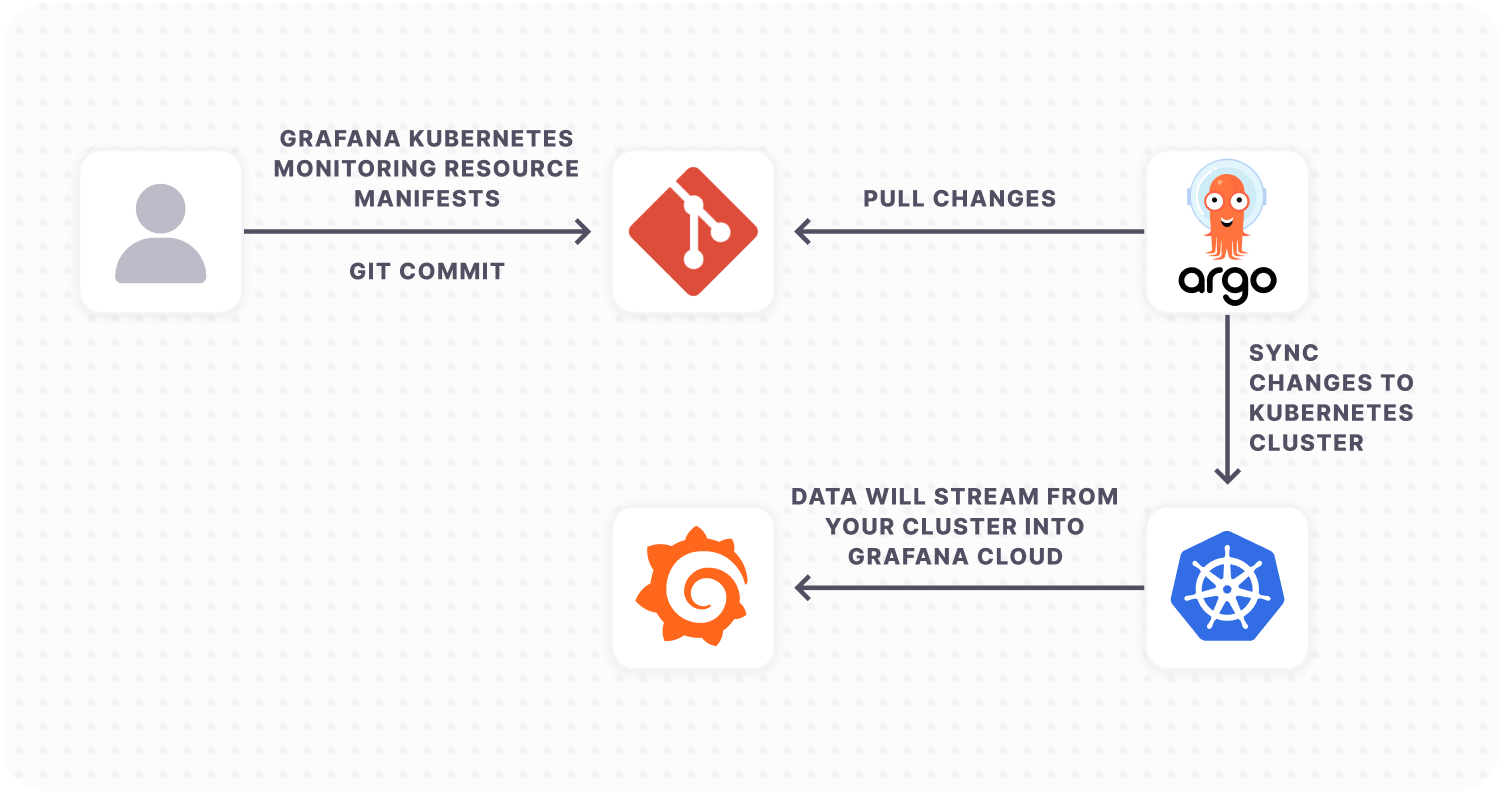
But what’s an easy way to add resources to your cluster while using Kubernetes Monitoring? ArgoCD has become the established tool for implementing GitOps workflows, simplifying the process of deploying and managing Kubernetes resources. If you are using Argo CD to manage your Kubernetes deployments, you can easily configure Grafana Cloud’s Kubernetes Monitoring solution to work with your cluster.
In this blog post, we’ll walk you through how to use Argo CD to configure Kubernetes Monitoring in Grafana Cloud.
What is Argo CD?
Argo CD is a declarative, open source GitOps continuous delivery tool that helps to automate the deployment of applications to Kubernetes clusters. It provides a centralized and standardized way of managing Kubernetes resources in large and complex environments. By using Argo CD, users can easily manage their Kubernetes resources and applications using Git repositories, allowing for version control and auditability.
Argo CD’s key features and capabilities include the ability to manually or automatically deploy applications to a Kubernetes cluster; automatic synchronization of application state to the current version of declarative configuration; a web user interface and command-line interface; and the ability to detect and remediate configuration drift. It also has role-based access control (RBAC), which allows for multi-cluster management, single sign-on (SSO) with various providers, and support for webhooks that trigger actions.
Why pair Argo CD with Kubernetes Monitoring in Grafana Cloud?
Kubernetes Monitoring in Grafana Cloud simplifies monitoring your Kubernetes fleet by:
Deploying Grafana Agent with useful defaults for collecting metrics that aid in cardinality management.
Providing custom queries to collect useful logs.
Offering preconfigured dashboards, alert rules, and recording rules for users to plug into their existing infrastructure.
But there is some manual effort required to deploy the necessary resources for Kubernetes Monitoring in Grafana Cloud. Users have to copy the configurations and run the commands, which are outlined in Grafana Cloud. While easy enough to do, this process can quickly become error-prone, especially in larger, more complex environments where multiple teams may be deploying resources across multiple clusters. Plus each change must be verified and deployed to each cluster by hand.
As a result, GitOps tools like Argo CD can help to automate Kubernetes resource deployment. Argo CD takes a declarative, GitOps approach to Kubernetes resource management, allowing for automated and standardized deployments across multiple clusters. This method not only saves time, but also reduces the risk of deployment errors and inconsistencies.
There are three key advantages to deploying Kubernetes Monitoring with Argo CD:
You’ll use a GitOps-based approach to manage resources required by Grafana Cloud’s Kubernetes Monitoring solution.
It’s easier to make changes in a controlled environment to Grafana Agent configuration and resources.
The Git repository would be maintained as a single source of truth for your Kubernetes resources.
Prerequisites for configuring Argo CD with Grafana Cloud
Before you begin, make sure you have the following available:
Argo CD installed and running in your Kubernetes cluster
Metrics and events: Deploy Grafana Agent ConfigMap and StatefulSet
Create Grafana Agent ConfigMap
Note: The default scrape interval is set to 60s. Scrape intervals lower than 60s may result in increased costs (DPM > 1). To learn more, see our documentation on active series and DPM.
Replace
${NAMESPACE} with your namespace
${METRICS_USERNAME} with Prometheus Instance ID
${PROMETHEUS_URL} with the push endpoint URL of the Prometheus Instance
${LOGS_USERNAME} with Loki Username ${LOKI_URL} with the push endpoint URL of the Loki Instance
${GRAFANA_CLOUD_API_KEY} with your Grafana Cloud API Key
Paste the following script into your shell and run it to create the metrics Agent ConfigMap configuration file.
This ConfigMap configures the Grafana Agent StatefulSet to scrape the cadvisor, kubelet, and kube-state-metrics endpoints in your cluster. It also configures Grafana Agent to collect Kubernetes events from your cluster’s control plane and ship these to your Grafana Cloud Loki instance. To learn more about configuring Grafana Agent, see our Grafana Agent configuration reference docs.
Create Grafana Agent StatefulSet
Replace ${NAMESPACE} with your namespace and paste the following script into your shell and run it to create the configuration file for metrics Grafana Agent StatefulSet.
kube-state-metrics watches Kubernetes resources in your cluster and emits Prometheus metrics that can be scraped by Grafana Agent. To learn more, see the kube-state-metrics docs.
Replace ${Argo CD_NAMESPACE} with your namespace in which Argo CD is deployed and ${NAMESPACE} with the namespace where you want to deploy Kubernetes Monitoring resources. Then paste the following script into your shell and run it to create the configuration file for kube-state-metrics Argo CD application.
Node_exporter
Node_exporter is used to collect host metrics from each node in your cluster, and emits them as Prometheus metrics.
Replace ${Argo CD_NAMESPACE} with your namespace in which Argo CD is deployed and ${NAMESPACE} with the namespace where you want to deploy Kubernetes Monitoring resources. Then paste the following script into your shell and run it to create the configuration file for node_exporter Argo CD application.
Logs: Deploy Grafana Agent ConfigMap and DaemonSet
Create Grafana Agent ConfigMap
Replace
${NAMESPACE} with your namespace
${METRICS_USERNAME} with Prometheus Instance ID
${PROMETHEUS_URL} with the push endpoint URL of the Prometheus Instance
${LOGS_USERNAME} with Loki Username
${LOKI_URL} with the push endpoint URL of the Loki Instance
${GRAFANA_CLOUD_API_KEY}
Paste the following script into your shell and run it to create the logs Agent ConfigMap configuration file.
Replace ${NAMESPACE} with your namespace and paste the following script into your shell and run it to create the configuration file for Logs Grafana Agent DaemonSet.
The ideal setup is to have changes that are made to the main branch of your Git repository automatically synced within Kubernetes. To achieve this, follow the steps below:
Create a folder in your Git repository (For this post, let’s create a folder named kubernetes-monitoring).
Push all the manifest files for earlier steps (metrics.yaml, metrics-agent.yaml, kube-state-metrics.yaml, node-exporter.yaml, logs.yaml and logs-agent.yaml) into the newly created folder.
Argo CD application setup
ArgoCD New App web interface.
In the Argo CD web interface, click on the New App button. Enter a name for the application, such as grafana-kubernetes-monitoring, and select the your desired project name (if there is none, select default) and sync policy as automatic. Select Prune Resources and Self Heal options to ensure configuration in Git Repository is always maintained within the Kubernetes cluster. Also tick the Auto-Create Namespace option and the Retry options.
Under Source, enter the URL for your Git repository along with the revision (by default it is HEAD). Set the path to the folder (kubernetes-monitoring).
Under Destination, enter your cluster URL. If it’s the same cluster where Argo CD is deployed, use https://kubernetes.default.svc and the namespace for creating the application resource. The namespace should be the same as the one where Argo CD is deployed.
Select Directory Recurse as its useful when having configuration files within nested folders
Finally, click on the Create button to create the application.
You can also run the below command to create the Argo CD application that monitors your Git Repository folder for changes. Make sure to replace ${GIT_REPO_URL} with your Git Repository URL; ${Argo CD_NAMESPACE} with your namespace in which Argo CD is deployed; and ${NAMESPACE} with the namespace where you want to deploy Kubernetes Monitoring resources.
Once the application has been created, the Kubernetes manifest defined in the Git repository will be automatically deployed.
Install prebuilt Grafana dashboards and alerts
Note: You must have the Admin role to install dashboards and alerts in Grafana Cloud.
Navigate to your Grafana Cloud instance and in the navigation menu, select Kubernetes under the Monitoring section.
Go to the configuration and click on Install dashboards and alert rules.
The configuration has been already completed, so you can now start viewing dashboards.
Once the metrics and logs from your Kubernetes cluster are being ingested into Grafana Cloud, you can:
Easily navigate around your Kubernetes setup using a single UI. Begin with a cluster view and drill down to specific Kubernetes pods with the preconfigured Grafana dashboards.
Use node observability. Find out more about node health along with pod density and node logs.
Use the cluster efficiency dashboard. Understand your resource usage and use the information for capacity planning and optimizing costs and efficiency.
Stay on top of your cluster. Use the preconfigured Grafana alerts to monitor your fleet.
Next steps for monitoring Kubernetes clusters with Grafana Cloud
Once you have settled into your new Argo CD configuration, you can continue to expand on your observability strategy with Kubernetes Monitoring in Grafana Cloud.
You can leverage the latest integrations available within the Kubernetes Monitoring solution such as Cert Manager, CockroachDB and more. To configure scraping application pod metrics, you can refer to our detailed documentation. And while Kubernetes Monitoring currently covers metrics and logs, to get a complete timeline into data transactions, request durations, and bottlenecks, it is also important to use traces. You can configure your applications to send traces to Grafana Agent, which can then be configured to send that tracing data to Grafana Cloud’s hosted tracing instance.
The easiest way to get started with Kubernetes Monitoring is with Grafana Cloud. We have a generous free forever tier and plans for every use case. Sign up for free today!
Grafana Labs this week announced it acquired Pyroscope and plans to merge Pyroscope’s open source continuous profiling project with the open source continuous profiling database that Grafana Labs launched last year.
Richard Hartmann, director of community at Grafana Labs, said after logs, metrics and traces, continuous profiling is now the fourth pillar of observability that enables DevOps teams to identify how much infrastructure resources any given piece of code is consuming. That capability is critical for everything from controlling costs to improving performance to limiting the amount of carbon generated by an application both before and after an application is deployed, he added.
The resulting Grafana Pyroscope project will be natively integrated with Grafana Labs’ open source dashboard project to make it simpler to visualize profiling data and correlate it with metrics, logs, and traces. Grafana Labs is also committing to adding profiling capabilities to the fully managed Grafana Cloud observability platform.
Pyroscope currently makes a plug-in for Grafana available in addition to a cloud instance of Pyroscope. Integrating Pyroscope with the Grafana Labs portfolio will make it simpler for DevOps teams to visualize issues before there is a major disruption to an application environment, said Hartmann.
It’s still early days as far as the adoption of observability platforms is concerned, but it’s apparent that as application environments become more complex, the plethora of monitoring tools that DevOps teams rely on will need to be streamlined. Observability platforms promise to unify logs, metrics and traces in a way that makes it simpler to launch queries to identify the root cause of an issue. The rate at which DevOps teams will embrace observability will naturally vary, but the biggest obstacle might not be the platforms themselves. Instead, the issue is understanding what queries can help DevOps teams better understand the root cause of an IT issue. Visualization tools, in combination with code profiling tools such as Pyroscope, should make it simpler to surface those issues.
Grafana Labs is also enabling organizations to better address sustainability concerns that have emerged as more policies are enacted to encourage organizations to reduce the overall size of their carbon footprints. The European Union, especially, has been enacting policies that provide organizations with a range of incentives to encourage greater efficiency from IT environments. It won’t be long before more DevOps tools and platforms provide greater visibility and control over the amount of infrastructure application code is consuming to achieve sustainability goals.
In the meantime, overall observability should continue to improve as organizations move beyond continuous monitoring to gain insights into how application environments are behaving. As IT environments become more complex, tools that monitor a set of pre-defined metrics are no longer enough to ensure application resiliency. The challenge—and the opportunity—is to determine how to take observability to the next level before the next inexplicable application performance degradation.
At the same time, Grafana Labs announced version 2.0 of Loki, which normalizes different structured, unstructured or JSON log formats in a way that allows DevOps teams to extract additional labels as well as enable additional filtering and grouping. IT teams are also not required to define labels in advance and store those labels in the database.
A Loki 2.0 query can also be used to directly generate an alert statement using a new distributed rules evaluation engine. Previously, Loki would have to have been configured as a Prometheus data source, which then would allow the distributed instance of Prometheus, dubbed Grafana, to generate alerts.
Tom Wilkie, vice president of product for Grafana Labs, says Loki 2.0 also serves to make the database employed to observe events in real-time smaller, resulting in faster queries. The result is an approach to analyzing log data that is significantly less expensive than legacy platforms, he said, noting DevOps teams should expect to see Grafana Labs also use Loki to address security use cases.
Wilkie said both Loki and Grafana Tempo are intended to reduce the barriers to achieving observability in a way that doesn’t require nearly as much time, effort and skills on the part of a DevOps team. Grafana Tempo supports the same Tempo data discovery engine employed by Loki and the open source Prometheus monitoring platform and the Grafana platform built on top of Prometheus. That level of integration makes it easier for IT teams to narrow in on a specific trace using open source tracing protocols such as Jaeger, Zipkin and OpenTelemetry. Users of the platform can jump from log to trace and back again easily, he said.
There is also no need to set up and maintain a separate index that IT teams must maintain, Wilkie added. In addition, Tempo is compatible with object storage systems commonly found on cloud services, so the total cost of achieving observability drops significantly compared to platforms that rely on a proprietary database, he said.
Despite observability being a core tenet of DevOps, it remains an elusive goal for most IT organizations. There is no shortage of tools for monitoring individual applications and systems, but aggregating all the data the tools generate into actionable intelligence requires a significant amount of time and effort. Loki makes it much easier to analyze the relevant logs at the right time in a way the average IT administrator can navigate without having to become a superuser of more complex platform, said Wilkie.
It’s too early to say how the observability wars will play out. The good news from an IT perspective is at least now there is no shortage of options.










 Despite observability being a core tenet of DevOps, it remains an elusive goal for most IT organizations. There is no shortage of tools for monitoring individual applications and systems, but aggregating all the data the tools generate into actionable intelligence requires a significant amount of time and effort. Loki makes it much easier to analyze the relevant logs at the right time in a way the average IT administrator can navigate without having to become a superuser of more complex platform, said Wilkie.