Tag: Google Cloud Platform

  • Dead Downtown: It’s YOUR Fault | Pentagon’s FOUR Cloud Vendors | Apple Adds MORE Price Flexibility

    Dead Downtown: It’s YOUR Fault | Pentagon’s FOUR Cloud Vendors | Apple Adds MORE Price Flexibility

    Welcome to The Long View—where we peruse the news of the week and strip it to the essentials. Let’s work out what really matters.

    This week: Home working is ripping the heart out of cities, the DoD’s bizarre cloud strategy, and Apple adds a $10,000 app price option. (more…)

  • Google Looks to Secure Software Supply Chains

    Google Looks to Secure Software Supply Chains

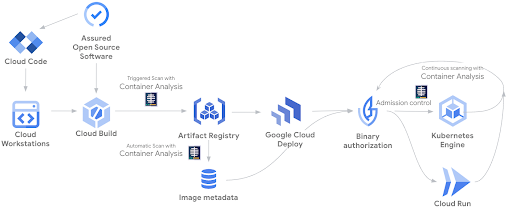
    At the Google Cloud Next ’22 conference, Google today launched a managed Software Delivery Shield (SDS) service to enable DevOps team to store, manage and secure the build artifacts in Artifact Registry. At its core, SDS is based on a trust-based policy engine to establish, maintain and verify a chain of trust across the software supply chain.

    In addition, Google has updated its container analysis tool to include vulnerability scanning for Maven and Go containers along with preview support for non-containerized Maven packages.

    The managed Software Delivery Shield service spans a range of Google runtimes environments, including Google Kubernetes Engine (GKE), Cloud Code, Cloud Build, Cloud Deploy, Artifact Registry and Binary Authorization. Cloud Build also now officially supports Supply chain Levels for Software Artifacts (SLSA) Level 3 best practices by default in addition to generating authenticated and non-falsifiable build provenance for both containerized applications and non-containerized Maven and Python packages.

    GKE, in preview now, provides detailed assessments, assigns severity ratings and surfaces the security posture of the clusters and workloads, including insights into operating system vulnerabilities, workload configurations and other actionable insights. Log data can now also be captured while security event information can be routed to, for example, a security information and event management (SIEM) platform.

    The Google Cloud Run serverless platform can also, in preview, display software supply chain security insights such as SLSA build-level compliance, build provenance and vulnerabilities found in running services.

    At the same time, Google is also making available in preview Cloud Workstations, which provide fully managed secure development environments on Google Cloud that can be accessed via a browser. Built-in security capabilities include virtual private cloud (VPC) controls, no local storage of source code, private ingress/egress, forced image updates and identity access management (IAM) policies.

    Finally, the Cloud Code plug-in for integrated development environments (IDEs) now includes a preview of Source Protect to give developers real-time security feedback in the form of vulnerability dependencies and license reporting as they write code.

    Collectively, Google claimed it now provides more than 250 curated packages across Java and Python with verified provenance. It also automatically generates a software bill of materials (SBOM) to create an inventory of all components and dependencies.

    Historically, cloud service providers have been advocating a shared responsibility approach to cloud security that required organizations to not only secure their applications but also the way cloud infrastructure is provisioned. The challenge is developers generally provision cloud infrastructure themselves even though they generally have limited cybersecurity expertise. Too many developers assume the underlying cloud infrastructure is more secure than it actually is.

    Now, cloud service providers are extending the security services they provide at a time when organizations are making security a bigger factor in determining where to build and deploy applications.

    Sunil Putti, vice president and general manager for Google Cloud Platform, said Google is attempting to make cybersecurity invisible to developers in the sense that guardrails will automatically be embedded within the platform.

    The issue is that cloud computing environments are becoming more complex as new classes of cloud-native applications are deployed alongside legacy monolithic applications. Complexity, as always, is the enemy of cybersecurity.

  • Google Focuses on Enterprise Cloud With Mandiant Acquisition

    Google Focuses on Enterprise Cloud With Mandiant Acquisition

    Thomas Kurian became the CEO of Google Cloud Platform (GCP) with a modest mandate: Turn Google Cloud into an enterprise cloud platform behemoth. Easy, right? By 2019 “Google” was already a verb because of its search engine dominance and the company’s revenue was north of $136.8 billion. So, why have I been closely tracking Google Cloud’s progress on winning enterprise cloud business? Let’s back up.

    When Kurian left Oracle and joined Google, the company was an extremely successful advertising company. At the time, over 85% of Google’s revenue came from advertising. The search engine, email service and lightweight office productivity apps all served the ultimate goal of keeping eyeballs on Google sites so that users could be served more advertisements and increasingly more personalized ads based on a user’s Google interactions.

    If You Build it, Will They Come?

    Enterprises Require More Than Just Technology From Their Cloud Providers

    Google clearly has the scale, tools and technical expertise to provide businesses with what they need from a cloud vendor. When Kurian left Oracle, he was one of the highest-paid technology executives in the world (according to Oracle, his 2017 compensation package was around $36 million). So why would Google hire Thomas Kurian? Because enterprises require their technology and services partners to have more than just great tech. When advising enterprise clients, the following are the top three topics that come up when discussing the selection of a cloud vendor:

    • Industry Expertise: For the enterprise, understanding industry nuances is critical. I recently talked to an executive at a large airline company that fired their large, publicly-traded technology services company because the partners and the services company didn’t truly understand the airline industry. They weren’t using the right terminology and didn’t understand the business pain points.
    • Predictability: Why have large enterprises been hesitant to go all-in on the cloud? They need predictable technology. That doesn’t just mean “stable;” it means that costs, security, usability and service levels must all be predictable. Why, for example, is the mainframe still critically important for many enterprises? Because it is predictable and secure.
    • Ecosystem: Clouds can’t live in isolation. Cloud vendors must have an ecosystem to support enterprise client needs. My number two cloud prediction for 2022 is that we will see an increase in industry-specific ecosystems. Amazon Web Services (AWS), Microsoft Azure and IBM Cloud all have cloud ecosystem strategies focused on financial services.

    Thomas Kurian is well aware of the need to play well with other cloud providers and enterprise cloud providers. In fact, the widely held belief is that Kurian left Oracle because he and Oracle CEO, Larry Ellison disagreed on Oracle’s multi-cloud strategy—Kurian wanted Oracle’s packaged applications to be available on other vendors’ cloud platforms.

    What Does the Mandiant Acquisition Mean for Google?

    It’s clear that Google Cloud is focused on the enterprise. Google has no shortage of DevOps, data, machine learning and artificial intelligence tools to satisfy developers and data scientists. However, what Google needs are more features that enterprises expect from a cloud partner.

    Google Cloud isn’t new to cybersecurity—the company has been securing its own cloud since its foundation. In addition, the company has been gaining enterprise traction with Google Workspace and Gmail and the security around these SaaS offerings is paramount.

    By acquiring Mandiant, Google Cloud can more closely partner with cloud customers throughout the entire life cycle: From code creation (through a combination of Google’s existing Google Chronicle tools) through testing, threat detection and advisory work around incident response.

    My Analyst View

    The debate around security and the cloud isn’t even close to being resolved. Many will tell you that cloud vendors invest millions upon millions of dollars more than any other company in the cloud. It’s imperative that cloud vendors don’t experience infrastructure or SaaS security breaches. However, security continues to be a roadblock for cloud adoption—and, most importantly, enterprise cloud adoption. While every enterprise is doing some work in the cloud, many are still reluctant to move critical workloads (especially their sensitive data) to the cloud.

    Google Cloud should use Mandiant as the bedrock on which its enterprise cloud security business is built. Rather than having piecemeal parts and partners, businesses want their cloud providers to have opinionated frameworks and best practices. Mandiant has some of the best security minds in the industry and can help Google Cloud customers create secure instances. I expect Google Cloud to provide ready-to-provision cloud environments tailored for specific regulated industries by leveraging Mandiant’s expertise. Of course, customers aren’t going to want to necessarily adopt everything that Google Cloud suggests, and customers should be able to swap out components. However, many businesses are already overwhelmed with the number of cloud partners they have to engage with to create a secure cloud environment.

    What Will Microsoft and AWS Do?

    I expect AWS and Microsoft Azure will focus their attention on building out enterprise-focused security offerings. I recently wrote about why it made sense for Microsoft to purchase Mandiant. My general feeling was that Microsoft had many security offerings—ranging from simple consumer-grade virus scanning to enterprise offerings—but that the company lacked a cohesive enterprise security strategy. I still believe Microsoft needs to clearly define its enterprise security assets (and more coherently group them together) either through a reorganization and/or an acquisition. Like Microsoft, AWS has hundreds if not thousands of security offerings and partners. Although AWS is the cloud leader, the company is well behind Microsoft and Google in defining its cloud security strategy. The company needs to outline its enterprise cloud strategy, and cybersecurity needs to be one of the linchpins of that enterprise strategy.

  • Setting Up Google Authenticator on Multiple Servers

    Setting Up Google Authenticator on Multiple Servers

    Google Authenticator is pretty great. It allows me as an administrator to set up and configure multi-factor authentication into my UNIX boxes without having to spend money on a tool like YubiKey or RSA tokens. It’s easy to set up on any type of phone—no specialized hardware or dongles needed. It’s also pretty cool in that you don’t have to have network access from the server to the outside world. Since Google Authenticator is time-based, it doesn’t need to send an SMS or do a callout to a centralized server to get the current valid token.

    What is a bit painful, though, is needing to have a different Google Authenticator token for every one of my servers. The standard setup would have you run the google-authenticator command on each and have as many tokens as you have servers. Obviously, this quickly becomes unwieldy and untenable.

    Instead, I want to have one token for multiple servers. Here’s how I installed and configured Google Authenticator on each system.

    First Machine

    On my first machine I’m going to install Google Authenticator and create a secret key—the exact flow I’d use normally.

    1: Install Google Authenticator. This is pretty well-documented; examples can be seen at untrusted connection and How-To Geek. I won’t walk through each step since this part varies from OS to OS; the rest of the steps are identical, however.

    2: Restart the ssh service

    $ sudo restart ssh

    3: Run the google-authenticator command to generate a secret key for your account, which you’ll store in your phone. This information will be stored in a configuration file that we’re going to get into later. I don’t need to comment that you actually have to enter the secret key into your phone, do I?

    4: Give it a spin. From another shell go ahead and try it out.

    5: Let’s take a look at the configuration file. We’re going to copy these contents to our other machines that we want to have the same secret key.

    Installing Google Authenticator on Additional Machines

    For all other machines I’m going to install Google Authenticator as normal, but I’m going to use the secret key from the first machine. This will let me log in to each of them using that same secret key that I stored from the first machine.

    1: Install Google Authenticator. Again, other places describe this in detail. We’re going to install the program but not do the creation of any secret keys

    2: Create the configuration file and add the content that we got from the other machine.

    3: Set permissions for the configuration file.

    4: Restart the ssh service.

    5: Test the login.

    Voila! A shared secret key across my servers! Happy day.

    — Rajat Bhargava

  • SoulCycle Flexes Its Muscles with DevOps and CI/CD

    SoulCycle Flexes Its Muscles with DevOps and CI/CD

    When SoulCycle wanted to improve application development and deployment, including improving services for customers across its 80-plus indoor cycling centers in the United States and Canada, the company turned to Mark Sost, a veteran developer and engineer who worked at several media companies, including Hearst.

    Over the last two-plus years, Sost, who now holds the title of senior director of engineering at SoulCycle, has built-up the company’s engineering and DevOps teams, increasing the headcount from eight or nine developers to about 40 employees now.

    The first major project was revamping a legacy, LAMP-based stack used to support applications to focus more on a modern platform that could take advantage of DevOps methodologies, as well as continuous integration and continuous delivery practices (CI/CD).

    Sost and his team dubbed this new platform Podium. However, Podium is more than a development platform, Sost explained.

    “Podium became the ethos and the methodology, as well as the architecture and application stack for re-platforming Soul’s technology stack in total,” Sost said in a telephone interview. “We moved from that monolithic to more of a service-oriented architecture. As such, we started to break out functionality on multiple applications.”

    The re-engineering also meant investing in new infrastructure, as well as other cloud-based technologies. This includes a multi-cloud approach.

    While most of the legacy applications have now been moved to Amazon Web Services, SoulCycle also uses Google Cloud Platform for Podium and all new developments. Sost also takes advantage of Kubernetes and Docker for container orchestrations, as well as investments in other managed services.

    Other tools in the DevOps arsenal include Jenkins to run unit tests; DataDog and StackDriver for monitoring and analytics for workflows; combing Travis CI, Cloud Builder and GCR for CI; and technology from startup Harness, which provides CD-as-a-service. Sost called Harness the “last-mile” tool needed for application deployment.

    “For Harness, that’s CD for us,” Sost said. “That’s continuous delivery to our various Podium environments. We’re leveraging it for delivery to all our Podium environments. Everywhere from UAC (user account control) during the code review cycle to QA after merge, to production, load test and everywhere in-between.”

    This revamped approach to application development now means that the SoulCycle engineering team has created approximately 30 different apps over the last 24 months, this includes internal apps used within the company environment, and ultimately to customers using the facilities and equipment.

    Additionally, Podium helps create a more unified architecture to help ensure that the entire team—whether it’s DevOps, QA or the production team—can paint a 360-degree view of the problem that needs to be solved and what the implications are for the business once the solution is put into place.

    This is what Sost and his team call “Podium principles.”

    “When we say that we’re building things with Podium principles in mind, we’re talking about the fact that everything is version-controlled,” Sost said. “We have full test coverage. We have everything in terms of Kubernetes manifests to infrastructure automation written down and version control checks it as part of source code. That applications are conforming to more of that 12-factor methodology and that we’re really focused really heavily on developer empowerment.

    “I think for us, that really is a shift that Podium has introduced; a move from writing the code as an application developer and then throwing it over a wall to an operations person—a QA person—to test it and deliver it somewhere,” Sost added. “Instead, we provide a developer the tools and the patterns of principles to go about controlling more of their application development life cycle all the way through to delivery.”

    The results have helped improve the overall SoulCycle experience for customers, which includes:

    • Reducing deployment time by approximately 80 percent.
    • Instead of one hour, deployments now take one developer 10 to 15 minutes.
    • QA verification has been reduced by approximately 80 percent.
    • It now takes three QA engineers one hour to verify, compared to three to six hours previously.

    At the same time, Sost believes that the Podium approach gives developers more control over their projects and lets them focus on writing good code that creates apps people want to use.

    “It’s more, ‘Now, I know what’s involved with getting my application to people,’” Sost said. “Because at the end of the day, engineers are just concerned with writing things that people want to use. … This is how we’re going to give you more control of the code and applications that you’re writing, so that you can see meaningful results quicker, without having to wait for someone.”

    What’s next for Sost and his team at SoulCycle? The answer: Machine learning and a bit of automation to the DevOps process.

    Here, SoulCycle is using Harness tools to log more data and infrastructure monitoring into the platform, which allows the algorithm to learn more about the various development projects. This can make the code better and eliminate errors that come with constant development and deployment.

    “We’re letting it get smarter over time around how it can detect anomalies and understand whether our code was successful because there are going to be times where things slip through unit testing or slip through integration tests and there are even going to be times where they slip through load tests, where things like 99 percent are just not going to cut it,” Sost said.

    — Scott Ferguson

  • Google Cloud Platform: The Basics for Absolute Beginners

    Google Cloud Platform: The Basics for Absolute Beginners

     Google Cloud Platform provides powerful tools and services. Why should you pay attention to one of the leading cloud service providers? More and more companies are moving to the cloud to help create software applications and manage data, and Google Cloud Platform is one of the many platforms available for cloud computing, an industry that is poised to break $159 billion in market value by 2020.

    There are four basic options for creating applications on Google’s infrastructure:

    • Google Compute Engine
    • Google App Engine
    • Google Kubernetes Engine
    • Google Cloud Functions

    What You Need to Know About Google Compute Engine

    Google Compute engine lets you create instances. These instances are virtual machines with their own set of hardware and software. Basically, your personal instance, or VM, is a virtualized environment that sits on top of the very real partitioned environment on servers in a Google data center.

    Google Compute Engine is an infrastructure as a service (IaaS). As such, you’ll be able to control networking, firewalls, disk storage and a lot of granular aspects of how, when, where and why your application works.

    The Essentials of Google App Engine

    Google App Engine is a platform as a service (PaaS). You don’t have to worry about the infrastructure—this is taken care for you. Your project will scale as necessary according to your needs. Simply vendor your APIs, add custom code, load it into the app engine and voilá! You’ve got yourself a working Google Cloud application.

    Simply set up billing, add some developers, put in a dash of code and you’ve got the gist of the full project arc for App Engine.

    Google Kubernetes Engine: The Absolute Basics

    Google Kubernetes Engine lets you create containerized applications with the open source Kubernetes. Containerized application management is just another way of talking about a kind of specialized VM management.

    With containerized apps, you don’t need a full VM to launch distributed software applications. In other words, it’s a way to boost memory and efficiency by having multiple containers sitting on top of a single VM instance. It’s a relatively new way of developing applications.

    Google Cloud Functions

    Serverless applications aren’t without their dedicated service, either. For all your serverless application needs, Google Cloud Functions has got you covered.

    Getting Started With Your First Project

    Setting up your first project within Google Cloud Platform can be done with relative ease.

    First, you’ll want to get an account with Google Cloud Platform if you haven’t already. This can be done in a few easy steps:

    1. Sign up with a Gmail account.
    2. Agree to the terms of service.
    3. Sign up for the free trial (one year of free membership and $300 credit toward your account).
    4. Enter your credit card information.

    After you’ve completed those steps, you’ll be prompted to an in-browser tutorial. Don’t skip this. It’s an easy way to get oriented to the platform right off the bat. Follow the tutorial so you can get a feel for how the developer console is organized.

    Creating Your First Project

    Now it’s time to create your first project, add team members and enable billing. This is fairly straightforward, but it’s important to get acquainted with these pages, dashboards and controls early on.

    To create a project, simply click on “create a new project,” then follow the prompts. Every Google Cloud Platform project needs a unique title so make sure you supply one or accept a generated one. Then scroll down to IAM policies. You’ll want to make sure you have the right privileges in place.

    After you’ve gone through a few of the tutorials and created your first project, open up the hamburger menu in the upper left corner. When you expand the menu you’ll see a long list of services. App Engine, Compute Engine and Kubernetes should all be visible.

    Conclusion

    There are four major options when deciding to employ Google Cloud Platform: Google Compute Engine, Google App Engine, the Kubernetes Engine and Google Cloud Functions. All are great options for starting your first cloud project.

    Google Cloud Platform is a service that gives you access to cloud client libraries and enterprise-grade hardware. As more and more companies move to the cloud, and more and more data is produced, it’s important to start investigating which cloud solution is right for you.

    With the Google Cloud Platform, you have many options, from building atop an infrastructure, a platform or building and managing containerized applications. What you choose to employ is completely up to you.

    — Charles Dearing

  • From the Trenches: Zesty.io’s Google Cloud Migration

    From the Trenches: Zesty.io’s Google Cloud Migration

    Zesty.io recently migrated its sites to the Google Cloud Platform from Rackspace—a process the company believes will make it more agile while streamlining its operations. Zesty.io community manager Phil Ballew recently spoke with Chris Hiestand, Zesty.io’s DevOps leader, to discuss some of the reasons for the migration and get a feel for just what the new cloud system brings to the company.

    Ballew: So what exactly is Google Cloud, and how does that compare to Rackspace?

    Hiestand: Google Cloud Platform is similar to AWS, Rackspace or Azure; they manage infrastructure and services to host your applications and data on. With Zesty.io being SaaS, there are servers running the user’s website that we will manage, and these names are the companies that provide the infrastructure.

    Ballew: So what about Google Cloud made you choose that over Rackspace?

    Hiestand: The difference is that Rackspace has been around for a long time and has produced great business tools, but Google’s tools, which they have been using internally for a while and are now making publicly available, will fit the needs for Zesty.io as we scale out at a rapid pace. Some tech that Google created about 10 years ago is considered cutting-edge today.

    Ballew: What was the reason and initial appeal for moving from Rackspace to Google Cloud?

    Hiestand: Google’s infrastructure is a well-designed fit for containers using the Kubernetes project. Their architecture is designed to minimize operations work, saving labor. Using GCP, we can focus more on writing good software and less on the drudgery of making that software run. Google’s network is remarkable in every respect: good security, bandwidth within the data center, between data centers and out to the greater internet. And their compute nodes are set up in such a way that when they do maintenance, they can move our systems around and we don’t even know it. We stay running and focused while they maintain the hardware.

    Ballew: Kubernetes? What is that exactly?

    Hiestand: Kubernetes is a container orchestration tool based on Google technology that we use on GCP to help us automate and scale the deployment of our software and websites for the users. It helps us think about our applications first and operations a distant second. It also empowers Zesty.io engineers to own what’s running in ops.

    Ballew: What other technologies are you using?

    Hiestand: Kubernetes is built on container technology, so we also use Docker extensively in development.

    Ballew: What were some of the major obstacles that you ran into when migrating to Google Cloud?

    Hiestand: The technical parts are pretty straightforward. The hardest part is probably coordinating with customers. We are mitigating this by keeping Rackspace and Google Cloud in production at the same time, giving customers time to update their DNS records.

    DNS instructions can be found at: https://developer.zesty.io/docs/satellite-sites/launching-a-satellite-site

    Ballew: What are some of the benefits Zesty.io users will see from this switch?

    Hiestand: The most obvious benefit will be the faster page load speeds of Zesty.io-developed websites, including slightly faster application load times for Zesty.io developers. In the not-too-distant future, international load times will be very good, particularly for our enterprise customers. In addition, we are pushing a lot of new features to Zesty.io that will be on the Google Cloud version soon for people to try out. The rollout to GCP also improves our software engineer development velocity so we can get improvements delivered to our customers faster.

    Ballew: Even though Zesty.io users have not all been moved to Google Cloud, is there the option to move now if somebody wanted to, and if so, how can they do that?

    Hiestand: Sure! I would love to help out with that. They can send me an email at support@zesty.io. After we migrate their site, they can update their DNS to point to the new CNAME when they are ready, and customers won’t be able to update their Rackspace website anymore. They will also want to update their bookmarks because the administration URLs have changed, but for the time being, they will get automatically redirected to the new ones. We can help them with any questions they have. Eventually, we will be updating all websites for all users. If you do not update your CNAME, it will take a little extra time for your site to load because of additional network routing from Rackspace to GCP.

    About the Author / Phil Ballew


    philballewPhil Ballew is the Zesty.io community manager, working with developers and building the Zesty.io community through many unique outlets. Connect with him on LinkedIn.