Tag: gitops

  • How GitOps Can (Sometimes) Save DevOps

    How GitOps Can (Sometimes) Save DevOps

    A lot has been written about GitOps since its release by Weaveworks more than a year ago as a “single source of truth for the whole system” for using Git for Kubernetes deployments on the cloud.

    Aptly described by Alexis Richardson, Weaveworks co-founder and CEO, as “90% best practices and 10% cool new stuff,” GitOps largely offers a framework for DevOps CI/CD deployments on Kubernetes. This was something very often seen as missing among the many Kubernetes management distributions on offer—hence, its popularity.

    The tool is obviously not of use for organizations that have not adopted Kubernetes, but in many ways has enabled organizations’ DevOps to more efficiently take advantage of Kubernetes by running Git in a more disciplined and focused way.

    “The idea behind GitOps is to maximize the time developers spend on productive coding versus worrying about working with the latest source code, merging their saved code back into the repository and continuously supporting problems that come up during the application build process,” Torsten Volk, an analyst for Enterprise Management Associations (EMA), said.

    GitOps offers DevOps a way to use its version control capabilities to archive changes to application deployments in a way that allows them to be recalled at a later time. This can come in handy when an architecture fails and it is necessary to access and reinstate a previous version of an application deployment or update prior to the incident. All changes are tagged and archived in a way that each developer knows when and how their changes to an application were changed.

    “Ideally, each developer would check in their code and receive a link to the running application with his or her latest changes applied, as well as with all the other changes that were checked into the repository,” Volk said.

    The Adoption Checklist

    Volk offered the following elements he said DevOps should have in place before adopting GitOps:

    — All infrastructure and application configurations, including databases, middleware and machine learning models, need to be defined as code, Volk said.

    “Everyone must accept the basic concept that code is only complete when all components for a successful build are checked into Git,” he said. “CLI-driven, ad hoc deployments are no longer acceptable.”

    — The DevOps group has to be able to detect changes to application code that previously might have been able to bypass Git. There must be thus be a process in place to bring these changes back under GitOps control, Volk said.

    “The IT Ops/DevOps teams need to make operational changes to the app exclusively via changes to the code checked into Git,” he said. “This means that tasks such as scaling, failover, creating maintenance windows, etc. as well as urgent troubleshooting tasks have to run through Git. The latter is especially tricky, as the enterprise will not accept longer mean time to detect (MTTD) and mean time to repair (MTTR) due to GitOps.”

    — Declarative management practices have to be used in Dev and Ops. “This has proven to be a critical roadblock,” Volk said. “Kubernetes developers, as part of Dev and Ops, still often prefer the control of imperative management over the promise of defining their desired end state and letting the software deal with how to get there.”

    For DevOps teams that have the prerequisites in place as described above to use Git to run Kubernetes deployments on the cloud, then GitOps deserves at least a look. However, for those organizations that adopt GitOps for the right reasons, it is not designed as a one-size-fits-all solution and organizations will need to modify it to fit their needs. Its implementation, for example, will almost certainly different compared to how Weaveworks described its functioning after using it for two years to run Kubernetes and Prometheus telemetry databases on a cloud platform.

    DevOps will, thus, need to be actively involved in GitOps deployment and maintenance to make sure it meets organizations’ individualized needs. When first describing GitOps, Weaveworks’ Richardson wrote: “Fair warning: this is what works for us, and dear reader, you may disagree.”

    — B. Cameron Gain

  • Picking a Git for the Enterprise

    Picking a Git for the Enterprise

    Some of my Agile and DevOps transformation work, not surprisingly, involves helping clients with tooling adoption—to set up, scale and operate across the organization. This blog piece is about a recent experience of setting up Git across a client organization.

    Git, as most of you are aware, is a fundamental building block for many of the modern engineering practices associated with Agile and DevOps. Software configuration management tools such as Git, in simple words, allow you to track and manage your software code and configuration changes in the most-effective, efficient and distributed way. Git, as the choice of source control, has remained steadfast over the years, while other tools across various categories of DevOps tools have seen their fortunes go up and down with the ever-changing technology landscape of DevOps tools. In fact, one new buzzword is GitOps—some even calling it the next stage of evolution for DevOps.

    Origins of Git

    More than a decade ago , the Linux community faced a challenge  because none of the existing revision control tools met their need for a distributed version control tool. And from that need Git was born. In the words of the creator of Git, Linus Torvalds, “The main issues with SCMs is the politics around who can make changes.” Ever since its creation, Git has radically changed the notion of software configuration management (SCM), by enabling engineers to work remotely and autonomously. (If you are new to Git and interested in exploring more about Git and its features, Atlassian has a tutorial and GitHub has a list of resources.)

    Git and More

    While Git as the core product is fundamentally the same whichever flavor your prefer—GitHub, GitLab or Bitbucket—the wrapper around it determines the important non-functional characteristics such as operatability, security, usability and maintainability. Our quest for an enterprise-scale Git focused on the wrapper and not the core product itself, as much has been written, debated and documented on the core product of Git itself already. The value and relevance to enterprises is in the wrapper that these productsplatforms provide.

    We looked at the core product and related offerings; as you can imagine, the three tooling vendors have different positioning and taking different directions with the future road map for their respective tools. Bitbucket’s strength lies in the fact that Atlassian is bundling the product with the omnipresent Jira Software and Confluence. GitLab’s road map seems to be taking the product beyond Git and into the idea of a single product for your entire pipeline automation, from concept to cash. GitHub, which is being acquired by Microsoft, is increasingly relying on the strength of integrations with other tools and the workflow capability the company is bundling with it.

    (I avoid an overemphasis on the commercial aspect in this blog; however, I’m not ignoring it completely. Part of the reason is due to the fact that enterprise pricing is not entirely transparent and may vary wildly depending on organization’s negotiating capability, the scale of usage, future potential and marketable track records as perceived by the tooling vendors. This blog is also not meant to be a feature by feature comparison, as this is something you can Google and find out yourself very easily.)


    The Verdict

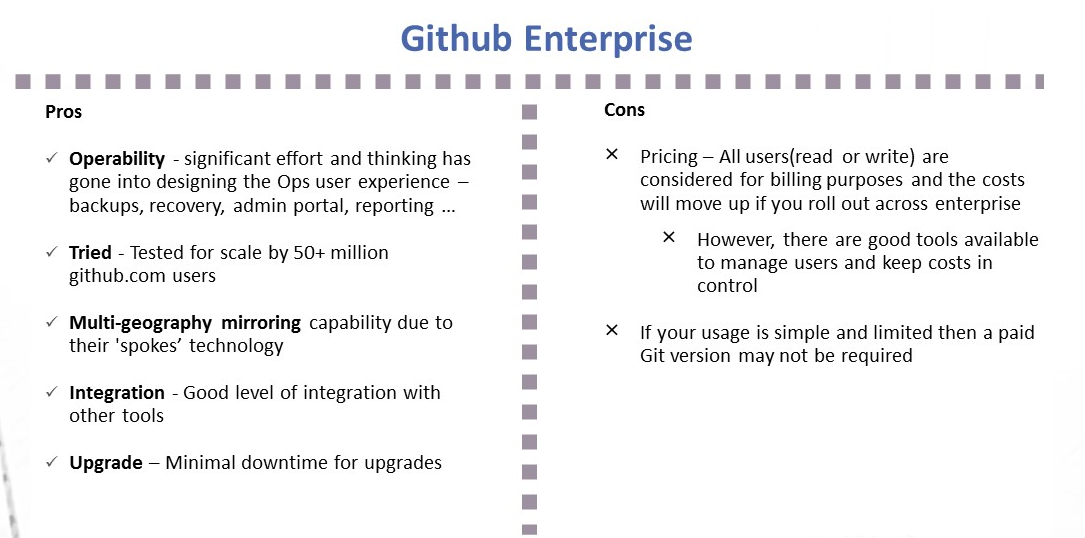
    Github Enterprise pros and cons
    Image1; Github Enterprise – Pros and Cons
    Gitlab Ultimate and features
    Image 2:  Gitlab Ultimate – Pros and Cons

    My Recommendation: It Depends

    1. I liked the vision of GitLab as a single-stop tooling platform for continuous integration/continuous delivery (CI/CD), which goes beyond source control. I think the tool is simple and intuitive to use and great for small to midsized setups or even large enterprises that are focused on having smaller and autonomous teams.
    2. GitHub seems to be well-suited for large and complex enterprises with significant outsourced and offshore-based technology teams.

    I would love to hear your views on what has been your thinking with regards to choosing a Git-based product for your enterprise or teams. Meanwhile, here are some links you might find useful in your decision-making:

    1. Why and how GitLab abandoned Microsoft Azure for Google Cloud – https://venturebeat.com/2018/04/06/why-and-how-gitlab-abandoned-microsoft-azure-for-google-cloud/
    2. Tooling integrations of GitLab – https://docs.gitlab.com/ee/integration/README.html#doc-nav%20for%20list%20of%20integrations
    3. GitHub add-ons are listed at Addons are listed at https://github.com/marketplace
    4. Security and scalability info of GitHub is at https://github.com/jonico/github_security_and_scalability_overview
    5. Products that integrate with GitHub platform – https://github.com/works-with
    6. Pricing of GitLab – https://about.gitlab.com/pricing/

    — Aditya Vadaganadam