Tag: github

  • Microsoft and GitHub: The Sky is Not Falling

    Microsoft and GitHub: The Sky is Not Falling

    The consternation seen in some corners of the internet over Microsoft’s agreement to acquire GitHub is overblown and too early.

    For those who don’t follow me normally, I am a developer for Windows, Android and Linux. I am also a user of both GitHub and BitBucket. While I am an advocate, I am more of an IT productivity/tools advocate than a pro/con MS advocate. So pretty much, I am IT. I’ve worked in pretty much every IT environment from developing embedded devices to cell phones to apps for smartphones to a raft of enterprises from financials to utilities.

    Until we know what Microsoft intends with GitHub, it makes no sense to go crazy with plans to migrate away from the platform.

    Oh, I could draw up plans to move my company’s GitHub repositories to BitBucket (or GitLab, or wherever), but honestly at this point there is no reason to do so. We (all of IT) have a limited amount of time available, and is migration away from GitHub the best use of that time?

    I argue that at this point, it absolutely is not.

    Stop. Breathe.

    There are things Microsoft could do that would make my company want to move away from GitHub. I do not expect that any of those things will happen. Or if they do happen, it is because they were going to happen anyway.

    Remember, early rumors of this merger started with, “They were working on joint marketing, and GitHub let slip they needed a cash infusion …” needed a cash infusion. That means something at GitHub needed to change regardless of ownership. You don’t go as long and get as large as it has and need a cash infusion, if you’re doing things right. So change was likely coming, regardless of ownership.

    But until we see what Microsoft has planned, expending energy either complaining about it or planning to move away seems like a bad use of your time. As long as git pull still works, and the terms of service haven’t changed, it is much ado about nothing.

    Stay focused on your customers, and keep a wary eye on developments with regards to all of your back-end tools, but don’t waste energy in potentially unnecessary or fruitless exercises. Think about it, and if it becomes necessary, we can all make careful, planned moves when it’s clear that is the proper course.

    — Don Macvittie

  • Microsoft Is Acquiring GitHub for $7.5B, Becomes Steward of Leading Open Source Repository

    Microsoft Is Acquiring GitHub for $7.5B, Becomes Steward of Leading Open Source Repository

    As part of its effort to get even closer to the developer community, Microsoft is acquiring GitHub for $7.5 billion. GitHub controls the open source repository that is at the center of millions of DevOps processes and is home to up to 28 million developers worldwide.

    Microsoft CEO Satya Nadella said GitHub will remain an open platform that developers will be able to employ for any programming language to deploy software anywhere. As part of that commitment, GitHub will continue to operate as a Microsoft business unit led by Microsoft Corporate Vice President Nat Friedman, founder of Xamarin who will assume the role of GitHub CEO. Current GitHub CEO, Chris Wanstrath, will become a Microsoft technical fellow, reporting to Executive Vice President Scott Guthrie. Wanstrath previously announced his intention to step down as the CEO of GitHub. The deal is expected to close before the end of this calendar year.

    Nadella said Microsoft is committed to acting as a steward for GitHub rather than making the open source repository an element of the application development business unit.

    Microsoft recognizes that GitHub is the platform through which millions of developers now collaborate, said Nadella. Acquiring GitHub presents the company with an opportunity to get closer to the developer community by providing both the platform they collaborate on as well as the tools many of them rely on to build applications. That’s critical now because as more organizations transform into software companies, those organizations are pouring more resources into application development and workflows than ever, Nadella said.

    Friedman said GitHub will focus on making it easier for cloud service providers to plug their platforms into GitHub, adding Microsoft is also committing to making all its application development tools available on the GitHub marketplace. The company also will make GitHub services available via its direct sales and reseller channel.

    It’s unclear yet how the open source community that relies on GitHub will react to the stewardship of Microsoft. There are plenty of smaller repository options that might benefit from developers deciding to shift their allegiance. Microsoft clearly is aware of the potential downside, which helps account for why Friedman is stressing that any effort to make it simple to integrate GitHub with cloud services would apply to all services, not just Azure. At the same time, however, given its long history of delivering application development tools, there’s probably a deeper appreciation for how GitHub plays to a Microsoft customer base that counts developers as its largest segment.

    On the plus side, Microsoft will become a much bigger advocate for application development based on open source code. The company steadily has been making large swaths of its application development tools available as open source code. Less clear is to what degree it will be willing to embrace open source across its entire portfolio. With more than 2 million commits made to GitHub a year, Microsoft claims to be the largest contributor to GitHub.

    The challenge from a DevOps perspective, however, is not the repository employed to house code, but rather how well that repository fits into a larger continuous integration/continuous deployment (CI/CD) environment.

    — Mike Vizard

  • Microsoft Snaps Up GitHub for $7.5 Billion

    Microsoft Snaps Up GitHub for $7.5 Billion

    Recognizing the role GitHub plays in the larger developer and DevOps ecosystems, Microsoft is acquiring the software development platform for a cool $7.5 billion, the two companies have announced.

    GitHub, the world’s leading software development platform, has more than 28 million users who “learn, share and collaborate to create the future,” according to the press release announcing the acquisition.

    “Developers are the builders of this new era, writing the world’s code. And GitHub is their home,” wrote Microsoft CEO Satya Nadella in a blog post. He noted Microsoft is the most active organization on GitHub, with more than 2 million commits made to projects.

    “Microsoft has been a developer-focused company from the very first product we created to the platforms and tools we offer today. Building technology so that others can build technology is core to our mission to empower every person and every organization on the planet to achieve more,” he wrote.

    GitHub CEO Chris Wanstrath was quick to point out the irony of Microsoft, once a bastion of proprietary software and apps, purchasing a repository for open source code.

    “When GitHub first launched ten years ago, I could have never imagined this headline,” he wrote in his blog. “Git was a powerful but niche tool, clouds were just things in the sky, and Microsoft was a very different company. Open source and business, people said at the time, mixed as well as oil and water.”

    That said, there is a certain synergy between the two companies, he noted. “We both believe that software development needs to become easier, more accessible, more intelligent, and more open, so more people can become developers and existing developers can spend more time focusing on the unique problems they’re trying to solve.”

    Under the terms of the agreement, Microsoft will acquire GitHub for $7.5 billion in Microsoft stock. The acquisition is expected to close by the end of the calendar year.

    Keep checking devopsy.kinsta.cloud for updates on analysis on Microsoft’s purchase of GitHub and its potential impact on the DevOps community at large.

    — Charlene O’Hanlon

  • Morpheus Data Advances DevOps Across Hybrid Clouds

    Morpheus Data Advances DevOps Across Hybrid Clouds

    Thanks to the rise of multi-cloud computing, the challenges associated with managing DevOps are becoming exponentially greater. Most IT organizations are not likely to be 100 percent sure at any given time which application workload is running where.

    To address that issue, Morpheus Data has added a Cross-Platform Discovery module to its Unified Ops Orchestration platform that employs machine learning algorithms to determine not only what applications, virtual machines and containers have been deployed on-premises or in a public cloud, but also how much capacity, memory usage and power consumption each is using and their and overall performance.

    At the same time, Morpheus Data is adding integration with Github and Jenkins continuous integration/continuous delivery (CI/CD) environments as well as support for both Docker Swarm and Kubernetes clusters.

    Finally, Morpheus Data has added connectors to IBM Cloud, Upcloud and HPE OneView services and been certified as a ServiceNow partner. The Unified Ops Orchestration platform already supports Amazon Web Services (AWS), Microsoft Azure and Google Cloud Platform.

    Brad Parks, vice president of marketing and business development for Morpheus Data, notes that as IT environments become more distributed in the age of the cloud, new approaches to change management will be required. The Unified Ops Platform provides an opportunity to consolidate change management processes within the context of a single control plane.

    While more IT organizations are making use of multiple cloud services, most are managing each IT environment in isolation. Over time, the lack of unification of the control planes for each of those environments conspires to increase the total cost of ownership for IT. Morpheus Data is making a case of for unifying the management of multiple platforms running on-premises or in public cloud instead of requiring IT staff to master multiple management tools.

    That single management plane, Parks says, also makes it much easier for IT organizations to take dynamically employ multiple cloud environments. Price points for cloud services are liable to change at any moment, but it doesn’t necessarily follow that the same type of workload will continue to be deployed on the same cloud. At the same time, the characteristics of a workload may have evolved to the point where it doesn’t make financial sense to deploy it on a public cloud. A common management platform makes it possible to move that workload with the least amount of disruption possible.

    Most IT organizations today are concerned about getting locked into a cloud service provider. Being able to demonstrate an ability to switch between cloud service providers gives IT organizations an opportunity to negotiate cloud service contracts from a position of strength. Most cloud service providers are counting on the fact that the cost of switching from one provider to another is simply too high. Integrated DevOps processes wrapped around a common management plane, however, will make it clear to all concerned that the platform provider serves at the pleasure of the internal IT department, not the other way around.

    — Mike Vizard

  • GitHub Applies Data Science to Managing Code

    GitHub Applies Data Science to Managing Code

    Over the last several years GitHub has emerged as one of the primary repositories around which application development now revolves. At its recent GitHub Universe 2017 conference, the company revealed how it is extending that central role to provide DevOps teams with the addition of a dependency graph that can be employed to alert DevOps teams when a module of code has been updated and a security alert service that will notify them anytime a patch has been made available for a specific module.

    Miju Han, engineering manager for data science for GitHub, says both new capabilities are examples of how the company is applying advanced algorithms and data science techniques to make it easier to manage DevOps processes that revolve around GitHub.

    In addition, Han says GitHub is making available a news feed through which DevOps teams can track updates to groups of modules stored in the repository, as well as a tool through which they can explore a curated set of modules.

    Han says his company intends to combine a variety of emerging data science tools to simplify the daily workflow that revolves around GitHub. As the repository has become more widely used, the sheer volume of code and related updates a DevOps team is supposed to track has become, in many cases, overwhelming. That’s why the company is now pouring resources in several data science research projects with an eye toward making it simpler to navigate the repository.

    The latest annual edition of an Octoverse report published by GitHub finds that there are now more than 24 million developers in 1.5 million organizations around the world accessing 67 million GitHub repositories. A total of 25 million of those repositories are public. The most popular programming languages in use across GitHub are JavaScript (2.3 million projects); Python (1 million projects); Java (986,000 projects) and Ruby (870,000 projects). In terms of pull requests, GitHub notes that Python surpassed Java in popularity in the last year. The company also notes that half of the largest companies in the U.S. based on revenue are employing GitHub repositories.

    There is no shortage of repositories being employed inside and out of enterprise IT organizations, including an enterprise edition of GitHub that the company claims has been implemented by 45 percent of the Fortune 100 list of the world’s largest companies.

    Arguably, the biggest challenging many organizations now face is trying to reconcile the various code repositories in use. Just about every provider of an application development platform provides access to a code repository. In addition, providers of everything from container frameworks to application lifecycle management (ALM) often provide similar capabilities. Keeping track of what version of any given piece of code resides where at any given time has become a significant challenge.

    The good news is that providers of repositories are starting to address that issue on their own platforms, which means it stands to reason that one day soon tools for managing code across heterogeneous repositories may not be all the far off. In the meantime, DevOps teams can take some comfort in the fact that the management tools they rely to manage all the code are about to become a whole lot smarter.

    — Mike Vizard

  • ChatOps: Has the Fat Lady Already Sung?

    ChatOps: Has the Fat Lady Already Sung?

    One of the sometimes unsung stars of the DevOps scene is ChatOps. I have heard lots of folks use the term, but what does it really mean to you? ChatOps is a phenomenon that started, perhaps not surprisingly, inside of GitHub. It was only natural that developers leveraging the repository to share and build better code would eventually start collaborating in ways that other messaging options just couldn’t provide.

    Whether ChatOps in GitHub is something that gave rise to the growing enterprise collaboration and chat  product/services market is open for debate. There is no doubt, however, that the 30 (give or take) cloud-based messaging and chat platforms out there today are looking to make their mark in the world of developers, engineers, admins, DevOps and IT professionals. Some of the larger players in the space have already launched features designed specifically to appeal to this set of users, with Atlassian HipChat and Slack among the leaders. But they are not alone. I thought it would be worth the effort to take a look at some of the players and up and comers in the space.

    HipChat has been a strong proponent of ChatOps for a time now. The company has consistently been tagged as a leader and boasts product integrations with many different tools and services. For example, a Puppet integration brings the power of ChatOps to joint HipChat/Puppet DevOps customers. Slack has made strides as well. Integrations with incident management and response providers including VictorOps and PagerDuty are only a few examples of how Slack has given teams the ability to collaborate on and fix problems with just a few clicks.

    Despite the millions of users already using Slack, HipChat, Microsoft Teams, Facebook Workplace and other apps in the market, there is still no definitive proof of whether any of the competitors have won the hearts and minds of the IT professional. In fact, we are seeing many of general IT publications writing about several of these tools because many of their users are in that category. The original ChatOps tool that was brought to life in GitHub, for all we know, may still be king among the IT audience.

    Will the Jury Reach a Verdict?

    There are two things that are certain in the market: The jury hasn’t yet decided if there is a ChatOps winner among the numerous options, and developers and other IT professionals may want to consider other options before reaching a decision. Unfortunately, for as much as the true IT practitioners despise marketing, there simply has been no way to avoid the  buzz that the aforementioned providers have created. Chances are, if you are searching for a solution, one of the biggies is going to pop up in the top of your browser and potentially block you from finding all options available.

    The Choice Gets Tougher

    The foundational similarity between top platforms is that they use cloud-based applications to connect teams in efficient, collaborative and transparent ways. Mobile workflows and the growth of BYOD has increased the popularity of enterprise messaging and chat platforms as they create ways for employees to quickly reach one another on their own terms. Yet even so, enterprise messaging vendors are learning that  to be effective, they must also provide users with agility, security and the ability to execute on change.

    Options to Consider

    The past couple ​of year​s​ have highlighted just how competitive this space is, and how quickly it is moving. If you work in an environment that leverages ChatOps or are considering ChatOps options, the list below presents a few of the lesser-known or up-and-coming platforms out there with the potential to become your ChatOps solution. That is not to say that the big guys such as HipChat or Slack are not worthy. On the contrary; they are great solutions. But some of these others might be worth looking into:

    Newcomer Flock entered the U.S. market in September 2016. With an eye on the developer community, the startup worked quickly to open its API to developers and has started adding integrations with partners such as PagerDuty, Bitbucket and Appsignal. Flock’s biggest differentiator is that it allows developers to build bots, widgets and apps on its framework using Java and Node.js SDKs, which easily feed into Flock’s Appstore for distribution. Flock allows developers  to spin up applications in just days. For developer teams stretched on time and budget, they’ll find the application has GitHub integration, engages quickly after being turned on and offers low costs for its paid version.

    Ryver, founded in 2015, provides all-in-one team collaboration, from chats, posts and files to the option to invite as many team members and guests as needed. Additionally, Ryver has a broad range of functionality that offers the ability to share long-form posts or threaded discussion, and integrates with the likes of Google Docs, Dropbox, Asana, Jira, Twitter and Facebook, among others. Ryver recently rolled out its “Global search” bar, which allows a keyword search to locate multiple matches across conversations and solves email’s common problem of archiving data.

    Third, there’s ChatWork, known as a group app for global teams. ChatWork is available in five languages and says it supports 124,000 customers in 205 countries. Last month, ChatWork announced new features to connect multiple chat platforms through the ChatWork desktop app as well as a new screenshot feature. The multichat and chat service integration features allow users to be logged into multiple ChatWork accounts without having to change browsers or log in and out repeatedly. This comes in handy when using multiple ChatWork accounts, such as personal and business accounts at the same time. It also allows teams that use Gmail, Outlook or Skype to use these services together from a single area within the desktop app.

    eXo Platform began as an open-source project in 2002 focused on implementing the industry’s first Java portlet container. The project grew into a company in 2003, to start working with its first customer, the U.S. Department of Defense. Today, eXo is an all-in-one open-source digital collaboration platform that provides knowledge, document and content management, social engagement and project collaboration tools integrated into your business’s applications. It is full-featured and extensible, and has a great design. eXo helps companies connect their employees, customers and developers through social, collaborative and content-driven intranets, websites and dashboards.

    Assembla is a set of cloud-based task and code management tools for software developers. Created in 2005, Assembla hosts more than 100,000 commercial and open-source projects and is used by more than 800,000 users in 100+ countries. With Assembla, software engineering teams can manage tasks, teams and code in one place with SVN, Perforce, Git repos, cardwall view of tickets for drag and drop planning, wikis and more. Integrations include Slack, Github and Zapier.

    Finally, there’s Salesforce company Quip. Quip was founded in 2012 by Facebook and Google alumni and combines documents, spreadsheets and chat into one experience. With Quip, enterprises can manage projects, finalize budget plans, share meeting notes and stay connected. Quip is used by thousands of the world’s most well-known and innovative companies, including Facebook, NewRelic, Quora, and Pinterest.

    As you can see, there are lots of choices out there if you have not already settled on Slack or HipChat, or if you want to see if something else is better for your situation. If you haven’t heard the singing, there is still time to check them out.

    — Alan Shimel

  • From a Commodore 64 to DevSecOps

    From a Commodore 64 to DevSecOps

    We all know the story: a farm, a kid, a Commodore 64, and a modem maxing out at 300bps. A few unexpected phone bills later, and young Ian Allison is figuring out how to game the system so he can keep using his newfound gateway to the world of tech. According to Ian, that is where he began building the foundation of skills for his career in computer security.

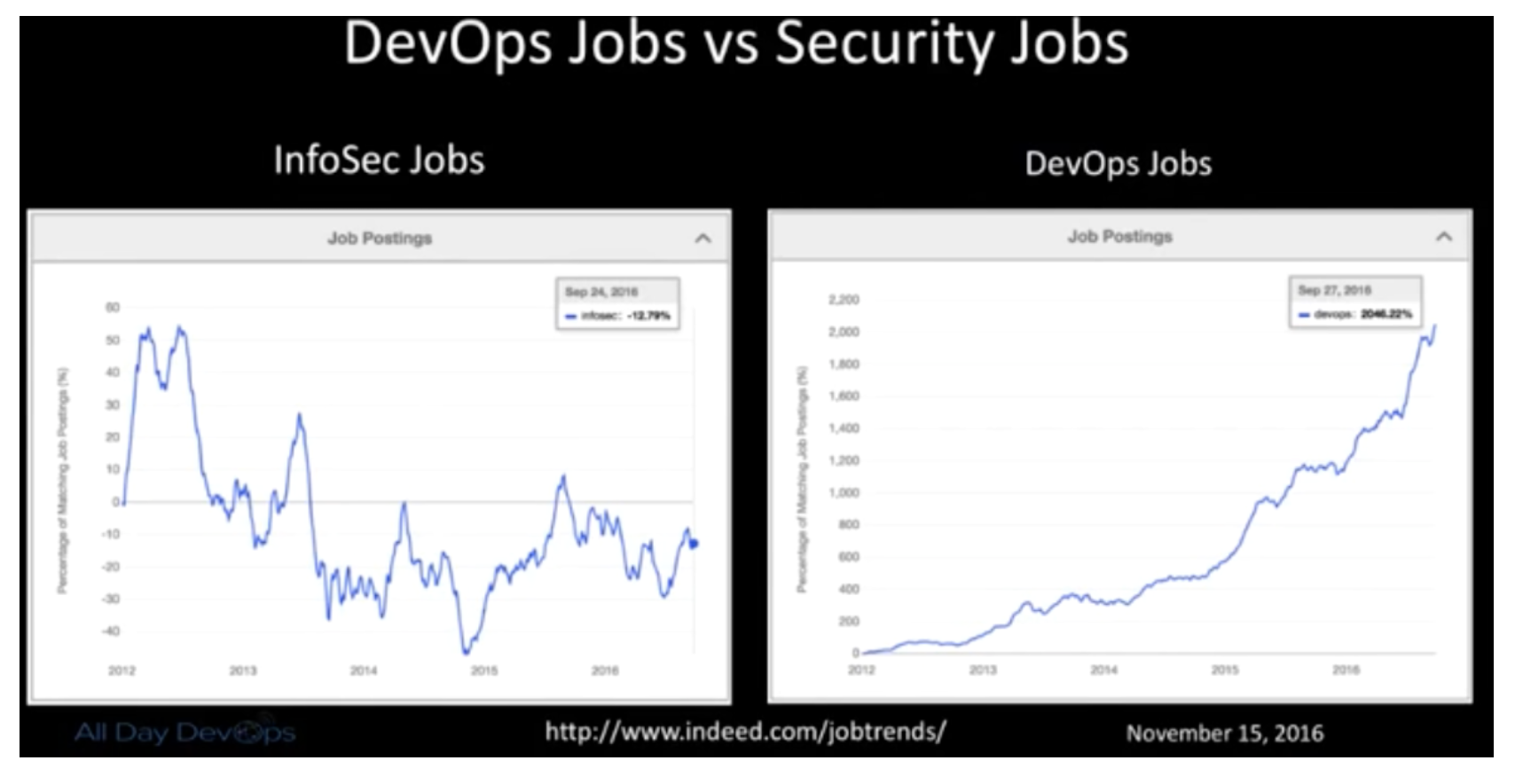
    At the recent All Day DevOps conference, Ian (@iallison), now with Intuit, talked about his history of being “that” security guy. You know, the one who thinks developers don’t care about security or deadlines and, really, are just plain “stupid.” But, don’t worry, he is enlightened now and realizes that we all have the same goal: Everyone wants to build a secure system.

    Ian realized that “security doesn’t understand how developers or operations works. Security solves for security, but that leaves everyone else in their own place.” He started his enlightenment when his career path led him to a place called DevSecOps; that is, DevOps where security plays a more integral role.

    Ian pointed out that traditional InfoSec relies on compliance, regulations, appliances and perimeter (CRAP). He then realized the selfishness of his own and his peer’s perspective: Remediation is left up to the developers, the feedback they get are 200-page scanner reports, and it only solves problems for security and compliance. It doesn’t help developers reach their shared goal of a secure system.

    DevOps creates an opportunity for security to get a better view into our infrastructure, operations and development efforts.  DevOps is not only fast, lean and efficient, but when done right, it is also collaborative and empathetic. Couple speed with collaboration and empathy, and DevSecOps can blossom.

    Here is the reality that Ian was facing: Scanners find the absolute bare minimum; bad default configs are a HUGE problem even with SaaS vendors; manual testing can uncover defects that have been hiding for year; and the attackers are more skilled and motivated.

    How do you implement it and make it better?

    • Allow Dev teams to assume the risk of their decisions.
    • No more Security exceptions or signoffs.
    • Security is everyone’s responsibility.
    • Test the crap out of your own stuff like an attacker would.

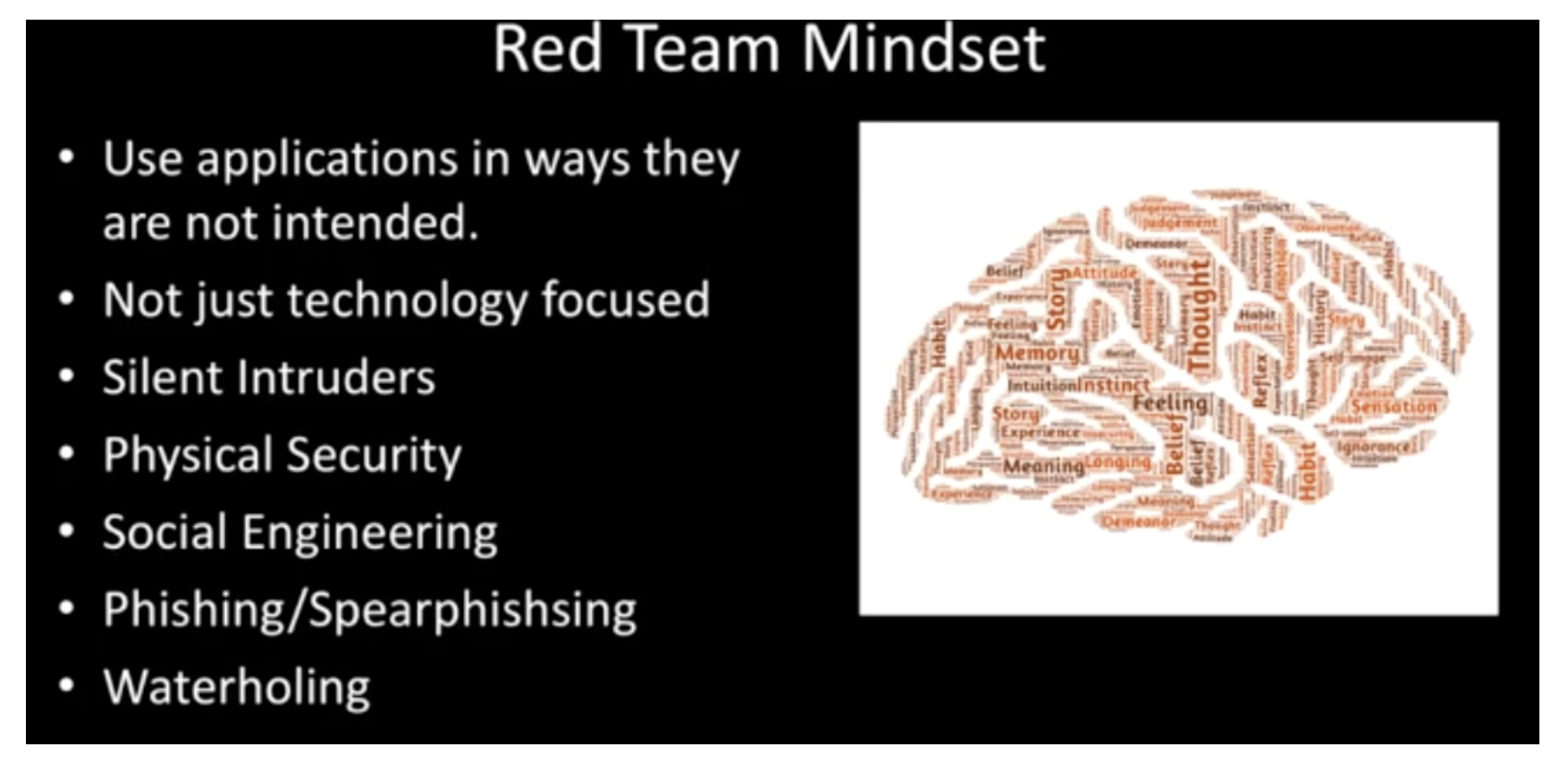
    At Intuit, Ian wanted to help build stronger bridges between development, operations and security teams.  To do this, he set up a Red Team to:

    • Use same tactics as attackers.
    • Only scope is “Don’t take down production.”
    • Need to adapt and evolve like an attacker.
    • Prove risks actually exist.
    • Should be writing their own exploits.
    • Should have ongoing campaigns that mimic attackers.

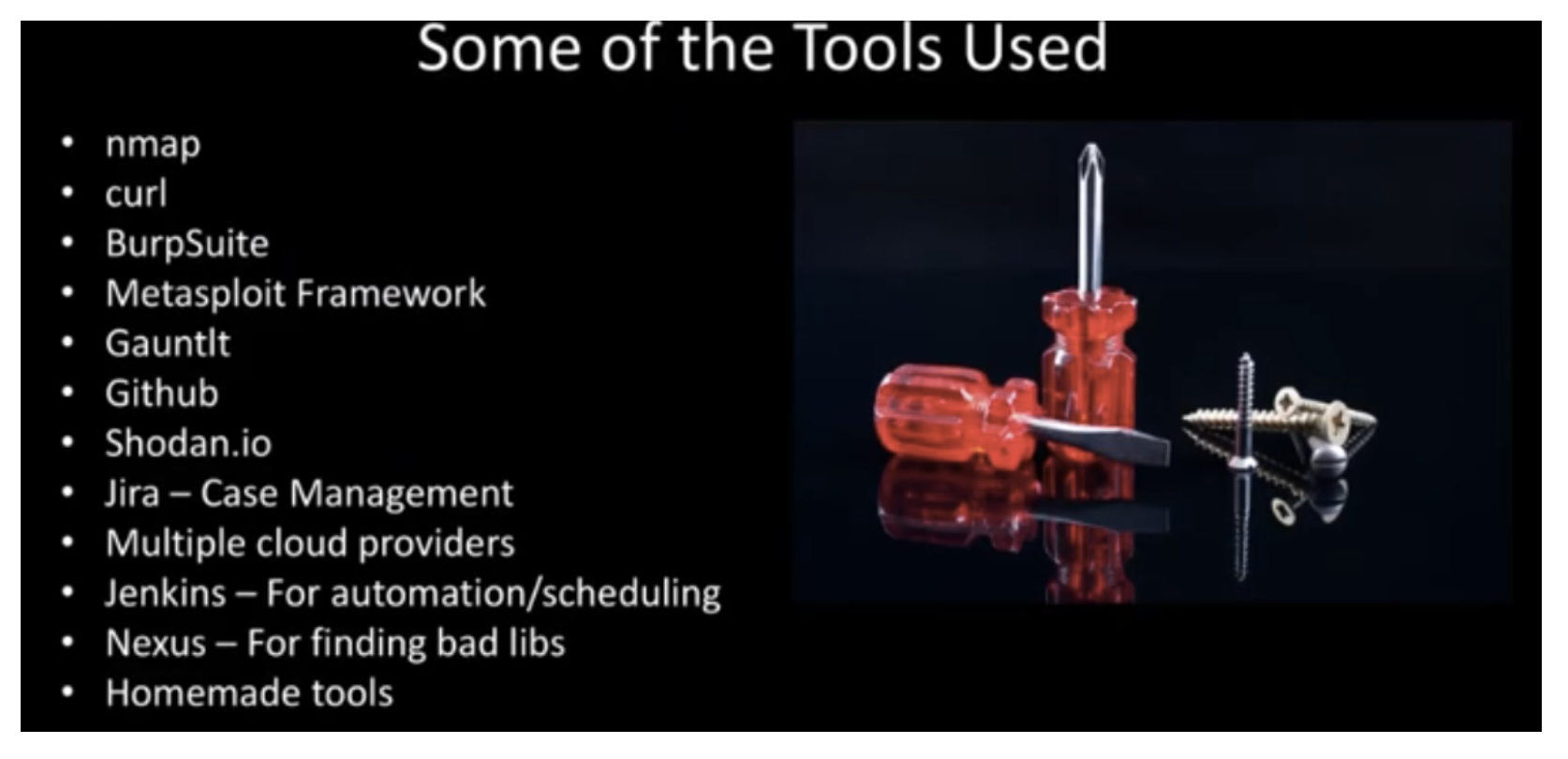
    The Red Team started small and lean and focused on the cloud. It worked like an Agile DevOps team, working manually with the use of some tools. In the end, the team found, reported and fixed thousands of vulnerabilities not found by scanners.

    Ian goes into more details and lessons learned in his full All Day DevOps conference session (just 30 minutes). The other 56 presentations from the All Day DevOps Conference are also available online, free-of-charge here.

    This blog series is reviewing sessions from the All Day DevOps conference from November which hosted more than 13,500 registered attendees. Last week I discussed, “System Hardening with Ansible.” Next week, look for my review of an awesome session by Erlend Oftedal:  “There is No Server: Immutable Infrastructure and Serverless Architecture.”

    — Derek E. Weeks

  • Migrating to GitHub

    Migrating to GitHub

    In recent months, Newt Global Consulting migrated multiple source code repositories to GitHub. The repositories are anywhere from 10MB to few Gigabytes of source code. This blog is to share our experiences in migrating source code from SVN and AccuRev to GitHub. Most of the material below should be valid for any Git repositories.

    We used 100 percent open-source tools that are freely available, and we developed the process that fits our needs. Thank you very much for the authors of these tools; without them, we couldn’t have done it. Long live open-source community and may the day never come when machines code!

    This article is mainly focused on executing migration; best practices or branching strategies for GitHub are not in the scope.

    Before diving into migration, here are some of the motivators we observed that are steering organizations away from traditional source code repositories:

    • Managers and architects like the distributed and offline feature of GitHub.
    • Enforces discipline on developer’s part (less excuses of dependency—you have local copy of everything, intelligent merging of GitHub, etc.).
    • Technical-savvy groups already are using GitHub (Git Bridges).
    • Developers hate the change in the beginning but they are quick learners and like to adapt with rest of the industry.
    • Integration with other DevOps toolkits is a motivator (ex: Webhooks).
    • Naturally fits with open-source software development (easily extend and contribute).
    • Enterprise-level groups are pushing the change (playing catchup with individual development groups and the rest of the industry).
    • File size limitation of GitHub is forcing the use of binary repositories and security teams like it, as they can now monitor the large open-source libraries spread across the org.

    SVN to GitHub Migration

    There is plenty of material on the web about the difference between SVN and GitHub. I suggest that you go through them (if you have to). Here are few links that we found interesting:

    Prerequisites

    • Get read-only user access for SVN repository.
    • Make sure “gitsvn” utility is available in local environment.
    • Download svn-migration-scripts.jar from https://bitbucket.org/atlassian/svn-migrationscripts/
      downloads
    • Refer to the following URL for more documentation on the above script: https://www.atlassian.com/git/tutorials/migrating-prepare/
    • Decide on GitHub organization name, team name and members who will be part of the team.
    • Set up the organization.
    • Set up the team and assign team members.
    • Create a repository to push the code from your work area.

    Migration

    • Extract the users information from SVN java -jar svn-migration-scripts.jar authors <SVN Repo URL> > authors.txt
    • Clone the SVN Repository git svn clone –stdlayout –authors-file=authors.txt <SVN Repo URL> <GitHub Repo
      Name>
    • Create connectivity to remote repository git remote add origin <GitHub Repo URL>
    • Push the code from local to remote repo git push –u origin master
    • Converting remote braches to local repo java -Dfile.encoding=utf-8 -jar svn-migration-scripts.jar clean-git –force
    • Push all the changes to remote repo git push –all

    Noteworthy

    • We ran the scripts on Linux (case-sensitive file system); OS X has additional steps to follow (refer: https://www.atlassian.com/git/tutorials/migrating-prepare/)
    • If SVN instances have local user IDs defined (not SSO), the authors file created is not of use. But you need this file to successfully to run the scripts.
    • Incremental migration is possible, but we scheduled weekly jobs for full migration during the transition phase.
    • Full migration takes time; try to avoid network delays. For us, our 300MB repo took around four to six hours.
    • In some cases, we had to clone the SVN repo to our local file system due to access issues.

    AccuRev to GitHub Migration

    AccuRev is a centralized version control system developed by Borland (now Micro Focus). It uses client-server architecture and preparatory technology, and so it’s a bit tricky to extract code for full migration. We used the ac2git utility developed by Navico—the tool does the heavy lifting but took few iterations and bit of tweaking to fit our need. Most of the difficulty was in understanding how AccRev works and the relative mapping to GitHub.

    Prerequisites

    • Install python 3.4, Git-Bash version 2.7.4 and AccuRev
    • Make sure the paths to the AccuRev and git executables are correct for your machine, and git default configuration has been set
    • Clone the ac2git repo from the https://github.com/NavicoOS/ac2git
    • Run python ac2git.py –help to see all the options (strongly recommend you do this)
    • Run python ac2git.py –example-config to get an example configuration
    • Strictly follow the steps outlined in the “How to Use” section; otherwise, you will be forced after few failed attempts

    Migration

    • Make an example config file:
      • python ac2git.py –example-config
    • Modify the generated file ac2git.config.example.xml, (there are plenty of notes in the file and it is time to run –help option if you have not done it as advised in prerequisites)
    • Rename the ac2git.config.example.xml file as ac2git.config.xml
    • Modify the configuration file and add the following information:
      • Set accurev username & password
      • Name the depot. Map each depot to single Git repository. Run the script for each depot separately
      • Running the script for multiple depots to single folder overrides all depot streams into same folder. Scripts fail when given multiple folders, so always run the script for one depot at a time
      • Create an empty folder and provide the complete path in the config xml file. The folder must exist and preferably should be empty
      • There is no concept of having same folder name as stream name. There just needs to be an empty folder where all the contents of stream will store
      • Start & end transactions which correspond to what you would enter in the accurev hist command as the<time-spec> (the keyword highest or the keyword now)
      • If the start-transaction and the end-transaction are time-spec, the script will fetch the data and history only within this time period. For example start-transaction = “2013-02-07 13:41:17” and endtransaction=
        “2014-02-07 13:41:17”
      • Use “highest” keyword instead of using “now” in end-transaction
        • “now” will fetch data until the date and if there was some history deleted from workspace or not promoted from other streams than “now” keyword will not work
        • “highest” keyword always look for the latest and highest commit history (preferred option)
      • User mapping from Accurev to GitHub. Hint: Run accurev show -fi users to see a list of all the users
      • Choose the preferred method for converting the streams
        • Recommend ”deep-hist” method for sparse streams (transactions that have changed the stream contents are far apart)
        • Recommend “diff” method for regular streams (when in doubt, just use “deep-hist”.)
      • Run the script
        • python ac2git.py
      • If you encounter any trouble, run the script with the –help flag for more options.

    Noteworthy

    • The stream must always have some history. The script did not work for us when no history was available.
    • If there are any duplicate or missing usernames, make sure to use the corresponding parameter. We ended up changing the script to handle duplicate users (this is not needed if you use the right parameters).
    • In GetMissingUsers(config) method of ac2git.py code, comment last two lines
      • # if not found:
      • # missingList.append(user)
    • Migration takes time, try to avoid network delays. For us, a 300MB repo took around six to eight hours.
    • We have not tried incremental migration—we scheduled a weekly full migration and cut over all the users over a long weekend.

    Conclusion

    Overall, the experience was very rewarding, not only in assembling the right toolkit but process-wise as well. Every organization has its own methodology when comes to source code management and how it promotes code (branching strategy). We found small-to-medium-size enterprises have much more mature process than some of the large enterprises, though they are catching up fast.

    • Don’t expect large enterprises have centrally managed source code repos (SVN hosted in some sharable desktop under manager’s desk).
    • Difficult to get developers to think distributed mindset (why should I clone the entire repo?).
    • Working closely with Enterprise GitHub helped in reassuring clients.
    • Most of developers like to use IDE plugins than command line or web client.
    • Prepare to answer backup, HA and DR-related questions.
    • Enterprise GitHub comes as virtual appliance not application—prepare yourself to deal with infrastructure groups on deploying VMs into production.
    • Some application groups preferred lift and shift mode than migration; don’t get shocked when they say “don’t care about history” (typically these are small dev groups).
    • Integrated Slack with GitHub—this was hit not only with developers but also leadership.
    • Extended Hygeia dashboard to provide team level analytics for leadership view.

    About the Author / Sridhar Peddinti

    sridharpeddintiSridhar Peddinti is vice president, DevOps and Cloud practice at Newt Global Consulting. He is a 20-year technology and business leader with global experience in executing large scale projects across multiple industry verticals. He champions the consulting space helping customers with complex problems and providing them with DevOps and Cloud strategy. He has extensive hands on experience in process improvements using combination of tools kits and migrating number of legacy systems to Cloud and related technologies. Connect with him on LinkedIn and Twitter.

  • Webinar: Scaling DevOps for the Enterprise with GitHub

    Webinar: Scaling DevOps for the Enterprise with GitHub

    RECORDING

    SLIDES

    [seoslides embed_id=”ca8e622fc796″ script_src=”https://devopsy.kinsta.cloud/embed-script/scaling-devops-enterprise-github/17419/” overview_src=”https://devopsy.kinsta.cloud/slides/scaling-devops-enterprise-github/” site_src=”https://devopsy.kinsta.cloud” site_title=”devopsy.kinsta.cloud” title=”Scaling DevOps for the Enterprise with GitHub” /]

  • DevOps Chat: GitHub Enterprise as a Hosted Service, with Jean-Louis Vignaud

    DevOps Chat: GitHub Enterprise as a Hosted Service, with Jean-Louis Vignaud

    I recently sat down with Jean-Louis Vignaud, program manager at IBM, about the new GitHub Enterprise as a hosted service that recently was rolled out on Bluemix. The GitHub Enterprise as a hosted service is a great option for enterprises that, due to compliance or other security requirements, cannot used a shared, public GitHub service.

    This GitHub Enterprise as a hosted service is the first of its type available and is hosted on the Bluemix service as both on-premises and hybrid environments. You can get more info on this at:

    1. Blog : Introducing the first-ever GitHub Enterprise as a hosted service

    2. Video : Benefits of GitHub Enterprise with IBM Bluemix Dedicated

    3. SlideShare: IBM Bluemix Dedicated – GitHub Enterprise

    Also, we will have a webinar that goes into greater detail on this. More info is at: http://webinars.devopsy.kinsta.cloud/scaling-devops-github/

    In the meantime, here is the streaming audio file of this chat, followed below by the transcript of our conversation to follow along.

    Alan Shimel: Hi, this is Alan Shimel, devopsy.kinsta.cloud, and I’m here with another DevOps Chat. Today’s guest on DevOps Chat is Jean-Louis Vignaud, Program Manager from IBM. Jean-Louis, I hope I didn’t mess up that name too bad.

    Jean-Louis Vignaud: No, that’s fine. Thank you, Alan.

    Shimel: Okay. Welcome to DevOps Chat, Jean-Louis, and as I mentioned, you are a Program Manager at IBM, and right now anyway, you’re very involved in working on the GitHub Enterprise as a hosted service offering, and we wanted to talk to you specifically about that.

    Vignaud: Okay.

    Shimel: So, Jean-Louis, I think everyone listening out here is familiar with Git and GitHub, but they may not be familiar with the concept of GitHub Enterprise as a service, so why don’t we start there, if you can explain to our audience a little bit about what that is.

    Vignaud: Okay, so maybe we can start with GitHub first.

    Shimel: Okay.

    Vignaud: GitHub is very well-known, it has probably 15,000,000 users as of today, it’s a very well-known user experience. It’s a collaboration platform, and it’s based on Git, so it’s running on top of Git, but it has many other services on top of Git. And the purpose of GitHub is to provide this collaboration platform that enables people from all around the world to collaborate on a business project, or even a private project.

    And that very well-known collaboration platform is very attractive for enterprises that want to provide the same level of collaboration within their own organization. And so what was introduced by GitHub the end of 2011, early 2012 was GitHub Enterprise. GitHub Enterprise is an on-premises version of GitHub. So, same set of capabilities, but you can install it when it’s on-premises in your—on-premises in your environment, and get it working within your firewall. So that enables teams to—you know, to enable organizations and different teams to collaborate among each other in a safe way.

    So that’s the background, and where we were standing before we introduced our offering.

    Shimel: Mm-hmm, and [Cross talk]—I’m sorry. I didn’t mean to interrupt.

    Vignaud: Yeah, so what I was going to say is that, as usual, inside an organization, as soon as you have to install your product, you have to run it, you have to manage it, you have to provision your infrastructure, you have to have the people set up and standing to manage the GitHub Enterprise offering, meaning doing the backup, doing the upgrade, monitoring its running and doing everything that needs to be done in order to comply with the enterprise security requirements.

    And that requires time, and most of an inside organization, you know, people are looking to move to the cloud, benefit of the cloud facilities, which they could find in GitHub today, but it’s a public cloud that does not meet the security requirements of an organization, and they would want the same GitHub experience, but within their organization. And this is where we come with our service offering around GitHub Enterprise—providing the user experience of GitHub within the organization while still managed by IBM.

    Shimel: Got it. And just to make clear, Jean-Louis, as far as I know, IBM is the only one actually offering this GitHub Enterprise as a hosted service, correct?

    Vignaud: Yes, this is a first-of-its-kind offering. I know if you look into what GitHub provides, GitHub provides GitHub Enterprise so you can run it on premise. You also can install it on infrastructure as a service, so you can run it inside AWS, you can run it inside Azure, but there was no one providing a service offering around GitHub Enterprise. So, with IBM, it’s hosted and managed by IBM so the “and managed” is unique.

    Shimel: Got it. And another thing I just want to emphasize, because as we were speaking about before we started today’s broadcast was, you know, this is in partnership with Git, right?

    Vignaud: Yes, that’s a partnership with GitHub, yes. We announced the partnership at InterConnect early this year in February, and so since the announcement, we have been working and creating this offering. So it took us 12 months to build it and to release it.

    Shimel: Understood. And I think that’s important, because you know, it’s one thing to just take some open-source project and offer it as a hosted service, right? Anyone could do that, it’s open source.

    Vignaud: Yes.

    Shimel: But to really have the cooperation with Git behind this really gives, I think, the best chance for enterprises to have their own Git environment really, truly as a hosted service.

    Jean-Louis, I wanted to talk about another aspect of this offering, and that is, as it’s part of an Integrated Bluemix Dedicated offering as well, right?

    Vignaud: Yes.

    Shimel: So let’s start off with, what is Bluemix Dedicated?

    Vignaud: Okay, so IBM platform-as-a-service offering is Bluemix. So, Bluemix, it consists of a huge set of services, for mobile application, for cognitive applications, so about more than 150 APIs organizations can use to build a cloud-native application, to integrate these applications with a back-end system. And so Bluemix is available in the public cloud, but as well, it’s available as a single-tenant dedicated cloud for the customer.

    So that’s Bluemix Dedicated. So, meaning, it’s a Bluemix for our customer with all this API, all these platforms that enable you to build and run your application. It’s based on Cloud Foundry, it supports containers, Dockers and so on. So it provides a very extensive set of technology that enables organizations to quickly build applications.

    As part of Bluemix, there are a set of DevOps services, so tools we provide to help organizations build those Bluemix applications. And this is where our GitHub Enterprise offering sits. It’s a DevOps offering, part of Bluemix Dedicated.

    Shimel: Got it. So, Jean-Louis, this is—I mean, unfortunately, we only have 12 to 15 minutes here, but there’s a lot of layers that we can peel back it of what one can do with this GitHub Enterprise offering, you know? And especially, in my mind—look, if you’re developing applications and you just want to have your whole platform as a service with best-of-breed stuff such as a Git, such as a Cloud Foundry, all of these elements that give you a best-of-breed application development in platform as a service forum, it seems that all the pieces are here to come together. And it’s a great time to be alive. It’s a great time to have to—you know, if you wanna develop applications, to have that at your fingertips.

    Vignaud: Yes, and in the context of Bluemix Dedicated, single-tenant, completely integrated with your enterprise network, so it enables you to safely integrate with your back-end system. So you really have a very advanced platform enabling you to develop in a safe way; you know, very innovative applications.

    Shimel: Yeah. So, Jean-Louis, two questions for you. No. 1, in terms of advantages of using the GitHub Enterprise hosted versus the public Git, that GitHub that so many of us, I think 50 million is the number of people use—the obvious advantage is, this is a more secure environment, it’s yours only. But are there any downsides? Is there any kind of features not available in the hosted service that would be available in the public service?

    Vignaud: No, not really. You know, the GitHub Enterprise has been designed to provide the same user experience as GitHub. I would say that the value of GitHub Enterprise, it’s the user experience of GitHub, but you can run it for you, so it’s a single-tenant for you as a customer, leveraging the cloud infrastructure from IBM, you can run it in a data center where you want to, geographically you can localize it in the country where you belong. So if you have compliance requirements requiring you to host your source code in-country, you can do that.

    So, I would say, no limitation and much more flexibility when it comes to the deployment of the offering.

    Shimel: Excellent. Next question, I just wanna make sure—is this publicly available today? Because I remember—

    Vignaud: It is, yes. It is available today. We announced it on the 17th of June. We officially announced it on the 17th of June, so yes, it is available today, and any Bluemix Dedicated customers can use it as part of the offering.

    Shimel: Oh, excellent. And I should also mention, Jean-Louis, that in the near future, actually—I think we’re finalizing scheduling right now—we’re actually gonna do a full webinar with GitHub and IBM, where we’re gonna explore a little deeper into this offering and for those of you listening who may be interested, I strongly, strongly encourage you to attend that webinar.

    But Jean-Louis, if people don’t want to wait for the webinar, I know IBM has put up several content pieces where people can get more information from this. One is a blog introducing the GitHub Enterprises service, there’s a video that shows the benefits, and I think there’s also something up on SlideShare about IBM Bluemix Dedicated and GitHub Enterprise. I will try to—

    Vignaud: Yes.

    Shimel: — yes, I will try to include the links to those when we publish this chat, but again, I strongly—if you have questions about his, if you’re a Git user and thinking you’d like your own GitHub Enterprise dedicated service, I’ll try to put those in there.

    You know what, Jean-Louis, unfortunately we’re just about out of time. Is there anything you want to add?

    Vignaud: I think this is fine. Thank you very much, Alan, for the interview here.

    Shimel: Thank you.

    Vignaud: I really look forward to have many customers for this offering.

    Shimel: You know, I think it’s something the market needs. It’s good to have that. As I said, it’s a great time to be a developer today, right? So many tools, so easy to use.

    Vignaud: Yes.

    Shimel: Anyway, Jean-Louis Vignaud, Program Manager at IBM, thanks so much for joining us today, and we look forward to hearing more about GitHub Enterprise as a service.

    This is Alan for devopsy.kinsta.cloud. Thank you for listening in, and we’ll see you on the next DevOps Chat.

    Vignaud: Thank you.