Tag: GitHub repositories

  • Why Do You Need GitHub Backup?

    Why Do You Need GitHub Backup?

    You’ve probably heard the joke that there are two types of people in IT: Those who do backups and those who will start. Though it’s still valid, this joke has become less relevant to businesses and professionals. The IT industry has been increasing expenditures on security for years, and backup is a critical area. However, despite the growing awareness of the need for backups and the wide availability of modern backup solutions, the problem still exists. The number of security breaches is growing, and the topic of data security looks like an endless arms race. So what can organizations do?

    First, let’s analyze some data and trends. Year over year, the number of cyberattacks, especially ransomware, is increasing. The year 2020 saw attacks intensifying due to the pandemic and the sudden shift to remote work, for which, unfortunately, not everyone was prepared. Once organizations got better at enabling effective work-from-home models, the hope was that everything could settle into a new normal. Unfortunately, the new norm became these increased attacks.

    It’s a bit like the metaphysical yin and yang—two opposing but complementary forces. One drives the other. Suffice it to say that the estimated cost of the global damage caused by ransomware in 2021 is as high as $20B! And a ransomware attack occurs, on average, every 11 seconds around the world.

    According to an Identity Theft Resource Center (ITRC) report, by the end of September 2021, there were more incidents of this type than during all of 2020. The authors of the report emphasized that they found 26 cases where cloud databases were unsecured. As a result, hackers were able to access confidential data belonging to 99 million people.

    Git Threats: Are my Bitbucket/GitLab/GitHub Repositories Secure? 

    Back in May 2019, ransomware attacks impacted hundreds of repositories on GitHub, GitLab and Bitbucket. The attack wiped away all the data and left only one piece of information: The amount of ransom demanded and a method of payment. Eventually, most of the data was recovered but the cost and the amount of time spent recovering from the attack was enormous.

    According to the Cisco Benchmark Study, approximately 40% of companies experienced downtime longer than eight hours due to a major failure. And 39% reported that at least half of their systems had been affected by a serious breach. According to IBM, the total average cost of a data protection breach on a global basis is as much as $3.86M, and the highest ransom demanded by cybercriminals in 2020 was $15 million. These numbers are scary. On the other hand, in most cases of successful ransomware attacks, the ransom is ultimately not paid; even if organizations do not pay the ransom, the mere fact that they fell victim and experienced failure or downtime can be very expensive.

    GitHub as Backup Tool

    GitHub provides many useful security tools. However, we must be aware of two things: What does GitHub backup really mean and what are its features? And what responsibility do cloud services providers have versus users’ responsibility for security? Let’s start with the latter.

    Most cloud service providers (including Amazon, Microsoft, Google, IBM, Salesforce, GitHub or Atlassian) operate on the basis of the so-called shared responsibility model. Users of cloud services most often assume that providers are fully responsible for their protection. However, providers are primarily responsible only for ensuring the security and availability of infrastructure, software and access, period. Users are responsible for the security of the business data stored as part of these services. So users themselves have to take care of backup and disaster recovery plans and solutions. In short: Providers are responsible for the security of the cloud itself and users are responsible for data security in the cloud. And at this point, it is worth pointing out that, according to data from the UK’s CybSafe, in 2019, 90% of data breaches were caused by user error.

    It can happen to any of us—a ransomware attack, phishing, loss of access to a GitHub account or an entire computer or simply overwriting another developer’s work in a repository. It affects both individual users and large corporations. In July of 2019, Ubuntu Security reported that the credentials for a company-owned GitHub account were compromised. Hackers used these compromised credentials to create repositories, issues, pull requests, etc. The attack did not cause a major crash, but repairing the damage took some work and restoring some repositories or issue trackers to the previous state was difficult.

    There are some common features any good backup should have:

    • Automation (i.e. daily backups)
    • AES encryption with its own encryption key
    • Versioning
    • Long-term data retention
    • Disaster recovery process
    • Easy monitoring (audit logs, email notifications)
    • Central management
    • Multi-tenancy (to manage admins, privileges and roles)
    • Scalability

    Based on these criteria, GitHub (and other similar hosting services) cannot be considered a proper backup tool. GitHub is a great open source project, but its purpose is completely different.

    How to Back Up Manually

    Since the cloud service itself is not enough, how can you take care of GitHub backup? Well, you could do it on your own. And often, especially in small businesses, this is the preferred method. It may seem like a good idea at first. Knowing Git well, we can create appropriate scripts that create backups for us that give us full control over what is happening without having to pay anyone for it. But this is very risk and not profitable in the long run. Disk space costs money; our employees’ time to create scripts and perform the backup is another cost. And the most important thing, in this case, is that these scripts must be maintained and updated all the time, so they constantly generate additional costs. Any change in such a script may cause an error and, as a result, deprive an organization of a working backup. Of course you could also create an appropriate mechanism to test it, but that’s an additional cost. Manual GitHub backups do not end with writing a single script.

    I’ve experienced this myself. In one project, backups were generated using such a script and then kept on our own servers. It was cheaper this way. But we did not have any validation of the created backup. One day, while updating the backup scripts, we did a manual test and it turned out that we had a serious problem—the backup was created correctly but its name did not change, so we kept overwriting the same archive constantly! The effect? It turned out that we didn’t have any copies older than one month! Luckily for us, they weren’t needed because the systems and databases were working properly at that time and there weren’t any incidents, but it makes me cringe just thinking about “What if …?”

    All in all, manually writing backup scripts is not a very good idea for many reasons. The low cost of this solution is only theoretical; with time, the cost of maintaining this mechanism increases and, in practice, often only one or two people are responsible for it, which creates additional risk. Okay, you might have more control, but overall you are wasting time and money. The backup itself is also not enough, because you need a proper restoration solution for systems or data in the event of an incident. There’s also the question of how to create a backup of the script that creates the backup? Are you sure you cannot make better use of your employees’ working time?

    How Much Does it Cost?

    It is difficult to accurately measure this; it all depends on the level of complexity of systems, the number of repositories, the skills of your team, etc. However, you can estimate how much the lack of access to services or programmers’ downtime will cost. You can also calculate the development and maintenance costs of writing, testing, maintaining and updating your own backup scripts. The history of GitHub attacks and crashes shows that the data is usually recoverable, which is good news. On the other hand, the time when services are unavailable or when teams are unable to work can be very costly.

    Third-Party GitHub Backup Tools

    Another solution—and, in my opinion, a better one—is to use third-party backup software.

    In fact, in the GitHub documentation, it is recommended:

     “Backing up a repository: You can use the API or a third-party tool to back up your repository.”

    If you can use the GitHub API, why do you need a third-party GitHub backup tool? Well, first of all, such applications are created by experts in a given field who have knowledge, experience and stay up-to-date on the current security trends. Second, these solutions are ready and available right away; you don’t have to spend time and money reinventing the wheel. Yes, there is a cost, but in the long run (taking into account the factors described earlier) the cost usually turns out to be much lower than a bespoke solution. Outsourcing backup management responsibilities may be incredibly beneficial and will allow us to focus on developing our business instead of managing GitHub repository backup all over again.

    When it comes to backup, be smart. If external third-party tools allow us to develop our products faster and more efficiently, then we should not hesitate to use them. And never forget to implement proper backups and disaster recovery plans. Taking care of it today will help ensure a more secure future.

  • Using Netflix’s HubCommander to Automate GitHub Organizations

    Using Netflix’s HubCommander to Automate GitHub Organizations

    Netflix owes a great deal of its exponential growth to its phenomenal tech stack. Throttling its content through a single internal API, the company was able to deliver content agnostic of device type and quickly disrupt its contemporary competitors in the consumer entertainment industry.

    We’re intrigued, then, when Netflix exposes some of its internal architecture for others to use. HubCommander is just one recent addition to Netflix’s growing collection of open source tools. It’s a ChatOps tool for GitHub management.

    We’ve previously covered an open source approach to ChatOps, tracking how to bring free operational tools into the conversation for increased transparency and efficiency. In this article, we’ll resume this research by learning how Netflix has utilized HubCommander and delve into its open source iteration to see how others might leverage it to automate its GitHub organization.

    Problems

    Managing many GitHub repositories while working in a large organization can be frustrating; especially difficult is the task of managing permission levels between various user subsets. Not only are various user permission levels difficult to trace, but there is an intrinsic security problem to address as well, especially when working with external teams.

    “One of the biggest challenges with using GitHub organizations is user management.” — Netflix

    Project managers need to administer different organizations, and GitHub requires admin privileges to manage such repository settings; if onboarding thousands of employees, editing this manually could be an extremely tedious job.

    Benefits!

    At Netflix, HubCommander standardizes its user management approach, enabling automation for GitHub repo permissions across development teams.

    “Management of many users on GitHub can be a challenge without tooling. We needed to provide enhanced security capabilities while maintaining developer agility. As such, we created HubCommander to provide these capabilities in a method optimized for Netflix.”

    HubCommander thereby provides this missing link, granting admins the ability to quickly grant privileges. Easily to embeddable into chat, the HubCommander is made with ChatOps in mind. Therefore, privileged GitHub organization management tasks can be performed from the Slack channel, “without granting administrative or owner privileges to your GitHub organization members.”

    Using HubCommander

    To use HubCommander, first, you must have Python 3.5+, Slack, a GitHub organization, and a GitHub bot user with ownership level privileges.

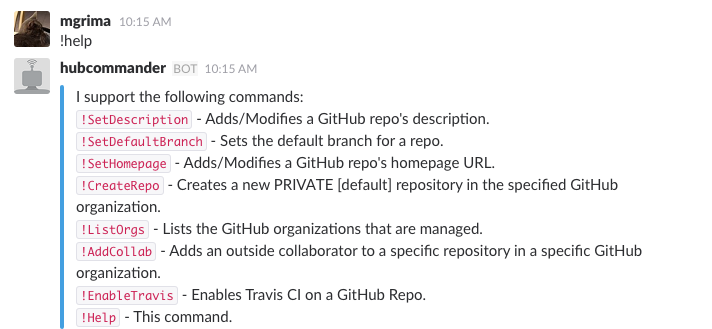
    Next, Slack channels with HubCommander installed can make the call !help to return a list of bot commands:

    Source: Netflix

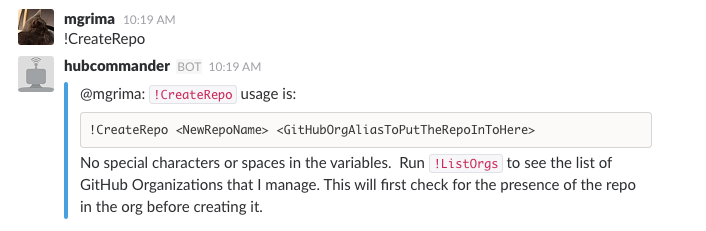
    To create a repo, for example, you can simply use the command !CreateRepo:

    Source: Netflix

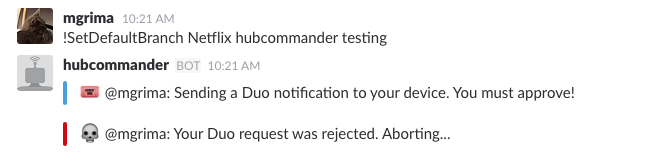
    Utilizing HubCommander also has security benefits as it reduces the number of GitHub API permissions granted per user—reducing attack vectors inherently increases security. Another point on security is HubCommander’s integration with Duo for additional authentication:

    Source: Netflix

    The total list of HubCommander features include:

    • Repository creation
    • Repository deletion
    • Repository description and website modification
    • Granting outside collaborators specific permissions to repositories
    • Repository default branch modification
    • Repository PR listing
    • Repository deploy Key listing/creation/deletion
    • Repository topics creation/deletion
    • Repository branch protection enabling/disabling
    • Enable Travis CI on a GitHub repo
    • Safeguard commands with 2FA via Duo

    Automating GitHub With ChatOps

    If your code resides in multiple Git repositories, like Netflix, having a method to configure permissions across all entities in a convenient way becomes a necessity. With a bot to perform operational tasks on GitHub repositories, Netflix is benefiting from automatic manipulation and a wider team access, adding to its agile goals:

    “The reduction in administrative overhead has significantly simplified our open source efforts.”

    Netflix operates with three development channels (a core Netflix OSS, Spinnmaker and a skunkworks project for new ideas). Thus, having a consistent permissions model across organizations can decrease friction. Also, since Netflix collaborates with third parties, such as contractors or other open source contributors, HubCommander also acts as an effective way to maintain security.

    Final Thoughts

    Netflix recognizes a growing popularity in the ChatOps approach and cites other benefits such as team transparency, a timestamp for each event and a self-service nature—all reasons for adopting a ChatOps strategy into its developer tooling.

    HubCommander appears like a good ChatOps tool for GitHub repository management. However, GitHub Actions (still in beta at the time of writing) is a new feature that will aid development workflows, offering automation for the GitHub operational duties themselves. This may spark alternative bots to be developed, especially in terms of workflows that respond to events.

    For now, with open source utilities such as HubCommander, certain GitHub duties can be quickened, stimulating a culture of more efficient management to decrease redundant tasks. While shorthand for GitHub repository management might not seem at first glance as a priority, it could scale down operational headaches tremendously.

    — Bill Doerrfeld