Tag: full-stack pipeline

  • The Cloud and DevOps: Like Peanut Butter and Jelly

    The Cloud and DevOps: Like Peanut Butter and Jelly

    Cloud is practically designed for DevOps. No matter which cloud provider you are using, each has set up systems designed to spin up/spin down on demand, has the ability to run pretty much what you need and offer APIs/command lines to achieve your DevOps goals on the infrastructure side.

    That means that the infrastructure side of DevOps can be handled by careful choice of base image, some scripts to configure network and other supporting infrastructure, and some scripts to install what’s needed once the instance is running and protected.

    Not All Roses …

    The problem is one of breadth and complexity. Yes, cloud is the perfect place to spin up DevOps, at least on the infrastructure side and, once you have a Jenkins instance, on the coding side, too. But the complexity masked by “spin up the infrastructure side” can be daunting. Different sets of APIs for servers, storage and networking, and sometimes different APIs for security versus accounts … It can get snarled quickly.

    So, What to Do?

    What can you do to make life in cloud automation/DevOps easier? There are numerous options available to you to simplify the operational part of cloud DevOps and allow you to focus on discussing issues and resolving them.

    First on the list is the growing amount of automation of cloud automation. Sound crazy? It’s not—just my way of expressing that cloud vendors provide you with APIs and tools such as Puppet are getting better at wrapping those APIs for you, so you can focus on problems, not what is supposed to be the solution.

    This idea is extended by companies that are tying disparate APIs together into a unified whole in one segment or another. One example of this is CloudCoreo, whose tools can do security audits of cloud deployments. The company takes the time to wrap the various security-related APIs and let you pick what is important for your team to monitor.

    There also is an entire market segment growing up of both consultants and VARs that will help an enterprise move to the cloud. Most of these companies focus on one vendor or another, but all share a desire to help make the shift to the cloud easier. By way of examples to get you started, consider Neoxia (in the EU) for GCE, Accenture (in North America) for AWS or Atmosera (in North America) for Azure. (Note: I have never used the cloud services of any of these companies; I’m merely offering you a sampling of what is available. Check your cloud providers’ partners page for more partners.)

    Another option that will reduce, but not eliminate, cloud-based complexity is to use containers to set up the application. The container can then be run on whatever cloud platform suits your needs (or in your data center, if that’s the preference). Any instances spun up still must be protected and given access, but most of the networking, security and instance complexity can be handled at the container management level.

    In fact, if you implement container management and choose for interoperability, a container management tool such as DC/OS can let you choose at deployment time where to put the container.

    Seeing what enterprises are starting to do with containers and entire build/test environments, it is possible that very soon you will be able to just kick off a job, have it build containers that will run your DevOps processes, run tests, deploy to other containers and then go away once the relevant data from them has been saved. The containers used along the way, by taking advantage of a multitarget container management platform, could be anywhere.

    To Sum It Up: Cloud is Good for DevOps

    The issue at hand—as it has been for DevOps and cloud for a while—is the rate of change. Here we’ve discussed a cross-section of ways to make DevOps in the cloud easier and more complete. But no doubt we’ve missed some great ideas and products, because there is so much going on.

    The point is, tools are coming available to make it easier. Don’t write a billion miles of scripts that are useful for only one provider if you can avoid it. Look into these options (and others that will crop up) to lighten your load of technical debt moving forward, and make getting DevOps roaring in the cloud easier.

    And as always, keep rocking it. The change has been constant, and you’re still cranking. That says a ton.

    — Don Macvittie

  • 3 Practical Steps to Employing DevOps

    3 Practical Steps to Employing DevOps

    Everyone seems to be talking about DevOps but, if you are new to it, it might all seem a little overwhelming. One of the hardest things about DevOps is knowing where to begin. This is because to “do DevOps” its seems you have to suddenly start using a lot of new processes and tools at once.

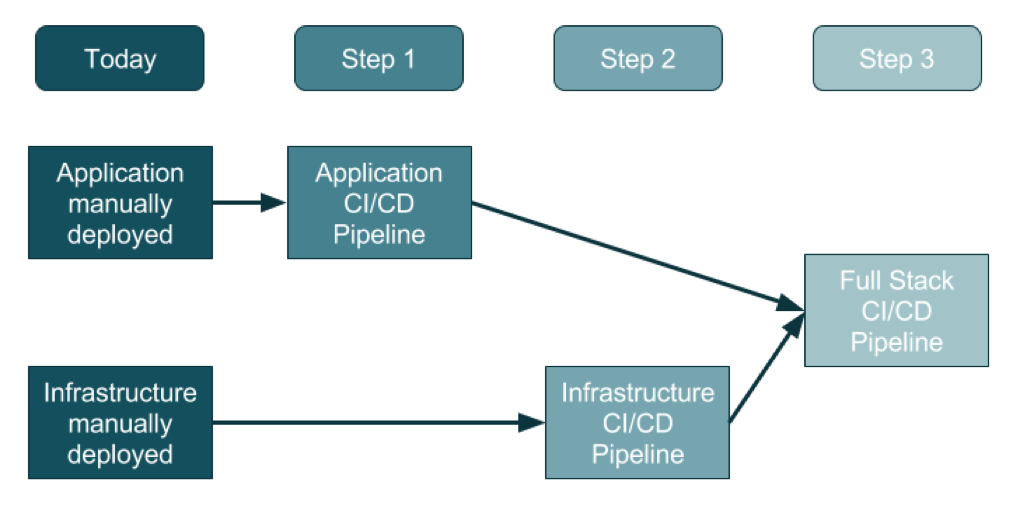
    For an organization that doesn’t use DevOps today, the adoption of this three-step method will promise a generally clean approach.

    Source: https://ukcloud.pro/

    Step 1: Creating the Application Pipeline

    Regardless of the type of application, the pipeline looks—at a distance—very similar. The goal is to weave application releases into a new coordinated process that looks something like this:

    1. The developer makes changes locally to their laptop/PC/Mac, and upon completion (including testing, etc.) issues a Pull Request.
    2. Code review kicks in, the developer changes are reviewed and accepted and a new release can be created.
    3. Someone, or the system, runs a procedure to create a release artifact, which could be a Java JAR file, a Docker file or any other kind of unit of deployment.
    4. Someone, or the system, copies the artifact to the web or application servers and restarts the instances.
    5. Database migrations/updates may be additionally applied, although the database is often left outside of the application release process.

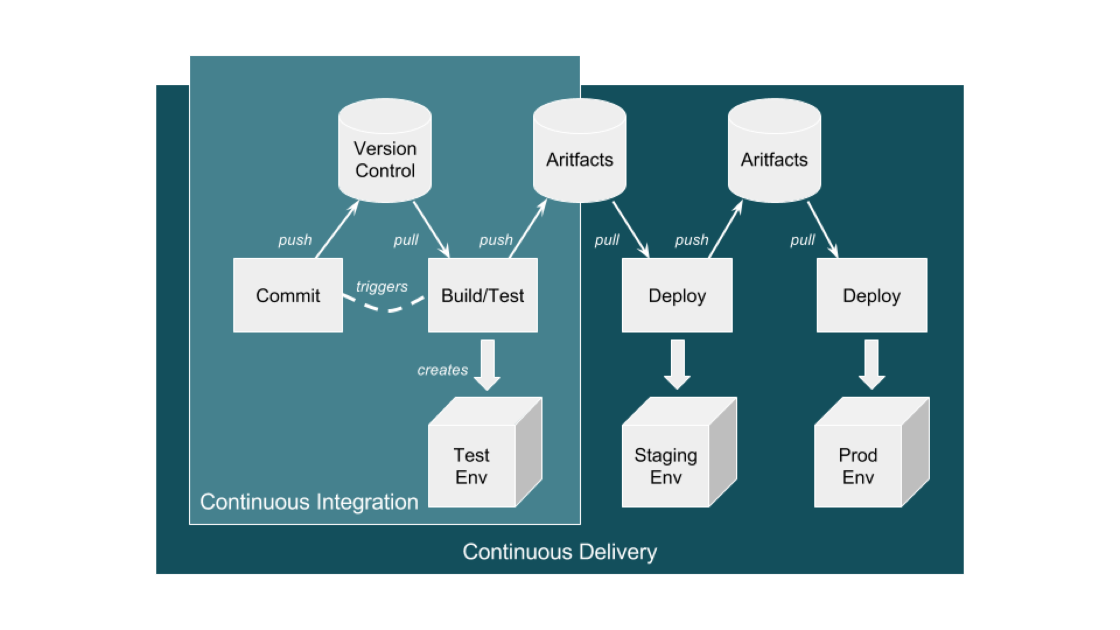
    This process evolves into an automated application-only continuous integration and continuous deployment (CI/CD) pipeline by using a toolset to automate the process as shown in the diagram below:

    Source: https://ukcloud.pro/

    A Typical CI/CD Pipeline


    However, be aware that this isn’t ideal (yet), because at this point the application alone is being released (injected) into existing environments.

    Why is this potentially an issue? If the developer has altered the local environment as well as the application but these local environment changes are not part of the release, then they’re not in version control. And, if they are not applied at the same time as the application, then the application will break and the common argument occurs: “Well, it works on my machine!” The solution is for application and infrastructure releases to be synced—and hence steps 2 and 3.

    Step 2: Creating the Infrastructure Pipeline

    Ideally, the infrastructure team has learned from the developer team’s DevOps and CI/CD pipeline journey and can expand and adapt it for the infrastructure (which increasingly is a public cloud).

    There are some differences with the infrastructure pipeline, specifically around units of deployment that are now the infrastructure layers in environments, the things that surround an application such as the DNS, load balancers, the virtual machines and/or containers, databases and a plethora of other complex and interconnected components.

    The big difference here is that the infrastructure is no longer described in a Visio diagram: it is brought to life in code, in a configuration file, in version control—this is infrastructure as code (IAC).

    Before this, a load balancer was described in Visio diagrams, Word documents and Excel spreadsheets of IPs and configurations. This is now swapped to describe everything about the load balancer in a configuration file.

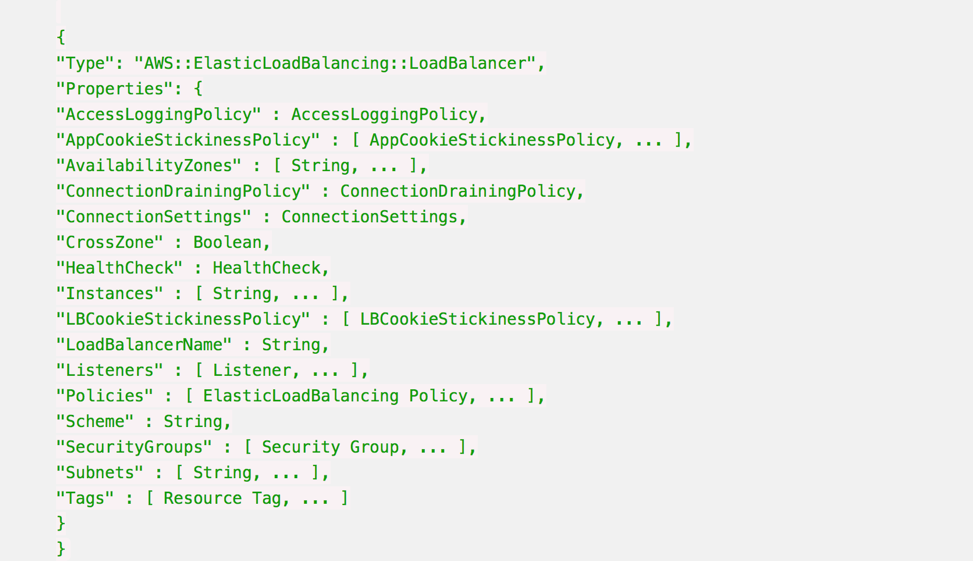
    Here’s an example AWS CloudFormation Configuration for a Load Balancer:

    Whenever this file is changed in Version Control, such as changing the subnets a load balancer can point to, then the automation engine can update an existing infrastructure environment to reflect that one change, and any dependencies that change.

    It also means that you can apply this template to multiple environments just by changing the environment name from staging to production, for example, and be very confident that all environments are consistent, from the developer laptop to production.

    It is also possible to make the templates dynamic to change their behavior according to the environment, so in production the environment will scale out across three datacenters, but on a developer’s laptop it will use a local VirtualBox single-system.

    Step 3: Creating the Full-Stack Pipeline

    The goal of a full-stack pipeline is to ensure that the application and infrastructure changes over time are in sync, both in version control and the release deployments across each pipeline stage. And a developer should never say, “It worked on my laptop!” when a release fails in production.

    The popular CI/CD tools can now automate the full stack because everything is programmable. This means everything can be captured in version control, and the same configuration can use dynamic input parameters to build an environment on a developer’s laptop, or a QA system in the cloud or updates to production.

    Imagine a developer makes an application change that also requires a change to the database, the web instance scaling configuration and the DNS. All of these changes are captured in one version control branch and the developer builds a system on their laptop from this branch, and tests it.

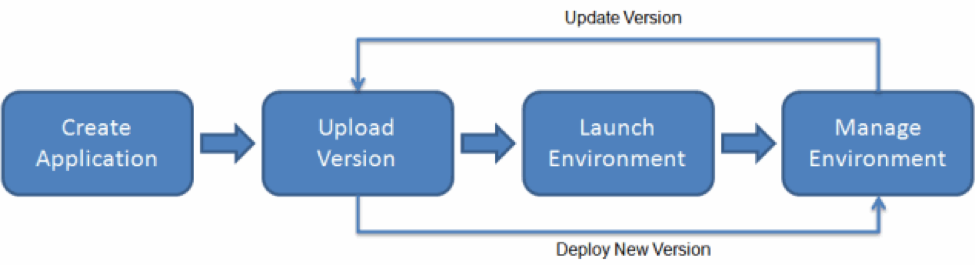
    This is what platform-as-a-service systems can do. By adding an environment configuration file inside the same code base as your application, you can ensure that you have bound your application to the infrastructure. 

    AWS Elastic Beanstalk Example

    This is the target end goal, though it takes a lot of practice, and learning, to get there. It can be very satisfying to watch a build and a deployment, seeing the automation use tags and dynamic configurations to build, or update, the target environment with application and infrastructure changes.

    About the Author / Sarah Lahav

    Sarah Lahav is CEO of SysAid Technologies. As the company’s first employee, Sarah Lahav has remained the vital link between SysAid Technologies and its customers since 2003. She is the current CEO and former VP of Customer Relations at SysAid – two positions that have fueled her passion in customer service. Connect with her on LinkedIn and Twitter.