Tag: firewall

  • OpsMX Adds Deployment Firewall to Ensure Compliance

    OpsMX Adds Deployment Firewall to Ensure Compliance

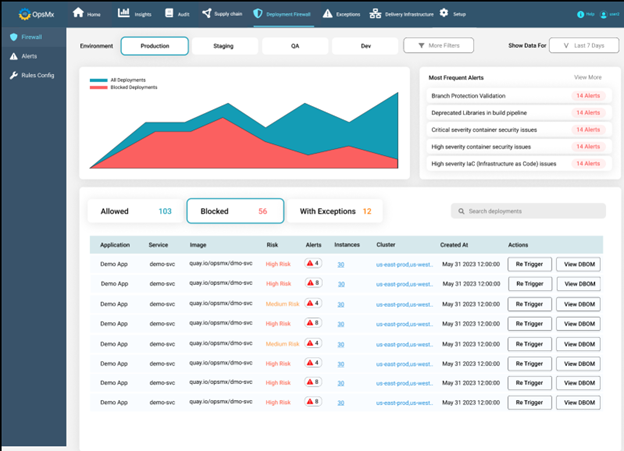
    OpsMx today added a deployment firewall to its Deploy Shield portfolio for securing continuous integration/continuous delivery (CI/CD) platforms.

    The deployment firewall automatically applies rules to ensure DevOps teams comply with mandates such as the payment card industry data security standard (PCI DSS) or the Health Insurance Portability and Accountability Act (HIPAA). It then evaluates a release against a checklist of policies and blocks any deployments into a production environment unless a specific exception has been defined. In those instances, DevOps teams can also set an alert to address that issue at a later date.

    In addition, DevOps teams can extend those rules defined by OpsMX to address specific compliance requirements.

    The checklist includes making sure vulnerability scams have been run, tracking when the manifest was last updated, confirming that operational controls are being followed, checking whether images have been modified and evaluating the infrastructure being employed and performing an analysis of the performance impact.

    A simulation feature also allows developers to check their release for compliance before it is time to deploy.

    OpsMx CEO Gopal Dommety said the goal is to streamline the effort that is required to meet multiple compliance mandates as the pace at which applications are being developed and deployed continues to increase.

    Today there are simply too many data silos for DevOps teams to manage, with each one presenting yet another opportunity to run afoul of a compliance mandate, he added. The overall goal is to reduce the cognitive load being placed on developers as more responsibility for compliance is shifted left, noted Dommety.

    The deployment firewall currently supports DevOps platforms such as Jenkins, Argo and Spinnaker, with support for GitHub Actions and GitLab to follow.

    OpsMX claims its overall customer base has increased by more than 60% in the first half of this year, with customers including Google, Cisco and Western Union. In addition to Deploy Shield, the company provides a Delivery Bill of Materials (DeliveryBOM) tool to capture a consolidated record of every step in the application software delivery and deployment process. Security checks, approvals, policy enforcement and audits are tracked via one tool. In addition, the company provides tools for managing the deployments of software via either the Argo or Spinnaker CD platforms.

    It’s now only a matter of time before various regulations that apply to the building and deploying applications become more stringent. Tolerance for sloppy application development processes is dropping as legislative bodies increasingly determine that software development practices are a big cybersecurity problem that threatens national security and the global economy.

    Organizations that fail to comply with those regulations will be subject to even heftier fines than the ones that already exist. In many cases, that may slow down the rate at which applications are deployed unless DevOps teams find ways to manage compliance-as-code more effectively as part of a larger DevSecOps workflow.

    When it comes to DevSecOps, progress tends to be slow in most organizations, but as more tools become available to automate various tasks, it’s now only a matter of time before software supply chains are more tightly secured. Hopefully, the pace at which those advances are being made will occur faster than cybercriminals can exploit the vulnerabilities that today are too numerous to manually track.

  • SonicWall Adds Multi-Gigabit Switches to SD-Branch Portfolio

    SonicWall Adds Multi-Gigabit Switches to SD-Branch Portfolio

    SonicWall has added a line of multi-gigabit switches to its software-defined (SD)-branch offering that unifies the management of wireless access points and firewalls that include software-defined wide area network (SD-WAN) capabilities.

    Dmitriy Ayrapetov, vice president of platform architecture for SonicWall, said the switches will replace a series of switches that SonicWall had been reselling from Dell Technologies. SonicWall spun out of Dell at the end of 2018 after being acquired in 2012.

    SonicWall has been making a case for unifying the management of remote office networking via a central management console dubbed Capture Security Center. To achieve that goal, the company embedded SD-WAN capabilities in its firewalls while expanding its portfolio to include wireless access points and switches.

    Ayrapetov said in the wake of the COVID-19 pandemic, interest in centralizing the management of remote offices has increased for two reasons: First, IT teams are no longer inclined to travel to remote offices unless there is an absolute requirement; and second, following the economic downturn brought on by the pandemic, there’s more interest in reducing costs—an issue SonicWall addresses by consolidating the management of networking and security.

    As part of its SD-Branch offering, SonicWall also makes available client software in multiple forms, providing IT teams with capabilities such as URL filtering to block access to malicious websites that can be applied to any device on the network, including systems that employees are using to work from home. That capability makes it possible for IT organizations to enforce cybersecurity policies regardless of where employees are located or what network they are using to access IT resources in a branch office, said Ayrapetov.

    Longer-term, Ayrapetov said it’s clear organizations are moving toward zero-trust networking architecture to better ensure cybersecurity using SD-WANs and other technologies to access cloud applications. However, in the short-term, most organizations will continue to rely on virtual private networks (VPNs) to access IT resources located in a branch office, on-premises data center or public cloud.

    SonicWall has been making a case for its Boundless Cybersecurity platform, which can be broadly applied across a distributed computing environment. At the core of that platform is its Capture Advanced Threat Protection (ATP) cloud sandbox service that relies on deep memory inspection in real-time, machine learning and cyber threat intelligence to identify malware and other potential threats.

    As part of that architecture, SonicWall also provides zero-touch deployment capabilities, which eliminate the need for extensive cybersecurity expertise to deploy its appliances and services.

    It’s not clear to what degree organizations will be consolidating the management of networking and cybersecurity. However, the smaller the organization, the more likely one team is managing both networking and security. As the number of cybersecurity threats organizations face continues to rise at a time when IT budgets are under massive pressure, chances are high many larger IT organizations soon also will be consolidating the management of networking and security.

  • It’s the Outbound Stupid!

    It’s the Outbound Stupid!

    As nice as the word “Egress” may sound, I like “Outbound” better. Outbound is hardcore firewalling for the traffic that was initiated on the “trusted” side of the firewall, and is destined OUT to the unknown. However, over the last 20 years network administrators have put much more emphasis on what can come IN to their networks, rather than to worry about what comes OUT of them. There are many reasons for that, but the key one is that if nothing can come in, then we need not worry about what comes out. Right? Yea, right…
    Fast Forward 2014 we have firewalls everywhere. On our smartphones, laptops and home broadband wifi routers. In the cloud, any typical IaaS setup has a firewall for every group of instances, usually called Security Group and every instance has its own, internal firewall that is controlled by the instance OS. We are starting to see more and more people that use them as a core building block, in a  network security architecture, and as a fundamental element of it. But as most of you (us) actually spend time, energy and concern about inbound firewall rules, only 15% of you (us) even bother with the Outbound. That’s true, and its about time we change that.

    Plan. Plan for Success.

    A well planned inbound firewall policy can give the bad guys a true challenge, but what happens when they do get in and there’s no outbound policy in place? Its an all-you-can-eat buffet. With a well planned Outbound policy, theres a strong chance they will go away, or be easily discovered – and that’s a great ROI for your time!
    It all starts with a written (English, not Erlang or Java) security policy that outlines the way groups of servers interact with each other and with the outside world. First for the inbound/ingress which should be pretty easy to formulate. Then comes the outbound/egress tricky part – lets take a closer look at an application server.
    Usually application servers sits in one of the middle tier, trusting traffic coming from the web-tier and initiating requests to the database tier before sending the replies back to the web servers.
    Inbound: Allow traffic from Web Servers, usually only for HTTP or HTTPS depending on the Web<>APP settings.
    Outbound: Allow DB traffic to the Databases on the specific DB port, for example, TCP3306 for MySQL.

    Don’t forget the monitoring

    Any monitoring solution you may be using, affects your security policy. An agent-based monitoring solution installed on the machine will have to be allowed to connect out, where an external monitoring service, that probes your servers from the outside, will have to be allowed in to do its job.
    Agent Based Monitoring: Allow Outbound on specific protocol to a specific IP or a list of IPs
    External Monitoring: Allow Inbound for specific protocol and from a specific IP or list of IPs

    What else on the Outbound? The Killer (No) Rules

    Our app server runs Ubuntu so it may needs access to the ubuntu update services and also needs DNS to live happily. Now the common theme would be to allow access to update services for outbound on https (TCP443) and to allow outbound DNS (UDP53). Right? WRONG. Why not limit only to the specific repository services that our OS needs? The hardline DevOps will kill updates altogether, stating that any part of your application should not update itself. You can always bake/launch a fresh updated one instead of messing with a working instance.
    Result: No Outbound HTTPS TCP443
    Now for DNS. If you are a security concerned it is recommended to stop using DNS altogether and use /etc/hosts instead. A less drastic approach would be to allow DNS access only to a DNS server that you trust (E.g. Google’s 8.8.8.8), this is done to make sure that data leaked using DNS queries could only reach Google, and they already know everything.
    Result: No Outbound DNS  UDP53 or Allow DNS (UDP53) to 8.8.8.8 if you must.

    Your Feedback Loop: The Network Logs

    After setting this strict Outbound policy, we can finally identify the services that were left hanging, as we just severed their lifeline. It could be a non-critical agent that we should uninstall, or, god forbid, a rogue piece of code some bad guy wrote and now can’t connect to its C&C server – more on that next time.

    Happy Firewalling,
    Zohar